lock Citroen DS5 2016 1.G Workshop Manual
[x] Cancel search | Manufacturer: CITROEN, Model Year: 2016, Model line: DS5, Model: Citroen DS5 2016 1.GPages: 500, PDF Size: 55.11 MB
Page 232 of 500
DS5_en_Chap08_info-pratiques_ed02-2015
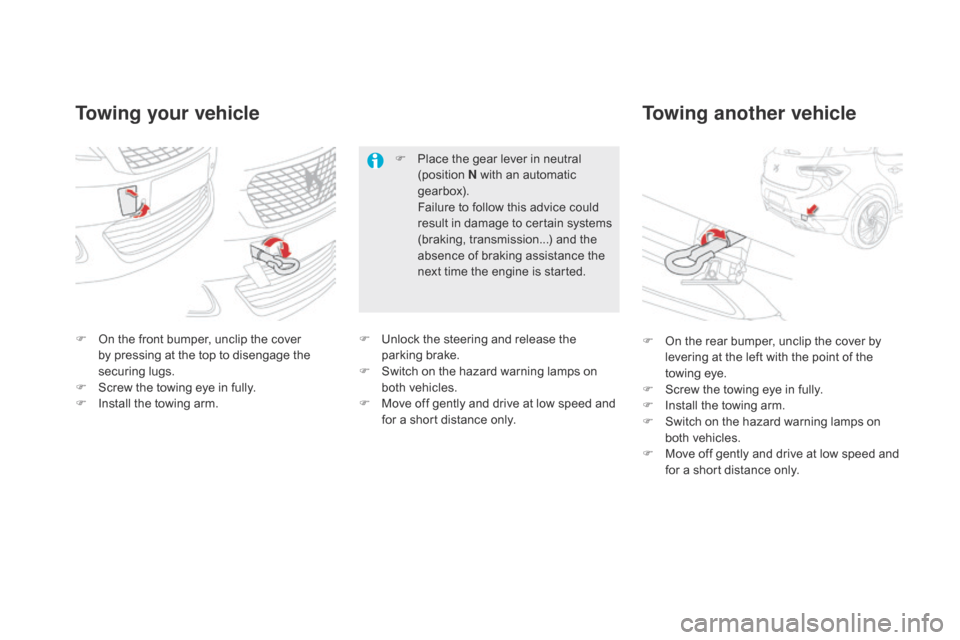
Towing your vehicleTowing another vehicle
F On the front bumper, unclip the cover
b
y pressing at the top to disengage the
securing lugs.
F
Sc
rew the towing eye in fully.
F
In
stall the towing arm. F On t
he rear bumper, unclip the cover by
levering at the left with the point of the
towing eye.
F
Sc
rew the towing eye in fully.
F
In
stall the towing arm.
F
Sw
itch on the hazard warning lamps on
both vehicles.
F
Mov
e off gently and drive at low speed and
for a short distance only.
F
Pl
ace the gear lever in neutral
(position N with an automatic
gearbox).
Fa
ilure to follow this advice could
result in damage to certain systems
(braking, transmission...) and the
absence of braking assistance the
next time the engine is started.
F Un lock the steering and release the
parking brake.
F
Sw
itch on the hazard warning lamps on
both vehicles.
F
Mov
e off gently and drive at low speed and
for a short distance only.
Page 251 of 500
249
DS5_en_Chap09_verifications_ed02-2015
coolant level
The coolant level should be close
to the "MA X" mark but should never
exceed it.
Fluid specification
The coolant must conform to the
manufacturer's recommendations.In addition, as the cooling system is
pressurised, wait at least one hour after
switching off the engine before carrying
out any work.
To avoid any risk of scalding, unscrew
the cap by two turns to allow the
pressure to drop. When the pressure
has dropped, remove the cap and top
up the level.
When the engine is warm, the temperature of
the coolant is regulated by the fan.
The cooling fan may star t after switching
off the engine: take care with ar ticles and
clothing that might be caught by the fan
blades.
Specification of the fluid
To ensure optimum cleaning and to avoid
freezing, the fluid should never be topped up or
replaced by plain water.
In wintry conditions, the use of an ethyl alcohol
or methanol base fluid is recommended.
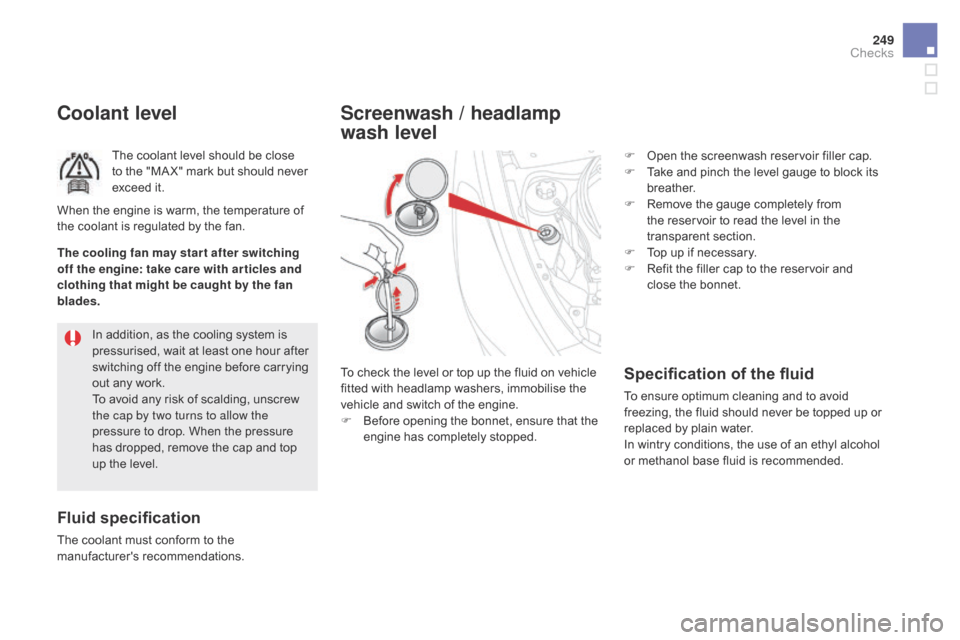
Screenwash / headlamp
wash level
To check the level or top up the fluid on vehicle
fitted with headlamp washers, immobilise the
vehicle and switch of the engine.
F
Be
fore opening the bonnet, ensure that the
engine has completely stopped. F
Op
en the screenwash reservoir filler cap.
F
Ta
ke and pinch the level gauge to block its
breather.
F
Re
move the gauge completely from
the reservoir to read the level in the
transparent section.
F
To
p up if necessary.
F
Re
fit the filler cap to the reservoir and
close the bonnet.
checks
Page 262 of 500
DS5_en_Chap09_verifications_ed02-2015
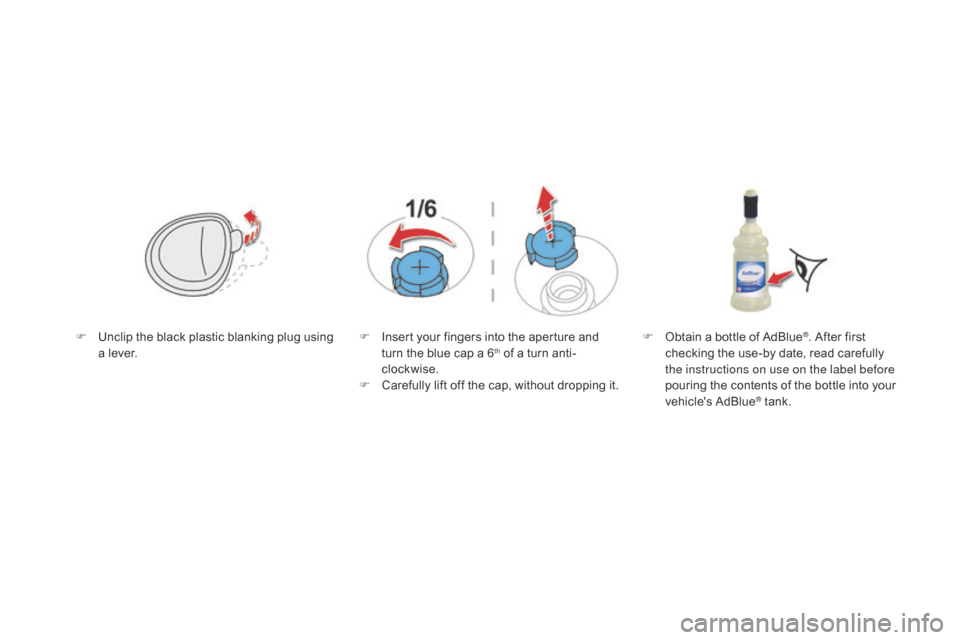
F Unclip the black plastic blanking plug using
a lever. F In
sert your fingers into the aperture and
turn the blue cap a 6th of a turn anti-
clockwise.
F
Ca
refully lift off the cap, without dropping it. F Ob
tain a bottle of AdBlue
®. After first
checking the use-by date, read carefully
the instructions on use on the label before
pouring the contents of the bottle into your
vehicle's AdBlue
® tank.
Page 263 of 500

261
DS5_en_Chap09_verifications_ed02-2015
F After emptying the bottle, wipe away any
spillage around the tank filler using a damp
cloth.
F
Re
fit the blue cap to the tank and turn it a
6
th of a turn clockwise, to its stop.
F Re fit the black plastic blanking plug,
clipping it in place.
F
Lo
wer the boot floor and close the tailgate.
Important: if your vehicle's
AdBlue
® tank is completely empty -
wh
ich is confirmed by the alert
messages and the impossibility of
starting the engine - you must add at
least 3.8 litres, so two 1.89 litre bottles. If any additive is split or splashed, wash
immediately with cold water or wipe
with a damp cloth.
If the additive has crystallised, clean it
off using a sponge and hot water.Important:
when topping up after
running out of additive , signalled
by the message "Top up emissions
additive: Starting prevented", you must
wait for approximately 5 minutes before
switching on the ignition, without
opening the driver's door, unlocking
the vehicle, placing the key of the
"Keyless Entr y and Star ting" system
inside the vehicle or inser ting the
electronic key in the reader.
Switch on the ignition, wait for
10
s
econds, then start the engine.
Never dispose of AdBlue
® additive
bottles in the household waste. Place
them in a special container provided
this purpose or take them to your
dealer.
checks
Page 306 of 500
DS5_en_Chap11d_RD5_ed02-2015
QUESTIONANSWER SOLUTION
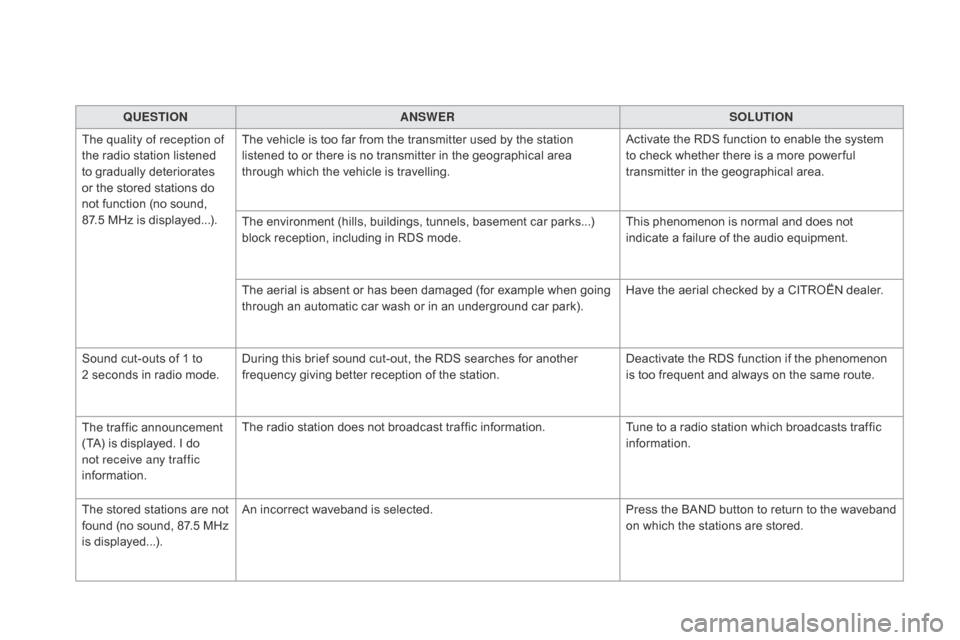
The quality of reception of
the radio station listened
to gradually deteriorates
or the stored stations do
not function (no sound,
87.5
M
Hz is displayed...). The vehicle is too far from the transmitter used by the station
listened to or there is no transmitter in the geographical area
through which the vehicle is travelling.
Activate the RDS function to enable the system
to check whether there is a more power ful
transmitter in the geographical area.
The environment (hills, buildings, tunnels, basement car parks...)
block reception, including in RDS mode. This phenomenon is normal and does not
indicate a failure of the audio equipment.
The aerial is absent or has been damaged (for example when going
through an automatic car wash or in an underground car park). Have the aerial checked by a CITROËN dealer.
Sound cut-outs of 1 to
2
s
econds in radio mode. During this brief sound cut-out, the RDS searches for another
frequency giving better reception of the station. Deactivate the RDS function if the phenomenon
is too frequent and always on the same route.
The traffic announcement
(TA) is displayed. I do
not receive any traffic
information. The radio station does not broadcast traffic information.
Tune to a radio station which broadcasts traffic
information.
The stored stations are not
found (no sound, 87.5 MHz
is displayed...). An incorrect waveband is selected.
Press the BAND button to return to the waveband
on which the stations are stored.
Page 312 of 500
AB
Accessories .................................................. 23 4
Accessory position ....................................... 101
Ad
ditive, AdBlue
.............................. 29
, 253 -261
Additive, Diesel
.....................................
250, 251
Adjusting headlamps
.................................... 150
A
djusting head restraints
.......................... 72
, 75
Adjusting seats
.......................................... 72
, 73
Adjusting the date
..................................... 39
, 42
Adjusting the height and reach of the steering wheel
........................................ 81
A
djusting the seat belt height
....................... 187
A
djusting the time
............................... 38
, 39, 42
Advice on care and maintenance
............................................... 233
A
dvice on driving
......................................
98, 99
Airbags
....................................................
31, 189
Airbags, curtain
..................................... 191
, 192
Airbags, front......................................... 189, 192
Airbags, lateral
...................................... 191
, 192
Air conditioning, automatic
....................... 90
, 91
Air vents
.......................................................... 89
A
larm
............................................................... 63
An
ti-lock braking system (ABS)
.................... 182
A
nti-pinch
........................................................ 68
Ant
i-theft
....................................................... 10
1
Armrest, front
............................................ 82
, 85
Armrest, rear
............................................. 82
, 86
Ashtray
............................................................ 8
2
Assistance call
......................................
181, 278
Assistance, emergency braking
................... 182
A
udible warning
............................................ 181
A
udio streaming (Bluetooth)
................. 29
1, 293
Audio system
...........................................
39, 281
Automatic headlamps
............................. 20
, 147Battery ............................................
223 -227, 251
Battery, charging ........................................... 2
25
Battery, remote control
............................. 59
, 60
Black panel ...................................................... 38
Blind spot sensors
........................................ 123
Bl
ueHDi
.........................................
246, 253 -261
Bluetooth (hands-free)
.................................. 292
Boo
t
.................................................................62
B
oot (opening)
.................................................53
B
rake discs
....................................................252
B
rake lamps
..................................................2
16
Brake warning lamp
........................................ 27
B
raking assistance system
...........................182
B
raking, dynamic emergency
...............103
, 107
Bulbs (changing)
.................................... 21
1-218
Capacity, fuel tank
........................................ 23
9
Cap, fuel filler
................................................ 239
CD .................................................................
287
CD, MP3
................................................ 28
8, 289
Central locking
.......................................... 53
, 55
Changing a bulb
..................................... 211
-218
Changing a fuse
..................................... 21
9-222
Changing a wheel
.................................. 20
2-209
Changing a wiper blade
........................ 15
6, 228
Changing the remote control battery
.............. 59
Ch
ecking the engine oil level
.................. 36
, 247
Checking the levels
................................ 24
7-25 0
Checking tyre pressures (using the kit)
........ 201
C
hecks
..................................
244, 245, 251, 252
Checks, routine
..................................... 25
1, 252Date (setting)
.............................................
39, 42
Daytime running lamps
..................14
5, 211, 212
Deactivating ESC
.......................................... 18 4
D
eactivating the passenger airbag
...............19 0
D
eadlocking
....................................................56
D
emisting, defrosting
......................................95
Dem
isting, defrosting
the mirrors
..............................................
80, 95
cd
Child lock ............................................... 169, 176
Children .................................. 160 -176, 188, 190
Child seats
............................................ 1
6 2-18 8
Child seats, conventional
...................... 168
, 169
Child seats, ISOFIX
............................... 170
-173
Cigarette lighter............................................... 83
C
IT
ROËN
Lo
calised
Emergency Call
.......................................... 278
C
leaning (advice)
.......................................... 233
Cl
ock
............................................................... 38
C
losing the boot
.............................................. 62
C
losing the doors
......................................
53, 55
Configuration, vehicle
............................... 39
, 45
Control, emergency boot release
................... 62
Co
ntrol, emergency door
................................ 57
Co
ntrol, heated seats
...................................... 76
Co
ntrol stalk, lighting
............................ 142
, 148
Control stalk, wipers
.............................. 153
-155
Courtesy lamps
............................................. 157
C
ruise control
........................................ 12
8, 133
Cup holder
....................................................... 8
2
Page 316 of 500
v
W
T
Ventilation .................................................
89, 90
Visibility ........................................................... 95
W
arning and indicator lamps
..................... 19
- 31
Warning lamp, braking system
....................... 27
W
arning lamp, Diesel engine pre-heater
....... 21
War
ning lamps
.................................... 21
, 24, 26
Warning lamp, SCR emissions control system
........................................................... 3
0
Warning lamp, Service.................................... 25
Washing (advice) ................................... 138, 233
Weights
.................................................
265, 269
Wheel, spare
......................................... 20
2, 203
Window controls
............................................. 66
Wip
er blades (changing)
....................... 15
6, 228
Wiper, rear ..................................................... 15 4
Wipers
............................................. 22
, 153, 155
Wipers, automatic rain sensitive
........... 153
, 155
U
Under-inflation (detection) ............................11 6
U nlocking .................................................. 52, 54
Unlocking from the inside
............................... 61
Ta
ble of weights
....................................26
5, 269
Tables of engines
..................................
264, 267
Tables of fuses
.............................................. 219
T
ank, AdBlue
® additive ......................... 25
3, 258
Tank, fuel ............................................... 239, 242
Technical data
....................................... 26
4-276
Temperature, coolant
...................................... 32
Th
ird brake lamp
........................................... 218
T
hree flashes (direction indicators)
.............. 180
T
ime (setting)
......................................
38, 39, 42
To o l s
......................................................
202, 203
Topping-up the AdBlue
® additive ................. 258
T
otal distance recorder ................................... 37
To
uch screen ................................. 38, 43, 45, 47
To w b a r
........................................................... 2
31
Towed loads
..........................................26
5, 269
Towing another vehicle
................................. 230
T
raction control (ASR)
............................ 27
, 182
Traffic information (TA)
................................. 286
Tr
a i l e r
......................................................
99, 231
Trajectory control systems
............................ 182
T
riangle, warning ............................................. 88
Trip computer
............................................ 46-
48
Trip distance recorder
..................................... 37
Ty
r e s
........................................................ 14
, 276
Tyre under-inflation detection
....................... 11 6U
nlocking the boot
..........................................
53
Un
locking the doors
........................................
61
URE
A
....................................................
253, 254
USB player
...................................................... 85
Page 373 of 500
47 Audio and Telematics
As a safety measure and because it
requires sustained attention by the
driver, using a smartphone when
driving is prohibited.
All operations must be done with the
vehicle stationary
.
The synchronisation of a
smartphone allows applications on a
smartphone that are adapted to the
MirrorLink
TM technology to be displayed
in the vehicle's screen.
The principles and standards
are constantly evolving. For the
communication process between the
smartphone and the system to work
correctly, the smartphone must be
unlocked; update the operating system
of your smartphone as well as the date
and time in the smartphone and the
system.
For the list of eligible smar tphones,
connect to the brand's internet website
in your country.
Please note:
- if your smartphone is supported, to
make it "MirrorLink
TM " compatible,
some phone manufacturers
nevertheless invite you to first
download a dedicated application.
When connecting a smartphone to
the system, it is recommended that
Bluetooth
® be started on the smartphone
.
Start the application on the
smartphone (optional, depending
on the smartphone and operating
system).
During the procedure, several screen
pages relating to certain functions
are displayed.
Accept to start and end the
connection.
Connect a USB cable. The
smartphone charges when
connected by a USB cable.
Press " MirrorLink
TM
" to start
the application in the system.
Once connection is established, an page
is displayed with the applications already
downloaded to your smartphone and adapted
to MirrorLink
TM technology.
If only one application has been downloaded to
the smartphone, it starts automatically.
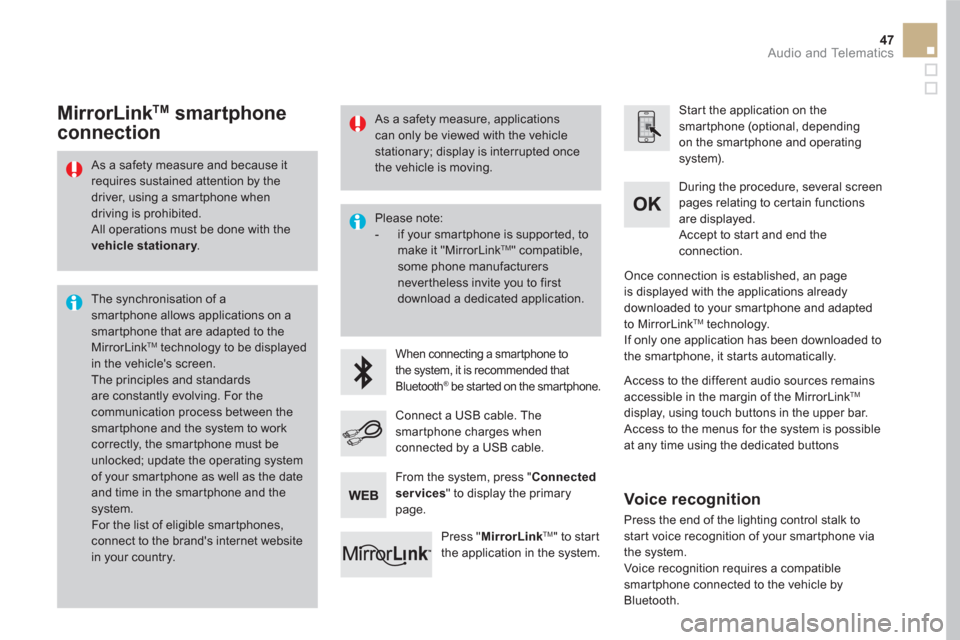
MirrorLink TM
smartphone
connection
Access to the different audio sources remains
accessible in the margin of the MirrorLink TM
display, using touch buttons in the upper bar.
Access to the menus for the system is possible
at any time using the dedicated buttons
From the system, press " Connected
services
" to display the primary
page.
As a safety measure, applications
can only be viewed with the vehicle
stationary; display is interrupted once
the vehicle is moving.
Voice recognition
Press the end of the lighting control stalk to
start voice recognition of your smartphone via
the system.
Voice recognition requires a compatible
smartphone connected to the vehicle by
Bluetooth.
Page 390 of 500
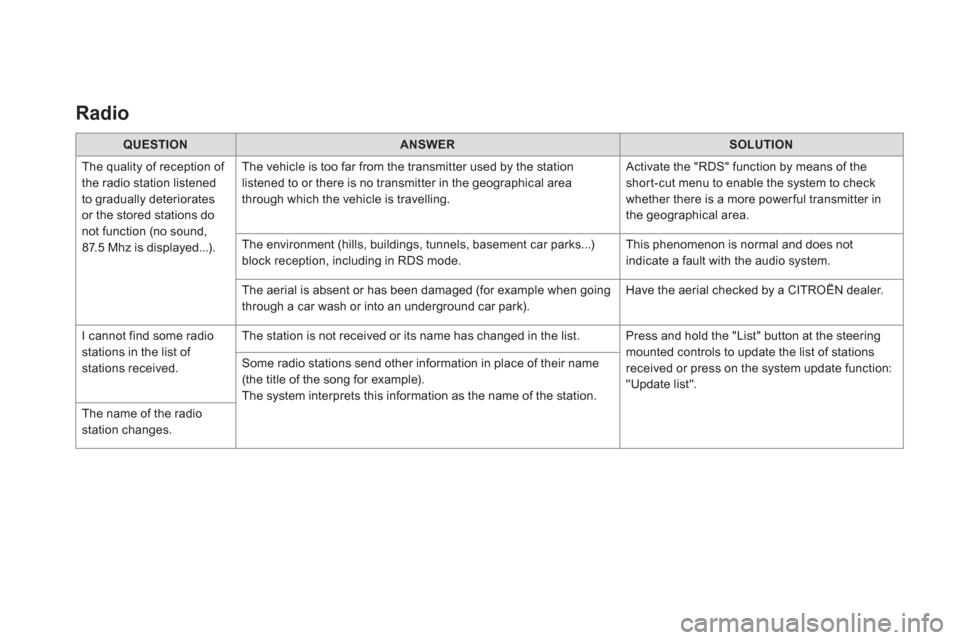
Radio
QUESTION
ANSWER
SOLUTION
The quality of reception of
the radio station listened
to gradually deteriorates
or the stored stations do
not function (no sound,
87.5 Mhz is displayed...). The vehicle is too far from the transmitter used by the station
listened to or there is no transmitter in the geographical area
through which the vehicle is travelling. Activate the "RDS" function by means of the
short-cut menu to enable the system to check
whether there is a more power ful transmitter in
the geographical area.
The environment (hills, buildings, tunnels, basement car parks...)
block reception, including in RDS mode. This phenomenon is normal and does not
indicate a fault with the audio system.
The aerial is absent or has been damaged (for example when going
through a car wash or into an underground car park). Have the aerial checked by a CITROËN dealer.
I cannot find some radio
stations in the list of
stations received. The station is not received or its name has changed in the list. Press and hold the "List" button at the steering
mounted controls to update the list of stations
received or press on the system update function:
"Update list". Some radio stations send other information in place of their name
(the title of the song for example).
The system interprets this information as the name of the station.
The name of the radio
station changes.
Page 438 of 500

22
23
1
Settings specific to
connected navigation
For access to connected navigation,
you have to select the option:
" Authorize sending information
".
Select " Options
".
Select " Alerts
".
- " Allow declaration of danger
areas
"
- " Guidance to final destination
on foot
"
- " Authorise sending
information
"
Activate or deactivate:
Activate or deactivate " Warn of
danger zones
".
The display of danger zones is
conditioned by the legislation in force
and subscription to the ser vice.
The temperature displayed at 6 o'clock in the morning
will be the maximum temperature for the day.
The temperature displayed at 6 o'clock in the evening
will be the minimum temperature for the night.
Select " Settings
".
Press on Navigation
to display the
primary page.
Press the " MENU
" button to go to the
secondary page.
Display the weather
Select " Weather
".
Press on this button to display the
first level of information.
Press on this button to display the
detailled weather information.
Select " View map
".
Press on Navigation
to display the
primary page.
Press on this button to display the list
of ser vices.