ad blue Citroen DS5 HYBRID4 2013 1.G User Guide
[x] Cancel search | Manufacturer: CITROEN, Model Year: 2013, Model line: DS5 HYBRID4, Model: Citroen DS5 HYBRID4 2013 1.GPages: 364, PDF Size: 10.21 MB
Page 287 of 364
06
285
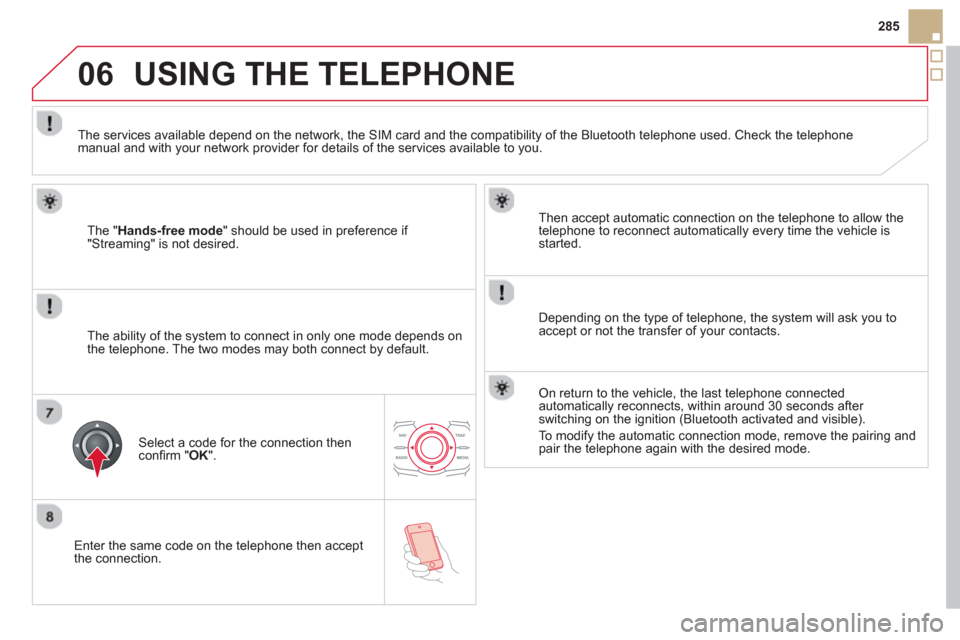
Enter the same code on the telephone then accept
th
e connection.
Then accept automatic connection on the telephone to allow the
telephone to reconnect automaticall
y every time the vehicle is started.
Dependin
g on the type of telephone, the system will ask you to
accept or not the transfer of your contacts.
USING THE TELEPHONE
The "Hands-free mode" should be used in preference if "Streaming" is not desired.
The services available depend on the network, the
SIM card and the compatibility of the Bluetooth telephone used. Check the telephone manual and with your network provider for details of the services available to you.
The ability o
f the system to connect in only one mode depends on
the telephone. The two modes may both connect by default.
Select a code for the connection then confi rm " OK
".
On return to the vehicle, the last telephone connected
automatically reconnects, within around 30 seconds after switching on the ignition (Bluetooth activated and visible).
To modi
fy the automatic connection mode, remove the pairing andpair the telephone again with the desired mode.
Page 292 of 364
06
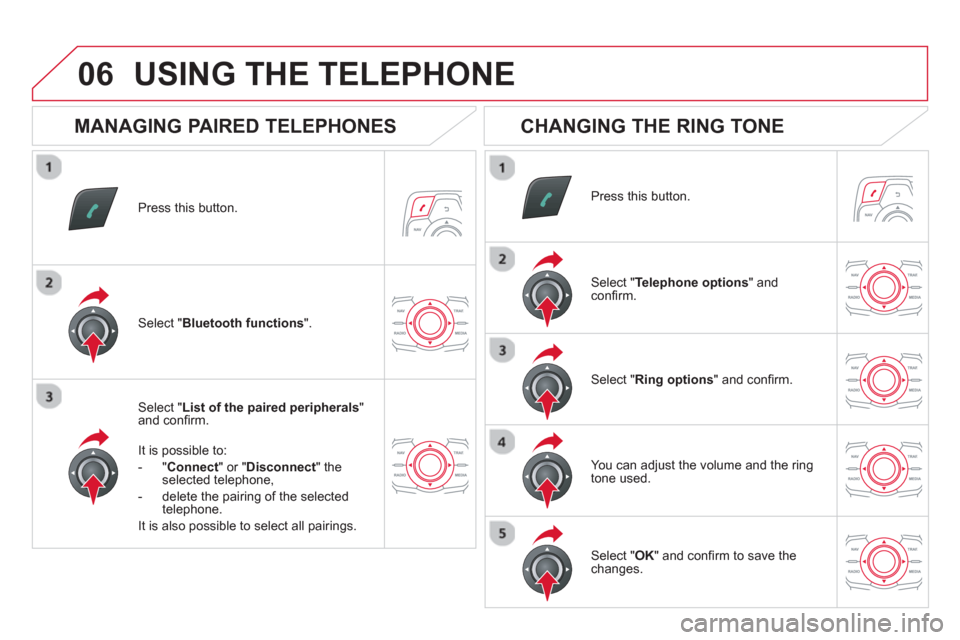
Press this button.
Select " List of the paired peripherals"and confi rm.
It is possible to:
-
"Connect" or " Disconnect " theselected telephone,
- delete the pairin
g of the selected
telephone.
It is also possible to select all pairin
gs.
USING THE TELEPHONE
MANAGING PAIRED TELEPHONES
CHANGING THE RING TONE
Press this button.
Select " Telephone options" andconfi rm.
Select " Ring options" and confi rm.
You can ad
just the volume and the ring
tone used.
Select " Bluetooth functions".
Select " OK
" and confi rm to save thechanges.
Page 293 of 364
07
291
DIRECTORY - ADDR BOOK
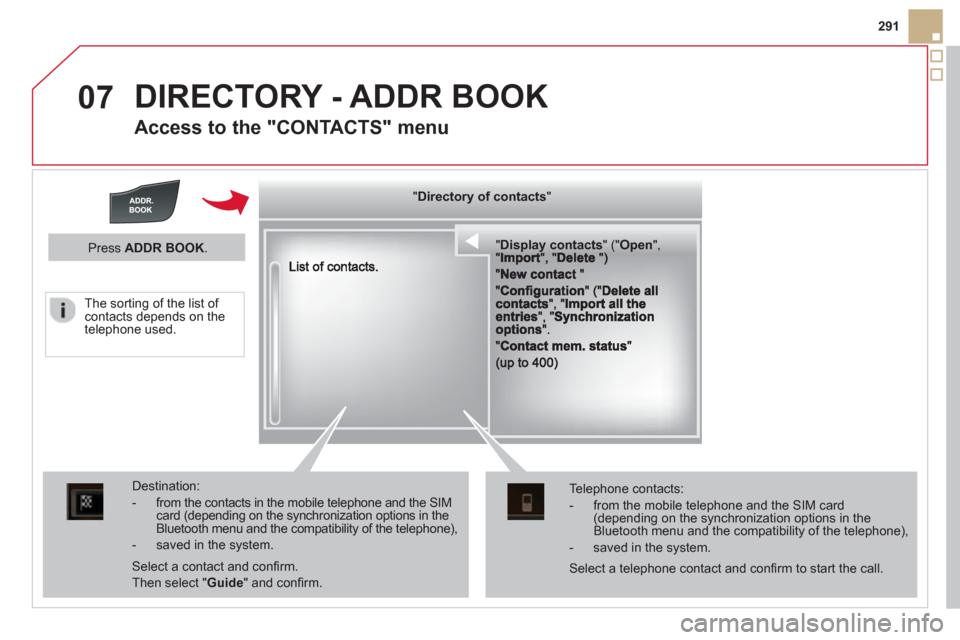
Access to the "CONTACTS" menu
""""""""""pypypypypypypysp ay co tactsDisplay contactsDisplay contactsDisplay contactsDisplay contactsDisplay contactsDisplay contactsDisplay contactsDisplay contactsDisplay contactsDisplay contactsDisplay contactsDisplay contactsDisplay contactsDisplay contactsDisplay contactsDisplay contactsDisplay contactsDisplay contactsDisplay contactsDisplay contactsDi l t tDi l t tDi l t tDi l t tDi l t tDi l t tDi l(((((((( ( (((((((((((((((("(""(""(""(""(""(""(""(""(""("pppppppOpeOpenOpenOpenOpenOpenOpenOpenOpenOpenOpenOpenOpenOpenOpenOpenOpenOpenOpenOpenOpenOOOOOOO,,,,, , ,,,""""""""""""""ItItItIt""""""""DltDltDltDlt")")")"))
Destination:
- from the contacts in the mobile telephone and the SIMcard (depending on the synchronization options in the Bluetooth menu and the compatibility of the telephone),
- saved in the system.
Select a contact and confi rm.
Then select "Guide
" and confi rm.
Telephone contacts:
- from the mobile telephone and the SIM card(depending on the synchronization options in the Bluetooth menu and the compatibility of the telephone),
- saved in the system.
Press ADDR BOOK.
Select a telephone contact and confi rm to start the call.
The sortin
g of the list of contacts depends on the
telephone used.
""""""""yyyyyDirectory of contactsDirectory of contactsDirectory of contactsDirectory of contactsDirectory of contactsDirectory of contactsDirectory of contactsDirectory of contactsDirectory of contactsDirectory of contactsDirectory of contactsDirectory of contactsDirectory of contactsDirectory of contactsDi t f t tDi t f t tDi t f t tDi t f t tDi f""""""""
Page 295 of 364
07
293
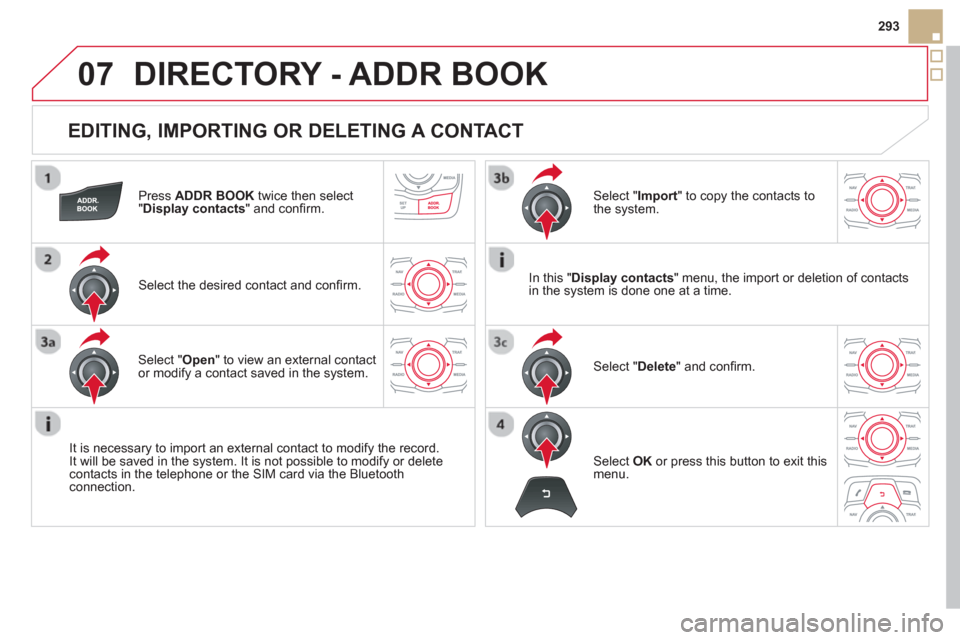
EDITING, IMPORTING OR DELETING A CONTACT
DIRECTORY - ADDR BOOK
Press ADDR BOOK
twice then select"Display contacts
" and confi rm.
Select the desired contact and confi rm.
It is necessar
y to import an external contact to modify the record. It will be saved in the system. It is not possible to modify or deletecontacts in the telephone or the SIM card via the Bluetooth connection.
Select OK
or press this button to exit this
menu.
In this "Display contacts" menu, the import or deletion of contacts
in the system is done one at a time.
Select "Import" to copy the contacts to
the system.
Select "Delete
" and confi rm. Select "Open " to view an external contact or modify a contact saved in the system.
Page 303 of 364
09
301
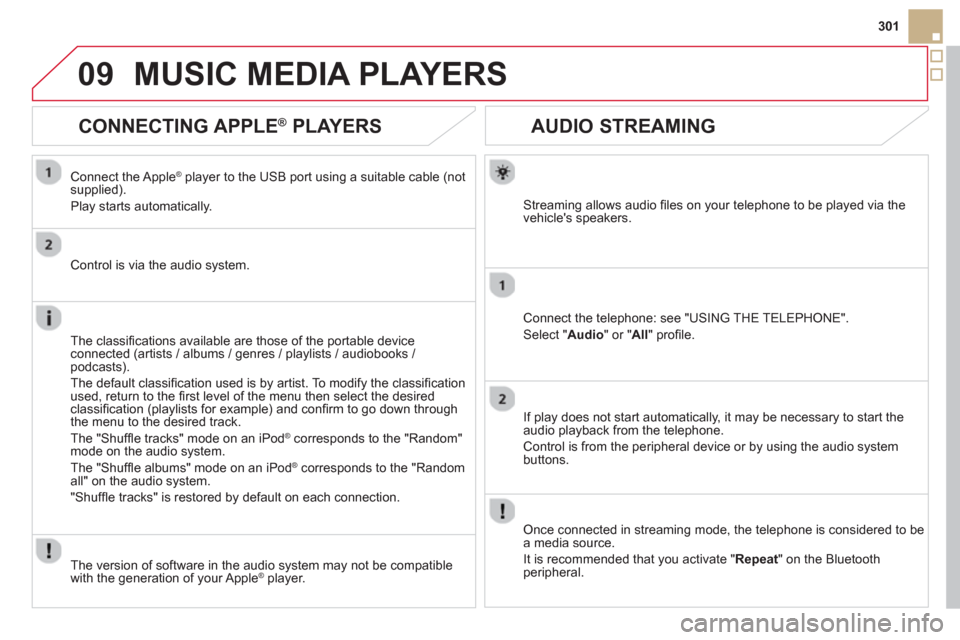
AUDIO STREAMING
Streaming allows audio fi les on your telephone to be played via the
vehicle's speakers.
Connect the telephone: see "USING THE TELEPHONE".
Select " Audio" or " All" profi le.
I
f play does not start automatically, it may be necessary to start the audio playback from the telephone.
Control is from the peripheral device or b
y using the audio system buttons.
Once connected in streaming mode, the telephone is considered to bea media source.
It is recommended that
you activate " Repeat" on the Bluetooth
peripheral.
MUSIC MEDIA PLAYERS
CONNECTING APPLE ®
PLAYERS
Connect the Apple ®player to the USB port using a suitable cable (not
supplied).
Play starts automatically.
Control is via the audio system.
The classi
fi cations available are those of the portable deviceconnected (artists / albums / genres / playlists / audiobooks / podcasts).
The de
fault classifi cation used is by artist. To modify the classifi cationused, return to the fi rst level of the menu then select the desired classifi cation (playlists for example) and confi rm to go down through
the menu to the desired track.
The "
Shuffl e tracks" mode on an iPod
®
corresponds to the "Random" ®
mode on the audio system.
The "
Shuffl e albums" mode on an iPodÆ corresponds to the "Random Æ
all" on the audio system.
"
Shuffl e tracks" is restored by default on each connection.
The version o
f software in the audio system may not be compatible
with the generation of your Apple Æplayer.
Page 309 of 364
12
307
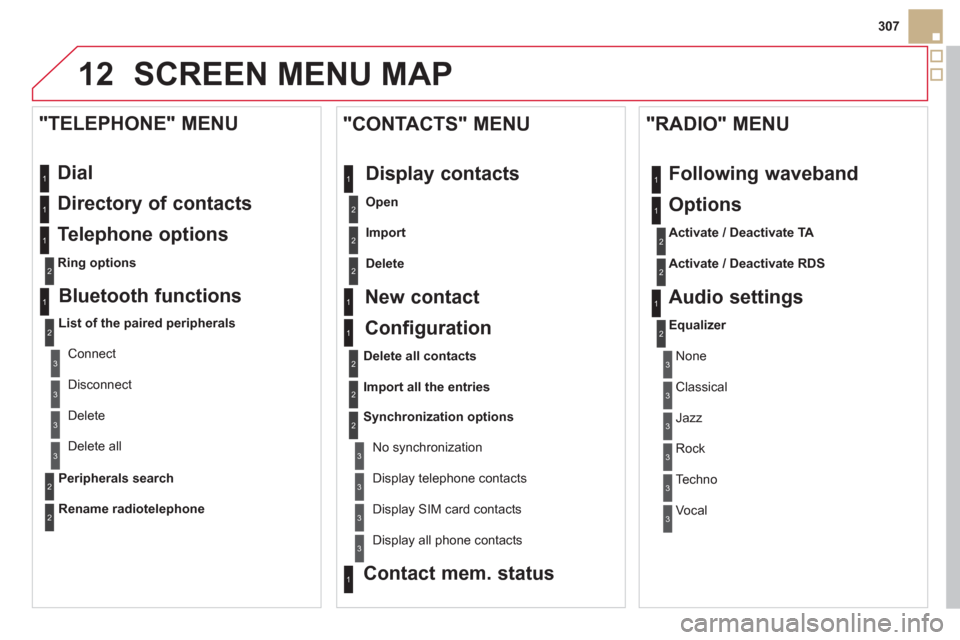
SCREEN MENU MAP
Dial
Directory of contacts
Telephone options
Ring options
"TELEPHONE" MENU
1
2
1
1
3
3
2
1
3
3
2
2
1
2
2
2
1
1
2
2
2
1
3
3
3
3
1
2
2
1
1
3
3
3
3
3
3
2
Configuration
Delete all contacts
Import all the entries
S
ynchronization options
No s
ynchronization
"CONTACTS" MENU
Display contacts
Open
Import
Delete
New contact
Equalizer
"RADIO" MENU
Following waveband
Options
Activate / Deactivate TA
Activate / Deactivate RDS
Audio settings
Display telephone contacts
Displa
y SIM card contacts
Contact mem. status
Display all phone contacts
Bluetooth functions
List of the paired peripherals
Connect
Di
sconnect
D
elete
Peripherals search D
elete all
Rename radiotele
phone
None
Classical
Jazz
Rock
Techno
Vocal
Page 312 of 364
FREQUENTLY ASKED QUESTIONS
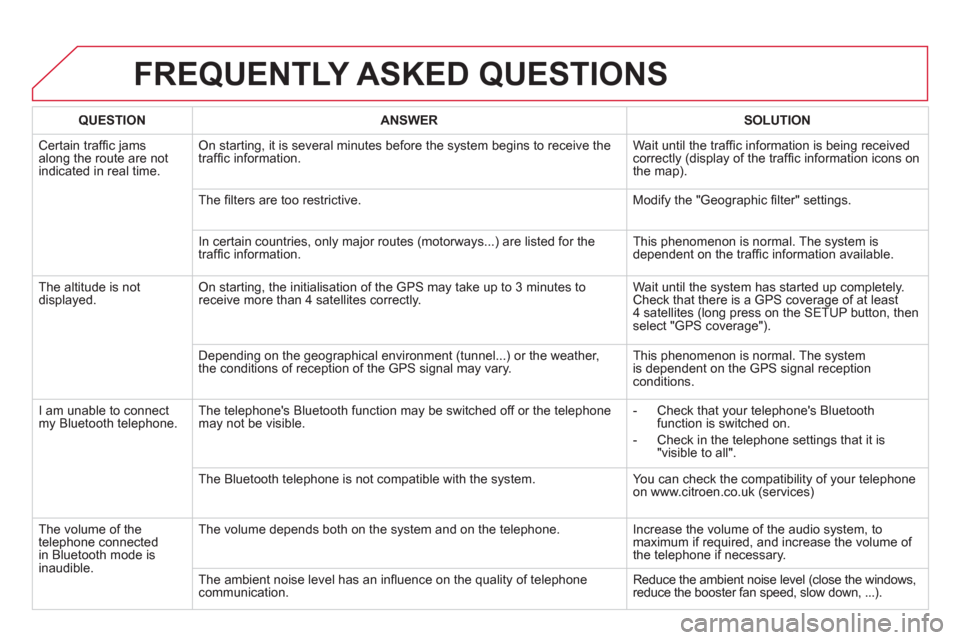
QUESTIONANSWERSOLUTION
Certain traffi c jams
along the route are not
indicated in real time.
On starting, it is several minutes before the system begins to receive the
traffi c information. Wait until the traffi c information is being received correctly (display of the traffi c information icons on
the map).
Th
e fi lters are too restrictive. Modify the "Geographic fi lter" settings.
In certain countries, onl
y major routes (motorways...) are listed for the
traffi c information. This phenomenon is normal. The system is
dependent on the traffi c information available.
Th
e altitude is not
displayed. On starting, the initialisation of the GPS may take up to 3 minutes toreceive more than 4 satellites correctly. Wait until the system has started up completely.
Check that there is a GPS coverage of at least
4 satellites (long press on the SETUP button, then select "GPS coverage").
Dependin
g on the geographical environment (tunnel...) or the weather,
the conditions of reception of the GPS signal may vary. This phenomenon is normal. The system
is dependent on the GPS signal receptionconditions.
I
am unable to connect my Bluetooth telephone. The telephone's Bluetooth function may be switched off or the telephone
may not be visible.
- Check that your telephone's Bluetoothfunction is switched on.
- Check in the telephone settin
gs that it is "visible to all".
The Bluetooth telephone is not compatible with the system. You can check the compatibility of your telephone
on www.citroen.co.uk (services)
Th
e volume of thetelephone connected
in Bluetooth mode isinaudible. The volume depends both on the s
ystem and on the telephone. Increase the volume of the audio system, tomaximum if required, and increase the volume of
the telephone if necessary.
The ambient noise level has an infl uence on the qualit
y of telephone communication. Reduce the ambient noise level (close the windows,reduce the booster fan speed, slow down, ...).
Page 313 of 364
311
FREQUENTLY ASKED QUESTIONS
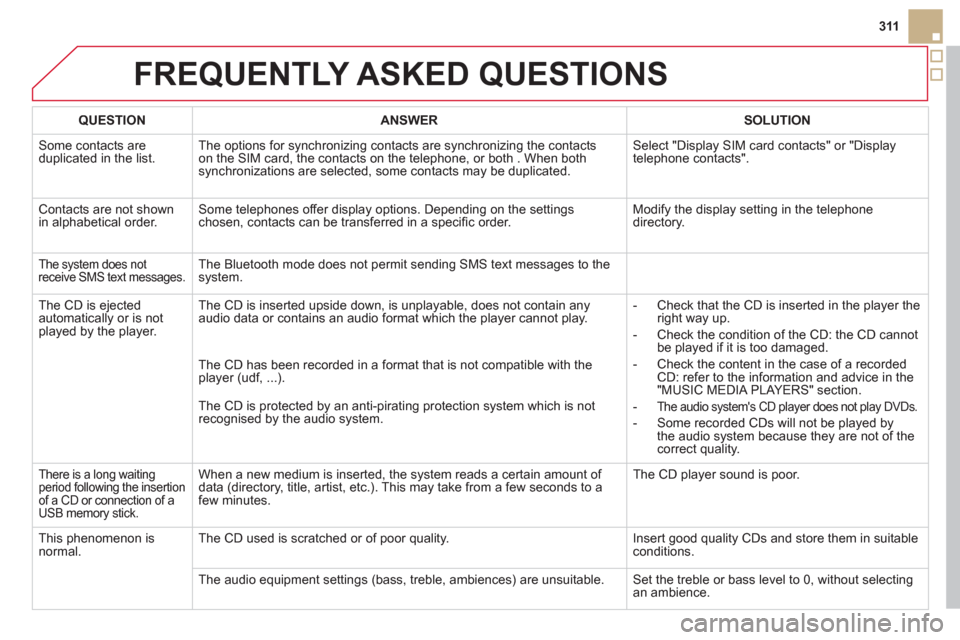
QUESTIONANSWERSOLUTION
Some contacts are
duplicated in the list.The options for synchronizing contacts are synchronizing the contacts
on the SIM card, the contacts on the telephone, or both . When both
synchronizations are selected, some contacts may be duplicated.
Select "Display SIM card contacts" or "Display
telephone contacts".
Contacts are not shown in alphabetical order.Some telephones offer display options. Depending on the settingschosen, contacts can be transferred in a specifi c order. Modify the display setting in the telephone directory.
The system does notreceive SMS text messages. The Bluetooth mode does not permit sending SMS text messages to the
system.
The CD is e
jected
automatically or is not played by the player. The CD is inserted upside down, is unpla
yable, does not contain any audio data or contains an audio format which the player cannot play.
- Check that the CD is inserted in the player the
right way up.
-
Check the condition of the CD: the CD cannot
be played if it is too damaged.
-
Check the content in the case of a recordedCD: refer to the information and advice in the"MUSIC MEDIA PLAYERS" section.
-
The audio system's CD player does not play DVDs.
- Some recorded CDs will not be played by
the audio system because they are not of thecorrect quality. The
CD has been recorded in a format that is not compatible with the
player (udf, ...).
The
CD is protected by an anti-pirating protection system which is not recognised by the audio system.
There is a long waiting
period following the insertion of a CD or connection of aUSB memory stick.
When a new medium is inserted, the system reads a certain amount of
data (directory, title, artist, etc.). This may take from a few seconds to afew minutes. The
CD player sound is poor.
This
phenomenon is normal.The CD used is scratched or of poor quality. Insert good quality CDs and store them in suitable conditions.
The audio equipment settin
gs (bass, treble, ambiences) are unsuitable. Set the treble or bass level to 0, without selectingan ambience.
Page 314 of 364
FREQUENTLY ASKED QUESTIONS
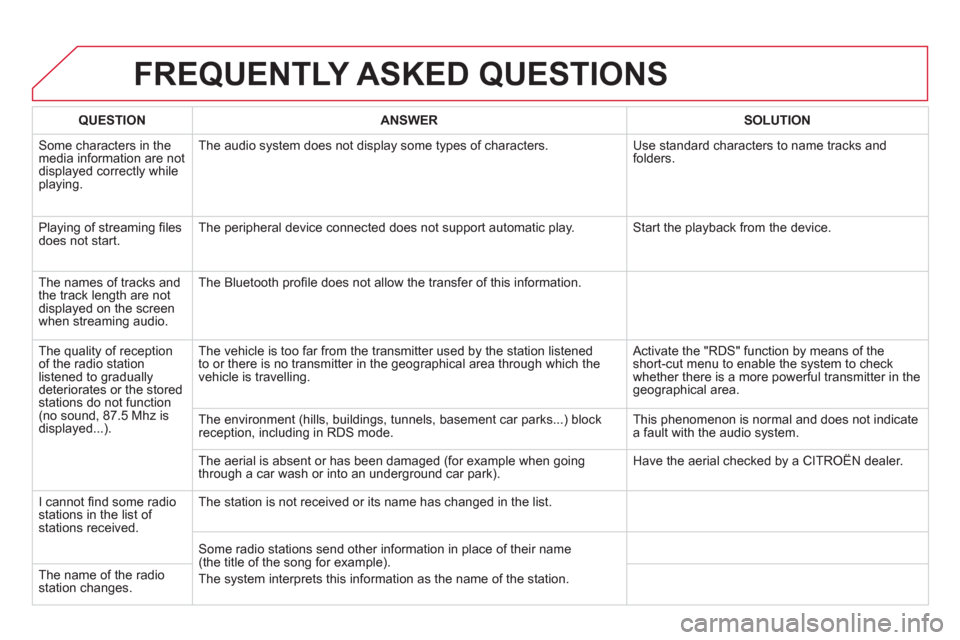
QUESTIONANSWER SOLUTION
Some characters in themedia information are not
displayed correctly while playing. The audio s
ystem does not display some types of characters. Use standard characters to name tracks andfolders.
Pla
ying of streaming fi lesdoes not start. The peripheral device connected does not support automatic play. Start the playback from the device.
Th
e names of tracks and
the track length are not
displayed on the screen
when streaming audio. The Bluetooth pro
fi le does not allow the transfer of this information.
The qualit
y of receptionof the radio station listened to graduallydeteriorates or the stored stations do not function(no sound, 87.5 Mhz is
displayed...). The vehicle is too far from the transmitter used b
y the station listened
to or there is no transmitter in the geographical area through which the
vehicle is travelling.
Activate the "RDS" function by means of theshort-cut menu to enable the system to check
whether there is a more powerful transmitter in the
geographical area.
The environment
(hills, buildings, tunnels, basement car parks...) block reception, including in RDS mode. This phenomenon is normal and does not indicate
a fault with the audio system.
The aerial is absent or has been dama
ged (for example when goingthrough a car wash or into an underground car park). Have the aerial checked by a CITROÀN dealer.
I
cannot fi nd some radiostations in the list of stations received.
The station is not received or its name has changed in the list.
Some radio stations send other information in place of their name
(the title of the song for example).
The s
ystem interprets this information as the name of the station. The name of the radio station changes.
Page 317 of 364
315
The system is coded in such a way that it will only
operate in your vehicle.
AUDIO SYSTEM / BLUETOOTH
01 First steps
For safety reasons, the driver must only carry out
operations which require prolonged attention while the
vehicle is stationary.
When the engine is switched o
ff and to prevent
discharging of the battery, the audio system may switch off after a few minutes.
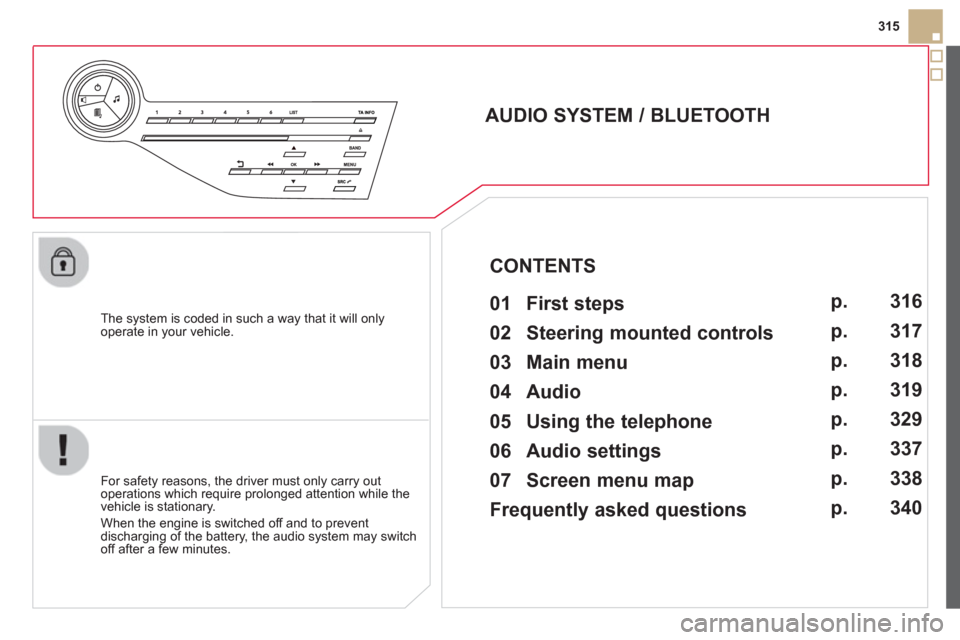
CONTENTS
02 Steering mounted controls
03 Main menu
04 Audio
05 Using the telephone
06 Audio settings
07 Screen menu map
Frequently asked questions p.
p.
p.
p.
p.
p.
p.
p. 3
16
317
3
18
319
329
337
3
38
340