steering Citroen DS5 RHD 2014 1.G User Guide
[x] Cancel search | Manufacturer: CITROEN, Model Year: 2014, Model line: DS5 RHD, Model: Citroen DS5 RHD 2014 1.GPages: 400, PDF Size: 37.32 MB
Page 107 of 400

105Driving
Switching off using the
electronic key
Immobilise the vehicle.
Electronic key left in the reader
If the electronic key is left in the reader,
on opening the driver's door a message
appears to warn you.
Stopping with the "Keyless
Entry and Starting" system
Immobilise the vehicle.
If the vehicle is not immobilised, the
engine will not stop.
Ignition on without
starting
With the electronic key inside
the vehicle, press the " START/
STOP
" button.
The engine stops and the
steering column locks.
Press the " START/STOP
"
button.
The engine stops and the
steering column locks.
Anti-theft protection
Electronic engine immobiliser
The keys contain an electronic chip which has
a secret code. When the ignition is switched
on, this code must be recognised in order for
starting to be possible.
This electronic engine immobiliser locks the
engine management system a few minutes
after the ignition is switched off and prevents
starting of the engine by anyone who does not
have the key.
In the event of a malfunction, you are informed
by a message in the instrument panel screen.
In this case, your vehicle does not start; contact
a CITROËN dealer as soon as possible.
With the electronic key in the reader or the
Keyless Entry and Starting key inside the
vehicle, pressing the "START/STOP" button,
with no action on the pedals
, allows the
ignition to be switched on.
Remove the electronic key from the reader.
Press the "START/STOP" button,
the instrument panel comes on
but the engine does not start.
Press the button again to switch
off the ignition and so allow the
vehicle to be locked.
With the ignition on, the system goes
into energy economy mode when
necessary to maintain the state of
charge of the battery.
Switching off the engine leads to a loss
of braking assistance.
Page 108 of 400

Emergency starting with the
Keyless Entry and Starting
system
When the electronic key is in the recognition
zone and your vehicle does not start after
pressing the "START/STOP" button:
Insert the electronic key in the reader.
Press the brake pedal on vehicles with an
automatic or electronic gearbox, or fully
declutch with a manual gearbox.
Press the "START/STOP" button.
The engine starts.
In the event of an emergency only, the engine
can be switched of without conditions. To do
this, press and hold the "START/STOP" button
for about 3 seconds.
In this case the steering column locks as soon
as the vehicle stops.
If the electronic key is no longer in the
recognition zone when driving or when you
(later) request switching off the engine, a
message appears in the instrument panel.
Emergency switch- off
Electronic key not recognised by
the "Keyless Entry and Starting"
system
Press and hold the "START/STOP" button
for about 3 seconds if you want to force
switching off the engine (note that restarting
will not be possible without the key).
Page 122 of 400

Electronic gearbox
Six-speed electronic gearbox system which
offers a choice between the comfort of fully
automatic operation or the pleasure of manual
gear changing.
There are two driving modes:
- automatic
mode for automatic control of
the gears by the gearbox,
- manual
mode for sequential gear changing
by the driver.
For each of these two modes, there is a
a Sport
setting, corresponding to a more
dynamic driving style.
In automatic mode, it remains possible to
change gear manually by using the steering
mounted control paddles when required, when
overtaking, for example.
R.
Reverse
With your foot on the brake, lift the lever
and push for wards.
N.
Neutral.
With your foot on the brake, select this
position to start.
A.
Automatic mode.
Move the lever backwards to select this
mode.
M.
Manual mode with sequential gear
changing.
Lift the lever then move it backwards to
select this mode, then use the steering
mounted control paddles to change gear.
S.
Sport setting.
Press the button to switch it on or off.
Gear lever
+.
Change up paddle to the right of the steering
wheel.
Press the back of the "+"
steering mounted
paddle to change up a gear.
-.
Change down paddle to the left of the
steering wheel.
Press the back of the "-"
steering mounted
paddle to change down a gear.
Steering mounted control paddles
The steering mounted paddles cannot
be used to select neutral or to engage
or disengage reverse gear.
Page 124 of 400
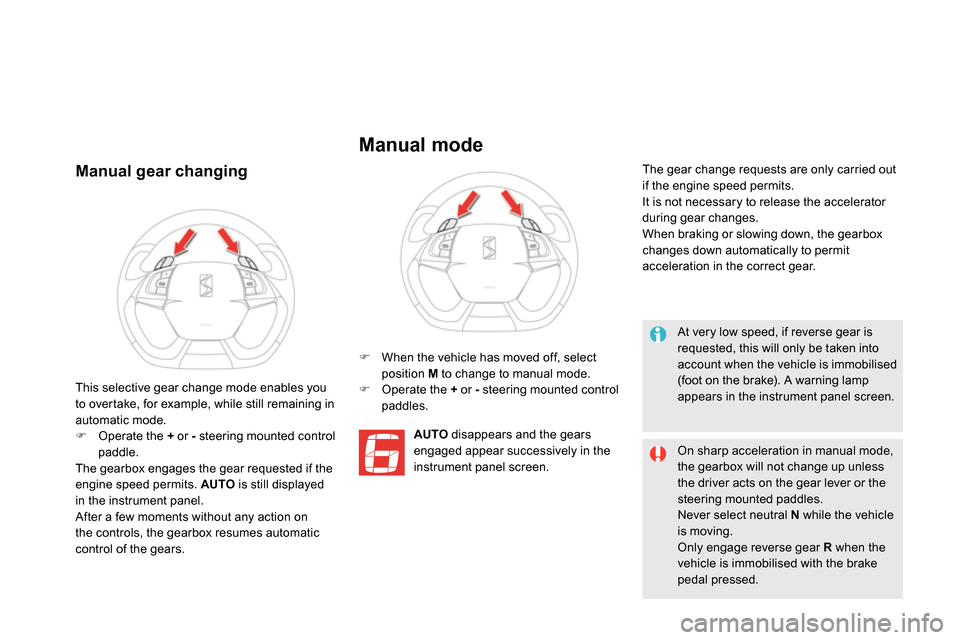
Manual gear changing
When the vehicle has moved off, select
position M
to change to manual mode.
Operate the +
or -
steering mounted control
paddles.
A
UTO
disappears and the gears
engaged appear successively in the
instrument panel screen. The gear change requests are only carried out
if the engine speed permits.
It is not necessary to release the accelerator
during gear changes.
When braking or slowing down, the gearbox
changes down automatically to permit
acceleration in the correct gear.
This selective gear change mode enables you
to overtake, for example, while still remaining in
automatic mode.
Operate the +
or -
steering mounted control
paddle.
The gearbox engages the gear requested if the
engine speed permits. AUTO
is still displayed
in the instrument panel.
After a few moments without any action on
the controls, the gearbox resumes automatic
control of the gears.
Manual mode
At very low speed, if reverse gear is
requested, this will only be taken into
account when the vehicle is immobilised
(foot on the brake). A warning lamp
appears in the instrument panel screen.
On sharp acceleration in manual mode,
the gearbox will not change up unless
the driver acts on the gear lever or the
steering mounted paddles.
Never select neutral N
while the vehicle
is moving.
Only engage reverse gear R
when the
vehicle is immobilised with the brake
pedal pressed.
Page 128 of 400
Under-inflation alert
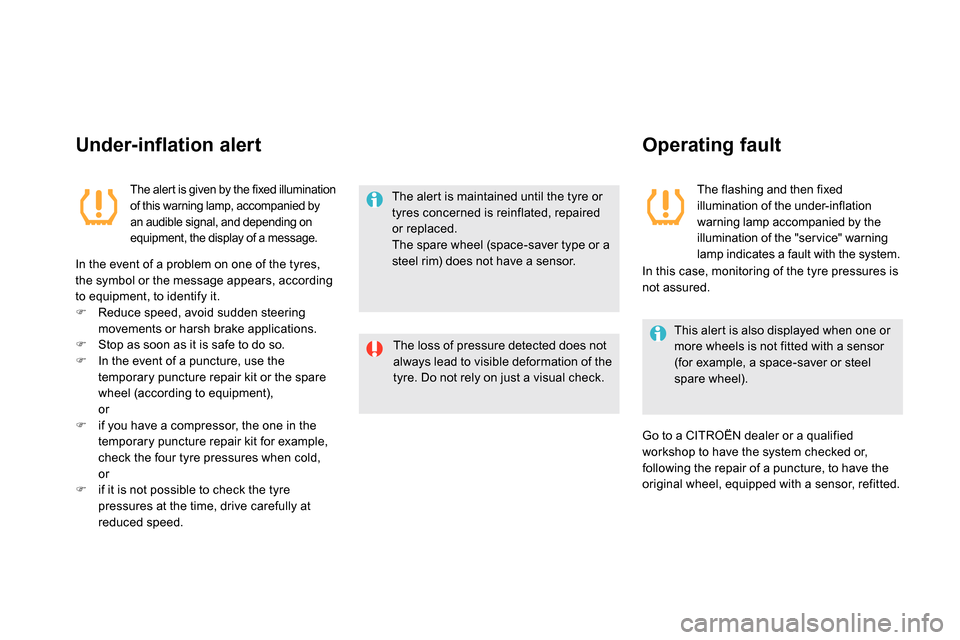
The aler t is given by the fixed illumination
of this warning lamp, accompanied by
an audible signal, and depending on
equipment, the display of a message.
In the event of a problem on one of the tyres,
the symbol or the message appears, according
to equipment, to identify it.
Reduce speed, avoid sudden steering
movements or harsh brake applications.
Stop as soon as it is safe to do so.
In the event of a puncture, use the
temporary puncture repair kit or the spare
wheel (according to equipment),
or
if you have a compressor, the one in the
temporary puncture repair kit for example,
check the four tyre pressures when cold,
or
if it is not possible to check the tyre
pressures at the time, drive carefully at
reduced speed.
The alert is maintained until the tyre or
tyres concerned is reinflated, repaired
or replaced.
The spare wheel (space-saver type or a
steel rim) does not have a sensor.
The loss of pressure detected does not
always lead to visible deformation of the
tyre. Do not rely on just a visual check.
Operating fault
The flashing and then fixed
illumination of the under-inflation
warning lamp accompanied by the
illumination of the "ser vice" warning
lamp indicates a fault with the system.
This alert is also displayed when one or
more wheels is not fitted with a sensor
(for example, a space-saver or steel
spare wheel).
Go to a CITROËN dealer or a qualified
workshop to have the system checked or,
following the repair of a puncture, to have the
original wheel, equipped with a sensor, refitted.
In this case, monitoring of the tyre pressures is
not assured.
Page 129 of 400
127Driving
Stop & Start
Operation
Going into engine STOP mode
The "ECO"
warning lamp comes on
in the instrument panel and the engine
goes into standby automatically:
- with a manual gearbox
, at speeds below
12 mph (20 km/h) or vehicle stationary with
the Blue HDi 120 version, when you place
the gear lever in neutral, and you release
the clutch pedal,
- with an electronic gearbox
, at speeds
below 5 mph (8 km/h), when you press
the brake pedal or put the gear lever in
position N
,
- with an automatic gearbox
, vehicle
stationary, when you press the brake pedal
or put the gear lever in position N
. If your vehicle is fitted with the system, a time
counter calculates the sum of the periods in
STOP mode during a journey. It resets itself to
zero every time the ignition is switched on with
the START/STOP button.
Never refuel with the engine in STOP
mode; you must switch off the ignition
with the START/STOP button.
For your comfort, during parking
maoeuvres, STOP mode is not
available for a few seconds after
coming out of reverse gear.
STOP mode does not affect the
functionality of the vehicle, such as for
example, braking, power steering...
Special cases: STOP mode not
available
STOP mode is not invoked when:
- the vehicle is on a steep slop (rising or
falling),
- the driver's door is open,
- the driver's seat belt is not fastened,
- the vehicle has not exceeded 6 mph
(10 km/h) since the last engine start using
the START/STOP button,
- the electric parking brake is applied or
being applied,
- the engine is needed to maintain a
comfortable temperature in the passenger
compartment,
- demisting is active,
- some special conditions (battery charge,
engine temperature, braking assistance,
ambient temperature...) where the engine is
needed to assure control of a system.
In this case, the "ECO"
warning lamp
flashes for a few seconds then goes
off. The Stop & Start system puts the engine temporarily into standby - STOP mode - during stops in the traffic (red lights, traffic jams, or other...).
The engine restarts automatically - START mode - as soon as you want to move off. The restart takes place instantly, quickly and silently.
Per fect for urban use, the Stop & Start system reduces fuel consumption and exhaust emissions as well as the noise level when stationary.
This operation is per fectly normal.
Page 135 of 400
133Driving
Memorising speeds
This memorising of speeds applies to both the speed limiter and the cruise control.
Select the "Personalisation-configuration"
menu and confirm.
Select " Vehicle parameters" menu and
confirm.
Select the "Driving assistance" line and
conform.
Select the "Speeds memorised" line and
confirm.
Modify the speed.
Select " OK
" and confirm to save the
modifications.
For safety reasons, the driver must only
carry out these operations using the
audio system screen when stationary.
You can memorise up to 5 speeds in the system.
By default, some speeds are already memorised.
Select the "Configuration" menu and
confirm.
Select the " Vehicle parameters" menu and
confirm.
Select the "Driving assistance" line and
confirm.
Select the "Speeds memorised" line and
confirm.
Modify the speed.
Select " OK
" and confirm to save the
modifications.
With the Audio System
With eMyWay
Go to the main menu by
pressing the "MENU"
button.
Go to the main menu by
pressing "SET UP"
.
Access
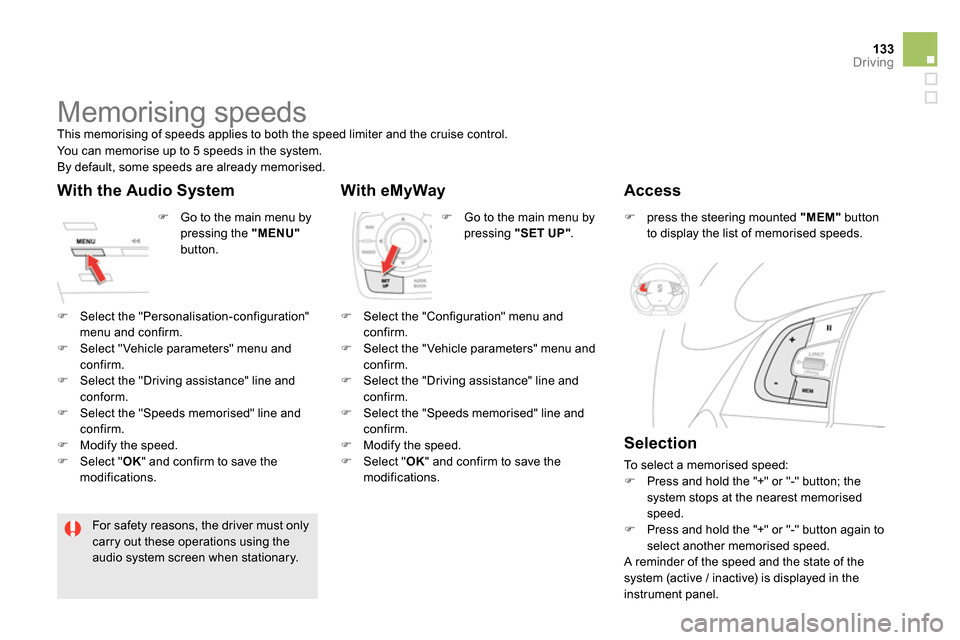
press the steering mounted "MEM"
button
to display the list of memorised speeds.
Selection
To select a memorised speed:
Press and hold the "+" or "-" button; the
system stops at the nearest memorised
speed.
Press and hold the "+" or "-" button again to
select another memorised speed.
A reminder of the speed and the state of the
system (active / inactive) is displayed in the
instrument panel.
Page 136 of 400

The programmed information is grouped
together in the instrument panel screen.
6.
Speed limiter on / off indication.
7.
Speed limiter mode selection indication.
8.
Programmed speed value.
9.
Selection of a memorised speed.
(see "Memorising speeds")
Displays in the instrument panel
Speed limiter
System which prevents the vehicle from
exceeding the speed programmed by the driver.
When the programmed speed limit is reached,
pressing the accelerator pedal no longer has
any effect.
The speed limiter cannot, in any
circumstances, replace the need to
respect speed limits, nor can it replace
the need for vigilance and responsibility
on the part of the driver. The functions of this system are grouped
together on the steering mounted controls.
1.
Speed limiter mode selection wheel.
2.
Programmed value decrease button.
3.
Programmed value increase button.
4.
Speed limiter on / off button.
5.
List of memorised speeds display button.
(see the "Memorising speeds" section)
Steering mounted controls
Operation
The speed limiter is switched on
manually:
it requires a programmed speed of at least
20 mph (30 km/h).
The speed limiter is switched off
by manual
operation of the control.
The programmed speed can be exceeded
temporarily by pressing the accelerator firmly
beyond the point of resistance.
To return to the programmed speed, simply
release the accelerator pedal.
The programmed speed remains in the memory
when the ignition is switched off.
This information also appears in the
head-up display.
For more information, refer to the
"Head-up display" section.
Page 138 of 400
The cruise control system cannot, in any
circumstances, replace the need to respect speed
limits, nor can it replace the need for vigilance and
responsibility on the part of the driver.
You are advised to keep your feet near the pedals
at all times.
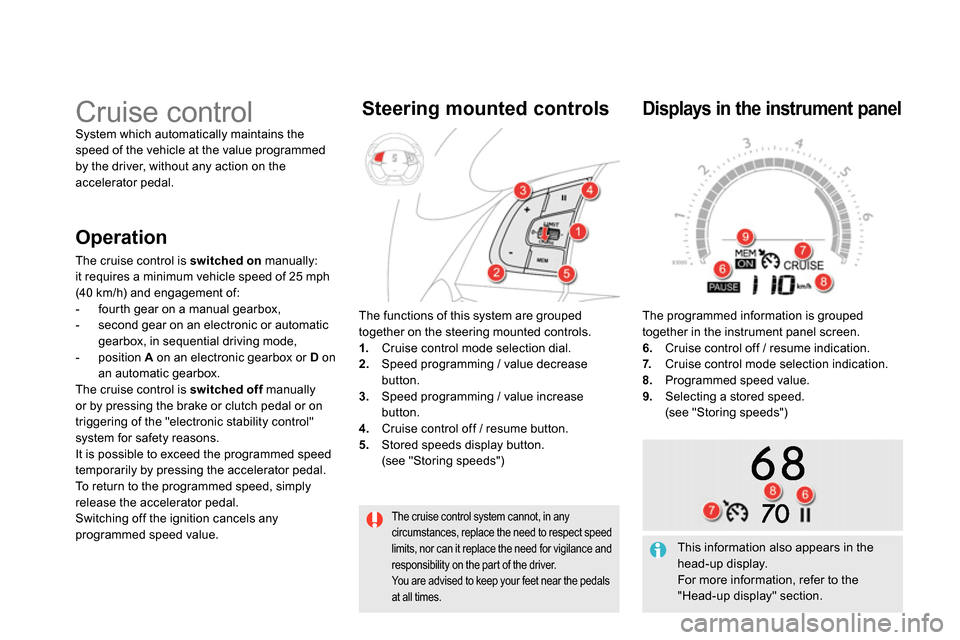
Cruise control
System which automatically maintains the
speed of the vehicle at the value programmed
by the driver, without any action on the
accelerator pedal.
The functions of this system are grouped
together on the steering mounted controls.
1.
Cruise control mode selection dial.
2.
Speed programming / value decrease
button.
3.
Speed programming / value increase
button.
4.
Cruise control off / resume button.
5.
Stored speeds display button.
(see "Storing speeds")
Steering mounted controls
The programmed information is grouped
together in the instrument panel screen.
6.
Cruise control off / resume indication.
7.
Cruise control mode selection indication.
8.
Programmed speed value.
9.
Selecting a stored speed.
(see "Storing speeds")
Displays in the instrument panel
Operation
The cruise control is switched on
manually:
it requires a minimum vehicle speed of 25 mph
(40 km/h) and engagement of:
- fourth gear on a manual gearbox,
- second gear on an electronic or automatic
gearbox, in sequential driving mode,
- position A
on an electronic gearbox or D
on
an automatic gearbox.
The cruise control is switched off
manually
or by pressing the brake or clutch pedal or on
triggering of the "electronic stability control"
system for safety reasons.
It is possible to exceed the programmed speed
temporarily by pressing the accelerator pedal.
To return to the programmed speed, simply
release the accelerator pedal.
Switching off the ignition cancels any
programmed speed value.
This information also appears in the
head-up display.
For more information, refer to the
"Head-up display" section.
Page 156 of 400
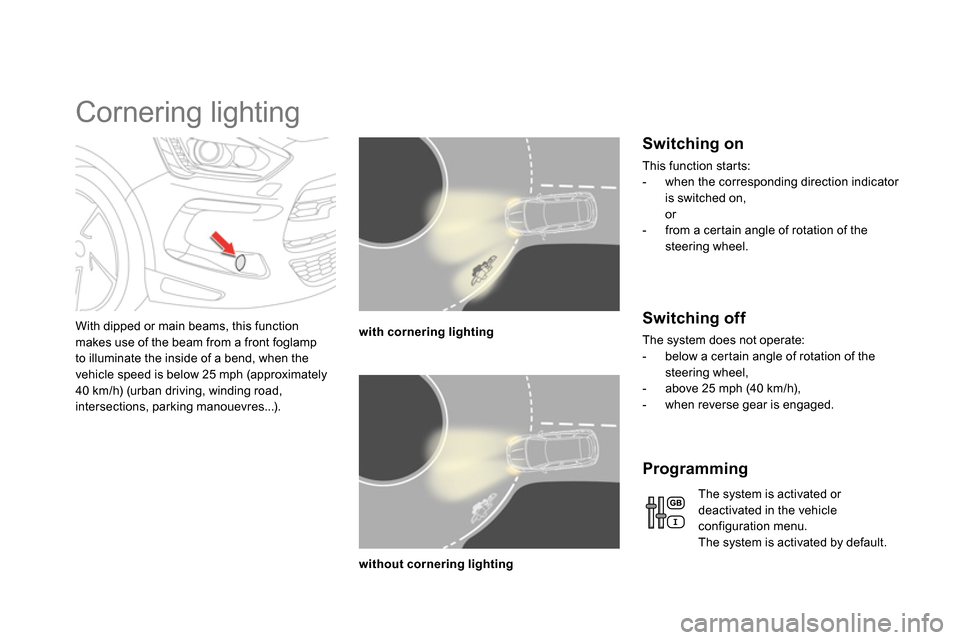
Cornering lighting
With dipped or main beams, this function
makes use of the beam from a front foglamp
to illuminate the inside of a bend, when the
vehicle speed is below 25 mph (approximately
40 km/h) (urban driving, winding road,
intersections, parking manouevres...).
with cornering lighting
without cornering lighting
Switching on
This function starts:
- when the corresponding direction indicator
is switched on,
or
- from a certain angle of rotation of the
steering wheel.
Switching off
The system does not operate:
- below a certain angle of rotation of the
steering wheel,
- above 25 mph (40 km/h),
- when reverse gear is engaged.
Programming
The system is activated or
deactivated in the vehicle
configuration menu.
The system is activated by default.