gearbox Citroen DS5 RHD 2014 1.G Owner's Guide
[x] Cancel search | Manufacturer: CITROEN, Model Year: 2014, Model line: DS5 RHD, Model: Citroen DS5 RHD 2014 1.GPages: 400, PDF Size: 37.32 MB
Page 121 of 400

11 9Driving
Invalid value during manual
operation
This symbol is displayed if a gear
is not engaged correctly (selector
between two positions).
Stopping the vehicle
Before switching off the engine, put the lever in
position P
or N
to place the gearbox in neutral.
In both cases, apply the parking brake to
immobilise the vehicle, unless it is programmed
to automatic mode.
If the lever is not in position P
, when the
driver's door is opened or approximately
45 seconds after the ignition is switched
off, there is an audible signal and a
message appears.
Return the lever to position P
;
the audible signal stops and the
message disappears.
Operating fault
When the ignition is on, a message appears
in the instrument panel screen to indicate a
gearbox fault.
In this case, the gearbox switches to back-up
mode and is locked in 3rd gear. You may feel
a substantial knock when changing from P
to R
and from N
to R
. This will not cause any
damage to the gearbox.
Do not exceed 60 mph (100 km/h), local speed
restrictions permitting.
Have it checked by a CITROËN dealer or a
qualified workshop.
You risk damaging the gearbox:
- if you press the accelerator and
brake pedals at the same time,
- if you force the lever from position P
to another position when the
battery is flat.
To reduce fuel consumption when
stationary for long periods with the
engine running (traffic jam...), position
the gear lever at N
and apply the
parking brake, unless it is programmed
in automatic mode.
Page 122 of 400

Electronic gearbox
Six-speed electronic gearbox system which
offers a choice between the comfort of fully
automatic operation or the pleasure of manual
gear changing.
There are two driving modes:
- automatic
mode for automatic control of
the gears by the gearbox,
- manual
mode for sequential gear changing
by the driver.
For each of these two modes, there is a
a Sport
setting, corresponding to a more
dynamic driving style.
In automatic mode, it remains possible to
change gear manually by using the steering
mounted control paddles when required, when
overtaking, for example.
R.
Reverse
With your foot on the brake, lift the lever
and push for wards.
N.
Neutral.
With your foot on the brake, select this
position to start.
A.
Automatic mode.
Move the lever backwards to select this
mode.
M.
Manual mode with sequential gear
changing.
Lift the lever then move it backwards to
select this mode, then use the steering
mounted control paddles to change gear.
S.
Sport setting.
Press the button to switch it on or off.
Gear lever
+.
Change up paddle to the right of the steering
wheel.
Press the back of the "+"
steering mounted
paddle to change up a gear.
-.
Change down paddle to the left of the
steering wheel.
Press the back of the "-"
steering mounted
paddle to change down a gear.
Steering mounted control paddles
The steering mounted paddles cannot
be used to select neutral or to engage
or disengage reverse gear.
Page 123 of 400
121Driving
Engagement of reverse gear is
accompanied by an audible signal.
If the engine does not start:
- If N
is flashing in the instrument
panel, move the gear lever to
position A
then to position N
.
- If the message "foot on the brake"
is displayed, press the brake pedal
firmly.
When the engine is idling with the
brakes off, if position R
, A
or M
is
selected, the vehicle will move off
on its own without any action on the
accelerator.
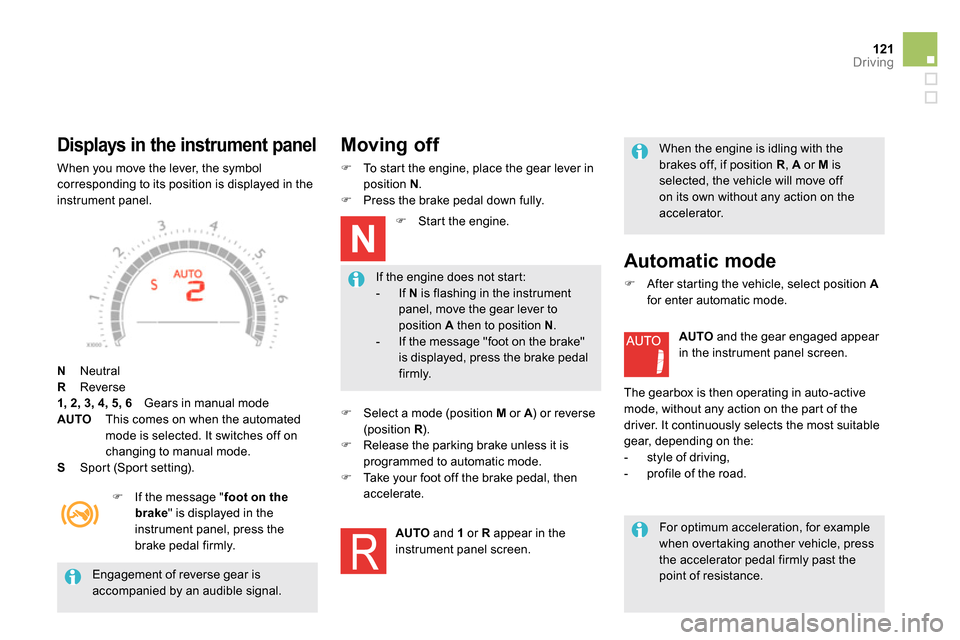
Displays in the instrument panel
When you move the lever, the symbol
corresponding to its position is displayed in the
instrument panel.
N
Neutral
R
Reverse
1, 2, 3, 4, 5, 6
Gears in manual mode
AUTO
This comes on when the automated
mode is selected. It switches off on
changing to manual mode.
S
Sport (Sport setting).
If the message " foot on the
brake
" is displayed in the
instrument panel, press the
brake pedal firmly.
Moving off
To start the engine, place the gear lever in
position N
.
Press the brake pedal down fully.
Start the engine.
Select a mode (position M
or A
) or reverse
(position R
).
Release the parking brake unless it is
programmed to automatic mode.
Take your foot off the brake pedal, then
accelerate.
A
UTO and 1
or R
appear in the
instrument panel screen.
Automatic mode
After starting the vehicle, select position A
for enter automatic mode.
A
UTO
and the gear engaged appear
in the instrument panel screen.
The gearbox is then operating in auto-active
mode, without any action on the part of the
driver. It continuously selects the most suitable
gear, depending on the:
- style of driving,
- profile of the road.
For optimum acceleration, for example
when overtaking another vehicle, press
the accelerator pedal firmly past the
point of resistance.
Page 124 of 400
Manual gear changing
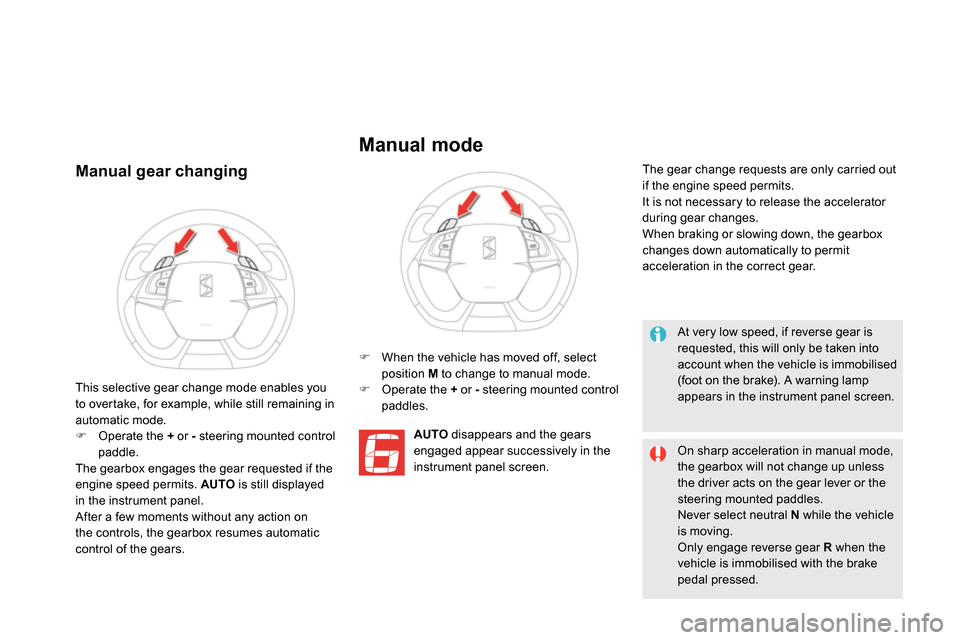
When the vehicle has moved off, select
position M
to change to manual mode.
Operate the +
or -
steering mounted control
paddles.
A
UTO
disappears and the gears
engaged appear successively in the
instrument panel screen. The gear change requests are only carried out
if the engine speed permits.
It is not necessary to release the accelerator
during gear changes.
When braking or slowing down, the gearbox
changes down automatically to permit
acceleration in the correct gear.
This selective gear change mode enables you
to overtake, for example, while still remaining in
automatic mode.
Operate the +
or -
steering mounted control
paddle.
The gearbox engages the gear requested if the
engine speed permits. AUTO
is still displayed
in the instrument panel.
After a few moments without any action on
the controls, the gearbox resumes automatic
control of the gears.
Manual mode
At very low speed, if reverse gear is
requested, this will only be taken into
account when the vehicle is immobilised
(foot on the brake). A warning lamp
appears in the instrument panel screen.
On sharp acceleration in manual mode,
the gearbox will not change up unless
the driver acts on the gear lever or the
steering mounted paddles.
Never select neutral N
while the vehicle
is moving.
Only engage reverse gear R
when the
vehicle is immobilised with the brake
pedal pressed.
Page 125 of 400

123Driving
You must press the brake pedal when
starting the engine.
Whatever the circumstances, you must
manually apply the parking brake when
parking, unless the parking brake is
programmed in automatic mode.
When immobilising the vehicle, with
the engine running, you must place the
gear lever in neutral N
.
Before carrying out any work in the
engine compartment, check that the
gear lever is in neutral N
and that the
parking brake is applied.
Stopping the vehicle
With the ignition on, the
flashing of this warning lamp,
accompanied by an audible
signal and a message
in the instrument panel screen, indicates a
malfunction of the gearbox.
Have it checked by CITROËN or a qualified
workshop. Before switching off the engine, you can
choose to:
- move to position N
to engage neutral,
- leave the gear engaged; in this case, it will
not be possible to move the vehicle.
In both cases, you should apply the parking
brake to immobilise the vehicle.
Operating fault
Sport setting
After selection of manual or
automated mode, press the
S
button to switch on the Sport
setting, which provides a more
dynamic driving style.
S
appears alongside the gear
engaged in the instrument panel
screen.
Press the S
button again to switch it off.
S
then disappears from the instrument
panel screen.
The Sport setting is switched off every time the
ignition is switched off.
Page 126 of 400

Gear effi ciency indicator
System which reduces fuel consumption by recommending the most appropriate gear.
Operation
Depending on the driving situation and your
vehicle's equipment, the system may advise
you to skip one (or more) gear(s). You can
follow this instruction without engaging the
intermediate gears.
The gear engagement recommendations must
not be considered compulsory. In fact, the
configuration of the road, the amount of traffic
and safety remain determining factors when
choosing the best gear. Therefore, the driver
remains responsible for deciding whether or not
to follow the advice given by the system.
This function cannot be deactivated.
- You are in third gear.
Example:
- You press the accelerator pedal.
- The system may suggest that you engage
a higher gear.
The information appears in the instrument
panel in the form of an arrow.
The system adapts its gear change
recommendation according to the
driving conditions (slope, load, ...) and
the demands of the driver (power,
acceleration, braking, ...).
The system never suggests:
- engaging first gear,
- engaging reverse gear.
With an electronic or automatic gearbox, the
system is only active in manual mode.
On vehicle fitted with a manual gearbox,
the arrow may be accompanied by the gear
recommended.
Page 129 of 400
127Driving
Stop & Start
Operation
Going into engine STOP mode
The "ECO"
warning lamp comes on
in the instrument panel and the engine
goes into standby automatically:
- with a manual gearbox
, at speeds below
12 mph (20 km/h) or vehicle stationary with
the Blue HDi 120 version, when you place
the gear lever in neutral, and you release
the clutch pedal,
- with an electronic gearbox
, at speeds
below 5 mph (8 km/h), when you press
the brake pedal or put the gear lever in
position N
,
- with an automatic gearbox
, vehicle
stationary, when you press the brake pedal
or put the gear lever in position N
. If your vehicle is fitted with the system, a time
counter calculates the sum of the periods in
STOP mode during a journey. It resets itself to
zero every time the ignition is switched on with
the START/STOP button.
Never refuel with the engine in STOP
mode; you must switch off the ignition
with the START/STOP button.
For your comfort, during parking
maoeuvres, STOP mode is not
available for a few seconds after
coming out of reverse gear.
STOP mode does not affect the
functionality of the vehicle, such as for
example, braking, power steering...
Special cases: STOP mode not
available
STOP mode is not invoked when:
- the vehicle is on a steep slop (rising or
falling),
- the driver's door is open,
- the driver's seat belt is not fastened,
- the vehicle has not exceeded 6 mph
(10 km/h) since the last engine start using
the START/STOP button,
- the electric parking brake is applied or
being applied,
- the engine is needed to maintain a
comfortable temperature in the passenger
compartment,
- demisting is active,
- some special conditions (battery charge,
engine temperature, braking assistance,
ambient temperature...) where the engine is
needed to assure control of a system.
In this case, the "ECO"
warning lamp
flashes for a few seconds then goes
off. The Stop & Start system puts the engine temporarily into standby - STOP mode - during stops in the traffic (red lights, traffic jams, or other...).
The engine restarts automatically - START mode - as soon as you want to move off. The restart takes place instantly, quickly and silently.
Per fect for urban use, the Stop & Start system reduces fuel consumption and exhaust emissions as well as the noise level when stationary.
This operation is per fectly normal.
Page 130 of 400
Going into engine START mode
The "ECO"
warning lamp goes off
and the engine starts automatically:
- with a manual gearbox
, when you fully
depress the clutch pedal,
- with an electronic gearbox
:
●
gear lever in position A
or M
, when you
release the brake pedal,
●
or gear lever in position N
and brake
pedal released, when you place the gear
lever in position A
or M
,
●
or when you engage reverse.
- with an automatic gearbox
:
●
gear lever in position D
or M
, when you
release the brake pedal,
●
or gear lever in position N
and brake
pedal released, when you place the gear
lever in position D
or M
,
●
or when you engage reverse.
START mode is invoked automatically when:
- the driver's door is open,
- the driver's seat belt is not fastened,
- the speed of the vehicle exceeds 15 mph
(25 km/h) with a manual gearbox (2 mph
(3 km/h) with the Blue HDi 120 version),
7 mph (11 km/h) with an electronic gearbox
and 2 mph (3 km/h) with an automatic
gearbox.
- the electric parking brake is being applied,
- some special conditions (battery charge,
engine temperature, braking assistance,
ambient temperature...) where the engine is
needed for control of a system.
Special cases: START invoked
automatically
If the system has been deactivated
in STOP mode, the engine restarts
immediately.
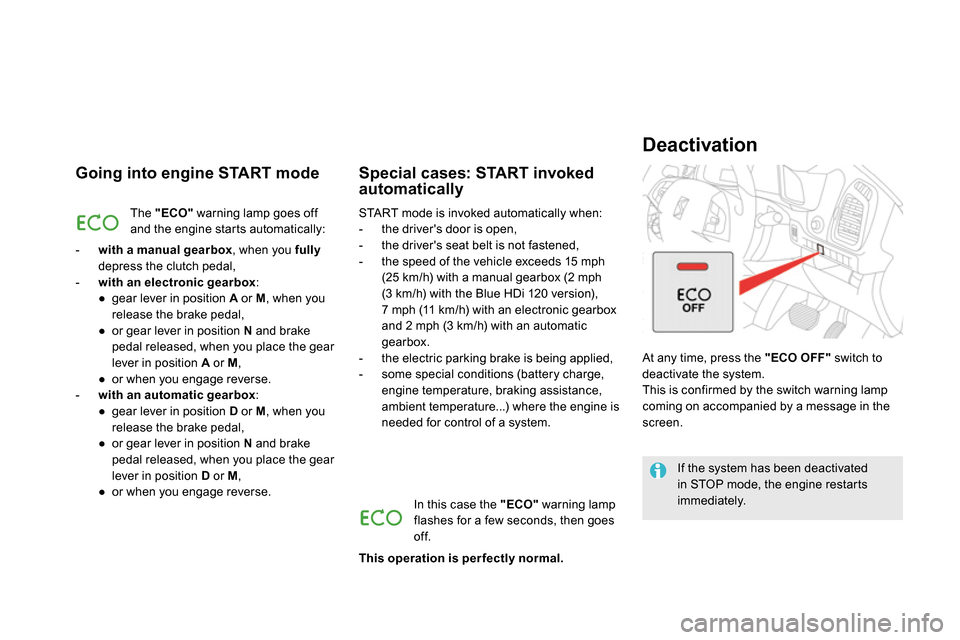
At any time, press the "ECO OFF"
switch to
deactivate the system.
This is confirmed by the switch warning lamp
coming on accompanied by a message in the
screen.
Deactivation
In this case the "ECO"
warning lamp
flashes for a few seconds, then goes
off.
This operation is per fectly normal.
Page 138 of 400
The cruise control system cannot, in any
circumstances, replace the need to respect speed
limits, nor can it replace the need for vigilance and
responsibility on the part of the driver.
You are advised to keep your feet near the pedals
at all times.
Cruise control
System which automatically maintains the
speed of the vehicle at the value programmed
by the driver, without any action on the
accelerator pedal.
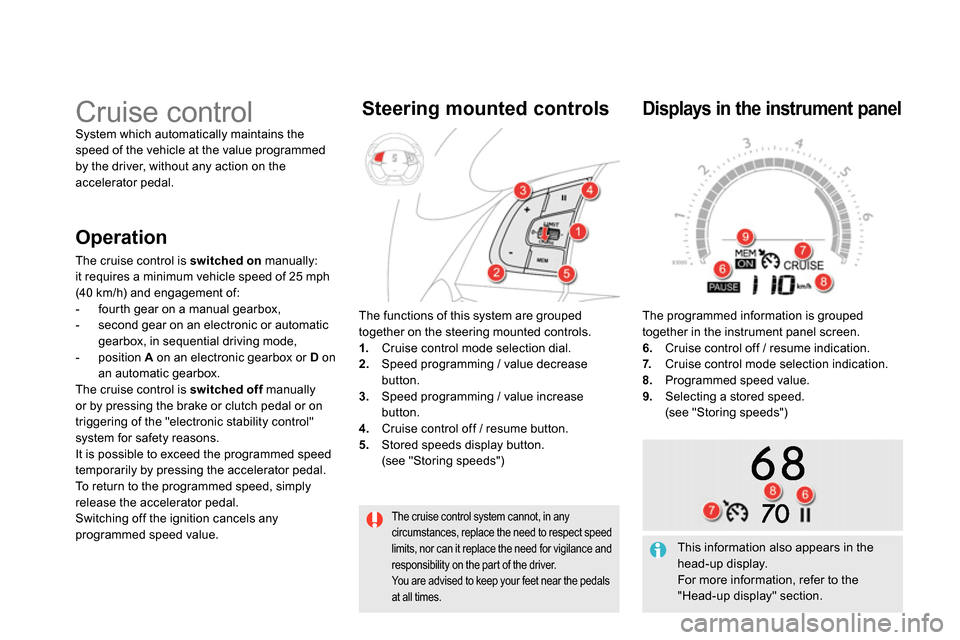
The functions of this system are grouped
together on the steering mounted controls.
1.
Cruise control mode selection dial.
2.
Speed programming / value decrease
button.
3.
Speed programming / value increase
button.
4.
Cruise control off / resume button.
5.
Stored speeds display button.
(see "Storing speeds")
Steering mounted controls
The programmed information is grouped
together in the instrument panel screen.
6.
Cruise control off / resume indication.
7.
Cruise control mode selection indication.
8.
Programmed speed value.
9.
Selecting a stored speed.
(see "Storing speeds")
Displays in the instrument panel
Operation
The cruise control is switched on
manually:
it requires a minimum vehicle speed of 25 mph
(40 km/h) and engagement of:
- fourth gear on a manual gearbox,
- second gear on an electronic or automatic
gearbox, in sequential driving mode,
- position A
on an electronic gearbox or D
on
an automatic gearbox.
The cruise control is switched off
manually
or by pressing the brake or clutch pedal or on
triggering of the "electronic stability control"
system for safety reasons.
It is possible to exceed the programmed speed
temporarily by pressing the accelerator pedal.
To return to the programmed speed, simply
release the accelerator pedal.
Switching off the ignition cancels any
programmed speed value.
This information also appears in the
head-up display.
For more information, refer to the
"Head-up display" section.
Page 208 of 400
Removing a wheel
Parking the vehicle
Immobilise the vehicle where it does not
block traffic: the ground must be level,
stable and not slippery.
Apply the parking brake unless it has
been programmed to automatic mode,
switch off the ignition and engage first
gear * to block the wheels.
Check that the braking warning lamp
and the P
warning lamp in the parking
brake control lever come on.
The occupants must get out of the
vehicle and wait where they are safe.
Never go underneath a vehicle raised
using a jack; use an axle stand.
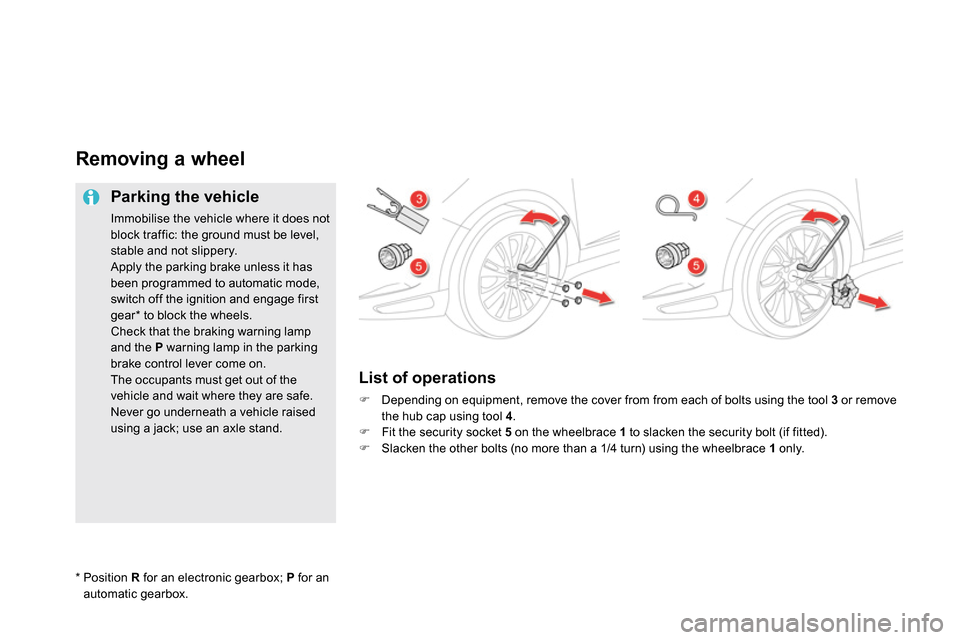
List of operations
Depending on equipment, remove the cover from from each of bolts using the tool 3
or remove
the hub cap using tool 4
.
Fit the security socket 5
on the wheelbrace 1
to slacken the security bolt (if fitted).
Slacken the other bolts (no more than a 1/4 turn) using the wheelbrace 1
only.
*
Position R
for an electronic gearbox; P
for an
automatic gearbox.