battery CITROEN DS7 CROSSBACK 2017 Owner's Manual
[x] Cancel search | Manufacturer: CITROEN, Model Year: 2017, Model line: DS7 CROSSBACK, Model: CITROEN DS7 CROSSBACK 2017Pages: 244, PDF Size: 6.87 MB
Page 43 of 244
41
Access02
Before operating the sunroof or blind
control buttons, ensure that no object or
person might prevent the movement.
Be particularly aware of children when
operating the sunroof or blind.
If something is trapped when operating
the sunroof or blind, you should reverse the
movement of the sunroof or blind by pressing
the control in question.
The driver must ensure that passengers use
the sunroof and blind correctly.
Anti-pinch system
If the sunroof or blind encounters an obstacle
when closing, the movement is automatically
reversed.
The roof anti-pinch system is designed to be
effective at speeds of up to 75 mph (120 km/h).
Opening/Closing
► To open the sunroof or the blind, use the part
of the button located towards the rear of the
vehicle.
► To close the sunroof or the blind, use the part
of the button located towards the front of the
vehicle.
Operation of buttons
► Pressing a button beyond its point of
resistance directly opens or closes the sunroof or
blind fully.
► Pressing the button again stops the current
movement.
► When holding a button (without going
beyond the point of resistance), the movement
of the sunroof or blind stops when this button is
released.
► When the sunroof is closed: pressing once
without passing the point of resistance moves it
to a partially open position.
► When the sunroof is partially open: pressing
once without passing the point of resistance
opens or closes it fully.
The sunroof and windows, then the blind,
can be closed by holding down the door
locking control. The manoeuvre stops as soon
as the locking control is released.
Closing of the blind is limited by the
position of the sunroof: the blind cannot
go further than the front of the movable glass.
During simultaneous movements of the
sunroof and blind, the blind automatically
stops or resumes movement depending on the
position of the sunroof.
Reinitialisation
Following reconnection of the battery or in the
event of a fault or jerky movement of the sunroof
or blind, reinitialisation is required.
► Check that nothing is interfering with the
sunroof or blind and that the seals are clean.
► With the ignition on, fully close the sunroof
and blind.
► Press and hold the front part of button A, until
the sunroof and blind move slightly, then hold for
a further 1 second before releasing.
► Wait 2 seconds and then press and hold the
front part of button A. The blind and the sunroof
will open and close, one after the other. When
both are completely closed again, hold for a
further 2 seconds and release.
If there is an operating fault, restart the
whole procedure.
Page 46 of 244
44
Ease of use and comfort03
Height
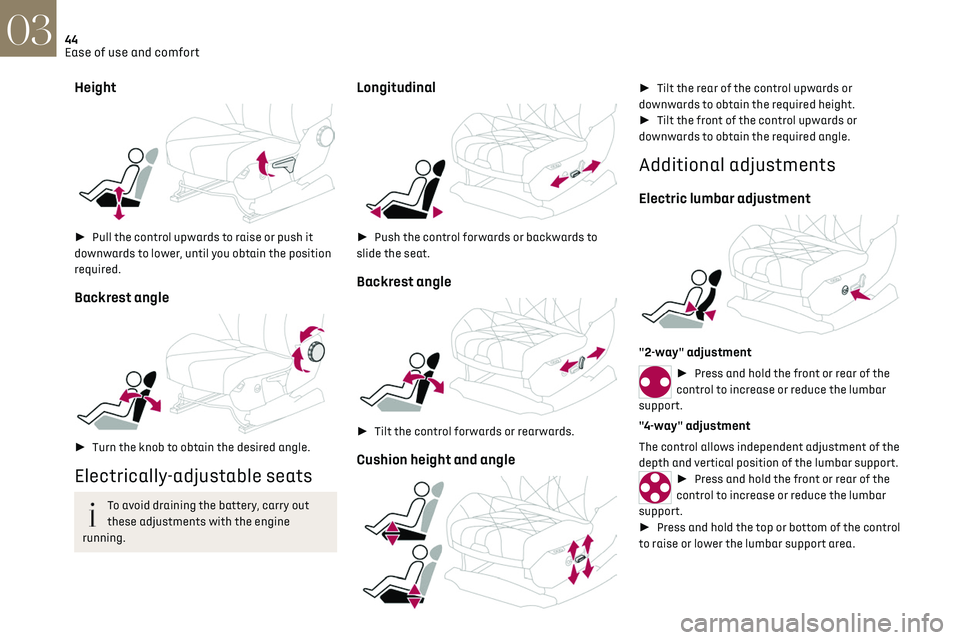
► Pull the control upwards to raise or push it
downwards to lower, until you obtain the position
required.
Backrest angle
► Turn the knob to obtain the desired angle.
Electrically-adjustable seats
To avoid draining the battery, carry out
these adjustments with the engine
running.
Longitudinal
► Push the control forwards or backwards to
slide the seat.
Backrest angle
► Tilt the control forwards or rearwards.
Cushion height and angle
► Tilt the rear of the control upwards or
downwards to obtain the required height.
► Tilt the front of the control upwards or
downwards to obtain the required angle.
Additional adjustments
Electric lumbar adjustment
"2-way" adjustment
► Press and hold the front or rear of the
control to increase or reduce the lumbar
support.
"4-way" adjustment
The control allows independent adjustment of the
depth and vertical position of the lumbar support.
► Press and hold the front or rear of the
control to increase or reduce the lumbar
support.
► Press and hold the top or bottom of the control
to raise or lower the lumbar support area.
Page 53 of 244
51
Ease of use and comfort03
activated, for a period which depends on the
battery charge.
This function does not include the air conditioning
system.
Dual-zone automatic air
conditioning
This system automatically controls the activation
of the air conditioning system, regulating the
temperature, air flow and air distribution inside
the passenger compartment.
This system works with the engine running, but
access to the ventilation and its controls remains
possible with the ignition on.
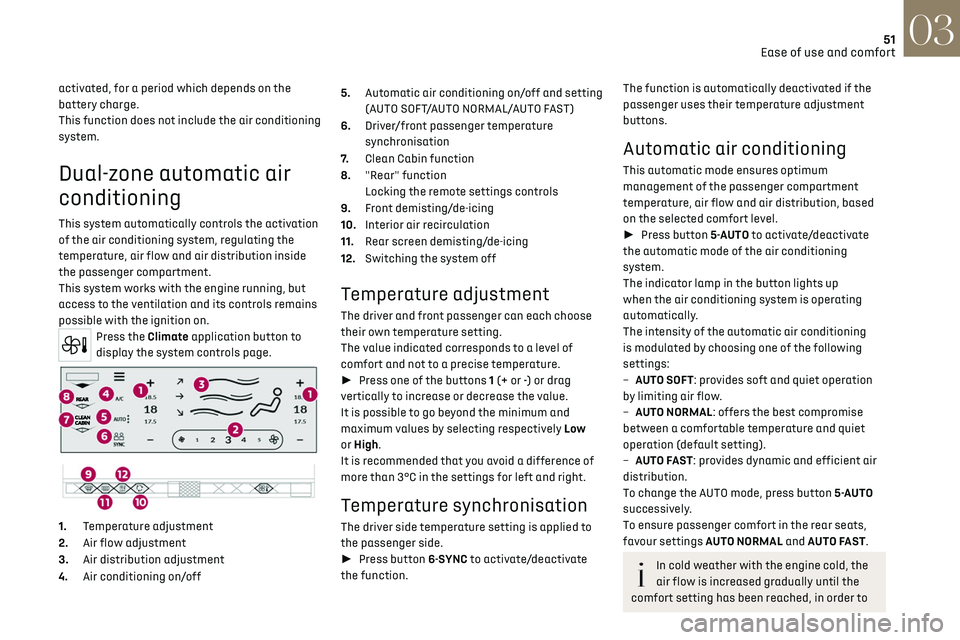
Press the Climate application button to
display the system controls page.
1. Temperature adjustment
2. Air flow adjustment
3. Air distribution adjustment
4. Air conditioning on/off 5.
Automatic air conditioning on/off and setting
(AUTO SOFT/AUTO NORMAL/AUTO FAST)
6. Driver/front passenger temperature
synchronisation
7. Clean Cabin function
8. "Rear" function
Locking the remote settings controls
9. Front demisting/de-icing
10. Interior air recirculation
11. Rear screen demisting/de-icing
12. Switching the system off
Temperature adjustment
The driver and front passenger can each choose
their own temperature setting.
The value indicated corresponds to a level of
comfort and not to a precise temperature.
► Press one of the buttons 1 (+ or -) or drag
vertically to increase or decrease the value.
It is possible to go beyond the minimum and
maximum values by selecting respectively Low
or High.
It is recommended that you avoid a difference of
more than 3°C in the settings for left and right.
Temperature synchronisation
The driver side temperature setting is applied to
the passenger side.
► Press button 6-SYNC to activate/deactivate
the function.
The function is automatically deactivated if the
passenger uses their temperature adjustment
buttons.
Automatic air conditioning
This automatic mode ensures optimum
management of the passenger compartment
temperature, air flow and air distribution, based
on the selected comfort level.
► Press button 5-AUTO to activate/deactivate
the automatic mode of the air conditioning
system.
The indicator lamp in the button lights up
when the air conditioning system is operating
automatically.
The intensity of the automatic air conditioning
is modulated by choosing one of the following
settings:
–
A
UTO SOFT: provides soft and quiet operation
by limiting air flow.
–
A
UTO NORMAL: offers the best compromise
between a comfortable temperature and quiet
operation (default setting).
–
A
UTO FAST: provides dynamic and efficient air
distribution.
To change the AUTO mode, press button 5-AUTO
successively.
To ensure passenger comfort in the rear seats,
favour settings AUTO NORMAL and AUTO FAST.
In cold weather with the engine cold, the
air flow is increased gradually until the
comfort setting has been reached, in order to
Page 57 of 244
55
Ease of use and comfort03
► Press + to add a programme.
► Select the time of entry into the vehicle and
the desired days. Press OK.
► Press ON to activate this programming.
The pre-conditioning sequence begins
approximately 45 minutes before the programmed
time when the vehicle is connected (20 minutes
when it is not connected) and is maintained for
10 minutes after.
This indicator lamp comes on fixed when
a temperature pre-conditioning cycle is
programmed. It flashes when temperature pre-
conditioning is in progress.
You can set multiple programmes.
Each one is saved in the system.
To optimise the driving range, we recommend
starting a programme while the vehicle is
connected.
The programming can also be carried out
from a smartphone via the MyDS App
application.
For more information on Remotely operable
additional functions, refer to the corresponding
section.
The fan noise that occurs during
temperature pre-conditioning is perfectly
normal.
Operating conditions
– The function is only activ ated when the ignition
is switched off and the vehicle locked.
–
When the v
ehicle is not connected, the function
is only activated if the battery charge level is
greater than 20%.
–
When the v
ehicle is not connected and a
recurring programme is active (e.g. from Monday
to Friday), if two temperature pre-conditioning
sequences are run without the vehicle being used,
the programme will be deactivated.
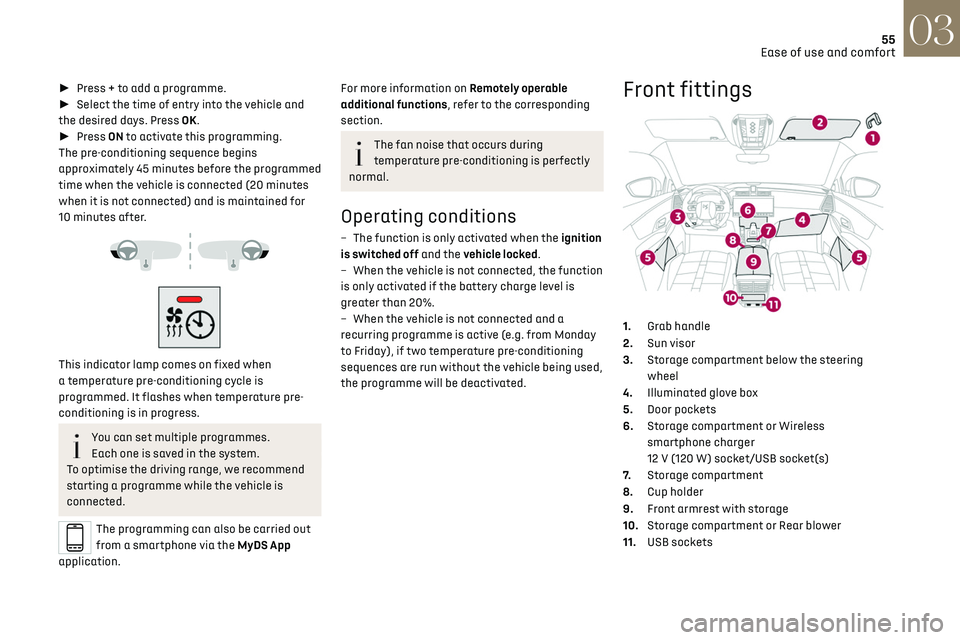
Front fittings
1. Grab handle
2. Sun visor
3. Storage compartment below the steering
wheel
4. Illuminated glove box
5. Door pockets
6. Storage compartment or Wireless
smartphone charger
12 V (120 W) socket/USB socket(s)
7. Storage compartment
8. Cup holder
9. Front armrest with storage
10. Storage compartment or Rear blower
11. USB sockets
Page 59 of 244
57
Ease of use and comfort03
When the USB socket is used, the portable
device charges automatically.
While charging, a message is displayed if the
power drawn by the portable device exceeds
the current supplied by the vehicle.
For more information about how to use this
equipment, refer to the sections describing the
audio and telematics systems.
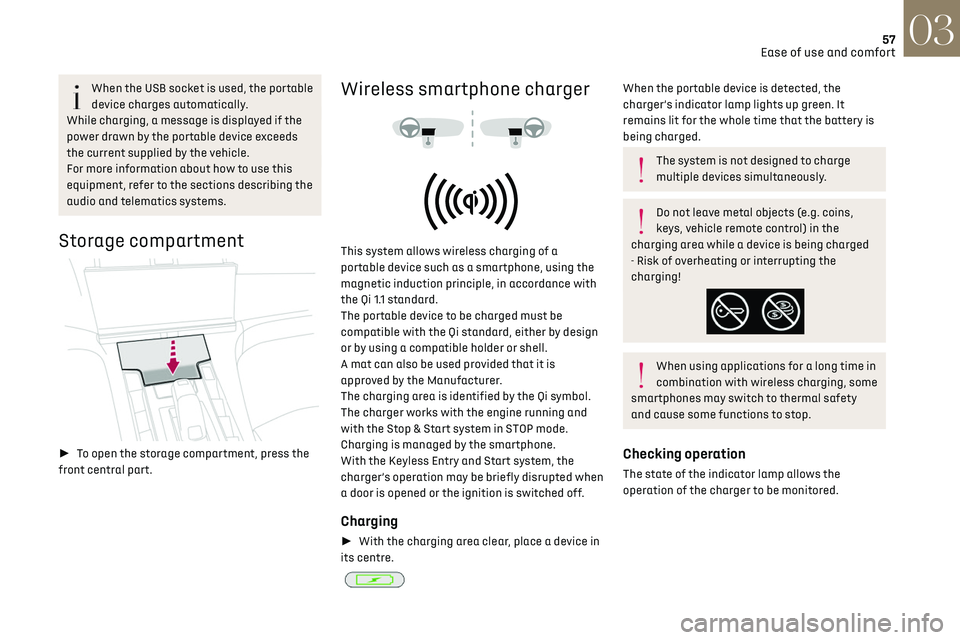
Storage compartment
► To open the storage compartment, press the
front central part.
Wireless smartphone charger
This system allows wireless charging of a
portable device such as a smartphone, using the
magnetic induction principle, in accordance with
the Qi 1.1 standard.
The portable device to be charged must be
compatible with the Qi standard, either by design
or by using a compatible holder or shell.
A mat can also be used provided that it is
approved by the Manufacturer.
The charging area is identified by the Qi symbol.
The charger works with the engine running and
with the Stop & Start system in STOP mode.
Charging is managed by the smartphone.
With the Keyless Entry and Start system, the
charger’s operation may be briefly disrupted when
a door is opened or the ignition is switched off.
Charging
► With the charging area clear, place a device in
its centre.
When the portable device is detected, the
charger’s indicator lamp lights up green. It
remains lit for the whole time that the battery is
being charged.
The system is not designed to charge
multiple devices simultaneously.
Do not leave metal objects (e.g. coins,
keys, vehicle remote control) in the
charging area while a device is being charged
- Risk of overheating or interrupting the
charging!
When using applications for a long time in
combination with wireless charging, some
smartphones may switch to thermal safety
and cause some functions to stop.
Checking operation
The state of the indicator lamp allows the
operation of the charger to be monitored.
Page 60 of 244
58
Ease of use and comfort03
State of the
indicator lampMeaning
Off Engine switched off.
No compatible devices
detected.
Charging complete.
Fixed green Compatible portable device detected.
Charging.
Flashing orange Foreign object detected in the charging zone.
Portable device not well
centred in the charging
zone.
Fixed orange Malfunction of the portable device's battery
meter.
Device battery
temperature too high.
Charger malfunction.
If the indicator lamp is fixed orange:
– remo ve the device, then place it back in the
centre of the charging zone.
or
–
remo
ve the device and try again in a quarter of
an hour.
If the problem persists, have the system checked
by a dealer or a qualified workshop.
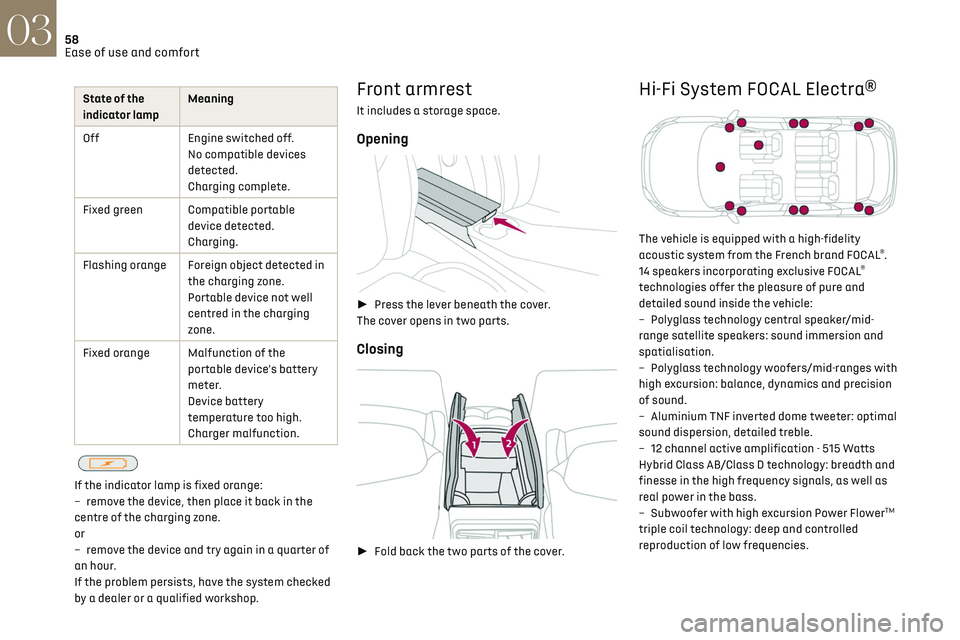
Front armrest
It includes a storage space.
Opening
► Press the lever beneath the cover.
The cover opens in two parts.
Closing
► Fold back the two parts of the cover.
Hi-Fi System FOCAL Electra®
The vehicle is equipped with a high-fidelity
acoustic system from the French brand FOCAL®.
14 speakers incorporating exclusive FOCAL®
technologies offer the pleasure of pure and
detailed sound inside the vehicle:
–
Poly
glass technology central speaker/mid-
range satellite speakers: sound immersion and
spatialisation.
–
Poly
glass technology woofers/mid-ranges with
high excursion: balance, dynamics and precision
of sound.
–
Aluminium TNF in
verted dome tweeter: optimal
sound dispersion, detailed treble.
–
12 channel activ
e amplification - 515 Watts
Hybrid Class AB/Class D technology: breadth and
finesse in the high frequency signals, as well as
real power in the bass.
–
Sub
woofer with high excursion Power Flower
TM
triple coil technology: deep and controlled
reproduction of low frequencies.
Page 66 of 244
64
Lighting and visibility04
Switching on the lamps after switching
off the ignition
To reactivate the lighting control, rotate the
ring to the "AUTO" position, then to the desired
position.
If the driver's door is opened, a temporary
audible signal warns the driver that the lamps
are on.
They will go off automatically after a period of
time that depends on the level of charge in the
battery (entering energy economy mode).
In some weather conditions (e.g. low
temperature or humidity), misting on the
internal surface of the glass of the headlamps
and rear lamps is normal, and will disappear
after the lamps have been on for a few
minutes.
Never look too closely at the light beam of
LED technology lamps - risk of serious eye
injury!
Travelling abroad
The design of the dipped beam headlamps
allows you to drive, without any modification,
in a country that drives on the other side of
the road to the country in which your vehicle
was sold.
Daytime running lamps/
Sidelamps
These LED lamps at the front and rear of the
vehicle light up automatically when the engine
starts.
They perform the following functions:
–
Da
ytime running lamps (lighting control stalk at
position "AUTO" with adequate ambient light).
–
Sidelamp
s (lighting control stalk at position
"AUTO" with low ambient light or "Sidelamps
only" or "Dipped/main beam headlamps").
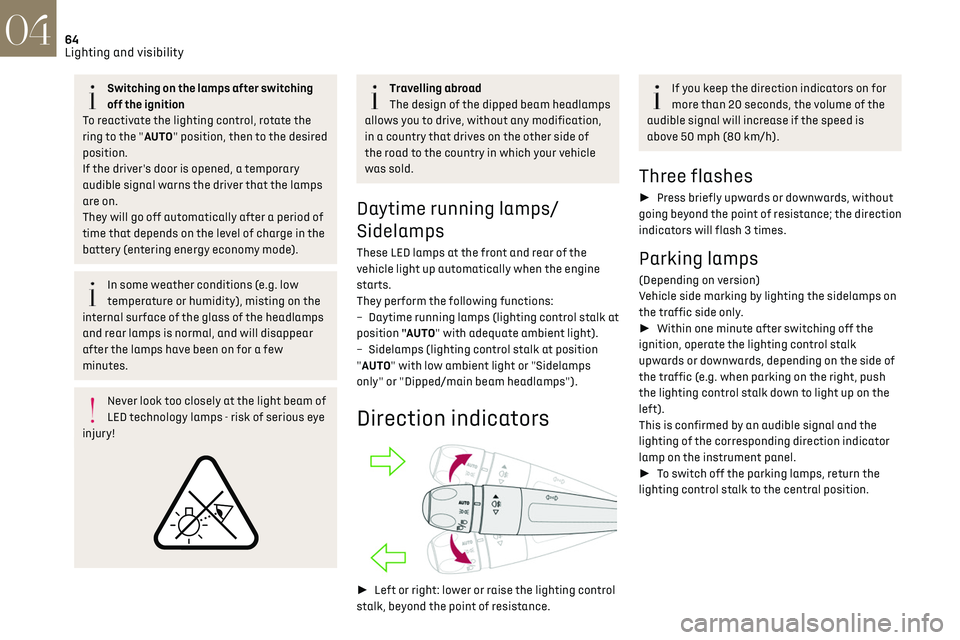
Direction indicators
► Left or right: lower or raise the lighting control
stalk, beyond the point of resistance.
If you keep the direction indicators on for
more than 20 seconds, the volume of the
audible signal will increase if the speed is
above 50 mph (80 km/h).
Three flashes
► Press briefly upwards or downwards, without
going beyond the point of resistance; the direction
indicators will flash 3 times.
Parking lamps
(Depending on version)
Vehicle side marking by lighting the sidelamps on
the traffic side only.
► Within one minute after switching off the
ignition, operate the lighting control stalk
upwards or downwards, depending on the side of
the traffic (e.g. when parking on the right, push
the lighting control stalk down to light up on the
left).
This is confirmed by an audible signal and the
lighting of the corresponding direction indicator
lamp on the instrument panel.
► To switch off the parking lamps, return the
lighting control stalk to the central position.
Page 80 of 244
78
Safety05
Operation of the system
– Upon switching on the ignition, the indicator
lamp lights up for a few seconds and then goes
out: the system is operating correctly.
–
The indic
ator lamp flashes red: emergency
battery is flat. This will be recharged after a few
minutes' driving.
–
The indic
ator lamp is fixed red: system
malfunction. The emergency and assistance call
services may not work.
–
If the indic
ator lamp does not light up when
the ignition is turned on, this is also a system
malfunction.
If the problem persists, contact a qualified
workshop as soon as possible.
The malfunction of the system does not
prevent the vehicle from driving.
When an onboard system update is being
performed, the eCall (SOS) function is not
available.
Data processing
All processing of personal data by
the eCall (SOS) function complies with
the framework for protection of personal
information established by Regulation
2016/679 (General Data Protection Regulation
- GDPR) and Directive 2002/58/EC of the
European Parliament and the Council, and in
particular, seeks to protect the vital interests
of the data subject, in accordance with Article
6 (1) d) GDPR.
The processing of personal data is strictly
limited to the purpose of handling the eCall
(SOS) function used with the “112” single
European emergency call number.
The eCall (SOS) function is only able to collect
and process the following data relating to the
vehicle: vehicle identification number, vehicle
type (passenger vehicle or light commercial
vehicle), fuel type or power source, three
most recent locations and direction of travel,
number of passengers and a timestamped log
file of the automatic activation of the system
and its timestamp.
The recipients of the processed data are the
emergency call handling centres designated
by the relevant national authorities in the
territory in which they are located, enabling
priority routing and handling of calls to the
“112” emergency number.
Data storage
Data contained in the system’s memory is
not accessible from outside the system until a
call is made. The system is not traceable and
is not continuously monitored in its normal
operating mode.
The data in the system's internal memory is
automatically and continuously erased. Only
the vehicle’s three most recent locations,
necessary for the normal functioning of the
system, are stored.
When an emergency call is triggered, the data
log is stored for no more than 13 hours.
Access to data
You have the right of access to data and
as appropriate to request the rectification,
erasure or restriction of processing of any
personal data not processed in accordance
with the provisions of GDPR. Third parties
to which data has been disclosed shall be
notified of any rectification, erasure or
restriction carried out in compliance with
GDPR, unless it proves impossible or involves a
disproportionate effort.
You also have the right to lodge a complaint
with the respective data protection
supervisory authority.
If you want to claim your above-mentioned
rights please contact us per email at:
[email protected].
For more information regarding our contact
details please take a look at our Privacy &
Cookies Policy on the brand's website.
Page 100 of 244
98Driving06
Move the electronic key so that the engine can
be started or switched off.
If there is still a problem, refer to the "Key not
detected - Back-up starting or Back-up switch-
off" section.
Illuminated animations of the "START/
STOP" button indicate the presence or
absence of the electronic key in the passenger
compartment.
Starting
► Select mode P or N on the automatic gearbox,
then depress the brake pedal.
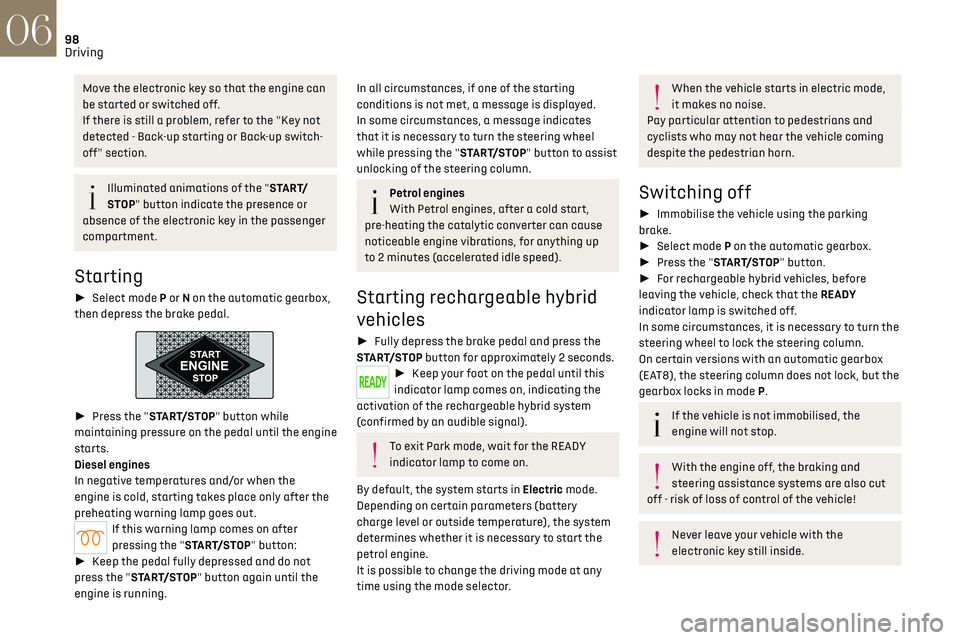
► Press the "START/STOP" button while
maintaining pressure on the pedal until the engine
starts.
Diesel engines
In negative temperatures and/or when the
engine is cold, starting takes place only after the
preheating warning lamp goes out.
If this warning lamp comes on after
pressing the "START/STOP" button:
► Keep the pedal fully depressed and do not
press the "START/STOP" button again until the
engine is running.
In all circumstances, if one of the starting
conditions is not met, a message is displayed.
In some circumstances, a message indicates
that it is necessary to turn the steering wheel
while pressing the "START/STOP" button to assist
unlocking of the steering column.
Petrol engines
With Petrol engines, after a cold start,
pre-heating the catalytic converter can cause
noticeable engine vibrations, for anything up
to 2 minutes (accelerated idle speed).
Starting rechargeable hybrid
vehicles
► Fully depress the brake pedal and press the
START/STOP button for approximately 2 seconds.
► Keep your foot on the pedal until this
indicator lamp comes on, indicating the
activation of the rechargeable hybrid system
(confirmed by an audible signal).
To exit Park mode, wait for the READY
indicator lamp to come on.
By default, the system starts in Electric mode.
Depending on certain parameters (battery
charge level or outside temperature), the system
determines whether it is necessary to start the
petrol engine.
It is possible to change the driving mode at any
time using the mode selector.
When the vehicle starts in electric mode,
it makes no noise.
Pay particular attention to pedestrians and
cyclists who may not hear the vehicle coming
despite the pedestrian horn.
Switching off
► Immobilise the vehicle using the parking
brake.
► Select mode P on the automatic gearbox.
► Press the "START/STOP" button.
► For rechargeable hybrid vehicles, before
leaving the vehicle, check that the READY
indicator lamp is switched off.
In some circumstances, it is necessary to turn the
steering wheel to lock the steering column.
On certain versions with an automatic gearbox
(EAT8), the steering column does not lock, but the
gearbox locks in mode P.
If the vehicle is not immobilised, the
engine will not stop.
With the engine off, the braking and
steering assistance systems are also cut
off - risk of loss of control of the vehicle!
Never leave your vehicle with the
electronic key still inside.
Page 101 of 244
99Driving06
Switching on the ignition
without starting the engine
With the electronic key in the passenger
compartment, pressing the "START/STOP" button,
without depressing any of the pedals, allows the
ignition to be switched on without starting the
engine.
► Press this button again to switch off the
ignition and allow the vehicle to be locked.
Key not detected
Back-up starting
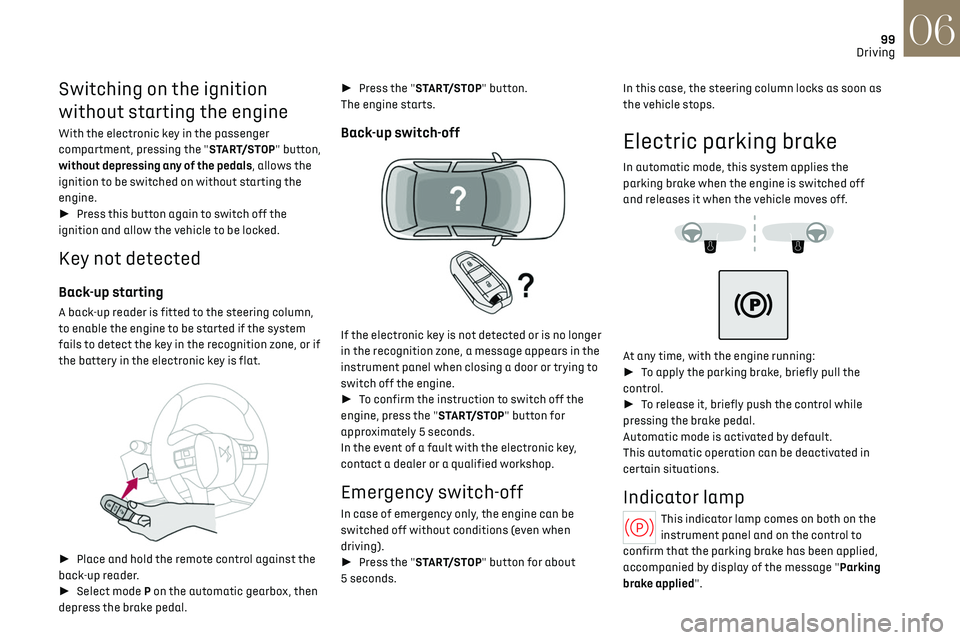
A back-up reader is fitted to the steering column,
to enable the engine to be started if the system
fails to detect the key in the recognition zone, or if
the battery in the electronic key is flat.
► Place and hold the remote control against the
back-up reader.
► Select mode P on the automatic gearbox, then
depress the brake pedal. ►
Press the "START/STOP" button.
The engine starts.
Back-up switch-off
If the electronic key is not detected or is no longer
in the recognition zone, a message appears in the
instrument panel when closing a door or trying to
switch off the engine.
► To confirm the instruction to switch off the
engine, press the "START/STOP" button for
approximately 5 seconds.
In the event of a fault with the electronic key,
contact a dealer or a qualified workshop.
Emergency switch-off
In case of emergency only, the engine can be
switched off without conditions (even when
driving).
► Press the "START/STOP" button for about
5 seconds. In this case, the steering column locks as soon as
the vehicle stops.
Electric parking brake
In automatic mode, this system applies the
parking brake when the engine is switched off
and releases it when the vehicle moves off.
At any time, with the engine running:
► To apply the parking brake, briefly pull the
control.
► To release it, briefly push the control while
pressing the brake pedal.
Automatic mode is activated by default.
This automatic operation can be deactivated in
certain situations.
Indicator lamp
This indicator lamp comes on both on the
instrument panel and on the control to
confirm that the parking brake has been applied,
accompanied by display of the message "Parking
brake applied".