battery CITROEN DS7 CROSSBACK 2017 Workshop Manual
[x] Cancel search | Manufacturer: CITROEN, Model Year: 2017, Model line: DS7 CROSSBACK, Model: CITROEN DS7 CROSSBACK 2017Pages: 244, PDF Size: 6.87 MB
Page 188 of 244
186
In the event of a breakdown08
Referring to the relevant section, reinitialise
certain equipment:
–
Electronic k
ey.
–
Sunroo
f and electric blind.
–
Electric windo
ws.
–
Da
te and time.
–
Pre
set radio stations.
After reconnecting the battery, the
message "Collision risk detection system
fault" is displayed on the instrument panel
when the ignition is switched on. This
operation is perfectly normal. The message
will disappear while driving.
Towing the vehicle
General recommendations
Observe the legislation in force in the
country where you are driving.
Ensure that the weight of the towing vehicle is
higher than that of the towed vehicle.
The driver must remain at the wheel of the
towed vehicle and must have a valid driving
licence.
When towing a vehicle with all four wheels on
the ground, always use an approved towing
arm; rope and straps are prohibited.
The towing vehicle must move off gently.
When the vehicle is towed with its engine
off, there is no longer braking and steering
assistance.
A professional towing service must be
called if:
–
B
roken down on a motorway or main road.
–
No
t possible to put the gearbox into neutral,
unlock the steering, or release the parking
brake.
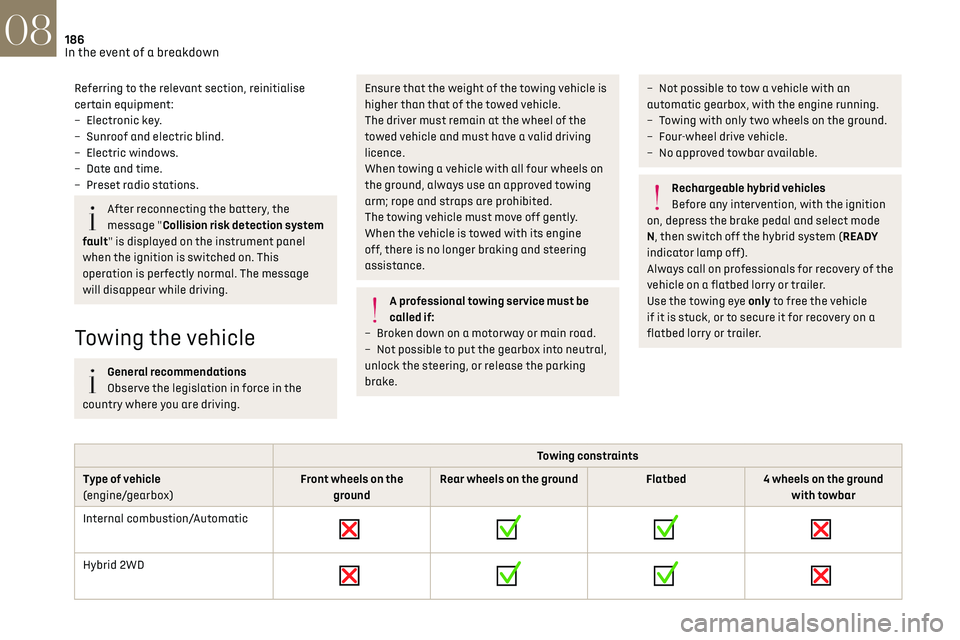
– Not possible to tow a vehicle with an
automatic gearbox, with the engine running.
–
T
owing with only two wheels on the ground.
–
Four-wheel driv
e vehicle.
–
No appro
ved towbar available.
Rechargeable hybrid vehicles
Before any intervention, with the ignition
on, depress the brake pedal and select mode
N, then switch off the hybrid system (READY
indicator lamp off).
Always call on professionals for recovery of the
vehicle on a flatbed lorry or trailer.
Use the towing eye only to free the vehicle
if it is stuck, or to secure it for recovery on a
flatbed lorry or trailer.
Towing constraints
Type of vehicle
(engine/gearbox) Front wheels on the
ground Rear wheels on the ground
Flatbed4 wheels on the ground
with towbar
Internal combustion/Automatic
Hybrid 2WD
Page 189 of 244
187
In the event of a breakdown08
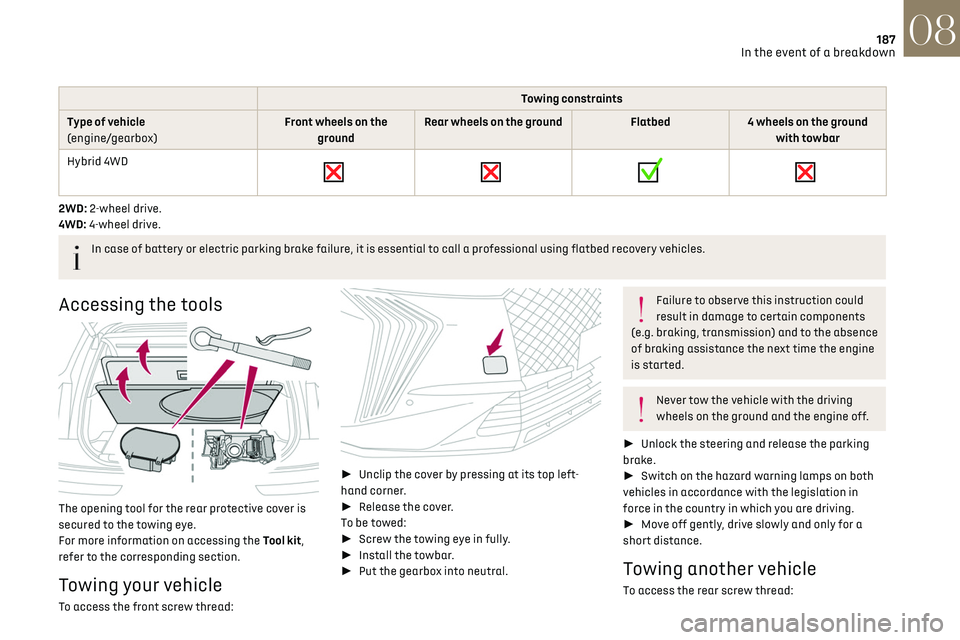
Towing constraints
Type of vehicle
(engine/gearbox) Front wheels on the
ground Rear wheels on the ground
Flatbed4 wheels on the ground
with towbar
Hybrid 4WD
2WD: 2-wheel drive.
4WD: 4-wheel drive.
In case of battery or electric parking brake failure, it is essential to call a professional using flatbed recovery vehicles.
Accessing the tools
The opening tool for the rear protective cover is
secured to the towing eye.
For more information on accessing the Tool kit,
refer to the corresponding section.
Towing your vehicle
To access the front screw thread:
►
Unclip the cover by pressing at its top left-
hand corner.
► Release the cover.
To be towed:
► Screw the towing eye in fully.
► Install the towbar.
► Put the gearbox into neutral.
Failure to observe this instruction could
result in damage to certain components
(e.g. braking, transmission) and to the absence
of braking assistance the next time the engine
is started.
Never tow the vehicle with the driving
wheels on the ground and the engine off.
► Unlock the steering and release the parking
brake.
► Switch on the hazard warning lamps on both
vehicles in accordance with the legislation in
force in the country in which you are driving.
► Move off gently, drive slowly and only for a
short distance.
Towing another vehicle
To access the rear screw thread:
Page 194 of 244
192Technical data09
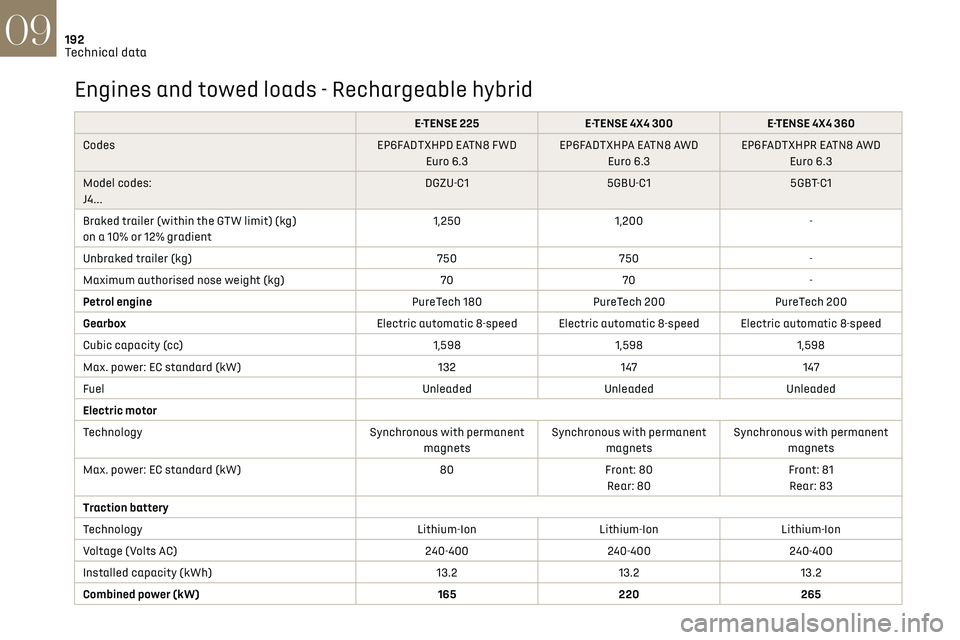
Engines and towed loads - Rechargeable hybrid
E-TENSE 225E-TENSE 4X4 300 E-TENSE 4X4 360
Codes EP6FADTXHPD EATN8 FWD
Euro 6.3 EP6FADTXHPA EATN8 AWD
Euro 6.3 EP6FADTXHPR EATN8 AWD
Euro 6.3
Model codes:
J4... DGZU-C1
5GBU-C1 5GBT-C1
Braked trailer (within the GTW limit) (kg)
on a 10% or 12% gradient 1,250
1,200 -
Unbraked trailer (kg) 750750 -
Maximum authorised nose weight (kg) 7070 -
Petrol engine PureTech 180PureTech 200 PureTech 200
Gearbox Electric automatic 8-speed Electric automatic 8-speed Electric automatic 8-speed
Cubic capacity (cc) 1,5981,5981,598
Max. power: EC standard (kW) 132147147
Fuel UnleadedUnleadedUnleaded
Electric motor
Technology Synchronous with permanent
magnets Synchronous with permanent
magnets Synchronous with permanent
magnets
Max. power: EC standard (kW) 80Front: 80
Rear: 80 Front: 81
Rear: 83
Traction battery
Technology Lithium-IonLithium-IonLithium-Ion
Voltage (Volts AC) 240-400240-400240-400
Installed capacity (kWh) 13.213.213.2
Combined power (kW) 165220 265
Page 199 of 244
197DS IRIS SYSTEM - 12" touch screen Infotainment system10
connected service will be carried out remotely,
in particular using "Over the Air" technology.
To do this, a secure connection via radio
network is established between the vehicle
and the Manufacturer's device management
server each time the ignition is switched on,
when a mobile telephone network is available.
Depending on the vehicle's equipment,
the connection configuration must be set
to "Connected vehicle" to enable to the
connection to the radio network.
Irrespective of a valid subscription to a
connected service, the remote management
of devices relating to or connected with
the security of devices, and the updating of
software and firmware, will be carried out
when necessary in order to comply with a legal
requirement applicable to the Manufacturer
(e.g. the applicable law in terms of product
liability, the regulations governing e-call) or
when necessary to protect the respective
vital interests of the vehicle's users and
passengers.
The establishment of a secure connection via
radio network and the corresponding remote
updates are not affected by the privacy
settings and are intended to be carried out
after being initialised by the user in response
to a related notification.
The system can notify the receipt of an update
when it is connected to an exterior Wi-Fi network
or a mobile telephone network.Large updates are downloaded only via the Wi-Fi
network.
The availability of an update is notified on the
screen at the end of the journey with an option
of immediate installation or postponement of
installation.
The installation time is variable and can take
several minutes with a maximum of about 30
minutes. A notification will give an estimate of the
duration and a description of the update.
Update information is available through the
"Settings" application.
Press the "Settings" application.
In the list, select the "Updates" tab.
This button allows you to change the
authorisation for automatic downloading
of updates via an exterior Wi-Fi network.
For safety reasons and because it
requires sustained attention on the part
of the driver, the installation must be carried
out with the ignition on but without starting
the engine.
The installation cannot be carried out in the
following cases:
–
engine running.
–
emergenc
y call in progress.
–
insufficien
t battery level.
–
when charging for electric v
ehicles.
If an update has failed or has expired, contact a
dealer or a qualified workshop.
The Manufacturer does not charge for the
use of this service.
However, the use of Wi-Fi and/or mobile
telephone networks by your smartphone may
incur extra charges if you exceed the data
allowance included in your contract.
Any associated costs will be billed to you by
your mobile telephone operator.
Personalisation
Press and hold the screen from one of the
system's home pages.
Or
Press the "Settings" application.
In the list, select the "Customization" tab.
Press the "Displays" field.
A page divided into 2 parts is displayed.
Press the HOME button at any time to leave this
page.
Personalising the screen
Press the pencil in the "Customize
Touchscreen" part.
A representation of the organisation of the
different home page (HOME) Widgets is
displayed.
A Widget is a reduced window of an
application or service.
Page 212 of 244
210
Vehicle data recording and privacy11
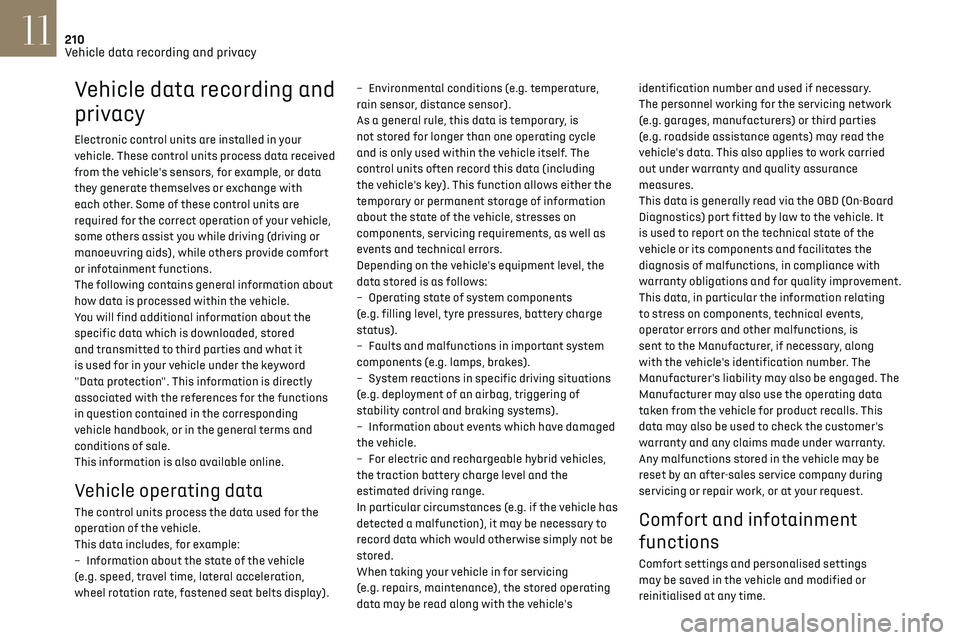
Vehicle data recording and
privacy
Electronic control units are installed in your
vehicle. These control units process data received
from the vehicle's sensors, for example, or data
they generate themselves or exchange with
each other. Some of these control units are
required for the correct operation of your vehicle,
some others assist you while driving (driving or
manoeuvring aids), while others provide comfort
or infotainment functions.
The following contains general information about
how data is processed within the vehicle.
You will find additional information about the
specific data which is downloaded, stored
and transmitted to third parties and what it
is used for in your vehicle under the keyword
"Data protection". This information is directly
associated with the references for the functions
in question contained in the corresponding
vehicle handbook, or in the general terms and
conditions of sale.
This information is also available online.
Vehicle operating data
The control units process the data used for the
operation of the vehicle.
This data includes, for example:
–
In
formation about the state of the vehicle
(e.g. speed, travel time, lateral acceleration,
wheel rotation rate, fastened seat belts display). –
En
vironmental conditions (e.g. temperature,
rain sensor, distance sensor).
As a general rule, this data is temporary, is
not stored for longer than one operating cycle
and is only used within the vehicle itself. The
control units often record this data (including
the vehicle's key). This function allows either the
temporary or permanent storage of information
about the state of the vehicle, stresses on
components, servicing requirements, as well as
events and technical errors.
Depending on the vehicle's equipment level, the
data stored is as follows:
–
O
perating state of system components
(e.g. filling level, tyre pressures, battery charge
status).
–
Faults and malfunctions in import
ant system
components (e.g. lamps, brakes).
–
Sy
stem reactions in specific driving situations
(e.g. deployment of an airbag, triggering of
stability control and braking systems).
–
In
formation about events which have damaged
the vehicle.
–
For electric and rechargeable h
ybrid vehicles,
the traction battery charge level and the
estimated driving range.
In particular circumstances (e.g. if the vehicle has
detected a malfunction), it may be necessary to
record data which would otherwise simply not be
stored.
When taking your vehicle in for servicing
(e.g. repairs, maintenance), the stored operating
data may be read along with the vehicle's identification number and used if necessary.
The personnel working for the servicing network
(e.g. garages, manufacturers) or third parties
(e.g. roadside assistance agents) may read the
vehicle's data. This also applies to work carried
out under warranty and quality assurance
measures.
This data is generally read via the OBD (On-Board
Diagnostics) port fitted by law to the vehicle. It
is used to report on the technical state of the
vehicle or its components and facilitates the
diagnosis of malfunctions, in compliance with
warranty obligations and for quality improvement.
This data, in particular the information relating
to stress on components, technical events,
operator errors and other malfunctions, is
sent to the Manufacturer, if necessary, along
with the vehicle's identification number. The
Manufacturer's liability may also be engaged. The
Manufacturer may also use the operating data
taken from the vehicle for product recalls. This
data may also be used to check the customer's
warranty and any claims made under warranty.
Any malfunctions stored in the vehicle may be
reset by an after-sales service company during
servicing or repair work, or at your request. Comfort and infotainment
functions
Comfort settings and personalised settings
may be saved in the vehicle and modified or
reinitialised at any time.
Page 215 of 244
213Alphabetical index
360 Vision 140
A
ABS 79
Accelerated charging unit (Wallbox)
147–148
Accessories
76
Active LED Vision
65
Active Safety Brake
128, 130
Active Scan Suspension
105
Active suspension
105
Adaptive headlamp lighting
67
AdBlue®
19, 165
AdBlue® tank
166
Additive, Diesel
163
Adjusting headlamps
65
Adjusting head restraints
43
Adjusting seat
43–44
Adjusting the air distribution
50, 52
Adjusting the air flow
50, 52
Adjusting the headlamp beam height
65
Adjusting the height and reach
of the steering wheel
46
Adjusting the seat angle
44
Adjusting the seat belt height
82
Adjusting the temperature
51
Adjusting the time
23, 208
Advice on care and maintenance
146, 167
Advice on driving
8, 96–97
Airbags
83–87
Airbags, curtain 85–86
Airbags, front
84–85, 88
Airbags, lateral
84–85
Air conditioning
50–51
Air conditioning, automatic
53
Air conditioning, dual-zone automatic
51
Air intake
52–53
Air vents
49
Alarm
37–38
Amplifier, audio
58
Anti-lock braking system (ABS)
79
Antitheft / Immobiliser
27
Applications
24
Armrest, front
58
Armrest, rear
60
Assistance call
77–78
Assistance, emergency braking
80, 130
Audio streaming (Bluetooth)
205
B
Battery, 12 V 159, 163, 181–185
Battery, ancillaries
181
Battery, charging
181–182, 184
Battery, remote control
31
Blanking screen (snow shield)
158
Blind
40–41
Blind spot monitoring
135
BlueHDi
19, 163, 170
Bluetooth (hands-free)
202
Bluetooth (telephone) 202
Bodywork
168
Bonnet
160
Boot
32–34, 62
Brake discs
164
Brake lamps
179
Brakes
164
Braking
105
Braking assistance system
79–80
Braking, automatic emergency
128, 130
Braking, dynamic emergency
100–101
Bulbs (changing)
178–179
C
Capacity, fuel tank 143
Care of the bodywork
168
Central locking
29–30
Changing a bulb
178–179
Changing a fuse
180
Changing a wheel
171, 175
Changing a wiper blade
73–74
Changing the remote control battery
31
Changing to free-wheeling
166
Charge level indicator (Rechargeable hybrid)
21
Charger, induction
57
Charger, wireless
57
Charging cable
149
Charging cable
(Rechargeable hybrid)
147–148, 154
Page 216 of 244
214Alphabetical index
Charging connector
(Rechargeable hybrid)
146, 153–154
Charging flap
(Rechargeable hybrid)
146, 153–154
Charging the traction battery
(Rechargeable hybrid)
20, 145, 153–154
CHECK
21
Checking the engine oil level
18
Checking the levels
161–162
Checking tyre pressures (using the kit)
172, 174
Checks
161, 163–165
Checks, routine
163–164
Child lock
95
Children
83, 89–91, 94
Children (safety)
95
Child seats
83, 86–89
Child seats, conventional
88–89
Child seats, i-Size
94
Child seats, ISOFIX
90–92
Cigar lighter
56
Cleaning (advice)
146, 167–169
Clock
23
Closing the boot
29, 33
Closing the doors
29, 32
Collision Risk Alert
128–129
Comfort mode
108
Configuration, vehicle
10, 24
Connection, Bluetooth
202
Connectivity
207
Consumptions
24
Container, AdBlue®
165–166
Control, emergency boot release
33Control, emergency door 30–31
Control, heated seats
46
Controls, steering mounted
101–103
Control stalk, lighting
63–64
Control stalk, wipers
72–74
Control unit
147–149, 154
Courtesy lamp, front
59
Courtesy lamps
59
Cruise control
116, 118–120
Cruise control, adaptive
120
Cruise control, adaptive with Stop function
116
Cruise control by speed limit recognition
116
Cup holder
56
D
Date (setting) 208
Daytime running lamps
64, 179
Deactivating the passenger airbag
84, 87–88
Deadlocking
27, 29
Deferred charging
24, 155
Deferred charging
(Rechargeable hybrid)
24–25, 146, 153
Defrosting
47, 53
Defrosting, front
53
Defrosting, rear screen
54
Demisting
47, 53
Demisting, front
53
Demisting, rear
54
Diagnosis, vehicle
21
Dials and gauges 10
Digital instrument panel
10
Dimensions
193
Dipstick
18, 161
Direction indicators (turn signals)
64, 179
Display screen, instrument panel
10
Domestic charging
149
Domestic charging (Rechargeable hybrid)
154
Door pockets
56
Doors
32
Driver’s attention warning
131–132
Driving
42–43, 96–97
Driving aids camera (warnings)
112
Driving aid shortcuts
113
Driving aids (recommendations)
112
Driving economically
8
Driving modes
106
Driving positions (storing)
45
DS Drive Assist
120
Dynamic stability control (DSC)
80
E
EBFD 79
Eco-driving (advice)
8
ECO mode
106
Electric automatic gearbox
(Rechargeable hybrid)
104
Electronic brake force distribution (EBFD)
79
Emergency braking assistance (EBA)
80
Page 219 of 244
217Alphabetical index
Night Vision 70
O
Obstacle detection 137
Oil change
161
Oil consumption
161
Oil, engine
161
On-board tools
62, 170–172
Opening the bonnet
160
Opening the boot
28, 32
Opening the doors
28, 32
P
Pads, brake 164
Paint
168, 193
Paint colour code
193
Parcel shelf, rear
60
Parking brake, electric
99–101, 164
Parking (sensors)
137
Parking sensors, audible and visual
137
Parking sensors, front
137
Parking sensors, rear
137
Parking sensors, side
138
Passenger compartment temperature
pre-conditioning (Rechargeable hybrid)
25, 54
Pedestrian horn (Rechargeable hybrid)
77
Personalisation
10
Plates, identification 193
Port, USB
56, 60
Power
20
Power indicator (Rechargeable hybrid)
8, 20
Pressures, tyres
164, 173–174, 193
Pre-tensioning (seat belts)
83
Priming the fuel system
170
Profiles
195
Programmable cruise control
119
Protecting children
84, 86–91, 94
Puncture
172–173, 175
R
Radar (warnings) 112
Radio
204–205
Range, AdBlue®
19, 163
Reading lamps, touch-sensitive
59
READY (warning lamp)
160
Rear air blower
53
Rear screen (demisting)
54
Rechargeable
hybrid engine
8, 24, 159–160, 186, 192
Rechargeable
hybrid system
6, 8, 24, 98, 107, 145
Recharging the battery
181–182, 184
Recharging the traction battery
149
Recharging the traction battery
(Rechargeable hybrid)
145, 153–154
Recirculation, air
52–53
Recorder, trip distance 21
Reduction of electrical load (mode)
159
Regeneration of the particle filter
163
Regenerative braking
(deceleration by engine braking)
105
Reinitialising the remote control
32
Reinitialising the under-inflation
detection system
111
Reminder, lighting on
63–64
Remote control
26–30
Remote functions
155
Remotely operable functions
(Rechargeable hybrid)
24–25, 54
Removing a wheel
175–177
Removing the mat
59
Replacing bulbs
178–179
Replacing fuses
180
Replacing the air filter
163
Replacing the oil filter
163
Replacing the passenger
compartment filter
163
Reservoir, screenwash
162
Resetting the trip
22
Reversing camera
112, 138–140
Reversing lamps
179
Roof bars
157–158
Running out of fuel (Diesel)
170
Page 220 of 244
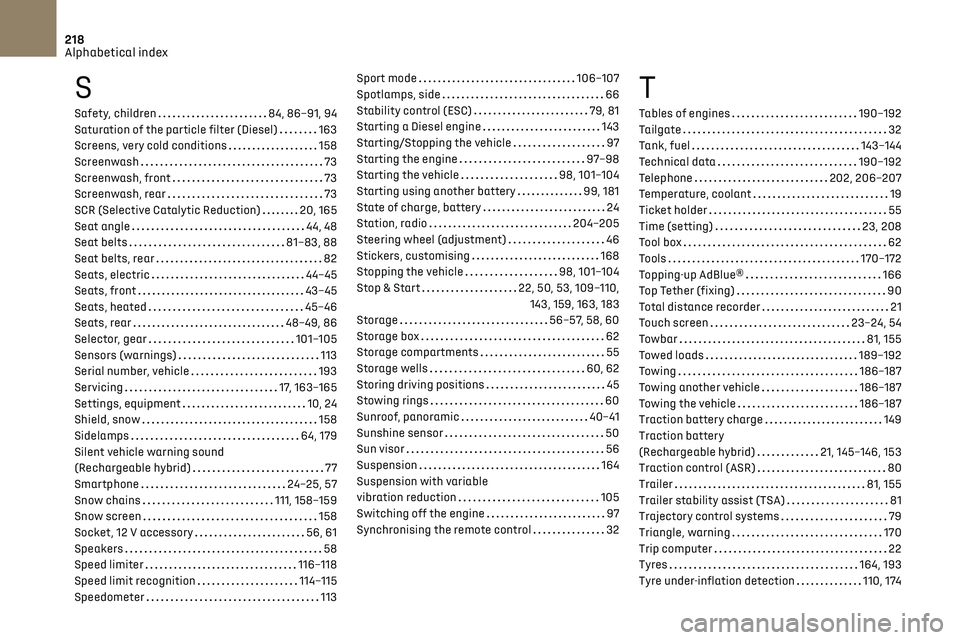
218Alphabetical index
S
Safety, children 84, 86–91, 94
Saturation of the particle filter (Diesel)
163
Screens, very cold conditions
158
Screenwash
73
Screenwash, front
73
Screenwash, rear
73
SCR (Selective Catalytic Reduction)
20, 165
Seat angle
44, 48
Seat belts
81–83, 88
Seat belts, rear
82
Seats, electric
44–45
Seats, front
43–45
Seats, heated
45–46
Seats, rear
48–49, 86
Selector, gear
101–105
Sensors (warnings)
113
Serial number, vehicle
193
Servicing
17, 163–165
Settings, equipment
10, 24
Shield, snow
158
Sidelamps
64, 179
Silent vehicle warning sound
(Rechargeable hybrid)
77
Smartphone
24–25, 57
Snow chains
111, 158–159
Snow screen
158
Socket, 12 V accessory
56, 61
Speakers
58
Speed limiter
116–118
Speed limit recognition
114–115
Speedometer
113
Sport mode 106–107
Spotlamps, side
66
Stability control (ESC)
79, 81
Starting a Diesel engine
143
Starting/Stopping the vehicle
97
Starting the engine
97–98
Starting the vehicle
98, 101–104
Starting using another battery
99, 181
State of charge, battery
24
Station, radio
204–205
Steering wheel (adjustment)
46
Stickers, customising
168
Stopping the vehicle
98, 101–104
Stop & Start
22, 50, 53, 109–110, 143, 159, 163, 183
Storage
56–57, 58, 60
Storage box
62
Storage compartments
55
Storage wells
60, 62
Storing driving positions
45
Stowing rings
60
Sunroof, panoramic
40–41
Sunshine sensor
50
Sun visor
56
Suspension
164
Suspension with variable
vibration reduction
105
Switching off the engine
97
Synchronising the remote control
32T
Tables of engines 190–192
Tailgate
32
Tank, fuel
143–144
Technical data
190–192
Telephone
202, 206–207
Temperature, coolant
19
Ticket holder
55
Time (setting)
23, 208
Tool box
62
Tools
170–172
Topping-up AdBlue®
166
Top Tether (fixing)
90
Total distance recorder
21
Touch screen
23–24, 54
Towbar
81, 155
Towed loads
189–192
Towing
186–187
Towing another vehicle
186–187
Towing the vehicle
186–187
Traction battery charge
149
Traction battery
(Rechargeable hybrid)
21, 145–146, 153
Traction control (ASR)
80
Trailer
81, 155
Trailer stability assist (TSA)
81
Trajectory control systems
79
Triangle, warning
170
Trip computer
22
Tyres
164, 193
Tyre under-inflation detection
110, 174