wiper CITROEN DS7 CROSSBACK 2019 User Guide
[x] Cancel search | Manufacturer: CITROEN, Model Year: 2019, Model line: DS7 CROSSBACK, Model: CITROEN DS7 CROSSBACK 2019Pages: 244, PDF Size: 6.87 MB
Page 116 of 244
114
Driving06
– First of all, the selection of all the functions
that you want to deactivate.
–
Sec
ondly, the simultaneous deactivation of all
these functions.
Selection of functions
► Press this button on the dashboard to
display the ADAS tabs.
► Select the Functions tab.
► Press this button to display the list of
available functions.
► Select the functions to deactivate (e.g. Stop
& Start, Lane Keeping Assist, Automatic Braking
System (Active Safety Brake)).
► Press this button to return to the
previous page.
The functions to deactivate are saved in the
system.
Deactivation of these functions
► Press and hold this button on
the dashboard.
All previously selected functions are deactivated
until the vehicle is next restarted (confirmed by an
audible signal).
Road signs recognition
For more information, refer to the General
recommendations on the use of driving
and manoeuvring aids.
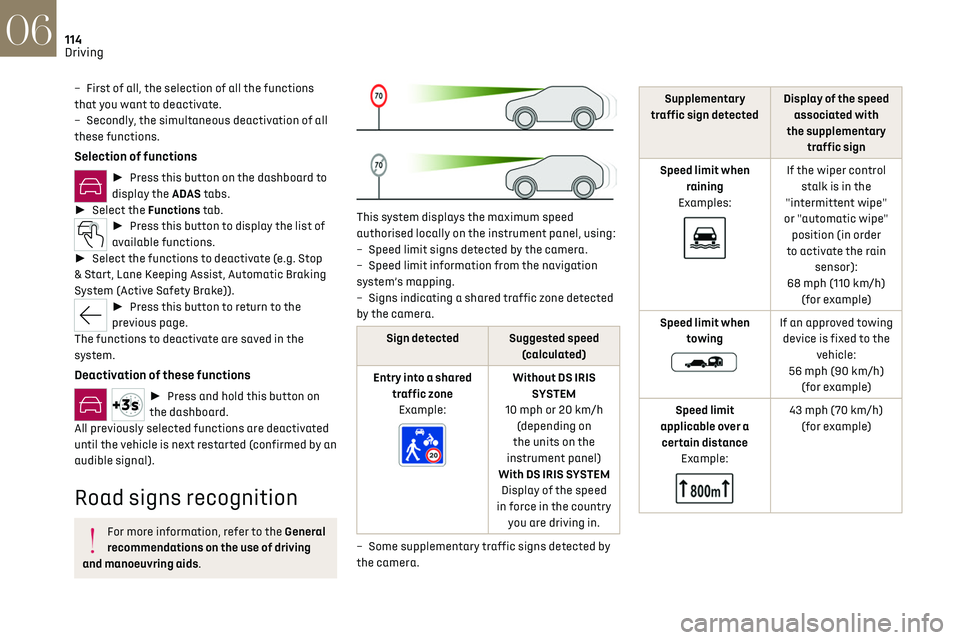
This system displays the maximum speed
authorised locally on the instrument panel, using:
–
Speed limit signs det
ected by the camera.
–
Speed limit in
formation from the navigation
system’s mapping.
–
Signs indic
ating a shared traffic zone detected
by the camera.
Sign detected Suggested speed (calculated)
Entry into a shared traffic zoneExample:
Without DS IRIS SYSTEM
10 mph or 20 km/h (depending on
the units on the
instrument panel)
With DS IRIS SYSTEM Display of the speed
in force in the country you are driving in.
–
Some supplemen
tary traffic signs detected by
the camera.
Supplementary
traffic sign detected Display of the speed
associated with
the supplementary traffic sign
Speed limit when raining
Examples:
If the wiper control stalk is in the
"intermittent wipe"
or "automatic wipe" position (in order
to activate the rain sensor):
68 mph (110 km/h) (for example)
Speed limit when towing
If an approved towing device is fixed to the vehicle:
56 mph (90 km/h) (for example)
Speed limit
applicable over a certain distance Example:
43 mph (70 km/h) (for example)
Page 184 of 244
182
In the event of a breakdown08
Check beforehand that the backup battery has
a nominal voltage of 12 V and a capacity at
least equal to that of the discharged battery.
The two vehicles must not be in contact with
each other.
Switch off all electricity-consuming equipment
on both vehicles (audio system, wipers,
lighting, etc.).
Make sure that the jump leads are well away
from the engine’s moving parts (fan, belt, etc.).
Do not disconnect the (+) terminal while the
engine is running.
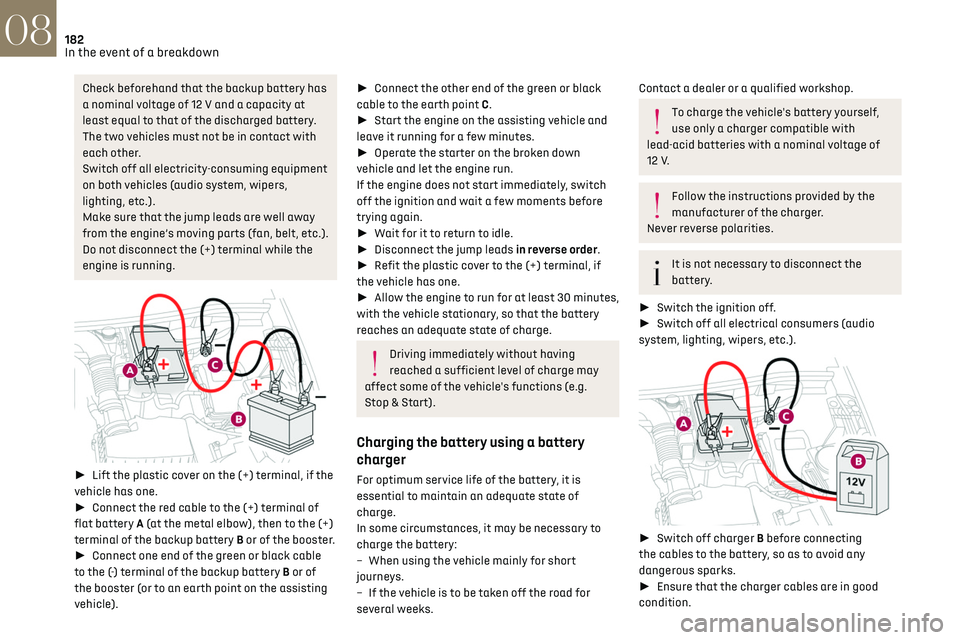
► Lift the plastic cover on the (+) terminal, if the
vehicle has one.
► Connect the red cable to the (+) terminal of
flat battery A (at the metal elbow), then to the (+)
terminal of the backup battery B or of the booster.
► Connect one end of the green or black cable
to the (-) terminal of the backup battery B or of
the booster (or to an earth point on the assisting
vehicle).
► Connect the other end of the green or black
cable to the earth point C.
► Start the engine on the assisting vehicle and
leave it running for a few minutes.
► Operate the starter on the broken down
vehicle and let the engine run.
If the engine does not start immediately, switch
off the ignition and wait a few moments before
trying again.
► Wait for it to return to idle.
► Disconnect the jump leads in reverse order.
► Refit the plastic cover to the (+) terminal, if
the vehicle has one.
► Allow the engine to run for at least 30 minutes,
with the vehicle stationary, so that the battery
reaches an adequate state of charge.
Driving immediately without having
reached a sufficient level of charge may
affect some of the vehicle's functions (e.g.
Stop & Start).
Charging the battery using a battery
charger
For optimum service life of the battery, it is
essential to maintain an adequate state of
charge.
In some circumstances, it may be necessary to
charge the battery:
–
When using the v
ehicle mainly for short
journeys.
–
If the v
ehicle is to be taken off the road for
several weeks.
Contact a dealer or a qualified workshop.
To charge the vehicle's battery yourself,
use only a charger compatible with
lead-acid batteries with a nominal voltage of
12 V.
Follow the instructions provided by the
manufacturer of the charger.
Never reverse polarities.
It is not necessary to disconnect the
battery.
► Switch the ignition off.
► Switch off all electrical consumers (audio
system, lighting, wipers, etc.).
► Switch off charger B before connecting
the cables to the battery, so as to avoid any
dangerous sparks.
► Ensure that the charger cables are in good
condition.
Page 185 of 244
183
In the event of a breakdown08
► Lift the plastic cover on the (+) terminal, if the
vehicle has one.
► Connect the cables of charger B as follows:
•
the po
sitive (+) red cable to the (+) terminal
of battery A,
•
the nega
tive (-) black cable to earth point C on
the vehicle.
► At the end of the charging operation, switch
off charger B before disconnecting the cables
from battery A.
If this label is present, use only a 12 V
charger to avoid causing irreversible
damage to the electrical components.
24V
12V
Disconnecting/reconnecting the battery
In order to maintain an adequate state of
charge for starting the engine, we recommend
disconnecting the battery if the vehicle is to be
unused for an extended period.
Before disconnecting the battery:
► Close all openings (doors, boot, windows,
roof).
► Switch off all electricity-consuming devices
(audio system, wipers, lamps, etc.).
► Switch off the ignition and wait for 4 minutes. After accessing the battery, it is only necessary to
disconnect the (+) terminal.
Quick-release terminal clamp
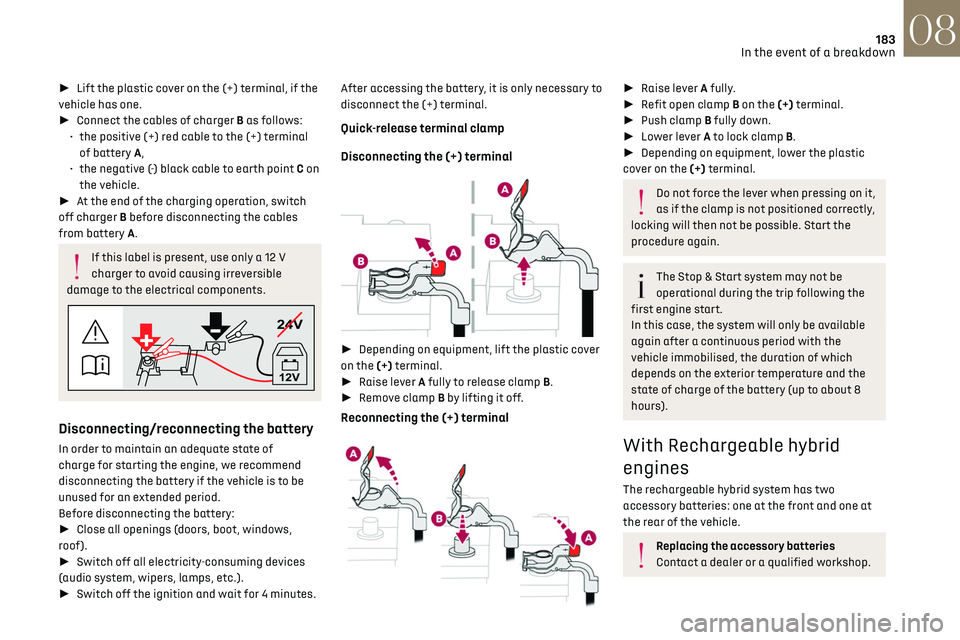
Disconnecting the (+) terminal
►
Depending on equipment, lift the plastic cover
on the (+) terminal.
► Raise lever A fully to release clamp B.
► Remove clamp B by lifting it off.
Reconnecting the (+) terminal
► Raise lever A fully.
► Refit open clamp B on the (+) terminal.
► Push clamp B fully down.
► Lower lever A to lock clamp B.
► Depending on equipment, lower the plastic
cover on the (+) terminal.
Do not force the lever when pressing on it,
as if the clamp is not positioned correctly,
locking will then not be possible. Start the
procedure again.
The Stop & Start system may not be
operational during the trip following the
first engine start.
In this case, the system will only be available
again after a continuous period with the
vehicle immobilised, the duration of which
depends on the exterior temperature and the
state of charge of the battery (up to about 8
hours).
With Rechargeable hybrid
engines
The rechargeable hybrid system has two
accessory batteries: one at the front and one at
the rear of the vehicle.
Replacing the accessory batteries
Contact a dealer or a qualified workshop.
Page 186 of 244
184
In the event of a breakdown08
Jump-starting another vehicle
Do not start or jump-start another vehicle
using the vehicle’s accessory batteries.
Accessing the accessory batteries
Front
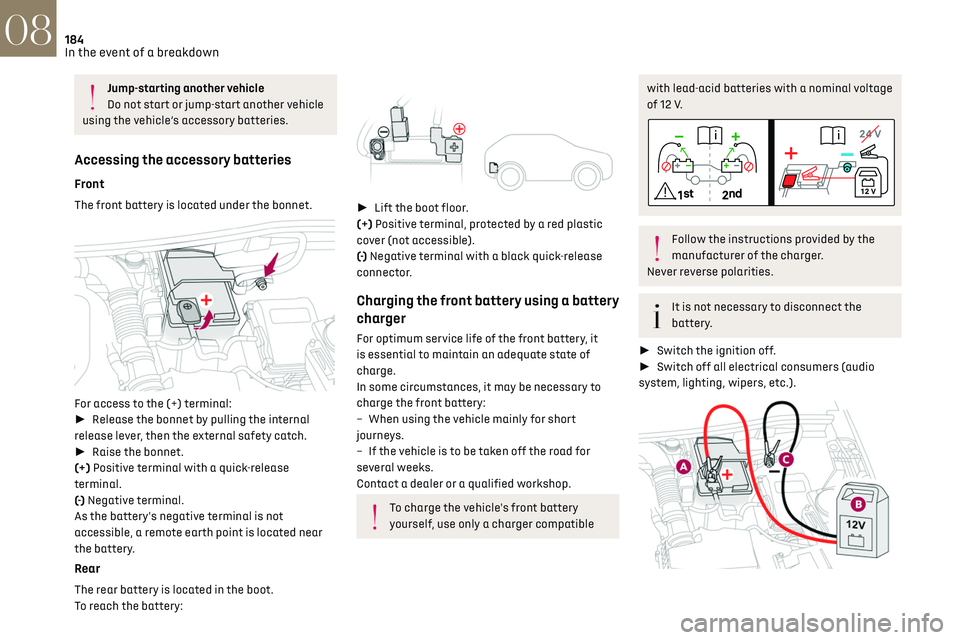
The front battery is located under the bonnet.
For access to the (+) terminal:
► Release the bonnet by pulling the internal
release lever, then the external safety catch.
► Raise the bonnet.
(+) Positive terminal with a quick-release
terminal.
(-) Negative terminal.
As the battery's negative terminal is not
accessible, a remote earth point is located near
the battery.
Rear
The rear battery is located in the boot.
To reach the battery:
► Lift the boot floor.
(+) Positive terminal, protected by a red plastic
cover (not accessible).
(-) Negative terminal with a black quick-release
connector.
Charging the front battery using a battery
charger
For optimum service life of the front battery, it
is essential to maintain an adequate state of
charge.
In some circumstances, it may be necessary to
charge the front battery:
–
When using the v
ehicle mainly for short
journeys.
–
If the v
ehicle is to be taken off the road for
several weeks.
Contact a dealer or a qualified workshop.
To charge the vehicle's front battery
yourself, use only a charger compatible
with lead-acid batteries with a nominal voltage
of 12 V.
Follow the instructions provided by the
manufacturer of the charger.
Never reverse polarities.
It is not necessary to disconnect the
battery.
► Switch the ignition off.
► Switch off all electrical consumers (audio
system, lighting, wipers, etc.).
Page 187 of 244
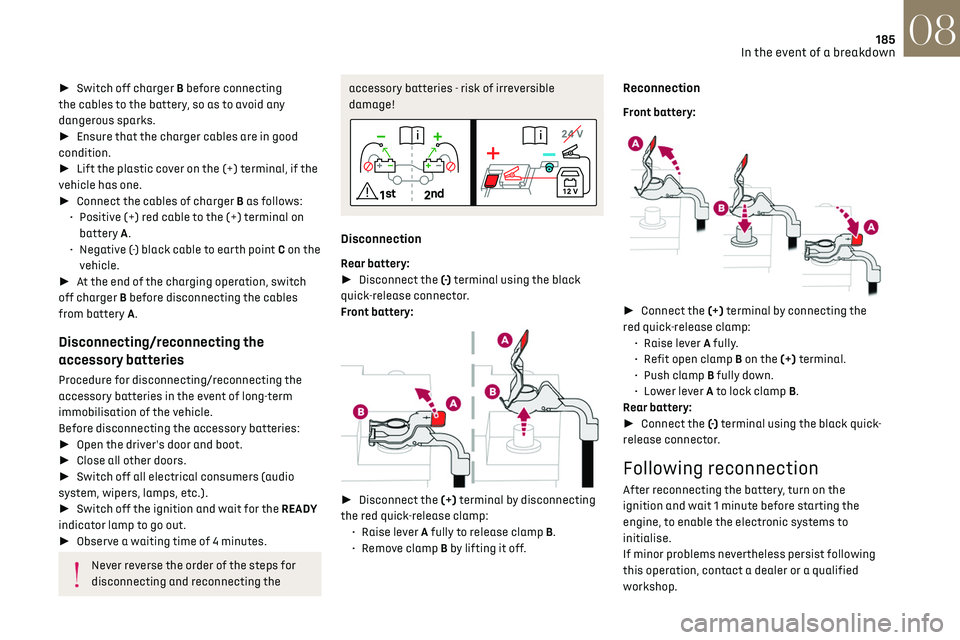
185
In the event of a breakdown08
► Switch off charger B before connecting
the cables to the battery, so as to avoid any
dangerous sparks.
► Ensure that the charger cables are in good
condition.
► Lift the plastic cover on the (+) terminal, if the
vehicle has one.
► Connect the cables of charger B as follows:
•
Po
sitive (+) red cable to the (+) terminal on
battery A.
•
Nega
tive (-) black cable to earth point C on the
vehicle.
► At the end of the charging operation, switch
off charger B before disconnecting the cables
from battery A.
Disconnecting/reconnecting the
accessory batteries
Procedure for disconnecting/reconnecting the
accessory batteries in the event of long-term
immobilisation of the vehicle.
Before disconnecting the accessory batteries:
► Open the driver's door and boot.
► Close all other doors.
► Switch off all electrical consumers (audio
system, wipers, lamps, etc.).
► Switch off the ignition and wait for the READY
indicator lamp to go out.
► Observe a waiting time of 4 minutes.
Never reverse the order of the steps for
disconnecting and reconnecting the
accessory batteries - risk of irreversible
damage!
Disconnection
Rear battery:
► Disconnect the (-) terminal using the black
quick-release connector.
Front battery:
► Disconnect the (+) terminal by disconnecting
the red quick-release clamp: •
Raise le
ver A fully to release clamp B.
•
R
emove clamp B by lifting it off.
Reconnection
Front battery:
► Connect the (+) terminal by connecting the
red quick-release clamp: •
Raise le
ver A fully.
•
R
efit open clamp B on the (+) terminal.
•
Push clamp
B fully down.
•
Lo
wer lever A to lock clamp B.
Rear battery:
► Connect the (-) terminal using the black quick-
release connector.
Following reconnection
After reconnecting the battery, turn on the
ignition and wait 1 minute before starting the
engine, to enable the electronic systems to
initialise.
If minor problems nevertheless persist following
this operation, contact a dealer or a qualified
workshop.
Page 215 of 244
213Alphabetical index
360 Vision 140
A
ABS 79
Accelerated charging unit (Wallbox)
147–148
Accessories
76
Active LED Vision
65
Active Safety Brake
128, 130
Active Scan Suspension
105
Active suspension
105
Adaptive headlamp lighting
67
AdBlue®
19, 165
AdBlue® tank
166
Additive, Diesel
163
Adjusting headlamps
65
Adjusting head restraints
43
Adjusting seat
43–44
Adjusting the air distribution
50, 52
Adjusting the air flow
50, 52
Adjusting the headlamp beam height
65
Adjusting the height and reach
of the steering wheel
46
Adjusting the seat angle
44
Adjusting the seat belt height
82
Adjusting the temperature
51
Adjusting the time
23, 208
Advice on care and maintenance
146, 167
Advice on driving
8, 96–97
Airbags
83–87
Airbags, curtain 85–86
Airbags, front
84–85, 88
Airbags, lateral
84–85
Air conditioning
50–51
Air conditioning, automatic
53
Air conditioning, dual-zone automatic
51
Air intake
52–53
Air vents
49
Alarm
37–38
Amplifier, audio
58
Anti-lock braking system (ABS)
79
Antitheft / Immobiliser
27
Applications
24
Armrest, front
58
Armrest, rear
60
Assistance call
77–78
Assistance, emergency braking
80, 130
Audio streaming (Bluetooth)
205
B
Battery, 12 V 159, 163, 181–185
Battery, ancillaries
181
Battery, charging
181–182, 184
Battery, remote control
31
Blanking screen (snow shield)
158
Blind
40–41
Blind spot monitoring
135
BlueHDi
19, 163, 170
Bluetooth (hands-free)
202
Bluetooth (telephone) 202
Bodywork
168
Bonnet
160
Boot
32–34, 62
Brake discs
164
Brake lamps
179
Brakes
164
Braking
105
Braking assistance system
79–80
Braking, automatic emergency
128, 130
Braking, dynamic emergency
100–101
Bulbs (changing)
178–179
C
Capacity, fuel tank 143
Care of the bodywork
168
Central locking
29–30
Changing a bulb
178–179
Changing a fuse
180
Changing a wheel
171, 175
Changing a wiper blade
73–74
Changing the remote control battery
31
Changing to free-wheeling
166
Charge level indicator (Rechargeable hybrid)
21
Charger, induction
57
Charger, wireless
57
Charging cable
149
Charging cable
(Rechargeable hybrid)
147–148, 154
Page 216 of 244
214Alphabetical index
Charging connector
(Rechargeable hybrid)
146, 153–154
Charging flap
(Rechargeable hybrid)
146, 153–154
Charging the traction battery
(Rechargeable hybrid)
20, 145, 153–154
CHECK
21
Checking the engine oil level
18
Checking the levels
161–162
Checking tyre pressures (using the kit)
172, 174
Checks
161, 163–165
Checks, routine
163–164
Child lock
95
Children
83, 89–91, 94
Children (safety)
95
Child seats
83, 86–89
Child seats, conventional
88–89
Child seats, i-Size
94
Child seats, ISOFIX
90–92
Cigar lighter
56
Cleaning (advice)
146, 167–169
Clock
23
Closing the boot
29, 33
Closing the doors
29, 32
Collision Risk Alert
128–129
Comfort mode
108
Configuration, vehicle
10, 24
Connection, Bluetooth
202
Connectivity
207
Consumptions
24
Container, AdBlue®
165–166
Control, emergency boot release
33Control, emergency door 30–31
Control, heated seats
46
Controls, steering mounted
101–103
Control stalk, lighting
63–64
Control stalk, wipers
72–74
Control unit
147–149, 154
Courtesy lamp, front
59
Courtesy lamps
59
Cruise control
116, 118–120
Cruise control, adaptive
120
Cruise control, adaptive with Stop function
116
Cruise control by speed limit recognition
116
Cup holder
56
D
Date (setting) 208
Daytime running lamps
64, 179
Deactivating the passenger airbag
84, 87–88
Deadlocking
27, 29
Deferred charging
24, 155
Deferred charging
(Rechargeable hybrid)
24–25, 146, 153
Defrosting
47, 53
Defrosting, front
53
Defrosting, rear screen
54
Demisting
47, 53
Demisting, front
53
Demisting, rear
54
Diagnosis, vehicle
21
Dials and gauges 10
Digital instrument panel
10
Dimensions
193
Dipstick
18, 161
Direction indicators (turn signals)
64, 179
Display screen, instrument panel
10
Domestic charging
149
Domestic charging (Rechargeable hybrid)
154
Door pockets
56
Doors
32
Driver’s attention warning
131–132
Driving
42–43, 96–97
Driving aids camera (warnings)
112
Driving aid shortcuts
113
Driving aids (recommendations)
112
Driving economically
8
Driving modes
106
Driving positions (storing)
45
DS Drive Assist
120
Dynamic stability control (DSC)
80
E
EBFD 79
Eco-driving (advice)
8
ECO mode
106
Electric automatic gearbox
(Rechargeable hybrid)
104
Electronic brake force distribution (EBFD)
79
Emergency braking assistance (EBA)
80
Page 221 of 244
219Alphabetical index
U
Under-inflation (detection) 110
Unlocking
26, 28
Unlocking from the inside
30
Unlocking the boot
26, 28
Unlocking the doors
30
Unlocking the tailgate
26, 28
Updating the time
208
V
Vehicle data recording and privacy 210
Ventilation
49–50
Visibility
53
W
Wallbox (Rechargeable hybrid) 147–148, 154
Warning and indicator lamps
11
Warning lamp, driver's seat
belt not fastened
82
Warning lamp, READY
160
Warning lamps
11
Warning lamp, seat belts
82
Warnings and indicators
11–12
Washing
113
Washing (advice)
146, 167–168
Weights
189
Welcome function
45
Welcome lighting 66
Wheel, spare
164, 171–172, 175
Window controls
39
Windscreen, heated
54
Wiper blades (changing)
73–74
Wiper, rear
73
Wipers
72, 74
Wipers, automatic rain sensitive
74
Wipers, windscreen
72, 74