fold CITROEN DS7 CROSSBACK 2020 User Guide
[x] Cancel search | Manufacturer: CITROEN, Model Year: 2020, Model line: DS7 CROSSBACK, Model: CITROEN DS7 CROSSBACK 2020Pages: 244, PDF Size: 6.87 MB
Page 62 of 244
60
Ease of use and comfort03
By default, the colour of the interior ambient
lighting is linked to that of the screens, depending
on the driving mode selected.
Activation/deactivation and adjustment of
the brightness are set via the Settings >
Brightness touch screen application.
The colour is selected via the Settings >
Customization touch screen application.
Rear fittings
USB sockets
Each USB socket is used only to power or recharge
a portable device.
Rear armrest
The armrest incorporates two cup holders.
Ski flap
Device for storing and transporting long objects.
Opening
► With the rear armrest lowered, open the flap
by pulling its handle downwards.
► Load the objects from inside the boot.
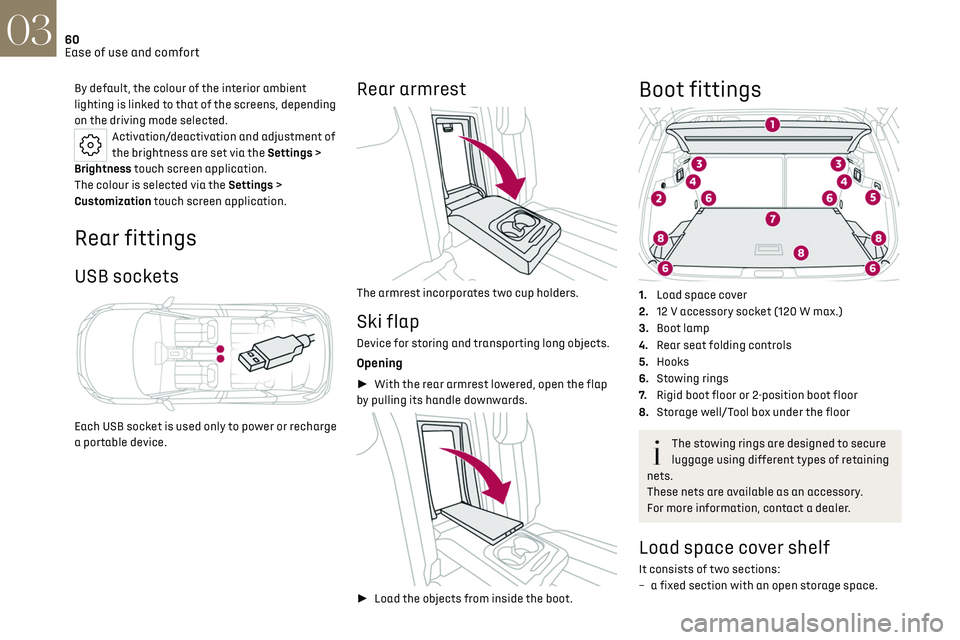
Boot fittings
1.Load space cover
2. 12 V accessory socket (120 W max.)
3. Boot lamp
4. Rear seat folding controls
5. Hooks
6. Stowing rings
7. Rigid boot floor or 2-position boot floor
8. Storage well/Tool box under the floor
The stowing rings are designed to secure
luggage using different types of retaining
nets.
These nets are available as an accessory.
For more information, contact a dealer.
Load space cover shelf
It consists of two sections:
– a fix ed section with an open storage space.
Page 63 of 244

61
Ease of use and comfort03
– a movable section which rises when the boot is
opened, with an open storage space.
To remove the load space cover shelf:
► Unhook the two cords.
► Raise the movable section slightly, then unclip
it on each side.
► Unclip the fixed section on each side, then
take out the load space cover shelf.
In the event of sudden deceleration,
objects placed on the load space cover
shelf can turn into projectiles.
High load retaining net
This removable net allows the entire loading
volume up to the roof to be used:
–
behind the fron
t seats (1
st row) when the rear
seats are folded down.
–
behind the rear sea
ts (2
nd row) when the load
space cover is removed.
This removable net protects the
occupants in the event of sudden braking.
Upper fixings
1. For installation behind row 1
2. For installation behind row 2
Lower fixings
3.For installation behind row 1 (Petrol or Diesel)
4. For installation behind row 1 (Rechargeable
hybrid)
5. For installation behind row 2
12 V accessory socket
► To connect a 12 V accessory (maximum
power: 120 W), lift the cover and plug in a suitable
adaptor.
► Switch on the ignition.
Page 64 of 244
62
Ease of use and comfort03
The connection of an electrical device not
approved by the Manufacturer, such as a
USB charger, may adversely affect the
operation of vehicle electrical systems,
causing faults such as poor radio reception or
interference with displays in the screens.
2-position boot floor
(Depending on version)
This 2-position floor allows the boot volume to be
optimised using the lateral stops located on the
sides:
–
High po
sition (100 kg max.): to obtain a flat
floor up to the front seats, when the rear seats
are folded down.
–
Lo
w position (150 kg max.): maximum boot
volume.
On certain versions, the adjustable boot
floor cannot be fitted in the low position.
To change the height:
► Lift and pull the floor towards you using its
central handle, then use the lateral stops to move
it.
► Push the floor all the way forwards to place it
in the desired position.
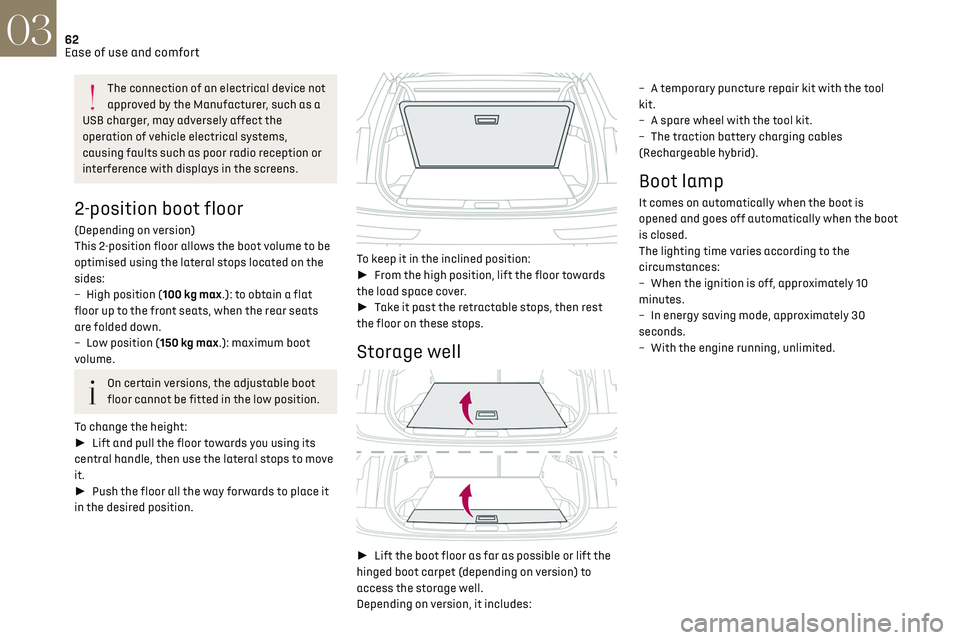
To keep it in the inclined position:
► From the high position, lift the floor towards
the load space cover.
► Take it past the retractable stops, then rest
the floor on these stops.
Storage well
► Lift the boot floor as far as possible or lift the
hinged boot carpet (depending on version) to
access the storage well.
Depending on version, it includes: –
A t
emporary puncture repair kit with the tool
kit.
–
A spare wheel with the t
ool kit.
–
The traction ba
ttery charging cables
(Rechargeable hybrid).
Boot lamp
It comes on automatically when the boot is
opened and goes off automatically when the boot
is closed.
The lighting time varies according to the
circumstances:
–
When the ignition is o
ff, approximately 10
minutes.
–
In energy sa
ving mode, approximately 30
seconds.
–
With the engine running, unlimit
ed.
Page 85 of 244

83
Safety05
At a speed greater than 12 mph (20 km/h), these
warning lamps flash, accompanied by an audible
signal for approximately two minutes. After this
time, these warning lamps remain on as long as
the seatbelts are not refastened.
Advice
The driver must ensure that passengers
use the seat belts correctly and that they
are all fastened before setting off.
Wherever seated in the vehicle, you must
always fasten the seat belt, even for short
journeys.
Do not invert the seat belt buckles, as they will
not fulfil their role properly.
To ensure the proper functioning of the belt
buckles, make sure that there are no foreign
bodies present (e.g. a coin) before fastening.
Before and after use, ensure that the seat belt
is reeled in correctly.
After folding or moving a seat or rear bench
seat, ensure that the seat belt is positioned
and reeled in correctly.
Installation
The lower part of the strap must be
positioned as low as possible over the pelvis.
The upper part must be positioned in the
hollow of the shoulder.
At the front, adjusting the position of the
seat belt may require the seat height to be
adjusted.
In order to be effective, a seat belt must:
– be tigh tened as close to the body as
possible.
–
be pulled in fron
t of you with a smooth
movement, checking that it is not twisted.
–
must only be used t
o secure one person.
–
no
t show signs of tearing or fraying.
–
no
t be changed or modified, in order to avoid
affecting its performance.
Recommendations for children
Use a suitable child seat if the passenger
is less than 12 years old or shorter than 1.5
metres.
Never use the same seat belt to secure more
than one child.
Never carry a child on your lap.
For more information on Child seats, refer to
the corresponding section.
Maintenance
In accordance with current safety
regulations, for all work on your vehicle's seat
belts, contact a qualified workshop with the
skills and equipment needed, which a dealer is
able to provide.
Have your seat belts checked regularly by a
dealer or a qualified workshop, particularly if
the straps show signs of damage.
Clean the seat belt straps with soapy water or
a textile cleaning product, sold by dealers.
Airbags
General information
This system is designed to improve the safety
of the occupants of the front seats and the rear
outer seats in the event of a violent collision. The
airbags supplement the action of the seat belts
equipped with a force limiting system.
Electronic detectors record and analyse the
front and side impacts sustained in the impact
detection zones:
–
In the e
vent of violent impact, the airbags
deploy instantly and help better protect the
occupants of the vehicle; immediately after the
impact, the airbags deflate rapidly in order not
to hinder the visibility or the possible exit of the
occupants.
–
In the e
vent of a slight impact, a rear impact
and under certain rollover conditions, the airbags
may not deploy; only the seat belt helps to protect
you in these situations.
The seriousness of the impact depends on the
nature of the obstacle and the speed of the
vehicle at the moment of collision.
The airbags do not operate when the
ignition is switched off.
This equipment will only deploy once. If a
second impact occurs (during the same or a
subsequent accident), the airbag will not be
deployed again.
Page 141 of 244

139
Driving06
The parking sensors supplement the information
in the view from above the vehicle.
Different contextual views are available:
–
Aut
omatic zoom view.
–
St
andard view.
–
Panoramic vie
w.
Depending on the context, the system chooses
the best view to display (standard or automatic
zoom).
The view type can be changed at any time during
the manoeuvre.
The system status is not saved when the ignition
is switched off.
Operating principle
Using the camera, the vehicle's close
surroundings are recorded during low speed
manoeuvres.
An image from above the vehicle in its close
surroundings is created in real time (on the side of
the screen), as the vehicle progresses.
This view makes it easier to align the vehicle
when parking and to perceive nearby obstacles. It is automatically deleted if the vehicle remains
stationary for too long.
Settings
In the side menu, this menu allows you to
carry out the following operations:
–
adjust the v
olume of the audible signal.
–
adjust the brigh
tness.
–
adjust the c
ontrast.
Activation/Deactivation
To activate the camera, engage reverse gear.
The system is deactivated:
–
when changing out o
f reverse gear.
–
b
y pressing the cross in the top left-hand corner
of the touch screen.
Automatic zoom view
The rear camera records the vehicle's
surroundings during the manoeuvre in order to
create a view from above the rear of the vehicle in
its close surroundings, allowing the vehicle to be
manoeuvred around nearby obstacles.
Using the sensors located on the rear bumper,
the automatic zoom view is displayed when
approaching an obstacle at the red line (less than
30 cm) during the manoeuvre.
This view is only available automatically.
Obstacles may appear further away than
they actually are.
It is important to monitor the sides of the
vehicle during the manoeuvre, using the
mirrors.
Parking sensors also provide additional
information about the area around the vehicle.
Standard view
The area behind the vehicle is displayed on the
screen.
The blue lines 1 represent the width of your
vehicle, with the mirrors unfolded; their direction
changes according to the position of the steering
wheel.
The red line 2 represents a distance of 30 cm
from the rear bumper; the two blue lines 3 and 4
represent 1 m and 2 m, respectively.
This view is available automatically or by
selection in the side menu.
Page 143 of 244

141
Driving06
Activation/Deactivation
Automatic
With the rear camera, engine running and vehicle
stationary, rear vision is displayed automatically
if reverse gear is engaged.
With the front camera, engine running and speed
below 10 mph (16 km/h), rear vision is displayed
automatically if a gear is engaged.
Manual
► In the ADAS touch screen application,
select Functions>Panoramic Camera
The system is deactivated:
–
aut
omatically for the rear, when changing out
of reverse gear.
–
aut
omatically for the front, above
approximately 10 mph (16 km/h).
–
b
y pressing the cross in the top left-hand corner
of the touch screen.
Automatic zoom view
The front or rear camera records the surroundings
during the manoeuvre to create a front or
rear view from above the vehicle in its close
surroundings, making it possible to manoeuvre
the vehicle around the surrounding obstacles.
Using the sensors located on the front or
rear bumper, the automatic zoom view is
displayed when approaching an obstacle at the
red line (less than 30 cm) during the manoeuvre.
This view is only available automatically.
Depending on version, it can be activated/
deactivated in the ADAS application of the touch
screen.
Obstacles may appear further away than
they actually are.
It is important to monitor the sides of the
vehicle during the manoeuvre, using the
mirrors.
Parking sensors also provide additional
information about the area around the vehicle.
Standard view
Depending on the context, the area behind or in
front of your vehicle is displayed on the screen.
The blue lines (at the rear)/orange lines (at the
front) 1 represent the width of your vehicle, with
the mirrors unfolded; their direction changes
according to the position of the steering wheel.
The red line 2 represents a distance of 30 cm from
the rear or front bumper; the two blue lines (at the rear)/orange lines (at the front) 3 and 4 represent
1 m and 2 m respectively.
This view is available automatically or by
selection in the left-hand side menu.
Panoramic view
The rear or front panoramic view allows you to
leave a parking space by anticipating the arrival
of vehicles, pedestrians or cyclists.
This view is not recommended for carrying out a
complete manoeuvre.
This view is only available by selection in the left-
hand side menu.
Page 158 of 244

156
Practical information07
If using accessories attached to the
towing device (e.g. bicycle carriers, tow
boxes):
–
Comply with the maximum authorised no
se
weight.
–
Do no
t transport more than 4 conventional
bicycles or 2 electric bicycles.
When loading bicycles onto a bicycle carrier
on a towball, be sure to place the heaviest
bicycles as close as possible to the vehicle.
Observe the legislation in force in the
country where you are driving.
Vehicle equipped with motorised tailgate
with hands-free function (Hands-Free
Tailgate Access)
To avoid unintentionally opening the motorised
tailgate when operating the towing device:
–
Deactiv
ate this function in advance in the
vehicle's configuration application.
–
O
r remove the electronic key from the
recognition zone, with the tailgate closed.
Rechargeable hybrid vehicles
A rechargeable hybrid vehicle with 20"
wheels (R20) cannot be fitted with a towing
device.
It is therefore not possible to tow a trailer or
caravan.
Towing device with
retractable ball joint
When this towing device is not in use, it is folded
away underneath the rear bumper.
No tools are required to install or stow it.
Before any operation, the vehicle must be
stationary with the parking brake applied.
The area close to the exhaust pipe may reach a
high temperature: risk of burns!
Vehicle equipped with motorised tailgate
with hands-free function (Hands-Free
Tailgate Access)
To avoid unintentional opening of the tailgate,
follow the recommendations on the Towing
device by referring to the corresponding
section.
Unlocking handle
The towball is locked in either the storage
position or the usage position.
The unlocking handle is behind the rear bumper,
protected by a storage case.
To reach the handle:
► Pass your hand flat under the rear bumper
with the palm facing upwards.
► Insert your hand into the storage case and
grasp the handle.
To unlock the towball:
► Pull the handle firmly downwards to release it.
The towball hangs, hooked onto its shaft.
Page 159 of 244

157
Practical information07
As soon as you release the handle, it is engaged
automatically in its storage case.
Usage position
Towball unlocked:
► Grasp the towball and rotate it while raising it
until it locks into place, in the vertical position.
The towball must be folded away when
using a high-pressure washer.
Do not direct the jet from less than 30 cm from
the towing system.
► Raise the electrical socket cover and connect
the plug for the trailer or carrying device.
► Attach the trailer’s safety cable to the ring in
the towball elbow.
Storage position
When the towing system is not in use, it is
recommended to fold the towball away.
In the event of a rear-end collision, damage to
the vehicle could be worse with the towball in
place.
Towball unlocked and socket disconnected:
► Grasp the towball and rotate it until it locks
into place, in the horizontal position.
Contact a dealer or a qualified workshop for any
work on the towing system.
Roof bars
As a safety measure and to avoid
damaging the roof, it is essential to use
transverse roof bars approved for your vehicle.
Observe the instructions on fitting and use
contained in the guide supplied with the roof
bars.
Maximum load distributed over the
transverse roof bars, for a loading height
not exceeding 40 cm (except bicycle carrier):
80 kg.
As this value may change, please verify the
maximum load quoted in the guide supplied
with the roof bars.
If the height exceeds 40 cm, adapt the speed
of the vehicle to the profile of the road to avoid
damaging the roof bars and the fixings on the
vehicle.
Be sure to refer to national legislation in order
to comply with the regulations for transporting
objects that are longer than the vehicle.
Page 173 of 244

171In the event of a breakdown08
Accessing the tools
The tool kit is stored in the boot, under the floor.
Versions with rigid boot floor:
► Open the boot.
► Lift the rigid boot floor.
► Attach the floor hook to the upper boot seal.
Versions with 2-position boot floor:
► Open the boot.
► Place the adjustable boot floor in the high
position. ►
Lift the boot floor past the two retractable
stops.
► Place the boot floor onto these two stops to
hold it up.
Versions with articulated boot mat
(Rechargeable hybrid):
► Open the boot.
► Unfold the articulated boot mat by pulling its
handle until it is fully opened.
With temporary puncture repair kit
With spare wheel
These tools are specific to the vehicle and
may vary according to the level of
equipment.
Do not use them for any other purpose.
The jack must only be used to change a
wheel with a damaged or punctured tyre.
Do not use any jack other than the one
supplied with the vehicle.
If the vehicle does not have its original jack,
contact a dealer or a qualified workshop
to obtain the one that was intended by the
manufacturer.
The jack meets European standards, as
defined in the Machinery Directive 2006/42/
CE.
The jack does not require any maintenance.
Page 179 of 244

177
In the event of a breakdown08
► Remove the bolts and store them in a clean
place.
► Remove the wheel.
Fitting a wheel
Fitting a steel or "space-saver" type spare
wheel
If the vehicle is fitted with alloy wheels, the
washers A do not make contact with the steel
or "space-saver" type spare wheel. The wheel
is held in place by the conical contact surface
B of each bolt.
► Fit the wheel on the hub.
► Screw in the bolts by hand as far as possible.
► Pre-tighten the security bolt using the
wheelbrace 5 equipped with a security socket 2.
► Pre-tighten the other bolts using the
wheelbrace 5 only.
► Lower the vehicle again fully.
► Fold jack 6 and remove it.
► Tighten the security bolt using the
wheelbrace 5 equipped with a security socket 2.
► Tighten the other bolts using the wheelbrace 5
only.
► Refit the bolt covers to each of the bolts
(depending on equipment).
► Store the tools.
After changing a wheel
Store the punctured wheel in the boot or,
depending on version, remove the central cover
first to store it beneath the floor in place of the
spare wheel.
With a "space-saver" type spare wheel
Deactivate certain driving aid functions (Active
Safety Brake, Adaptive cruise control, etc.).