tow CITROEN E-MEHARI 2022 User Guide
[x] Cancel search | Manufacturer: CITROEN, Model Year: 2022, Model line: E-MEHARI, Model: CITROEN E-MEHARI 2022Pages: 84, PDF Size: 3.48 MB
Page 53 of 84
51
The following actions may increase the
risk of losing control of the vehicle if
the tyres are not properly inflated:
-
s
udden harsh application of the
brakes,
-
r
eleasing the accelerator pedal
suddenly,
-
t
urning the steering wheel too quickly.
Note: The vehicle generally moves
towards or pulls in the direction of the
under-inflated tyre.
Never drive under the influence of alcohol
or drugs.
The presence of alcohol or drugs in your
bloodstream reduces coordination, slows
reaction and impairs judgement.
Driving after taking alcohol or drugs
increases the risk of being involved in
an accident causing injuries, suffered by
yourself or inflicted on others.
Note also that, in the event of an accident,
there is a
risk that the alcohol or drugs
will increase the severity of the injuries
suffered.
Never take medicines that might affect
your ability to drive and control the vehicle
before setting off. Never leave the starting switch in the
"MAR" position for a
long period when the
vehicle is not being used.
This can reduce the range of the vehicle.
When you stop your vehicle on a
rising
slope, do not hold the vehicle by pressing
the accelerator.
Always use the brake pedal for this.
Starting/Switching off the
vehicle
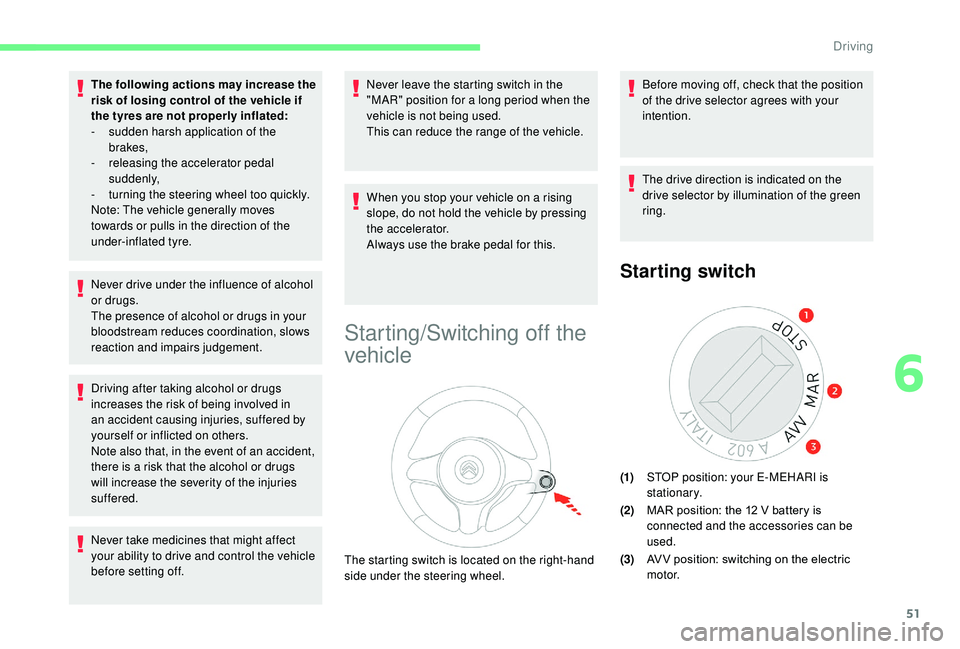
The starting switch is located on the right-hand
side under the steering wheel. Before moving off, check that the position
of the drive selector agrees with your
intention.
The drive direction is indicated on the
drive selector by illumination of the green
ring.
Starting switch
(1)
STOP position: your E-MEHARI is
stationary.
(2) MAR position: the 12
V battery is
connected and the accessories can be
used.
(3) AV V position: switching on the electric
motor.
6
Driving
Page 56 of 84
54
Drive selector
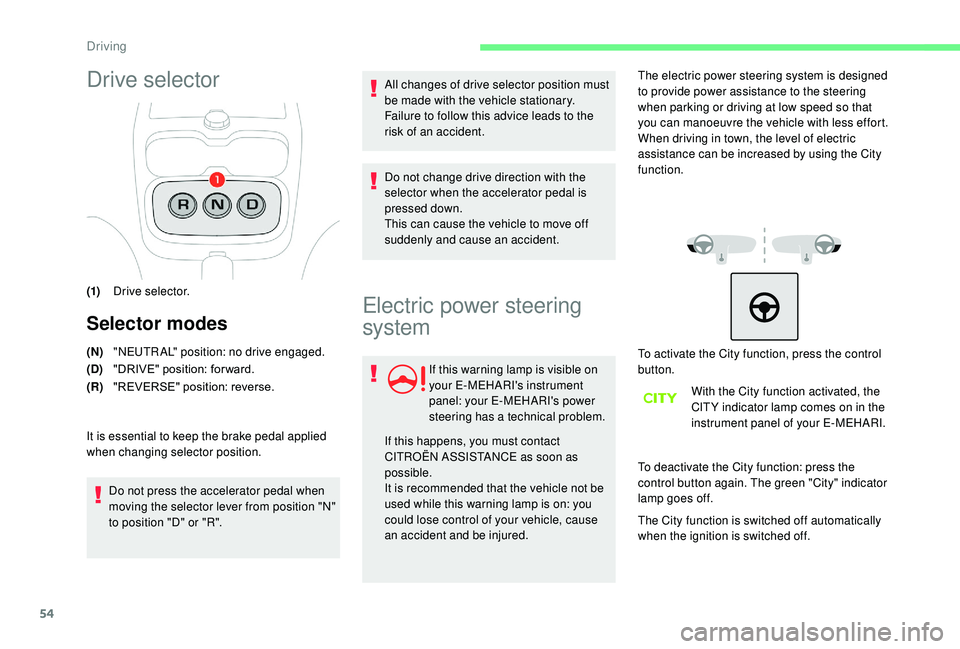
(1)Drive selector.
Selector modes
(N)"NEUTRAL" position: no drive engaged.
(D) "DRIVE" position: for ward.
(R) "REVERSE" position: reverse.
It is essential to keep the brake pedal applied
when changing selector position. Do not press the accelerator pedal when
moving the selector lever from position "N"
to position "D" or "R". All changes of drive selector position must
be made with the vehicle stationary.
Failure to follow this advice leads to the
risk of an accident.
Do not change drive direction with the
selector when the accelerator pedal is
pressed down.
This can cause the vehicle to move off
suddenly and cause an accident.
Electric power steering
system
If this warning lamp is visible on
your E-MEHARI's instrument
panel: your E-MEHARI's power
steering has a
technical problem.
If this happens, you must contact
CITROËN ASSISTANCE as soon as
possible.
It is recommended that the vehicle not be
used while this warning lamp is on: you
could lose control of your vehicle, cause
an accident and be injured. The electric power steering system is designed
to provide power assistance to the steering
when parking or driving at low speed so that
you can manoeuvre the vehicle with less effort.
When driving in town, the level of electric
assistance can be increased by using the City
function.
To activate the City function, press the control
button.
With the City function activated, the
CIT Y indicator lamp comes on in the
instrument panel of your E-MEHARI.
To deactivate the City function: press the
control button again. The green "City" indicator
lamp goes off.
The City function is switched off automatically
when the ignition is switched off.
Driving
Page 63 of 84
61
Starting the charge
To start charging, the ignition must be
switched off, the car must be unlocked
with the RFID key ring, and the parking
brake activated.
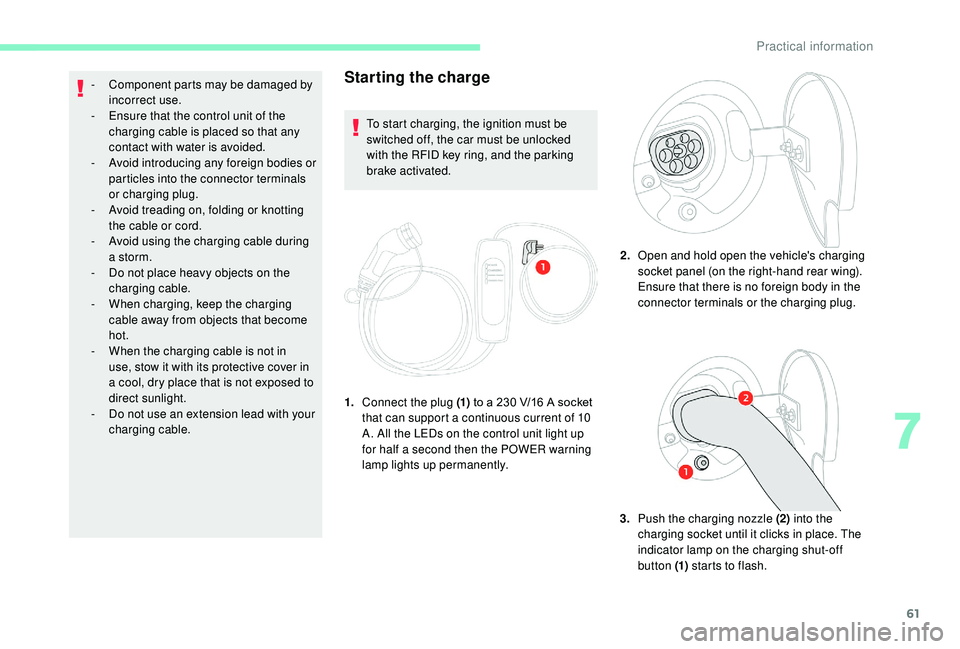
1. Connect the plug (1) to a
230 V/16 A socket
that can support a
continuous current of 10
A. All the LEDs on the control unit light up
for half a
second then the POWER warning
lamp lights up permanently. 2.
Open and hold open the vehicle's charging
socket panel (on the right-hand rear wing).
Ensure that there is no foreign body in the
connector terminals or the charging plug.
3. Push the charging nozzle (2) into the
charging socket until it clicks in place. The
indicator lamp on the charging shut-off
button (1) starts to flash.
-
C
omponent parts may be damaged by
incorrect use.
-
E
nsure that the control unit of the
charging cable is placed so that any
contact with water is avoided.
-
A
void introducing any foreign bodies or
particles into the connector terminals
or charging plug.
-
A
void treading on, folding or knotting
the cable or cord.
-
A
void using the charging cable during
a
storm.
-
D
o not place heavy objects on the
charging cable.
-
W
hen charging, keep the charging
cable away from objects that become
hot.
-
W
hen the charging cable is not in
use, stow it with its protective cover in
a
cool, dry place that is not exposed to
direct sunlight.
-
D
o not use an extension lead with your
charging cable.
7
Practical information