audio Citroen GRAND C4 PICASSO 2017 2.G User Guide
[x] Cancel search | Manufacturer: CITROEN, Model Year: 2017, Model line: GRAND C4 PICASSO, Model: Citroen GRAND C4 PICASSO 2017 2.GPages: 527, PDF Size: 12.91 MB
Page 322 of 527
320
C4-Picasso-II_en_Chap08_en-cas-panne_ed02-2016
Never try to charge a frozen battery.
If the battery has been frozen, have
it checked by a CITROËN dealer or a
qualified workshop, who will check that
the internal components have not been
damaged and the casing is not cracked,
which could cause a leak of toxic and
corrosive acid.
F
S
witch off the ignition.
F
S
witch off all electrical consumers (audio
system, lighting, wipers,
...).
F
S
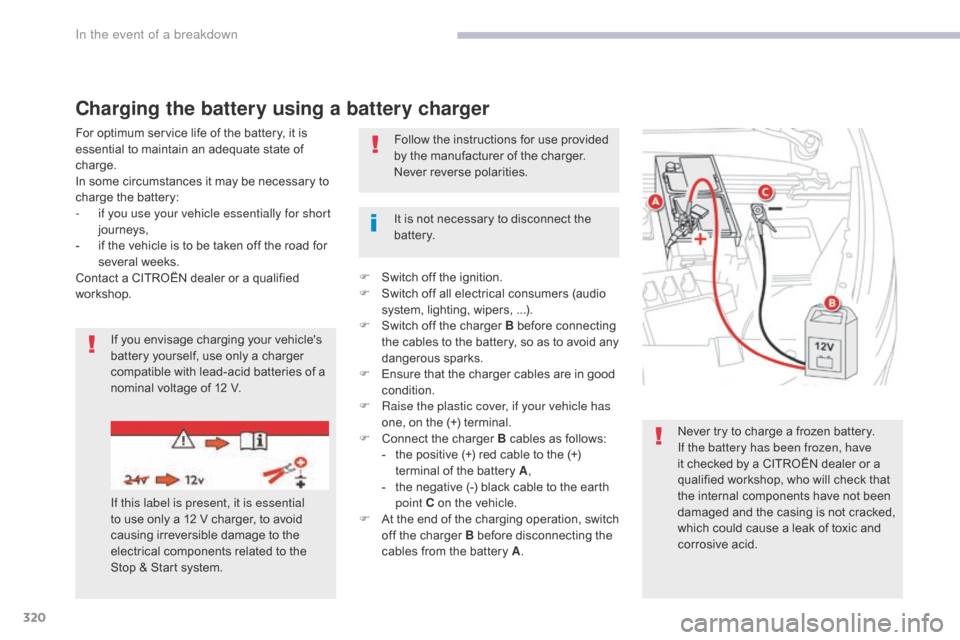
witch off the charger B before connecting
the cables to the battery, so as to avoid any
dangerous sparks.
F
E
nsure that the charger cables are in good
condition.
F
R
aise the plastic cover, if your vehicle has
one, on the (+) terminal.
F
C
onnect the charger B cables as follows:
-
t
he positive (+) red cable to the (+)
terminal of the battery A ,
-
t
he negative (-) black cable to the earth
point C on the vehicle.
F
A
t the end of the charging operation, switch
off the charger B before disconnecting the
cables from the battery A .
It is not necessary to disconnect the
battery.
If you envisage charging your vehicle's
battery yourself, use only a charger
compatible with lead-acid batteries of a
nominal voltage of 12 V. Follow the instructions for use provided
by the manufacturer of the charger.
Never reverse polarities.
Charging the battery using a battery charger
If this label is present, it is essential
to use only a 12 V charger, to avoid
causing irreversible damage to the
electrical components related to the
Stop & Start system.
For optimum service life of the battery, it is
essential to maintain an adequate state of
charge.
In some circumstances it may be necessary to
charge the battery:
-
i
f you use your vehicle essentially for short
journeys,
-
i
f the vehicle is to be taken off the road for
several weeks.
Contact a CITROËN dealer or a qualified
workshop.
In the event of a breakdown
Page 323 of 527
321
C4-Picasso-II_en_Chap08_en-cas-panne_ed02-2016
The Stop & Start system may not be
operational during the trip following the
first engine start.
In this case, the system will only be
available again after a continuous
period of immobilisation of the vehicle,
a period which depends on the ambient
temperature and the state of charge of
the battery (up to about 8 hours).
Do not force the lever as locking will
not be possible if the clamp is not
positioned correctly; start the procedure
again.
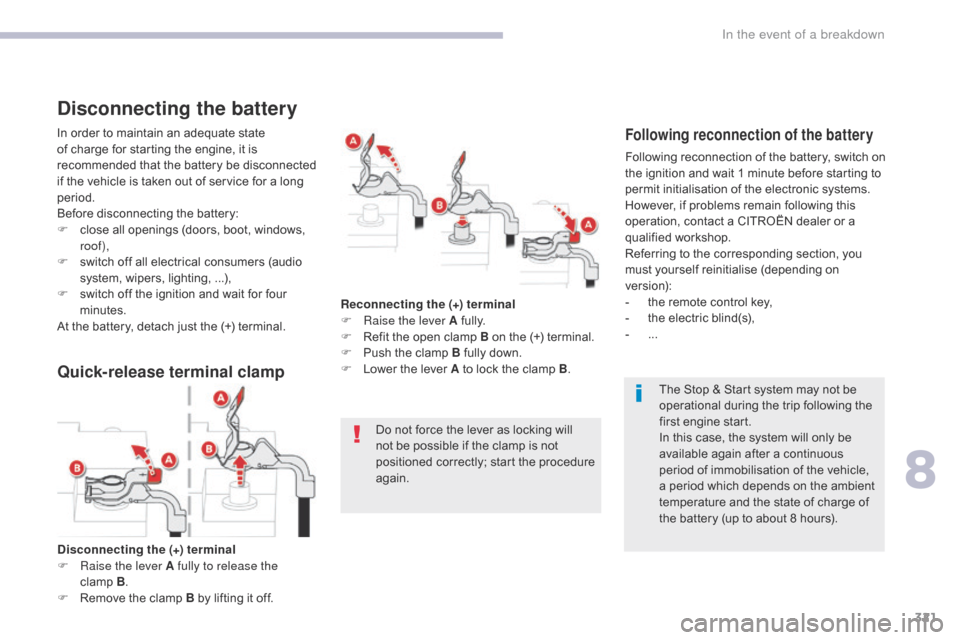
Disconnecting the (+) terminal
F
Ra
ise the lever A fully to release the
clamp
B .
F
R
emove the clamp B by lifting it off. Reconnecting the (+) terminal
F
Ra
ise the lever A fully.
F
R
efit the open clamp B on the (+) terminal.
F
P
ush the clamp B fully down.
F
L
ower the lever A to lock the clamp B
.
Disconnecting the battery
In order to maintain an adequate state
of charge for starting the engine, it is
recommended that the battery be disconnected
if the vehicle is taken out of service for a long
period.
Before disconnecting the battery:
F
c
lose all openings (doors, boot, windows,
roof),
F
s
witch off all electrical consumers (audio
system, wipers, lighting,
...),
F
s
witch off the ignition and wait for four
minutes.
At the battery, detach just the (+) terminal.Following reconnection of the battery
Following reconnection of the battery, switch on
the ignition and wait 1 minute before starting to
permit initialisation of the electronic systems.
However, if problems remain following this
operation, contact a CITROËN dealer or a
qualified workshop.
Referring to the corresponding section, you
must yourself reinitialise (depending on
version):
-
t
he remote control key,
-
t
he electric blind(s),
-
...
Quick-release terminal clamp
8
In the event of a breakdown
Page 341 of 527
339
C4-Picasso-II_en_Chap10_index-alpha_ed02-2016
Sidelamps .............211, 215, 304, 306, 308, 310
Side repeater .............................. ..................308
Snow chains
.................................................. 26
5
Socket, 12 V accessory
................. 1
07, 111, 114
Socket, JACK
...............................
.................111
Sockets, audio
.............................................. 111
Spe
ed limiter
...............................
.. 151, 154, 156
Speed limit recognition
................................. 15
2
Spotlamps, side
....................................2
19, 308
Stability control (ESC) ...................................233
Starting the vehicle
....................... 1
27, 129, 130
Starting using another battery
.............. 1
30, 319
Stay, bonnet
...............................
...................2 74
Steering wheel, adjustment
............................93
St
op
...............
.................................................. 28
Stopping the vehicle
..................... 1
27, 129, 130
Stop & Start
........................ 2
6, 51, 95, 104, 148,
149, 262, 274, 280, 318, 321
Stop (warning lamp)
........................................ 28
St
orage
................
.......................................... 108
Storage boxes
....................................... 11
2 , 114
Storing driving positions
.................................79
S
un visor
....................................................... 10
8
Sun visor flap
...............................
.................108
Synchronising the remote control
...................59
T
Tables of engines ......................... 3 25, 329, 330
Tables of fuses .............................................. 3
13
Tables of weights
.......................... 3
27, 331, 332
Tailgate
................
......................................64, 66
W
V
Warning and indicator lamps .............. 2 2, 27, 28
Warning lamp, braking system .......................3
0
Warning lamp, Diesel engine pre-heater
.......25
W
arning lamps
....................................2
5, 28, 31
Warning lamp, SCR emissions control system
................
........................................... 37
Warning lamp, Service.................................... 29
Warning lamp, Stop
........................................ 28
W
ashing (advice) ........................................... 281
Weights
...............
.......................... 327, 331, 332
Wheel, spare
......................................... 29
4-297
Window controls
............................................. 74
W
iper blades (changing)
....................... 2
27, 271
Wiper, rear ..................................................... 224
Wipers
............................................ 2
6, 223, 226
Wipers, automatic rain sensitive
.......... 2
23, 226
Under-inflation (detection)
............................ 20
5
Unlocking
..............................
....................53, 55
Unlocking from the inside
............................... 61
U
nlocking the boot
.......................................... 53
U
nlocking the doors
........................................ 61
U
pdating the date
............................................ 52
U
pdating the time
............................................ 52
U
Tank, AdBlue® additive .................................28 2
Tank, fuel
............................... ................262, 263
Technical data
....................... 325
, 327, 329-332
Temperature, coolant
...................................... 41
T
hree flashes (direction indicators)
..............2
20
Time (setting)
..............................
....................52
To o l s
................
...................................... 294-297
To r c h
..............................
............................... 12 2
Total distance recorder
................................... 46
T
ouch screen ............................................. 11, 13
Touch screen tablet
.................................. 1
1, 13
To w b a r
................
...................................126, 269
Towed loads
.................................. 3
27, 331, 332
Towing another vehicle
................................. 32
2
Traction control (ASR)
................... 3
2, 233, 235
Tr a i l e r
...............
.....................................126, 269
Triangle, warning ........................................... 286
Trip computer
............................................ 4
9 - 51
Trip distance recorder
..................................... 46
T
y r e s
..............................................................
.... 9
Tyre under-inflation detection
...............
................35, 205, 207, 293 Ventilation ..............................
.........9, 94, 95, 97
Visibility ............................... ..........................104
Vision 360
.....................................................19
5
.
Alphabetical index
Page 352 of 527
Transversal-Citroen_en_Chap00_debut
AUDIO AND TELEMATICS GUIDE
Page 353 of 527

Transversal-Citroen_en_Chap00_debut
On-line handbook
If the "MyCITROËN" function is not available on the CITROËN public\
website for your country, you can fi nd your handbook at the following address:
http://service.citroen.com/ddb/
Find your handbook and the audio and telematic systems on the CITROËN website, under "MyCITROËN". Find your handbook and the audio and telematic systems on the CITROËN website, under "MyCITROËN". Find your handbook and the audio and telematic systems on the
Select:
Select one of the following means of access to view your handbook on-line...
the language,
the vehicle, its body style,
the print edition of your handbook appropriate for the date of registration of your vehicle.
Referring to the handbook on-line also gives you access to the latest information available, easily identifi ed by the bookmark, associated with this symbol:
Page 354 of 527
1
.
Audio and Telematics
CITROËN Connect Nav
GPS satellite navigation - Applications - Multimedia audio - Bluetooth ® GPS satellite navigation - Applications - Multimedia audio - Bluetooth ® GPS satellite navigation - Applications - Multimedia audio - Bluetooth telephone ® telephone ®
Contents First steps 2
Steering mounted controls 5
Menus 6
Voice commands 8
Navigation 14
Connected navigation 30
Applications 40
Radio Media 54
Telephone 66
Settings 78
Frequently asked questions 88
The system is protected in such a way that it will only operate in your vehicle. Displaying of the Energy Economy Mode message signals that a change to standby is imminent.
The different functions and settings described vary according to the version and configuration of your vehicle.
The link below gives access to OSS (Open Source Software) codes for the system. http://www.psa-peugeot-citroen.com/oss
As a safety measure and because it requires sustained attention by the driver, the pairing of a Bluetooth mobile telephone with the Bluetooth hands-free system of your audio system must be done with the vehicle stationaryand the ignition on.
Page 355 of 527
2
FM/87.5 MHz
87.5MHz
12:13
18,5 21,5
23 °C
Audio and Telematics
First steps
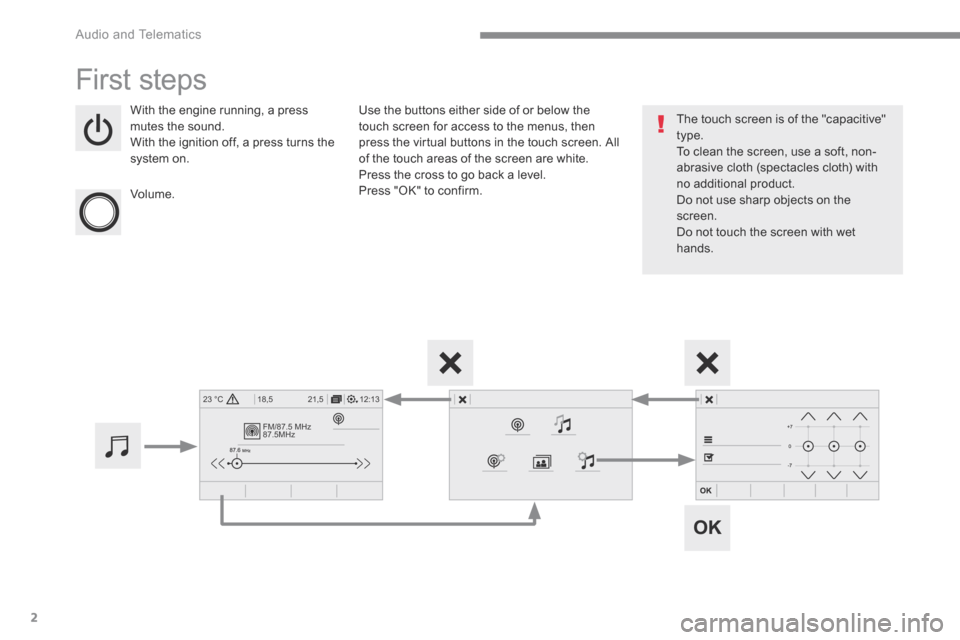
With the engine running, a press mutes the sound. With the ignition off, a press turns the system on.
Volume.
Use the buttons either side of or below the touch screen for access to the menus, then press the virtual buttons in the touch screen. All of the touch areas of the screen are white. Press the cross to go back a level. Press "OK" to confirm.
The touch screen is of the "capacitive" type. To clean the screen, use a soft, non-abrasive cloth (spectacles cloth) with no additional product. Do not use sharp objects on the screen. Do not touch the screen with wet hands.
Page 356 of 527
3
.
12:13
18,5 21,5
23 °C
Audio and Telematics
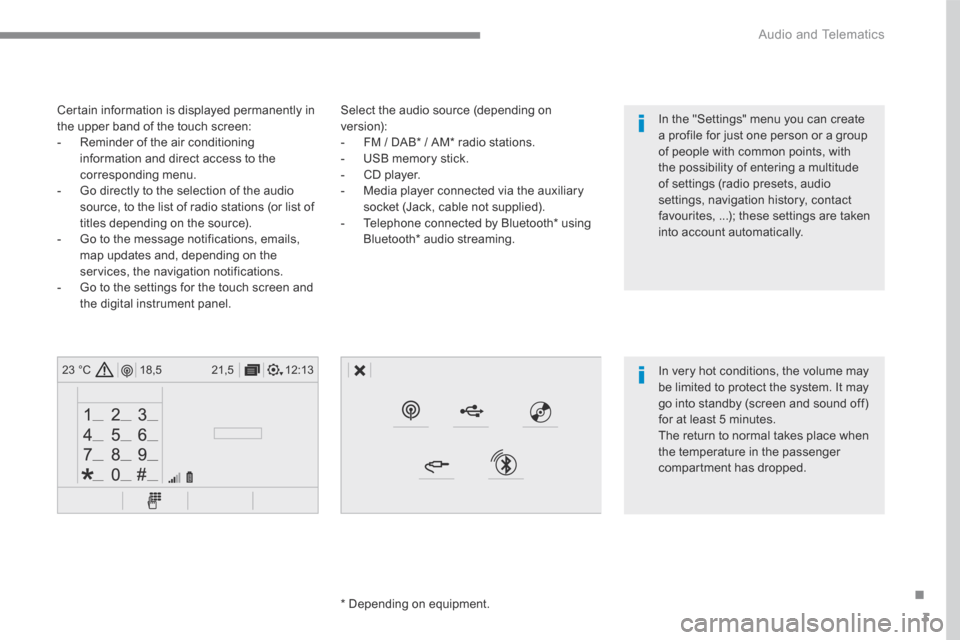
Select the audio source (depending on version): - FM / DAB * / AM * radio stations. - USB memory stick. - CD player. - Media player connected via the auxiliary socket (Jack, cable not supplied). - Telephone connected by Bluetooth * using
Bluetooth * audio streaming.
* Depending on equipment.
Certain information is displayed permanently in the upper band of the touch screen: - Reminder of the air conditioning information and direct access to the corresponding menu. - Go directly to the selection of the audio source, to the list of radio stations (or list of titles depending on the source).
- Go to the message notifications, emails, map updates and, depending on the services, the navigation notifications. - Go to the settings for the touch screen and the digital instrument panel.
In very hot conditions, the volume may be limited to protect the system. It may go into standby (screen and sound off) for at least 5 minutes.
The return to normal takes place when the temperature in the passenger compartment has dropped.
In the "Settings" menu you can create a profile for just one person or a group of people with common points, with the possibility of entering a multitude of settings (radio presets, audio settings, navigation history, contact favourites, ...); these settings are taken into account automatically.
Page 358 of 527
5
.
Audio and Telematics
Steering mounted controls
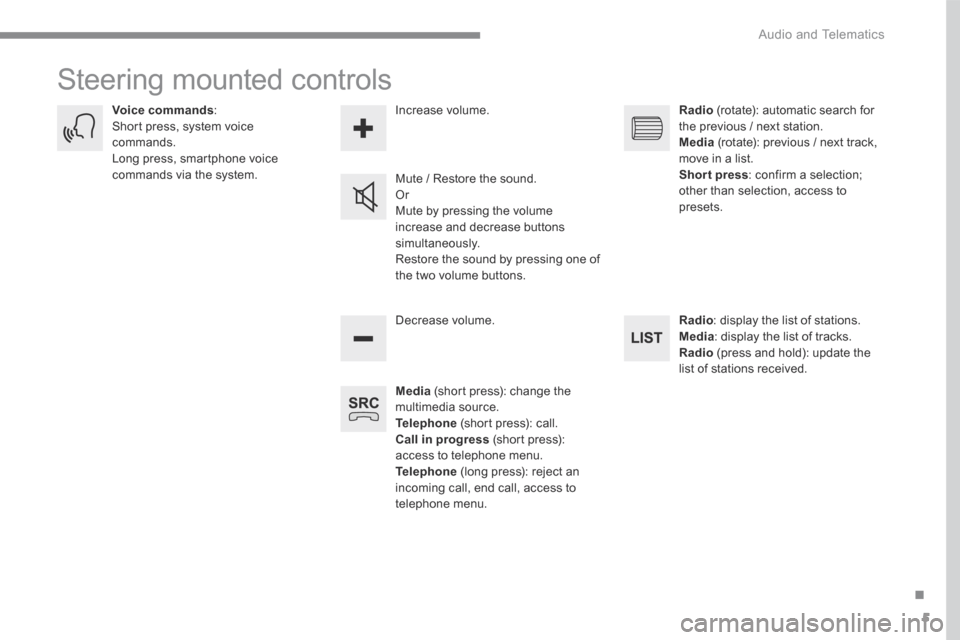
Media (short press): change the multimedia source. Telephone (short press): call. Call in progress (short press): access to telephone menu. Telephone (long press): reject an incoming call, end call, access to telephone menu.
Decrease volume.
Voice commands : Short press, system voice commands. Long press, smartphone voice commands via the system. Mute / Restore the sound. Or Mute by pressing the volume
increase and decrease buttons simultaneously. Restore the sound by pressing one of the two volume buttons.
Radio (rotate): automatic search for the previous / next station. Media (rotate): previous / next track, move in a list. Short press : confirm a selection; other than selection, access to presets.
Radio : display the list of stations. Media : display the list of tracks. Radio (press and hold): update the list of stations received.
Increase volume.
Page 359 of 527
6
12:13
18,5 21,5
23 °C
21,518,5
12:1323 °C12:13
18,5 21,5
23 °C
12:13
18,5 21,5
23 °C
Audio and Telematics
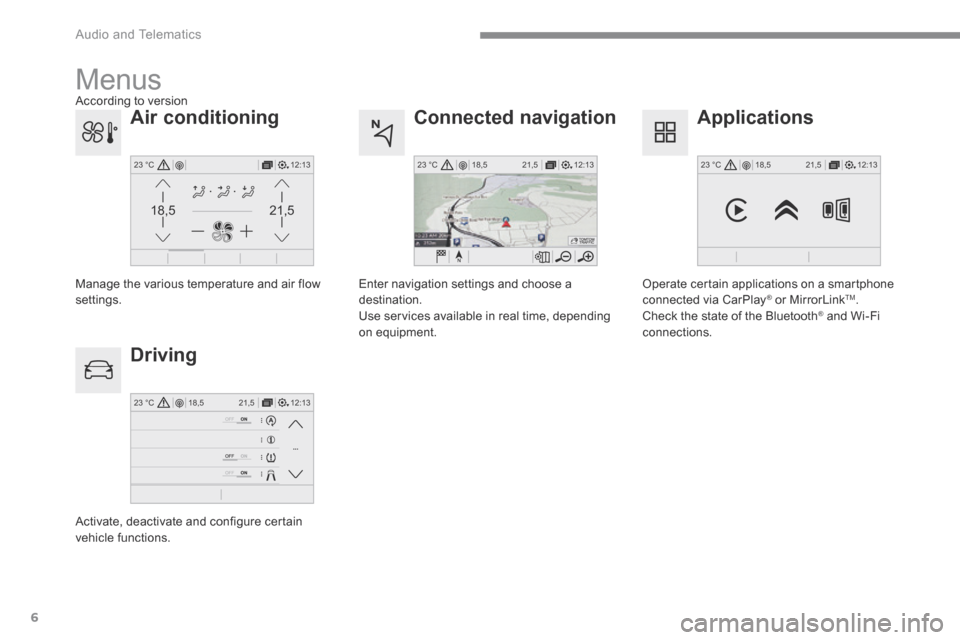
Connected navigation
Driving
Applications
Enter navigation settings and choose a destination. Use services available in real time, depending on equipment.
Activate, deactivate and configure certain vehicle functions.
Operate certain applications on a smartphone connected via CarPlay ® or MirrorLink ® or MirrorLink ®TM . Check the state of the Bluetooth ® and Wi-Fi ® and Wi-Fi ®
connections.
Menus
Air conditioning
Manage the various temperature and air flow settings.
A c c o r d i n g t o v e r s i o n