lock Citroen GRAND C4 PICASSO RHD 2016 2.G Owner's Guide
[x] Cancel search | Manufacturer: CITROEN, Model Year: 2016, Model line: GRAND C4 PICASSO RHD, Model: Citroen GRAND C4 PICASSO RHD 2016 2.GPages: 523, PDF Size: 13.63 MB
Page 65 of 523
63
Boot
Opening the tailgate
With the electronic key /
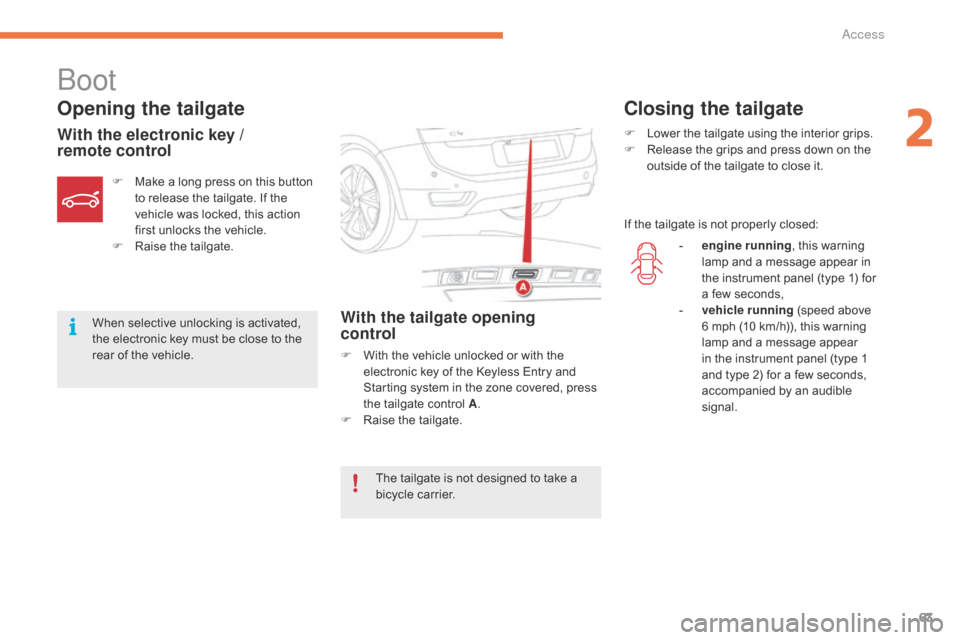
remote controlWith the tailgate opening
control
F With the vehicle unlocked or with the e
lectronic key of the Keyless Entry and
S
tarting system in the zone covered, press
t
he tailgate control A.
F
Ra
ise
t
he
t
ailgate.
F
M
ake
a
long
press
on
this
button
t
o
release
the
tailgate.
If
the
v
ehicle
was
locked,
this
action
f
irst
unlocks
the
vehicle.
F
Ra
ise
t
he
t
ailgate.
When
selective
unlocking
is
activated,
t
he
electronic
key
must
be
close
to
the
r
ear
of
the
vehicle.
Closing the tailgate
F Lower
the tailgate using the interior grips.
F R elease the grips and press down on the
o
utside of the tailgate to close it.
If
the tailgate is not properly closed:
The
tailgate
is
not
designed
to
take
a
b
icycle
carrier. -
e
ngine running,
this warning
l
amp and a message appear in
t
he instrument panel (type 1) for
a
few seconds,
-
v
ehicle running
(speed above
6
mph (10 km/h)), this warning
l
amp and a message appear
i
n the instrument panel (type 1
a
nd type 2) for a few seconds,
a
ccompanied by an audible
s
ignal.
2
Access
Page 66 of 523
64
Motorised tailgate
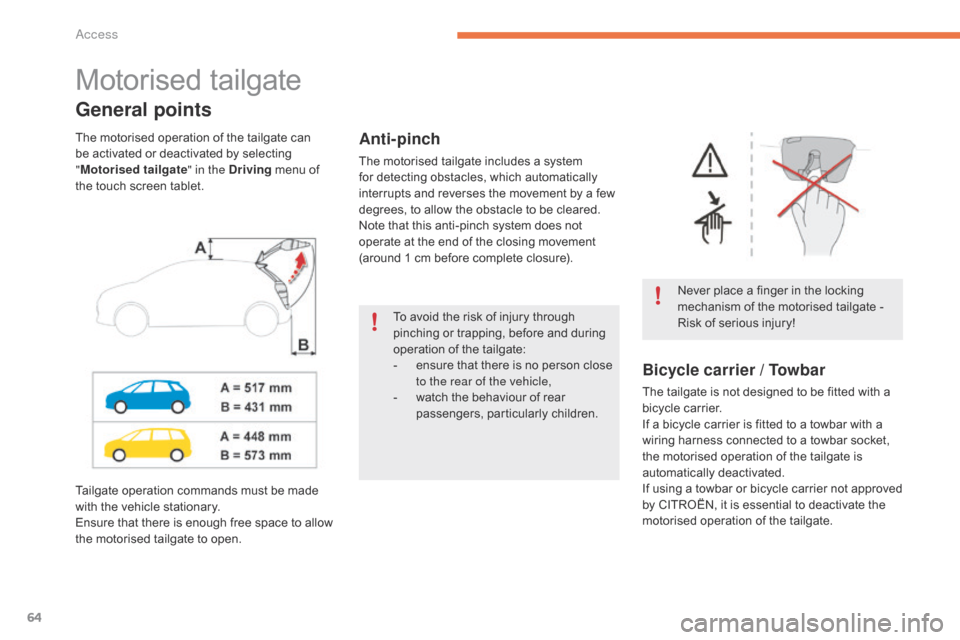
General points
Never place a finger in the locking mechanism of the motorised tailgate -
R
isk of serious injury!
Anti-pinch
The motorised tailgate includes a system for detecting obstacles, which automatically
i
nterrupts and reverses the movement by a few
d
egrees, to allow the obstacle to be cleared.
Note
that this anti-pinch system does not
o
perate at the end of the closing movement
(
around 1 cm before complete closure).
The
motorised
operation
of
the
tailgate
can
b
e
activated
or
deactivated
by
selecting
"
M
otorised tailgate " in the Driving
menu
of
t
he
touch
screen
tablet.
Bicycle carrier / Towbar
The tailgate is not designed to be fitted with a b icycle carrier.
If
a bicycle carrier is fitted to a towbar with a
w
iring harness connected to a towbar socket,
t
he motorised operation of the tailgate is
a
utomatically
d
eactivated.
If
using a towbar or bicycle carrier not approved
b
y CITROËN, it is essential to deactivate the
m
otorised operation of the tailgate.
Tailgate
operation
commands
must
be
made
w
ith
the
vehicle
stationary.
Ensure
that
there
is
enough
free
space
to
allow
t
he
motorised
tailgate
to
open. To
avoid
the
risk
of
injury
through
p
inching
or
trapping,
before
and
during
o
peration
of
the
tailgate:
-
e
nsure
that
there
is
no
person
close
t
o the rear of the vehicle,
-
w
atch
the
behaviour
of
rear
pa
ssengers,
par
ticularly
c
hildren.
Access
Page 67 of 523
65
or
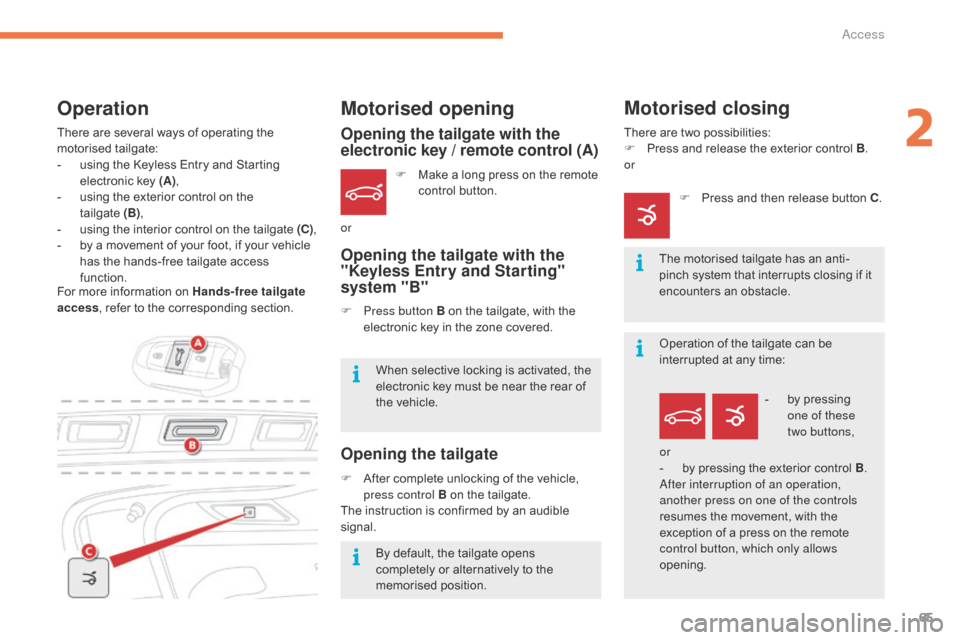
Opening the tailgate with the
electronic key / remote control (A)
Opening the tailgate with the
"Keyless Entry and Starting"
system "B"
Opening the tailgate
F Make a long press on the remote c
ontrol button.
F
P
ress button B on the tailgate, with the
e
lectronic key in the zone covered.
When
selective locking is activated, the
e
lectronic key must be near the rear of
t
he
vehicle.
By
default, the tailgate opens
c
ompletely or alternatively to the
m
emorised
p
osition.
F
A
fter
complete unlocking of the vehicle,
p
ress control B on the tailgate.
The
instruction is confirmed by an audible
s
ignal.
Motorised closing
There are two possibilities:
F P ress and release the exterior control B.
or
The
motorised tailgate has an anti-
pinch
system that interrupts closing if it
e
ncounters an obstacle.
F
P
ress and then release button C.
There
are
several
ways
of
operating
the
m
otorised t
ailgate:
-
u
sing
the
Keyless
Entry
and
Starting
e
lectronic
key
(A) ,
-
u
sing
the
exterior
control
on
the
t
ailgate (B),
-
u
sing
the
interior
control
on
the
tailgate
(C) ,
-
b
y
a
movement
of
your
foot,
if
your
vehicle
h
as
the
hands-free
tailgate
access
f
unction.
Motorised opening
For more information on Hands-free tailgate
a ccess ,
refer to the corresponding section.
Operation
Operation of the tailgate can be interrupted at any time:
-
b
y pressing
o
ne of these
two
buttons,
or
-
b
y pressing the exterior control B.
After interruption of an operation,
another press on one of the controls
resumes
the movement, with the
e
xception of a press on the remote
c
ontrol button, which only allows
opening.
2
Access
Page 69 of 523
67
Reinitialising the motorised
tailgate
This operation is necessary where there is
no movement - after detection of an obstacle,
c
onnecting or recharging the battery, ...
F
O
pen the tailgate manually, if necessary.
F
M
anually close the tailgate fully.
If
the problem persists, contact a CITROËN
d
ealer or a qualified workshop.
Precautions in use
In wintry conditions
In the event of an accumulation of snow on the tailgate, clear the snow before
c
ommanding a motorised opening of
t
he tailgate.
The
formation of ice can block the
t
ailgate and prevent its opening: wait
u
ntil the ice melts with the heating of
t
he
p
assenger
c
ompartment.
When washing the vehicle
When washing the vehicle in an automatic car wash, don't forget to
l
ock your vehicle to avoid the risk of
u
nexpected
ope
ning.
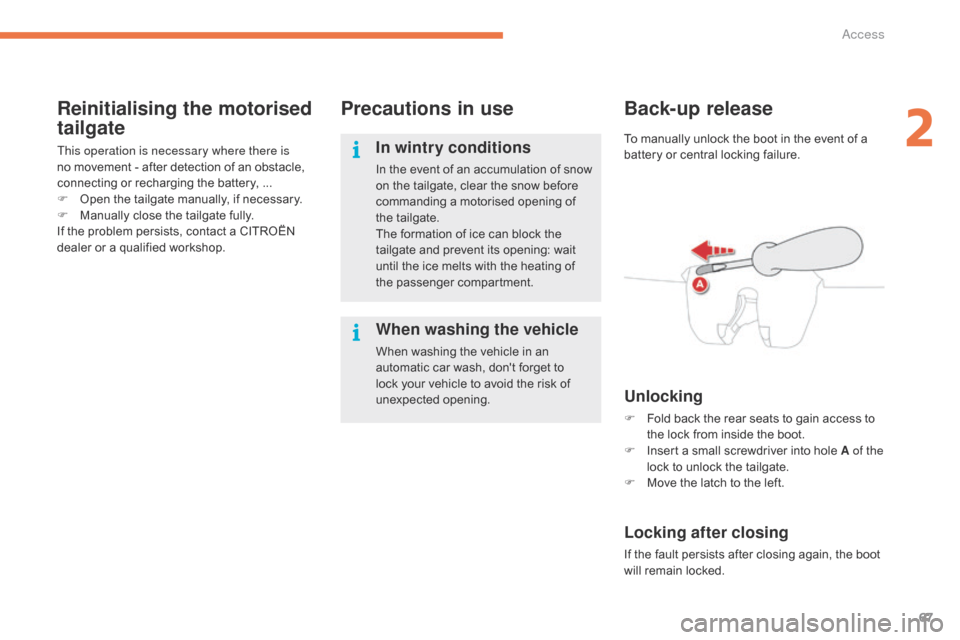
Back-up release
Unlocking
F Fold back the rear seats to gain access to t
he lock from inside the boot.
F
I
nsert a small screwdriver into hole A of the
lock
to unlock the tailgate.
F
M
ove the latch to the left.
Locking after closing
If the fault persists after closing again, the boot will remain locked.
To
manually unlock the boot in the event of a
b
attery or central locking failure.
2
Access
Page 70 of 523
68
Hands-free tailgate access
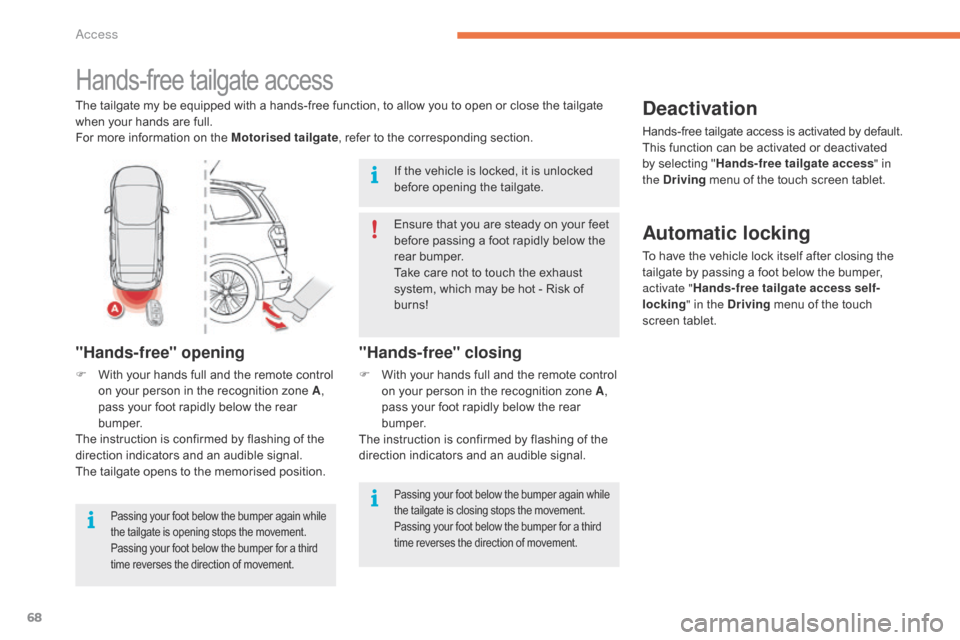
The tailgate my be equipped with a hands-free function, to allow you to open or close the tailgate when your hands are full.
For
more information on the Motorised tailgate,
refer to the corresponding section.
"Hands-free" opening
F With your hands full and the remote control o
n your person in the recognition zone A,
pass
your foot rapidly below the rear
b
u m p e r.
The
instruction is confirmed by flashing of the
d
irection indicators and an audible signal.
The
tailgate opens to the memorised position.
Passing your foot below the bumper again while the tailgate is opening stops the movement. P
assing your foot below the bumper for a third
t
ime reverses the direction of movement.
"Hands-free" closing
F With your hands full and the remote control o
n your person in the recognition zone A,
pass
your foot rapidly below the rear
b
u m p e r.
The
instruction is confirmed by flashing of the
d
irection indicators and an audible signal.
Deactivation
Hands-free tailgate access is activated by default.
T his function can be activated or deactivated
b
y selecting "Hands-free tailgate access " in
the Driving
menu of the touch screen tablet.
Ensure
that
you
are
steady
on
your
feet
b
efore
passing
a
foot
rapidly
below
the
r
ear
bumper.
Take
care
not
to
touch
the
exhaust
s
ystem,
which
may
be
hot
-
Risk
of
b
urns!
If
the
vehicle
is
locked,
it
is
unlocked
b
efore
opening
the
tailgate.
Automatic locking
To have the vehicle lock itself after closing the t ailgate by passing a foot below the bumper,
a
ctivate " Hands-free tailgate access self-
locking " in the Driving
menu of the touch
s
creen
t
ablet.
Passing your foot below the bumper again while the tailgate is closing stops the movement. P
assing your foot below the bumper for a third
t
ime reverses the direction of movement.
Access
Page 72 of 523
70
For all work on the alarm system, contact a CITROËN dealer or a
q
ualified
w
orkshop.
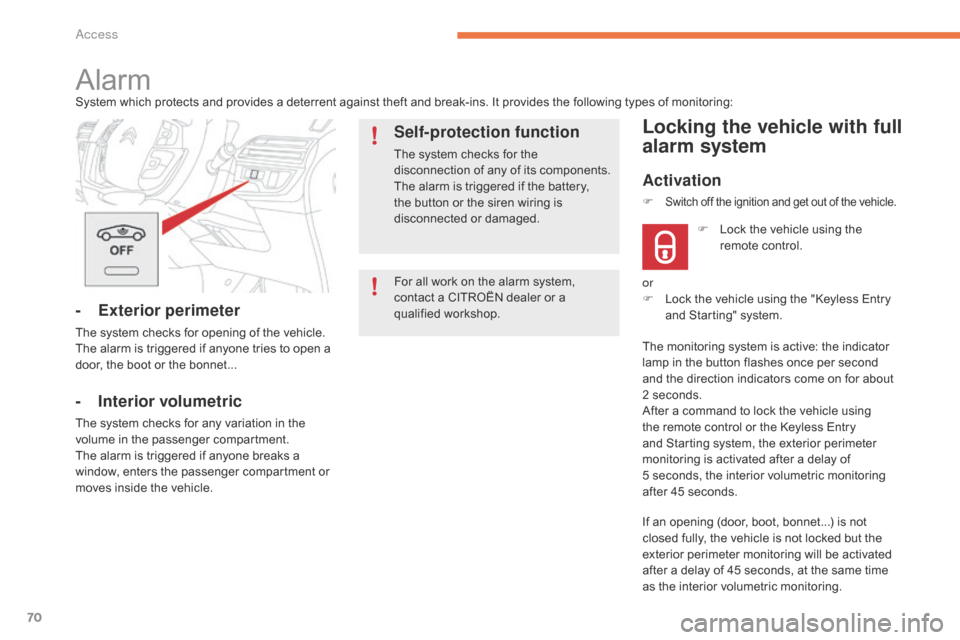
AlarmSystem which protects and provides a deterrent against theft and break-ins. It provides the following types of monitoring:
- Exterior perimeter
The system checks for opening of the vehicle.
T he alarm is triggered if anyone tries to open a
d
oor, the boot or the bonnet...
- Interior volumetric
The system checks for any variation in the volume in the passenger compartment.
The
alarm is triggered if anyone breaks a
w
indow, enters the passenger compartment or
m
oves inside the vehicle.
Self-protection function
The system checks for the disconnection of any of its components.
The
alarm is triggered if the battery,
t
he button or the siren wiring is
d
isconnected
o
r
d
amaged.
Locking the vehicle with full
alarm system
Activation
If an opening (door, boot, bonnet...) is not closed fully, the vehicle is not locked but the
e
xterior perimeter monitoring will be activated
a
fter a delay of 45 seconds, at the same time
a
s the interior volumetric monitoring.
F
L
ock the vehicle using the
r
emote control.
F
Switch off the ignition and get out of the vehicle.
or
F
L ock the vehicle using the "Keyless Entry
a
nd Starting" system.
The
monitoring system is active: the indicator
l
amp in the button flashes once per second
a
nd the direction indicators come on for about
2
seconds.
After
a command to lock the vehicle using
t
he remote control or the Keyless Entry
a
nd Starting system, the exterior perimeter
m
onitoring is activated after a delay of
5 s
econds, the interior volumetric monitoring
a
fter 45 seconds.
Access
Page 73 of 523
71
OFF
Locking the vehicle with exterior perimeter
monitoring only
Deactivate the interior volumetric monitoring to avoid unwanted triggering of the alarm in
c
ertain cases such as:
-
l
eaving a window partially open,
-
w
ashing your vehicle,
-
c
hanging a wheel,
-
t
owing your vehicle,
-
t
ransport on a ferry.
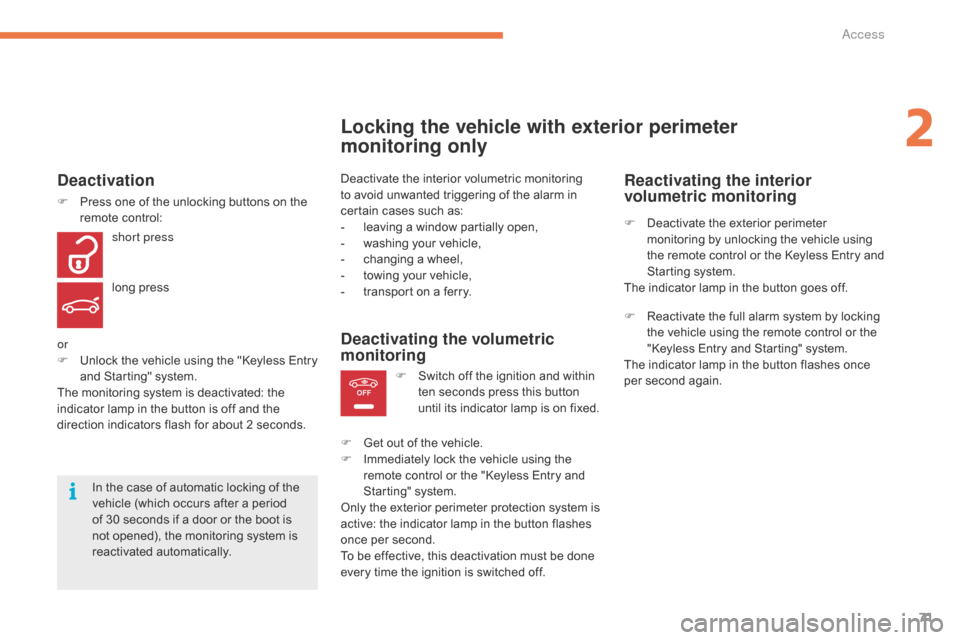
Deactivating the volumetric
monitoring
F Switch off the ignition and within t
en seconds press this button
u
ntil its indicator lamp is on fixed.
F
G
et
out of the vehicle.
F
I
mmediately lock the vehicle using the
r
emote control or the "Keyless Entry and
S
tarting" system.
Only
the
exterior perimeter protection system is
a
ctive:
the indicator lamp in the button flashes
o
nce
per
second.
To
be
effective, this deactivation must be done
e
very
time the ignition is switched off.
In
the
case
of
automatic
locking
of
the
v
ehicle
(which
occurs
after
a
period
o
f
30
seconds
if
a
door
or
the
boot
is
n
ot
opened),
the
monitoring
system
is
r
eactivated
a
utomatically.
Deactivation
F Press one of the unlocking buttons on the r
emote control:
short press
long
press
or
F
U
nlock the vehicle using the "Keyless Entry
a
nd Starting" system.
The
monitoring system is deactivated: the
i
ndicator lamp in the button is off and the
d
irection indicators flash for about 2 seconds.
Reactivating the interior
volumetric monitoring
F Deactivate the exterior perimeter m
onitoring by unlocking the vehicle using
t
he remote control or the Keyless Entry and
S
tarting system.
The
indicator lamp in the button goes off.
F
R
eactivate the full alarm system by locking
t
he vehicle using the remote control or the
"
Keyless Entry and Starting" system.
The
indicator lamp in the button flashes once
p
er second again.
2
Access
Page 74 of 523
72
Triggering of the alarm
This is indicated by sounding of the siren and flashing of the direction indicators for
t
hirty seconds.
The
monitoring functions remain active until
t
he alarm has been triggered eleven times in
s
uccession.
When
the vehicle is unlocked using the remote
c
ontrol or the Keyless Entry and Starting
s
ystem, rapid flashing of the indicator lamp
i
n the button informs you that the alarm was
t
riggered during your absence. When the
i
gnition is switched on, this flashing stops
i
mmediately.
Failure of the remote control
To deactivate the monitoring functions:
F
U
nlock the vehicle using the key (integral
w
ith the remote control) in the driver's door
l
ock.
F
O
pen the door; the alarm is triggered.
F
S
witch on the ignition; the alarm stops. The
i
ndicator lamp in the button goes off.
Locking the vehicle without
activating the alarm
F Lock or deadlock the vehicle using the key (
integral with the remote control) in the
d
river's door lock.
Operating fault
When the ignition is switched on, fixed illumination of the indicator lamp in the button
i
ndicates a fault in the system.
Have
it checked by a CITROËN dealer or a
q
ualified
w
orkshop.
Automatic activation*
2 minutes after the last door or the boot is closed, the system is activated automatically.
F
T
o avoid triggering the alarm on entering
t
he vehicle, first press the unlocking button
o
n the remote control or unlock the vehicle
u
sing the Keyless Entry and Starting
s
ystem.
*
Depending on the country of sale.
Access
Page 78 of 523
76
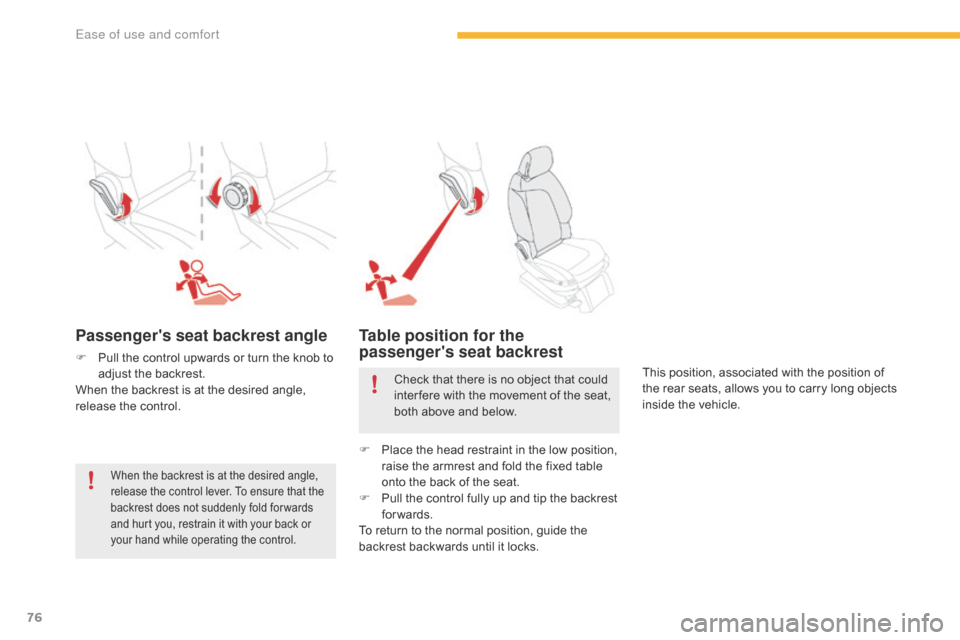
Passenger's seat backrest angle
F Pull the control upwards or turn the knob to a
djust the backrest.
When
the backrest is at the desired angle,
r
elease the control.
Table position for the
passenger's seat backrest
This position, associated with the position of the rear seats, allows you to carry long objects
i
nside the vehicle.
When the backrest is at the desired angle, release the control lever. To ensure that the
b
ackrest does not suddenly fold for wards
a
nd hurt you, restrain it with your back or
y
our hand while operating the control.
Check that there is no object that could inter fere with the movement of the seat,
b
oth above and below.
F
P
lace the head restraint in the low position,
r
aise the armrest and fold the fixed table
o
nto the back of the seat.
F
P
ull the control fully up and tip the backrest
fo
rwards.
To
return to the normal position, guide the
b
ackrest backwards until it locks.
Ease of use and comfort
Page 87 of 523
85
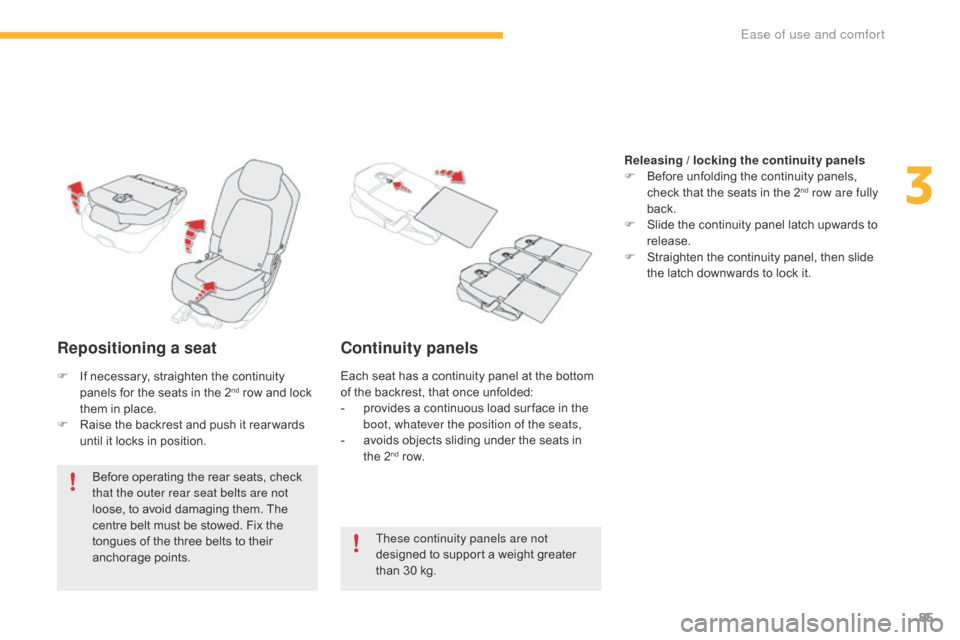
Repositioning a seat
Before operating the rear seats, check that the outer rear seat belts are not
loose,
to avoid damaging them. The
c
entre belt must be stowed. Fix the
t
ongues of the three belts to their
anc
horage
p
oints.
Continuity panels
These continuity panels are not
designed to support a weight greater
t
han 30 kg. Releasing / locking the continuity panels
F
B
efore unfolding the continuity panels,
c
heck that the seats in the 2
nd row are fully
back.
F
S
lide
the
continuity
panel
latch upwards to
r
elease.
F
S
traighten
the
continuity
panel, then slide
t
he
latch
downwards
to
lock
it.
F
I
f
necessary,
straighten
the
continuity
p
anels
for
the
seats
in
the
2
nd row and lock t
hem
in
place.
F
R
aise
the
backrest
and
push
it rear wards
u
ntil
it
locks
in
position. Each
seat has a continuity panel at the bottom o
f the backrest, that once unfolded:
- p rovides a continuous load sur face in the
b
oot, whatever the position of the seats,
-
a
voids objects sliding under the seats in
t
he 2
nd row.
3
Ease of use and comfort