Stop Citroen JUMPER 2008 2.G User Guide
[x] Cancel search | Manufacturer: CITROEN, Model Year: 2008, Model line: JUMPER, Model: Citroen JUMPER 2008 2.GPages: 163, PDF Size: 2.76 MB
Page 44 of 163
Ventilation
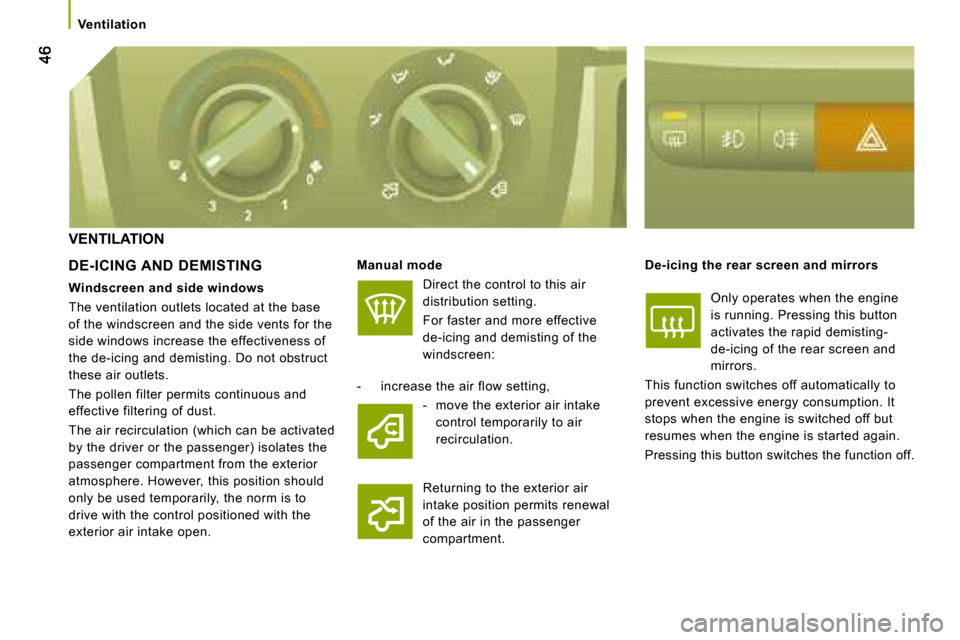
VENTILATION
DE-ICING AND DEMISTING
Manual mode
Direct the control to this air
distribution setting.
For faster and more effective
de-icing and demisting of the
windscreen: De-icing the rear screen and mirrors
Only operates when the engine
is running. Pressing this button
activates the rapid demisting-
de-icing of the rear screen and
mirrors.
This function switches off automatically to
prevent excessive energy consumption. It
stops when the engine is switched off but
resumes when the engine is started again.
Pressing this button switches the function off.
- increase the air flow setting,
- move the exterior air intake control temporarily to air
recirculation.
Returning to the exterior air
intake position permits renewal
of the air in the passenger
compartment.
Windscreen and side windows
The ventilation outlets located at the base
of the windscreen and the side vents for the
side windows increase the effectiveness of
the de-icing and demisting. Do not obstruct
these air outlets.
The pollen filter permits continuous and
effective filtering of dust.
The air recirculation (which can be activated
by the driver or the passenger) isolates the
passenger compartment from the exterior
atmosphere. However, this position should
only be used temporarily, the norm is to
drive with the control positioned with the
exterior air intake open.
Page 68 of 163
A
B
70
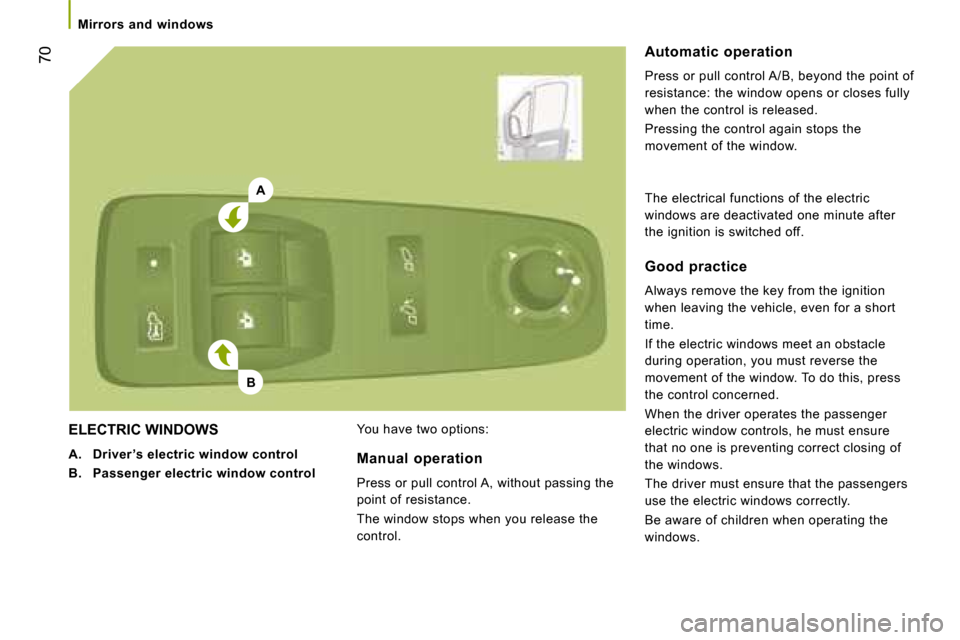
ELECTRIC WINDOWS
A. Driver ’s electric window control
B. Passenger electric window control You have two options: Automatic operation
Press or pull control A/B, beyond the point of
resistance: the window opens or closes fully
when the control is released.
Pressing the control again stops the
movement of the window.
Manual operation
Press or pull control A, without passing the
point of resistance.
The window stops when you release the
control. Good practice
Always remove the key from the ignition
when leaving the vehicle, even for a short
time.
If the electric windows meet an obstacle
during operation, you must reverse the
movement of the window. To do this, press
the control concerned.
When the driver operates the passenger
electric window controls, he must ensure
that no one is preventing correct closing of
the windows.
The driver must ensure that the passengers
use the electric windows correctly.
Be aware of children when operating the
windows.
The electrical functions of the electric
windows are deactivated one minute after
the ignition is switched off.
Mirrors and windows
Page 73 of 163
kmC I T Y
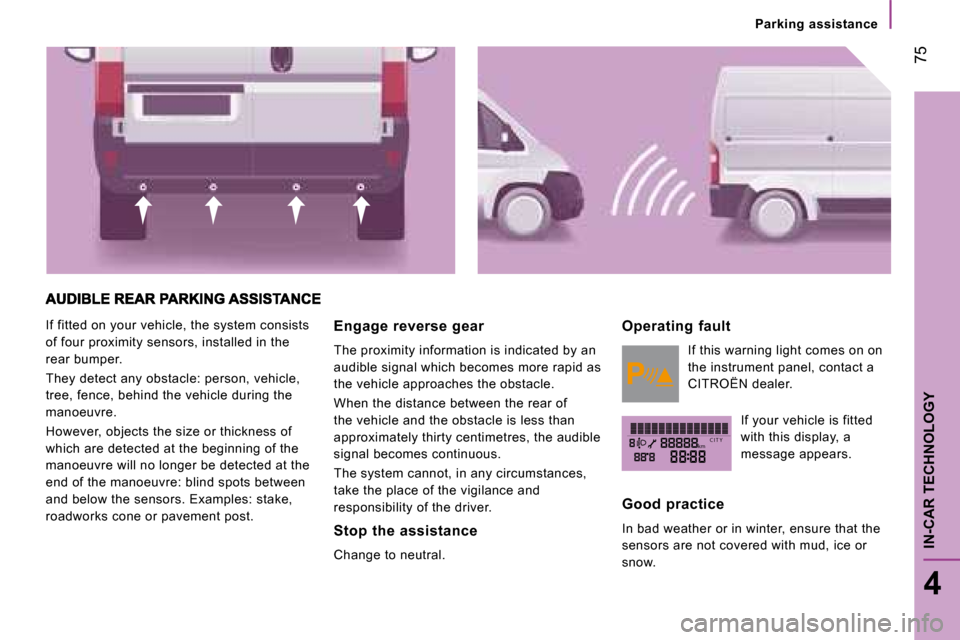
If fitted on your vehicle, the system consists
of four proximity sensors, installed in the
rear bumper.
They detect any obstacle: person, vehicle,
tree, fence, behind the vehicle during the
manoeuvre.
However, objects the size or thickness of
which are detected at the beginning of the
manoeuvre will no longer be detected at the
end of the manoeuvre: blind spots between
and below the sensors. Examples: stake,
roadworks cone or pavement post. Engage reverse gear
The proximity information is indicated by an
audible signal which becomes more rapid as
the vehicle approaches the obstacle.
When the distance between the rear of
the vehicle and the obstacle is less than
approximately thirty centimetres, the audible
signal becomes continuous.
The system cannot, in any circumstances,
take the place of the vigilance and
responsibility of the driver.
Stop the assistance
Change to neutral. Operating fault
If this warning light comes on on
the instrument panel, contact a
CITROËN dealer.
If your vehicle is fitted
with this display, a
message appears.
Good practice
In bad weather or in winter, ensure that the
sensors are not covered with mud, ice or
snow.
75
4
IN-CAR TECHNOLOGY
Parking assistance
Page 76 of 163
78
Pneumatic suspension
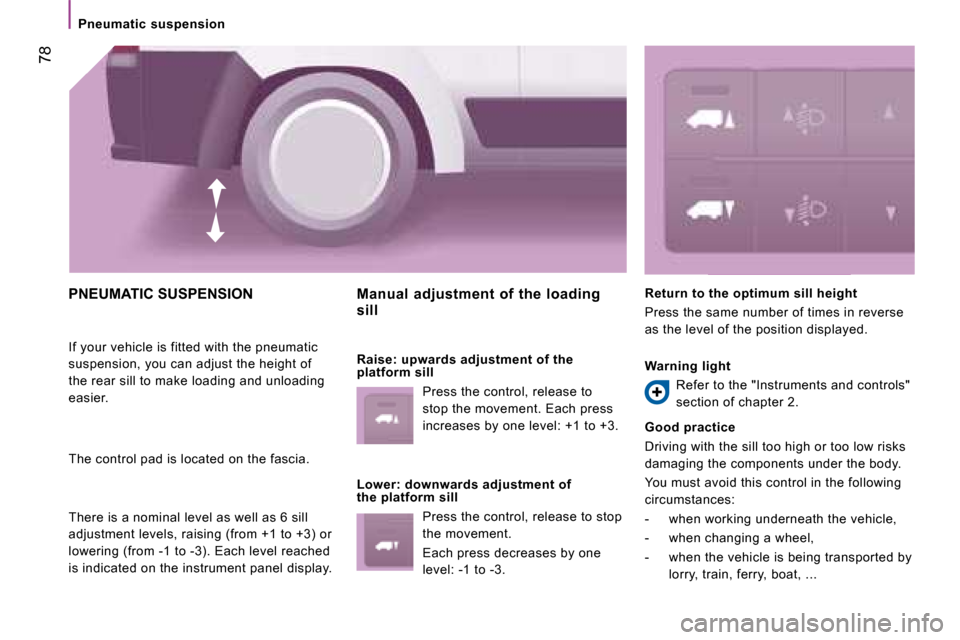
PNEUMATIC SUSPENSION
If your vehicle is fitted with the pneumatic
suspension, you can adjust the height of
the rear sill to make loading and unloading
easier.
The control pad is located on the fascia.
There is a nominal level as well as 6 sill
adjustment levels, raising (from +1 to +3) or
lowering (from -1 to -3). Each level reached
is indicated on the instrument panel display. Manual adjustment of the loading
sill
Raise: upwards adjustment of the
platform sill
Press the control, release to
stop the movement. Each press
increases by one level: +1 to +3.
Lower: downwards adjustment of
the platform sill Press the control, release to stop
the movement.
Each press decreases by one
level: -1 to -3. Return to the optimum sill height
Press the same number of times in reverse
as the level of the position displayed.
Warning light
Refer to the "Instruments and controls"
section of chapter 2.
Good practice
Driving with the sill too high or too low risks
damaging the components under the body.
You must avoid this control in the following
circumstances:
- when working underneath the vehicle,
- when changing a wheel,
- when the vehicle is being transported by lorry, train, ferry, boat, ...
Page 82 of 163
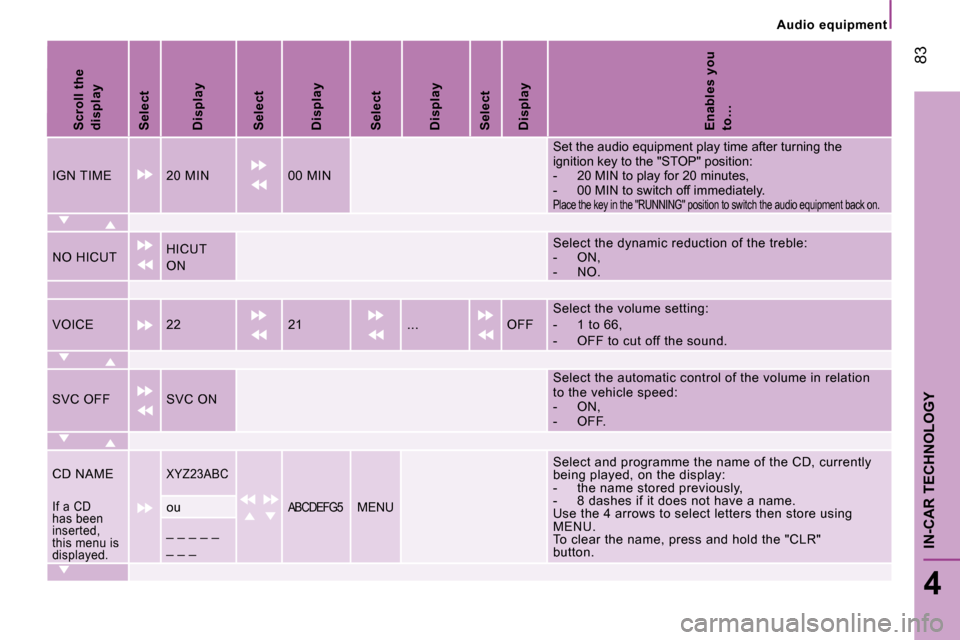
Scroll the displaySelectDisplaySelectDisplaySelectDisplaySelectDisplayEnables you to…
IGN TIME20 MIN00 MIN
Set the audio equipment play time after turning the ignition key to the "STOP" position:- 20 MIN to play for 20 minutes,- 00 MIN to switch off immediately.Place the key in the "RUNNING" position to switch the audio equipment back on.
NO HICUTHICUT
ON
Select the dynamic reduction of the treble:- ON,- NO.
VOICE2221...OFFSelect the volume setting:- 1 to 66,- OFF to cut off the sound.
SVC OFFSVC ON
Select the automatic control of the volume in relat ion to the vehicle speed:- ON,- OFF.
CD NAMEXYZ23ABCSelect and programme the name of the CD, currently being played, on the display:- the name stored previously,- 8 dashes if it does not have a name.Use the 4 arrows to select letters then store using MENU.To clear the name, press and hold the "CLR"button.
If a CD has been inserted, this menu is displayed.
ouABCDEFG5MENU
_ _ _ _ _
_ _ _
83
4
IN-CAR TECHNOLOGY
Audio equipment
Page 89 of 163
90
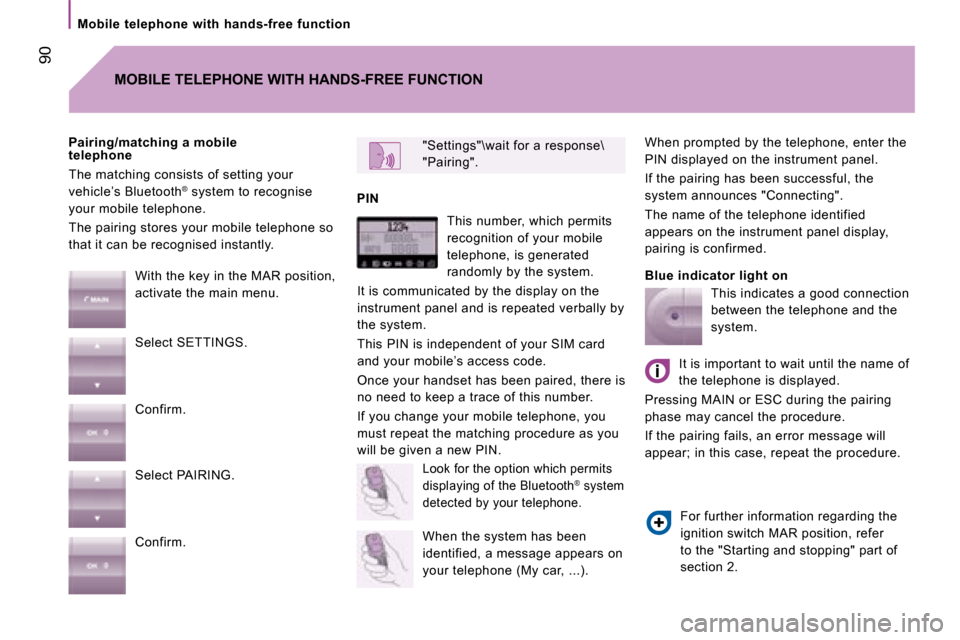
Mobile telephone with hands-free function When prompted by the telephone, enter the
PIN displayed on the instrument panel.
If the pairing has been successful, the
system announces "Connecting".
The name of the telephone identified
appears on the instrument panel display,
pairing is confirmed.
Blue indicator light on
"Settings"\wait for a response\
"Pairing".
PIN
Pairing/matching a mobile
telephone
The matching consists of setting your
vehicle’s Bluetooth
®
system to recognise
your mobile telephone.
The pairing stores your mobile telephone so
that it can be recognised instantly.
MOBILE TELEPHONE WITH HANDS-FREE FUNCTION
With the key in the MAR position,
activate the main menu.
Select SETTINGS.
Confirm.
Select PAIRING.
Confirm. This number, which permits
recognition of your mobile
telephone, is generated
randomly by the system.
It is communicated by the display on the
instrument panel and is repeated verbally by
the system.
This PIN is independent of your SIM card
and your mobile’s access code.
Once your handset has been paired, there is
no need to keep a trace of this number.
If you change your mobile telephone, you
must repeat the matching procedure as you
will be given a new PIN.
Look for the option which permits
displaying of the Bluetooth® system
detected by your telephone.
When the system has been
identified, a message appears on
your telephone (My car, ...). This indicates a good connection
between the telephone and the
system.
It is important to wait until the name of
the telephone is displayed.
Pressing MAIN or ESC during the pairing
phase may cancel the procedure.
If the pairing fails, an error message will
appear; in this case, repeat the procedure.
For further information regarding the
ignition switch MAR position, refer
to the "Starting and stopping" part of
section 2.
Page 93 of 163
94
Portable equipment audio player
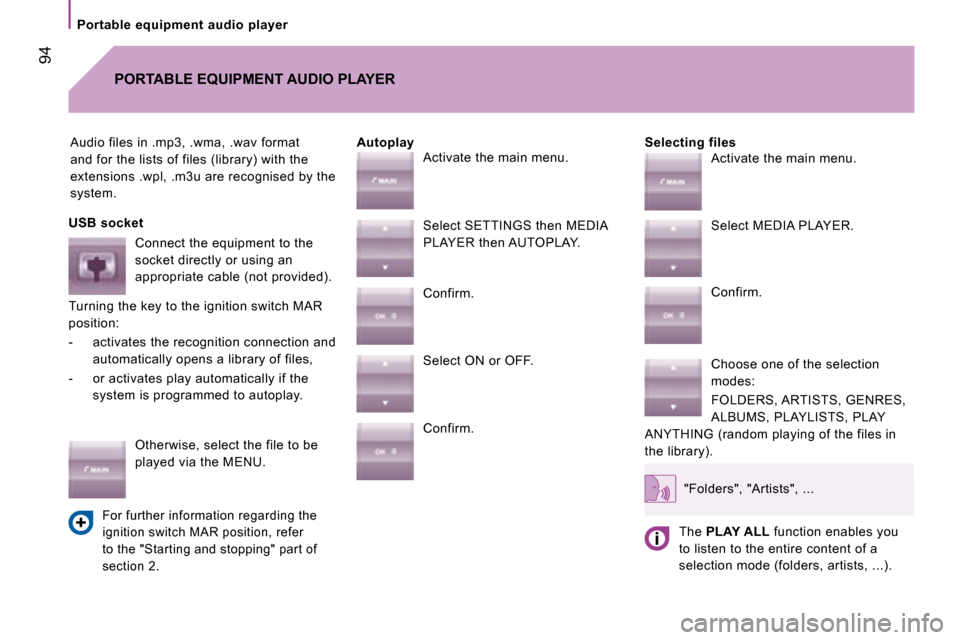
Audio files in .mp3, .wma, .wav format
and for the lists of files (library) with the
extensions .wpl, .m3u are recognised by the
system. Selecting files
PORTABLE EQUIPMENT AUDIO PLAYER
Autoplay
USB socket Connect the equipment to the
socket directly or using an
appropriate cable (not provided).
Turning the key to the ignition switch MAR
position:
- activates the recognition connection and automatically opens a library of files,
- or activates play automatically if the system is programmed to autoplay.
Otherwise, select the file to be
played via the MENU.
For further information regarding the
ignition switch MAR position, refer
to the "Starting and stopping" part of
section 2.
Activate the main menu.
Select SETTINGS then MEDIA
PLAYER then AUTOPLAY.
Confirm.
Select ON or OFF.
Confirm. Activate the main menu.
Select MEDIA PLAYER.
Confirm.
Choose one of the selection
modes:
FOLDERS, ARTISTS, GENRES,
ALBUMS, PLAYLISTS, PLAY
ANYTHING (random playing of the files in
the library).
"Folders", "Artists", ...
The PLAY ALL function enables you
to listen to the entire content of a
selection mode (folders, artists, ...).
Page 94 of 163
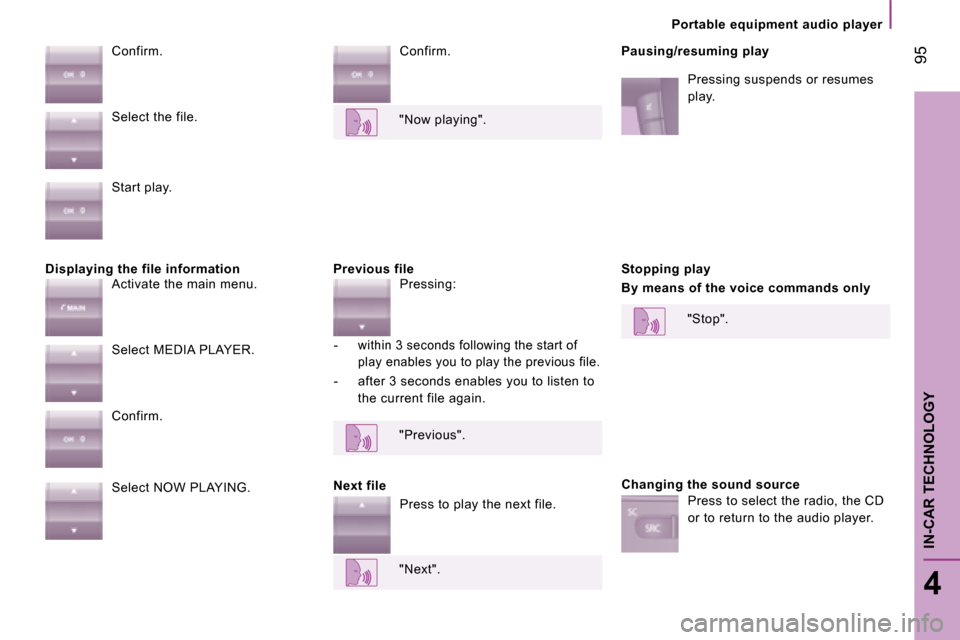
Displaying the file information Previous file Confirm.
Pausing/resuming play
Pressing suspends or resumes
play.
Confirm.
Next file Stopping play
By means of the voice commands only
Changing the sound source
Select the file.
Start play.
Activate the main menu.
Select MEDIA PLAYER.
Confirm.
Select NOW PLAYING. "Now playing".
Pressing:
- within 3 seconds following the start of play enables you to play the previous file.
- after 3 seconds enables you to listen to the current file again.
"Previous".
Press to play the next file.
"Next". "Stop".
Press to select the radio, the CD
or to return to the audio player.
95
4
IN-CAR TECHNOLOGY
Portable equipment audio player
Page 98 of 163
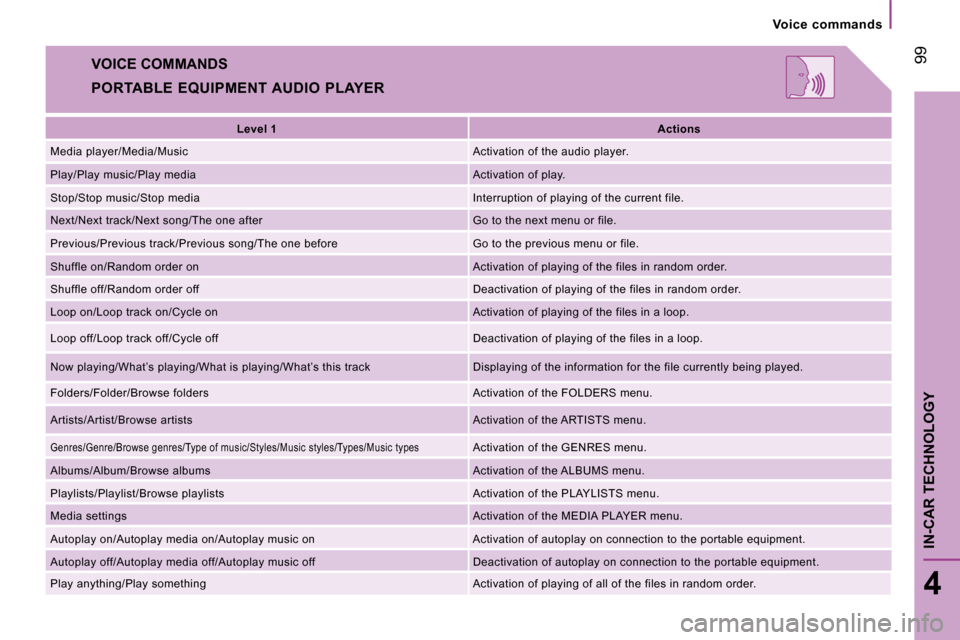
VOICE COMMANDS
PORTABLE EQUIPMENT AUDIO PLAYER
Level 1
Actions
Media player/Media/Music Activation of the audio player.
Play/Play music/Play media Activation of play.
Stop/Stop music/Stop media Interruption of playing of the current file.
Next/Next track/Next song/The one after Go to the next menu or file.
Previous/Previous track/Previous song/The one befo re Go to the previous menu or file.
Shuffle on/Random order on Activation of playing of the files in random order.
Shuffle off/Random order off Deactivation of playing of the files in random order.
Loop on/Loop track on/Cycle on Activation of playing of the files in a loop.
Loop off/Loop track off/Cycle off Deactivation of playing of the files in a loop.
Now playing/What’s playing/What is playing/What’s this track Displaying of the information for the fi le currently being played.
Folders/Folder/Browse folders Activation of the FOLDERS menu.
Artists/Artist/Browse artists Activation of the ARTISTS menu.
Genres/Genre/Browse genres/Type of music/Styles/Music styles/Types/Music types Activation of the GENRES menu.
Albums/Album/Browse albums Activation of the ALBUMS menu.
Playlists/Playlist/Browse playlists Activation of the PLAYLISTS menu.
Media settings Activation of the MEDIA PLAYER menu.
Autoplay on/Autoplay media on/Autoplay music on A ctivation of autoplay on connection to the portable equipment.
Autoplay off/Autoplay media off/Autoplay music off Deactivation of autoplay on connection to the por table equipment.
Play anything/Play something Activation of playing of all of the files in random order.
99
4
IN-CAR TECHNOLOGY
Voice commands
Page 99 of 163
Driving safety
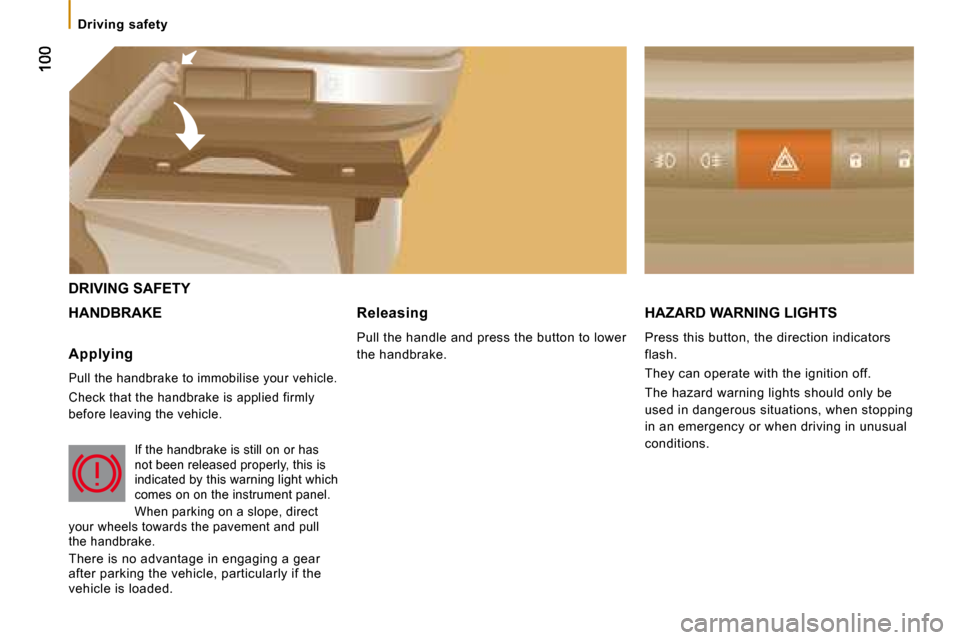
DRIVING SAFETY
HANDBRAKE HAZARD WARNING LIGHTS
Press this button, the direction indicators
flash.
They can operate with the ignition off.
The hazard warning lights should only be
used in dangerous situations, when stopping
in an emergency or when driving in unusual
conditions.
Applying
Pull the handbrake to immobilise your vehicle.
Check that the handbrake is applied firmly
before leaving the vehicle.
If the handbrake is still on or has
not been released properly, this is
indicated by this warning light which
comes on on the instrument panel.
When parking on a slope, direct
your wheels towards the pavement and pull
the handbrake.
There is no advantage in engaging a gear
after parking the vehicle, particularly if the
vehicle is loaded. Releasing
Pull the handle and press the button to lower
the handbrake.