Setting time Citroen JUMPER 2016 2.G User Guide
[x] Cancel search | Manufacturer: CITROEN, Model Year: 2016, Model line: JUMPER, Model: Citroen JUMPER 2016 2.GPages: 276, PDF Size: 8.93 MB
Page 185 of 276
183
jumper_en_Chap10a_Autoradio-Fiat-tactile-1_ed01-2015
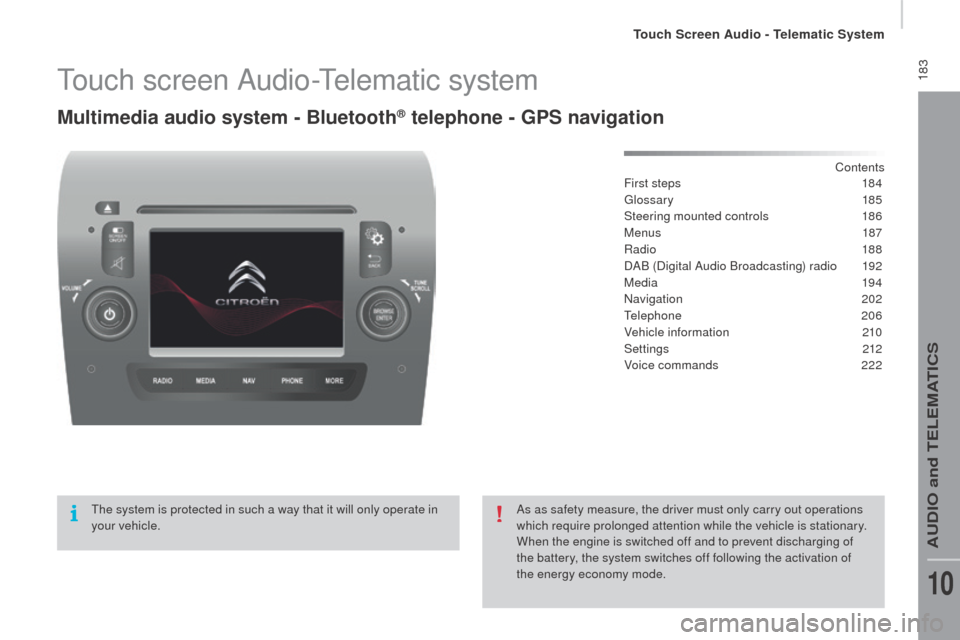
Touch screen Audio-Telematic system
Multimedia audio system - Bluetooth® telephone - GPS navigation
Contents
First steps
1 84
Glossary
185
Steering mounted controls
1
86
Menus
187
ra
dio
188
DAB (Digital Audio Broadcasting) radio
1
92
Media
19 4
na
vigation
2
02
Telephone
206
Vehicle information
2
10
Settings
212
Voice commands
2
22
The system is protected in such a way that it will only operate in
your vehicle. As as safety measure, the driver must only carry out operations
which require prolonged attention while the vehicle is stationary.
When the engine is switched off and to prevent discharging of
the battery, the system switches off following the activation of
the energy economy mode.
Touch Screen Audio - Telematic System
AUDio and TELEMATiCS
10
Page 193 of 276
191
jumper_en_Chap10a_Autoradio-Fiat-tactile-1_ed01-2015
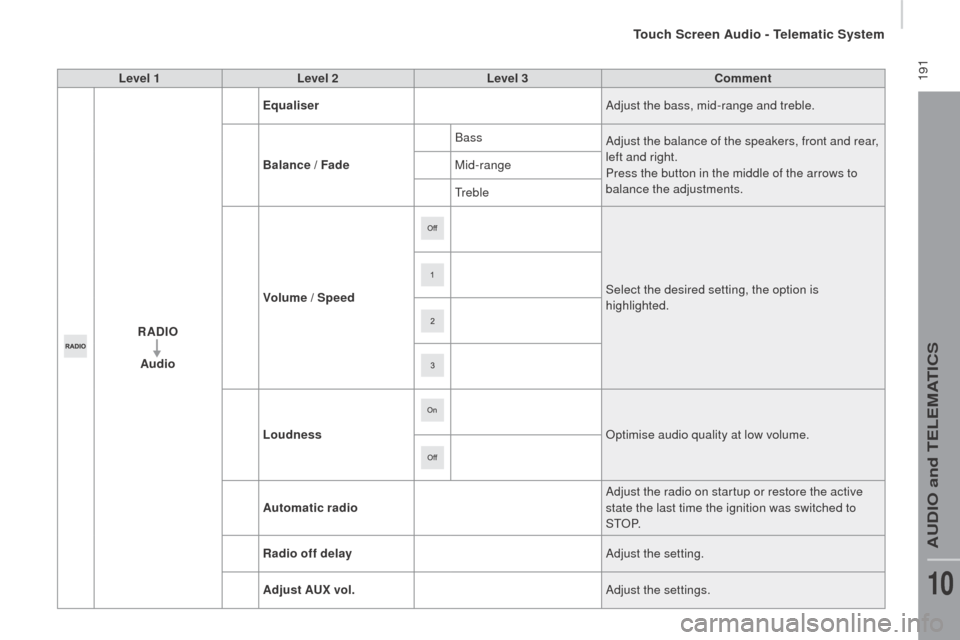
Level 1Level 2 Level 3co mment
rAd
IO
Audio Equaliser
Adjust the bass, mid-range and treble.
Balance / Fade Bass
Adjust the balance of the speakers, front and rear,
left and right.
Press the button in the middle of the arrows to
balance the adjustments.
Mid-range
Treble
Volume / Speed Select the desired setting, the option is
highlighted.
Loudness
op
timise audio quality at low volume.
Automatic radio Adjust the radio on startup or restore the active
state the last time the ignition was switched to
S T
oP.
ra
dio off delay Adjust the setting.
Adjust A
u
x vol. Adjust the settings.
Touch Screen Audio - Telematic System
AUDio and TELEMATiCS
10
Page 199 of 276
197
jumper_en_Chap10a_Autoradio-Fiat-tactile-1_ed01-2015
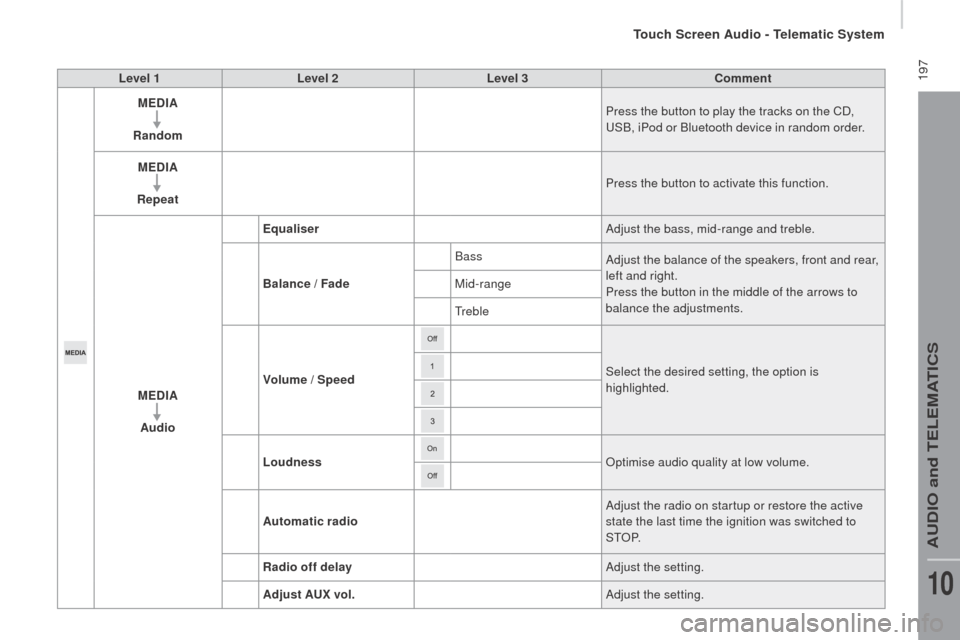
Level 1Level 2 Level 3co mment
ME d
I
A
ra
ndom Press the button to play the tracks on the CD,
USB, iPod or Bluetooth
device in random order.
ME
d
I
A
rep
eat Press the button to activate this function.
ME
d
I
A
Audio Equaliser
Adjust the bass, mid-range and treble.
Balance / Fade Bass
Adjust the balance of the speakers, front and rear,
left and right.
Press the button in the middle of the arrows to
balance the adjustments.
Mid-range
Treble
Volume / Speed Select the desired setting, the option is
highlighted.
Loudness
op
timise audio quality at low volume.
Automatic radio Adjust the radio on startup or restore the active
state the last time the ignition was switched to
S T
oP.
ra
dio off delay Adjust the setting.
Adjust A
u
x vol. Adjust the setting.
Touch Screen Audio - Telematic System
AUDio and TELEMATiCS
10
Page 201 of 276
199
jumper_en_Chap10a_Autoradio-Fiat-tactile-1_ed01-2015
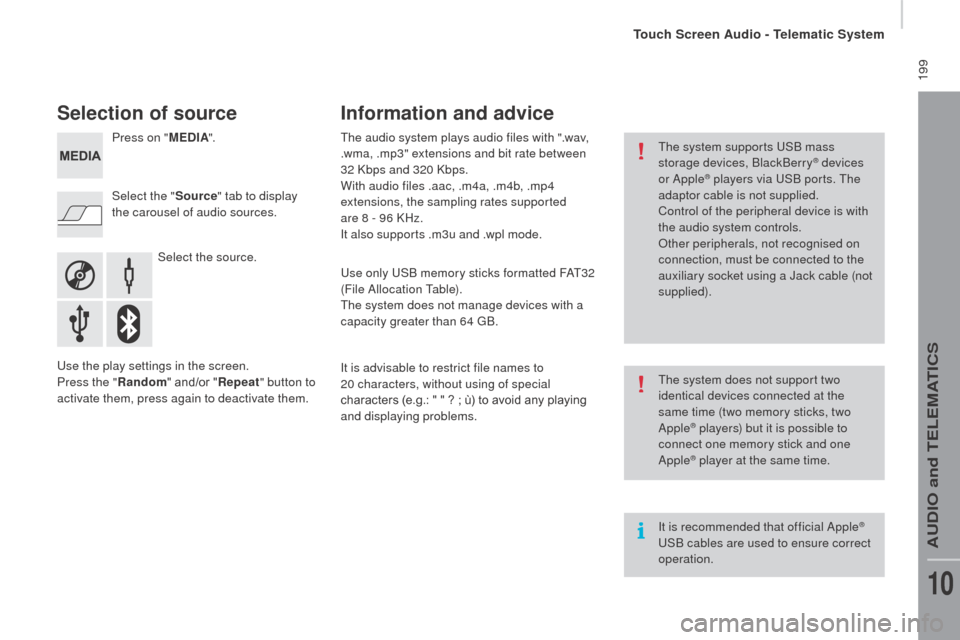
Selection of source
Select the source.
Select the "
Source" tab to display
the carousel of audio sources. Press on " MEd
I
A
".
Use the play settings in the screen.
Press the "
ra
ndom " and/or "
rep
eat" button to
activate them, press again to deactivate them. The audio system plays audio files with ".wav,
.wma, .mp3" extensions and bit rate between
32 Kbps and 320 Kbps.
With audio files .aac, .m4a, .m4b, .mp4
extensions, the sampling rates supported
are 8 - 96 KHz.
it a
lso supports .m3u and .wpl mode.
Use only USB memory sticks formatted FAT32
(File Allocation Table).
The system does not manage devices with a
capacity greater than 64 GB.
it i
s advisable to restrict file names to
20
characters, without using of special
characters (e.g.: " " ?
; ù) to avoid any playing
and displaying problems.
Information and advice
The system supports USB mass
storage devices, BlackBerry® devices
or Apple® players via USB ports. The
adaptor cable is not supplied.
Control of the peripheral device is with
the audio system controls.
ot
her peripherals, not recognised on
connection, must be connected to the
auxiliary socket using a Jack cable (not
supplied).
it i
s recommended that official Apple
®
USB cables are used to ensure correct
operation. The system does not support two
identical devices connected at the
same time (two memory sticks, two
Apple
® players) but it is possible to
c
onnect one memory stick and one
Apple
® player at the same time.
Touch Screen Audio - Telematic System
AUDio and TELEMATiCS
10
Page 207 of 276
205
jumper_en_Chap10a_Autoradio-Fiat-tactile-1_ed01-2015
Level 1Level 2 Level 3co mment
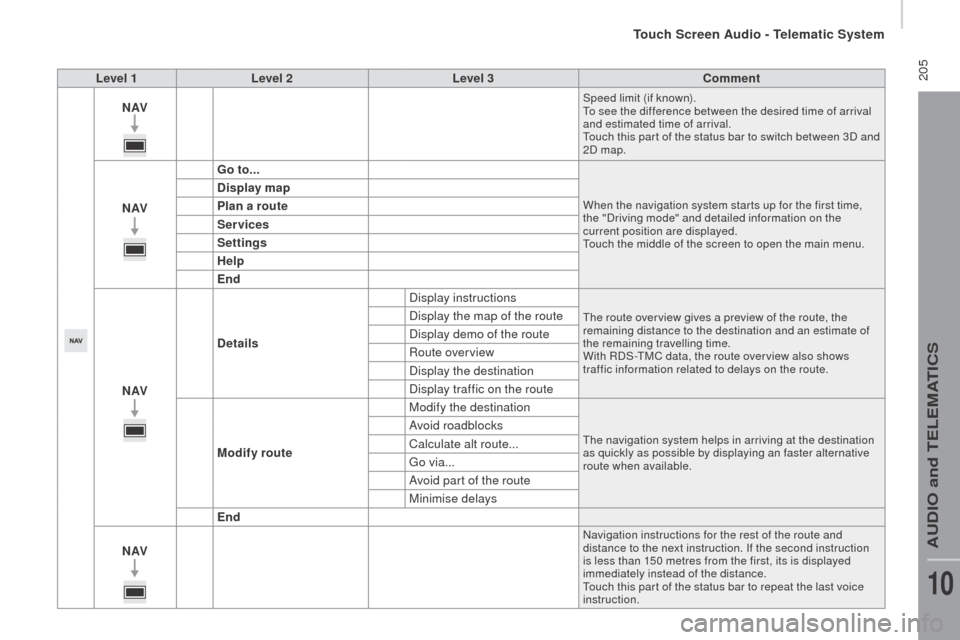
nAVSpeed limit (if known).
To see the difference between the desired time of arrival
and estimated time of arrival.
Touch this par t of the status bar to switch between 3D and
2D map.
nAVG o to...When the navigation system star ts up for the first time,
the "Driving mode" and detailed information on the
current position are displayed.
Touch the middle of the screen to open the main menu.
display map
P lan a route
Services
Settings
Help
End
nAV
de
tails Display instructions
The route over view gives a preview of the route, the
remaining distance to the destination and an estimate of
the remaining travelling time.
With
r
D
S-TMC data, the route over view also shows
traffic information related to delays on the route.Display the map of the route
Display demo of the route
ro
ute overview
Display the destination
Display traffic on the route
Modify route Modify the destination
The navigation system helps in arriving at the destination
as quickly as possible by displaying an faster alternative
route when available.Avoid roadblocks
Calculate alt route...
Go via...
Avoid part of the route
Minimise delays
End
nAV
navigation instructions for the rest of the route and
distance to the next instruction. if t he second instruction
is less than 150 metres from the first, its is displayed
immediately instead of the distance.
Touch this par t of the status bar to repeat the last voice
instruction.
Touch Screen Audio - Telematic System
AUDio and TELEMATiCS
10
Page 217 of 276
215
jumper_en_Chap10a_Autoradio-Fiat-tactile-1_ed01-2015
Level 1Level 2 Level 3co mment
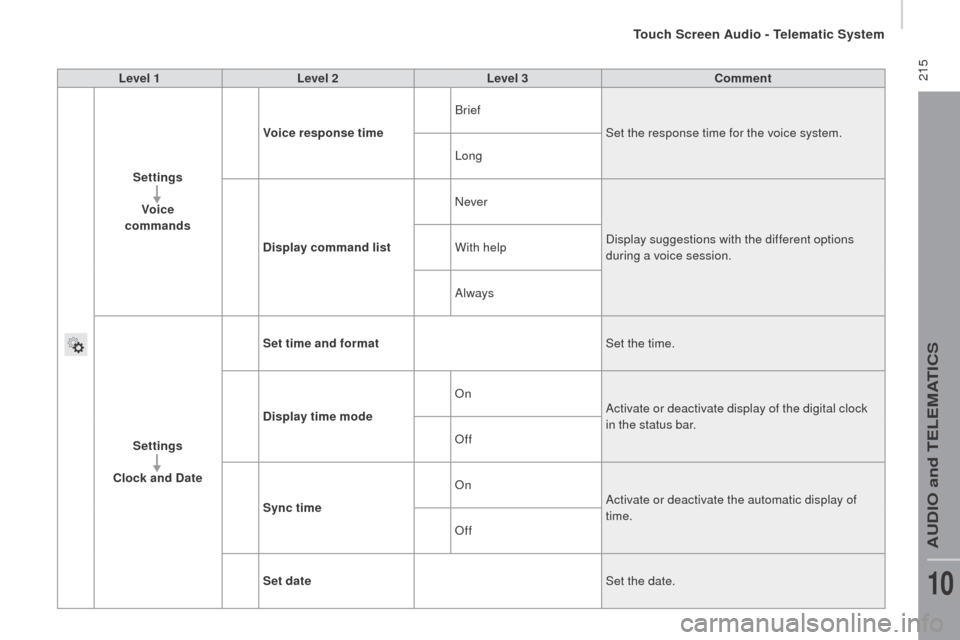
Settings Voice
commands Voice response time
Brief
Set the response time for the voice system.
Long
d
isplay command list
nev
erDisplay suggestions with the different options
during a voice session.
With help
Always
Settings
clo
ck and d
at
eSet time and format
Set the time.
d
isplay time mode
o
nActivate or deactivate display of the digital clock
in the status bar.
of
f
Sync time
o
nActivate or deactivate the automatic display of
time.
of
f
Set date Set the date.
Touch Screen Audio - Telematic System
AUDio and TELEMATiCS
10
Page 219 of 276

217
jumper_en_Chap10a_Autoradio-Fiat-tactile-1_ed01-2015
Level 1Level 2 Level 3co mment
Settings
Safety /Help
re
versing camera
o
nDisplay the reversing camera in reverse.
of
f
ca
mera delay
o
nMaintain the display in the screen of the image
from the reversing camera for a maximum of
10
seconds or up to 8 mph (18 km/h).
of
f
Settings Lamps
da
ytime lighting
o
nActivate or deactivate the automatic illumination
of headlamps when starting.
of
f
Settings
d
oors and
locking Autoclose
o
nActivate or deactivate the automatic locking of
doors when the vehicle is moving.
of
f
Touch Screen Audio - Telematic System
AUDio and TELEMATiCS
10
Page 221 of 276
219
jumper_en_Chap10a_Autoradio-Fiat-tactile-1_ed01-2015
Level 1Level 2 Level 3co mment
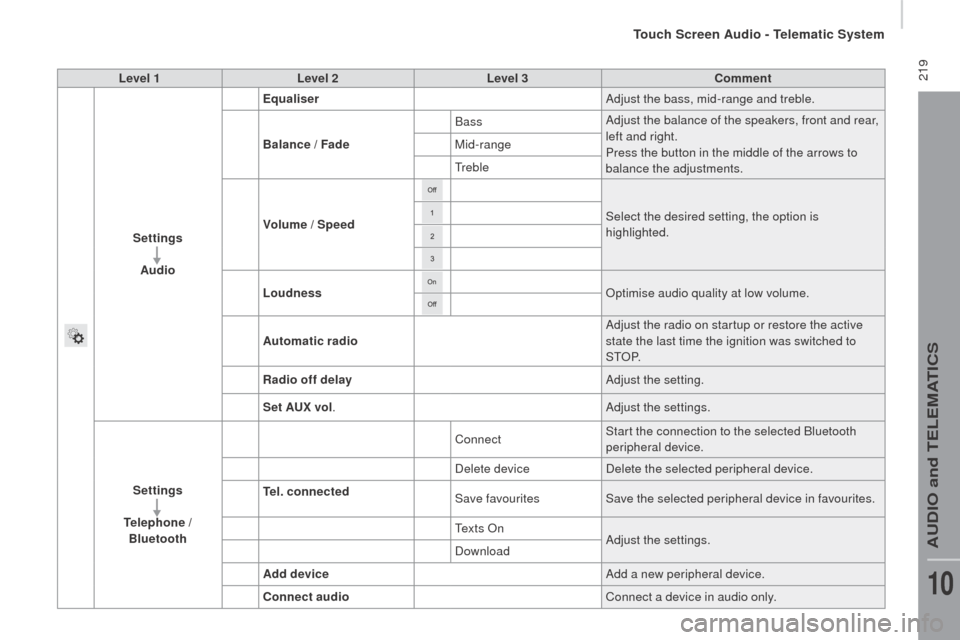
Settings Audio Equaliser
Adjust the bass, mid-range and treble.
Balance / Fade Bass
Adjust the balance of the speakers, front and rear,
left and right.
Press the button in the middle of the arrows to
balance the adjustments.
Mid-range
Treble
Volume / Speed Select the desired setting, the option is
highlighted.
Loudness
op
timise audio quality at low volume.
Automatic radio Adjust the radio on startup or restore the active
state the last time the ignition was switched to
S T
oP.
ra
dio off delay Adjust the setting.
Set A
u
x vol. Adjust the settings.
Settings
te
lephone /
Bluetooth
te
l. connected Connect
Start the connection to the selected Bluetooth
peripheral device.
Delete device Delete the selected peripheral device.
Save favourites Save the selected peripheral device in favourites.
Te x t s
o
nA
djust the settings.
Download
Add device Add a new peripheral device.
co
nnect audio Connect a device in audio only.
Touch Screen Audio - Telematic System
AUDio and TELEMATiCS
10
Page 233 of 276
231
jumper_en_Chap10b_Autoradio-Fiat-4_ed01-2015
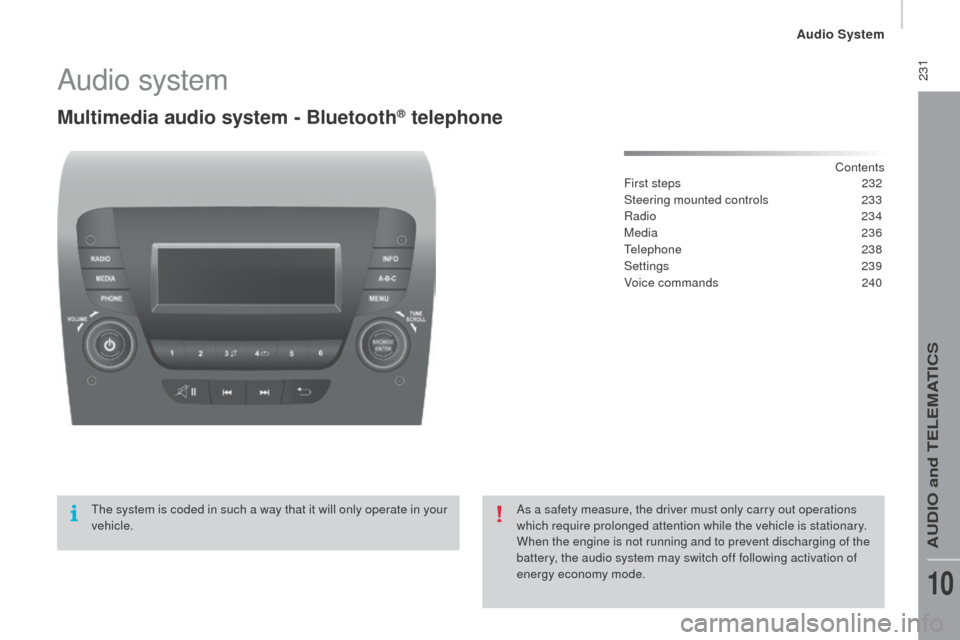
Audio system
Multimedia audio system - Bluetooth® telephone
Contents
First steps 2 32
Steering mounted controls
23
3
ra
dio
234
Media
236
Telephone
2
38
Settings
2
39
Voice commands
2
40
The system is coded in such a way that it will only operate in your
vehicle. As a safety measure, the driver must only carry out operations
which require prolonged attention while the vehicle is stationary.
When the engine is not running and to prevent discharging of the
battery, the audio system may switch off following activation of
energy economy mode.
Audio System
AUDio and TELEMATiCS
10