sensor Citroen JUMPER RHD 2016 2.G User Guide
[x] Cancel search | Manufacturer: CITROEN, Model Year: 2016, Model line: JUMPER RHD, Model: Citroen JUMPER RHD 2016 2.GPages: 292, PDF Size: 9.94 MB
Page 93 of 292
91From the "Safety / Help" sub menu, you can:
-
select "Parkview Camera", then
"Reversing camera" to activate or
deactivate its use (On, Off),
-
select "Parkview Camera", then "Camera
delay" to activate or deactivate the
maintaining of the display for 10 seconds
or up to 11 mph (18 km/h) (On, Off),
-
select "Passenger airbag" to activate or
deactivate its use (On, Off).
From the "Lighting" sub-menu, you can:
-
select "Day lamps" to activate or
deactivate their use (On, Off),
-
select "Headlamp sensor" to adjust its
sensitivity (1, 2, 3).
From the "Doors & locking", you can:
-
select "Autoclose" to activate or
deactivate its use (On, Off).
From the "Display" sub-menu, you can:
-
select "Languages" and choose one of
the languages listed above,
-
select "Units of measurement" to
choose the units for fuel consumption
(l/100
km, mpg), distance (miles, km)
and temperature (°C, °F),
-
select "Display
Trip B" to switch trip B
On or Off in the trip computer.
From the "Time and Date" sub-menu, you
can:
-
select "Adjust time and format" to set the
hour, minutes and seconds and choose
the format (24 h, 12 h with am or pm),
-
select "Adjust Date" to set the day
,
month and year.
To set the time manually, "Synch Time"
must be Off.
4
TECHNOLOGY ON BOARD
Vehicle configuration
Page 96 of 292
94
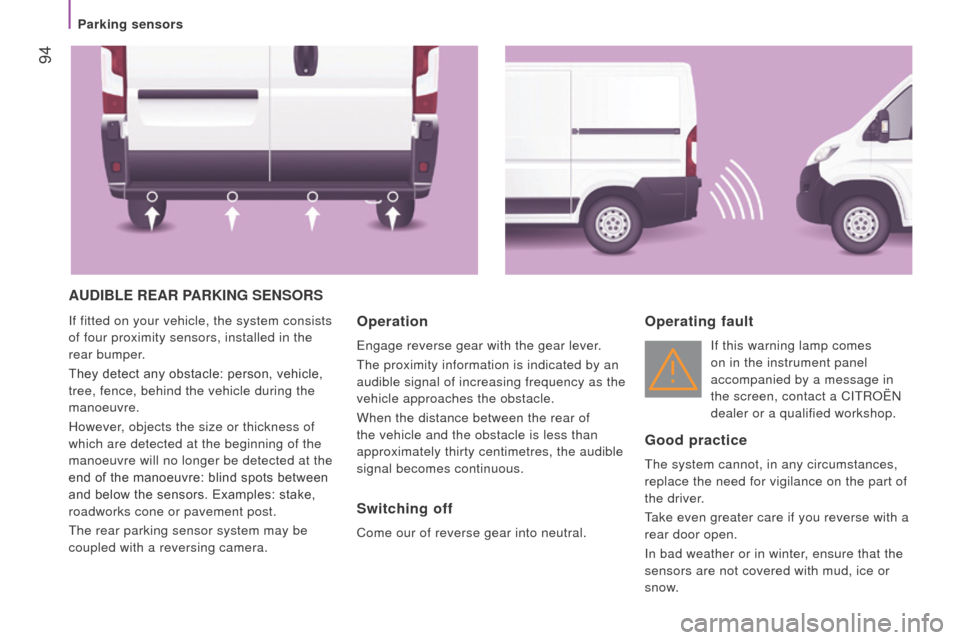
AudIBLE rEAr PArKInG SEnSOrS
If fitted on your vehicle, the system consists
of four proximity sensors, installed in the
rear bumper.
They detect any obstacle: person, vehicle,
tree, fence, behind the vehicle during the
manoeuvre.
However, objects the size or thickness of
which are detected at the beginning of the
manoeuvre will no longer be detected at the
end of the manoeuvre: blind spots between
and below the sensors. Examples: stake,
roadworks cone or pavement post.
The rear parking sensor system may be
coupled with a reversing camera.Operation
Engage reverse gear with the gear lever.
The proximity information is indicated by an
audible signal of increasing frequency as the
vehicle approaches the obstacle.
When the distance between the rear of
the vehicle and the obstacle is less than
approximately thirty centimetres, the audible
signal becomes continuous.
Switching off
Come our of reverse gear into neutral.
Operating fault
If this warning lamp comes
on in the instrument panel
accompanied by a message in
the screen, contact a CITROËN
dealer or a qualified workshop.
Good practice
The system cannot, in any circumstances,
replace the need for vigilance on the part of
the driver.
Take even greater care if you reverse with a
rear door open.
In bad weather or in winter, ensure that the
sensors are not covered with mud, ice or
snow.
Parking sensors
Page 97 of 292
95
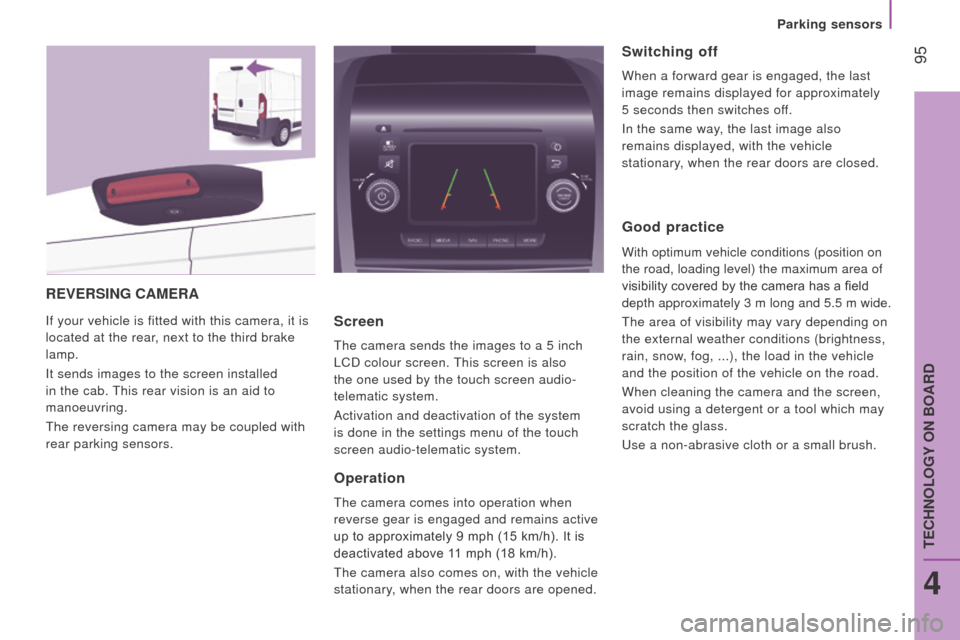
rEVErSInG cAMErA
If your vehicle is fitted with this camera, it is
located at the rear, next to the third brake
lamp.
It sends images to the screen installed
in the cab. This rear vision is an aid to
manoeuvring.
The reversing camera may be coupled with
rear parking sensors.Screen
The camera sends the images to a 5 inch
LCD colour screen. This screen is also
the one used by the touch screen audio-
telematic system.
Activation and deactivation of the system
is done in the settings menu of the touch
screen audio-telematic system.
Operation
The camera comes into operation when
reverse gear is engaged and remains active
up to approximately 9 mph (15 km/h). It is
deactivated above 11 mph (18 km/h).
The camera also comes on, with the vehicle
stationary, when the rear doors are opened.
Switching off
When a forward gear is engaged, the last
image remains displayed for approximately
5 seconds then switches off.
In the same way, the last image also
remains displayed, with the vehicle
stationary, when the rear doors are closed.
Good practice
With optimum vehicle conditions (position on
the road, loading level) the maximum area of
visibility covered by the camera has a field
depth approximately 3 m long and 5.5
m wide.
The area of visibility may vary depending on
the external weather conditions (brightness,
rain, snow, fog, ...), the load in the vehicle
and the position of the vehicle on the road.
When cleaning the camera and the screen,
avoid using a detergent or a tool which may
scratch the glass.
Use a non-abrasive cloth or a small brush.
4
TECHNOLOGY ON BOARD
Parking sensors
Page 124 of 292
122
driving advice
distribution of loads: distribute the load in
the trailer so that the heaviest objects are as
close as possible to the axle and the nose
weight is close to the maximum authorised
without, however, exceeding it.
c
ooling: towing a trailer on a slope
increases the coolant temperature.
As the fan is electrically controlled, its
cooling capacity is not dependent on the
engine speed.
On the contrary, use a high gear to lower the
engine speed and reduce your speed.
In all cases, pay attention to the coolant
temperature.
tyres:
check the tyre pressures of the
towing vehicle and of the trailer, observing
the recommended pressures.
Fitting a towbar
We recommend the use of genuine
CITROËN towbars and their harnesses,
which have been tested and approved from
the design stage of your vehicle and that
the fitting of this equipment is entrusted to a
CITROËN dealer.
These genuine towbars are compatible with
the operation of the rear parking sensors
and the reversing camera, if fitted to your
vehicle.
If this equipment is not fitted by a CITROËN
dealer, it must be fitted in line with the
manufacturer's instructions.
Good practice
If the coolant temperature
warning lamp comes on, stop the
vehicle and switch off the engine
as soon as possible.
Refer to the "Checks - Levels and
checks" section.
Brakes: towing increases the braking
distance. Drive at a moderate speed,
change down early and brake gradually. Side wind: sensitivity to side wind is
increased. Drive smoothly and at a
moderate speed. ABS: the system only controls the vehicle,
not the trailer.
r
ear parking sensors: the system is
deactivated while the vehicle is towing with a
genuine CITROËN towbar fitted.
Refer to the "Technical data -
Identification markings" section.
Transport solutions
Page 126 of 292
124
OtHEr AccESSOrIES
These accessories and parts, having been
tested and approved for reliability and
safety, are all adapted to your vehicle. A
wide range of recommended and genuine
parts is available.
"c omfort":
Air deflectors, insulated module, scented air
fresheners, reading lamp, cigarette lighter,
portable ashtray, non-slip seat cushions,
rear parking sensors...
"Protection":
Mats, mudflaps, vehicle protective cover,
seat covers, security grills for rear door
windows, twin rear security doors with
security locks, paint touch-up... "Security":
Anti-intrusion alarm, vehicle tracking system,
snow chains, non-slip covers, child seats,
first aid kit, warning triangle, high visibility
vest, fire extinguisher, pet safety belt, seat
belt cutter / glass hammer...
"Style":
Alloy wheels...
"Multimedia":
CD player, Wi-Fi on Board, semi-integral
satellite navigation system, hands-free kits,
driving aids, rear multimedia support, DVD
player, navigation mapping update, portable
satellite navigation systems, telephone
carrier, aftermarket digital radio, audio
systems...
"
t
ransport solutions":
T
owbars, towbar wiring harness with 7/13
connector, 7/7 connector, 13 connector,
interior protection kits, non-slip floor, wheel
arch protector, cab dividers, transverse roof
bars, roof racks, ladder for roof rack, roof
loading runners, loading plate for roof rack... Installation of radiocommunication
transmitters
You are advised to contact a CITROËN
dealer before installing accessory
radiocommunication transmitters with
external aerial on your vehicle.
CITROËN dealers can advise you on
the specifications (frequency waveband,
maximum output power, aerial position,
specific installation conditions) of the
transmitters which can be fitted, in
accordance with the Vehicle Electromagnetic
Compatibility Directive (2004/104/EC).
The fitting of electrical equipment or
accessories which are not listed by
CITROËN may result in the failure of your
vehicle's electronic system.
We request that you take note of this point
and recommend that you contact a dealer
to be shown the range of recommended
equipment and accessories.
Depending on the country in which the
vehicle is sold or operated, it may be
compulsory to have a high visibility vest,
warning triangle, replacement bulbs and
breathalyzer in the vehicle.
To prevent the mat from becoming
caught under the pedals:
-
ensure that the mat and its fixings are
positioned correctly,
-
never fit one mat on top of another
.
Equipment
Page 133 of 292
131
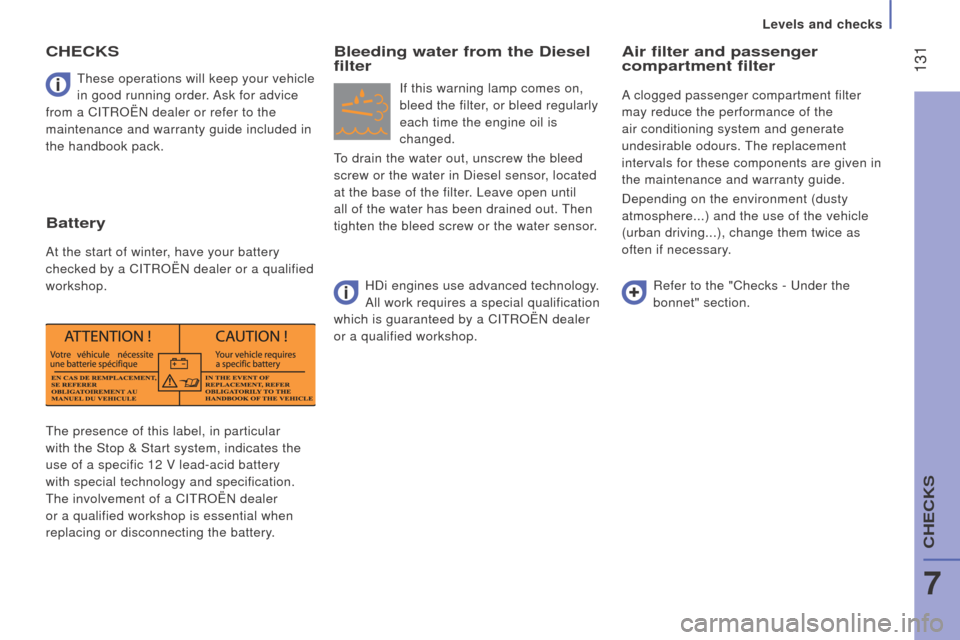
The presence of this label, in particular
with the Stop & Start system, indicates the
use of a specific 12 V lead-acid battery
with special technology and specification.
The involvement of a CITROËN dealer
or a qualified workshop is essential when
replacing or disconnecting the battery.These operations will keep your vehicle
in good running order. Ask for advice
from a CITROËN dealer or refer to the
maintenance and warranty guide included in
the handbook pack.
cHEcKS
Battery
At the start of winter, have your battery
checked by a CITROËN dealer or a qualified
workshop.
Bleeding water from the diesel
filter
If this warning lamp comes on,
bleed the filter, or bleed regularly
each time the engine oil is
changed.
To drain the water out, unscrew the bleed
screw or the water in Diesel sensor, located
at the base of the filter. Leave open until
all of the water has been drained out. Then
tighten the bleed screw or the water sensor.
Air filter and passenger
compartment filter
A clogged passenger compartment filter
may reduce the performance of the
air conditioning system and generate
undesirable odours. The replacement
intervals for these components are given in
the maintenance and warranty guide.
Depending on the environment (dusty
atmosphere...) and the use of the vehicle
(urban driving...), change them twice as
often if necessary.
Refer to the "Checks - Under the
bonnet" section.
HDi engines use advanced technology.
All work requires a special qualification
which is guaranteed by a CITROËN dealer
or a qualified workshop.
7
CHECKS
Levels and checks
Page 148 of 292
 Allocation
12 7.5Right-hand dipped headlamp
13 7.5Left-hand dipped headlamp
31 5Engine compartment control unit relay - Dashboard control unit relay (i\
gnition switch +)
32 7.5Cabin")
146FusesA (amps) Allocation
12 7.5Right-hand dipped headlamp
13 7.5Left-hand dipped headlamp
31 5Engine compartment control unit relay - Dashboard control unit relay (i\
gnition switch +)
32 7.5Cabin lighting (battery +)
33 7.5Battery check sensor on Stop & Start version (battery +)
34 7.5Minibus interior lighting - Hazard warning lamps
36 10Audio system - Air conditioning controls - Alarm - Tachograph - Battery cut-off control unit - Additional
heating programmer (battery +)
37 7.5Brake lamp switch - Third brake lamp - Instrument panel (ignition +)
38 20Central door locking (battery +)
42 5ABS control unit and sensor - ASR sensor - DSC sensor - Brake lamp switch
43 20Windscreen wiper motor (ignition switch +)
47 20Driver's electric window motor
48 20Passenger's electric window motor
49 5Parking sensors control unit - Audio system - Steering mounted controls - Centre and side switch panels\
-
Auxiliary switch panel - Battery cut-off control unit (ignition switch +)
50 7.5Airbags and pre-tensioners control unit
51 5Tachograph - Power steering control unit - Air conditioning - Reversing lamps - Water in Diesel sensor -
Air
flow sensor (ignition switch +)
53 7.5Instrument panel (battery +)
89 -Not used
90 7.5Left-hand main beam
91 7.5Right-hand main beam
92 7.5Left-hand front foglamp
93 7.5Right-hand front foglamp
Failed fuse
Page 285 of 292
7
4
TECHNOLOGY
on
BOARD
Vehicle configuration
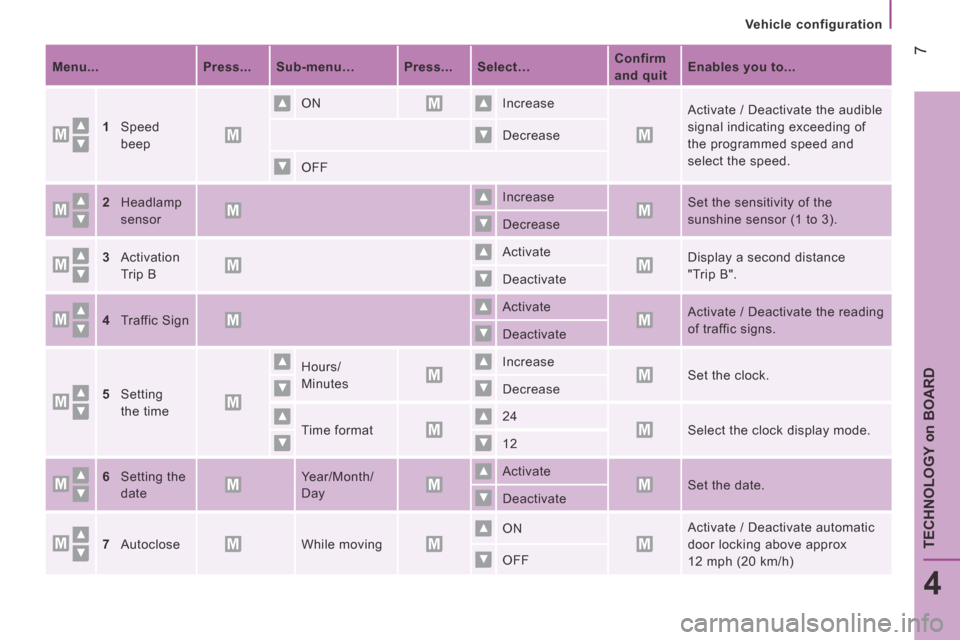
Menu... Press... Sub-menu… Press... Select… Confirm
and quit Enables you to...
1 Speed
beep
ON Increase Activate / Deactivate the audible
signal indicating exceeding of
the programmed speed and
select the speed.
Decrease
OFF
2 Headlamp
sensor
Increase Set the sensitivity of the
sunshine sensor (1 to 3). Decrease
3 Activation
Trip B
Activate Display a second distance
"Trip B". Deactivate
4 Traffic Sign Activate Activate / Deactivate the reading
of traffic signs. Deactivate
5 Setting
the time
Hours/
Minutes
Increase Set the clock. Decrease
Time format 24 Select the clock display mode. 12
6 Setting the
date
Year/Month/
Day
Activate Set the date. Deactivate
7 Autoclose While moving ON Activate / Deactivate automatic
door locking above approx
12 mph (20 km/h) OFF
Page 289 of 292
11
4
TECHNOLOGY
on
BOARD
Vehicle configuration
From the "Safety / Help" sub menu, you can:
- select "Parkview Camera", then
"Reversing camera" to activate or
deactivate its use (On, Off),
- select "Parkview Camera", then
"Camera delay" to activate or
deactivate the maintaining of the
display for 10 seconds or up to 11 mph
(18 km/h) (On, Off),
- select "Traffic Sign" to activate or
deactivate its use (On, Off),
- select "Passenger airbag" to activate or
deactivate its use (On, Off).
From the "Lighting" sub-menu, you can:
- select "Daytime running lamps" to
activate or deactivate their use (On, Off),
- select "Auto headlamp dipping" to
activate or deactivate its use (On, Off),
- select "Headlamp sensor" to adjust its
sensitivity (1, 2, 3).
From the "Doors & locking" sub-menu, you
can:
- select "Autoclose" to activate or
deactivate its use (On, Off).
From the "Display" sub-menu, you can:
- select "Languages" and choose one of
the languages listed above,
- select "Units of measurement" to
choose the units for fuel consumption
(l/100 km, mpg), distance (miles, km)
and temperature (°C, °F),
- select "Display Trip B" to switch trip B
On or Off in the trip computer.
From the "Time and Date" sub-menu, you
can:
- select "Adjust time and format" to set the
hour, minutes and seconds and choose
the format (24 h, 12 h with am or pm),
- select "Adjust Date" to set the day,
month and year.
To set the time manually, "Synch Time"
must be Off.