100 Citroen JUMPY 2011 2.G User Guide
[x] Cancel search | Manufacturer: CITROEN, Model Year: 2011, Model line: JUMPY, Model: Citroen JUMPY 2011 2.GPages: 260, PDF Size: 9.5 MB
Page 181 of 260
9.37
08TRIP COMPUTER
CONTROL SHORT-CUTS
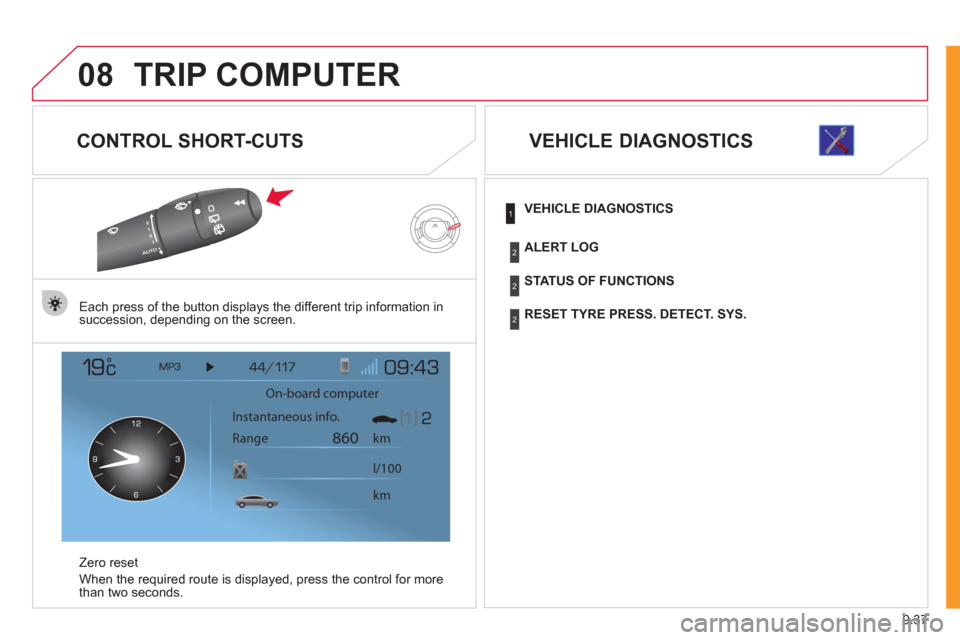
Each press of the button displays the different trip information in
succession, depending on the screen.
Z
ero reset
When the required route is displa
yed, press the control for more
than two seconds.
VEHICLE DIAGNOSTICS
On-board computer
km
860
km l/100 Instantaneous info.
Range
VEHICLE DIAGNOSTICS
STATUS OF FUNCTIONS
RESET TYRE PRESS. DETECT. SYS.
ALERT LOG
1
2
2
2
Page 209 of 260
9.65
06
3 2 1 1
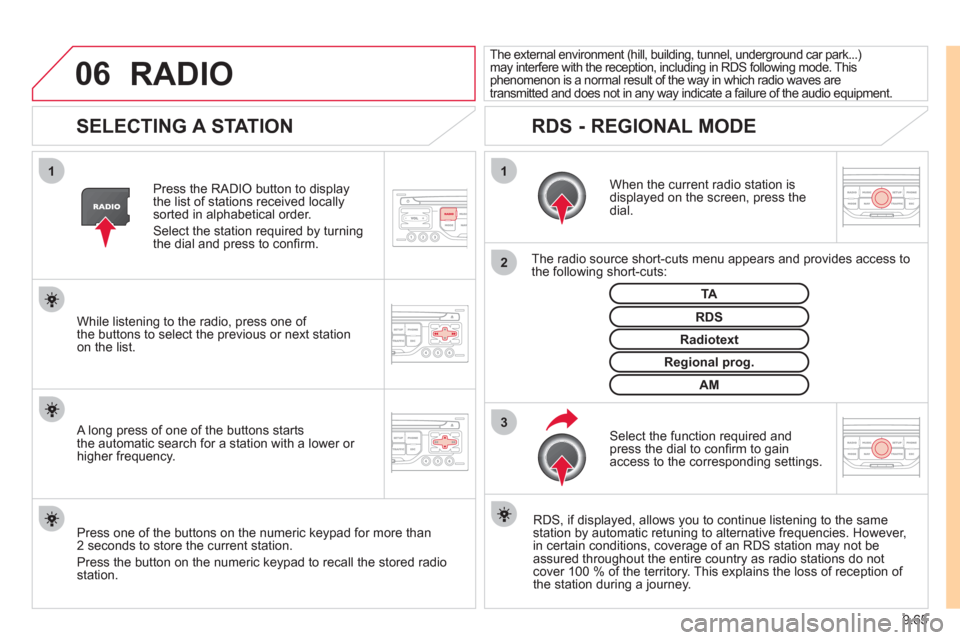
SELECTING A STATION
When the current radio station isdisplayed on the screen, press thedial.
The radio source short-cuts menu appears and provides access to
the following short-cuts:
Select the function re
quired and press the dial to confi rm to gain
access to the corresponding settings.
TA
RDS, if displayed, allows you to continue listening to the same station by automatic retuning to alternative frequencies. However,
in certain conditions, coverage of an RDS station may not be
assured throughout the entire country as radio stations do notcover 100 % of the territory. This explains the loss of reception of
the station during a journey. The external environment
(hill, building, tunnel, underground car park...) may interfere with the reception, including in RDS following mode. This phenomenon is a normal result of the way in which radio waves are
transmitted and does not in any way indicate a failure of the audio equipment.
RDS - REGIONAL MODE
Press the RADIO button to display
the list of stations received locally sorted in alphabetical order.
Select the station required by turningthe dial and press to confi rm.
Re
gional prog.
Radiotext
RDSWhile listening to the radio, press one of
the buttons to select the previous or next stationon the list.
Press one o
f the buttons on the numeric keypad for more than
2 seconds to store the current station.
Press the button on the numeric keypad to recall the stored radio
station.
AM
A long press of one of the buttons starts
the automatic search for a station with a lower or
higher frequency.
RADIO
Page 217 of 260
9.73
10
1
TRIP COMPUTER
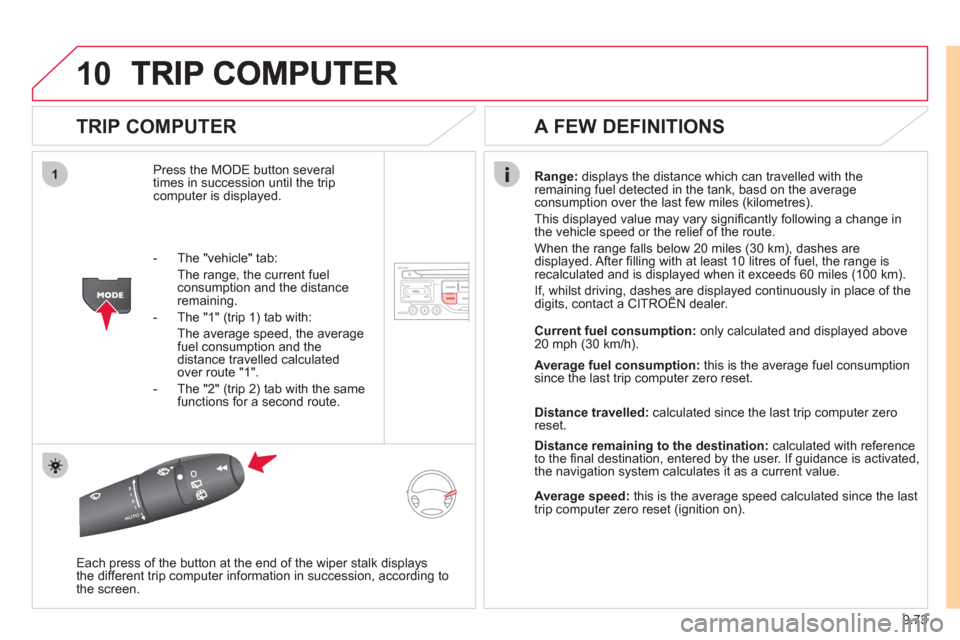
Press the MODE button several
times in succession until the tripcomputer is displayed.
Range: displays the distance which can travelled with the
remaining fuel detected in the tank, basd on the average consumption over the last few miles (kilometres).
This displa
yed value may vary signifi cantly following a change in
the vehicle speed or the relief of the route.
When the range
falls below 20 miles (30 km), dashes are
displayed. After fi lling with at least 10 litres of fuel, the range is
recalculated and is displayed when it exceeds 60 miles (100 km).
If, whilst driving, dashes are displayed continuously in place of thedigits, contact a CITROÀN dealer. ,g, p
Each press of the button at the end of the wiper stalk displays
the different trip computer information in succession, according to
the screen.
A FEW DEFINITIONS
- The "vehicle" tab:
The ran
ge, the current fuel consumption and the distance
remaining.
- The "1"
(trip 1) tab with:
The average speed, the average fuel consumption and thedistance travelled calculated over route "1".
- The "2"
(trip 2) tab with the same
functions for a second route.Current fuel consum
ption:only calculated and displayed above
20 mph (30 km/h).
Average fuel consumption: this is the average fuel consumption
since the last trip computer zero reset.
Distance travelled: calculated since the last trip computer zero
reset.
Distance remaining to the destination:calculated with referenceto the fi nal destination, entered by the user. If guidance is activated,
the navigation system calculates it as a current value.
Average speed:this is the average speed calculated since the last
trip computer zero reset (ignition on).
Page 218 of 260

9.74
11
RADIO
SCREEN MENU MAP
"Traffic" Menu
Messages on route
Onl
y warnings on route
All warning messages
All messages
Within2 miles (3 km)
Geo. Filter
Within
3 miles (5 km)
Within6 miles (10 km)
Within30 miles (50 km)
Within 60 miles (100 km)
"Music" Menu
Select music
Sound settin
gs
Balance/Fade
r
Bass/Treble
Linear
Equalizer
Classic
Jazz
Rock/Po
p
Techno
Vocal
Loudness
S
peed dependent volume
Reset sound settings
"Radio" Menu
Waveband
A
M
Linear F
M
Manual tune
Sound settin
gs
Balance
/Fader
Bass
/Treble
Equalizer
MAIN FUNCTION
OPTION A
option A1
option A2
OPTION B...
1
2
3
1
2
4
1
2
3
4
3
3
3
3
2
2
2
2
4
4
4
4
4
3
3
3
3
3
2
3
2
2
3
3
3
3
1
2
3
2
3
Page 221 of 260
9.77
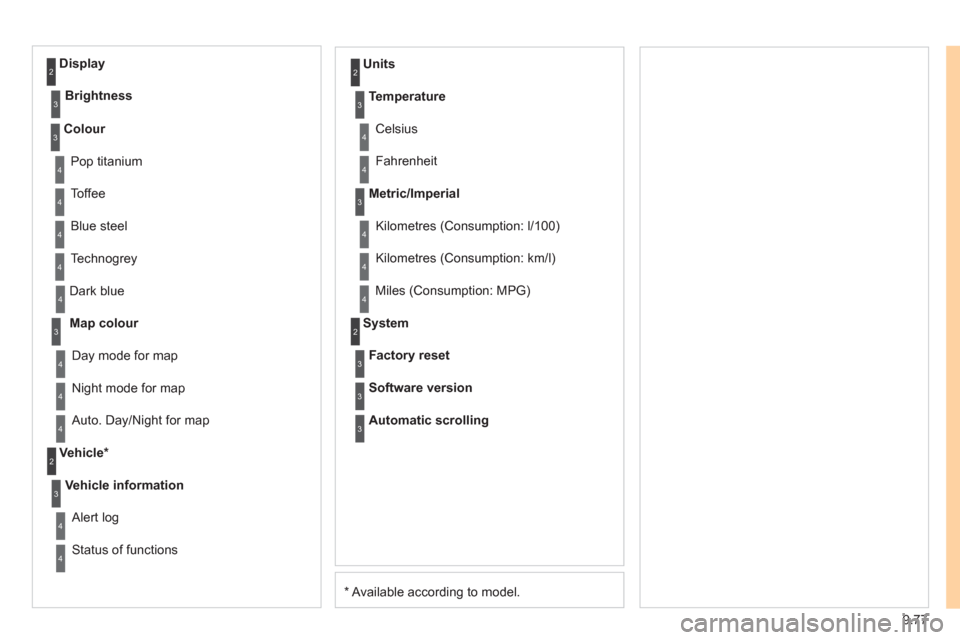
*
Available according to model. D
ark blue
Map colour
Ni
ght mode for map
Units
Da
y mode for map
Vehicle *
Vehicle information
Alert log
Status of functions
Temperature
Celsius
F
ahrenheit
Metric/Imperial
Kilometres (Consumption: l/100)
Kilometres
(Consumption: km/l)
Miles
(Consumption: MPG)
System
Auto. Day/Night for map Factor
y reset
Software version
Automatic scrolling
3
4
4
2
4
3
4
4
2
3
4
4
3
4
4
4
2
4
3
3
3
Colour
Pop titanium
T
offee
Bl
ue steel
Techno
grey
3
4
4
4
4
Display
Brightness
2
3
Page 231 of 260
9.87
04
1
2
3
4
1
2
3
4
AUDIO
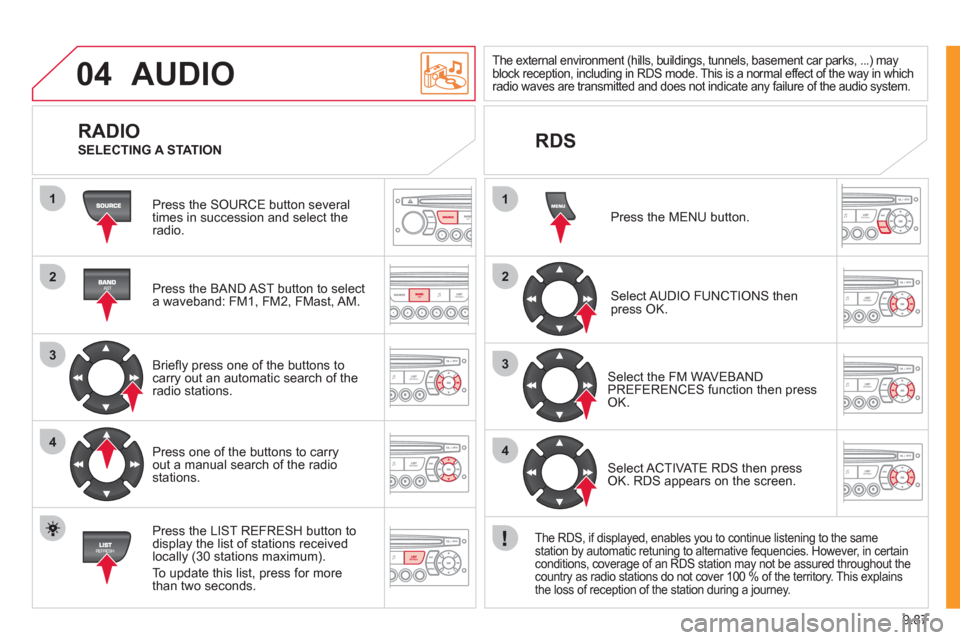
Press the SOURCE button several
times in succession and select theradio.
Press the BAND A
ST button to select
a waveband: FM1, FM2, FMast, AM.
Briefl
y press one of the buttons tocarry out an automatic search of theradio stations.
Press one o
f the buttons to carry out a manual search of the radio stations.
Press the LI
ST REFRESH button to
display the list of stations received
locally (30 stations maximum).
To update this list, press for more
t
han two seconds.
The external environment (hills, buildings, tunnels, basement car parks, ...) may
block reception, including in RDS mode. This is a normal effect of the way in whichradio waves are transmitted and does not indicate any failure of the audio system.
RDS
RADIO
SELECTING A STATION
Pr
ess the MENU button.
Select AUDIO FUNCTIONS thenpress OK.
Select the FM WAVEBANDPREFERENCES function then pressOK.
Select ACTIVATE RDS then pressOK. RDS appears on the screen.
The RDS, if displayed, enables you to continue listening to the same station by automatic retuning to alternative fequencies. However, in certain conditions, coverage of an RDS station may not be assured throughout the country as radio stations do not cover 100 % of the territory. This explains
the loss of reception of the station during a journey.
Page 241 of 260
9.97
11
08
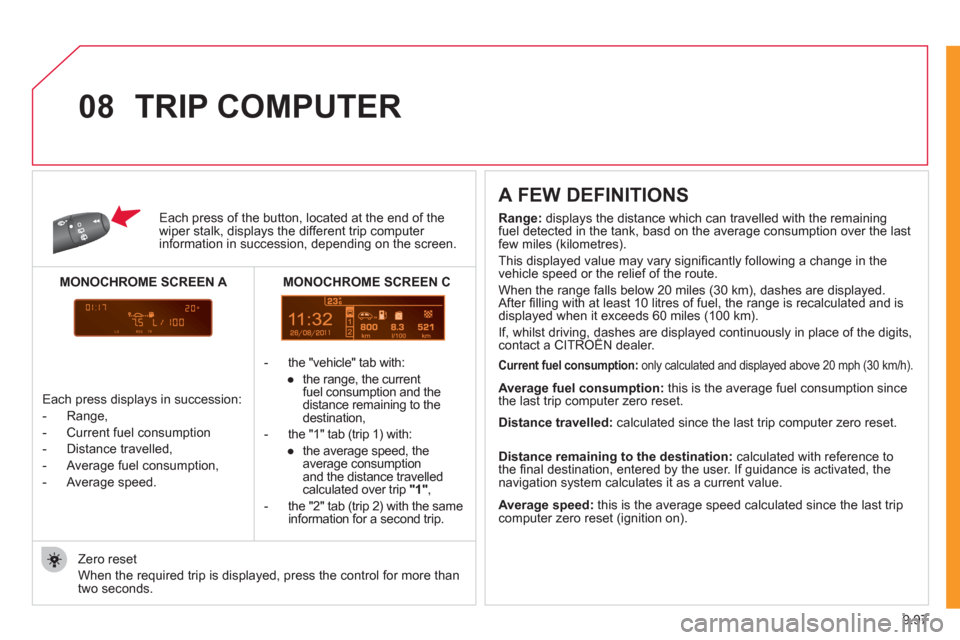
Each press of the button, located at the end of the wiper stalk, displays the different trip computer information in succession, depending on the screen.
- th
e "vehicle" tab with:
●
the ran
ge, the current
fuel consumption and the
distance remaining to thedestination,
- the "1" tab
(trip 1) with:
●
the avera
ge speed, the
average consumptionand the distance travelled calculated over trip "1" ,
- the "2" tab
(trip 2) with the same
information for a second trip.
A FEW DEFINITIONS
Zero reset
When the required trip is displa
yed, press the control for more than
two seconds.
TRIP COMPUTER
Range:
displays the distance which can travelled with the remaining fuel detected in the tank, basd on the average consumption over the lastfew miles (kilometres).
This displayed value may vary signi
fi cantly following a change in the
vehicle speed or the relief of the route.
When the ran
ge falls below 20 miles (30 km), dashes are displayed.
After fi lling with at least 10 litres of fuel, the range is recalculated and is
displayed when it exceeds 60 miles (100 km).
If, whilst driving, dashes are displayed continuously in place of the digits,contact a CITROËN dealer. ,g,
Current fuel consumption:only calculated and displayed above 20 mph (30 km/h).
Average fuel consumption: this is the average fuel consumption since
the last trip computer zero reset.
Average speed: this is the average speed calculated since the last trip computer zero reset (ignition on).
Distance travelled:
calculated since the last trip computer zero reset.
Distance remaining to the destination:calculated with reference to
the fi nal destination, entered by the user. If guidance is activated, the
navigation system calculates it as a current value.
Each press displays in succession:
-
Range,
-
Current fuel consumption
- Distance travelled,
- Avera
ge fuel consumption,
- Avera
ge speed.
MONOCHROME SCREEN C
MONOCHROME SCREEN A
Page 242 of 260
9.98
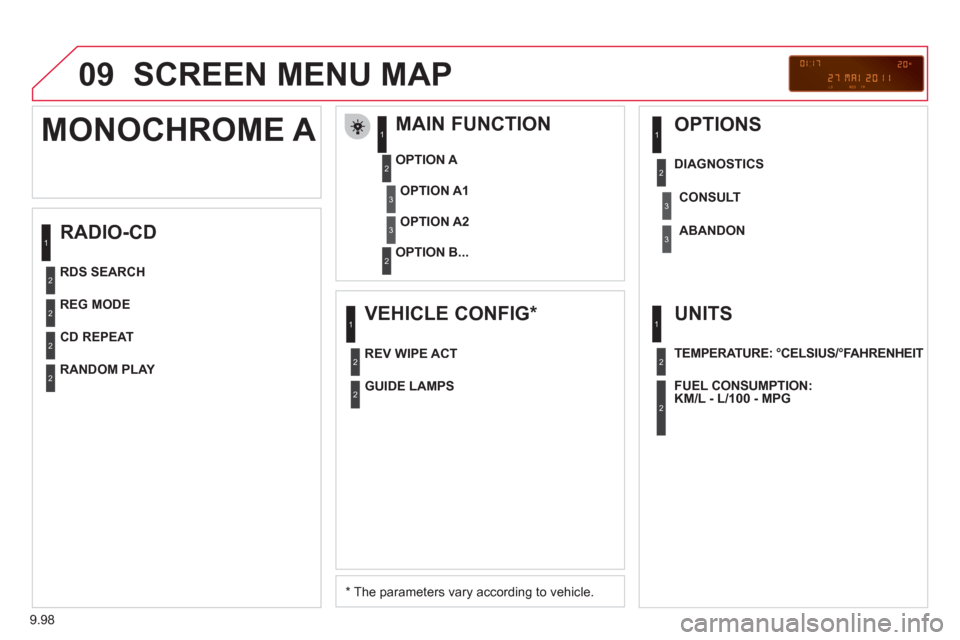
09 SCREEN MENU MAP
RADIO-CD
MAIN FUNCTION
*
The parameters vary according to vehicle.
OPTION
A
OPTION B...
MONOCHROME A
OPTION A1
OPTION A2
REG MODE
CD REPEAT
RANDOM PLAY
VEHICLE CONFIG *
REV WIPE ACT
OPTIONS
GUIDE LAMPS
DIAGNO
STICS
RDS SEARCHCONSUL
T
ABANDON
UNITS
TEMPERATURE: °CELSIUS/°FAHRENHEIT
FUEL CONSUMPTION:
KM/L - L/100 - MPG
1
2
3
31
2
2
2
2
1
2
3
2
3
1
2
2
1
2
2
Page 244 of 260
9.100
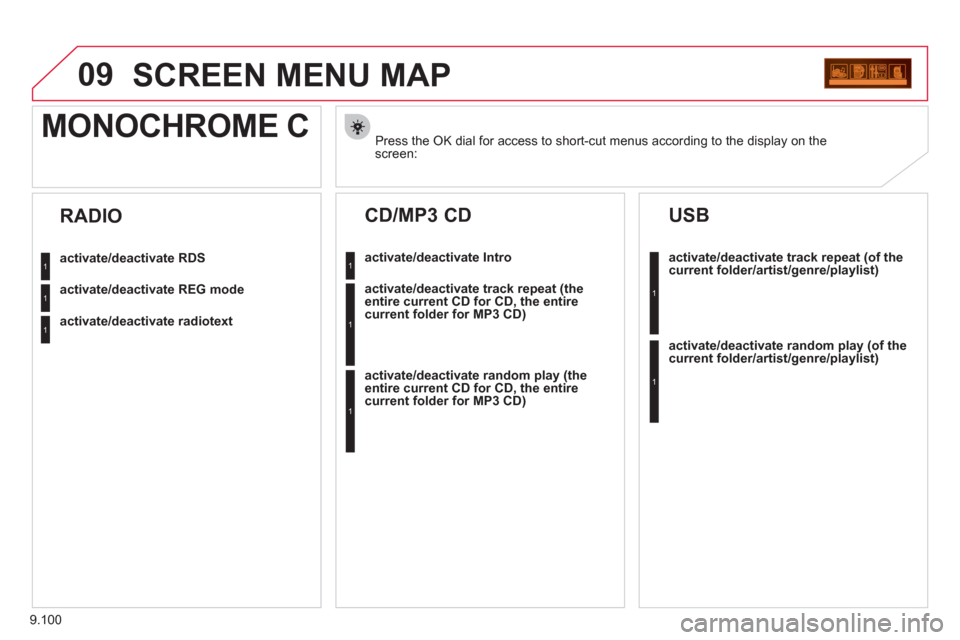
09SCREEN MENU MAP
Press the OK dial for access to short-cut menus according to the display on thescreen:
MONOCHROME C
activate/deactivate RDS
activate/deactivate REG mode
activate/deactivate radiotext
RADIO
activate/deactivate Intro
CD/MP3 CD
activate/deactivate track repeat (the
entire current CD for CD, the entire
current folder for MP3 CD)
activate/deactivate random play (the
entire current CD for CD, the entire
current folder for MP3 CD)
activate/deactivate track repeat (of the current folder/artist/genre/playlist)
USB
activate/deactivate random play(of thecurrent folder/artist/genre/playlist)
1
1
1
1
1
1
1
1
Page 245 of 260
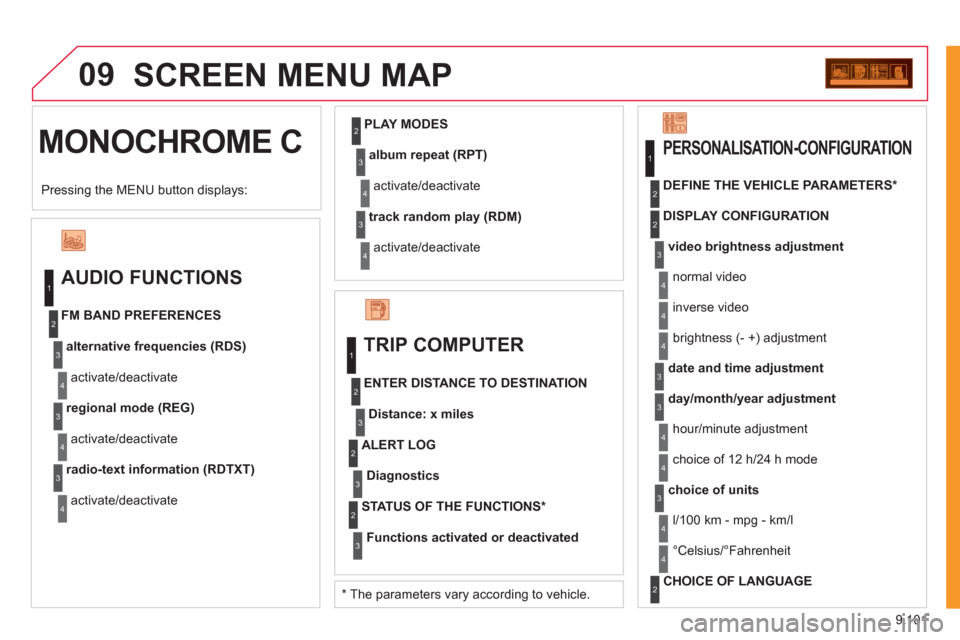
9.101
09
MONOCHROME CSCREEN MENU MA
P
AUDIO FUNCTIONS
alternative frequencies (RDS)
activate/deactivate FM BAND PREFERENCES
regional mode (REG)
activate/deactivate
radio-text information (RDTXT)
activate/deactivate
1
2
3
4
3
4
3
4
PLAY MODES
album repeat (RPT)
activate/deactivate
track random play (RDM)
activate/deactivate
2
3
4
3
4
TRIP COMPUTER
Distance: x miles
ENTER DISTANCE TO DESTINATION
Diagnostic s
ALERT LOG
Functions activated or deactivated
STATUS OF THE FUNCTIONS *
1
2
3
3
2
3
2
video brightness adjustment
DISPLAY CONFIGURATION DEFINE THE VEHICLE PARAMETERS *
PERSONALISATION-CONFIGURATION
normal video
inverse video
brightness (- +) adjustment
date and time adjustmen
t
day/month/year adjustment
hour/minute adjustment
choice of 12 h/24 h mode
choice of units
l/100 km - mp
g - km/l
°
Celsius/°Fahrenheit
CHOICE OF LANGUAGE
1
2
4
3
2
4
4
3
3
4
4
2
3
4
4
Pressing the MENU button displays:
*
The parameters vary according to vehicle.