100 Citroen JUMPY 2011 2.G Owner's Manual
[x] Cancel search | Manufacturer: CITROEN, Model Year: 2011, Model line: JUMPY, Model: Citroen JUMPY 2011 2.GPages: 260, PDF Size: 9.5 MB
Page 5 of 260
CONTENT
S
Contents
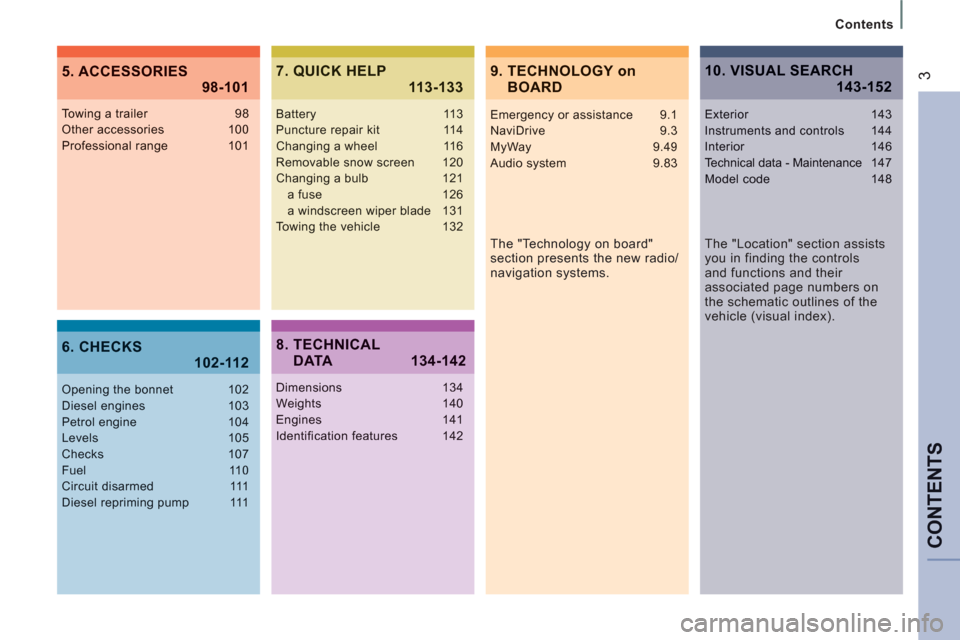
39. TECHNOLOGY onBOARD 5. ACCESSORIES
98-101
6. CHECKS 102-112
7. QUICK HELP 113-133
The "Technology on board"
section presents the new radio/
navigation systems.
Towing a trailer 98Other accessories 100Professional range 101
Opening the bonnet 102Diesel engines 103Petrol engine 104Levels 105Checks 107Fuel 110Circuit disarmed 111Diesel repriming pump 111
Battery 113Puncture repair kit 114Changing a wheel 116Removable snow screen 120Changing a bulb 121a fuse 126a windscreen wiper blade 131
Towing the vehicle 132
8. TECHNICAL DATA 134-142
Dimensions 134Weights 140Engines 141Identification features 142
10. VISUAL SEARCH 143-152
Emergency or assistance 9.1NaviDrive 9.3MyWay 9.49
Audio system 9.83
The "Location" section assists
you in finding the controls
and functions and their
associated page numbers on
the schematic outlines of the
vehicle (visual index).
Exterior 143Instruments and controls 144Interior 146Technical data - Maintenance147Model code 148
Page 17 of 260
5
333
15
Interior
FAMILIARISATIO
N
1
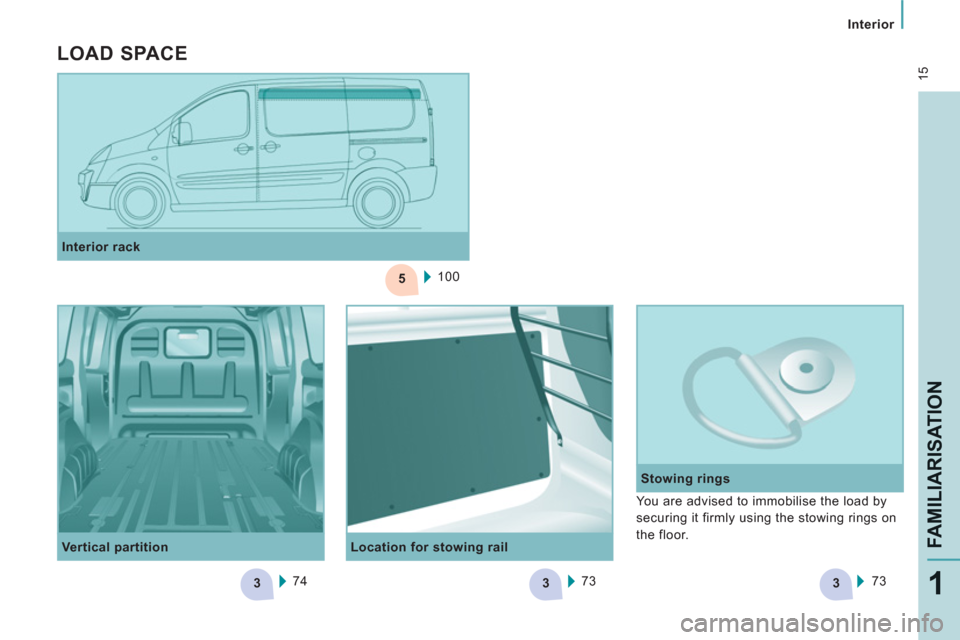
Location for stowing rail
Stowing rings
Interior rack
100
Vertical partition
74
73
73
You are advised to immobilise the load by
securing it firmly using the stowing rings on
the floor.
LOAD SPACE
Page 42 of 260

40
Gearboxes and steering wheel
Manual mode
Manual sequential gear changing.
- Select gear lever position M
,
- push the gear lever towards the + sign
to change up, from 1 through to 6,
- conversely, push the gear lever towards
the - sign to change down.
You can change from position D
(automatic mode) to position M
(manual mode) at any time.
In manual mode, it is only possible to
change from one gear to another if the
vehicle speed and engine speed permit.
If they do not, the vehicle will operate
temporarily in automatic mode.
When the vehicle is stationary or moving
very slowly, the gearbox automatically
selects first gear.
Good practice
Never select position N
when the vehicle is
moving.
Never select positions P
or R
unless the
vehicle is stationary.
Never change between positions to optimise
braking on a slippery surface.
There is a risk of damage to the gearbox:
- if you press the accelerator and brake
pedals at the same time,
- if you force the gear lever from
position P
to another position in the
event of a battery failure.
When the engine is at idle, brakes not
applied, if position R
, D
or M
is selected the
vehicle moves even without the accelerator
being pressed.
For this reason, do not leave children
unsupervised inside the vehicle, with the
engine running
.
Operating fault
Any operating fault is indicated by an
audible signal, accompanied by the
message "Automatic gear fault"
in the
screen.
In this situation the gearbox operates in
downgrade mode (locked in 3rd gear). You
may feel a substantial knock when changing
from P
to R
and from N
to R
(this will not
cause any damage to the gearbox).
Do not exceed 60 mph (100 km/h), keeping
within the limit of local speed restrictions.
Contact a CITROËN dealer or a qualified
workshop as soon as possible.
Page 51 of 260

49
Steering mounted controls
EASE OF USE
and COMFOR
T
3
Switching the function off
- Place the dial in position 0
or switch off
the ignition to switch everything off.
Good practice
When changing the programmed reference
speed by means of a maintained press,
pay attention as the speed can increase or
decrease rapidly.
Do not use the cruise control on slippery
roads or in heavy traffic.
In the event of a steep slope, the cruise
control cannot prevent the vehicle from
exceeding the programmed speed.
In any event, the cruise control cannot
replace the need to observe the speed limits,
nor can it replace the need for vigilance and
responsibility on the part of the driver.
It is advisable to leave your feet near the
pedals.
To avoid any jamming under the pedals:
- ensure that the mat and its fixings on the
floor are positioned correctly,
- never place one mat on top of another.
Cancelling the programmed
reference speed
When the vehicle becomes stationary, after
switching off the ignition, the system no
longer memorises a speed. Using the accelerator:
- exceed the memorised speed until the
speed required is reached,
- press the Set +
or Set -
button.
To memorise a speed lower than the
previous one:
- press the Set -
button.
A brief press decreases the speed by 1 mph
(km/h).
A maintained press decreases the speed in
steps of 5 mph (km/h).
Operating fault
The programmed speed is cleared then
replaced by three dashes. Contact a
CITROËN dealer or a qualified workshop to
have the system checked.
FIXED SPEED LIMITER
If your vehicle is fi tted with this function,
the speed of your vehicle can be limited to
a fi xed speed of approximately 56/60 mph
(90/100 km/h) or 68/80 mph (110/130 km/h).
The fi xed maximum speed cannot be
changed.
The fixed speed limiter is not a function
of the cruise control type. It cannot be
activated or deactivated by the driver while
driving.
Page 102 of 260

100
Equipment
OTHER ACCESSORIES
For any work on your vehicle, use
a qualified workshop that has the
technical information, competence and
equipment required, which a CITROËN
dealer is able to provide.
ROOF BARS
Maximum load: 100 kilograms.
Accessory not available on the
H2 version.
ROOF RACK
To install the transverse roof bars, use the
fixings provided for this purpose.
Maximum load: 170 kilograms.
Accessory not available on the
H2 version.
INTERIOR RACK
This rack allows you to carry long items of low weight (electrical conduits, pipes, etc...).
Page 113 of 260

DIESEL
111
Fuel
CHECK
S
6
FUEL CIRCUIT DISARMED
DIESEL REPRIMING PUMP
If you should run out of fuel, it is necessary
to re-prime the circuit:
- fill the fuel tank with at least five litres of
diesel,
- squeeze and release the manual
re-priming pump, under the bonnet
under the protective cover, until fuel
appears in the transparent pipe,
- operate the starter until the engine
starts. In a serious collision, a mechanism
automatically prevents fuel from reaching
the engine.
The flashing of this warning light
is accompanied by a message on
the display.
Check that there is no odour or leakage of
fuel outside the vehicle and re-establish the
fuel supply:
- switch off the ignition (STOP position),
- remove the key,
- put the key back in the ignition,
- switch on the ignition and start.
Quality of the fuel used for petrol
engines
Quality of the fuel used for Diesel
engines
The petrol engines are perfectly compatible
with E10 or E24 type petrol biofuels
(containing 10 % or 24 % ethanol),
conforming to European standards EN 228
and EN 15376.
E85 type fuels (containing up to 85 %
ethanol) are reserved exclusively for
vehicles marketed for the use of this type
of fuel (BioFlex vehicles). The quality of
the ethanol must comply with European
standard EN 15293.
For Brazil only, special vehicles are
marketed to run on fuels containing up to
100 % ethanol (E100 type).
The Diesel engines are perfectly compatible
with biofuels which conform to current
and future European standards (Diesel
fuel which complies with standard EN 590
mixed with a biofuel which complies with
standard EN 14214) available at the pumps
(containing up to 7 % Fatty Acid Methyl
Ester).
The B30 biofuel can be used in certain
Diesel engines; however, this use is subject
to strict application of the special servicing
conditions. Contact a CITROËN dealer or a
qualified workshop.
The use of any other type of (bio)fuel
(vegetable or animal oils, pure or diluted,
domestic fuel...) is strictly prohibited (risk of
damage to the engine and fuel system).
Page 142 of 260

140
Weights
WEIGHTS AND TOWED LOADS (KG)
For further information, refer to your registration certificate.
In each country, it is imperative that the towed loads permitted by local legislation are complied with. To find out your vehicle's towing
capabilities and its gross train weight, contact a CITROËN dealer.
Load transfer
If the towing vehicle has not reached the GVW, it is possible to transfer this weight to the trailer.
In all cases, do not exceed the weight of the trailer and the GTW, indicated on your registration certificate.
Comply with the towing capacities of your vehicle.
The weight of a braked trailer with load transfer can be increased on condition that the equivalent weight is removed from the vehicle and
the GTW is not exceeded.
High ambient temperatures may result in a reduction in the performance of the vehicle to protect the engine. If the ambient temperature is
above 37 °C, limit the towed load to 700 kg, without any transfer of load.
The speed of a towing vehicle must not exceed 60 mph (100 km/h) (comply with the legislation in force in your country).
Page 143 of 260
14
1
Diesel - Petrol engines
TECHNI
CAL DAT
A
8
Diesel
Petrol
1.6 HDi 90
2.0 HDi 120
2.0 HDi 120
PEF
2.0 HDi 136
PEF
2.0 HDi 163
PEF
2.0 PETROL
140
Cubic capacity (cc)
1 560
1 997
1 997
-
1 997
Bore x stroke (mm)
75 x 88
85 x 88
85 x 88
-
85 x 88
Power (hp)
90
120
136
163
138
EU standard maximum power (kW)
66
88
100
-
103
Max power engine speed (rpm)
4 000
4 000
4 000
-
6 000
EU standard max torque (Nm)
180
300
320
-
180
Max torque engine speed (rpm)
1 750
2 000
2 000
-
2 500
Catalytic converter
Ye s
Ye s
Ye s
Ye s
Ye s
-
Particle emission filter
No
No
Ye s
Ye s
Ye s
/
Fuel
Diesel
Diesel
Diesel
Diesel
Diesel
Unleaded
Gearbox
Manual
Gears
5
6
6
6
5
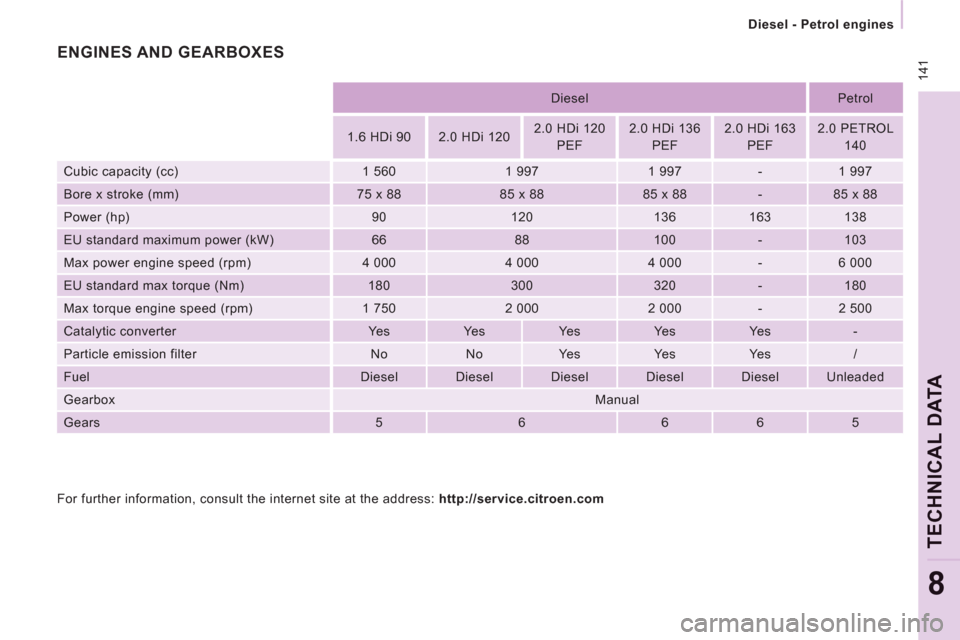
ENGINES AND GEARBOXES
For further information, consult the internet site at the address: http://service.citroen.com
Page 167 of 260
9.23
06
1
2
4
3
1
2
4
3
AUDIO/VIDEO
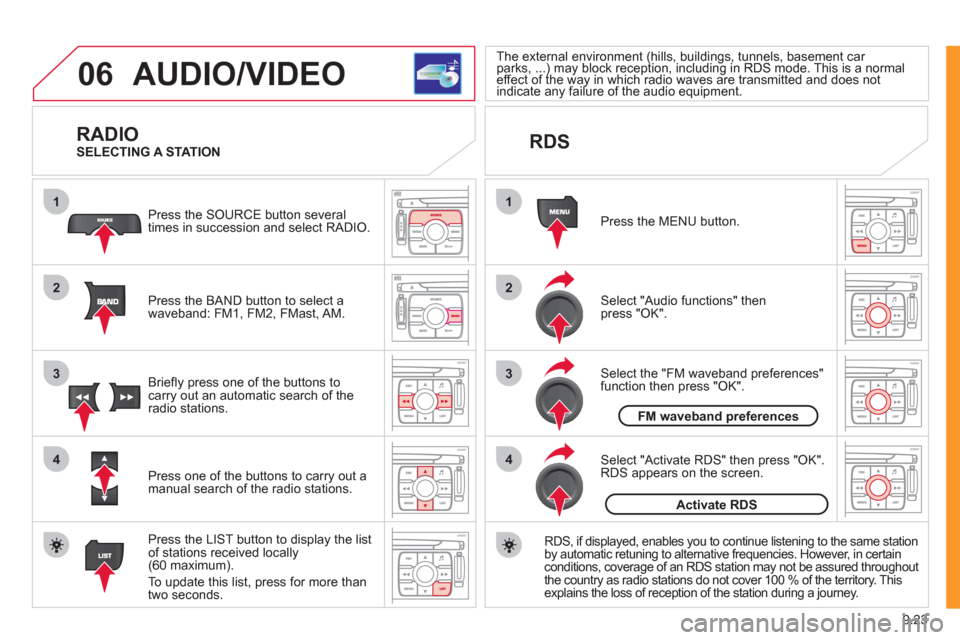
RADIO
Press the BAND button to select awaveband: FM1, FM2, FMast, AM. Pr
ess the SOURCE button several
times in succession and select RADIO.
Press the LIST button to displa
y the list
of stations received locally(60 maximum).
To update this list, press for more than
tw
o seconds.
Press one of the buttons to carr
y out a
manual search of the radio stations. Brie
fl y press one of the buttons tocarry out an automatic search of the radio stations.
RDS
Select "Audio functions" then press "OK".
Press the MENU button.
RD
S, if displayed, enables you to continue listening to the same station
by automatic retuning to alternative frequencies. However, in certain conditions, coverage of an RDS station may not be assured throughout
the country as radio stations do not cover 100 % of the territory. Thisexplains the loss of reception of the station during a journey.
Select "Activate RDS" then press "OK". RDS appears on the screen.
Select the "FM waveband preferences" function then press "OK".
The external environment (hills, buildings, tunnels, basement car parks, ...) may block reception, including in RDS mode. This is a normal(g(g
effect of the way in which radio waves are transmitted and does notp)y p g)y p g
indicate any failure of the audio equipment. yy
SELECTING A STATION
FM waveband preferences
Activate RDS
Page 180 of 260
9.36
08
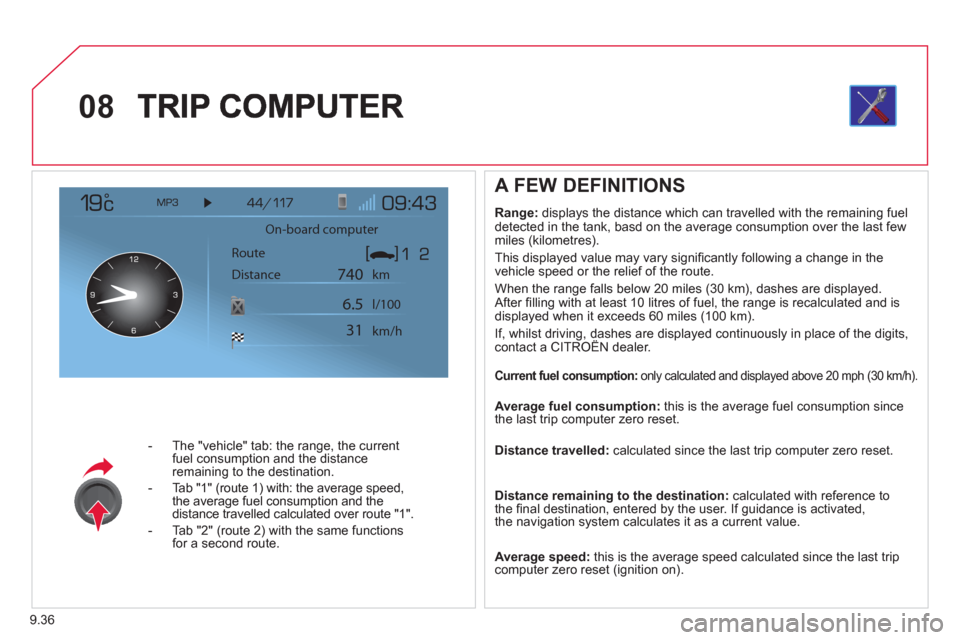
- The "vehicle" tab: the range, the current
fuel consumption and the distance
remaining to the destination.
- Tab "1"
(route 1) with: the average speed,
the average fuel consumption and the distance travelled calculated over route "1".
- Tab "2"
(route 2) with the same functions for a second route.
A FEW DEFINITIONS
Range:
displays the distance which can travelled with the remaining fuel
detected in the tank, basd on the average consumption over the last few
miles (kilometres).
This displa
yed value may vary signifi cantly following a change in the
vehicle speed or the relief of the route.
When the ran
ge falls below 20 miles (30 km), dashes are displayed.
After fi lling with at least 10 litres of fuel, the range is recalculated and is
displayed when it exceeds 60 miles (100 km).
If, whilst driving, dashes are displayed continuously in place of the digits,contact a CITROÀN dealer. g
Current fuel consumption: only calculated and displayed above 20 mph (30 km/h).
Average fuel consumption:
this is the average fuel consumption since
the last trip computer zero reset.
Distance travelled: calculated since the last trip computer zero reset.
Distance remaining to the destination:calculated with reference to
the fi nal destination, entered by the user. If guidance is activated,
the navigation system calculates it as a current value.
Average speed: this is the average speed calculated since the last trip computer zero reset (ignition on).
On-board computer
Route
Distance km
km/h l/100
740
6.5
31