ABS Citroen JUMPY 2013 2.G User Guide
[x] Cancel search | Manufacturer: CITROEN, Model Year: 2013, Model line: JUMPY, Model: Citroen JUMPY 2013 2.GPages: 248, PDF Size: 8.07 MB
Page 134 of 248

132
Changing a bulb
REAR LAMPS
For more information on bulbs, refer to the
"Types of bulb".
- Identify the faulty bulb then open the
rear doors to 180°. Refer to the "Access"
section of chapter 2.
- Remove the two fixing nuts.
Pull the lens unit from the outside.
- Holding the lamp unit, disconnect the
electrical connector.
- Move aside the 8 tabs then extract the
bulb holder.
- Remove the failed bulb by pressing it
lightly while turning it anticlockwise.
- Change the bulb.
1.
Brake lamps / sidelamps
Type B
, P21/5W - 21/5W
2.
Direction indicators
Type B
, PY21W - 21W (amber)
3.
Reversing lamps
Type B
, P21W - 21W
4.
Foglamps
Type B
, P21W - 21W When refitting, take care to correctly
reposition:
- the 8 tabs,
- the two white lugs in the two rubber
holes to maintain the sealing of the lamp
unit,
- the supply wire to avoid trapping it.
Page 135 of 248

133
Changing a bulb
QUICK HEL
P
7
THIRD BRAKE LAMP
Type A
, W5W - 5W
NUMBER PLATE LAMPS
Type A
, W5W - 5W
Lamp located on the inside (tailgate)
- Unscrew the two screws using a Torx
TM
20 screwdriver.
- Remove the plastic cover.
- Remove the bulb holder moving aside
the two tabs.
- Remove the failed bulb by pressing it
lightly while turning it anticlockwise.
- Change the bulb.
Type B
, P21W - 21W
With tailgate
- Move aside the plastic lens using a
screwdriver, on the point indicated by
the arrow.
- Change the bulb.
- Replace the plastic lens and press on it.
With hinged doors
- Unclip the interior trim.
- Disconnect the connector by moving
aside its tab.
- Remove the plastic cover.
- Turn the bulb holder a quarter turn
anticlockwise.
- Change the bulb.
Lamp located on the outside (hinged doors)
- Unscrew the two screws using a Torx TM
20 screwdriver.
- Remove the lamp.
- Change the bulb.
Type B
, P21W - 21W
Lamp on door top
- Remove the screws using an 8 mm
spanner.
- Remove the failed bulb by pressing it
lightly while turning it anticlockwise.
- Change the bulb.
Page 139 of 248
137
Changing a fuse
QUICK HEL
P
7
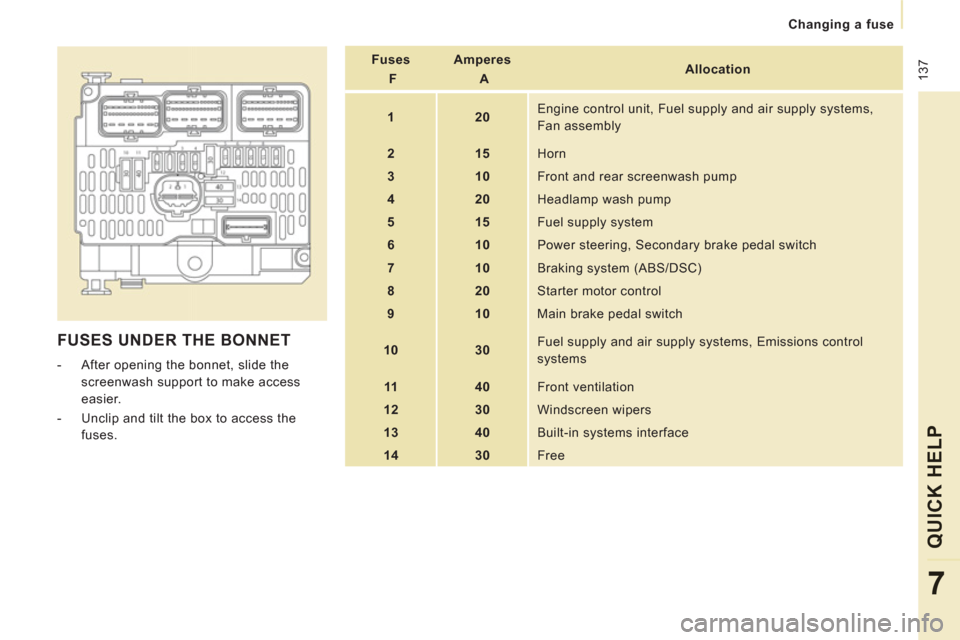
FUSES UNDER THE BONNET
- After opening the bonnet, slide the
screenwash support to make access
easier.
- Unclip and tilt the box to access the
fuses.
Fuses
F
Amperes
A
Allocation
1
20
Engine control unit, Fuel supply and air supply systems,
Fan assembly
2
15
Horn
3
10
Front and rear screenwash pump
4
20
Headlamp wash pump
5
15
Fuel supply system
6
10
Power steering, Secondary brake pedal switch
7
10
Braking system (ABS/DSC)
8
20
Starter motor control
9
10
Main brake pedal switch
10
30
Fuel supply and air supply systems, Emissions control
systems
11
40
Front ventilation
12
30 Windscreen wipers
13
40
Built-in systems interface
14
30
Free
Page 142 of 248

140
Having your vehicle towed
Without lifting (4 wheels on the
ground)
You should always use a towing bar.
From the front
- Unclip the cover by pressing at the
bottom,
- Fully screw in the removable towing eye.
TOWING THE VEHICLE
Lifting (2 wheels on the ground only)
It is preferable to lift the vehicle using
professional lifting equipment.
From the rear
- Unclip the cover using a coin or the flat
part of the towing eye,
- Fully screw in the removable towing eye.
Vehicles fitted with a manual
gearbox (Diesel version)
In the case of vehicles fitted with a manual
gearbox, the gear lever must be in the
neutral position. Failure to observe this
special condition may result in damage
to certain braking components and the
absence of braking assistance the next time
the engine is started.
Page 211 of 248

9.59
FREQUENTLY ASKED QUESTIONS
QUESTIONANSWERSOLUTION
Some characters in themedia information are not
displayed correctly while playing. The audio s
ystem does not display some types of characters. Use standard characters to name tracks andfolders.
Pla
ying of streaming fi lesdoes not start. The peripheral device connected does not support automatic play. Start the playback from the device.
Th
e names of tracks and
the track length are not
displayed on the screen
when streaming audio. The Bluetooth
profi le does not allow the transfer of this information.
The qualit
y of receptionof the radio station
listened to graduallydeteriorates or the stored stations do not function(no sound, 87.5 Mhz is
displayed...). The vehicle is too
far from the transmitter used by the station listened
to or there is no transmitter in the geographical area through which the
vehicle is travelling.
Activate the "RDS" function by means of theshort-cut menu to enable the system to check
whether there is a more powerful transmitter in thegeographical area.
The environment
(hills, buildings, tunnels, basement car parks...) block reception, including in RDS mode. This phenomenon is normal and does not indicate
a fault with the audio system.
The aerial is absent or has been dama
ged (for example when goingthrough a car wash or into an underground car park). Have the aerial checked by a CITROËN dealer.
I
cannot fi nd some radiostations in the list of stations received.The station is not received or its name has chan
ged in the list.
Some radio stations send other information in place of their name (the
title of the song for example).
The s
ystem interprets this information as the name of the station. The name of the radio station changes.
Page 236 of 248

9.84
QUESTION
ANSWER
SOLUTION
The stored stations donot function (no sound, 87.5 Mhz is displayed...).
An incorrect waveband is selected.
Press the BAND AST button to return to the waveband (AM, FM1, FM2, FMAST) on which thestations are stored.
The traffi c announcement(TA) is displayed. I donot receive any traffi c information.
The radio station is not part of the regional traffi c information network.
Tune to a radio station which broadcasts traffi c information.
The quality of receptionof the radio station listened to graduallydeteriorates or the stored stations do not function(no sound, 87.5 Mhz is displayed...).
The vehicle is too far from the transmitter used by the station listenedto or there is no transmitter in the geographical area through which the vehicle is travelling.
Activate the RDS function to enable the system to check whether there is a more powerful transmitter in the geographical area.
The environment (hills, buildings, tunnels, basement car parks...) block reception, including in RDS mode. This phenomenon is normal and does not indicate a failure of the audio equipment.
The aerial is absent or has been damaged (for example when goingthrough a car wash or into an underground car park).
Have the aerial checked by a CITROËN dealer.
Sound cut-outs of 1 to2 seconds in radio mode.During this brief sound cut-out, the RDS searches for any frequency permitting better reception of the station.
Deactivate the RDS function if the phenomenon is too frequent and always on the same route.
With the engine off, the audio equipment switches off after a few minutes of use.
When the engine is switched off, the audio equipment operating timedepends on the battery charge.
The switch-off is normal: the audio equipment switches to economy mode and switches off to prevent discharging of the vehicle's battery.
Start the vehicle's engine to increase the batterycharge.
The message "the audio system is overheated" appears on the display.
In order to protect the installation if the surrounding temperature is toohigh, the audio equipment switches to an automatic thermal protectionmode leading to a reduction of the volume or stopping of the playing of the CD.
Switch the audio system off for a few minutes toallow the system to cool.
Page 237 of 248

15
1
Exterior
VISUAL SEARCH
10
EXTERIOR
Remote control 20-21
Changing the battery, reinitialisation 21
Key 21
Starting 43
Central locking / unlocking 20, 24
Locking / unlocking the load
space 20, 24
Alarm 22-23
Fuel cut-off, Diesel priming 117-118 Wiper blades 139
Door mirrors 81
Side repeater 131
Front lamps, foglamps, direction
indicators 45-47
Headlamp beam height adjustment 47
Changing front bulbs 129-131
Headlamp wash 48, 112
Snow shield 127
Front doors 24
Sliding side door 25
Key 21
Opening the bonnet 108
Filler cap, fuel tank 116-117
Towbar 104-105
Rear parking sensors 85
Van dimensions 142-145 Doors, tailgate 24-26
Emergency control 26
Number plate lamp 133
Spare wheel, jack, changing a wheel,
tools 123-127
Infl ation, pressures 150
Towing, lifting 140-141
Rear lamps, direction indicators 45-46, 132
3rd brake lamp 133
Changing rear bulbs 129, 132
Load space 20, 24 Accessories 106-107
Roof bars 106
Temporary puncture repair kit 121-122 Platform cab dimensions 146-147
Brakes, pads 84, 111, 113
Emergency braking 86
ABS, EBFD 86
ASR, DSC 87
Tyre, pressure 150
Snow chains 128
Rear suspension 78-80