aux Citroen JUMPY 2016 2.G User Guide
[x] Cancel search | Manufacturer: CITROEN, Model Year: 2016, Model line: JUMPY, Model: Citroen JUMPY 2016 2.GPages: 595, PDF Size: 12.47 MB
Page 447 of 595
445
3
2
4
Jumpy_en_Chap10c_RCC-1_ed01-2016
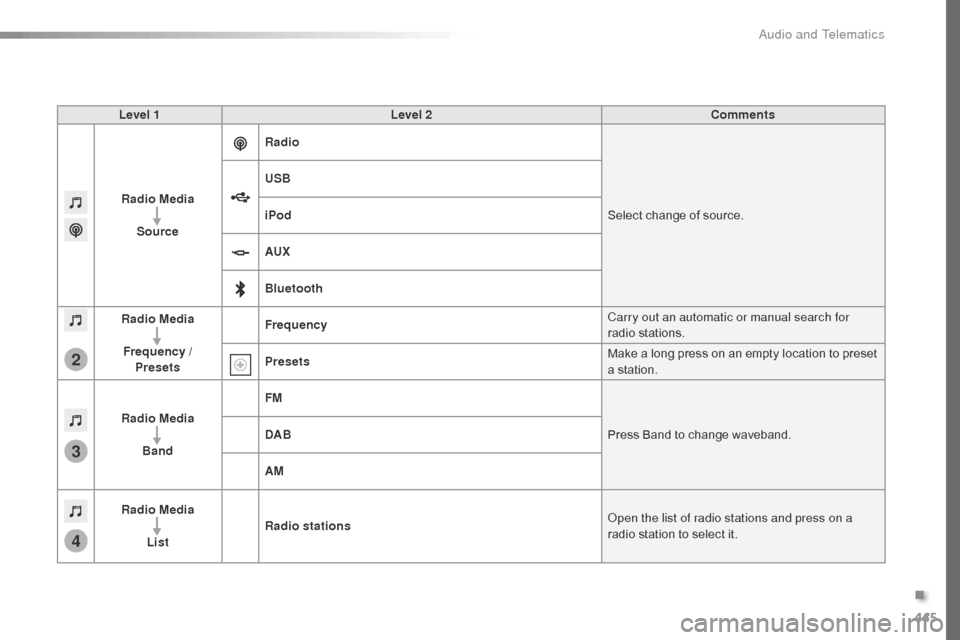
Level 1Level 2 Comments
Radio Media Source Radio
Select change of source.
USB
iPod
AUX
Bluetooth
Radio Media
Frequency / Presets Frequency
Carry out an automatic or manual search for
radio stations.
Presets Make a long press on an empty location to preset
a station.
Radio Media Band FM
Press Band to change waveband.
DAB
AM
Radio Media List Radio stations
Open the list of radio stations and press on a
radio station to select it.
.
Audio and Telematics
Page 456 of 595
454
Jumpy_en_Chap10c_RCC-1_ed01-2016
Media
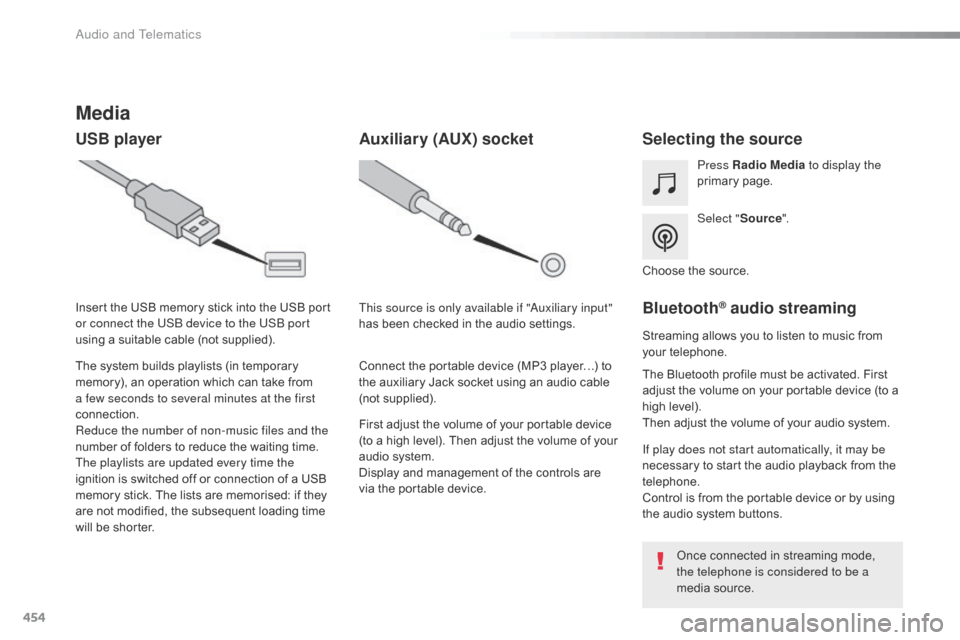
USB playerSelecting the source
Select "Source".
Press Radio Media
to display the
primary page.
The system builds playlists (in temporary
memory), an operation which can take from
a few seconds to several minutes at the first
connection.
Reduce the number of non-music files and the
number of folders to reduce the waiting time.
The playlists are updated every time the
ignition is switched off or connection of a USB
memory stick. The lists are memorised: if they
are not modified, the subsequent loading time
will be shorter. Insert the USB memory stick into the USB port
or connect the USB device to the USB port
using a suitable cable (not supplied).
Auxiliary (AUX) socket
First adjust the volume of your portable device
(to a high level). Then adjust the volume of your
audio system.
Display and management of the controls are
via the portable device. This source is only available if "Auxiliary input"
has been checked in the audio settings.
Connect the portable device (MP3 player…) to
the auxiliary Jack socket using an audio cable
(not supplied). Choose the source.
Bluetooth® audio streaming
Streaming allows you to listen to music from
your telephone.
The Bluetooth profile must be activated. First
adjust the volume on your portable device (to a
high level).
Then adjust the volume of your audio system.
If play does not start automatically, it may be
necessary to start the audio playback from the
telephone.
Control is from the portable device or by using
the audio system buttons.
Once connected in streaming mode,
the telephone is considered to be a
media source.
Audio and Telematics
Page 457 of 595
455
Jumpy_en_Chap10c_RCC-1_ed01-2016
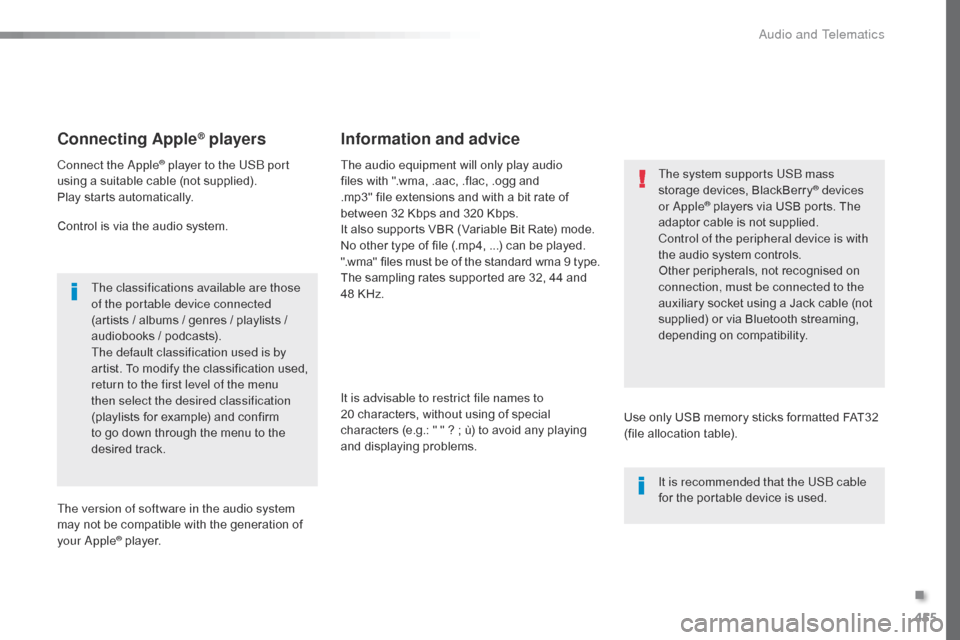
Connecting Apple® players
Connect the Apple® player to the USB port
using a suitable cable (not supplied).
Play starts automatically.
Control is via the audio system.
The classifications available are those
of the portable device connected
(artists / albums / genres / playlists /
audiobooks / podcasts).
The default classification used is by
artist. To modify the classification used,
return to the first level of the menu
then select the desired classification
(playlists for example) and confirm
to go down through the menu to the
desired track.
The version of software in the audio system
may not be compatible with the generation of
your Apple
® player. The audio equipment will only play audio
files with ".wma, .aac, .flac, .ogg and
.mp3" file extensions and with a bit rate of
between
32 Kbps and 320 Kbps.
It also supports VBR (Variable Bit Rate) mode.
No other type of file (.mp4, ...) can be played.
".wma" files must be of the standard wma 9 type.
The sampling rates supported are 32, 44 and
48 KHz.
It is advisable to restrict file names to
20 characters, without using of special
characters (e.g.: " " ? ; ù) to avoid any playing
and displaying problems.
Information and advice
Use only USB memory sticks formatted FAT32
(file allocation table). The system supports USB mass
storage devices, BlackBerry
® devices
or Apple® players via USB ports. The
adaptor cable is not supplied.
Control of the peripheral device is with
the audio system controls.
Other peripherals, not recognised on
connection, must be connected to the
auxiliary socket using a Jack cable (not
supplied) or via Bluetooth streaming,
depending on compatibility.
It is recommended that the USB cable
for the portable device is used.
.
Audio and Telematics
Page 476 of 595

474
3
4
5
6
7
1
19
Jumpy_en_Chap10c_RCC-1_ed01-2016
Press Settings to display the primary
page.
Profile settings
Audio settings
Press Settings to display the primary
page.
Select " Audio settings ".
Select " Ambience ".
Or "Position "
Or "Sound "
Or "Voice "
Or "Ringtone ".
On-board audio: Arkamys
© Sound
Staging optimises the distribution of
sound in the passenger compartment. The settings for " Position" (All
passengers, Driver and Front only) are
common to all sources.
Activate or Deactivate " Touch tones",
" Volume linked to speed " and
" Auxiliary input ".
The sound distribution (or spatialisation
with the Arkamys
© system) is audio
processing that allows the quality of the
sound to be adapted according to the
number of passengers in the vehicle.
Available only with the 6 -speaker
configuration.
The audio Ambience settings
(6
ambiences available) as well as the
Bass , Medium and Tr e b l e settings
are different and independent for each
sound source.
Activate or Deactivate " Loudness".
Press " Confirm " to save the settings. Press "
Confirm ".
Press the "
OPTIONS" button to go to
the secondary page.
Select " Profile 1 ", "Profile 2 ",
" Profile 3 " or "Common profile ".
Select "
Setting of the profiles ".
Press this button to enter a name for
the profile using the virtual keypad
As a safety measure and because it
requires the sustained attention of the
driver, changes to settings must only be
done with the vehicle stationary
.
Audio and Telematics
Page 486 of 595
484
First steps
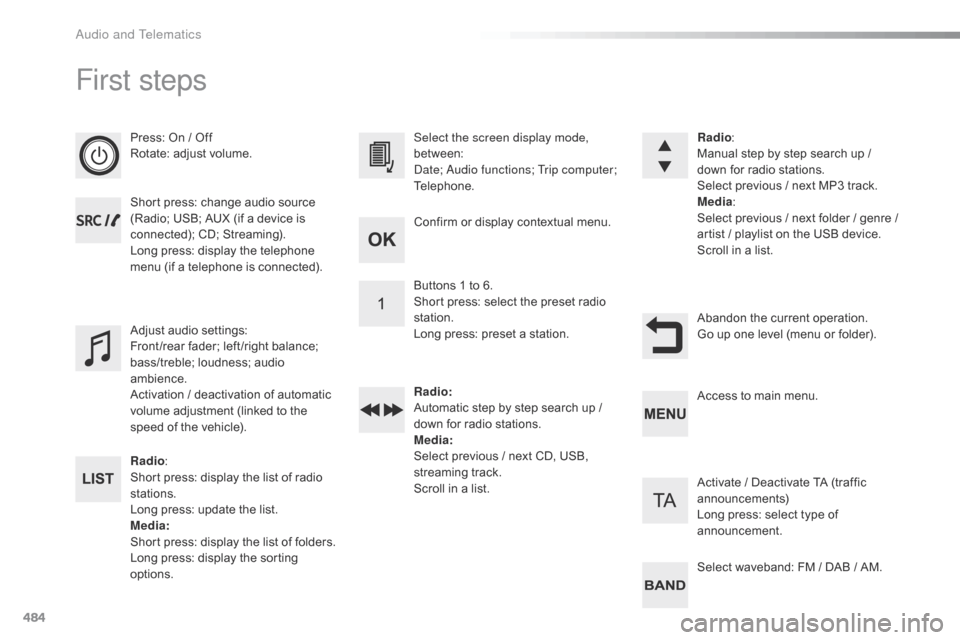
Press: On / Off
Rotate: adjust volume.
Short press: change audio source
(Radio; USB; AUX (if a device is
connected); CD; Streaming).
Long press: display the telephone
menu (if a telephone is connected).
Radio:
Short press: display the list of radio
stations.
Long press: update the list.
Media :
Short press: display the list of folders.
Long press: display the sorting
options. Select the screen display mode,
between:
Date; Audio functions; Trip computer;
Telephone.
Adjust audio settings:
Front /rear fader; left /right balance;
bass/treble; loudness; audio
ambience.
Activation / deactivation of automatic
volume adjustment (linked to the
speed of the vehicle). Radio
:
Manual step by step search up /
down for radio stations.
Select previous / next MP3 track.
Media :
Select previous / next folder / genre /
artist
/ playlist on the USB device.
Scroll in a list.
Abandon the current operation.
Go up one level (menu or folder).
Confirm or display contextual menu.
Buttons 1 to 6.
Short press: select the preset radio
station.
Long press: preset a station.
Radio
:
Automatic step by step search up /
down for radio stations.
Media :
Select previous / next CD, USB,
streaming track.
Scroll in a list. Access to main menu.
Activate / Deactivate TA (traffic
announcements)
Long press: select type of
announcement.
Select waveband: FM / DAB / AM.
Audio and Telematics
Page 487 of 595
485
Jumpy_en_Chap10d_RD6_ed01-2016
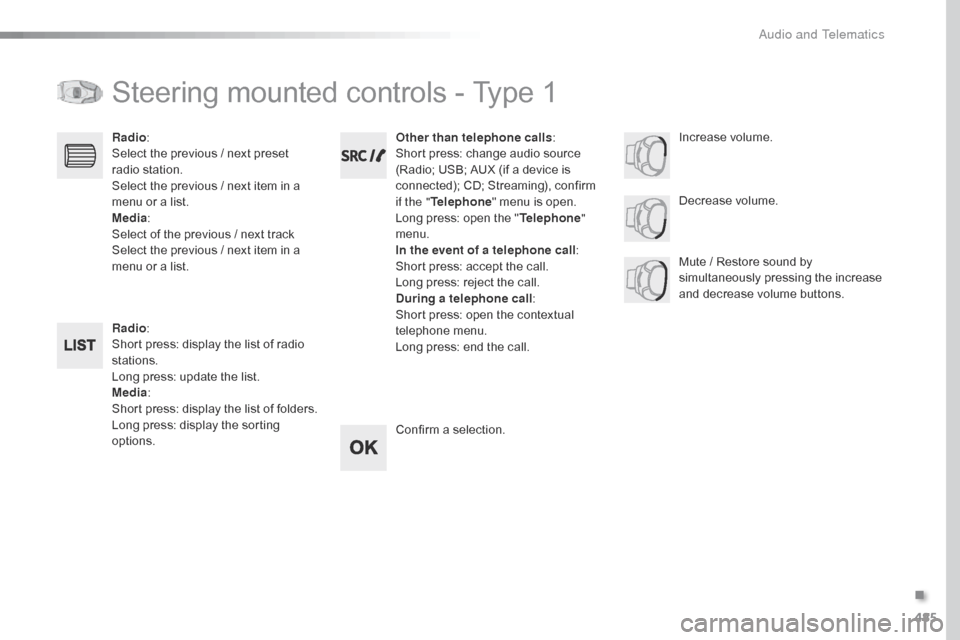
Steering mounted controls - Type 1
Radio:
Short press: display the list of radio
stations.
Long press: update the list.
Media :
Short press: display the list of folders.
Long press: display the sorting
options. Decrease volume.
Radio
:
Select the previous / next preset
radio station.
Select the previous / next item in a
menu or a list.
Media :
Select of the previous / next track
Select the previous / next item in a
menu or a list. Mute / Restore sound by
simultaneously pressing the increase
and decrease volume buttons.
Other than telephone calls
:
Short press: change audio source
(Radio; USB; AUX (if a device is
connected); CD; Streaming), confirm
if the " Telephone " menu is open.
Long press: open the " Telephone"
menu.
In the event of a telephone call :
Short press: accept the call.
Long press: reject the call.
During a telephone call :
Short press: open the contextual
telephone menu.
Long press: end the call.
Confirm a selection. Increase volume.
.
Audio and Telematics
Page 488 of 595
486
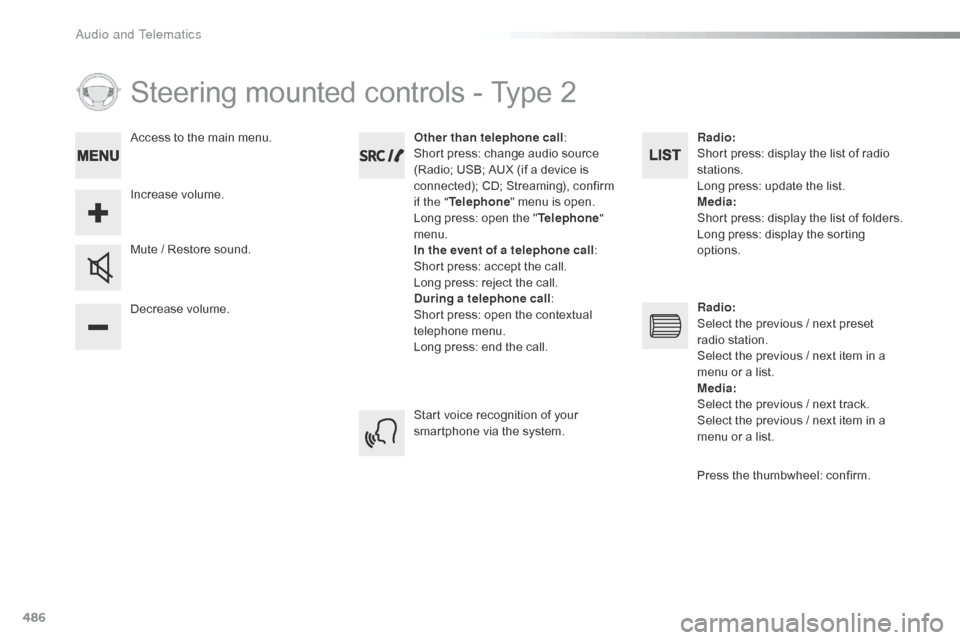
Steering mounted controls - Type 2
Decrease volume. Mute / Restore sound.Other than telephone call
:
Short press: change audio source
(Radio; USB; AUX (if a device is
connected); CD; Streaming), confirm
if the " Telephone " menu is open.
Long press: open the " Telephone"
menu.
In the event of a telephone call :
Short press: accept the call.
Long press: reject the call.
During a telephone call :
Short press: open the contextual
telephone menu.
Long press: end the call.
Increase volume. Access to the main menu.
Start voice recognition of your
smartphone via the system.Radio
:
Short press: display the list of radio
stations.
Long press: update the list.
Media :
Short press: display the list of folders.
Long press: display the sorting
options.
Radio :
Select the previous / next preset
radio station.
Select the previous / next item in a
menu or a list.
Media :
Select the previous / next track.
Select the previous / next item in a
menu or a list.
Press the thumbwheel: confirm.
Audio and Telematics
Page 494 of 595

492
Media
USB player
This unit consists of a USB port and an
auxiliary Jack socket, depending on model.Insert a USB memory stick into the USB port
or connect a USB peripheral device to the USB
port using a suitable cable (not supplied).
The system changes automatically to "USB"
source.
The system creates playlists
(temporary memory), which can take
from a few seconds to several minutes
on the first connection.
Reducing the number of non-music
files and the number of folders reduces
this waiting time. Playlists are updated
every time a new USB memory stick is
connected.
Press this button to display the
contextual menu for the Media
function.
Press this button to select the play
mode.
Press this button to confirm.Play mode
The play modes available are:
- No rmal: the tracks are played in order,
depending on the classification of the
selected files.
-
R
andom : the tracks in an album or folder
are played in a random order.
-
R
andom on all media : all of the tracks
saved in the media are played in random
o r d e r.
-
R
epeat : the tracks played are only those
from the current album or folder.
The choice made is displayed at the top of the
screen.
While connected by USB, the portable
device may be charged automatically.
Audio and Telematics
Page 496 of 595

494
Jack auxilary (AUX) socket
Connect the portable device (MP3 player, …) to
t he auxiliary Jack socket using an audio cable
(not supplied).
Press the SOURCE button several
times in succession and select
" AUX ".
First adjust the volume on your portable device
(to a high level). Then adjust the volume on
your audio system. Operation of controls is via
the portable device.
Do not connect a device to both the
Jack auxiliary socket and the USB port
at the same time.
CD player
Insert circular compact discs only.
Some anti-pirating systems, on original discs
or CDs copied using a personal recorder, may
cause faults which are no reflection on the
quality of the vehicle's player.
Insert a CD in the player, play begins
automatically.
To play a disc which has already
been inserted, press the SOURCE
button several times in succession
and select CD .
Press one of the buttons to select a
track on the CD.
Press the LIST button to display the
list of tracks on the CD.
Press and hold one of the buttons for
fast for ward or fast back.
Playing an MP3 compilation
Insert an MP3 CD compilation in the player.
The audio equipment searches for all of the
music tracks, which may take anything between
a few seconds and several tens of seconds,
before play begins.
On a single disc, the CD player can
read up to 255 MP3 files spread
over 8 folder levels.
However, it is advisable to keep to a
limit of two levels to reduce the access
time before the CD is played.
While the CD is being played, the folder
structure is not followed.
All of the files are displayed on a single
level.
External CD players connected via the
USB port are not recognised by the
system.
Audio and Telematics
Page 508 of 595
506
Jumpy_en_Chap11_index-alpha_ed01-2016
180° rear vision .............................................259
ABS
........
....................................................... 161
Access, AdBlue tank
..................................... 28
5
Accessories
..............................
.... 203, 271, 272
Access to the spare wheel
............................2
97
Active Safety Brake........................ 23, 243, 246
AdBlue
® ............................... . 26, 35 -37, 283 -285
Additive, AdBlue ................... 2 6, 35 -37, 283 -285
Additive, Diesel
...............................
......280, 281
Adjusting headlamp beam height
.................15
5
Adjusting headlamps
.................................... 15
5
Adjusting head restraints
......................10
3, 104
Adjusting seat
.........................................9
9, 102
Adjusting the air distribution
.........................12
8
Adjusting the air flow
..................................... 12
8
Adjusting the date
...........................4
6, 420, 476
Adjusting the height and reach of the steering wheel
...............................
.........99
Adjusting the lumbar support
........................10
0
Adjusting the seat belt height
.......................16
6
Adjusting the temperature
............................12
8
Adjusting the time
........................... 4
6, 421, 477
Advice on driving
..............................
....19 6 -198
Airbags
...............
............................. 24, 170, 177
Airbags, curtain
............................................. 17
3
Airbags, front......................................... 171, 173
Airbags, lateral
...................................... 17
2 , 173
Air conditioning
............... 1
2, 127, 129, 130, 137
Air conditioning, automatic
...........................13
5
Air conditioning, digital
......................... 13
2, 13 6Air conditioning, dual-zone automatic
..........
12
8
Air conditioning, manual
....... 1
26, 132, 135, 136
Air intake
...............
................ 125, 126, 128, 131
Alarm
............................................................... 95
A
larm, volumetric
............................................
95
A
nti-lock braking system (ABS)
....................
16
1
Anti-theft
..............................
............. 52, 67, 205
Area, loading
...............................
........ 47, 55, 73
Armrest, front
................................................
10
3
ASR
............................................................... 16
1
Assistance call
...............................
.......160, 338
Assistance, emergency braking
........... 1
61, 247
Audio streaming (Bluetooth)
........ 3
98, 454, 495
Audio system
...........................8
9, 150 -152, 158,
226, 245, 247, 250, 256, 264, 483
Auxiliary ............................................... 3 98, 454
A
C
B
Boot .................................................................
94
Boot lid ............... .................64, 65, 94, 313, 314
Brake discs
.................................................... 28
2
Brake lamps
........................... 31
0, 311, 313 - 315
Brakes
...............................................1
8, 22, 282
Braking, automatic emergency
............................ 2
3, 243, 245 -247
Bulbs (changing)
...................3
03, 304, 310, 313
Bulbs (changing, type)
..................................3
03
Cable, audio
......................................... 3
98, 454
Cable, jack
..............................
............. 398, 454
Capacity, fuel tank
..............................
..........265
Cap, fuel filler
................................................ 26
5
CarPlay connection .............................. 386, 442
CD
..............................
.................. 398, 454, 494
CD, MP3
....................................... 3
98, 454, 494
Central locking
..........................................5
9, 64
Changing a bulb
..... 3
03, 304, 310, 311, 313 -315
Changing a bulb (boot lid))............................ 313
Changing a bulb (side-hinged doors)
.................................... 3
10
Changing a fuse
............................ 3
16, 317, 320
Changing a wheel
...............................
..........296
Changing a wiper blade
........................ 1
59, 274
Changing the remote control battery
........5
4, 70
Checking the engine oil level
..........................34
C
hecking the levels
...............................2
78-280
Checking tyre pressures (using the kit)
..............................
................290
Battery
...............................
.....270, 281, 321-325
Battery capacity
...............................
............. 325
Battery, charging
...............................
............ 323
Battery, remote control
............... 5
4, 70, 71, 139
Bench seat, one-piece, fixed
........................ 11
0
Blind spot monitoring system
......... 2
9, 252, 254
Blinds, side
.................................................... 12
3
BlueHDi
...............................
......31, 35, 208, 283
Bluetooth (hands-free)
............... 4
06, 407, 462, 463, 497
Bluetooth (telephone)
............ 4
06 - 408, 462- 464
Bonnet
...............
............................................ 276
Alphabetical index