instrument panel Citroen JUMPY 2016 2.G Repair Manual
[x] Cancel search | Manufacturer: CITROEN, Model Year: 2016, Model line: JUMPY, Model: Citroen JUMPY 2016 2.GPages: 595, PDF Size: 12.47 MB
Page 512 of 595
510
Jumpy_en_Chap11_index-alpha_ed01-2016
Roof rack ...............................................272, 273
Running out of fuel (Diesel) ..........................3
27
Safety, children
.............................. 17
1, 174 -176 ,
182, 187, 188, 190, 193
Saturation of the particle filter (Diesel)
............................................... 2
81
Screen, instrument panel
.......................... 4
0 , 41
Screen menu map
................................3
52, 354,
356, 358, 360, 362, 370, 372, 374, 378,
384, 386, 388, 390, 392, 400, 402, 404, 412, 414, 416, 434, 440, 442, 444, 446, 448, 456, 458, 460, 468, 470, 472
Screen, multifunction (with audio system)
.....................................4
87
Screenwash
..............................
....................15 8
Screenwash, rear
...............................
...........157
SCR (Selective Catalytic Reduction)
.................. 28
3
SCR system
..............................
....................283
Seat and bench seat, r e a r, f i xe d
...............................
.............113 , 11 6
Seat and bench seat, rear, on rails
............................................... 11
6
Seat belts
......................1
66, 168, 169, 180, 181
Seat belts, rear
...............................
...............167
Seat, front bench, 2-seat
...................... 10
4, 167
Seat, rear bench
..............................
.............11 6
Seats, electric
............................................... 10
2
S
Seats, front ...................................... 99, 101, 102
Seats, front bench ............................... ..........105
Seats, heated
...............................
.........103, 105
Seats, rear
............................................. 11
0 , 113
Selector, gear
................................................ 2
14
Serial number, vehicle
.................................. 3
37
Service
...............................
.............................28
Service indicator
....................................... 3
1, 33
Service (warning lamp)
...................................28
S
ervicing
...............................
..........................12
Settings
...............
.. 412, 414, 416, 468, 470, 472
Settings, system
...............................
..... 420, 476
Sidelamps
............. 1
46, 304-306, 310, 313, 315
Side repeater
..............................
..................305
Sliding side door, electric
............................ 4
9, 57, 64, 65, 78 - 84
Sliding side door, hands-free
..............................
.......... 87, 89, 90
Sliding side door, manual
.........................7
5 -77
Sliding side window
...................................... 12
4
Snow chains
......................................... 2
62, 268
Snow chains, link
.......................................... 26
8
Socket, 12 V accessory
................................12
1
Socket, auxiliary
........................... 3
98, 454, 494
Socket, JACK
....................... 1
22, 398, 454, 494
Sockets, audio
.............................................. 12
2
Speed limiter
...............................
..224, 227, 229
Speed limit recognition
................. 2
25, 226, 229, 232, 236
Speedometer
..............................
...............14 -16
Stability control (ESC)............................. 25, 161
Starting the engine
....................................... 19
9
Starting the vehicle
...... 2
02, 204, 206, 209, 214
Station, radio
........................ 3
94, 395, 450, 451
Stay, bonnet
...............................
...................276
Steering mounted controls, audio
...............
................... 344, 432, 485, 486
Steering wheel, adjustment
............................99
St
op
...............
.................................................. 18
Radio ...............
.... 394, 398, 450, 454, 488, 489
Radio, digital (Digital Audio Broadcasting - DAB)
.......... 3
96, 397, 452, 453
Radio Media
........ 3
88, 390, 392, 444, 446, 448
Range
................
.............................................. 42
Range, AdBlue
...............................
................. 35
RDS
................
.......................................395, 451
Rear screen, demisting
......................... 13
3, 13 4
Recharging the battery
................................. 32
3
Recirculation, air
................... 1
25, 126, 128, 131
Reduction of electrical load
.......................... 2
70
Regeneration of the particle filter
........
..................................................... 281
Reinitialisation of the under-inflation detection system
......................................... 26
3
Reinitialising the remote control
...............5
4, 70
Reminder, key in ignition
............................... 2
01
Reminder, lighting on
.................................... 14
8
Remote control
.................................... 4
7-50, 52,
55 -59, 67, 68, 71, 74, 75
Removing a wheel
..............................
.......... 299
Removing the mat
...............................
.......... 11 9
Replacing bulbs
..... 3
03, 304, 310, 311, 313 -315
Replacing fuses
..............................
...... 316, 317
Replacing the air filter
................................... 2
81
Replacing the oil filter
................................... 2
81
Replacing the passenger
compartment filter
...................................... 2
81
Reservoir, headlamp wash
........................... 28
0
Reservoir, screenwash
................................. 28
0
Reset journey
.................................................. 41
R
esetting the service indicator
....................... 33
R
esetting the trip recorder
.............................. 38
R
ev counter
................................................ 1
4 -16
Reversing camera
...............................
.......... 259
Reversing camera (on interior mirror)
....................................... 25
8
Reversing lamp
............................. 3
10, 313, 315
Roof bars
...............................................2
72, 273
R
Alphabetical index
Page 523 of 595

97
Transversal-Citroen_en_Chap02_RCC-2-2-0_ed01-2016
Select the audio source (depending on
version):
-
F
M / DAB* / AM* stations.
-
T
elephone connected by Bluetooth* and
using Bluetooth* audio streaming.
-
C
D player.
-
U
SB memory stick.
-
M
edia player connected to the auxiliary
socket (Jack, cable not supplied).
* Depending on equipment.
Certain information is displayed permanently in
the upper band of the touch screen:
-
R
eminder of the air conditioning
information, and direct access to the
corresponding menu.
-
R
eminder of the Radio Media and
Telephone menu information.
-
A
ccess to the Settings of the touch screen
and digital instrument panel.
In very hot conditions, the volume may
be limited to protect the system. It may
go into standby (screen and sound off)
for at least 5 minutes
The return to normal takes place when
the temperature in the passenger
compartment has dropped. In the "Settings" menu you can create
a profile for just one person or a group
of people with common points, with the
possibility of entering a multitude of
settings (radio presets, audio settings,
ambiences, ...); these settings are
taken into account automatically.
.
Audio and Telematics
Page 559 of 595
133
1
2
3
4
Transversal-Citroen_en_Chap02_RCC-2-2-0_ed01-2016
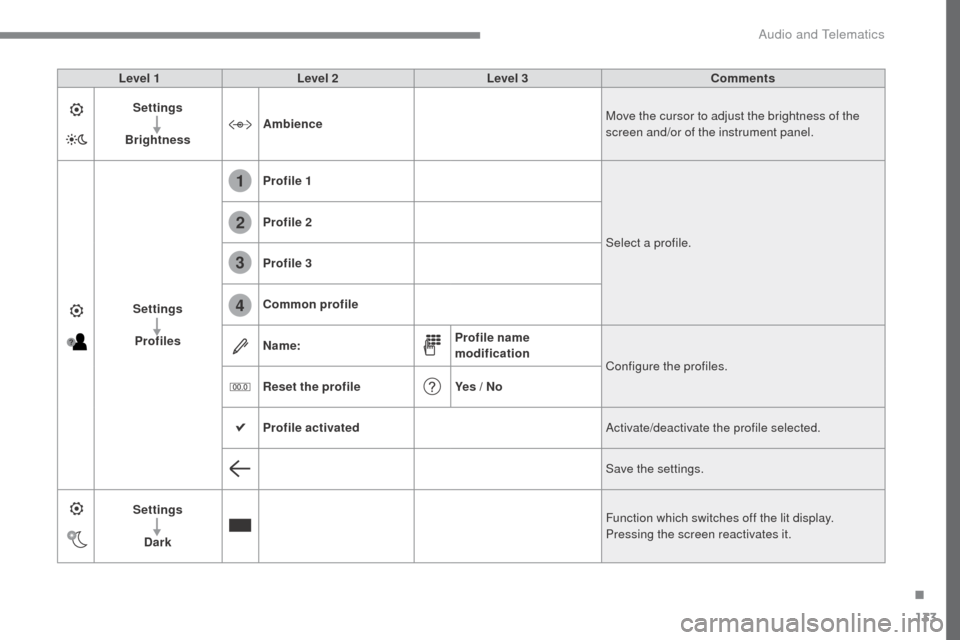
Level 1Level 2 Level 3 Comments
Settings
Brightness Ambience
Move the cursor to adjust the brightness of the
screen and/or of the instrument panel.
Settings Profiles Profile 1
Select a profile.
Profile 2
Profile 3
Common profile
Name:
Profile name
modification
Configure the profiles.
Reset the profile Yes / No
Profile activated Activate/deactivate the profile selected.
Save the settings.
Settings Dark Function which switches off the lit display.
Pressing the screen reactivates it.
.
Audio and Telematics
Page 561 of 595
135
Transversal-Citroen_en_Chap02_RCC-2-2-0_ed01-2016
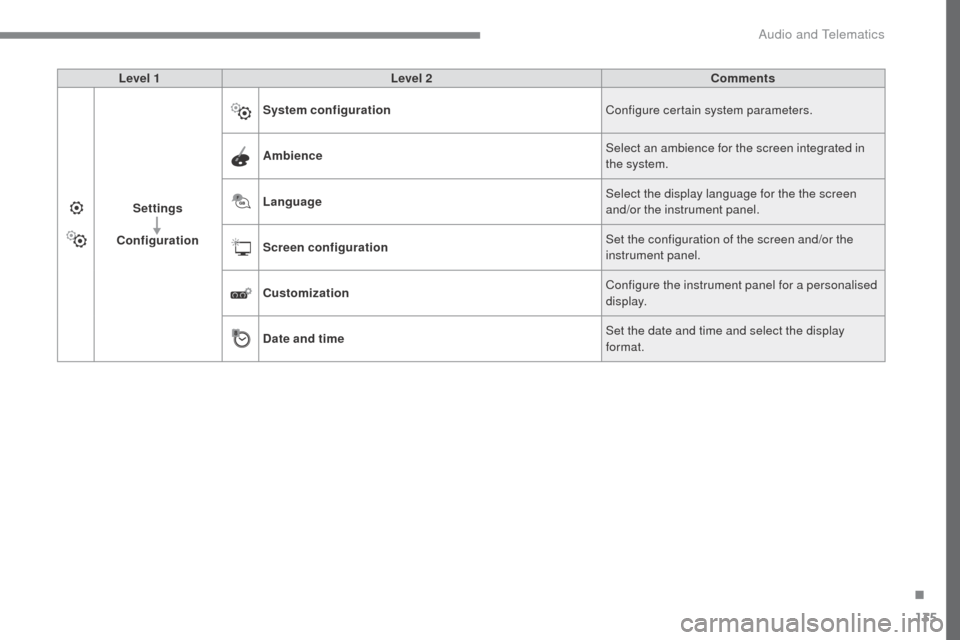
Level 1Level 2 Comments
Settings
Configuration System configuration
Configure certain system parameters.
Ambience Select an ambience for the screen integrated in
the system.
Language Select the display language for the the screen
and/or the instrument panel.
Screen configuration Set the configuration of the screen and/or the
instrument panel.
Customization Configure the instrument panel for a personalised
display.
Date and time Set the date and time and select the display
format.
.
Audio and Telematics
Page 563 of 595
137
6
5
7
8
9
10
11
Transversal-Citroen_en_Chap02_RCC-2-2-0_ed01-2016
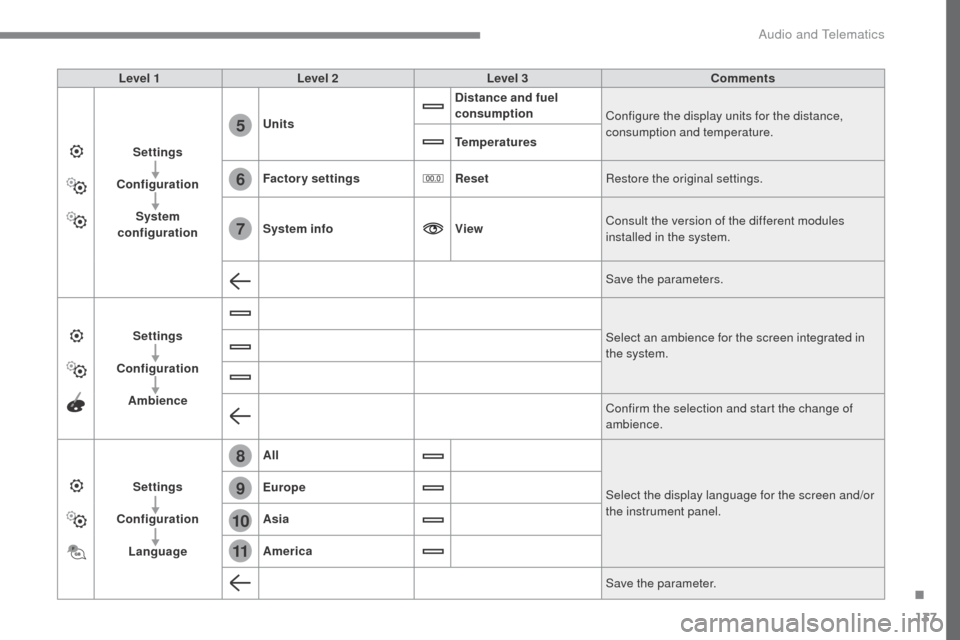
Level 1Level 2 Level 3 Comments
Settings
Configuration System
configuration Units
Distance and fuel
consumption
Configure the display units for the distance,
consumption and temperature.
Temperatures
Factory settings ResetRestore the original settings.
System info ViewConsult the version of the different modules
installed in the system.
Save the parameters.
Settings
Configuration Ambience Select an ambience for the screen integrated in
the system.
Confirm the selection and start the change of
ambience.
Settings
Configuration Language All
Select the display language for the screen and/or
the instrument panel.
Europe
Asia
America
Save the parameter.
.
Audio and Telematics
Page 566 of 595
140
1
Transversal-Citroen_en_Chap02_RCC-2-2-0_ed01-2016
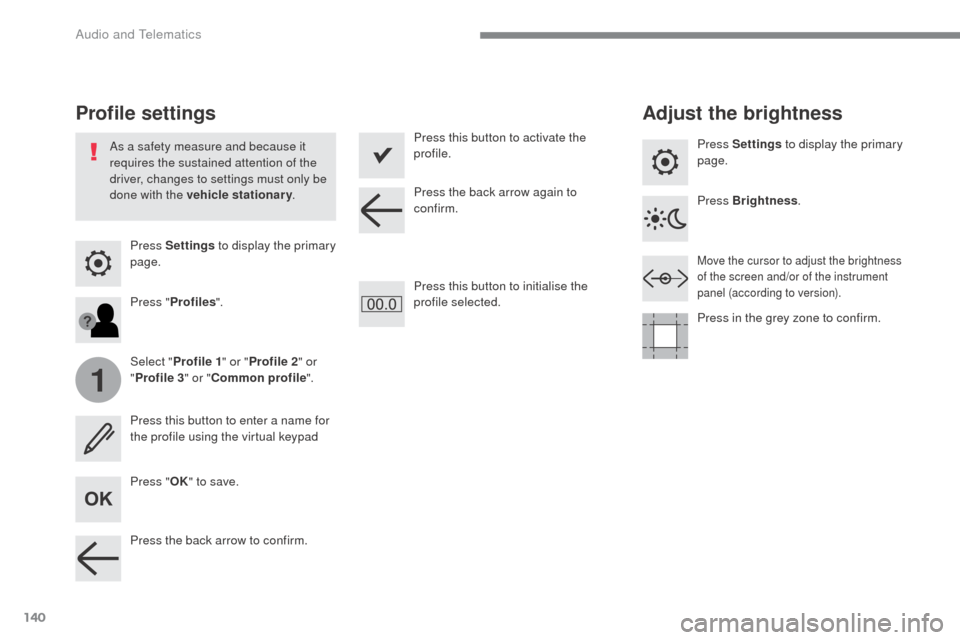
Press Settings to display the primary
page.
Profile settings Adjust the brightness
Press "OK" to save.
Select "
Profile 1 " or "Profile 2 " or
" Profile 3 " or "Common profile ".
Press "
Profiles ".
Press this button to enter a name for
the profile using the virtual keypad
As a safety measure and because it
requires the sustained attention of the
driver, changes to settings must only be
done with the vehicle stationary
.Press this button to activate the
profile.
Press this button to initialise the
profile selected. Press Settings
to display the primary
page.
Move the cursor to adjust the brightness
of the screen and/or of the instrument
panel (according to version).
Press Brightness .
Press in the grey zone to confirm.
Press the back arrow to confirm. Press the back arrow again to
confirm.
Audio and Telematics
Page 567 of 595
141
5
6
7
12
13
Transversal-Citroen_en_Chap02_RCC-2-2-0_ed01-2016
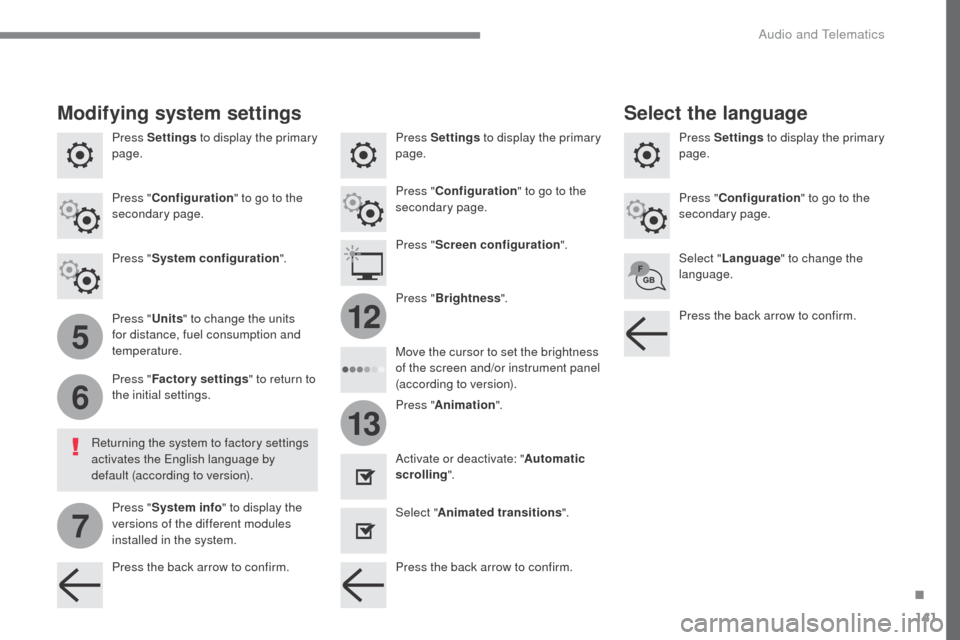
Press Settings to display the primary
page. Press Settings
to display the primary
page.
Press Settings
to display the primary
page.
Press " Configuration " to go to the
secondary page. Press "
Configuration " to go to the
secondary page.
Press "
Configuration " to go to the
secondary page.
Press " System configuration ".Press "
Screen configuration ".
Press " Units" to change the units
for distance, fuel consumption and
temperature. Select "
Language " to change the
language.
Activate or deactivate: " Automatic
scrolling ".
Select " Animated transitions ".
Move the cursor to set the brightness
of the screen and/or instrument panel
(according to version).
Press "
Factory settings " to return to
the initial settings.
Press " System info " to display the
versions of the different modules
installed in the system.
Modifying system settings
Returning the system to factory settings
activates the English language by
default (according to version). Press "
Animation ".
Press "
Brightness ".
Select the language
Press the back arrow to confirm. Press the back arrow to confirm.Press the back arrow to confirm.
.
Audio and Telematics