wheel Citroen JUMPY RHD 2016 2.G User Guide
[x] Cancel search | Manufacturer: CITROEN, Model Year: 2016, Model line: JUMPY RHD, Model: Citroen JUMPY RHD 2016 2.GPages: 520, PDF Size: 10.54 MB
Page 43 of 520

41
Trip reset
With LCD text instrument panel
F When the trip is displayed, press the button on the end of the wiper control stalk .
F
O
r, depending on equipment, press the
thumbwheel on the steering wheel for
more than two seconds.
F
W
hen the desired trip is displayed, press
the reset button in the instrument panel for
more than two seconds.
With LCD text or matrix
instrument panel
With LCD instrument panel
F When the trip is displayed, press the button on the end of the wiper control stalk for
two seconds.
1
Instruments
Page 92 of 520

90
Ensure that no person or object could
prevent the correct opening or closing
of the doors.
Be aware of children when operating
the doors.
If "
Hands-free access self-locking " is
selected in the vehicle menu and after
closing the door, check that your vehicle
has locked correctly.
This is because locking will not take
place:
-
i
f the ignition is on,
-
i
f one of the doors or the tailgate is
open,
-
i
f a "Keyless Entry and Starting"
remote control is inside the vehicle.
If a number of gestures with your foot
have no effect, wait a few seconds
before starting again.
The system is automatically deactivated
in heavy rain or with accumulations of
snow.
If the system fails to work, check that
the remote control is not exposed to a
source of electromagnetic inter ference
(smar tphone, ...).
Operation may be affected if using a
prosthetic leg.
This system may not work correctly if
your vehicle is fitted with a towbar. The sliding door may open or close
erratically if:
-
y
our vehicle is fitted with a towbar,
-
y
ou attach or detach a trailer,
-
y
ou fit or remove a bicycle carrier,
-
y
ou load or unload bicycles on a
bicycle carrier,
-
y
ou remove or raise something
behind the vehicle,
-
a
n animal approaches the bumper,
-
y
ou wash your vehicle,
-
a s
ervice is being carried out on
your vehicle,
-
y
ou change a wheel.
To avoid unwanted operation, keep the
key away or deactivate the function in
the vehicle configuration menu.
Access
Page 98 of 520

96
Deactivation
F Press this unlocking button on the remote control.
or
F
U
nlock the vehicle using the "Keyless Entry
and Starting" system.
If the vehicle locks itself automatically
(this occurs after 30 seconds if one of
the doors is not opened), the monitoring
system is reactivated automatically.
The monitoring system is deactivated: the
indicator lamp in the button is off and the
direction indicators flash for about 2 seconds.
Protection - exterior
perimeter monitoring only
Deactivate the interior volumetric monitoring
to avoid unwanted triggering of the alarm in
certain cases such as:
-
o
ccupant(s) present in the vehicle,
-
l
eaving a window partially open,
-
w
ashing your vehicle,
-
c
hanging a wheel,
-
t
owing your vehicle,
-
t
ransport on a ferry.
Volumetric monitoring
Deactivation F
S
witch off the ignition and within
ten seconds press this button
until its indicator lamp is on fixed.
F
G
et out of the vehicle.
Reactivation
The indicator lamp in the button goes off. F
I
mmediately lock the vehicle
using the remote control or the
"Keyless Entry and Starting"
system.
Only the exterior perimeter protection system is
active: the indicator lamp in the button flashes
once per second.
To be effective, this deactivation must be done
every time the ignition is switched off.
F
D
eactivate the exterior perimeter
monitoring by unlocking the
vehicle using the remote control
or the "Keyless Entry and
Starting" system. F
R
eactivate the full alarm system
by locking the vehicle using the
remote control or the "Keyless
Entry and starting" system.
The indicator lamp in the button flashes once
per second again.
Triggering of the alarm
This is indicated by sounding of the siren
and flashing of the direction indicators for
thirty seconds.
The monitoring functions remain active until
the alarm has been triggered eleven times in
succession.
When the vehicle is unlocked using
the remote control or the "Keyless
Entry and Starting" system, rapid
flashing of the indicator lamp in the
button informs you that the alarm was
triggered during your absence.
When the ignition is switched on, this
flashing stops immediately.
Access
Page 101 of 520
99
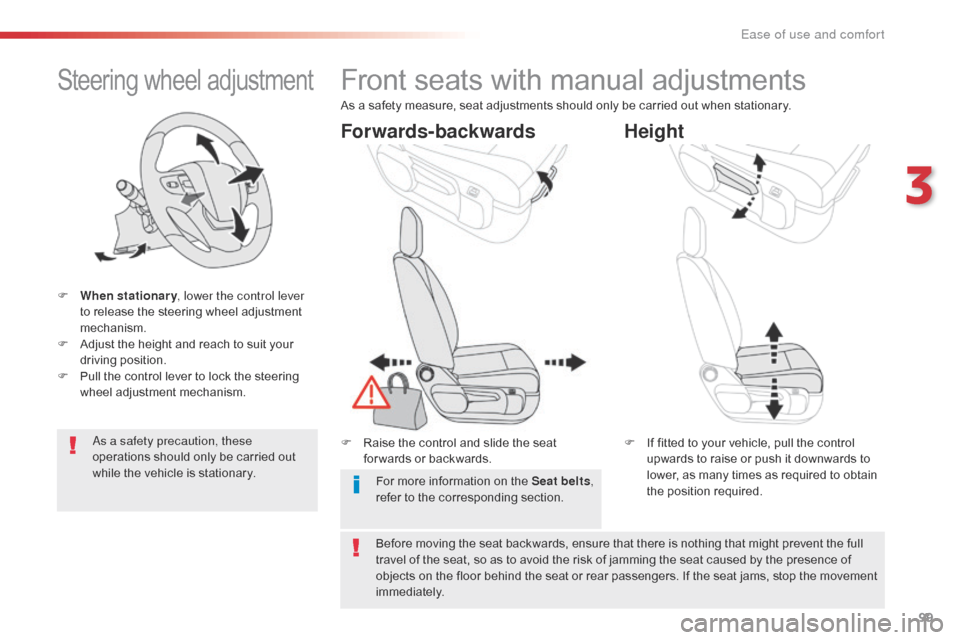
Steering wheel adjustment
F When stationary, lower the control lever
to release the steering wheel adjustment
mechanism.
F
A
djust the height and reach to suit your
driving position.
F
P
ull the control lever to lock the steering
wheel adjustment mechanism.
As a safety precaution, these
operations should only be carried out
while the vehicle is stationary.
Front seats with manual adjustments
F Raise the control and slide the seat for wards or backwards. F
I f fitted to your vehicle, pull the control
upwards to raise or push it downwards to
lower, as many times as required to obtain
the position required.
Forwards-backwards Height
As a safety measure, seat adjustments should only be carried out when stationary.
Before moving the seat backwards, ensure that there is nothing that might prevent the full
travel of the seat, so as to avoid the risk of jamming the seat caused by the presence of
objects on the floor behind the seat or rear passengers. If the seat jams, stop the movement
immediately. For more information on the Seat belts ,
refer to the corresponding section.
3
Ease of use and comfort
Page 105 of 520
103
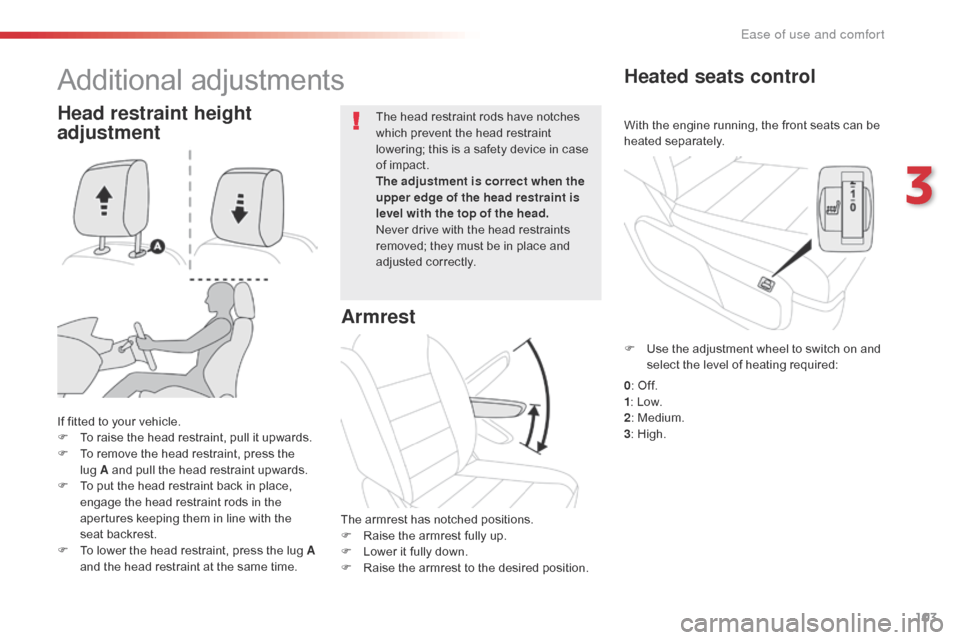
With the engine running, the front seats can be
heated separately.
Heated seats control
If fitted to your vehicle.
F T o raise the head restraint, pull it upwards.
F
T
o remove the head restraint, press the
lug
A and pull the head restraint upwards.
F
T
o put the head restraint back in place,
engage the head restraint rods in the
apertures keeping them in line with the
seat backrest.
F
T
o lower the head restraint, press the lug A
and the head restraint at the same time. The head restraint rods have notches
which prevent the head restraint
lowering; this is a safety device in case
of impact.
The adjustment is correct when the
upper edge of the head restraint is
level with the top of the head.
Never drive with the head restraints
removed; they must be in place and
adjusted correctly.
Head restraint height
adjustment
Additional adjustments
Armrest
The armrest has notched positions.
F
R aise the armrest fully up.
F
L
ower it fully down.
F
R
aise the armrest to the desired position. F
U
se the adjustment wheel to switch on and
select the level of heating required:
0 : Off.
1 : Low.
2 : Medium.
3 : High.
3
Ease of use and comfort
Page 107 of 520

105
Heated bench seat
0: Off.
1 : Low.
2 : Medium.
3 : High.
F
U
se the adjustment twheel to switch on and
select the level of heating required:
With the engine running, the bench seat
cushions can be heated.
Under-seat storage
If your vehicle is so equipped, a storage space
is provided under the seat.
F
P
ull the strap to tip the seat.
3
Ease of use and comfort
Page 123 of 520
121
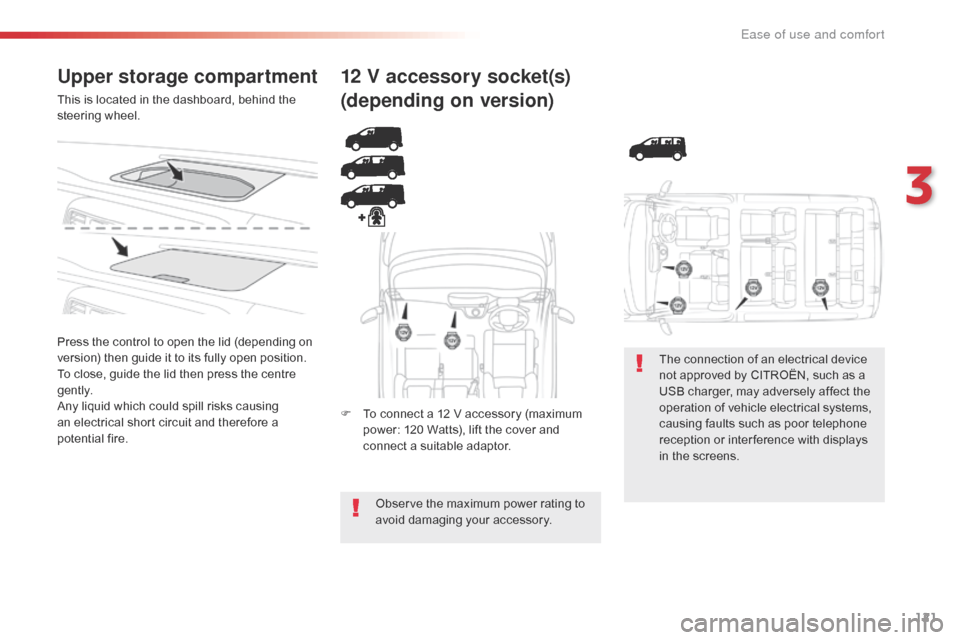
Upper storage compartment
This is located in the dashboard, behind the
steering wheel.
Press the control to open the lid (depending on
version) then guide it to its fully open position.
To close, guide the lid then press the centre
g e nt l y.
Any liquid which could spill risks causing
an electrical short circuit and therefore a
potential fire.
12 V accessory socket(s)
(depending on version)
F To connect a 12 V accessory (maximum power: 120 Watts), lift the cover and
connect a suitable adaptor.
Observe the maximum power rating to
avoid damaging your accessory. The connection of an electrical device
not approved by CITROËN, such as a
USB charger, may adversely affect the
operation of vehicle electrical systems,
causing faults such as poor telephone
reception or inter ference with displays
in the screens.
3
Ease of use and comfort
Page 154 of 520

152
In the vehicle settings menu, activate/
deactivate "Driving lighting ".
With the touch screen
With the audio system
In the "
Personalisation-configuration " menu,
activate/deactivate " Driving lighting".
The system is activated or deactivated in the
vehicle configuration menu.
The system is activated by default.
ProgrammingCornering lighting
With dipped or main beams, this function
makes use of the beam from a front foglamp
to illuminate the inside of a bend, when the
vehicle speed is below 25 mph (40 km/h)
(urban driving, winding road, intersections,
parking manoeuvres...).
With cornering lighting
Without cornering lighting
Switching on
The system operates:
- w hen the corresponding direction indicator
is switched on,
or
-
f
rom a certain angle of rotation of the
steering wheel.
Switching off
The system does not operate:
- b elow a certain angle of rotation of the
steering wheel,
-
a
bove 25 mph (40 km/h),
-
w
hen reverse gear is engaged.
Lighting and visibility
Page 163 of 520

161
Electronic stability control (ESC) incorporating
the following systems:
-
a
nti-lock braking system (ABS) and
electronic brake force distribution (EBFD),
-
e
mergency braking assistance (EBA),
-
w
heel anti-slip regulation (ASR) or traction
control,
-
d
ynamic stability control (DSC).
Electronic stability control (ESC)
Definitions
Anti-lock braking system (ABS)
and electronic brake force
distribution (EBFD)
This system improves the stability and
manoeuvrability of your vehicle when braking
and contributes towards improved control on
corners, in particular on poor or slippery road
surfaces.
The ABS prevents wheel lock in the event of
emergency braking.
The EBFD manages the braking pressure
wheel by wheel.
Emergency braking assistance
(EBA)
In an emergency, this system enables you to
reach the optimum braking pressure more
quickly and therefore reduce the stopping
distance.
It is triggered according to the speed at which
the brake pedal is pressed. This is felt by a
reduction in the resistance of the pedal and an
increase in the effectiveness of the braking.
Anti-slip regulation (ASR)
The ASR system (also known as Traction
Control) optimises traction in order to limit
wheel slip by acting on the brakes of the driving
wheels and on the engine. It also improves
the directional stability of the vehicle on
acceleration.
Dynamic stability control
(DSC)
If there is a difference between the path
followed by the vehicle and that required by
the driver, the DSC monitors each wheel and
automatically acts on the brake of one or more
wheels and on the engine to return the vehicle
to the required path, within the limits of the laws
of physics.
Horn
F Press the central part of the steering wheel.
5
Safety
Page 164 of 520

162
Anti-lock braking system
(ABS) and electronic brake
force distribution (EBFD)
In emergency braking, press ver y
firmly and maintain this pressure. When changing wheels (tyres and
rims), ensure that these are approved
for your vehicle.
Normal operation of the ABS may make
itself felt by slight vibrations of the brake
pedal.
The fixed illumination of this warning
lamp indicates that there is a fault
with the ABS.
The vehicle retains conventional
braking. Drive carefully at moderate
speed.
When this warning lamp comes on,
coupled with the STOP and ABS
warning lamps, accompanied by
an audible signal and a message,
it indicates that there is a fault
with the electronic brake force
distribution (EBFD).
You must stop as soon as it is
safe to do so.
In both cases, have the system
checked by a CITROËN dealer or
a qualified workshop as soon as
possible.
Intelligent traction
control
If fitted to your vehicle, it has a system to help
driving on snow: intelligent traction control .
This system detects situations of difficult
sur face adhesion that could make it difficult to
move off or make progress on deep fresh snow
or compacted snow.
In these situations, intelligent traction
control limits the amount of wheel slip to
provide the best traction and trajectory control
for your vehicle.
The use of snow tyres is strongly
recommended on sur faces offering low
levels of grip.
Safety