lock Citroen NEMO 2008.5 1.G Owner's Guide
[x] Cancel search | Manufacturer: CITROEN, Model Year: 2008.5, Model line: NEMO, Model: Citroen NEMO 2008.5 1.GPages: 140, PDF Size: 2.21 MB
Page 39 of 140
34
Accesses Good practice
When opening, take care not to obstruct the
guide space on the floor to allow the door to
slide correctly.
Do not block traffic.
Load space
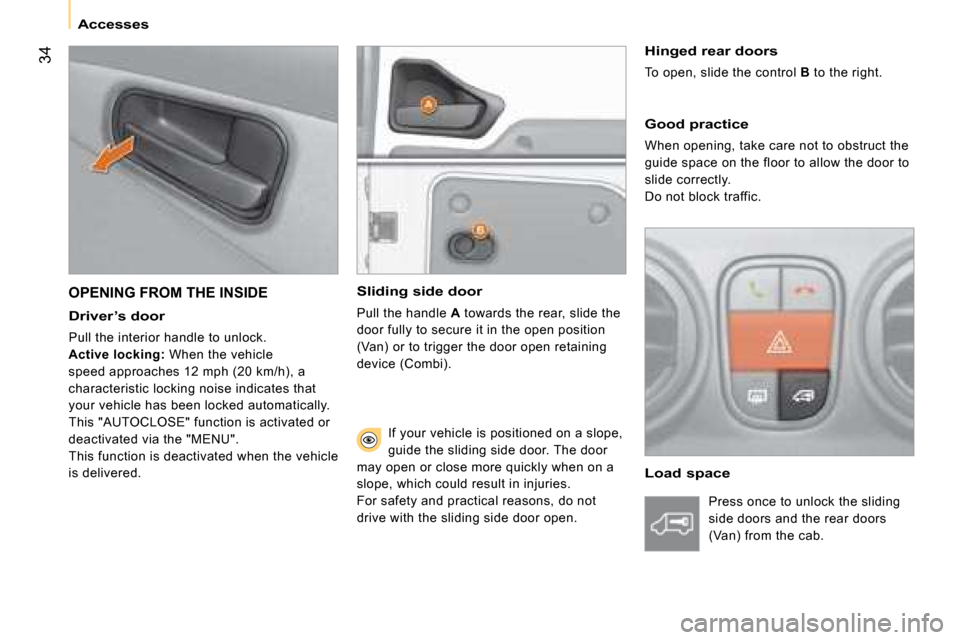
OPENING FROM THE INSIDE Sliding side door
Pull the handle A towards the rear, slide the
door fully to secure it in the open position
(Van) or to trigger the door open retaining
device (Combi).
Driver’s door
Pull the interior handle to unlock.
Active locking : When the vehicle
speed approaches 12 mph (20 km/h), a
characteristic locking noise indicates that
your vehicle has been locked automatically.
This "AUTOCLOSE" function is activated or
deactivated via the "MENU".
This function is deactivated when the vehicle
is delivered.
Hinged rear doors
To open, slide the control B to the right.
If your vehicle is positioned on a slope,
guide the sliding side door. The door
may open or close more quickly when on a
slope, which could result in injuries.
For safety and practical reasons, do not
drive with the sliding side door open. Press once to unlock the sliding
side doors and the rear doors
(Van) from the cab.
Page 40 of 140
35
1
READY TO SET OFF
Accesses
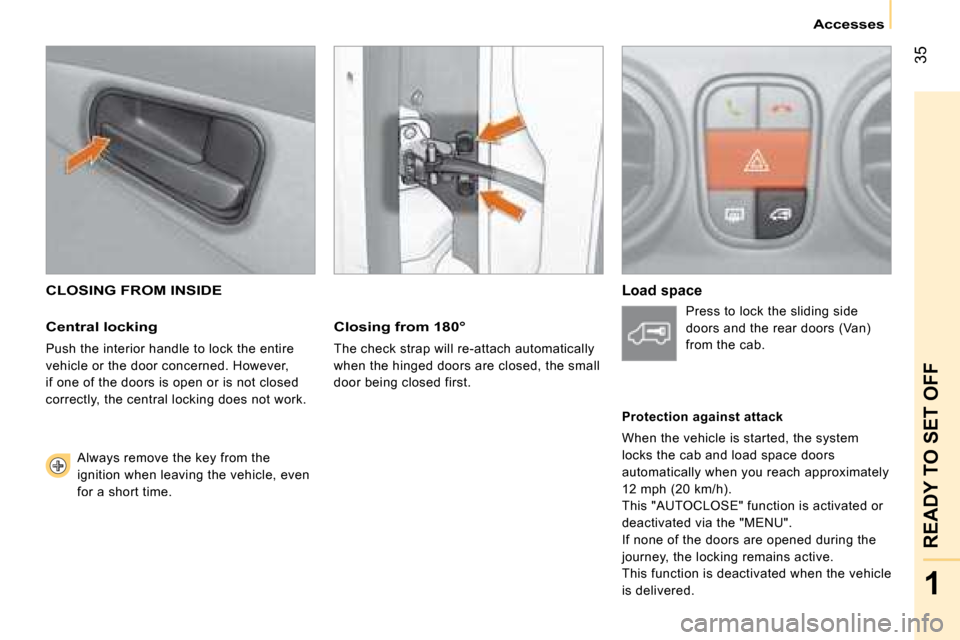
CLOSING FROM INSIDE
Central locking
Push the interior handle to lock the entire
vehicle or the door concerned. However,
if one of the doors is open or is not closed
correctly, the central locking does not work.
Always remove the key from the
ignition when leaving the vehicle, even
for a short time.
Closing from 180°
The check strap will re-attach automatically
when the hinged doors are closed, the small
door being closed first.
Load space Press to lock the sliding side
doors and the rear doors (Van)
from the cab.
Protection against attack
When the vehicle is started, the system
locks the cab and load space doors
automatically when you reach approximately
12 mph (20 km/h).
This "AUTOCLOSE" function is activated or
deactivated via the "MENU".
If none of the doors are opened during the
journey, the locking remains active.
This function is deactivated when the vehicle
is delivered.
Page 41 of 140
36
Accesses
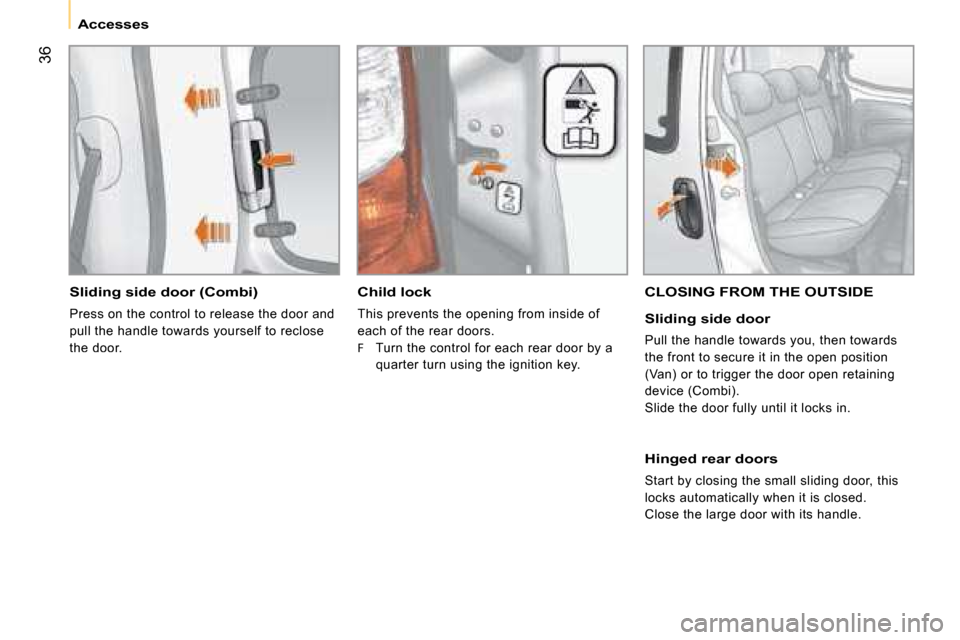
Sliding side door (Combi)
Press on the control to release the door and
pull the handle towards yourself to reclose
the door.
Child lock
This prevents the opening from inside of
each of the rear doors.
F Turn the control for each rear door by a
quarter turn using the ignition key.
CLOSING FROM THE OUTSIDE
Sliding side door
Pull the handle towards you, then towards
the front to secure it in the open position
(Van) or to trigger the door open retaining
device (Combi).
Slide the door fully until it locks in.
Hinged rear doors
Start by closing the small sliding door, this
locks automatically when it is closed.
Close the large door with its handle.
Page 42 of 140
36
Accesses
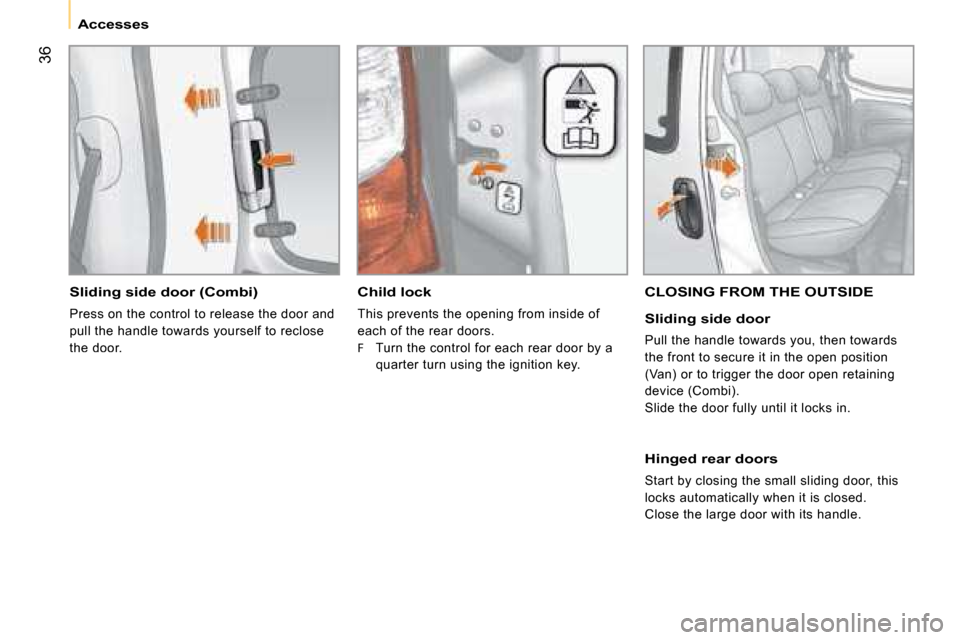
Sliding side door (Combi)
Press on the control to release the door and
pull the handle towards yourself to reclose
the door.
Child lock
This prevents the opening from inside of
each of the rear doors.
F Turn the control for each rear door by a
quarter turn using the ignition key.
CLOSING FROM THE OUTSIDE
Sliding side door
Pull the handle towards you, then towards
the front to secure it in the open position
(Van) or to trigger the door open retaining
device (Combi).
Slide the door fully until it locks in.
Hinged rear doors
Start by closing the small sliding door, this
locks automatically when it is closed.
Close the large door with its handle.
Page 48 of 140
41
1
READY TO SET OFF
Mirrors and windows
ELECTRIC WINDOWS
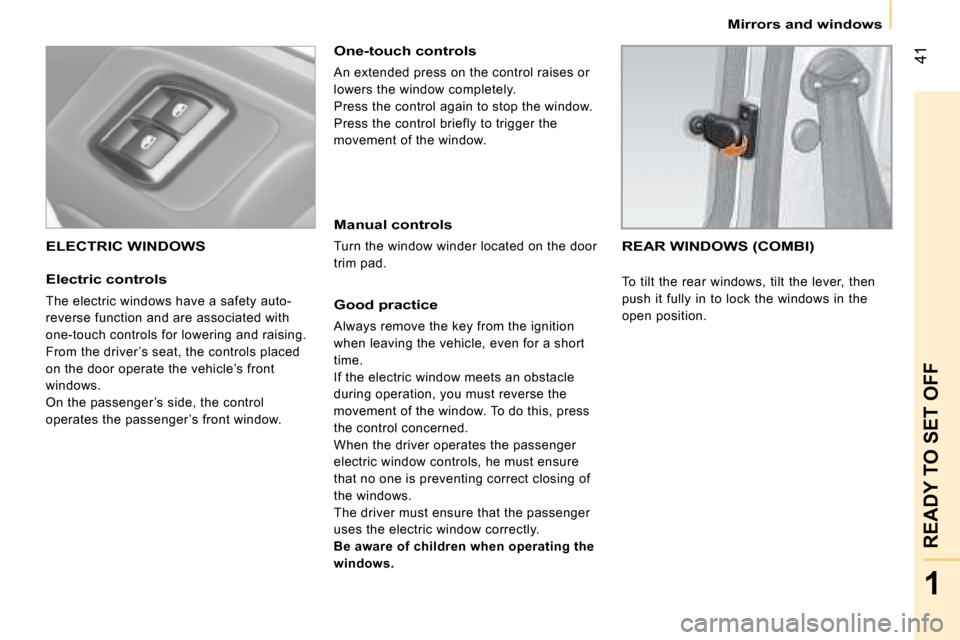
Electric controls
The electric windows have a safety auto-
reverse function and are associated with
one-touch controls for lowering and raising.
From the driver ’s seat, the controls placed
on the door operate the vehicle’s front
windows.
On the passenger ’s side, the control
operates the passenger ’s front window.
One-touch controls
An extended press on the control raises or
lowers the window completely.
Press the control again to stop the window.
Press the control briefly to trigger the
movement of the window.
Manual controls
Turn the window winder located on the door
trim pad.
Good practice
Always remove the key from the ignition
when leaving the vehicle, even for a short
time.
If the electric window meets an obstacle
during operation, you must reverse the
movement of the window. To do this, press
the control concerned.
When the driver operates the passenger
electric window controls, he must ensure
that no one is preventing correct closing of
the windows.
The driver must ensure that the passenger
uses the electric window correctly.
Be aware of children when operating the
windows.
REAR WINDOWS (COMBI)
To tilt the rear windows, tilt the lever, then
push it fully in to lock the windows in the
open position.
Page 49 of 140
Gearbox and steering wheel Good practice
To change gear easily, always press the
clutch pedal down fully.
To prevent the mat from becoming caught under the pedal:
- ensure that the mat is positioned correctly,
- never fit one mat on top of another.
Avoid leaving your hand on the gear knob as
the force exerted, even if slight, may wear
the internal components of the gearbox over
time.
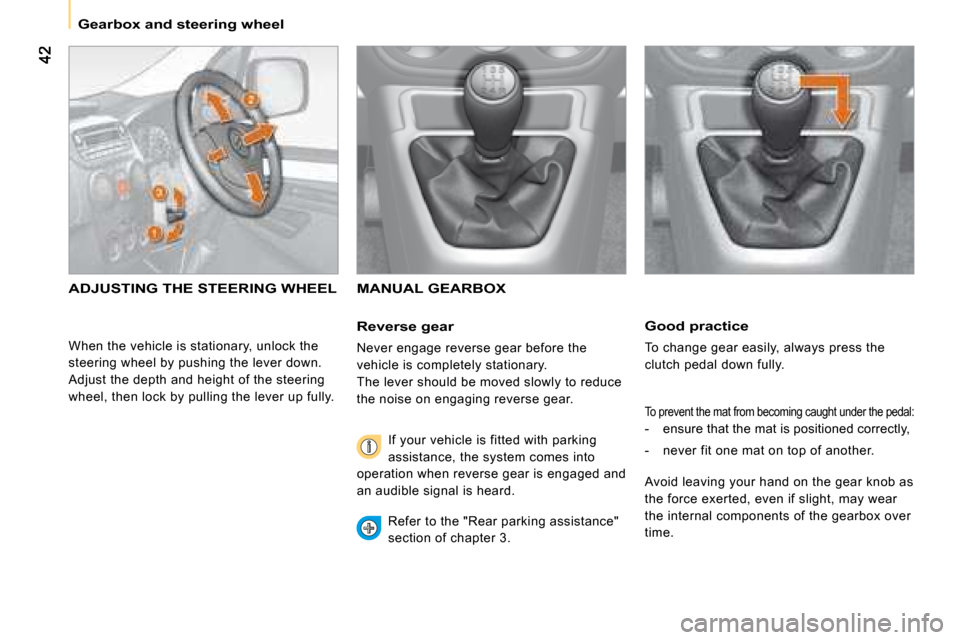
ADJUSTING THE STEERING WHEEL MANUAL GEARBOX
Reverse gear
Never engage reverse gear before the
vehicle is completely stationary.
The lever should be moved slowly to reduce
the noise on engaging reverse gear.
If your vehicle is fitted with parking
assistance, the system comes into
operation when reverse gear is engaged and
an audible signal is heard.
Refer to the "Rear parking assistance"
section of chapter 3.
When the vehicle is stationary, unlock the
steering wheel by pushing the lever down.
Adjust the depth and height of the steering
wheel, then lock by pulling the lever up fully.
Page 69 of 140
63
3
IN-CAR TECHNOLOGY
Menu
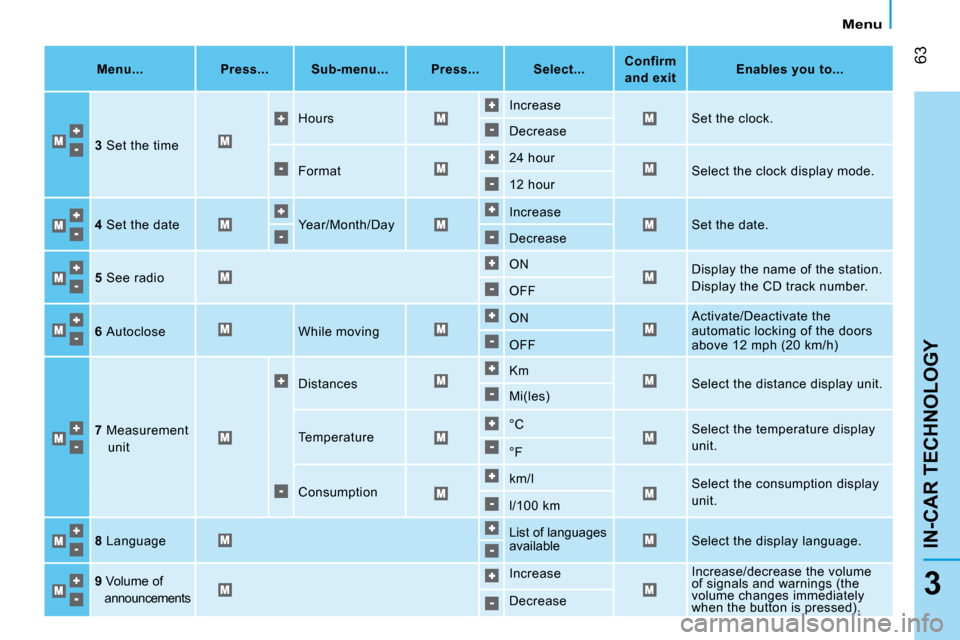
Menu...
Press... Sub-menu... Press... Select...
Confirm
and exit
Enables you to...
3 Set the time Hours
Increase
Set the clock.
Decrease
Format 24 hour
Select the clock display mode.
12 hour
4 Set the date Year/Month/Day Increase
Set the date.
Decrease
5 See radio ON
Display the name of the station.
Display the CD track number.
OFF
6 Autoclose While moving ON
Activate/Deactivate the
automatic locking of the doors
above 12 mph (20 km/h)
OFF
7 Measurement
unit Distances
Km
Select the distance display unit.
Mi(les)
Temperature °C
Select the temperature display
unit.
°F
Consumption km/l
Select the consumption display
unit.
l/100 km
8 Language List of languages
available
Select the display language.
9 Volume of
announcements Increase
Increase/decrease the volume
of signals and warnings (the
volume changes immediately
when the button is pressed).
Decrease
Page 79 of 140
73
4
ERGONOMICS and COMFORT
Seats
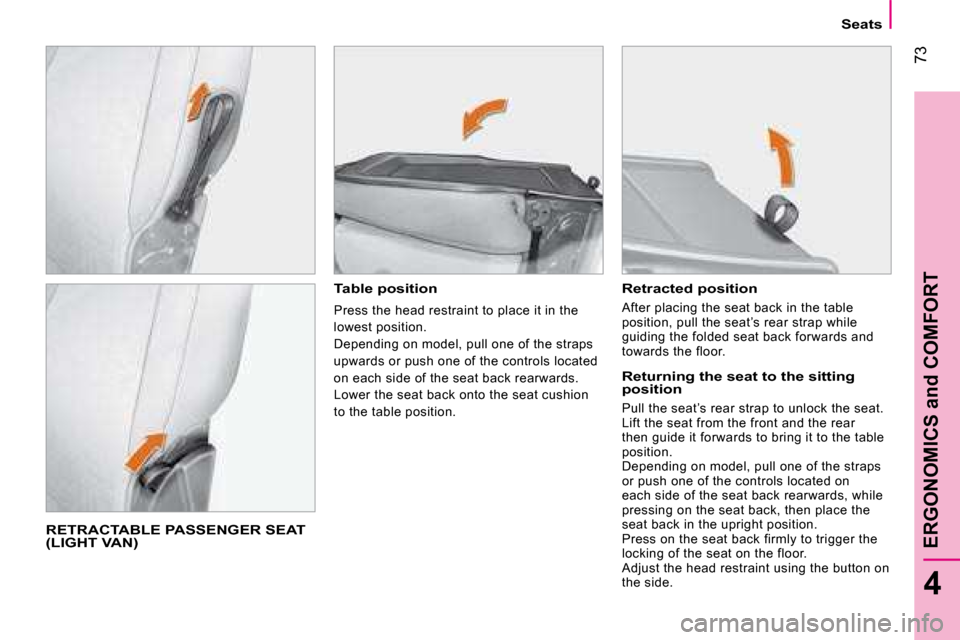
RETRACTABLE PASSENGER SEAT (LIGHT VAN)
Table position
Press the head restraint to place it in the
lowest position.
Depending on model, pull one of the straps
upwards or push one of the controls located
on each side of the seat back rearwards .
Lower the seat back onto the seat cushion
to the table position.
Retracted position
After placing the seat back in the table
position, pull the seat’s rear strap while
guiding the folded seat back forwards and
towards the floor.
Returning the seat to the sitting position
Pull the seat’s rear strap to unlock the seat.
Lift the seat from the front and the rear
then guide it forwards to bring it to the table
position.
Depending on model, pull one of the straps
or push one of the controls located on
each side of the seat back rearwards, while
pressing on the seat back, then place the
seat back in the upright position.
Press on the seat back firmly to trigger the
locking of the seat on the floor.
Adjust the head restraint using the button on
the side.
Page 80 of 140
74
Seats
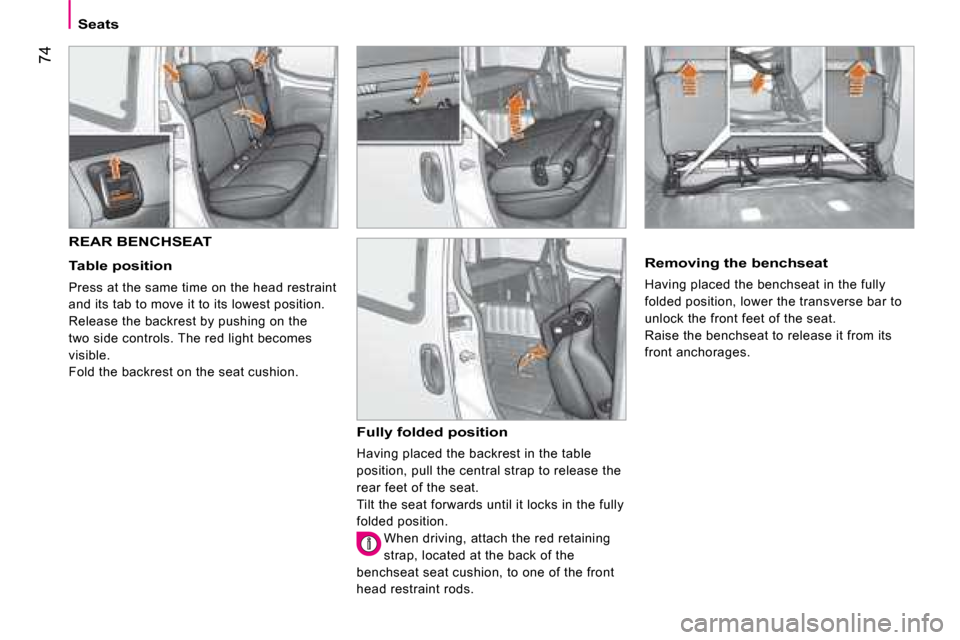
REAR BENCHSEAT
Table position
Press at the same time on the head restraint
and its tab to move it to its lowest position.
Release the backrest by pushing on the
two side controls. The red light becomes
visible.
Fold the backrest on the seat cushion.
Fully folded position
Having placed the backrest in the table
position, pull the central strap to release the
rear feet of the seat.
Tilt the seat forwards until it locks in the fully
folded position.
When driving, attach the red retaining
strap, located at the back of the
benchseat seat cushion, to one of the front
head restraint rods.
Removing the benchseat
Having placed the benchseat in the fully
folded position, lower the transverse bar to
unlock the front feet of the seat.
Raise the benchseat to release it from its
front anchorages.
Page 81 of 140
75
4
ERGONOMICS and COMFORT
Seats
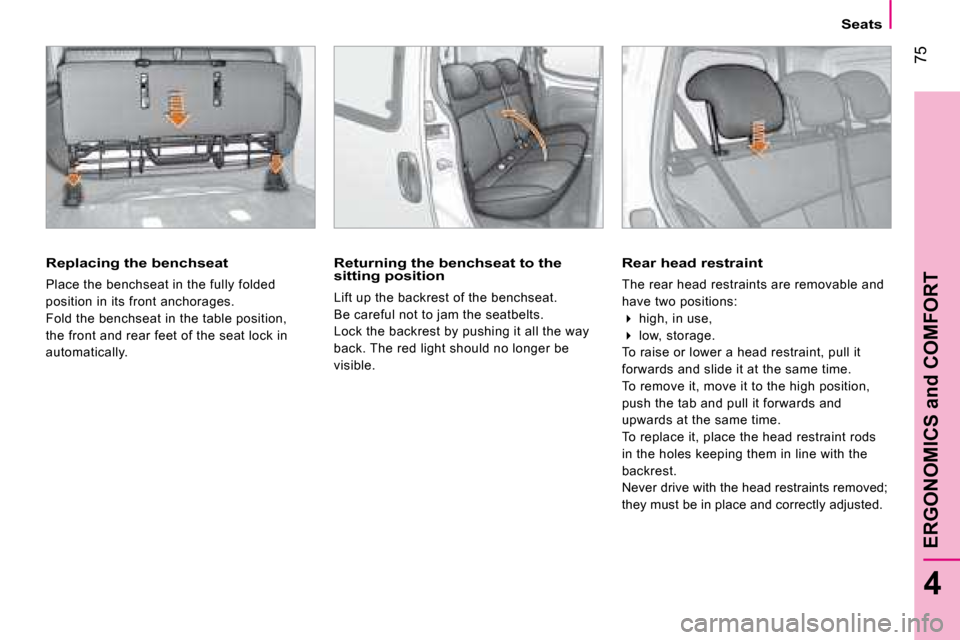
Replacing the benchseat
Place the benchseat in the fully folded
position in its front anchorages.
Fold the benchseat in the table position,
the front and rear feet of the seat lock in
automatically.
Returning the benchseat to the sitting position
Lift up the backrest of the benchseat.
Be careful not to jam the seatbelts.
Lock the backrest by pushing it all the way
back. The red light should no longer be
visible.
Rear head restraint
The rear head restraints are removable and
have two positions:
high, in use,
low, storage.
To raise or lower a head restraint, pull it
forwards and slide it at the same time.
To remove it, move it to the high position,
push the tab and pull it forwards and
upwards at the same time.
To replace it, place the head restraint rods
in the holes keeping them in line with the
backrest.
Never drive with the head restraints removed;
they must be in place and correctly adjusted.