dashboard CITROEN RELAY 2016 Handbook (in English)
[x] Cancel search | Manufacturer: CITROEN, Model Year: 2016, Model line: RELAY, Model: CITROEN RELAY 2016Pages: 308, PDF Size: 10.98 MB
Page 163 of 308

161
PuncturE rEPAIr KItrepairing the tyre
- Apply the parking brake.
-
Unscrew the tyre valve cap, remove the
filling hose B and screw the ring E onto
the valve. -
Start the engine.
-
Insert the connector G
into the nearest
power socket on the vehicle.
-
Switch on the compressor by placing the
switch F in position "I" (on),
-
Inflate the tyre to a pressure of 5 bar
.
To obtain a more accurate reading, you are
advised to check the pressure value on the
pressure gauge H , with the compressor off.
-
Check that the switch
F on the
compressor is in position "0" (off).
This temporary puncture repair kit stowed
in a bag located in one of the front door
pockets.
It consists of:
-
a cartridge
A , containing the sealant
fluid, equipped with:
●
a filling hose
B ,
●
a sticker
c
indicating "max. 80 km/h",
which the driver must affix in full view
(on the dashboard) after repairing the
tyre,
-
a quick guide to use of the repair kit,
-
a compressor
d
equipped with a
pressure gauge and unions,
-
adaptors, for the inflation of various
items.
QUICK HELP
8
Puncture
Page 170 of 308
 168
GLOSSArY OF LABELS
This section groups together all of the texts that appear on labels pres\
ent on the vehicle.under the bonnet
A
Original painting
Colour
Code
Refinishing code
B
AIR CONDITION")
168
GLOSSArY OF LABELS
This section groups together all of the texts that appear on labels pres\
ent on the vehicle.under the bonnet
A
Original painting
Colour
Code
Refinishing code
B
AIR CONDITIONED VEHICLE - R134A -
"CFC" FREE
QTY R134A (kg)
c
ONL
Y FOR JUMP START
d
DANGER
AUT
OMATIC ENGINE RESTART. EXTRACT
THE KEY FROM DASHBOARD WHEN
HOOD IS OPENED
For the vehicle identification labels, refer to the "Technical data" section.
Precautions...
Page 171 of 308

169
E
1 - CAUTION
ORIGINAL LUBRICANTS AND FLUIDS
Engine oil Transmission
Radiater Brake system
Windscreen Washer Power steering
REFER TO OWNER HANDBOOK WEAR EYE PROTECTION
2 - SAFETY
The use of original parts, fluids and original lubrificants and respecti\
ng scheduled
maintenance guarantees your cars reliability and safety overtime.
3 - DANGER
KEEP OUT OF CHILDREN'S REACH KEEP AWAY FROM
FLAMES DO NOT TOUCH
DO NOT OPEN CAP WITH ENGINE WARM EXPLOSION
CORROSIVE LIQUID
MAY START AUTOMATICALLY EVEN WITH ENGINE OFF HIGH PRESSURE GAS DO
NOT OPEN
AUTOMATIC ENGINE RESTART. EXTRACT THE KEY
FROM DASHBOARD WHEN BONNET HOOD IS OPENED HIGH VOLTAGE
QUICK HELP
8
Precautions...
Page 288 of 308

10
Vehicle configuration
Using the touch screen audio system
This audio system control panel, located in
the middle of the dashboard, gives access to
personalisation menus for certain systems.
The corresponding information appears in
the touch screen.
Nine languages are offered: Dutch, English,
French, German, Italian, Polish, Portuguese,
Spanish and Turkish.
As a safety precaution, some menus
can only be accessed when the ignition
is off.
This control panel button gives
access to the "Settings" menu.
"Settings" menu
1. "Display".
2. "Voice commands".
3. "Time and Date".
4. "Safety / Help".
5. "Lighting".
6. "Doors & locking".
7. "Audio".
8. "Telephone / Bluetooth".
9. "Radio settings".
10. "Restore Settings" to return to factory
settings.
11 . "Del. pers. data" to delete all of your
personal data, related to the Bluetooth
equipment in the audio system.
This button in the screen allows
you to go up a level in a menu or
increase a value.
This button in the screen allows
you to go down a level in a menu
or decrease a value.
For more information on the audio
system, the telephone, the radio and the
navigation system, the sub-menus 2 , 7 ,
8 , 9 and 11 are described in detail in the
"Audio and telematics" section.
The settings for sub-menus 4 , 5 and
6 vary according to the equipment
installed on the vehicle.
Page 304 of 308
10
Vehicle configuration
Using the touch screen audio system
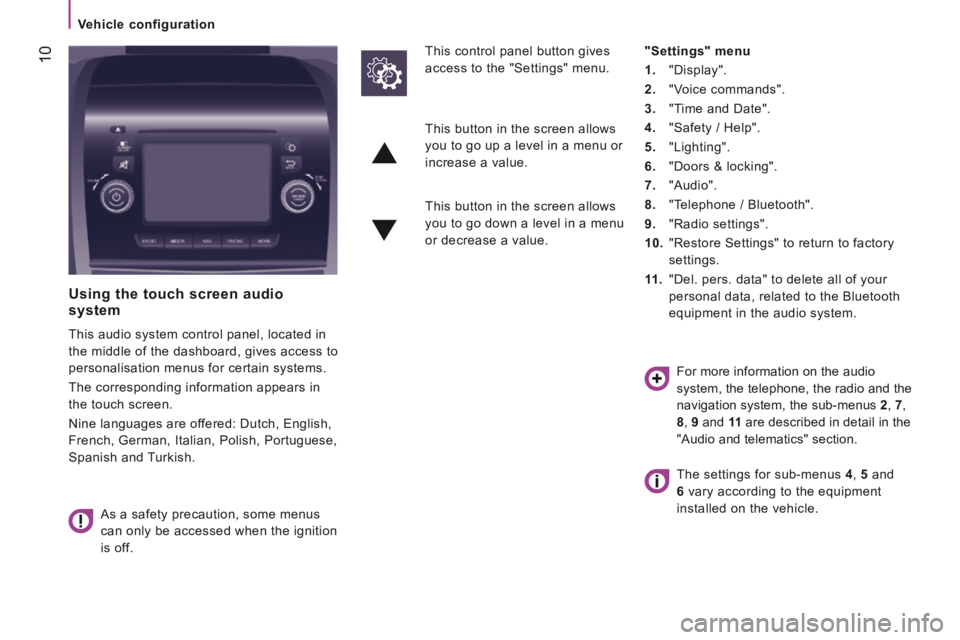
This audio system control panel, located in
the middle of the dashboard, gives access to
personalisation menus for certain systems.
The corresponding information appears in
the touch screen.
Nine languages are offered: Dutch, English,
French, German, Italian, Polish, Portuguese,
Spanish and Turkish.
As a safety precaution, some menus
can only be accessed when the ignition
is off.
This control panel button gives
access to the "Settings" menu.
"Settings" menu
1. "Display".
2. "Voice commands".
3. "Time and Date".
4. "Safety / Help".
5. "Lighting".
6. "Doors & locking".
7. "Audio".
8. "Telephone / Bluetooth".
9. "Radio settings".
10. "Restore Settings" to return to factory
settings.
11 . "Del. pers. data" to delete all of your
personal data, related to the Bluetooth
equipment in the audio system.
This button in the screen allows
you to go up a level in a menu or
increase a value.
This button in the screen allows
you to go down a level in a menu
or decrease a value.
For more information on the audio
system, the telephone, the radio and the
navigation system, the sub-menus 2 , 7 ,
8 , 9 and 11 are described in detail in the
"Audio and telematics" section.
The settings for sub-menus 4 , 5 and
6 vary according to the equipment
installed on the vehicle.