lock CITROEN RELAY 2017 Handbook (in English)
[x] Cancel search | Manufacturer: CITROEN, Model Year: 2017, Model line: RELAY, Model: CITROEN RELAY 2017Pages: 292, PDF Size: 9.04 MB
Page 83 of 292
81
cABIn FIttInGS
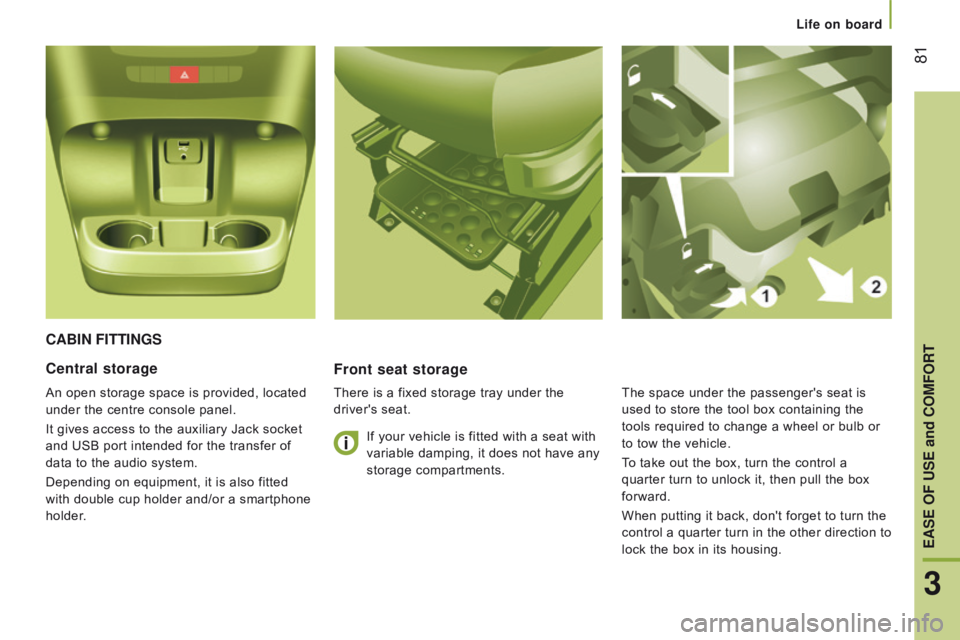
Front seat storage
There is a fixed storage tray under the
driver's seat.
central storage
An open storage space is provided, located
under the centre console panel.
It gives access to the auxiliary Jack socket
and USB port intended for the transfer of
data to the audio system.
Depending on equipment, it is also fitted
with double cup holder and/or a smartphone
holder.If your vehicle is fitted with a seat with
variable damping, it does not have any
storage compartments.
The space under the passenger's seat is
used to store the tool box containing the
tools required to change a wheel or bulb or
to tow the vehicle.
To take out the box, turn the control a
quarter turn to unlock it, then pull the box
forward.
When putting it back, don't forget to turn the
control a quarter turn in the other direction to
lock the box in its housing.
3
EASE OF uSE and cOMFOrt
Life on board
Page 84 of 292
82
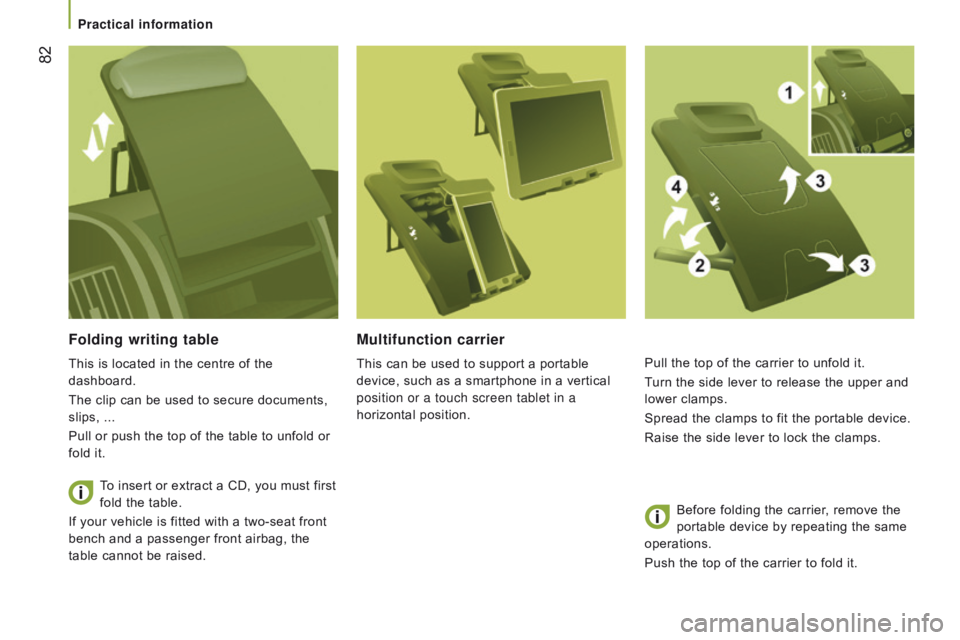
Folding writing table
This is located in the centre of the
dashboard.
The clip can be used to secure documents,
slips, ...
Pull or push the top of the table to unfold or
fold it.To insert or extract a CD, you must first
fold the table.
If your vehicle is fitted with a two-seat front
bench and a passenger front airbag, the
table cannot be raised.
Multifunction carrier
This can be used to support a portable
device, such as a smartphone in a vertical
position or a touch screen tablet in a
horizontal position. Pull the top of the carrier to unfold it.
Turn the side lever to release the upper and
lower clamps.
Spread the clamps to fit the portable device.
Raise the side lever to lock the clamps.
Before folding the carrier
, remove the
portable device by repeating the same
operations.
Push the top of the carrier to fold it.
Practical information
Page 87 of 292

85
Controls located at the bottom
of the dashboard on the driver's
side allow the driver to switch the
passenger spotlamp on or off.
reading lamps
These are controlled by the switches.
The driver's switch controls both reading
lamps simultaneously.
The passenger switch controls either the
driver's reading lamp or the passenger's
reading lamp.
courtesy lamp
It can be activated by means of:
-
the switches located on the courtesy
lamp, with the ignition on -
runn I n G
position,
-
opening or closing one of the front
doors,
-
locking/unlocking the vehicle.
It switches of
f automatically:
-
if the switch is not pressed to the right or
to the left,
-
in all cases after 15 minutes, if the doors
remain open,
-
or when the ignition is switched on.
Overhead storage compartment
This is located above the sun visors.
Maximum load: approximately 20 kg.
3
EASE OF uSE and cOMFOrt
Life on board
Page 95 of 292
93Menu...Press... Sub-menu… Press... Select…c onfirm
and quit Enables you to...
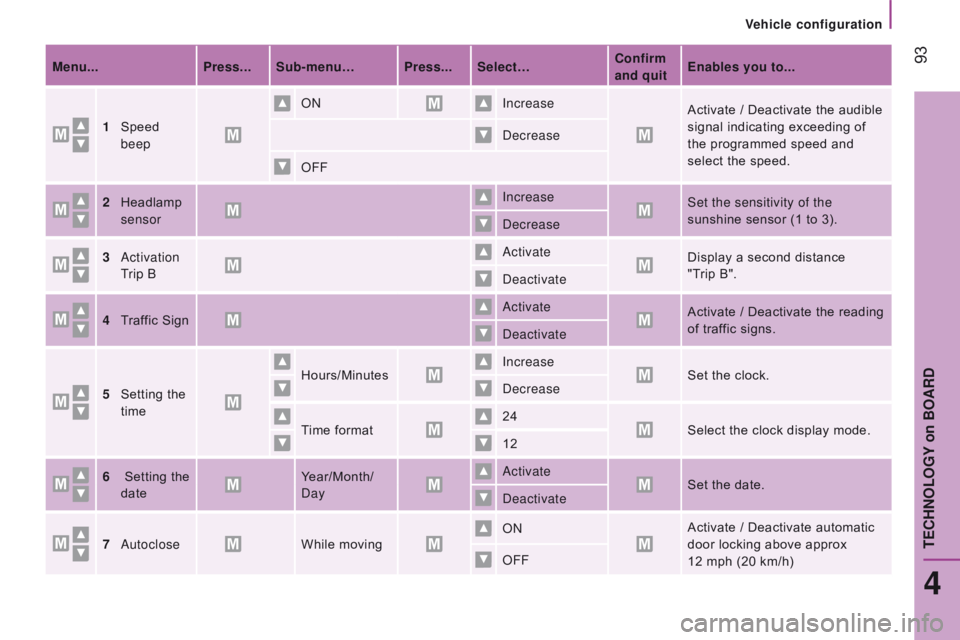
1
Speed
beep ON
Increase
Activate / Deactivate the audible
signal indicating exceeding of
the programmed speed and
select the speed.
Decrease
OFF
2
Headlamp
sensor Increase
Set the sensitivity of the
sunshine sensor (1 to 3).
Decrease
3
Activation
Trip B Activate
Display a second distance
"Trip B".
Deactivate
4
T
raffic Sign Activate
Activate / Deactivate the reading
of traffic signs.
Deactivate
5
Setting the
time Hours/Minutes
Increase
Set the clock.
Decrease
Time format 24
Select the clock display mode.
12
6
Setting the
date Year/Month/
Day Activate
Set the date.
Deactivate
7
Autoclose While moving ON
Activate / Deactivate automatic
door locking above approx
12
mph (20 km/h)
OFF
4
tEcHnOLOGY on BOArd
Vehicle configuration
Page 98 of 292
96
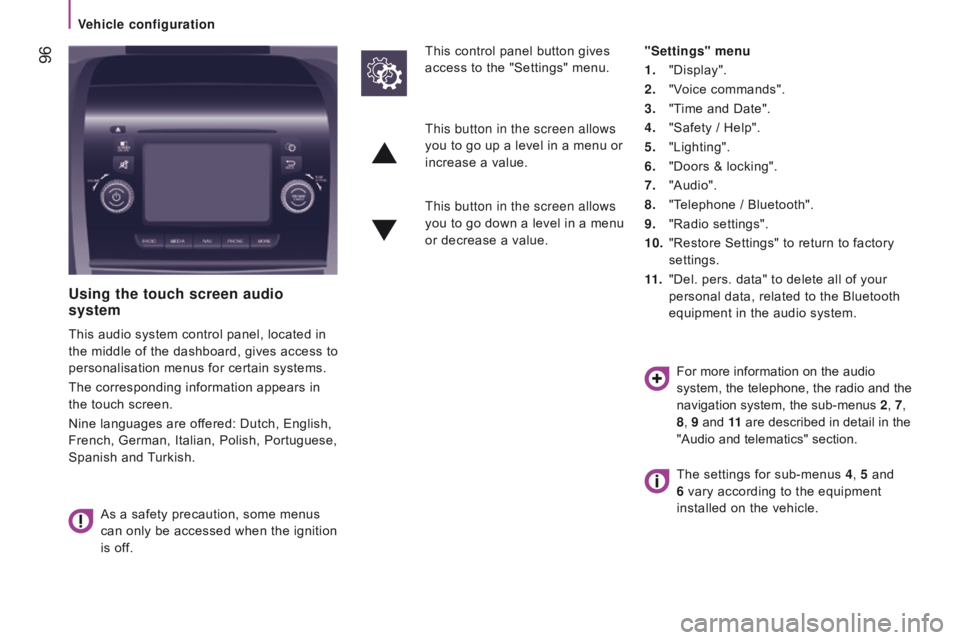
using the touch screen audio
system
This audio system control panel, located in
the middle of the dashboard, gives access to
personalisation menus for certain systems.
The corresponding information appears in
the touch screen.
Nine languages are offered: Dutch, English,
French, German, Italian, Polish, Portuguese,
Spanish and Turkish.
As a safety precaution, some menus
can only be accessed when the ignition
is off. This control panel button gives
access to the "Settings" menu.
"Settings" menu
1.
"Display".
2.
"V
oice commands".
3.
"T
ime and Date".
4.
"Safety / Help".
5.
"Lighting".
6.
"Doors & locking".
7.
"Audio".
8.
"T
elephone / Bluetooth".
9.
"Radio settings".
10.
"Restore Settings" to return to factory
settings.
11 .
"Del. pers. data" to delete all of your
personal data, related to the Bluetooth
equipment in the audio system.
This button in the screen allows
you to go up a level in a menu or
increase a value.
This button in the screen allows
you to go down a level in a menu
or decrease a value.
For more information on the audio
system, the telephone, the radio and the
navigation system, the sub-menus 2, 7,
8 , 9 and 11 are described in detail in the
"Audio and telematics" section.
The settings for sub-menus 4 , 5 and
6 vary according to the equipment
installed on the vehicle.
Vehicle configuration
Page 99 of 292

97From the "Safety / Help" sub menu, you can:
-
select "Parkview Camera", then
"Reversing camera" to activate or
deactivate its use (On, Off),
-
select "Parkview Camera", then
"Camera delay" to activate or deactivate
the maintaining of the display for
10
seconds or up to 11 mph (18 km/h)
(On, Off),
-
select "T
raffic Sign" to activate or
deactivate its use (On, Off),
-
select "Passenger airbag" to activate or
deactivate its use (On, Off).
From the "Lighting" sub-menu, you can:
-
select "Daytime running lamps" to
activate or deactivate their use (On, Off),
-
select "Auto headlamp dipping" to
activate or deactivate its use (On, Off),
-
select "Headlamp sensor" to adjust its
sensitivity (1, 2, 3). From the "Doors & locking" sub-menu,
you
can:
-
select "Autoclose" to activate or
deactivate its use (On, Off).
From the "Display" sub-menu, you can:
-
select "Languages" and choose one of
the languages listed above,
-
select "Units of measurement" to
choose the units for fuel consumption
(l/100
km, mpg), distance (miles, km)
and temperature (°C, °F),
-
select "Display
Trip B" to switch trip B
On or Off in the trip computer.
From the "Time and Date" sub-menu, you
can:
-
select "Adjust time and format" to set the
hour, minutes and seconds and choose
the format (24 h, 12 h with am or pm),
-
select "Adjust Date" to set the day
,
month and year.
To set the time manually, "Synch Time"
must be Off.
4
TECHNOLOGYon BOARD
V
Page 106 of 292

104
PAr KI n G B r AKEH A z A rd WA rn I n G LAMPS
Press this button, the direction indicators
flash.
They can operate with the ignition off.Applying
Pull the parking brake lever up to immobilise
your vehicle.
Check that the parking brake is applied
firmly before leaving the vehicle.Pull on the parking brake lever, only
with the vehicle stationary.
releasing
Pull the lever up slightly and press the
button to lower the parking brake lever.In the exceptional case of use of the
parking brake when the vehicle is
moving, apply the brake by pulling gently
to avoid locking the rear wheels (risk of
skidding).
If the parking brake is still on or has not
been released properly, this is indicated
by this warning lamp which comes on in
the instrument panel.
When parking on a slope, direct your wheels towards
the pavement and pull the parking brake lever up.
There is no advantage in engaging a gear after
parking the vehicle, particularly if the vehicle is
loaded.
The hazard warning lamps should only
be used in dangerous situations, when
stopping in an emergency or when
driving in unusual conditions.
driving safely
Page 107 of 292

105
HOrn
Press the centre of the steering wheel.
Anti-lock braking system and
electronic brake force distribution
Linked systems which improve the stability
and manoeuvrability of your vehicle when
braking, in particular on poor or slippery
surfaces.
Operation
The anti-lock braking system comes into
operation automatically when there is a risk
of wheel lock.
Normal operation of the ABS may make
itself felt by slight vibration of the brake
pedal accompanied by some noise.
When braking in an emergency
, press
very firmly without releasing the
pressure.
Switching off
These systems cannot be deactivated by
the
driver.
BrAKInG ASSIStA nc E SYS t EMS
Group of supplementary systems which help
you to obtain optimum braking in complete
safety in emergency situations:
-
anti-lock braking system (ABS),
-
electronic brake force distribution
(EBFD),
-
emergency braking assistance (EBA).
5
driving safely
SAFEtY
Page 108 of 292

106
Good practice
The ABS system does not provide shorter
braking distances. On very slippery surfaces
(black ice, oil...) the ABS can extend braking
distances. For emergency braking, press the
brake pedal hard and do not release it, even
on a slipper surface; you will then be able to
steer the vehicle and avoid an obstacle.
When replacing wheels (tyres and
rims), ensure that they conform to the
manufacturer's recommendations.Emergency braking assistance
System which, in an emergency, enables
you to obtain the optimum braking pressure
more quickly, thus reducing the stopping
distance.
Operation
It is triggered by the speed at which the
brake pedal is pressed.
The effect of this is a reduction in the
resistance of the pedal and an increase in
braking efficiency.
Switching off
This system cannot be deactivated by
the driver.
Operating fault
If this warning lamp comes on,
accompanied by an audible signal
and a message in the instrument
panel screen, it indicates a fault with
the anti-lock braking system which could result in
loss of control of the vehicle when braking.
For maximum braking efficiency, a
bedding-in period of around 300 miles
(500 kilometres) is needed. During this
period it is recommended that you avoid
harsh, repeated or prolonged braking. If this warning lamp comes on,
together with the ABS warning
lamp, accompanied by a message
in the instrument panel screen,
it indicates a fault with the electronic brake
force distribution which could result in loss
of control of the vehicle when braking. When braking in an emergency, press
firmly without releasing the pressure.
You must stop as soon as it is safe to do so.
In either case, contact a CITROËN dealer or
a qualified workshop.
driving safely
Page 120 of 292

118
cAB SEAt BELt S
If you install a front bench seat as
an accessory, it it must be fitted with
approved seat belts.
Fastening
Pull the strap in front of you with an even
movement, ensuring that it does not twist.
Engage the tongue in its buckle.
Check that the seat belt is fastened securely
and that the automatic locking system is
operating correctly by pulling the strap
rapidly.
unfastening
Press the red button on the buckle, the
seat belt reels in automatically but you are
advised to guide it.
As a safety measure, these operations
should not be carried out while the
vehicle is moving.
Seat belts not fastened
warning lamp
If the driver's seat belt is unfastened,
START mode of Stop & Start will not be
invoked. Engine restarting is only possible
with the ignition key. When the vehicle is started, this warning
lamp comes on, accompanied by an
increasing audible signal, if the driver and/
or the front passenger has not fastened their
seat belt.
The alert operates both for versions with
an individual passenger front seat and for
versions with a 2-seat front bench seat.
The driver's seat is fitted with a pyrotechnic
pretensioner and a force limiter.
On versions with a passenger's front airbag,
the passenger's seat is also fitted with a
pyrotechnic pretensioner and a force limiter.
The front bench seat is fitted with two seat
belts.
Height adjustment
For the driver or outer passenger seat,
squeeze the control at the adjustable top
mounting, slide the assembly, then release
at the desired position to lock it.
The height of the seat belt for the centre
seat cannot be adjusted.
Seat belts