lock CITROEN RELAY 2017 Handbook (in English)
[x] Cancel search | Manufacturer: CITROEN, Model Year: 2017, Model line: RELAY, Model: CITROEN RELAY 2017Pages: 292, PDF Size: 9.04 MB
Page 21 of 292

19remote control fault
Unlock the doors by using the key in the
door lock; the alarm is triggered.
Switch on the ignition, recognition of the
key's code turns off the alarm.Locking the doors by using the key in
the door lock does not set the alarm.
deactivation using the remote control
When this button is pressed, the
alarm is deactivated when the
vehicle is unlocked.
deactivation of the anti-tilt
protection*
Press this control to deactivate
the protection (when towing the
vehicle with the alarm on, for
example).
The protection remains active until the doors
are unlocked with the central locking.
ALArM
If your vehicle is fitted with an anti-theft
alarm.
This provides:
-
exterior perimeter protection by
detectors on the openings (doors,
bonnet) and on the electrical power
supply,
-
anti-tilt protection*.
Activation of the alarm
First ensure that all of the doors and bonnet
are closed correctly.
*
Depending on engine.
Good practice
to deactivate the siren quickly following
a false alarm:
-
switch on the ignition, recognition of the
key's code will switch off the alarm,
-
press the unlocking button (cab and key)
on the remote control.
To avoid setting the alarm, when washing
the vehicle for example, lock the vehicle
using the key.
Unlocking the vehicle using the remote
control deactivates the siren automatically.
The alarm is set by pressing this
padlock, the protection is active
after a few seconds.
While the alarm is monitoring,
any intrusion triggers the siren for
approximately 30 seconds, accompanied by
illumination of the direction indicators.
The alarm then returns to
monitoring mode but the
triggering event is stored and is
indicated by illumination of the
electronic immobiliser warning lamp for about
10
seconds when the ignition is switched on.
The alarm is also triggered following an
electrical supply cut-off, when the supply is
restored.
2
Access
rEAdY tO GO
Page 22 of 292

20
FrOnt dOOrSc hild lock
This prevents opening of the sliding side
door from the inside.
Press the control located on the edge of the
side door.
Use the corresponding button on the remote
control or use the key in the driver's door
lock barrel to unlock.
Pull the handle towards you.
SLIdInG SIdE dOOr
Take care not to obstruct the guide space
on the floor in order for the door to slide
correctly.
From outside
Pull the handle towards you then towards
the rear.
From inside
To unlock and open, push the handle
towards the rear.
Ensure that the door opens fully in order
for the latch at the bottom of the door to
engage.
To release and close, pull the handle while
sliding the door.
Do not drive with the sliding side door
open.
Access
Page 24 of 292

22
LOcKInG / unLOcKInG FrOM InSIdEd oor open warning lamp
If this warning lamp comes on,
check that all of the doors and
the bonnet are closed correctly.
reversing camera
With the vehicle stationary, opening the rear
doors activates the camera and sends the
image to the screen fitted in the cab.
cab and load space
Pressing permits electric central
locking and unlocking, when the
doors are closed.
The doors can still be opened from the
inside. If one of the doors is open or is not
closed correctly, the central locking
does not work. The indicator lamp in the control:
Load space
Press to lock or unlock the side
door and rear doors from the cab.
The indicator lamp remains on
when locked
Anti-intrusion security
When the vehicle is started, the
system locks the cab and load space
doors automatically when you reach
approximately
12 mph (20 km/h).
If none of the doors is opened during the
journey, the locking remains active.
Activation/deactivation of the system
The system setting is made with the MO
d E
button: in the "Autoclose" menu, select "ON"
or "OFF".
-
comes on when the doors
are locked and the ignition is
switched on,
-
then flashes when the doors
are locked when stationary
with the engine off.
The control is not active when the vehicle
has been locked using the remote control or
the key from the outside.
Good practice
If you decide to drive with the doors locked,
be aware that this could make access to the
vehicle by the emergency services more
difficult in an emergency. Refer to the "Technology on board -
Vehicle configuration" section.
Access
Page 27 of 292

25WArn I n G / I nd I c AtO r LAMPS
Every time the engine is started: a series of warning lamps comes on, applying a self-checking test. They go off almost
immediately.
When the engine is running: a warning lamp becomes an alert if it remains on continuously or flashes. This initial warning may
be accompanied by an audible signal and a message in the screen. "Do not ignore these warnings."
Warning/indicator lamp isindicates Solution - action
Service on temporarily. minor faults.
Contact a CITROËN dealer or a qualified workshop.
continuously on,
accompanied by
a message on
the screen. major faults.
and/or
an engine system fault.
Make a note of the warning message and contact a
CITROËN dealer or a qualified workshop.
Parking brake on. the parking brake is applied or
has not been released correctly.Releasing the parking brake switches off the warning
lamp.
Brake fluid level on.
the fluid level is too low. Top up with a fluid listed by CITROËN.
continuously on,
even though the
level is correct. Stop as soon as it is safe to do so.
Park, switch off the ignition and contact a
c I tr OË n
dealer or a qualified workshop.
+ Electronic brake
force distribution on.
a fault with the system. Stop as soon as it safe to do so.
Contact a CITROËN dealer or a qualified workshop.
Anti-lock braking
system on.
a fault with the system. The vehicle retains conventional braking without
assistance. However, we recommend that you stop and
contact a CITROËN dealer or a qualified workshop.
2
rEAdY tO GO
Instruments and controls
Page 31 of 292
29
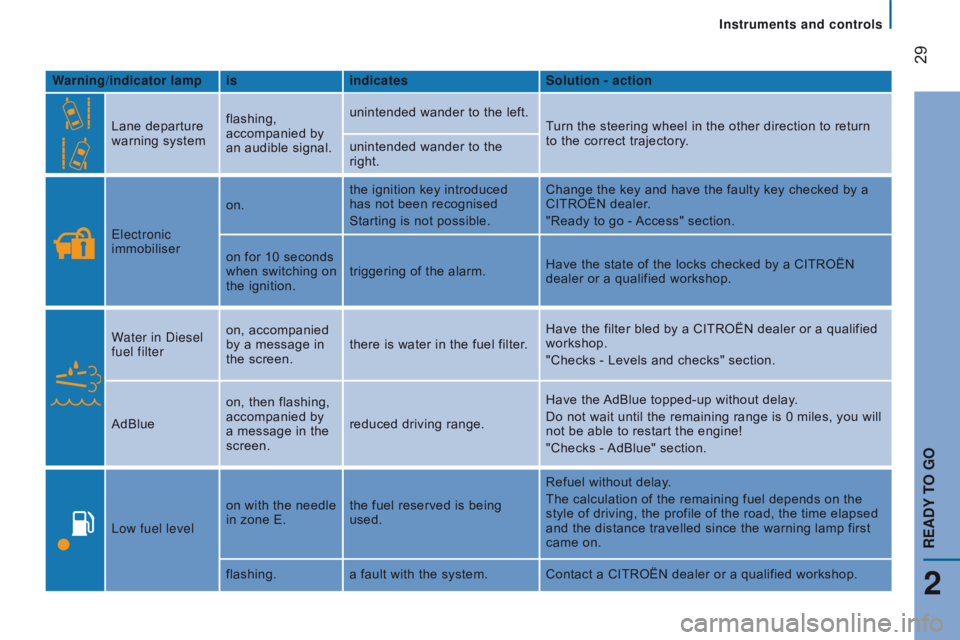
Warning/indicator lampisindicates Solution - action
Lane departure
warning system flashing,
accompanied by
an audible signal. unintended wander to the left.
Turn the steering wheel in the other direction to return
to the correct trajectory.
unintended wander to the
right.
Electronic
immobiliser on.
the ignition key introduced
has not been recognised
Starting is not possible. Change the key and have the faulty key checked by a
CITROËN dealer.
"Ready to go - Access" section.
on for 10 seconds
when switching on
the ignition. triggering of the alarm.
Have the state of the locks checked by a CITROËN
dealer or a qualified workshop.
Water in Diesel
fuel filter on, accompanied
by a message in
the screen.
there is water in the fuel filter. Have the filter bled by a CITROËN dealer or a qualified
workshop.
"Checks - Levels and checks" section.
AdBlue on, then flashing,
accompanied by
a message in the
screen. reduced driving range. Have the AdBlue topped-up without delay.
Do not wait until the remaining range is 0 miles, you will
not be able to restart the engine!
"Checks - AdBlue" section.
Low fuel level on with the needle
in zone E.
the fuel reserved is being
used. Refuel without delay.
The calculation of the remaining fuel depends on the
style of driving, the profile of the road, the time elapsed
and the distance travelled since the warning lamp first
came on.
flashing. a fault with the system. Contact a CITROËN dealer or a qualified workshop.
2
rEAdY tO GO
Instruments and controls
Page 41 of 292
39
Gearbox and steering wheel
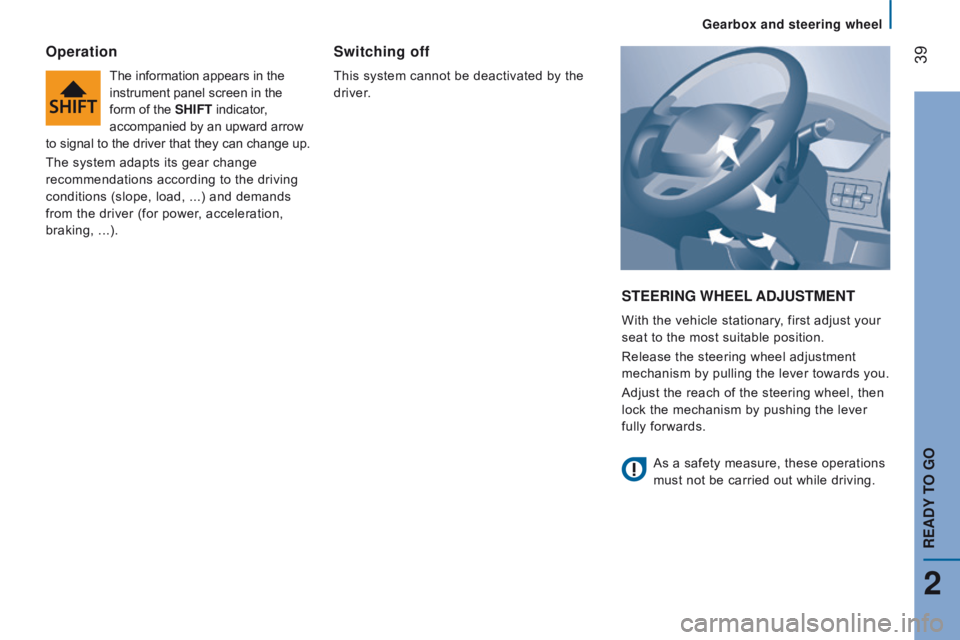
StEErInG WHEEL A dju S t ME nt
With the vehicle stationary, first adjust your
seat to the most suitable position.
Release the steering wheel adjustment
mechanism by pulling the lever towards you.
Adjust the reach of the steering wheel, then
lock the mechanism by pushing the lever
fully forwards.
Operation
The information appears in the
instrument panel screen in the
form of the SHIF
t indicator,
accompanied by an upward arrow
to signal to the driver that they can change up.
The system adapts its gear change
recommendations according to the driving
conditions (slope, load, ...) and demands
from the driver (for power, acceleration,
braking,
...).
Switching off
This system cannot be deactivated by the
driver.
As a safety measure, these operations
must not be carried out while driving.
2
rEAdY tO GO
Page 42 of 292
40
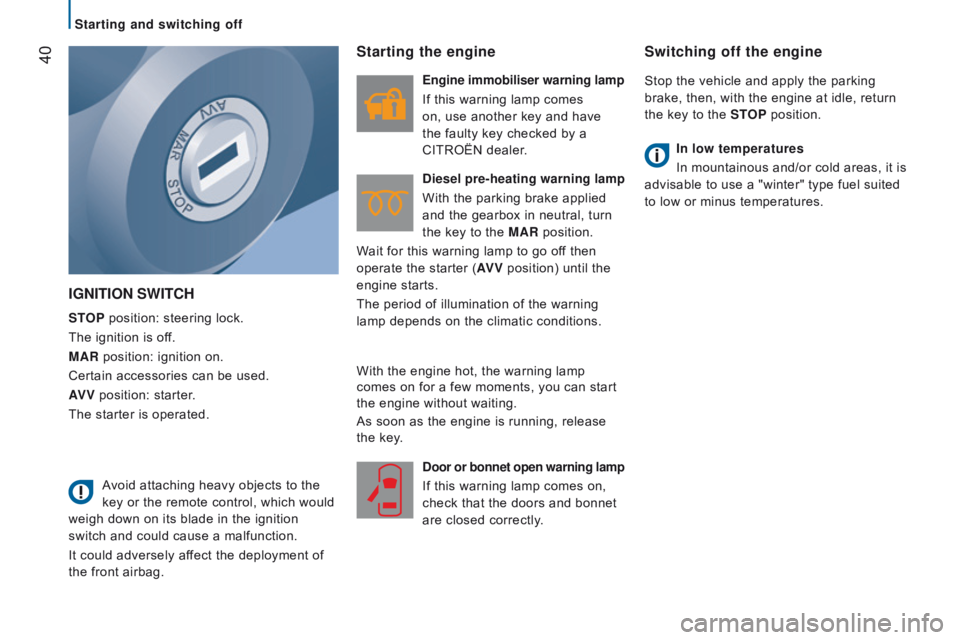
IGnItIOn SWItcH
StOP position: steering lock.
The ignition is off.
MA
r position: ignition on.
Certain accessories can be used.
AV V position: starter.
The starter is operated.
Starting the engine
Engine immobiliser warning lamp
If this warning lamp comes
on, use another key and have
the faulty key checked by a
CITROËN dealer.
d
iesel pre-heating warning lamp
With the parking brake applied
and the gearbox in neutral, turn
the key to the MA
r position.
Wait for this warning lamp to go off then
operate the starter (AV V position) until the
engine starts.
The period of illumination of the warning
lamp depends on the climatic conditions.
d
oor or bonnet open warning lamp
If this warning lamp comes on,
check that the doors and bonnet
are closed correctly.
Switching off the engine
Stop the vehicle and apply the parking
brake, then, with the engine at idle, return
the key to the S
t
OP
position.
In low temperatures
In mountainous and/or cold areas, it is
advisable to use a "winter" type fuel suited
to low or minus temperatures.
Avoid attaching heavy objects to the
key or the remote control, which would
weigh down on its blade in the ignition
switch and could cause a malfunction.
It could adversely affect the deployment of
the front airbag. With the engine hot, the warning lamp
comes on for a few moments, you can start
the engine without waiting.
As soon as the engine is running, release
the key.
Starting and switching off
Page 43 of 292
41
BAttE rY S tA nd BY SYS t EM
If the vehicle is not to be used for a
prolonged period, such as for winter storage,
for example, it is strongly recommended that
the battery be placed on standby in order to
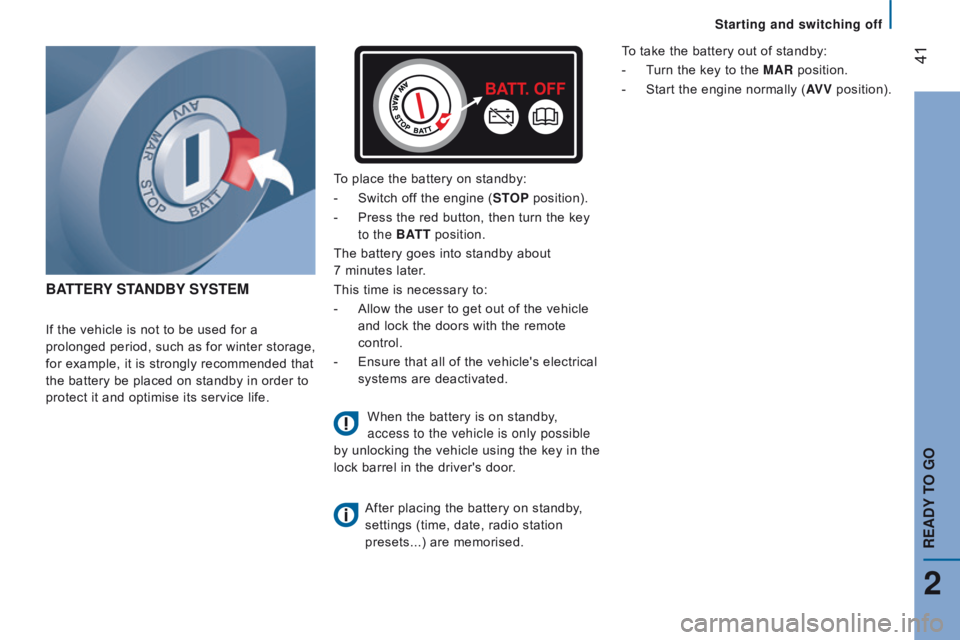
protect it and optimise its service life. To place the battery on standby:
-
Switch of
f the engine (S t
OP
position).
-
Press the red button, then turn the key
to the BA
tt
position.
The battery goes into standby about
7 minutes later.
This time is necessary to:
-
Allow the user to get out of the vehicle
and lock the doors with the remote
control.
-
Ensure that all of the vehicle's electrical
systems are deactivated.
When the battery is on standby,
access to the vehicle is only possible
by unlocking the vehicle using the key in the
lock barrel in the driver's door.
After placing the battery on standby
,
settings (time, date, radio station
presets...) are memorised. To take the battery out of standby:
-
T
urn the key to the MA r position.
-
Start
the engine normally (AV V
position).
2
rEAdY tO GO
Starting and switching off
Page 74 of 292
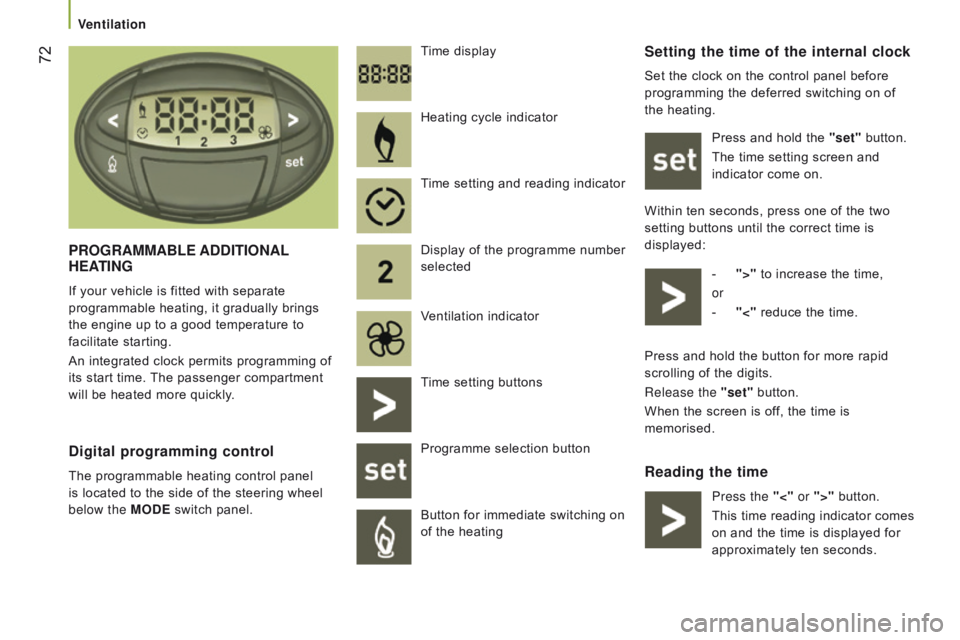
72Setting the time of the internal clock
Set the clock on the control panel before
programming the deferred switching on of
the heating.Press and hold the "set" button.
The time setting screen and
indicator come on.
Within ten seconds, press one of the two
setting buttons until the correct time is
displayed: -
">"
to increase the time,
or
-
"<"
reduce the time.
reading the time
Pr
OG
r
AMMABLE
A
dd
I
t
IO
n
AL
HEAt
I
n
G
If your vehicle is fitted with separate
programmable heating, it gradually brings
the engine up to a good temperature to
facilitate starting.
An integrated clock permits programming of
its start time. The passenger compartment
will be heated more quickly. Time display
digital programming control
The programmable heating control panel
is located to the side of the steering wheel
below the MO
d E switch panel. Heating cycle indicator
Time setting and reading indicator
Display of the programme number
selected
Ventilation indicator
Time setting buttons
Programme selection button
Button for immediate switching on
of the heating
Press and hold the button for more rapid
scrolling of the digits.
Release the "set" button.
When the screen is off, the time is
memorised.
Press the "<" or ">" button.
This time reading indicator comes
on and the time is displayed for
approximately ten seconds.
Ventilation
Page 78 of 292

76drIVEr'S SEAt
Head restraint
Press the tab to adjust the height of the
head restraint.
To remove the head restraint, press the tabs
and raise the head restraint.
Adjustable armrest
Raise or, lower the armrest.
Turn the wheel located under the end of the
armrest to lock it in the desired position.
Seats