lock CITROEN RELAY 2019 Handbook (in English)
[x] Cancel search | Manufacturer: CITROEN, Model Year: 2019, Model line: RELAY, Model: CITROEN RELAY 2019Pages: 232, PDF Size: 8.21 MB
Page 33 of 232

31
If one of the doors is open or not properly
closed, central locking does not take place.
The direction indicators flash once.
If your vehicle has an alarm, pressing this
button sets it.
Folding/Unfolding the key
F Press this button to fold/unfold the key.
If you do not press the button, there is
a
risk of damaging the mechanism.
Central locking
Pressing this button locks all of your
vehicle's doors, cab and load space.
The indicator lamp in the central locking button
comes on and flashes.
Deadlocking
Pressing this button twice in
succession deadlocks the vehicle.
It is then impossible to open the doors from the
inside or the outside.
The direction indicators flash three times. Never leave anyone inside the vehicle
when it is deadlocked.
Changing the battery
F Press the button to eject the key.
F T urn the screw 1 of the closed padlock
towards the open padlock using
a
screwdriver with a fine tip.
F
U
se the screwdriver as a lever to extract the
battery holder housing 2 . There is a
risk of damage if the replacement
battery is not of the correct type.
Only use batteries which are identical or of
an equivalent type to those recommended
by a CITROËN dealer. Take used batteries
to an authorised collection point.
Type: CR 2032/3 Volts. F
R
emove the housing and change the
battery 3 making sure that the polarities are
correct.
F
C
lose the battery holder 2 on the inside of
the key and lock it by turning the screw 1 .
2
Access
Page 34 of 232
32
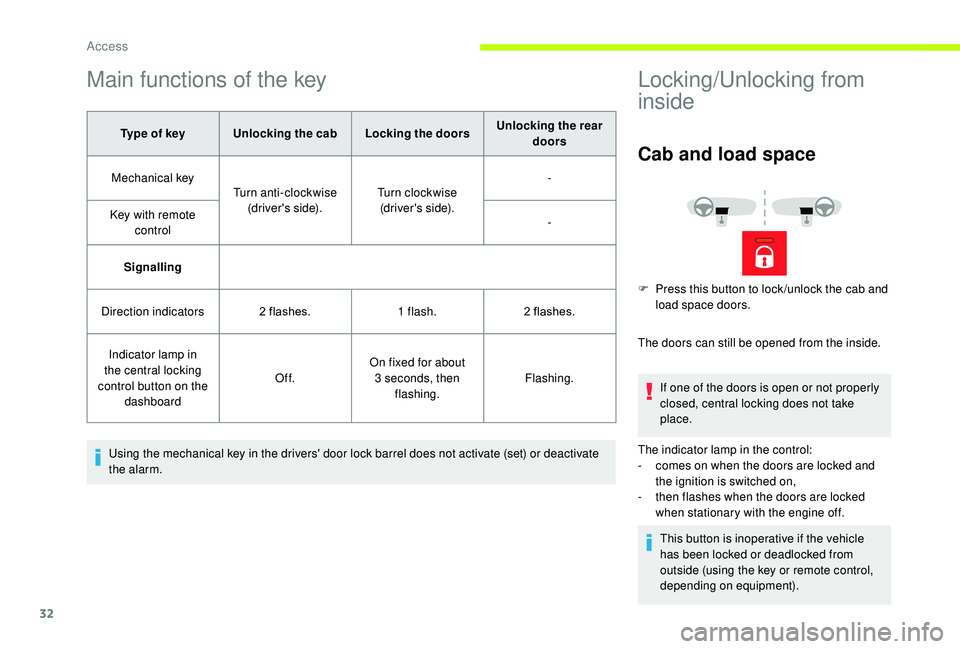
Main functions of the key
Type of keyUnlocking the cab Locking the doorsUnlocking the rear
doors
Mechanical key Turn anti-clockwise
(driver's side). Turn clockwise
(driver's side). -
Key with remote control -
Signalling
Direction indicators 2
flashes.1
flash.2
flashes.
Indicator lamp in
the central locking
control button on the dashboard Of f.
On fixed for about
3
seconds, then flashing. Flashing.
Using the mechanical key in the drivers' door lock barrel does not activate (set) or deactivate
the alarm.
Locking/Unlocking from
inside
Cab and load space
The doors can still be opened from the inside. If one of the doors is open or not properly
closed, central locking does not take
place.
The indicator lamp in the control:
-
c
omes on when the doors are locked and
the ignition is switched on,
-
t
hen flashes when the doors are locked
when stationary with the engine off.
This button is inoperative if the vehicle
has been locked or deadlocked from
outside (using the key or remote control,
depending on equipment).
F
P
ress this button to lock /unlock the cab and
load space doors.
Access
Page 35 of 232

33
If you decide to drive with the doors
locked, be aware that this could make
access to the vehicle by the emergency
services more difficult in an emergency.
Load space
F Press this button to lock /unlock the side door and the rear doors from the cab.
The indicator lamp remains on when locked.
Anti-intrusion security
When the vehicle is started, the system locks
the cab and load space doors automatically
when you reach approximately 12
mph
(20
km/h).
If none of the doors are opened during the
journey, the locking remains active.
Activation/deactivation of
the system
This system can be configured using the
MODE button:
F
I
n the "Autoclose" menu, select "ON" or
"OFF".
For more information on Vehicle
configuration , refer to the corresponding
section.
Front doors
F Use the corresponding button on the remote control or use the key in the driver's door
lock to unlock.
F
P
ull the handle towards you.
Sliding side door
Take care not to block the guide space
on the floor to allow the door to slide
c o r r e c t l y.
Opening
From outside
F Pull the handle towards you then towards the rear.
2
Access
Page 36 of 232

34
From inside
To hold the sliding side door open, open
it fully to block the device at the bottom of
the door.Do not drive with the sliding side door
open.
Closing
From outside
F Pull the handle towards you then towards
the front.
From inside
F To release and close, pull the handle while sliding the door.
F
T
o unlock and open, push the handle
towards the rear.
Rear doors
With the vehicle stationary, opening the
rear doors activates the camera and sends
the image to the screen fitted in the cab.
Opening
From outside
F Pull the handle towards you then pull the lever to open the left-hand door.
The two hinged doors open to 96°.
Access
Page 38 of 232

36
Deactivation using the
remote control
F Press this button.
Deactivation of the anti-tilt
protection
F Press this control to deactivate the protection (when towing the
vehicle with the alarm on, for
example).
Failure of the remote
control
F Unlock the doors by using the key in the door lock; the alarm is triggered.
F
S
witch on the ignition, recognition of the key
code stops the alarm.
Deactivation occurs when the vehicle is
unlocked.
(Depending on engine).
The protection remains active until the doors
are unlocked with the central locking.
Locking the doors using the key in the
door lock does not set the alarm. To deactivate the siren quickly
following a
false alarm:
F
s
witch on the ignition, recognition of
the key code stops the alarm,
F
p
ress the unlocking button (cab and
key) on the remote control.
To avoid setting the alarm, when washing
the vehicle for example, lock the vehicle
using the key.
Unlocking the vehicle using the remote
control deactivates the siren automatically.
Electric windows
A. Driver's window control
B. Passenger's window control
Manual operation
F To open or close the window, press or pull
switch A/B gently, without passing the
resistance point. The window stops as soon
as the switch is released.
Automatic operation
F To open or close the window, press or pull the control A fully, beyond the resistance
point: the window opens or closes
completely when the switch is released.
Pressing the switch again stops the
movement of the window.
Always remove the key from the ignition
when leaving the vehicle, even for a
short
time.
If an obstacle is encountered during
operation of the electric windows, you must
reverse the movement of the window. To do
this, press the window control concerned.
When the driver operates the passenger
electric windows, they must ensure that
no-one is preventing correct closing of the
windows.
The driver must ensure that the passengers
use the electric windows correctly.
Be particularly aware of children when
operating the windows.
Access
Page 40 of 232

38
Adjustable armrestHeated seat
When the seat and passenger
compartment have reached an adequate
temperature, you can switch off the
function; reducing the consumption
of electrical current reduces fuel
consumption.
F
T
o remove the head restraint, press the tabs
and raise the head restraint.
F
Ra
ise or lower the armrest.
F
T
urn the wheel located under the end of the
armrest to lock it in the desired position. Use this control to switch the heating of the
seat on or off.
Do not use the function when the seat is
e m pt y.
Prolonged use is not recommended for
those with sensitive skin.
There is a
risk of burns for people whose
perception of heat is impaired (illness,
taking medication, etc.).
There is a risk of overheating the system if
material with insulating properties is used,
such as cushions or seat covers.
Do not use the system:
-
i
f wearing damp clothing,
-
i
f child seats are fitted.
To avoid breaking the heating element in
the seat:
- d o not place heavy objects on the seat,
-
d
o not kneel or stand on the seat,
-
d
o not place sharp objects on the seat,
-
d
o not spill liquids onto the seat.
To avoid the risk of short-circuit:
-
d
o not use liquid products for cleaning
the seat,
-
n
ever use the heating function when
the seat is damp.
Ease of use and comfort
Page 43 of 232

41
Removing the bench seat
At least two people are required to remove
the bench seat.
F
F
old the seat backrest onto the cushion as
described above.
Check that the seat belts are always
accessible to the passenger and easy to
fasten.
A passenger must not take their seat
without adjusting the seat's head restraint
correctly and adjusting and fastening the
seat belt.
Do not remove a
head restraint without
storing it and securing it to a
support.
Do not allow anyone to travel in row 3
with
the row 2
bench in the vertical position.
Do not leave any objects on the folded
backrest of row 2.
Steering wheel
adjustment
F With the vehicle stationary, first adjust your seat to the most suitable position.
As a
safety precaution, these operations
must only be carried out while the vehicle
is stationary.
F
T
urn the two grips for ward to release the
rear anchorages.
F
T
ilt the base of the bench seat for wards to
place the assembly in the vertical position. F
T
urn the two levers upwards to release the
front anchorages.
F
Ra
ise the bench seat and remove it. F
R
elease the steering wheel adjustment
mechanism by pulling the lever towards you.
F
A
djust the reach of the steering wheel, then
lock the mechanism by pushing the lever
fully forwards.
3
Ease of use and comfort
Page 49 of 232
47
The warm air diffused at floor level from the
front air conditioning unit is distributed at the
feet of the rear passengers of rows 2 and 3.
A warm air diffusion vent, located on the rear
left wheel arch, can supplement the unit for the
feet of the rear passengers in row 3.
Activation/Deactivation
F From the driver's seat, press this button on the MODE control
panel to activate the operation
of the rear controls. The
indicator lamp comes on.
Air flow
F Turn the control to your chosen position to obtain sufficient air
flow for your comfort.
Comfort temperature
adjustment
F Turn the control to select a position between blue
(cold) and red (hot) so as to
adjust the temperature to your
requirements.
The OFF control on the "Single zone"
central control panel switches off the
function.
However, a safety device will ventilate the
rear circuit automatically, even if the control
is in position 0, to prevent condensation
forming.
Pressing this button again deactivates the rear
controls. The indicator lamp goes out.
Programmable additional
heating
This also facilitates passenger
compartment heating, demisting and
defrosting.
Digital programming
control
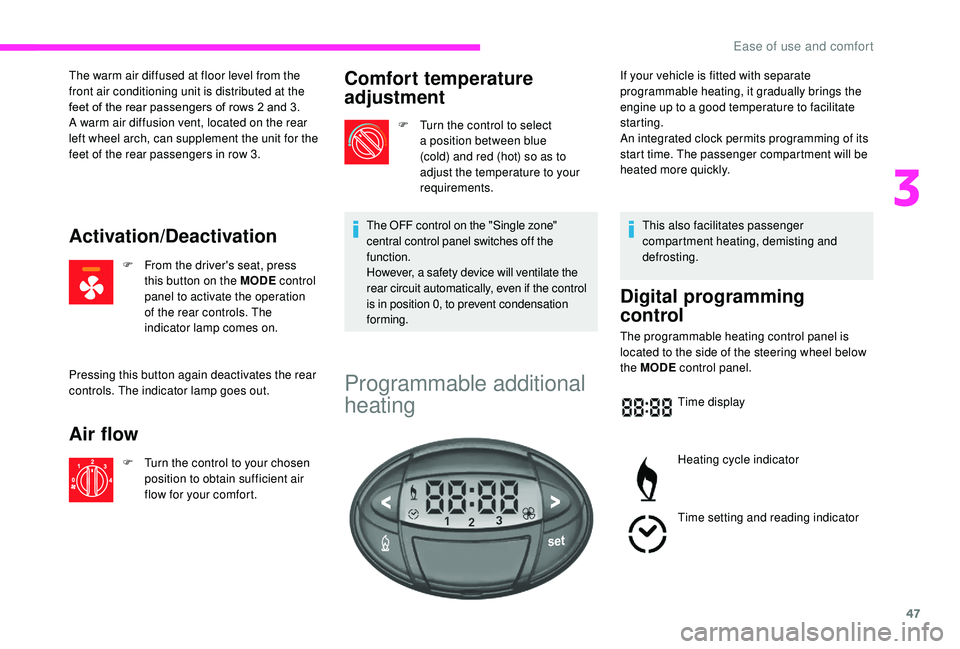
The programmable heating control panel is
located to the side of the steering wheel below
the MODE control panel.
Time display
Heating cycle indicator
Time setting and reading indicator
If your vehicle is fitted with separate
programmable heating, it gradually brings the
engine up to a
good temperature to facilitate
starting.
An integrated clock permits programming of its
start time. The passenger compartment will be
heated more quickly.
3
Ease of use and comfort
Page 50 of 232
48
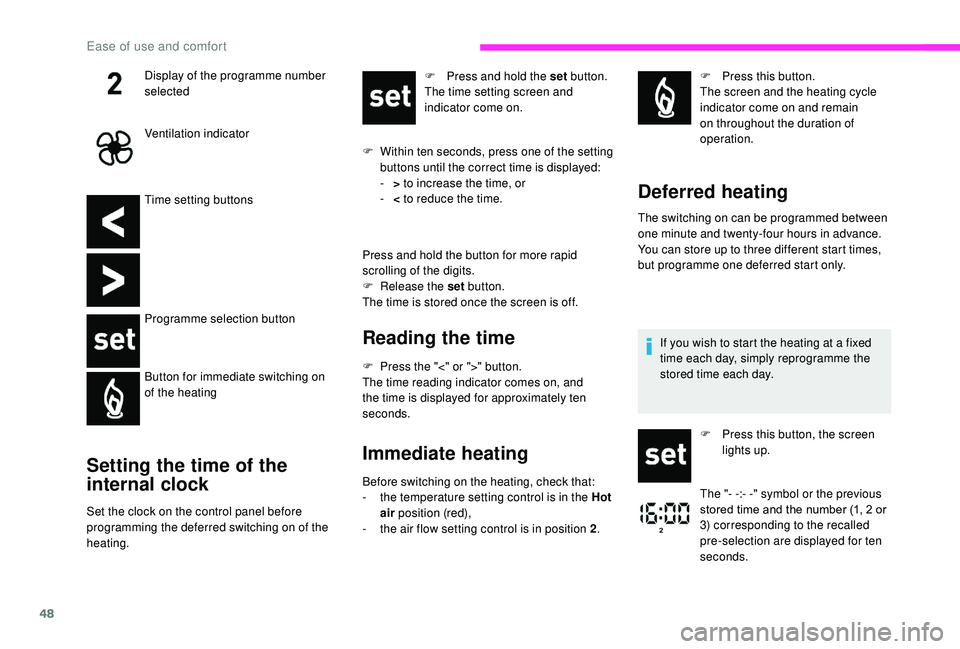
Time setting buttons
Programme selection button
Button for immediate switching on
of the heating
Setting the time of the
internal clock
Set the clock on the control panel before
programming the deferred switching on of the
heating.F
P
ress and hold the set button.
The time setting screen and
indicator come on.
F
W
ithin ten seconds, press one of the setting
buttons until the correct time is displayed:
-
>
to increase the time, or
-
<
to reduce the time.
Press and hold the button for more rapid
scrolling of the digits.
F
R
elease the set
button.
The time is stored once the screen is off.
Reading the time
F Press the "<" or ">" button.
The time reading indicator comes on, and
the time is displayed for approximately ten
seconds.
Immediate heating
Before switching on the heating, check that:
- t he temperature setting control is in the Hot
air position (red),
-
t
he air flow setting control is in position 2 .F
P
ress this button.
The screen and the heating cycle
indicator come on and remain
on throughout the duration of
operation.
Deferred heating
The switching on can be programmed between
one minute and twenty-four hours in advance.
You can store up to three different start times,
but programme one deferred start only.
Display of the programme number
selected
Ventilation indicator
If you wish to start the heating at a fixed
time each day, simply reprogramme the
stored time each day.
F
P
ress this button, the screen
lights up.
The "- -:- -" symbol or the previous
stored time and the number (1, 2
or
3) corresponding to the recalled
pre-selection are displayed for ten
seconds.
Ease of use and comfort
Page 55 of 232

53
To take out the box, turn the control a quarter
t urn to unlock it, then pull the box for ward.
Folding writing table
To insert or remove a CD, you must first
f old the table.
If your vehicle is fitted with a
two-seat
front bench and a
front passenger airbag,
the table cannot be raised.
Multifunction carrier
It keeps mobile equipment such as
a smartphone in a vertical position or a touch
screen tablet in a
horizontal position.
F
P
ull or push the top of the table to unfold or
fold it.
The clip can be used to secure documents,
notes, etc. When putting it back, do not forget to turn the
control a
quarter turn in the other direction to
lock the box in its housing.
3
Ease of use and comfort