lock DACIA DUSTER 2010 1.G Owner's Manual
[x] Cancel search | Manufacturer: DACIA, Model Year: 2010, Model line: DUSTER, Model: DACIA DUSTER 2010 1.GPages: 200, PDF Size: 7.12 MB
Page 46 of 200
control instruments ............................... (up to the end of the DU)
instrument panel ................................... (up to the end of the DU)
warning lights ........................................ (up to the end of the DU)
1.40
ENG_UD24501_4
Témoins lumineux (H79 - Dacia)
ENG_NU_898-5_H79_Dacia_1
Jaune NoirNoir texte
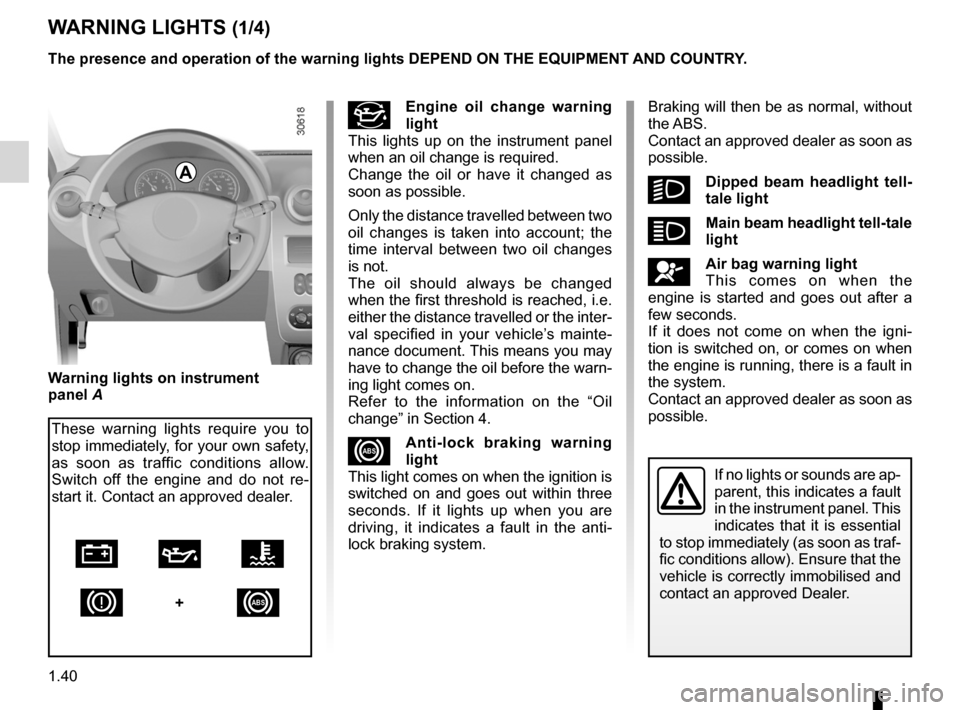
Instrument panel: warning lights
#Engine oil change warning
light
This lights up on the instrument panel
when an oil change is required.
Change the oil or have it changed as
soon as possible.
Only the distance travelled between two
oil changes is taken into account; the
time interval between two oil changes
is not.
The oil should always be changed
when the first threshold is reached, i.e.
either the distance travelled or the inter-
val specified in your vehicle’s mainte -
nance document. This means you may
have to change the oil before the warn-
ing light comes on.
Refer to the information on the “Oil
change” in Section 4.
xAnti-lock braking warning
light
This light comes on when the ignition is
switched on and goes out within three
seconds. If it lights up when you are
driving, it indicates a fault in the anti -
lock braking system.
WARNING LIGHTS (1/4)
The presence and operation of the warning lights DEPEND ON THE EQUIPMENT\
AND COUNTRY.
If no lights or sounds are ap-
parent, this indicates a fault
in the instrument panel. This
indicates that it is essential
to stop immediately (as soon as traf-
fic conditions allow). Ensure that the
vehicle is correctly immobilised and
contact an approved Dealer.
Warning lights on instrument
panel A
These warning lights require you to
stop immediately, for your own safety,
as soon as traffic conditions allow.
Switch off the engine and do not re -
start it. Contact an approved dealer.
Ú À Ô
D
+x
Braking will then be as normal, without
the ABS.
Contact an approved dealer as soon as
possible.
kDipped beam headlight tell -
tale light
áMain beam headlight tell-tale
light
åAir bag warning light
This comes on when the
engine is started and goes out after a
few seconds.
If it does not come on when the igni -
tion is switched on, or comes on when
the engine is running, there is a fault in
the system.
Contact an approved dealer as soon as
possible.
A
Page 47 of 200
JauneNoirNoir texte
1.41
ENG_UD24501_4
Témoins lumineux (H79 - Dacia)
ENG_NU_898-5_H79_Dacia_1
WARNING LIGHTS (2/4)
If not, switch off the engine and allow
it to cool before checking the coolant
level and the cleanliness of the radiator.
If the level is normal, this indicates an-
other fault. Consult an approved dealer.
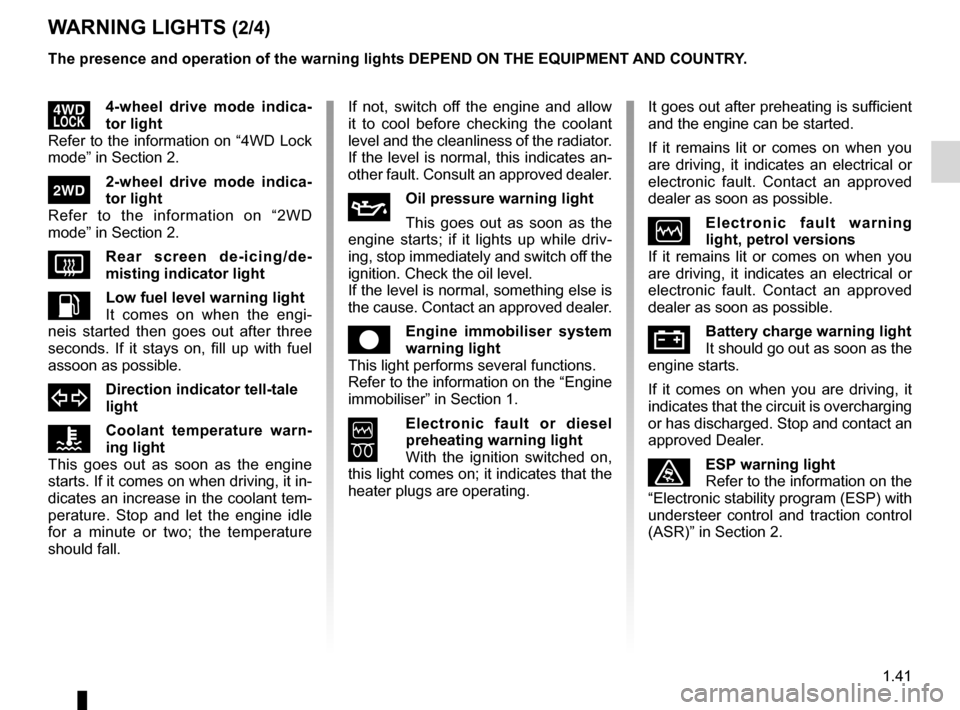
ÀOil pressure warning light
This goes out as soon as the
engine starts; if it lights up while driv -
ing, stop immediately and switch off the
ignition. Check the oil level.
If the level is normal, something else is
the cause. Contact an approved dealer.
êEngine immobiliser system
warning light
This light performs several functions.
Refer to the information on the “Engine
immobiliser” in Section 1.
6
Electronic fault or diesel
preheating warning light
With the ignition switched on,
this light comes on; it indicates that the
heater plugs are operating.
It goes out after preheating is sufficient
and the engine can be started.
If it remains lit or comes on when you
are driving, it indicates an electrical or
electronic fault. Contact an approved
dealer as soon as possible.
ÒElectronic fault warning
light, petrol versions
If it remains lit or comes on when you
are driving, it indicates an electrical or
electronic fault. Contact an approved
dealer as soon as possible.
ÚBattery charge warning light
It should go out as soon as the
engine starts.
If it comes on when you are driving, it
indicates that the circuit is overcharging
or has discharged. Stop and contact an
approved Dealer.
ùESP warning light
Refer to the information on the
“Electronic stability program (ESP) with
understeer control and traction control
(ASR)” in Section 2.
The presence and operation of the warning lights DEPEND ON THE EQUIPMENT\
AND COUNTRY.
’4-wheel drive mode indica
-
tor light
Refer to the information on “4WD Lock
mode” in Section 2.
‘2-wheel drive mode indica -
tor light
Refer to the information on “2WD
mode” in Section 2.
VRear screen de-icing/de -
misting indicator light
LLow fuel level warning light
It comes on when the engi -
neis started then goes out after three
seconds. If it stays on, fill up with fuel
assoon as possible.
dDirection indicator tell-tale
light
ÔCoolant temperature warn -
ing light
This goes out as soon as the engine
starts. If it comes on when driving, it in-
dicates an increase in the coolant tem-
perature. Stop and let the engine idle
for a minute or two; the temperature
should fall.
Page 51 of 200
fuel level ................................................................ (current page)
JauneNoirNoir texte
1.45
ENG_UD17408_2
Tableau de bord : afficheur et indicateurs (H79 - Dacia)
ENG_NU_898-5_H79_Dacia_1
DISPLAY AND INDICATORS (2/2)
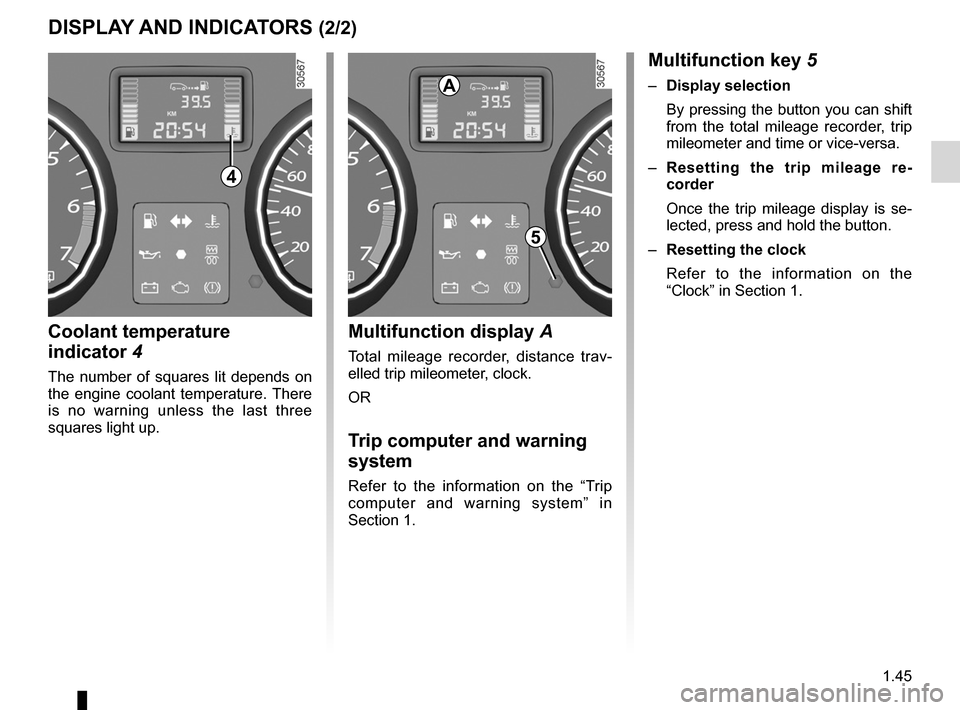
Coolant temperature
indicator 4
The number of squares lit depends on
the engine coolant temperature. There
is no warning unless the last three
squares light up.
Multifunction display A
Total mileage recorder, distance trav -
elled trip mileometer, clock.
OR
Trip computer and warning
system
Refer to the information on the “Trip
computer and warning system” in
Section 1.
Multifunction key 5
– Display selection
By pressing the button you can shift
from the total mileage recorder, trip
mileometer and time or vice-versa.
– Resetting the trip mileage re -
corder
Once the trip mileage display is se -
lected, press and hold the button.
– Resetting the clock
Refer to the information on the
“Clock” in Section 1.
4
5
A
Page 56 of 200
variable power-assisted steering ........................... (current page)
power-assisted steering ......................................... (current page)
power-assisted steering ......................................... (current page)
steering wheel adjustment ...................................... (up to the end of the DU)
1.50
ENG_UD20567_3
Volant de direction/Direction assistée (H79 - Dacia)
ENG_NU_898-5_H79_Dacia_1
Steering wheel, Power-assisted steering
STEERING WHEEL, POWER-ASSISTED STEERING
Power Assisted Steering
With the engine running, do not leave
the steering wheel at full lock while sta-
tionary as this may damage the power -
assisted steering pump.
With the engine switched off, or if there
is a system fault, it is still possible to
turn the steering wheel. The force re -
quired will be greater.
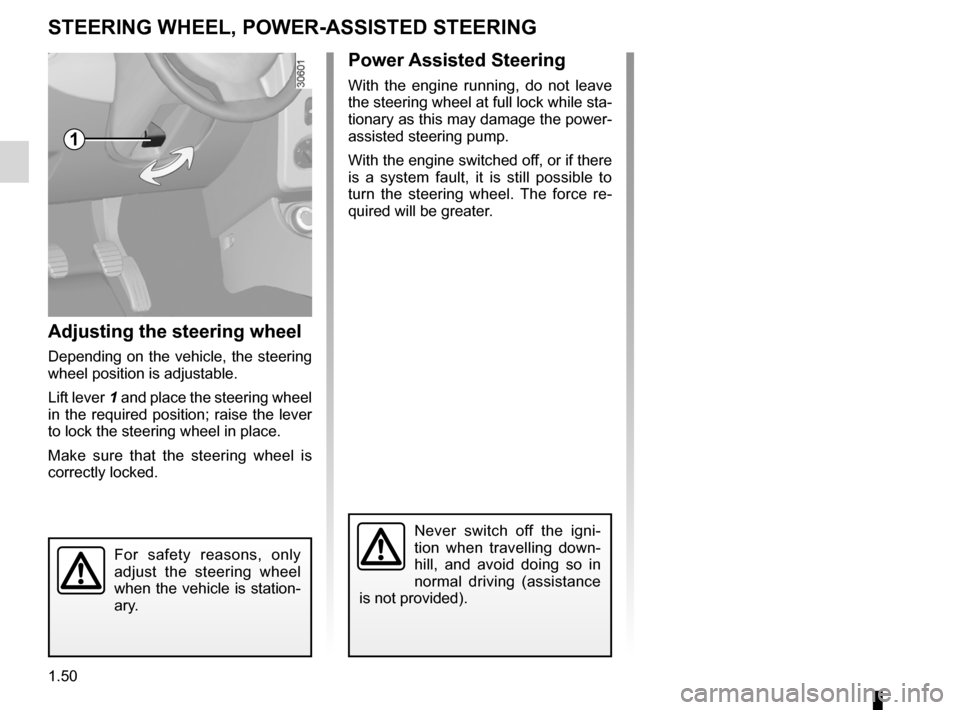
Adjusting the steering wheel
Depending on the vehicle, the steering
wheel position is adjustable.
Lift lever 1 and place the steering wheel
in the required position; raise the lever
to lock the steering wheel in place.
Make sure that the steering wheel is
correctly locked.
For safety reasons, only
adjust the steering wheel
when the vehicle is station-
ary.
Never switch off the igni -
tion when travelling down -
hill, and avoid doing so in
normal driving (assistance
is not provided).
1
Page 57 of 200

clock ...................................................................... (current page)
clock ...................................................................... (current page)
1.51
ENG_UD20658_3
Tableau de bord: heure (H79 - Dacia)
ENG_NU_898-5_H79_Dacia_1
Clock
CLOCK
Resetting the clock
With the ignition on, select display 1
showing total mileage and clock.
There are two ways to set the time:
– Pressing and holding button 2 allows
you to scroll through the hours and
minutes quickly;
– short presses on button 2 allow you
to set the time minute by minute.
If the electrical supply is cut (battery
disconnected, broken supply wire,
etc.), the clock will lose its time set-
ting.
The clock must be reset.
For your safety, we recom -
mend that you do not adjust
the clock while driving.
2
1
Page 62 of 200
lights:adjusting ......................................... (up to the end of the DU)
lights ..................................................... (up to the end of the DU)
lights adjustment ...................................... (up to the end of the DU)
headlight beam adjustment .................. (up to the end of the DU)
1.56
ENG_UD20686_2
Réglage de la hauteur des faisceaux (H79 - Dacia)
ENG_NU_898-5_H79_Dacia_1
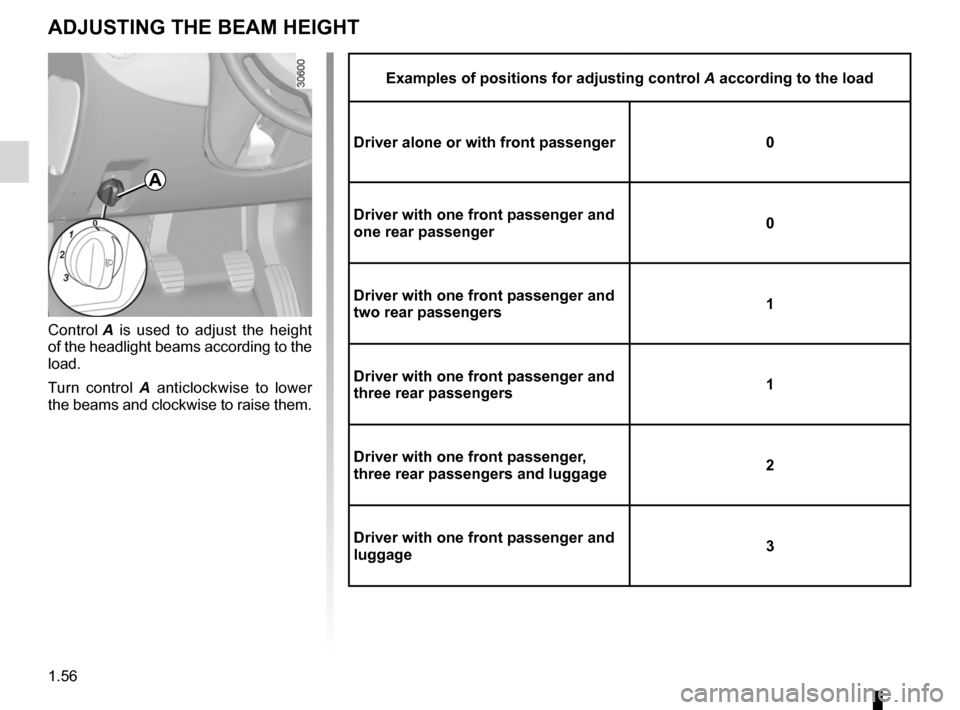
Examples of positions for adjusting control A according to the load
Driver alone or with front passenger 0
Driver with one front passenger and
one rear passenger 0
Driver with one front passenger and
two rear passengers 1
Driver with one front passenger and
three rear passengers 1
Driver with one front passenger,
three rear passengers and luggage 2
Driver with one front passenger and
luggage 3
Adjusting the headlight beam height
ADJUSTING THE BEAM HEIGHT
Control
A is used to adjust the height
of the headlight beams according to the
load.
Turn control A anticlockwise to lower
the beams and clockwise to raise them.
A
Page 66 of 200
fuel filler cap .......................................................... (current page)
fuel tank capacity ................................................... (current page)
fuel grade ................................................................ (current page)
fuel tank ................................................ (up to the end of the DU)
fuel filler cap .......................................................... (current page)
fuel grade ............................................................... (current page)
1.60
ENG_UD22445_3
Réservoir carburant (H79 - Dacia)
ENG_NU_898-5_H79_Dacia_1
Jaune NoirNoir texte
Fuel tank (filling with fuel)
FUEL TANK (1/3)
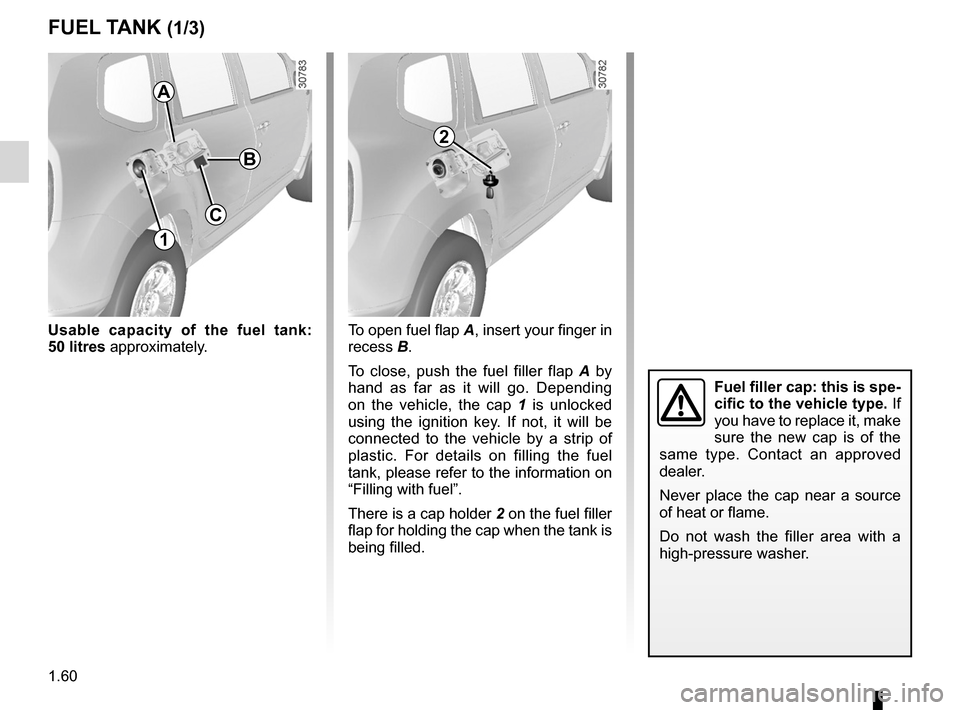
Usable capacity of the fuel tank:
50 litres approximately.
Fuel filler cap: this is spe-
cific to the vehicle type. If
you have to replace it, make
sure the new cap is of the
same type. Contact an approved
dealer.
Never place the cap near a source
of heat or flame.
Do not wash the filler area with a
high-pressure washer.
A
1
To open fuel flap A, insert your finger in
recess B.
To close, push the fuel filler flap A by
hand as far as it will go. Depending
on the vehicle, the cap 1 is unlocked
using the ignition key. If not, it will be
connected to the vehicle by a strip of
plastic. For details on filling the fuel
tank, please refer to the information on
“Filling with fuel”.
There is a cap holder 2 on the fuel filler
flap for holding the cap when the tank is
being filled.
2
C
B
Page 70 of 200
engine immobiliser (switch) .................. (up to the end of the DU)
ignition switch ....................................... (up to the end of the DU)
starting the engine ................................ (up to the end of the DU)
running in .............................................. (up to the end of the DU)
driving ................................................... (up to the end of the DU)
2.2
ENG_UD20629_3
Rodage / Contacteur de démarrage (H79 - Dacia)
ENG_NU_898-5_H79_Dacia_2
Running in, Ignition switch
Petrol version
For the first 600 miles (1,000 km), do
not exceed 78 mph (130 km/h) in the
highest gear, or 3,000 to 3,500 rpm.
You may only expect top performance
from your vehicle after approximately
1,800 miles (3,000 km).
S e r v i c e i n t e r v a l s : r e f e r t o t h e
Maintenance Service Booklet for the
vehicle.
Diesel version
For the first 900 miles (1,500 km), do
not exceed 2,500 rpm. After complet -
ing this mileage you may drive faster,
although you may only expect top per-
formance after approximately 3,600
miles (6,000 km).
Do not accelerate hard while the engine
is still cold and do not let the engine
over-rev.
S e r v i c e i n t e r v a l s : r e f e r t o t h e
Maintenance Service Booklet for the
vehicle.
RUNNING IN, IGNITION SWITCH
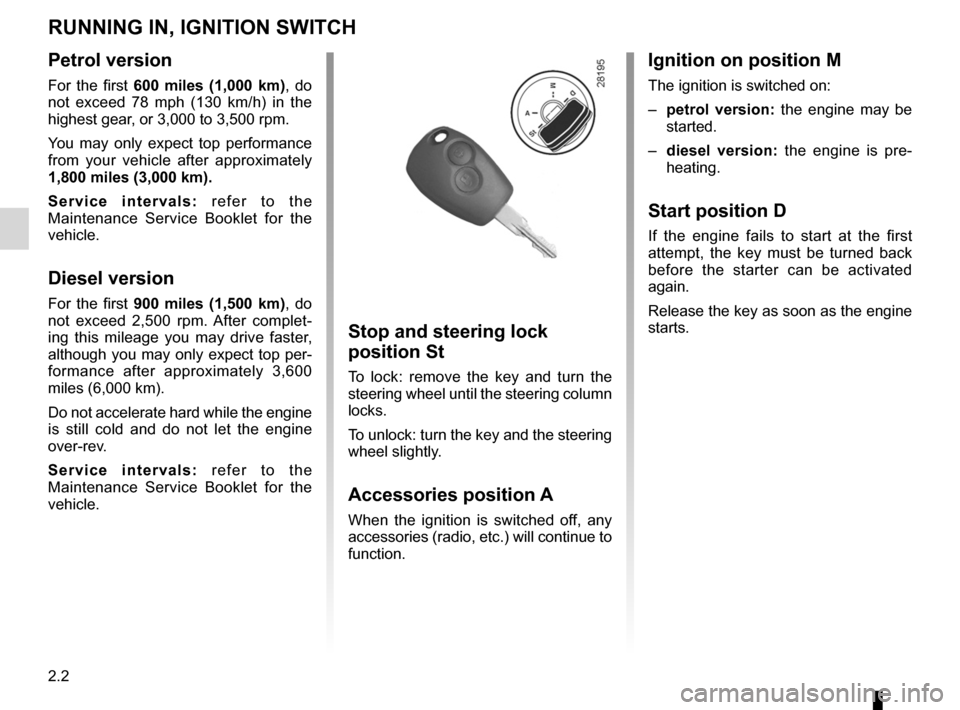
Stop and steering lock
position St
To lock: remove the key and turn the
steering wheel until the steering column
locks.
To unlock: turn the key and the steering
wheel slightly.
Accessories position A
When the ignition is switched off, any
accessories (radio, etc.) will continue to
function.
Ignition on position M
The ignition is switched on:
– petrol version: the engine may be
started.
– diesel version: the engine is pre -
heating.
Start position D
If the engine fails to start at the first
attempt, the key must be turned back
before the starter can be activated
again.
Release the key as soon as the engine
starts.
Page 71 of 200
driving ................................................... (up to the end of the DU)
starting .................................................. (up to the end of the DU)
starting the engine ................................ (up to the end of the DU)
2.3
ENG_UD17439_2
Mise en route / Arrêt du moteur (H79 - Dacia)
ENG_NU_898-5_H79_Dacia_2
Petrol injection
Engine warm or cold
– Turn the key to the start position
without depressing the accelera -
tor.
– Release the key as soon as the
engine starts.ÉDiesel injection
Turn the ignition key to ignition “On” po-
sition M, and hold this position until the
preheating warning light goes out.
Turn the key to starter position D with-
out depressing the accelerator
pedal.
Release the key as soon as the engine
starts.
Stopping the engine
With the engine idling, turn the key
back to “Stop” position St.
Starting the engine
In very cold conditions (temperatures
below –20°C): so that it is easier to
start the engine, switch on the ignition
for several seconds before starting the
engine.
Make sure the engine immobiliser is not
activated. Refer to the information on
the “Engine immobiliser” in Section 1.
Starting/stopping the engine
STARTING/STOPPING THE ENGINE
Never leave your vehicle with the key or remote control inside and never leave a child (or a pet) unsupervised, even
for a short while.
The reason for this is that the child may endanger himself or others by starting the engine, activating equipment such
as the window winders for example, or locking the doors.
Risk of serious injury.
Never switch off the ignition before the vehicle has stopped completely. Once the engine has stopped, the brake servo,
power assisted steering and passive safety equipment such as air bags wi\
ll no longer operate.
The steering is locked when the key is removed.
Page 79 of 200
4 wheel drive (4WD) ............................. (up to the end of the DU)
driving ................................................... (up to the end of the DU)
2.11
ENG_UD20643_3
Transmission : 4 roues motrices (4WD) (H79 - Dacia)
ENG_NU_898-5_H79_Dacia_2
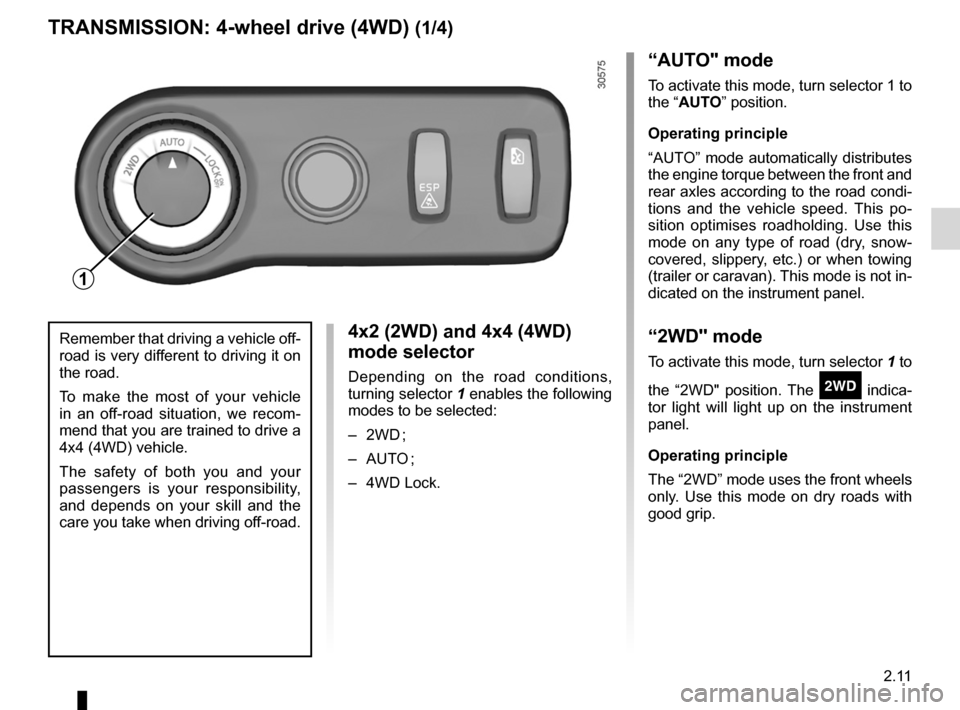
4x2 (2WD) and 4x4 (4WD)
mode selector
Depending on the road conditions,
turning selector 1 enables the following
modes to be selected:
– 2WD ;
– AUTO ;
– 4WD Lock.
Transmission: 4-wheel drive (4WD)
TRANSMISSION: 4-wheel drive (4WD) (1/4)
“AUTO" mode
To activate this mode, turn selector 1 to
the “AUTO” position.
Operating principle
“AUTO” mode automatically distributes
the engine torque between the front and
rear axles according to the road condi -
tions and the vehicle speed. This po -
sition optimises roadholding. Use this
mode on any type of road (dry, snow -
covered, slippery, etc.) or when towing
(trailer or caravan). This mode is not in-
dicated on the instrument panel.
“2WD" mode
To activate this mode, turn selector 1 to
the “2WD" position. The
‘ indica -
tor light will light up on the instrument
panel.
Operating principle
The “2WD” mode uses the front wheels
only. Use this mode on dry roads with
good grip.
Remember that driving a vehicle off-
road is very different to driving it on
the road.
To make the most of your vehicle
in an off-road situation, we recom -
mend that you are trained to drive a
4x4 (4WD) vehicle.
The safety of both you and your
passengers is your responsibility,
and depends on your skill and the
care you take when driving off-road.
1