ignition DACIA DUSTER 2012 1.G User Guide
[x] Cancel search | Manufacturer: DACIA, Model Year: 2012, Model line: DUSTER, Model: DACIA DUSTER 2012 1.GPages: 200, PDF Size: 2.4 MB
Page 43 of 200
JauneNoirNoir texte
1.37
ENG_UD24352_3
Poste de conduite direction à gauche (H79 - Dacia)
ENG_NU_898-5_H79_Dacia_1
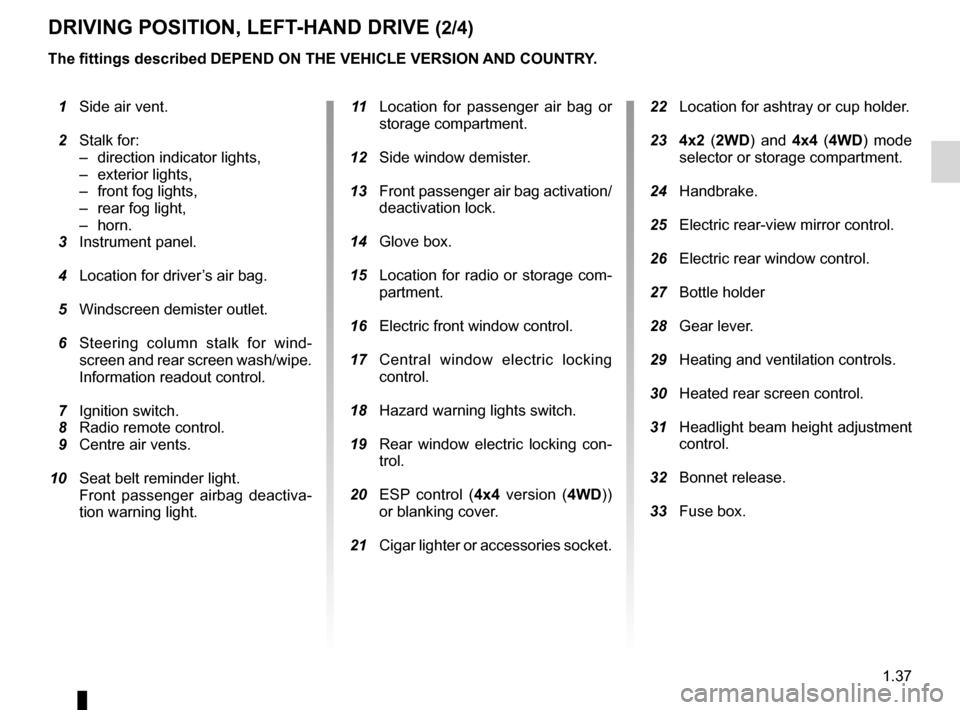
DRIVING POSITION, LEFT-HAND DRIVE (2/4)
1 Side air ven t.
2
Stalk for:
–
direction indicator lights,
–
exterior lights,
–
front fog lights,
–
rear fog light,
–
horn. 3
Instrument panel.
4
Location for
driver’s air bag.
5
Windscreen
demister outlet.
6
S
teering column stalk for wind-
screen and rear screen wash/wipe.
Information readout control.
7
Ignition swit
ch.
8
Radio remo
te control.
9
Centre air vents.
10
Seat belt reminder light.
F
ront passenger airbag deactiva-
tion warning light. 1 1 L ocation for passenger air bag or
storage compartment.
12
Side window
demister.
13
Front
passenger air bag activation/
deactivation lock.
14
Glove box.
15
Location
for radio or storage com-
partment.
16
Electric front window contro
l.
17
C
entral window electric locking
control.
18
Hazard war
ning lights switch.
19
R
ear window electric locking con-
trol.
20
E
SP control (4x4 version ( 4WD))
or blanking cover.
21
Cigar
lighter or accessories socket. 22 Location for ashtray or cup holder.
23
4
x2 (2WD ) and 4x4 (4WD ) mode
selector or storage compartment.
24
Handbrake.
25
Electric rear-view mirror con
trol.
26
Electric rear window control
.
27
Bottle holde
r
28
Gear lever
.
29
Heating and
ventilation controls.
30
Heated rear
screen control.
31
Headlight
beam height adjustment
control.
32
Bonnet rele
ase.
33
Fuse box.
The fittings described DEPEND ON THE VEHICLE VERSION AND COUNTRY.
Page 45 of 200
JauneNoirNoir texte
1.39
ENG_UD24352_3
Poste de conduite direction à gauche (H79 - Dacia)
ENG_NU_898-5_H79_Dacia_1
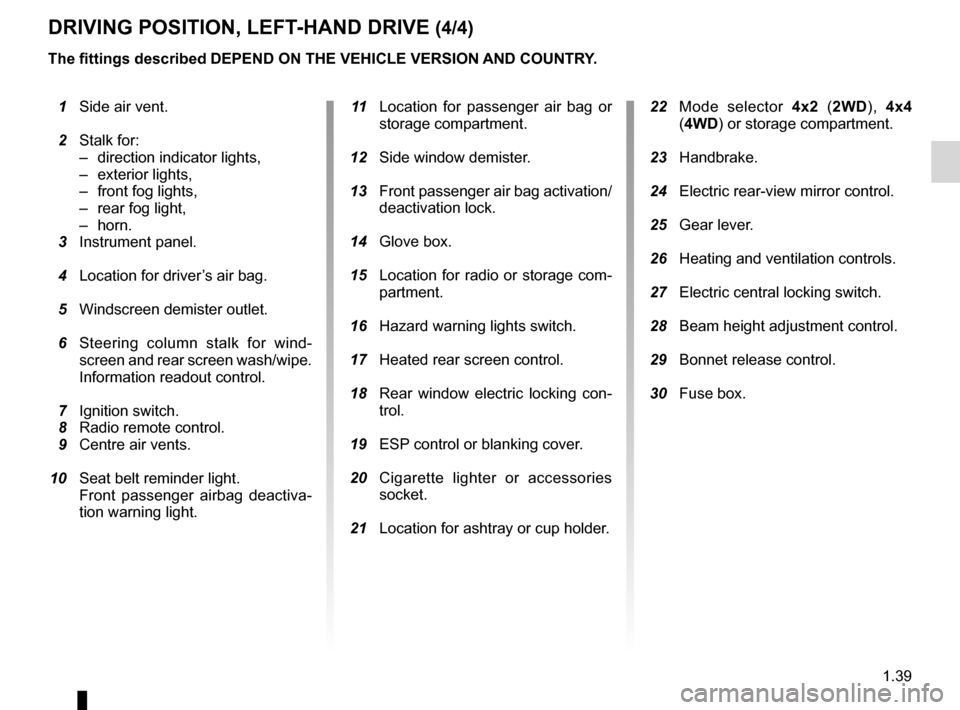
DRIVING POSITION, LEFT-HAND DRIVE (4/4)
The fittings described DEPEND ON THE VEHICLE VERSION AND COUNTRY.
1
Side air ven
t.
2
Stalk for:
–
direction indicator lights,
–
exterior lights,
–
front fog lights,
–
rear fog light,
–
horn. 3
Instrument panel.
4
Location for
driver’s air bag.
5
Windscreen
demister outlet.
6
S
teering column stalk for wind-
screen and rear screen wash/wipe.
Information readout control.
7
Ignition swit
ch.
8
Radio remo
te control.
9
Centre air vents.
10
Seat belt reminder light.
F
ront passenger airbag deactiva-
tion warning light.
1
1
L
ocation for passenger air bag or
storage compartment.
12
Side window
demister.
13
Front
passenger air bag activation/
deactivation lock.
14
Glove box.
15
Location
for radio or storage com-
partment.
16
Hazard war
ning lights switch.
17
Heated rear
screen control.
18
R
ear window electric locking con-
trol.
19
ESP
control or blanking cover.
20
C
igarette lighter or accessories
socket.
21
Location for
ashtray or cup holder.
22
M
ode selector 4x2 (2WD ), 4x4
(4WD) or storage compartment.
23
Handbrake.
24
Electric rear-view mirror con
trol.
25
Gear lever
.
26
Heating and
ventilation controls.
27
Electric central locking switc
h.
28
Beam heigh
t adjustment control.
29
Bonnet rele
ase control.
30
Fuse box.
Page 46 of 200
control instruments ............................... (up to the end of the DU)
instrument panel ................................... (up to the end of the DU)
warning lights........................................ (up to the end of the DU)
1.40
ENG_UD24501_4
Témoins lumineux (H79 - Dacia)
ENG_NU_898-5_H79_Dacia_1
Jaune NoirNoir texte
Instrument panel: warning lights
#Engine oil change warning
light
This lights up on the instrument panel
when an oil change is required.
Change the oil or have it changed as
soon as possible.
Only the distance travelled between two
oil changes is taken into account; the
time interval between two oil changes
is not.
The oil should always be changed
when the first threshold is reached, i.e.
either the distance travelled or the inter-
val specified in your vehicle’s mainte-
nance document. This means you may
have to change the oil before the warn-
ing light comes on.
Refer to the information on the “Oil
change” in Section 4.
xAnti-lock braking warning
light
This light comes on when the ignition is
switched on and goes out within three
seconds. If it lights up when you are
driving, it indicates a fault in the anti-
lock braking system.
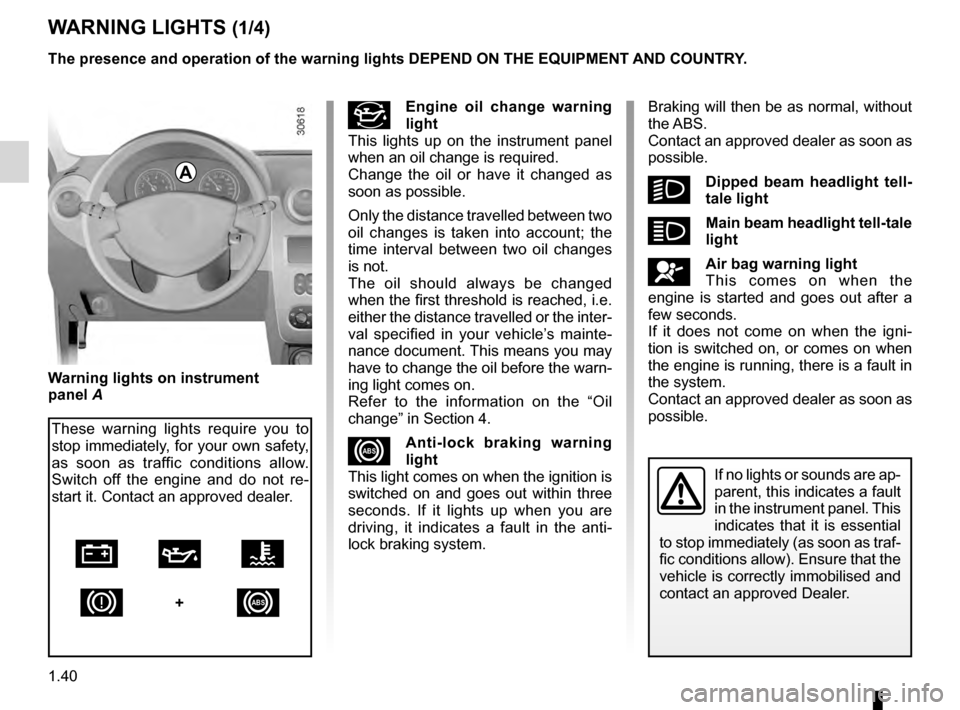
WARNING LIGHTS (1/4)
The presence and operation of the warning lights DEPEND ON THE EQUIPMENT\
AND COUNTRY.
If no lights or sounds are ap-
parent, this indicates a fault
in the instrument panel. This
indicates that it is essential
to stop immediately (as soon as traf-
fic conditions allow). Ensure that the
vehicle is correctly immobilised and
contact an approved Dealer.
Warning lights on instrument
panel A
These warning lights require you to
stop immediately, for your own safety,
as soon as traffic conditions allow.
Switch off the engine and do not re-
start it. Contact an approved dealer.
Ú À Ô D
+x
Braking will then be as normal, without
the ABS.
Contact an approved dealer as soon as
possible.
kDipped beam headlight tell-
tale light
áMain beam headlight tell-tale
light
åAir bag warning light
This comes on when the
engine is started and goes out after a
few seconds.
If it does not come on when the igni-
tion is switched on, or comes on when
the engine is running, there is a fault in
the system.
Contact an approved dealer as soon as
possible.
A
Page 47 of 200
JauneNoirNoir texte
1.41
ENG_UD24501_4
Témoins lumineux (H79 - Dacia)
ENG_NU_898-5_H79_Dacia_1
WARNING LIGHTS (2/4)
If not, switch off the engine and allow
it to cool before checking the coolant
level and the cleanliness of the radiator.
If the level is normal, this indicates an-
other fault. Consult an approved dealer.
ÀOil pressure warning light
This goes out as soon as the
engine starts; if it lights up while driv-
ing, stop immediately and switch off the
ignition. Check the oil level.
If the level is normal, something else is
the cause. Contact an approved dealer.
êEngine immobiliser system
warning light
This light performs several functions.
Refer to the information on the “Engine
immobiliser” in Section 1.
6
Electronic fault or diesel
preheating warning light
With the ignition switched on,
this light comes on; it indicates that the
heater plugs are operating.
It goes out after preheating is sufficient
and the engine can be started.
If it remains lit or comes on when you
are driving, it indicates an electrical or
electronic fault. Contact an approved
dealer as soon as possible.
ÒElectronic fault warning
light, petrol versions
If it remains lit or comes on when you
are driving, it indicates an electrical or
electronic fault. Contact an approved
dealer as soon as possible.
ÚBattery charge warning light
It should go out as soon as the
engine starts.
If it comes on when you are driving, it
indicates that the circuit is overcharging
or has discharged. Stop and contact an
approved Dealer.
ùESP warning light
Refer to the information on the
“Electronic stability program (ESP) with
understeer control and traction control
(ASR)” in Section 2.
The presence and operation of the warning lights DEPEND ON THE EQUIPMENT\
AND COUNTRY.
’4-wheel drive mode indica-
tor light
Refer to the information on “4WD Lock
mode” in Section 2.
‘2-wheel drive mode indica-
tor light
Refer to the information on “2WD
mode” in Section 2.
VRear screen de-icing/de-
misting indicator light
LLow fuel level warning light
It comes on when the engi-
neis started then goes out after three
seconds. If it stays on, fill up with fuel
assoon as possible.
dDirection indicator tell-tale light
ÔCoolant temperature warn-
ing light
This goes out as soon as the engine
starts. If it comes on when driving, it in-
dicates an increase in the coolant tem-
perature. Stop and let the engine idle
for a minute or two; the temperature
should fall.
Page 48 of 200
rear screendemisting ......................................................... (current page)
1.42
ENG_UD24501_4
Témoins lumineux (H79 - Dacia)
ENG_NU_898-5_H79_Dacia_1
Jaune NoirNoir texte
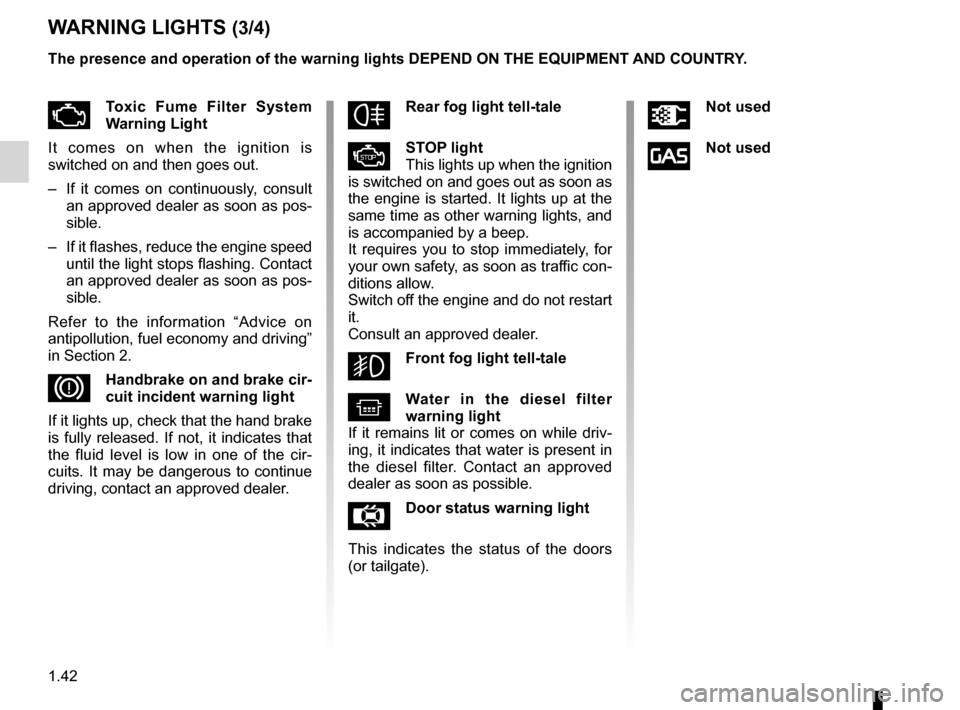
WARNING LIGHTS (3/4)
The presence and operation of the warning lights DEPEND ON THE EQUIPMENT\
AND COUNTRY.
ÄToxic Fume Filter System
Warning Light
It comes on when the ignition is
switched on and then goes out.
–
I
f it comes on continuously, consult
an approved dealer as soon as pos-
sible.
–
If
it flashes, reduce the engine speed
until the light stops flashing. Contact
an approved dealer as soon as pos-
sible.
Refer to the information “Advice on
antipollution, fuel economy and driving”
in Section 2.
DHandbrake on and brake cir-
cuit incident warning light
If it lights up, check that the hand brake
is fully released. If not, it indicates that
the fluid level is low in one of the cir-
cuits. It may be dangerous to continue
driving, contact an approved dealer.
fRear fog light tell-tale
ÆSTOP light
This lights up when the ignition
is switched on and goes out as soon as
the engine is started. It lights up at the
same time as other warning lights, and
is accompanied by a beep.
It requires you to stop immediately, for
your own safety, as soon as traffic con-
ditions allow.
Switch off the engine and do not restart
it.
Consult an approved dealer.
gFront fog light tell-tale
^Water in the diesel filter
warning light
If it remains lit or comes on while driv-
ing, it indicates that water is present in
the diesel filter. Contact an approved
dealer as soon as possible.
ÅDoor status warning light
T
his indicates the status of the doors
(or tailgate).
ÜNot used
îNot used
Page 57 of 200
clock ...................................................................... (current page)
clock ...................................................................... (current page)
1.51
ENG_UD20658_3
Tableau de bord: heure (H79 - Dacia)
ENG_NU_898-5_H79_Dacia_1
Clock
CLOCK
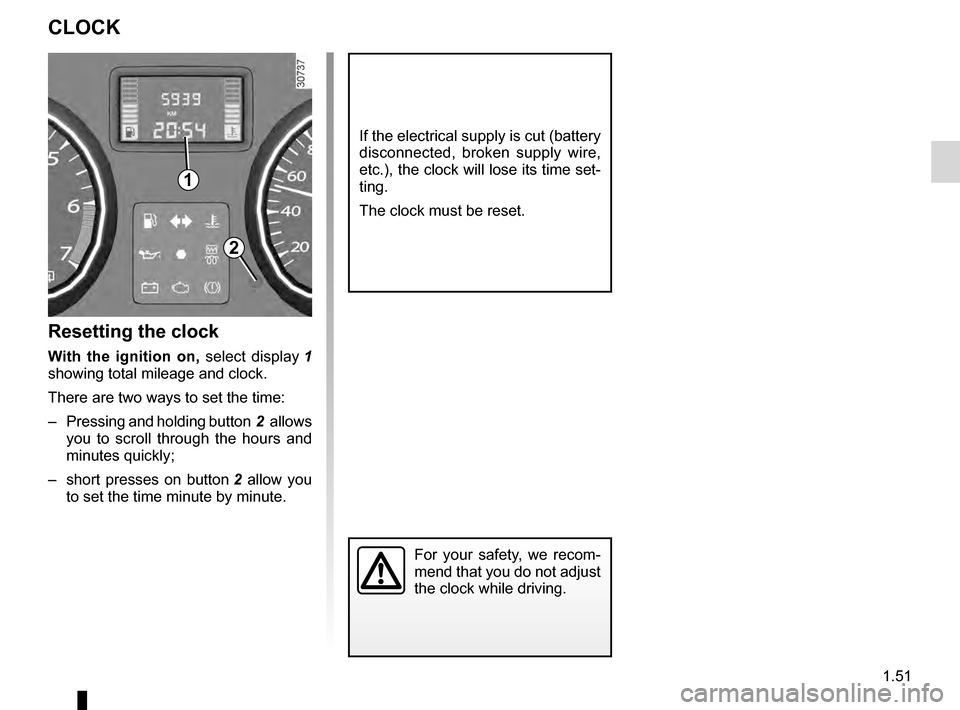
Resetting the clock
With the ignition on, select display 1
showing total mileage and clock.
There are two ways to set the time:
–
Pressing
and holding button 2 allows
you to scroll through the hours and
minutes quickly;
–
short
presses on button 2 allow you
to set the time minute by minute.
If the electrical supply is cut (battery
disconnected, broken supply wire,
etc.), the clock will lose its time set-
ting.
The clock must be reset.
For your safety, we recom-
mend that you do not adjust
the clock while driving.
2
1
Page 60 of 200
lighting:exterior ............................................ (up to the end of the DU)
lights: dipped beam headlights ................................... (current page)
lights: side lights ......................................................... (current page)
lights: main beam headlights ...................................... (current page)
lights ..................................................... (up to the end of the DU)
signals and lights .................................. (up to the end of the DU)
control instruments ............................... (up to the end of the DU)
1.54
ENG_UD14459_1
Éclairages et signalisations extérieures (H79 - Dacia)
ENG_NU_898-5_H79_Dacia_1
Jaune NoirNoir texte
Exterior lighting and signals
EXTERIOR LIGHTING AND SIGNALS (1/2)
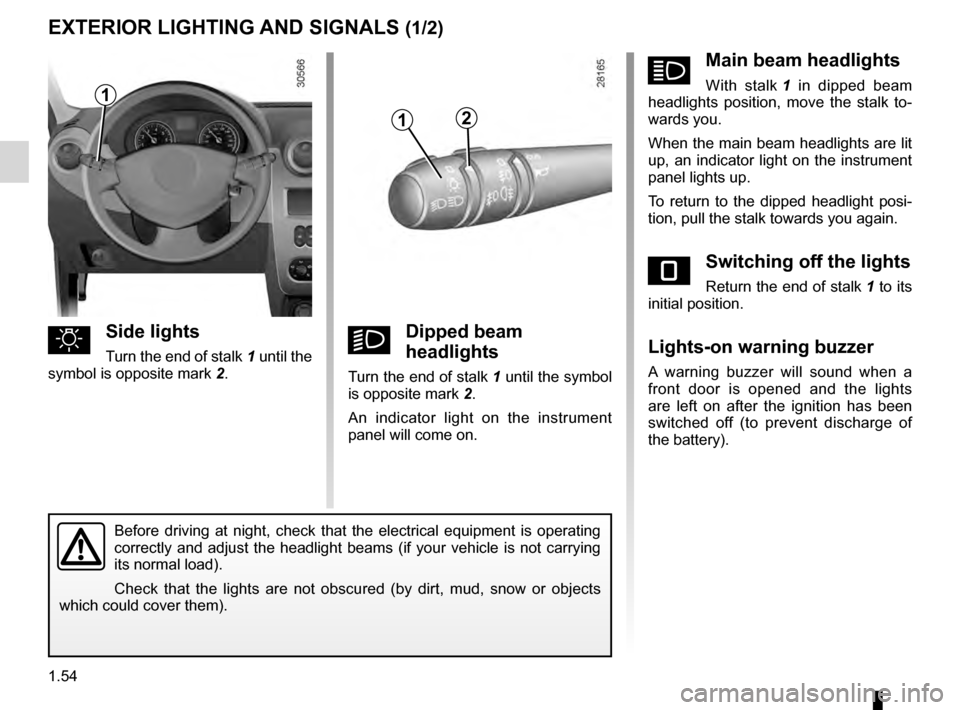
uSide lights
Turn the end of stalk 1 until the
symbol is opposite mark 2 .kDipped beam
headlights
Turn the end of stalk 1 until the symbol
is opposite mark 2 .
An indicator light on the instrument
panel will come on.
áMain beam headlights
With stalk 1 in dipped beam
headlights position, move the stalk to-
wards you.
When the main beam headlights are lit
up, an indicator light on the instrument
panel lights up.
To return to the dipped headlight posi-
tion, pull the stalk towards you again.
eSwitching off the lights
Return the end of stalk 1 to its
initial position.
Lights-on warning buzzer
A warning buzzer will sound when a
front door is opened and the lights
are left on after the ignition has been
switched off (to prevent discharge of
the battery).
Before driving at night, check that the electrical equipment is operating
correctly and adjust the headlight beams (if your vehicle is not carrying
its normal load).
Check that the lights are not obscured (by dirt, mud, snow or objects
which could cover them).
12
1
Page 63 of 200
wipers ................................................... (up to the end of the DU)
windscreen washer ............................... (up to the end of the DU)
1.57
ENG_UD24504_4
Essuie-vitre /Lave-vitre/Dégivrage (H79 - Dacia)
ENG_NU_898-5_H79_Dacia_1
Windscreen washer/wiper, De-icing
WINDSCREEN WASHER/WIPER, DE-ICING (1/3)
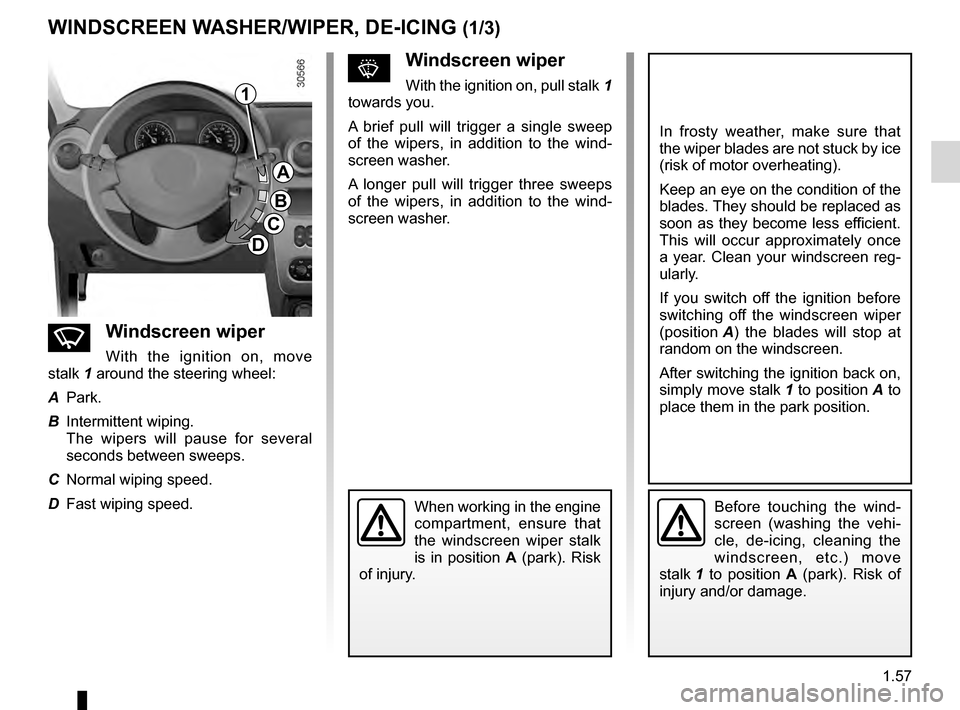
nWindscreen wiper
With the ignition on, move
stalk
1 around the steering wheel:
A
Park.
B
Intermittent wiping.
T
he wipers will pause for several
seconds between sweeps.
C
Normal wiping speed.
D
Fast wiping speed.
sWindscreen wiper
With the ignition on, pull stalk 1
towards you.
A
brief pull will trigger a single sweep
of the wipers, in addition to the wind-
screen washer.
A longer pull will trigger three sweeps
of the wipers, in addition to the wind-
screen washer.
In frosty weather, make sure that
the wiper blades are not stuck by ice
(risk of motor overheating).
Keep an eye on the condition of the
blades. They should be replaced as
soon as they become less efficient.
This will occur approximately once
a year. Clean your windscreen reg-
ularly.
If you switch off the ignition before
switching off the windscreen wiper
(position
A )
the blades will stop at
random on the windscreen.
After switching the ignition back on,
simply move stalk
1 to position
A
to
place them in the park position.
Before touching the wind-
screen (washing the vehi-
cle, de-icing, cleaning the
windscreen, etc.) move
stalk
1
to position A (park). Risk of
injury and/or damage.When working in the engine
compartment, ensure that
the windscreen wiper stalk
is in position A (park). Risk
of injury.
1
A
B
C
D
Page 64 of 200
1.58
ENG_UD24504_4
Essuie-vitre /Lave-vitre/Dégivrage (H79 - Dacia)
ENG_NU_898-5_H79_Dacia_1
Jaune NoirNoir texte
WINDSCREEN WASHER/WIPER, DE-ICING (2/3)
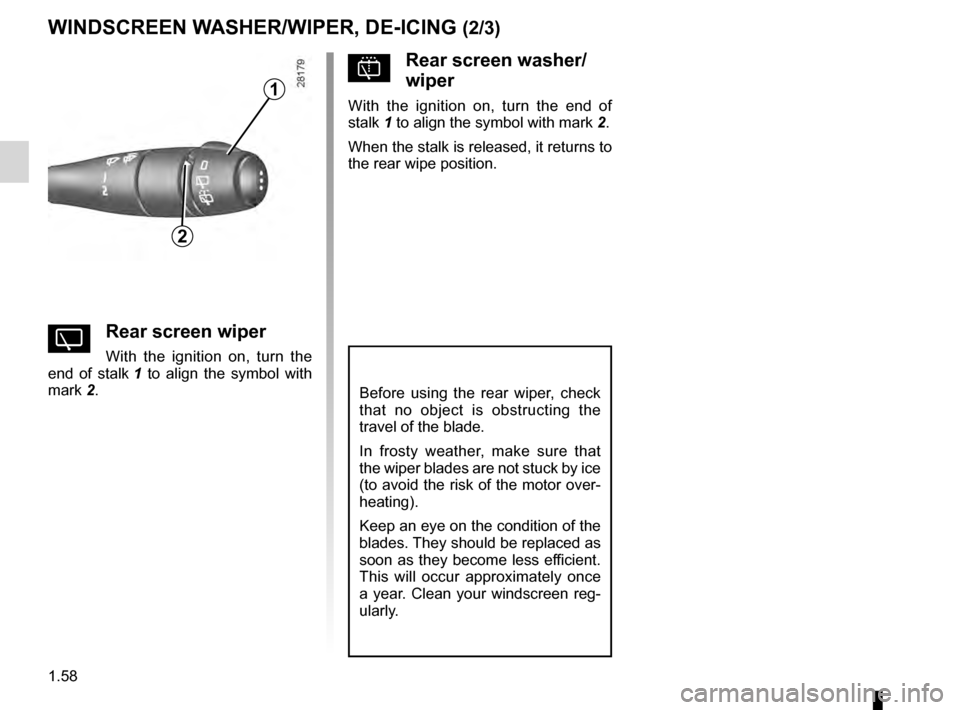
YRear screen wiper
With the ignition on, turn the
end of stalk 1
to align the symbol with
mark
2.
2
Before using the rear wiper, check
that no object is obstructing the
travel of the blade.
In frosty weather, make sure that
the wiper blades are not stuck by ice
(to avoid the risk of the motor over-
heating).
Keep an eye on the condition of the
blades. They should be replaced as
soon as they become less efficient.
This will occur approximately once
a year. Clean your windscreen reg-
ularly.
pRear screen washer/
wiper
With the ignition on, turn the end of
stalk 1 to align the symbol with mark 2 .
When the stalk is released, it returns to
the rear wipe position.1
Page 66 of 200
fuel filler cap .......................................................... (current page)
fuel tank capacity ................................................... (current page)
fuel grade ................................................................ (current page)
fuel tank ................................................ (up to the end of the DU)
fuel filler cap .......................................................... (current page)
fuel grade............................................................... (current page)
1.60
ENG_UD22445_3
Réservoir carburant (H79 - Dacia)
ENG_NU_898-5_H79_Dacia_1
Jaune NoirNoir texte
Fuel tank (filling with fuel)
FUEL TANK (1/3)
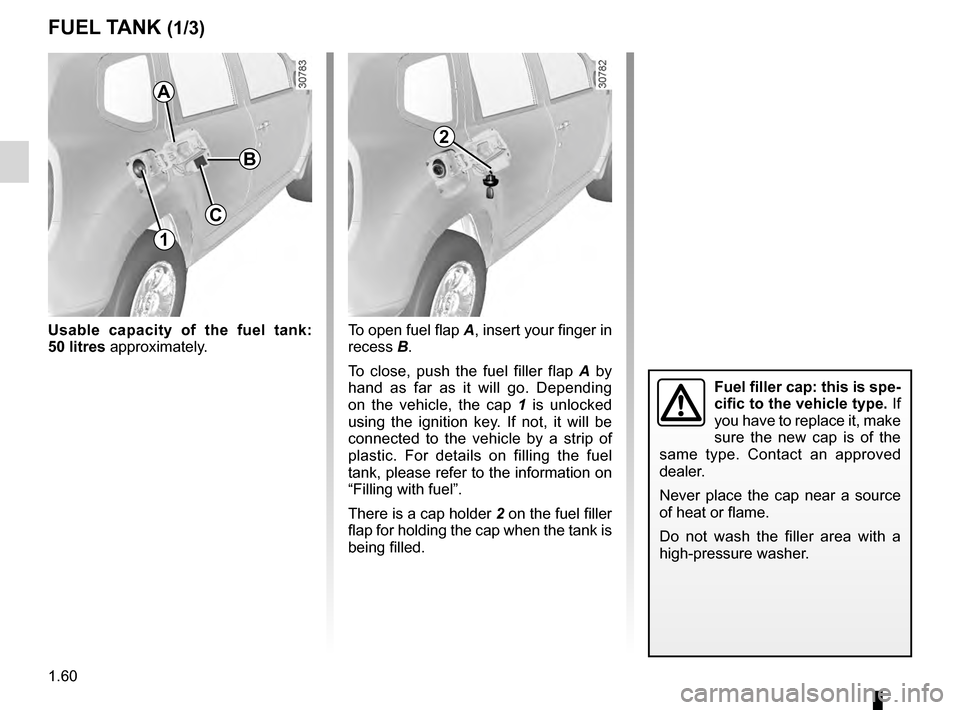
Usable capacity of the fuel tank:
50
litres approximately.
Fuel filler cap: this is spe-
cific to the vehicle type. If
you have to replace it, make
sure the new cap is of the
same type. Contact an approved
dealer.
Never place the cap near a source
of heat or flame.
Do not wash the filler area with a
high-pressure washer.
A
1
To open fuel flap A , insert your finger in
recess B.
To close, push the fuel filler flap
A
by
hand as far as it will go. Depending
on the vehicle, the cap
1
is unlocked
using the ignition key. If not, it will be
connected to the vehicle by a strip of
plastic. For details on filling the fuel
tank, please refer to the information on
“Filling with fuel”.
There is a cap holder
2 on the fuel filler
flap for holding the cap when the tank is
being filled.
2
C
B