warning DACIA DUSTER 2012 1.G Owner's Manual
[x] Cancel search | Manufacturer: DACIA, Model Year: 2012, Model line: DUSTER, Model: DACIA DUSTER 2012 1.GPages: 200, PDF Size: 2.4 MB
Page 52 of 200
control instruments ............................... (up to the end of the DU)
trip computer and warning system........ (up to the end of the DU)
warning lights........................................ (up to the end of the DU)
1.46
ENG_UD20512_3
Ordinateur de bord (H79 - Dacia)
ENG_NU_898-5_H79_Dacia_1
Jaune NoirNoir texte
Trip computer and warning system
TRIP COMPUTER AND WARNING SYSTEM (1/4)
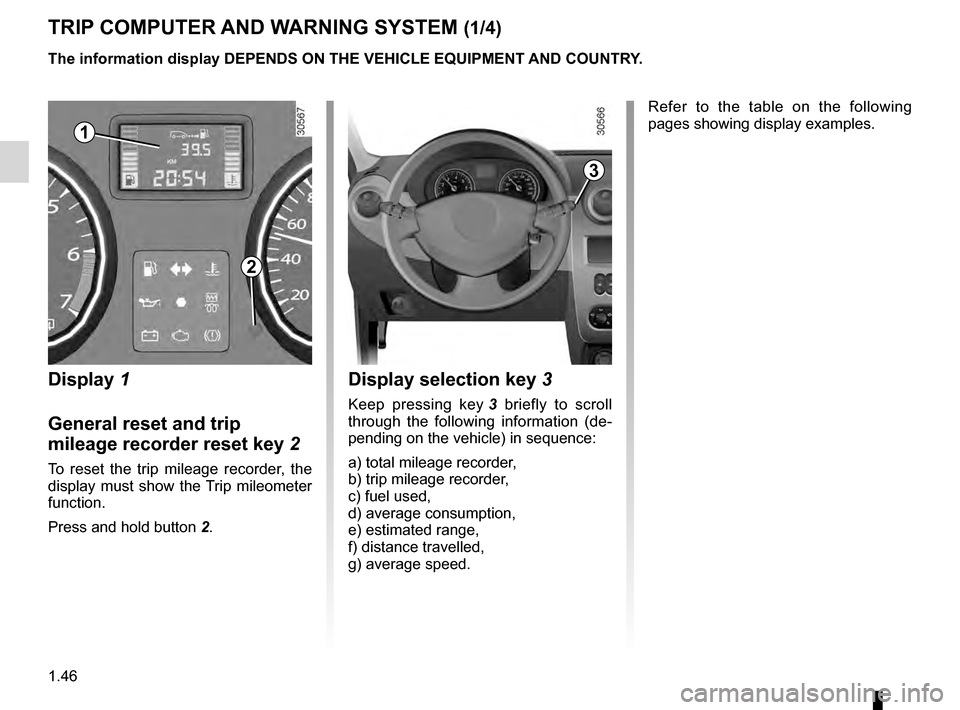
Display 1
General reset and trip
mileage recorder reset key
2
To reset the trip mileage recorder, the
display must show the Trip mileometer
function.
Press and hold button
2
.
Display selection key 3
Keep pressing key 3 briefly to scroll
through the following information (de-
pending on the vehicle) in sequence:
a) total mileage recorder,
b) trip mileage recorder,
c) fuel used,
d) average consumption,
e) estimated range,
f) distance travelled,
g) average speed. Refer to the table on the following
pages showing display examples.
The information display DEPENDS ON THE VEHICLE EQUIPMENT AND COUNTRY.
1
2
3
Page 53 of 200
JauneNoirNoir texte
1.47
ENG_UD20512_3
Ordinateur de bord (H79 - Dacia)
ENG_NU_898-5_H79_Dacia_1
Interpreting some of the
values displayed after
resetting
The values showing average fuel con-
sumption, range and average speed
will become more stable and reliable
the further you travel after pressing the
reset button.
For the first few miles after pressing the
reset key you will notice that the range
increases as you travel. This range
takes into account the average fuel con-
sumption since the last time the reset
button was pressed. Therefore, the fuel
consumption may decrease when:
–
the vehicle stops accelerating
,
–
t
he engine reaches its operating
temperature (engine cold when
reset button pressed),
–
when
driving from a built-up area
onto the open road.
Therefore,
if the average fuel con-
sumption decreases, the range
will increase.
The information display DEPENDS ON THE VEHICLE EQUIPMENT AND COUNTRY.
–
Y
ou may also notice that the aver-
age fuel consumption increases
when the vehicle is stationary and
the engine idling.
This is normal, since the computer
takes account of fuel used during
idling.
Manually resetting the journey pa-
rameters: with the display showing
one of the journey parameters, press
button
2 until the display is reset.
Automatically resetting the journey
parameters: the reset is automatic
when the capacity of one of the memo-
ries is exceeded.
TRIP COMPUTER AND WARNING SYSTEM (2/4)
Page 54 of 200
1.48
ENG_UD20512_3
Ordinateur de bord (H79 - Dacia)
ENG_NU_898-5_H79_Dacia_1
Jaune NoirNoir texte
TRIP COMPUTER AND WARNING SYSTEM (3/4)
The information display DEPENDS ON THE VEHICLE EQUIPMENT AND COUNTRY.
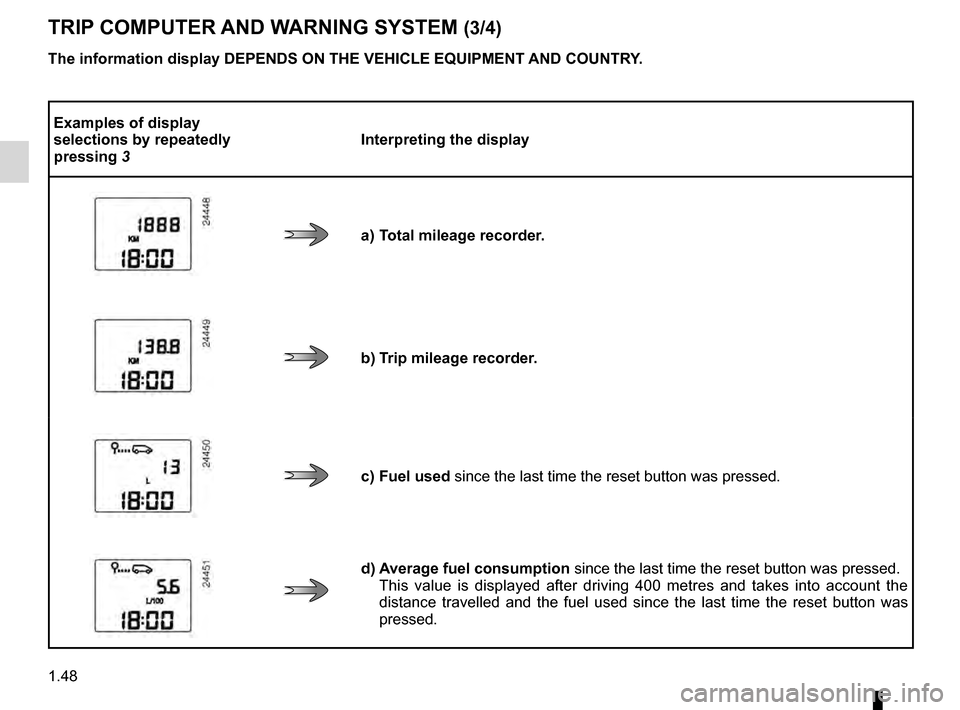
Examples of display
selections by repeatedly
pressing
3 Interpreting the display
a) Total mileage recorder.
b) Trip mileage recorder.
c) Fuel used since the last time the reset button was pressed.
d) Average fuel consumption
since the last time the reset button was pressed.
This value is displayed after driving 400 metres and takes into account the
distance travelled and the fuel used since the last time the reset button was
pressed.
Page 55 of 200
JauneNoirNoir texte
1.49
ENG_UD20512_3
Ordinateur de bord (H79 - Dacia)
ENG_NU_898-5_H79_Dacia_1
TRIP COMPUTER AND WARNING SYSTEM (4/4)
The information display DEPENDS ON THE VEHICLE EQUIPMENT AND COUNTRY.
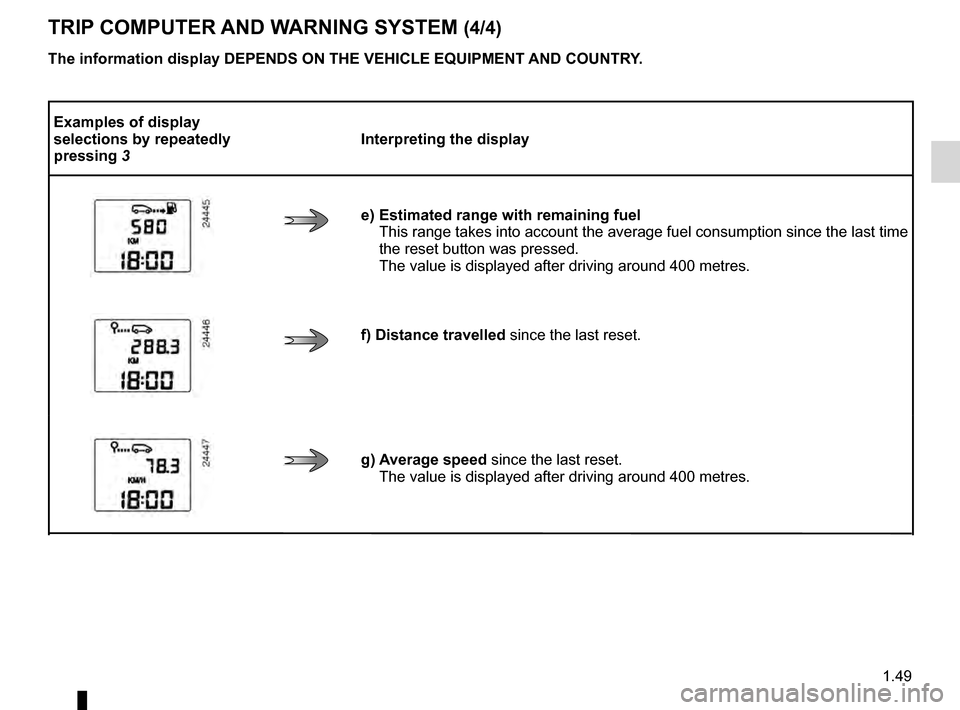
Examples of display
selections by repeatedly
pressing
3 Interpreting the display
e) Estimated range with remaining fuel This
range takes into account the average fuel consumption since the last time
the reset button was pressed.
The value is displayed after driving around 400 metres.
f) Distance travelled since the last reset.
g) Average speed since the last reset. The value is displayed after driving around 400 metres.
Page 58 of 200
headlight flashers ................................. (up to the end of the DU)
horn ...................................................... (up to the end of the DU)
indicators .............................................. (up to the end of the DU)
lights: direction indicators .......................... (up to the end of the DU)
lights: hazard warning ............................... (up to the end of the DU)
indicators: direction indicators .......................... (up to the end of the DU)
hazard warning lights signal ................. (up to the end of the DU)
hazard warning lights signal ................. (up to the end of the DU)
1.52
ENG_UD24503_3
Avertisseurs sonore et lumineux (H79 - Dacia)
ENG_NU_898-5_H79_Dacia_1
Jaune NoirNoir texte
Audible and visual signals
AUDIBLE AND VISUAL SIGNALS (1/2)
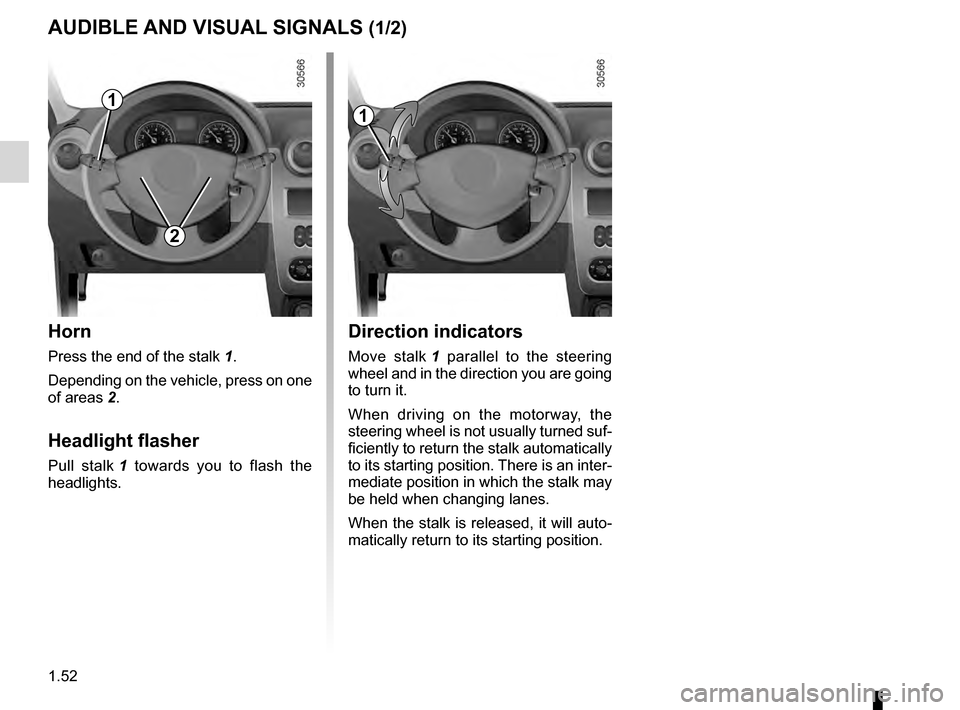
Horn
Press the end of the stalk 1.
Depending on the vehicle, press on one
of areas
2.
Headlight flasher
Pull stalk 1 towards you to flash the
headlights.
1
2
Direction indicators
Move stalk 1 parallel to the steering
wheel and in the direction you are going
to turn it.
When driving on the motorway, the
steering wheel is not usually turned suf-
ficiently to return the stalk automatically
to its starting position. There is an inter-
mediate position in which the stalk may
be held when changing lanes.
When the stalk is released, it will auto-
matically return to its starting position.
1
Page 59 of 200
JauneNoirNoir texte
1.53
ENG_UD24503_3
Avertisseurs sonore et lumineux (H79 - Dacia)
ENG_NU_898-5_H79_Dacia_1
AUDIBLE AND VISUAL SIGNALS (2/2)
33
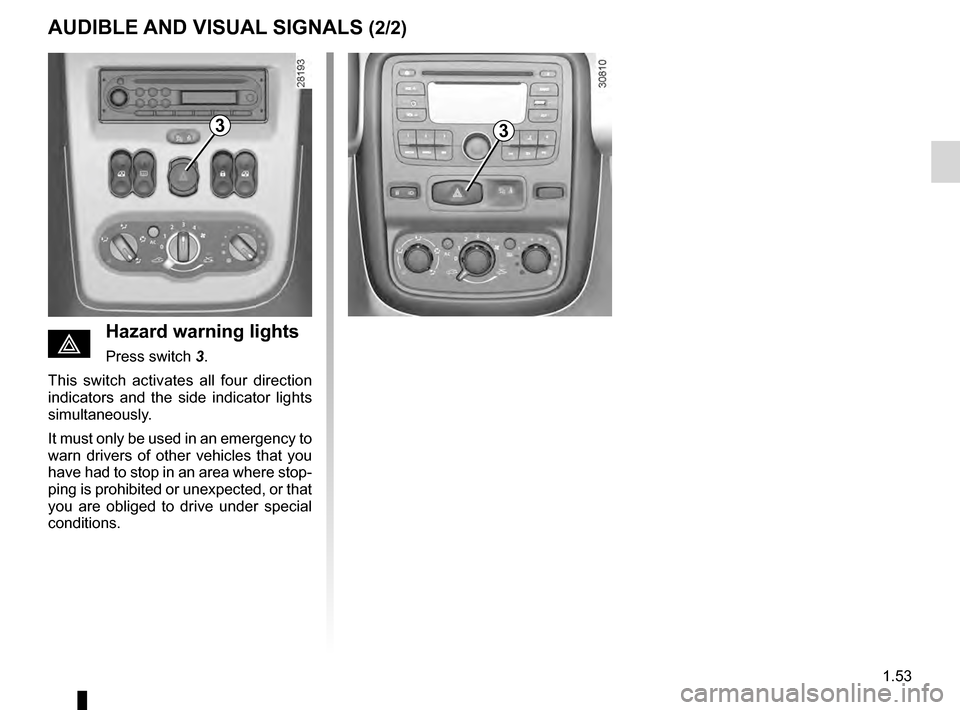
éHazard warning lights
Press switch 3.
T
his switch activates all four direction
indicators and the side indicator lights
simultaneously.
It must only be used in an emergency to
warn drivers of other vehicles that you
have had to stop in an area where stop-
ping is prohibited or unexpected, or that
you are obliged to drive under special
conditions.
Page 60 of 200
lighting:exterior ............................................ (up to the end of the DU)
lights: dipped beam headlights ................................... (current page)
lights: side lights ......................................................... (current page)
lights: main beam headlights ...................................... (current page)
lights ..................................................... (up to the end of the DU)
signals and lights .................................. (up to the end of the DU)
control instruments ............................... (up to the end of the DU)
1.54
ENG_UD14459_1
Éclairages et signalisations extérieures (H79 - Dacia)
ENG_NU_898-5_H79_Dacia_1
Jaune NoirNoir texte
Exterior lighting and signals
EXTERIOR LIGHTING AND SIGNALS (1/2)
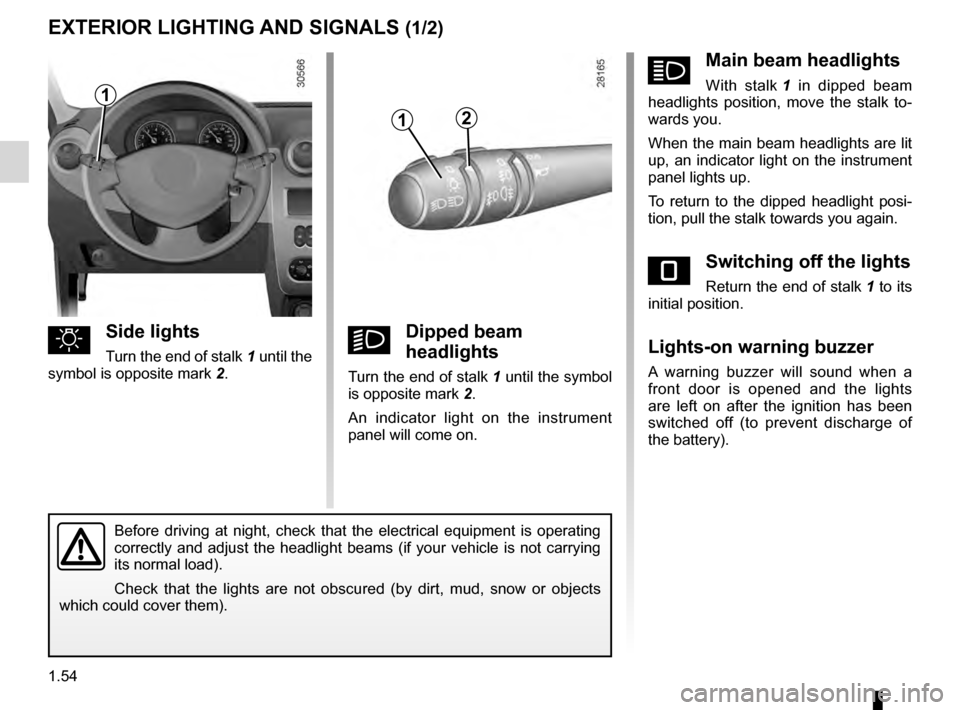
uSide lights
Turn the end of stalk 1 until the
symbol is opposite mark 2 .kDipped beam
headlights
Turn the end of stalk 1 until the symbol
is opposite mark 2 .
An indicator light on the instrument
panel will come on.
áMain beam headlights
With stalk 1 in dipped beam
headlights position, move the stalk to-
wards you.
When the main beam headlights are lit
up, an indicator light on the instrument
panel lights up.
To return to the dipped headlight posi-
tion, pull the stalk towards you again.
eSwitching off the lights
Return the end of stalk 1 to its
initial position.
Lights-on warning buzzer
A warning buzzer will sound when a
front door is opened and the lights
are left on after the ignition has been
switched off (to prevent discharge of
the battery).
Before driving at night, check that the electrical equipment is operating
correctly and adjust the headlight beams (if your vehicle is not carrying
its normal load).
Check that the lights are not obscured (by dirt, mud, snow or objects
which could cover them).
12
1
Page 61 of 200
warning buzzer ...................................................... (current page)
fog lights ................................................................ (current page)
lights: fog lights .......................................................... (current page)
JauneNoirNoir texte
1.55
ENG_UD14459_1
Éclairages et signalisations extérieures (H79 - Dacia)
ENG_NU_898-5_H79_Dacia_1
EXTERIOR LIGHTING AND SIGNALS (2/2)
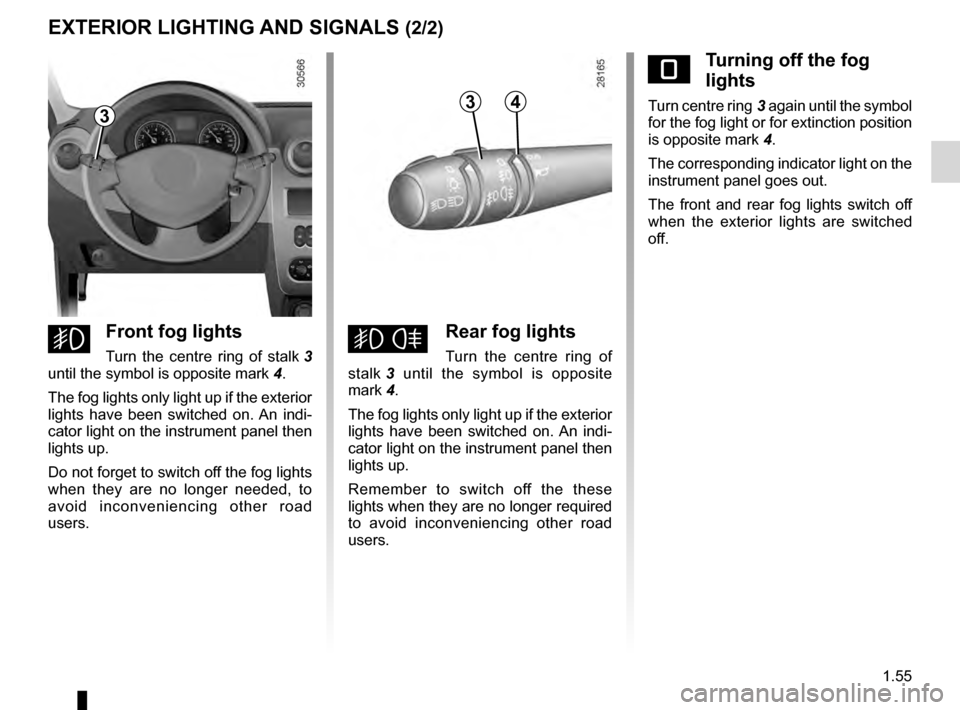
eTurning off the fog
lights
Turn centre ring 3 again until the symbol
for the fog light or for extinction position
is opposite mark
4
.
The corresponding indicator light on the
instrument panel goes out.
The front and rear fog lights switch off
when the exterior lights are switched
off.
gFront fog lights
Turn the centre ring of stalk 3
until the symbol is opposite mark 4 .
The fog lights only light up if the exterior
lights have been switched on. An indi-
cator light on the instrument panel then
lights up.
Do not forget to switch off the fog lights
when they are no longer needed, to
avoid inconveniencing other road
users.hRear fog lights
Turn the centre ring of
stalk 3
until the symbol is opposite
mark
4.
The fog lights only light up if the exterior
lights have been switched on. An indi-
cator light on the instrument panel then
lights up.
Remember to switch off the these
lights when they are no longer required
to avoid inconveniencing other road
users.
343
Page 68 of 200
1.62
ENG_UD22445_3
Réservoir carburant (H79 - Dacia)
ENG_NU_898-5_H79_Dacia_1
Persistent smell of fuel
If you notice a persistent
smell of fuel you should:
–
s
top the vehicle as soon
as traffic conditions allow and
switch off the ignition;
–
s
witch on the hazard warning
lights and ask your passengers to
leave the vehicle and stay clear
of the traffic;
–
contact an approved Dealer
.
No modifications what -
soever are permitted on
any part of the fuel supply
system (computers, wiring,
fuel circuit, injector, protection
covers, etc.) as this may be danger-
ous (such work must be undertaken
by qualified Network personnel).
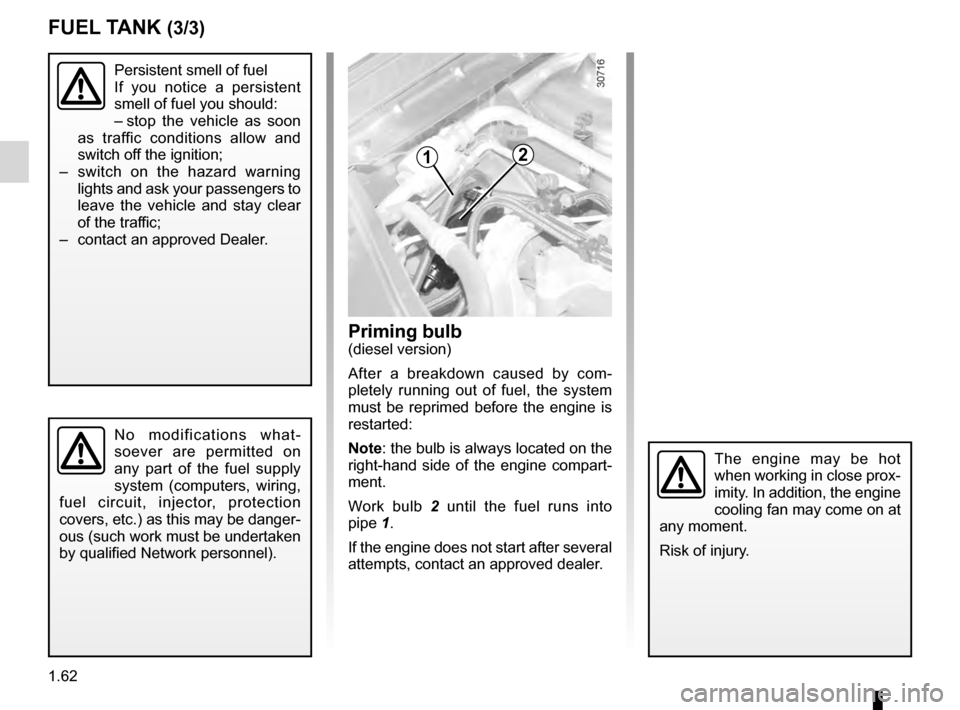
Priming bulb (diesel version)
After a breakdown caused by com-
pletely running out of fuel, the system
must be reprimed before the engine is
restarted:
Note: the bulb is always located on the
right-hand side of the engine compart-
ment.
Work bulb
2
until the fuel runs into
pipe
1.
If the engine does not start after several
attempts, contact an approved dealer.
The engine may be hot
when working in close prox-
imity. In addition, the engine
cooling fan may come on at
any moment.
Risk of injury.
FUEL TANK (3/3)
12
Page 71 of 200
driving ................................................... (up to the end of the DU)
starting .................................................. (up to the end of the DU)
starting the engine ................................ (up to the end of the DU)
2.3
ENG_UD17439_2
Mise en route / Arrêt du moteur (H79 - Dacia)
ENG_NU_898-5_H79_Dacia_2
Petrol injection
Engine warm or cold
–
T
urn the key to the start position
without depressing the accelera-
tor.
–
R
elease the key as soon as the
engine starts.ÉDiesel injection
T
urn the ignition key to ignition “On” po-
sition M, and hold this position until the
preheating warning light goes out.
Turn the key to starter position D with-
out depressing the accelerator
pedal.
Release the key as soon as the engine
starts.
Stopping the engine
With the engine idling, turn the key
back to “Stop” position St.
Starting the engine
In very cold conditions (temperatures
below –20°C): so that it is easier to
start the engine, switch on the ignition
for several seconds before starting the
engine.
Make sure the engine immobiliser is not
activated. Refer to the information on
the “Engine immobiliser” in Section 1.
Starting/stopping the engine
STARTING/STOPPING THE ENGINE
Never leave your vehicle with the key or remote control inside and never leave a child (or a pet) unsupervised, even
for a short while.
The reason for this is that the child may endanger himself or others by starting the engine, activating equipment such
as the window winders for example, or locking the doors.
Risk of serious injury.
Never switch off the ignition before the vehicle has stopped completely. Once the engine has stopped, the brake servo,
power assisted steering and passive safety equipment such as air bags wi\
ll no longer operate.
The steering is locked when the key is removed.