Túre DACIA DUSTER 2019 User Guide
[x] Cancel search | Manufacturer: DACIA, Model Year: 2019, Model line: DUSTER, Model: DACIA DUSTER 2019Pages: 244, PDF Size: 3.57 MB
Page 28 of 244
Downloaded from www.Manualslib.com manuals search engine JauneNoir Noir texte
1.22
ENG_UD32115_1
Dispositifs complémentaires aux ceintures avant (H79 - Dacia)
ENG_NU_1079-3_H79Ph2_Dacia_1
METHODS OF RESTRAINT IN ADDITION TO THE FRONT SEAT BELTS (3/3)
Warnings concerning the driver’s air bag
– Do not modify the steering wheel or the steering wheel boss.
– Do not cover the steering wheel boss under any circumstances.
– Do not attach any objects (badge, logo, clock, telephone holder, etc.) to the steering wheel boss.
– You must not remove the steering wheel (such work must only be performed\
by trained personnel from our Network).
– When driving, do not sit too close to the steering wheel. Sit with your \
arms slightly bent (see the information on “Adjusting
your driving position” in Section 1). This will allow sufficient space for the air bag to inflate properly and be fully effective.
Warnings concerning the passenger air bag
– Do not attach or glue any objects (badge, logo, clock, telephone holder, etc.) to the dashboard in the proximity of the air b ag
housing.
– Do not place anything between the dashboard and the passenger (pet, umb\
rella, walking stick, parcels, etc.).
– The passenger must not put his or her feet on the dashboard or seat as t\
here is a risk that serious injuries may occur. In general, all parts of the body should be kept away from the dashboard (\
knees, hands, head etc.).
– You should reactivate the passenger air bag as soon as you remove the chi\
ld seat to ensure the protection of the front pas- senger in the event of an impact.
A REAR-FACING CHILD SEAT MUST NOT BE FITTED TO THE FRONT PASSENGER SEAT UNLESS THE RESTRAINT SYSTEMS IN ADDITION TO THE SEAT BELT, I.E. AIR BAG, ARE DEACTIVATED.
(refer to the information on “Child safety: deactivating/activating \
the front passenger air bag” in Section 1)
All of the warnings below are given so that the air bag is not obstructe\
d in any way when it is deployed and also to pre-
vent the risk of serious injuries caused by items which may be dislodged\
when the air bag deploys.
Page 31 of 244

E")
Downloaded from www.Manualslib.com manuals search engine JauneNoir Noir texte
1.25
ENG_UD34997_13
Sécurite enfants : généralités (B90 - F90 - U90 - R90 - F90\
Ph2 - R90 Ph2 - H79 - X52 - Dacia)
ENG_NU_1079-3_H79Ph2_Dacia_1
CHILD SAFETY: General information (1/2)
Carrying children
Children, and adults, must be correctly
seated and strapped in for all journeys.
The children being carried in your vehi-
cle are your responsibility.
A child is not a miniature adult. Children
are at risk of specific injuries as their
muscles and bones have not yet fin-
ished growing. The seat belt alone
would not provide suitable protection.
Use an approved child seat and ensure
you use it correctly.
A collision at 30 mph
(50 km/h) is the same
as falling a distance of
10 metres. Transporting a
child without a restraint is the equi-
valent of allowing him or her to play
on a fourthfloor balcony without rail-
ings.
Never travel with a child held in your
arms. In the event of an accident,
you will not be able to keep hold of
the child, even if you yourself are
wearing a seat belt.
If your vehicle has been involved in
a road accident, replace the child
seat and have the seat belts and
ISOFIX fittings checked.
Never leave a child unat-
tended in the vehicle.
Check that your child is
always strapped in and that
the belt or safety harness used is
correctly set and adjusted. Avoid
wearing bulky clothing which could
cause the belts to slacken.
Never let your child put their head or
arms out of the window.
Check that the child is in the correct
position for the entire journey, espe-
cially if asleep.
To prevent the doors being
opened, use the childproof
locks (refer to the informa-
tion on “Locking/unlocking
the doors” in Section 1).
Page 32 of 244

E")
Downloaded from www.Manualslib.com manuals search engine JauneNoir Noir texte
1.26
ENG_UD34997_13
Sécurite enfants : généralités (B90 - F90 - U90 - R90 - F90\
Ph2 - R90 Ph2 - H79 - X52 - Dacia)
ENG_NU_1079-3_H79Ph2_Dacia_1
CHILD SAFETY: General information (2/2)
Using a child seat
The level of protection offered by the
child seat depends on its ability to re-
strain your child and on its installation.
Incorrect installation compromises the
protection it offers the child in the event
of harsh braking or an impact.
Before purchasing a child seat, check
that it complies with the regulations for
the country you are in and that it can
be fitted in your vehicle. Consult an ap-
proved dealer to find out which seats
are recommended for your vehicle.
Before fitting a child seat, read the
manual and respect its instructions. If
you experience any difficulties during
installation, contact the manufacturer
of the equipment. Keep the instructions
with the seat.Set a good example by always fas-
tening your seat belt and teaching
your child:
– to strap themselves in correctly;
– to always get in and out of the car
at the kerb, away from busy traf-
fic.
Do not use a second-hand child
seat or one without an instruction
manual.
Check that there are no objects in
the vicinity of the child seat which
could impede its operation.
Never leave a child unat-
tended in the vehicle.
Check that your child is
always strapped in and that
the belt or safety harness used is
correctly set and adjusted. Avoid
wearing bulky clothing which could
cause the belts to slacken.
Never let your child put their head or
arms out of the window.
Check that the child is in the correct
position for the entire journey, espe-
cially if asleep.
Page 34 of 244

ENG_NU_1079-3_H79Ph2_Dacia_1")
Downloaded from www.Manualslib.com manuals search engine JauneNoir Noir texte
1.28
ENG_UD32119_1
Sécurité enfants : choix de la fixation du siège enfant (H79 -\
Dacia)
ENG_NU_1079-3_H79Ph2_Dacia_1
CHILD SAFETY: mounting a child seat (1/2)
Attachment via the seat belt
The seat belt must be adjusted to
ensure that it is effective in the event of
harsh braking or an impact.
Ensure that the strap paths indicated
by the child seat manufacturer are re-
spected.
Always check that the seat belt is cor-
rectly fastened by pulling it up, then
pulling it out fully whilst pressing on the
child seat.
Check that the seat is correctly held by
moving it from side to side and back
to front: the seat should remain firmly
fixed.
Check that the child seat has not been
installed at an angle and that it is not
resting against a window. Attachment with the ISOFIX system
Authorised ISOFIX child seats are ap-
proved in accordance with regulation
ECE-R44 in one of the three following
cases:
– ISOFIX universal 3-point forward-
facing seat;
– ISOFIX semi-universal 2-point seat;
– specific.
For the latter two, check that your child
seat can be installed by consulting the
list of compatible vehicles.
Attach the child seat with the ISOFIX
locks, if these are provided. The ISOFIX
system allows quick, easy, safe fitting.
The ISOFIX system is composed of
2 rings for each rear side seat.
Before using an ISOFIX
child seat that you pur-
chased for another vehicle,
check that its installation is
authorised. Consult the list of ve-
hicles which can be fitted with the
seat from the equipment manufac-
turer.
No modifications may be
made to the component
parts of the restraint system
(seat belts, ISOFIX, seats
and their mountings) originally fitted.
The seat belt must never
be twisted or the tension
relieved. Never pass the
shoulder strap under the
arm or behind the back.
Check that the seat belt has not
been damaged by sharp edges.
If the seat belt does not operate nor-
mally, it will not protect the child.
Consult an approved dealer. Do not
use this seat until the seat belt has
been repaired.
Do not use the child seat
if it may unfasten the seat
belt restraining it: the base
of the seat must not rest on
the buckle and/or catch of the seat
belt.
Page 36 of 244

ENG_NU_1079-3")
Downloaded from www.Manualslib.com manuals search engine JauneNoir Noir texte
1.30
ENG_UD34961_5
Sécurité enfants : installation du siège enfant (H79 - H79 Ph2\
- H79 Nissan - Dacia)
ENG_NU_1079-3_H79Ph2_Dacia_1
CHILD SAFETY: fitting a child seat (1/6)
In the front seat
The laws concerning children travel-
ling in the front passenger seat differ in
every country. Consult the legislation in
force and follow the indications on the
diagram on the following page.
Before fitting a child seat in this seat (if
authorised):
– deactivate the front passenger air
bag;
– lower the seat belt as far as possible;
– move the seat as far back as pos- sible;
– gently tilt the seatback away from vertical (approximately 25°).
Do not change these settings after the
child seat is installed.
RISK OF DEATH OR
SERIOUS INJURY: before
fitting a child seat in this
seat, check that the air bag
has been deactivated (refer to the in-
formation on “Deactivating the front
passenger air bag” in Section 1).
Some seats are not suitable for fitting
child seats. The diagram on the fol-
lowing page shows you how to attach
a child seat.
The types of child seats indicated may
not be available. Before using a diffe-
rent child seat, check with the manufac-
turer that it can be fitted.
Fit the child seat in a rear
seat wherever possible.
Check that when installing
the child seat in the vehicle
it is not at risk of coming loose from
its base.
If you have to remove the headrest,
check that it is correctly stored so
that it does not come loose under
harsh braking or impact.
Always attach the child seat to the
vehicle even if it is not in use so that
it does not come loose under harsh
braking or impact.
Page 51 of 244
Downloaded from www.Manualslib.com manuals search engine JauneNoir Noir texte
1.45
ENG_UD34962_2
Témoins lumineux (H79 Ph2 - Dacia)
ENG_NU_1079-3_H79Ph2_Dacia_1
WARNING LIGHTS (2/7)
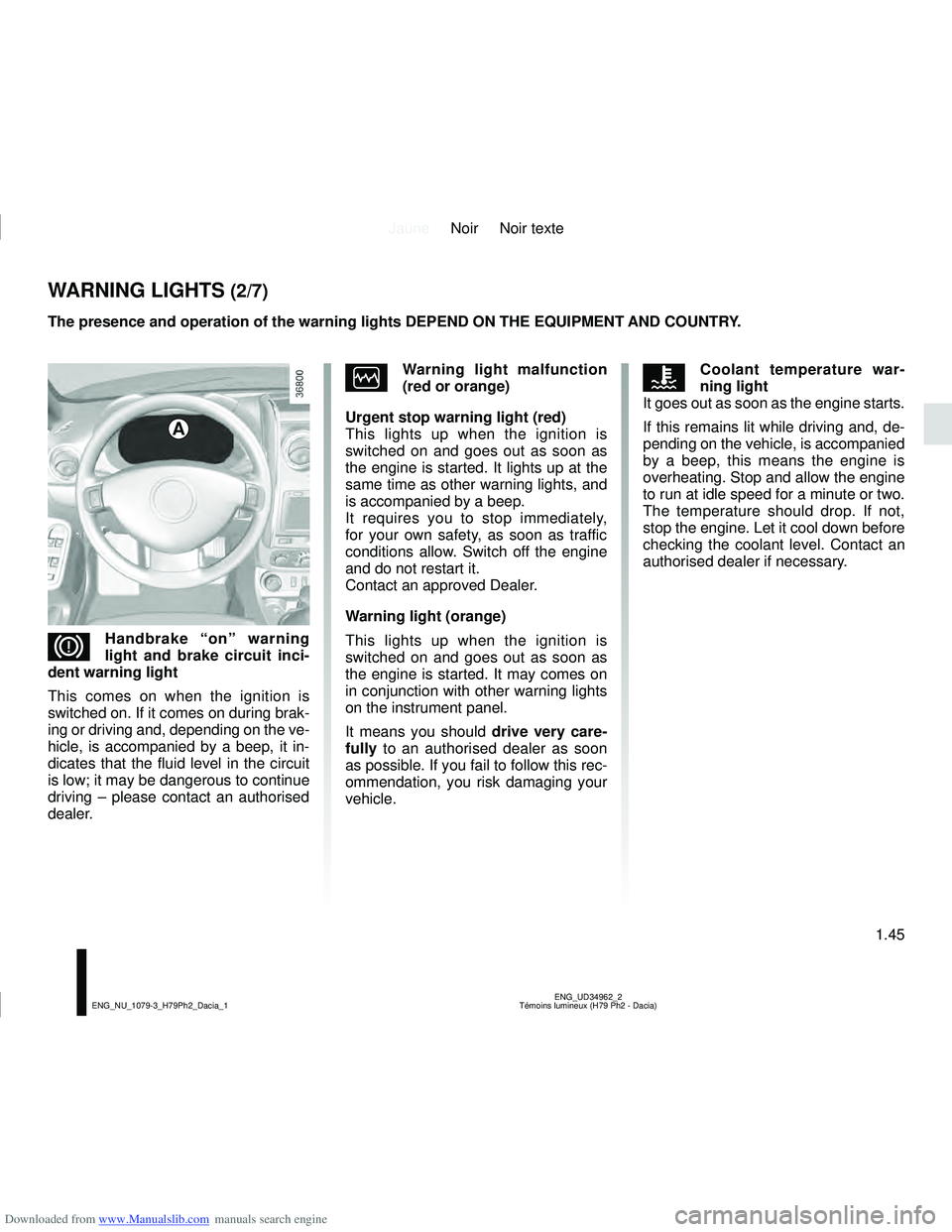
A
DHandbrake “on” warning
light and brake circuit inci-
dent warning light
This comes on when the ignition is
switched on. If it comes on during brak-
ing or driving and, depending on the ve-
hicle, is accompanied by a beep, it in-
dicates that the fluid level in the circuit
is low; it may be dangerous to continue
driving – please contact an authorised
dealer.
ÒWarning light malfunction
(red or orange)
Urgent stop warning light (red)
This lights up when the ignition is
switched on and goes out as soon as
the engine is started. It lights up at the
same time as other warning lights, and
is accompanied by a beep.
It requires you to stop immediately,
for your own safety, as soon as traffic
conditions allow. Switch off the engine
and do not restart it.
Contact an approved Dealer.
Warning light (orange)
This lights up when the ignition is
switched on and goes out as soon as
the engine is started. It may comes on
in conjunction with other warning lights
on the instrument panel.
It means you should drive very care-
fully to an authorised dealer as soon
as possible. If you fail to follow this rec-
ommendation, you risk damaging your
vehicle.ÔCoolant temperature war-
ning light
It goes out as soon as the engine starts.
If this remains lit while driving and, de-
pending on the vehicle, is accompanied
by a beep, this means the engine is
overheating. Stop and allow the engine
to run at idle speed for a minute or two.
The temperature should drop. If not,
stop the engine. Let it cool down before
checking the coolant level. Contact an
authorised dealer if necessary.
The presence and operation of the warning lights DEPEND ON THE EQUIPMENT\
AND COUNTRY.
Page 59 of 244
Downloaded from www.Manualslib.com manuals search engine JauneNoir Noir texte
1.53
ENG_UD32126_1
Afficheur et indicateurs (H79 - Dacia)
ENG_NU_1079-3_H79Ph2_Dacia_1
DISPLAY AND INDICATORS (3/3)
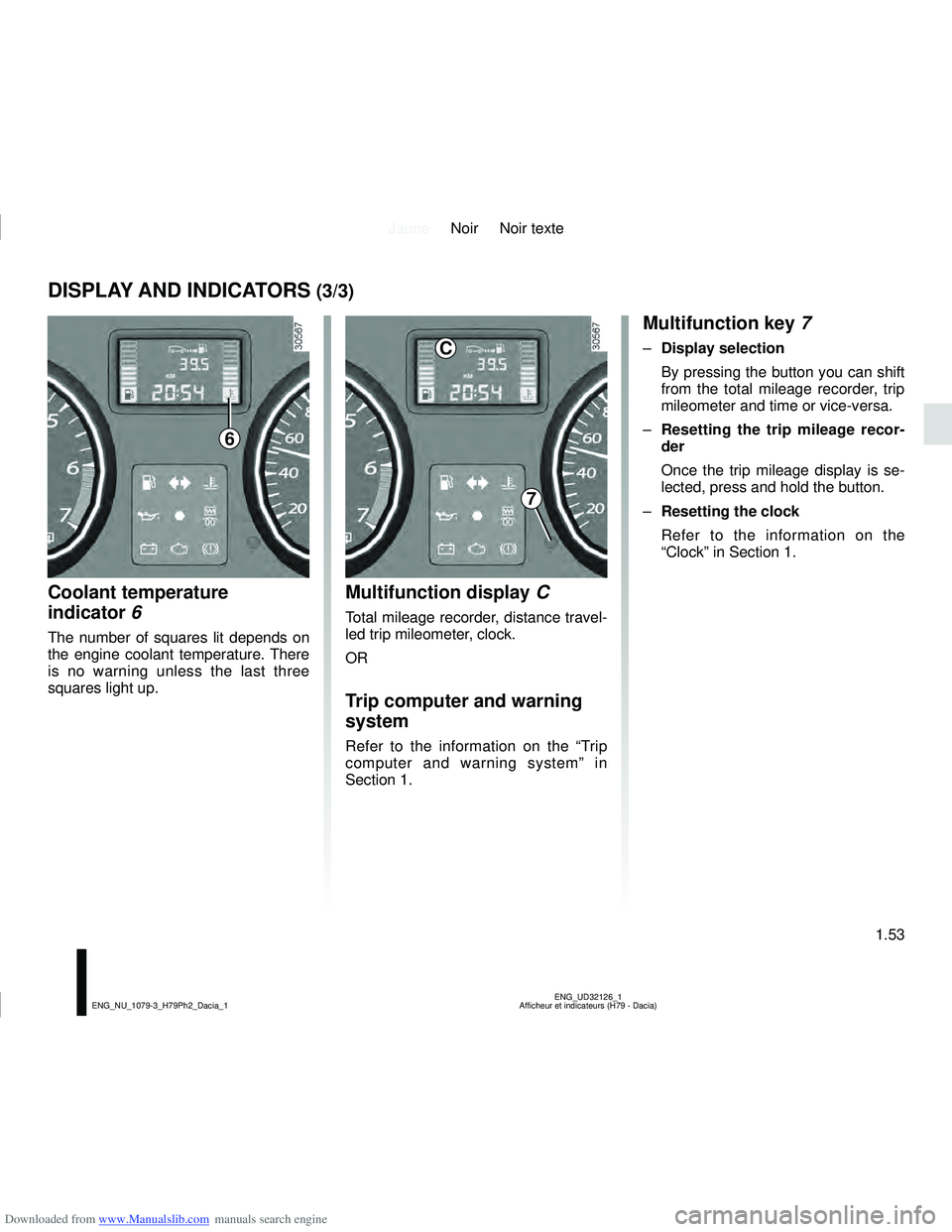
Coolant temperature
indicator 6
The number of squares lit depends on
the engine coolant temperature. There
is no warning unless the last three
squares light up.
Multifunction display C
Total mileage recorder, distance travel-
led trip mileometer, clock.
OR
Trip computer and warning
system
Refer to the information on the “Trip
computer and warning system” in
Section 1.
Multifunction key 7
– Display selection
By pressing the button you can shift
from the total mileage recorder, trip
mileometer and time or vice-versa.
– Resetting the trip mileage recor-
der
Once the trip mileage display is se-
lected, press and hold the button.
– Resetting the clock
Refer to the information on the
“Clock” in Section 1.
6
7
C
Page 60 of 244
Downloaded from www.Manualslib.com manuals search engine JauneNoir Noir texte
1.54
ENG_UD34963_2
Ordinateur de bord (H79 Ph2 - Dacia)
ENG_NU_1079-3_H79Ph2_Dacia_1
ON-BOARD COMPUTER (1/6)
2
3
4
The display of information shown below DEPENDS ON THE VEHICLE EQUIPMENT \
AND COUNTRY.
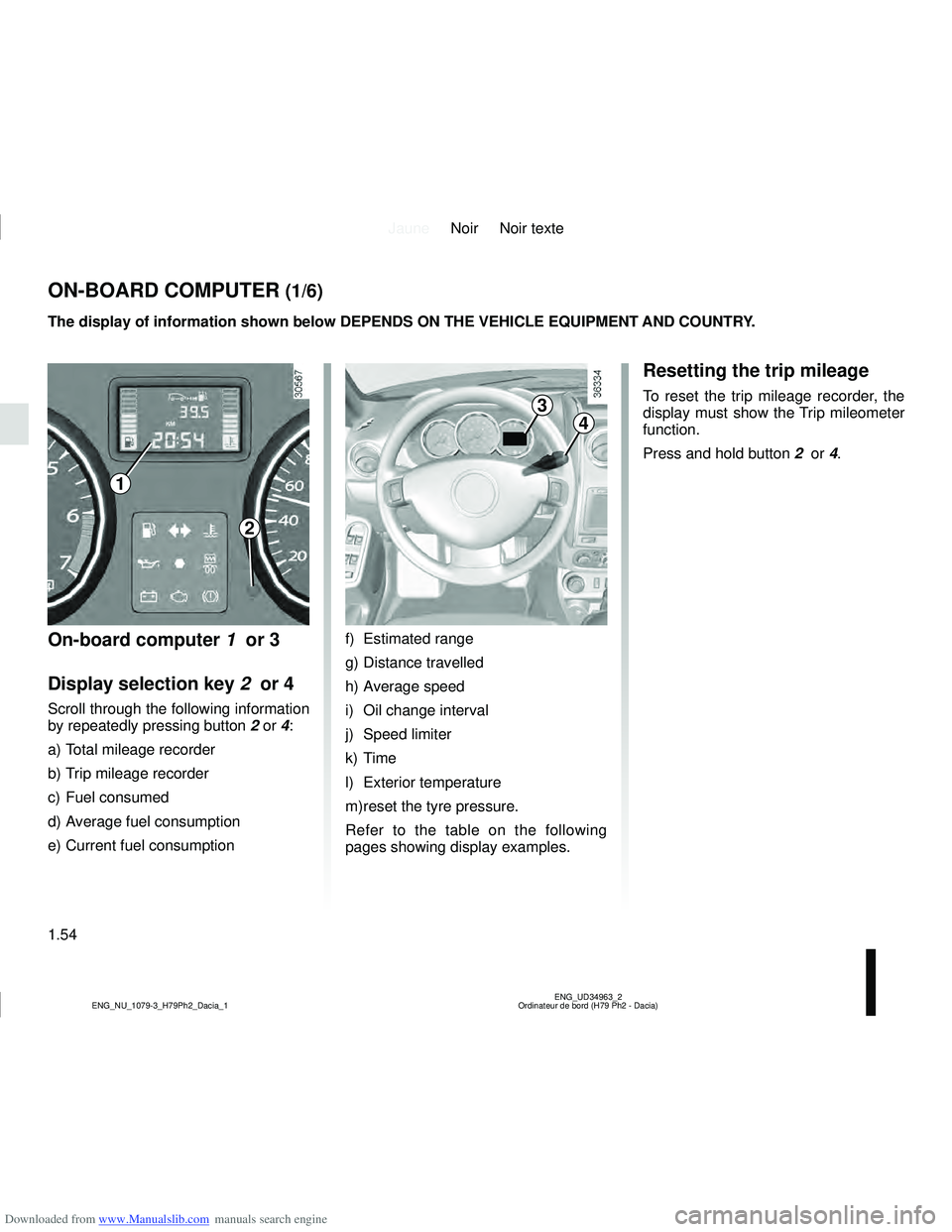
On-board computer 1 or 3
Display selection key 2 or 4
Scroll through the following information
by repeatedly pressing button 2 or 4:
a) Total mileage recorder
b) Trip mileage recorder
c) Fuel consumed
d) Average fuel consumption
e) Current fuel consumption f) Estimated range
g) Distance travelled
h) Average speed
i) Oil change interval
j) Speed limiter
k) Time
l) Exterior temperature
m) reset the tyre pressure.
Refer to the table on the following
pages showing display examples.
Resetting the trip mileage
To reset the trip mileage recorder, the
display must show the Trip mileometer
function.
Press and hold button
2 or 4.
1
Page 61 of 244
Downloaded from www.Manualslib.com manuals search engine JauneNoir Noir texte
1.55
ENG_UD34963_2
Ordinateur de bord (H79 Ph2 - Dacia)
ENG_NU_1079-3_H79Ph2_Dacia_1
Interpreting some of the
values displayed after
resetting
The values showing average fuel
consumption, range and average
speed will become more stable and re-
liable the further you travel after pres-
sing the reset button.
For the first few miles after pressing
the reset key you will notice that the
range increases as you travel. This
range takes into account the average
fuel consumption since the last time the
reset button was pressed. Therefore,
the fuel consumption may decrease
when:
– the vehicle stops accelerating,
– the engine reaches its operating
temperature (engine cold when
reset button pressed),
– when driving from a built-up area
onto the open road.
Therefore, if the average fuel
consumption decreases, the
range will increase. – You may also notice that the ave-
rage fuel consumption increases
when the vehicle is stationary and
the engine idling.
This is normal, since the computer
takes account of fuel used during
idling.
Manually resetting the journey para-
meters: with the display showing one
of the journey parameters, press the
button 2 until the display is reset.
Automatically resetting the journey
parameters: the reset is automatic
when the capacity of one of the memo-
ries is exceeded.
ON-BOARD COMPUTER (2/6)
The display of information shown below DEPENDS ON THE VEHICLE EQUIPMENT \
AND COUNTRY.
Page 65 of 244
Downloaded from www.Manualslib.com manuals search engine JauneNoir Noir texte
1.59
ENG_UD34963_2
Ordinateur de bord (H79 Ph2 - Dacia)
ENG_NU_1079-3_H79Ph2_Dacia_1
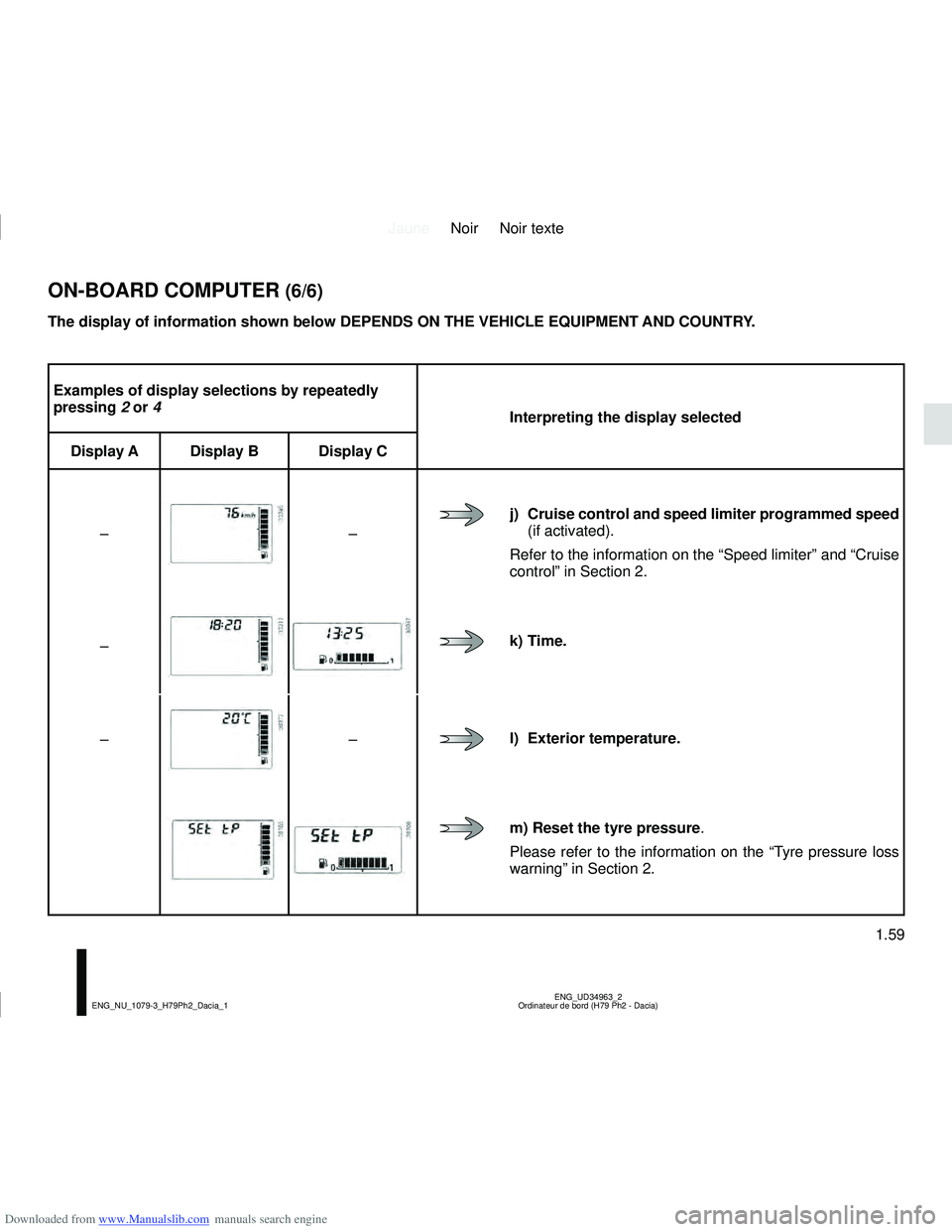
Examples of display selections by repeatedly
pressing 2 or 4
Interpreting the display selected
Display A Display B Display C
–
–
j) Cruise control and speed limiter programmed speed
(if activated).
Refer to the information on the “Speed limiter” and “Cruise
control” in Section 2.
–
k) Time.
–
–l) Exterior temperature.
m) Reset the tyre pressure .
Please refer to the information on the “Tyre pressure loss
warning” in Section 2.
ON-BOARD COMPUTER (6/6)
The display of information shown below DEPENDS ON THE VEHICLE EQUIPMENT \
AND COUNTRY.