SCR DACIA LODGY 2019 User Guide
[x] Cancel search | Manufacturer: DACIA, Model Year: 2019, Model line: LODGY, Model: DACIA LODGY 2019Pages: 220, PDF Size: 2.62 MB
Page 47 of 220
JauneNoir Noir texte
1.41
ENG_UD33069_3
Poste de conduite direction à gauche (X92 - Renault)
ENG_NU_975-6_X92_Dacia_1
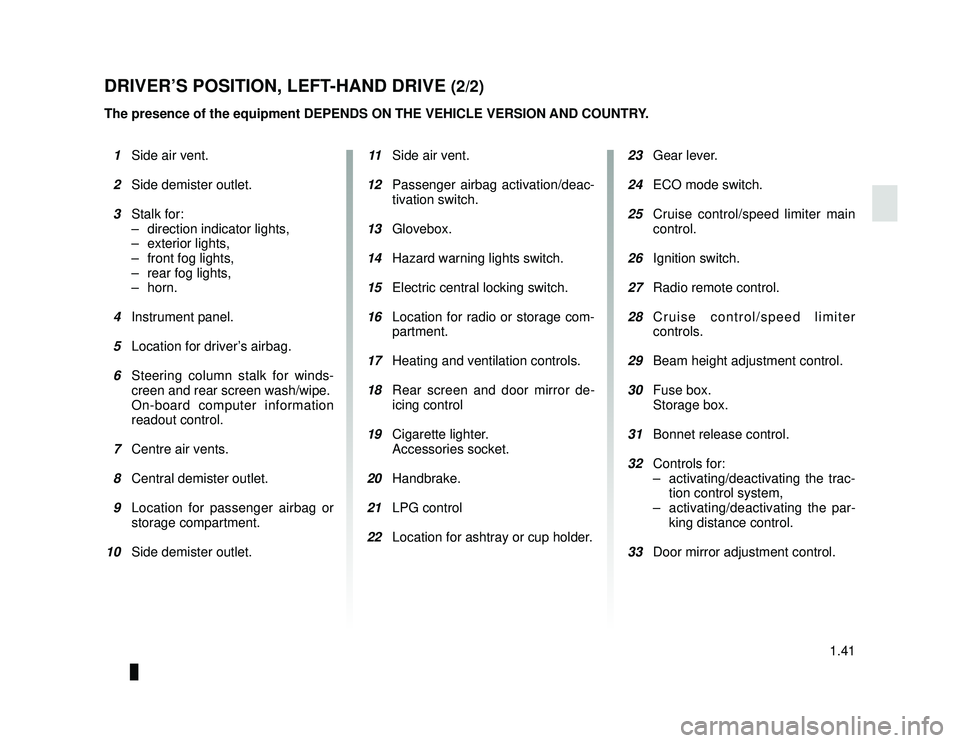
DRIVER’S POSITION, LEFT-HAND DRIVE (2/2)
The presence of the equipment DEPENDS ON THE VEHICLE VERSION AND COUNTRY.
1 Side air vent.
2 Side demister outlet.
3 Stalk for:
– direction indicator lights,
– exterior lights,
– front fog lights,
– rear fog lights,
– horn.
4 Instrument panel.
5 Location for driver’s airbag.
6 Steering column stalk for winds-
creen and rear screen wash/wipe.
On-board computer information
readout control.
7 Centre air vents.
8 Central demister outlet.
9 Location for passenger airbag or
storage compartment.
10 Side demister outlet. 11 Side air vent.
12 Passenger airbag activation/deac-
tivation switch.
13 Glovebox.
14 Hazard warning lights switch.
15 Electric central locking switch.
16 Location for radio or storage com-
partment.
17 Heating and ventilation controls.
18 Rear screen and door mirror de-
icing control
19 Cigarette lighter.
Accessories socket.
20 Handbrake.
21 LPG control
22 Location for ashtray or cup holder.
23 Gear lever.
24 ECO mode switch.
25 Cruise control/speed limiter main
control.
26 Ignition switch.
27 Radio remote control.
28 Cruise control/speed limiter
controls.
29 Beam height adjustment control.
30 Fuse box.
Storage box.
31 Bonnet release control.
32 Controls for:
– activating/deactivating the trac-tion control system,
– activating/deactivating the par- king distance control.
33 Door mirror adjustment control.
Page 54 of 220
JauneNoir Noir texte
1.48
ENG_UD34872_4
Ordinateur de bord (X92 - Renault)
ENG_NU_975-6_X92_Dacia_1
ON-BOARD COMPUTER (1/5)
Interpreting some of the
values displayed after
resetting
The values showing average fuel con-
sumption, range and average speed
will become more stable and reliable
the further you travel after pressing the
reset button.
For the first few miles after pressing the
reset key you will notice that the range
increases as you travel. This range
takes into account the average fuel con-
sumption since the last time the reset
button was pressed. Therefore, the fuel
consumption may decrease when:
– the vehicle stops accelerating;
– the engine reaches its operating
temperature (if the engine was cold
when the reset key was pressed);
– when driving from an urban area
onto the open road.
Resetting is automatic when the maxi-
mum capacity of any of the memories
is exceeded.
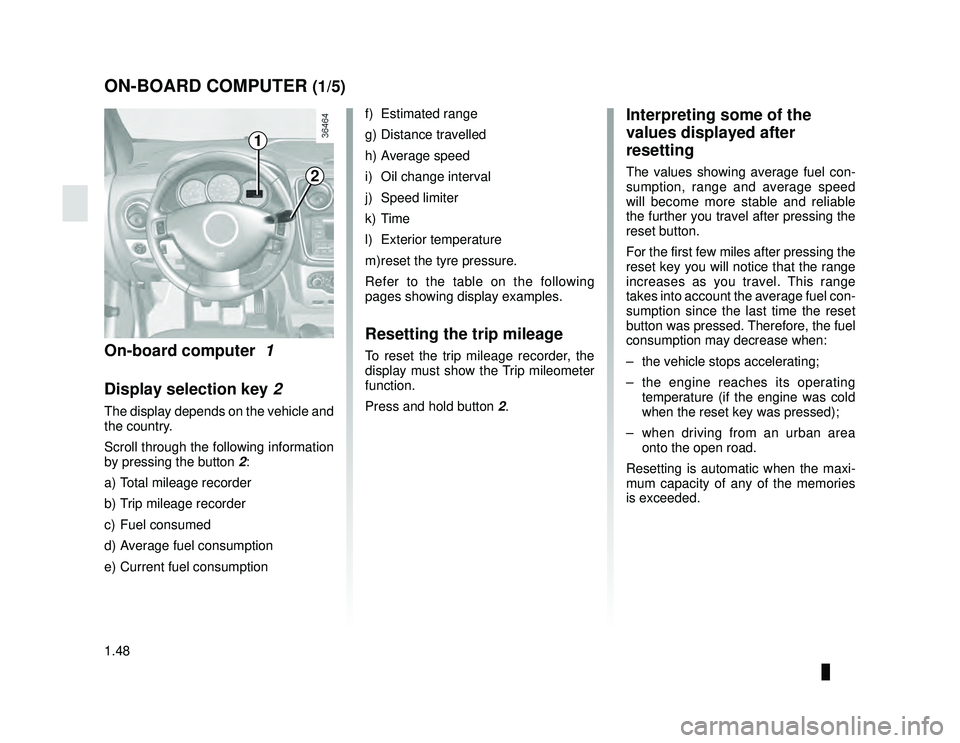
On-board computer 1
Display selection key 2
The display depends on the vehicle and
the country.
Scroll through the following information
by pressing the button 2:
a) Total mileage recorder
b) Trip mileage recorder
c) Fuel consumed
d) Average fuel consumption
e) Current fuel consumption
f) Estimated range
g) Distance travelled
h) Average speed
i) Oil change interval
j) Speed limiter
k) Time
l) Exterior temperature
m) reset the tyre pressure.
Refer to the table on the following
pages showing display examples.
Resetting the trip mileage
To reset the trip mileage recorder, the
display must show the Trip mileometer
function.
Press and hold button 2.
1
2
Page 59 of 220
JauneNoir Noir texte
1.53
ENG_UD24418_1
Volant de direction/Heure (X92 - Renault)
ENG_NU_975-6_X92_Dacia_1
STEERING WHEEL/CLOCK
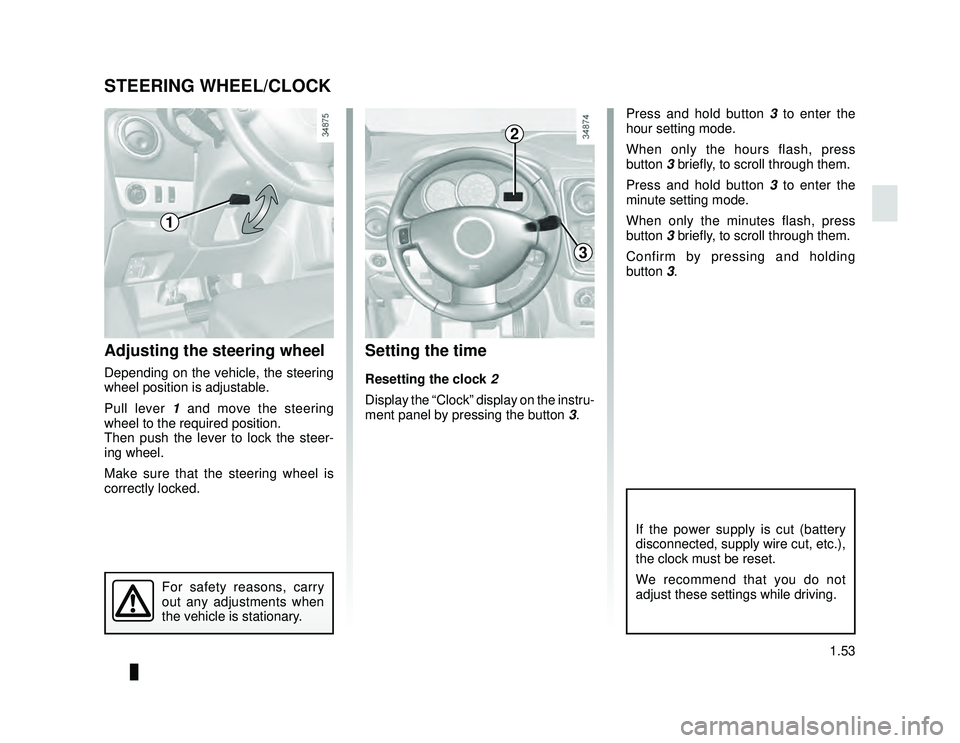
Adjusting the steering wheel
Depending on the vehicle, the steering
wheel position is adjustable.
Pull lever 1 and move the steering
wheel to the required position.
Then push the lever to lock the steer-
ing wheel.
Make sure that the steering wheel is
correctly locked.
For safety reasons, carry
out any adjustments when
the vehicle is stationary.
Setting the time
Resetting the clock 2
Display the “Clock” display on the instru-
ment panel by pressing the button 3.
2
1
2
3
If the power supply is cut (battery
disconnected, supply wire cut, etc.),
the clock must be reset.
We recommend that you do not
adjust these settings while driving.
Press and hold button 3 to enter the
hour setting mode.
When only the hours flash, press
button 3 briefly, to scroll through them.
Press and hold button 3 to enter the
minute setting mode.
When only the minutes flash, press
button 3 briefly, to scroll through them.
Confirm by pressing and holding
button 3.
Page 64 of 220
JauneNoir Noir texte
1.58
ENG_UD24423_1
Essuie-vitre / Lave-vitre avant (X92 - Renault)
ENG_NU_975-6_X92_Dacia_1
WINDSCREEN WASH/WIPE
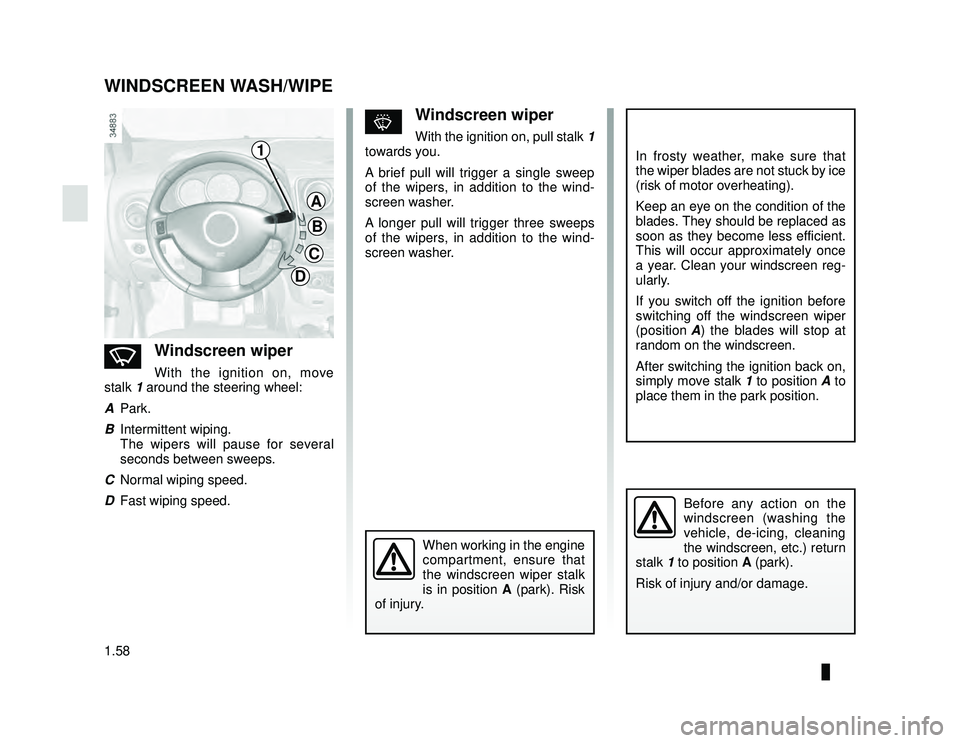
nWindscreen wiper
With the ignition on, move
stalk 1 around the steering wheel:
A Park.
B Intermittent wiping.
The wipers will pause for several
seconds between sweeps.
C Normal wiping speed.
D Fast wiping speed.
sWindscreen wiper
With the ignition on, pull stalk 1
towards you.
A brief pull will trigger a single sweep
of the wipers, in addition to the wind-
screen washer.
A longer pull will trigger three sweeps
of the wipers, in addition to the wind-
screen washer.
In frosty weather, make sure that
the wiper blades are not stuck by ice
(risk of motor overheating).
Keep an eye on the condition of the
blades. They should be replaced as
soon as they become less efficient.
This will occur approximately once
a year. Clean your windscreen reg-
ularly.
If you switch off the ignition before
switching off the windscreen wiper
(position A) the blades will stop at
random on the windscreen.
After switching the ignition back on,
simply move stalk 1 to position A to
place them in the park position.
Before any action on the
windscreen (washing the
vehicle, de-icing, cleaning
the windscreen, etc.) return
stalk 1 to position A (park).
Risk of injury and/or damage.
C
D1
D
C
B
A
When working in the engine
compartment, ensure that
the windscreen wiper stalk
is in position A (park). Risk
of injury.
Page 65 of 220
JauneNoir Noir texte
1.59
ENG_UD24424_1
Essuie-vitre / Lave-vitre arrière / Dégivrage (X92 - Renault)
ENG_NU_975-6_X92_Dacia_1
REAR SCREEN WASH/WIPE, DE-ICING
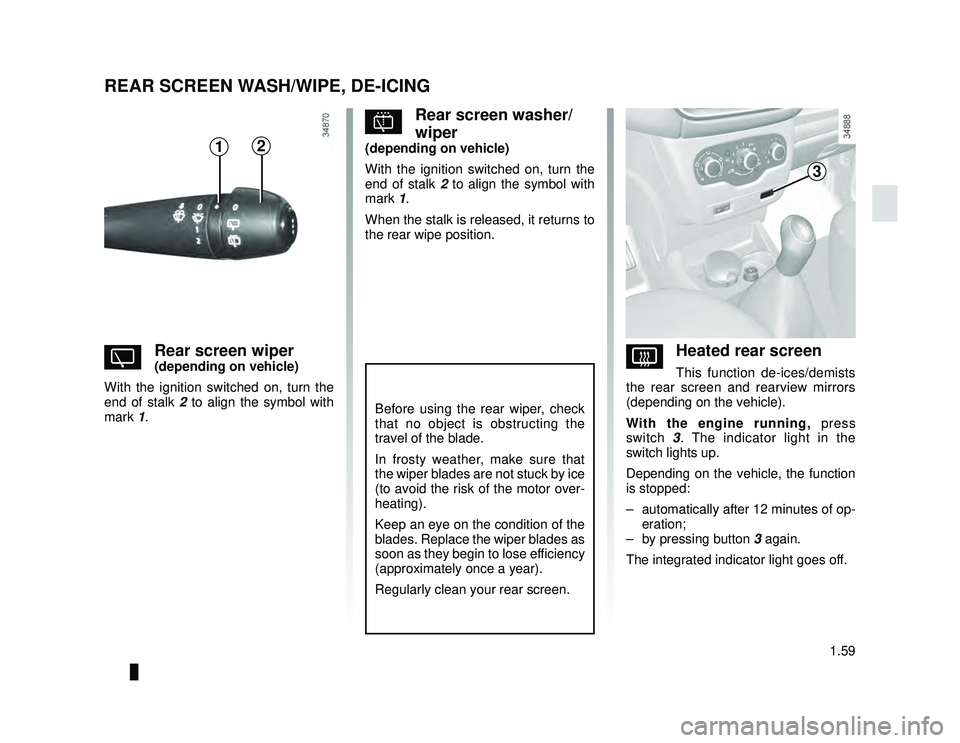
YRear screen wiper(depending on vehicle)
With the ignition switched on, turn the
end of stalk 2 to align the symbol with
mark 1.
pRear screen washer/
wiper
(depending on vehicle)
With the ignition switched on, turn the
end of stalk 2 to align the symbol with
mark 1.
When the stalk is released, it returns to
the rear wipe position.
VHeated rear screen
This function de-ices/demists
the rear screen and rearview mirrors
(depending on the vehicle).
With the engine running, press
switch 3. The indicator light in the
switch lights up.
Depending on the vehicle, the function
is stopped:
– automatically after 12 minutes of op- eration;
– by pressing button 3 again.
The integrated indicator light goes off.
Before using the rear wiper, check
that no object is obstructing the
travel of the blade.
In frosty weather, make sure that
the wiper blades are not stuck by ice
(to avoid the risk of the motor over-
heating).
Keep an eye on the condition of the
blades. Replace the wiper blades as
soon as they begin to lose efficiency
(approximately once a year).
Regularly clean your rear screen.
21
3
Page 69 of 220
JauneNoir Noir texte
1.63
ENG_UD33442_2
Réservoir carburant (X92 - Renault)
ENG_NU_975-6_X92_Dacia_1
FUEL TANK (4/5)
Filling stations with self-service
We recommend that you wear gloves
when handling the LPG pistol.
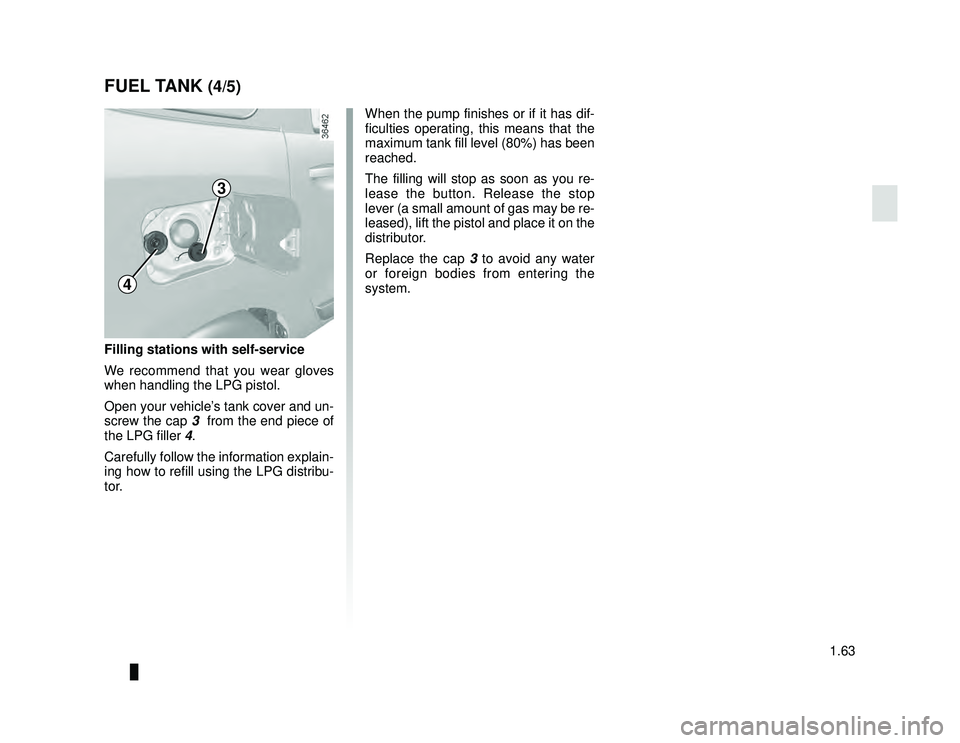
Open your vehicle’s tank cover and un-
screw the cap 3 from the end piece of
the LPG filler 4.
Carefully follow the information explain-
ing how to refill using the LPG distribu-
tor.
When the pump finishes or if it has dif-
ficulties operating, this means that the
maximum tank fill level (80%) has been
reached.
The filling will stop as soon as you re-
lease the button. Release the stop
lever (a small amount of gas may be re-
leased), lift the pistol and place it on the
distributor.
Replace the cap 3 to avoid any water
or foreign bodies from entering the
system.
4
3
Page 104 of 220
JauneNoir Noir texte
3.2
ENG_UD24439_1
Aérateurs, sorties air (X92 - Renault)
ENG_NU_975-6_X92_Dacia_3
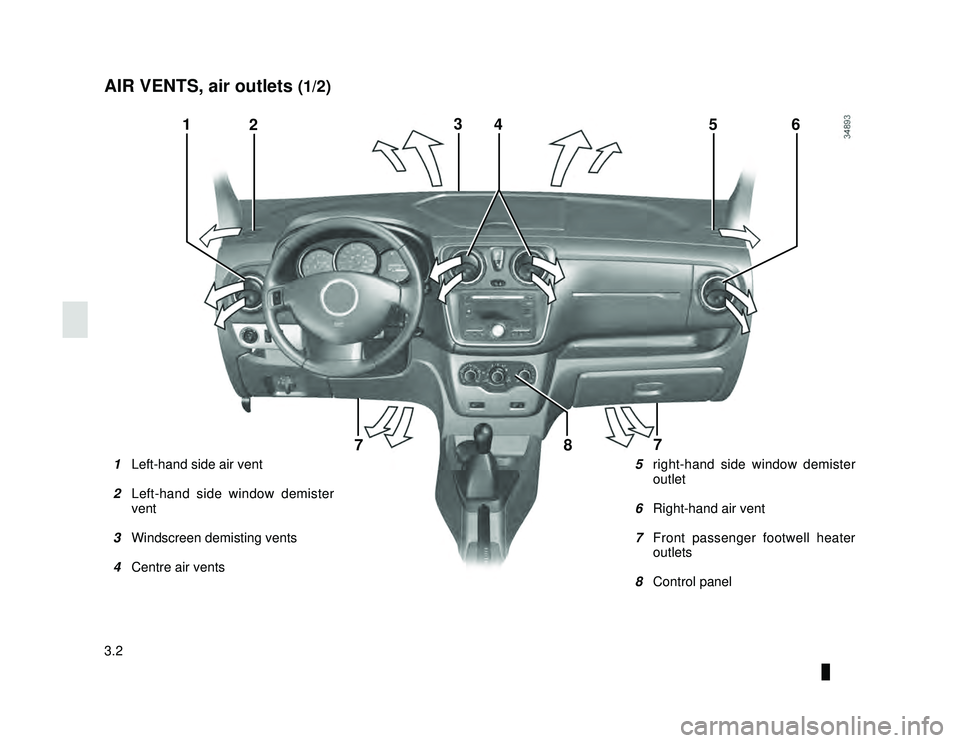
AIR VENTS, air outlets (1/2)
5 right-hand side window demister
outlet
6 Right-hand air vent
7 Front passenger footwell heater
outlets
8 Control panel
1 Left-hand side air vent
2 Left-hand side window demister
vent
3 Windscreen demisting vents
4 Centre air vents
12365
77
4
8
Page 106 of 220

JauneNoir Noir texte
3.4
ENG_UD29884_4
Chauffage - Ventilation - Air conditionné (X67 - X92 - Renault)
ENG_NU_975-6_X92_Dacia_3
HEATING, VENTILATION, AIR CONDITIONING (1/3)
Controls
The controls will depend on the vehicle
equipment level.
1 Distribution of air.
2 Switching air conditioning on or off.
3 Adjusting the ventilation fan speed.
4 Air temperature adjuster.
5 Switching passenger compartment isolation mode/air recirculation mode
on.
Leaving this control in position 0 for
prolonged periods can lead to con-
densation forming on the side win-
dows and windscreen and problems
due to the use of non-renewed air in
the passenger compartment.
Adjusting the air temperature
Turn control 4 to obtain the desired
temperature. The further the pointer is
in the red, the more the temperature will
be increased.
Adjusting the ventilation fan
speed.
Turn control 3 from 0 to 4. The further
to the right it is positioned, the more air
is blown into the passenger compart-
ment. If you want to shut off the flow of
air completely and stop the system, set
control 3 to 0.
The system is deactivated: the ventila-
tion speed for the passenger compart-
ment air is zero (vehicle stationary),
you can however still feel a slight flow
of air when the vehicle is moving.
Information and advice on use: refer
to information on “Air conditioning: in-
formation and advice on use”.
4321
5
Page 107 of 220

JauneNoir Noir texte
3.5
ENG_UD29884_4
Chauffage - Ventilation - Air conditionné (X67 - X92 - Renault)
ENG_NU_975-6_X92_Dacia_3
HEATING, VENTILATION, AIR CONDITIONING (2/3)
Switching passenger
compartment isolation mode/
air recirculation mode on.
Bring lever 5 to position â.
Under these conditions, air is taken
from the passenger compartment and
is recirculated, with no air being taken
from outside the vehicle. Air recirculation is used to:
– to isolate the passenger compart-
ment from the external atmosphere
(e.g. driving in polluted areas, etc.);
– to bring the passenger compartment to the desired temperature as quickly
as possible.
Prolonged use of air recirculation
can lead to condensation form-
ing on the side windows and wind-
screen, and discomfort due to the
use of non-renewed air in the pas-
senger compartment.
You are therefore advised to return
to normal mode (external air) as
soon as the air recirculation func-
tion is no longer required, by turning
control 5 to the right.
31
5
Rapid demisting
Turn controls 1 , 3 and 5 to positions
W:
– air from the outside;
– maximum fan speed;
– demisting.
Using the climate control increases the
speed of demisting.
Page 108 of 220
JauneNoir Noir texte
3.6
ENG_UD29884_4
Chauffage - Ventilation - Air conditionné (X67 - X92 - Renault)
ENG_NU_975-6_X92_Dacia_3
HEATING, VENTILATION, AIR CONDITIONING (3/3)
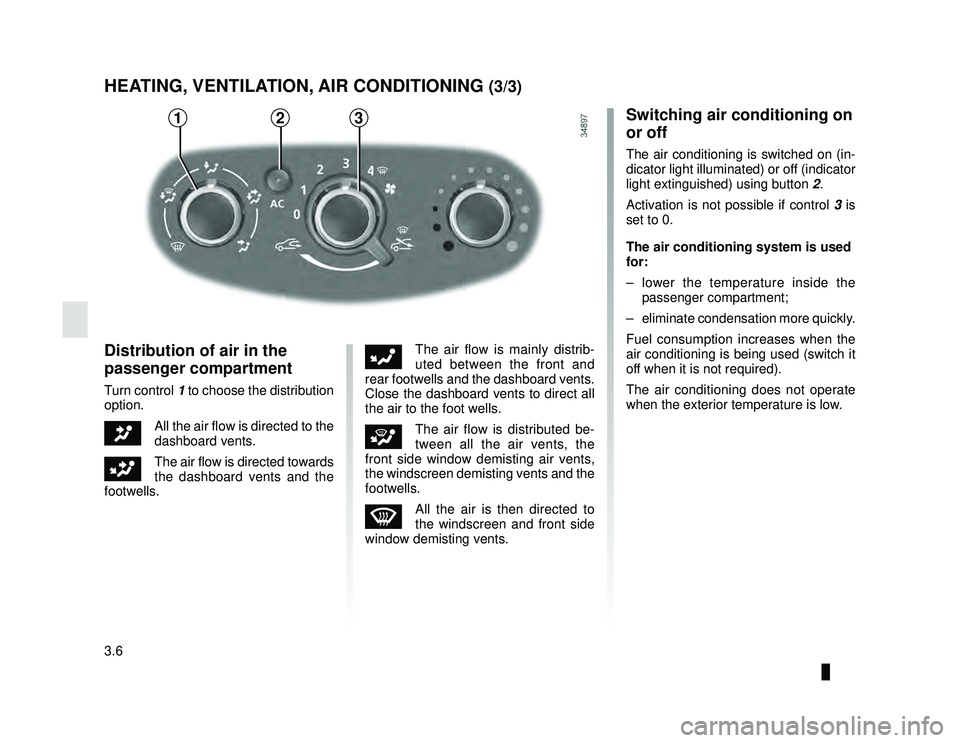
Distribution of air in the
passenger compartment
Turn control 1 to choose the distribution
option.
JAll the air flow is directed to the
dashboard vents.
GThe air flow is directed towards
the dashboard vents and the
footwells.
FThe air flow is mainly distrib-
uted between the front and
rear footwells and the dashboard vents.
Close the dashboard vents to direct all
the air to the foot wells.
iThe air flow is distributed be-
tween all the air vents, the
front side window demisting air vents,
the windscreen demisting vents and the
footwells.
WAll the air is then directed to
the windscreen and front side
window demisting vents.
Switching air conditioning on
or off
The air conditioning is switched on (in-
dicator light illuminated) or off (indicator
light extinguished) using button 2.
Activation is not possible if control 3 is
set to 0.
The air conditioning system is used
for:
– lower the temperature inside the passenger compartment;
– eliminate condensation more quickly.
Fuel consumption increases when the
air conditioning is being used (switch it
off when it is not required).
The air conditioning does not operate
when the exterior temperature is low.
321