key DAEWOO LACETTI 2004 Service Manual PDF
[x] Cancel search | Manufacturer: DAEWOO, Model Year: 2004, Model line: LACETTI, Model: DAEWOO LACETTI 2004Pages: 2643, PDF Size: 80.54 MB
Page 1955 of 2643

SECTION : 6E
STEERING WHEEL AND COLUMN
CAUTION : Disconnect the negative battery cable before removing or installing any electrical unit or when a tool
or equipment could easily come in contact with exposed electrical terminals. Disconnecting this cable will help
prevent personal injury and damage to the vehicle. The ignition must also be in LOCK unless otherwise noted.
TABLE OF CONTENTS
SPECIFICATIONS6E–1 . . . . . . . . . . . . . . . . . . . . . . . . . .
Fastener Tightening Specifications 6E–1. . . . . . . . . . .
SPECIAL TOOLS6E–2 . . . . . . . . . . . . . . . . . . . . . . . . . . .
Special Tools Table 6E–2. . . . . . . . . . . . . . . . . . . . . . . .
DIAGNOSIS6E–2 . . . . . . . . . . . . . . . . . . . . . . . . . . . . . . . .
Steering Column Diagnosis 6E–2. . . . . . . . . . . . . . . . .
MAINTENANCE AND REPAIR6E–8 . . . . . . . . . . . . . . .
ON–VEHICLE SERVICE 6E–8. . . . . . . . . . . . . . . . . . . . .
Headlamp/Turn Signal Switch and Lever 6E–8. . . . . .
Wiper Switch and Lever 6E–9. . . . . . . . . . . . . . . . . . . . Steering Wheel Rotation Sensor 6E–10. . . . . . . . . . . .
Steering Wheel Without SIR 6E–11. . . . . . . . . . . . . . . .
Steering Wheel With SIR 6E–13. . . . . . . . . . . . . . . . . .
Ignition Lock Cylinder and Switch 6E–13. . . . . . . . . . .
Steering Column 6E–15. . . . . . . . . . . . . . . . . . . . . . . . . .
UNIT REPAIR 6E–19. . . . . . . . . . . . . . . . . . . . . . . . . . . . .
Tilt Steering Column 6E–19. . . . . . . . . . . . . . . . . . . . . .
GENERAL DESCRIPTION AND SYSTEM
OPERATION6E–20 . . . . . . . . . . . . . . . . . . . . . . . . . . . . .
Steering Wheel and Column 6E–20. . . . . . . . . . . . . . . .
Ignition Key Reminder 6E–20. . . . . . . . . . . . . . . . . . . . .
SPECIFICATIONS
FASTENER TIGHTENING SPECIFICATIONS
ApplicationNSmLb–FtLb–In
Ignition Switch Housing Shear Bolts11–97
Ignition Switch Retaining Screw2.5–22
Steering Column Jacket Assembly Front Bracket Bolts2216–
Steering Column Jacket Assembly Rear Bracket Nuts2216–
Steering Shaft Universal Joint Pinch Bolt2518–
Steering Wheel Horn Cap Screws4.5–40
Steering Wheel Nut3828–
Steering Wheel Rotation Sensor Retaining Screw2–18
Support Housing Screws1612–
Turn Signal Switch Housing Screws3–27
Upper and Lower Steering Column Cover Panel Screws2.5–22
Page 1957 of 2643

STEERING WHEEL AND COLUMN 6E – 3
DAEWOO V–121 BL4
High Lock Effort
ChecksAction
Check the lock cylinder for damage.Replace the lock cylinder.
Check the ignition switch for lack of free movement.Lubricate the ignition switch.
Check for extreme misalignment of the housing to the cov-
er.Realign the cover on the housing. Replace the cover as
needed.
Check for a bent ignition switch mounting bracket.Replace the ignition switch mounting bracket.
Key Cannot Be Removed in the LOCK Position
ChecksAction
Check to see that the ignition switch is set correctly.Reset the ignition switch.
Check the lock cylinder for damage.Replace the lock cylinder.
Check the fuse F17 from the I/P fuse block.Replace the fuse F17
Check for an open or short in the circuit between terminal
2 of key interlock solenoid and the I/P fuse block.Replace the fuse F17
Select the gear shift lever to ”P” position.
Check the resistance between the terminal 2 and 1 of the
”P” position switch.Replace the ”P” position switch.
Check for an open or short in the circuit between the
ground G202 and terminal 1 of the key interlock unit.Replace the open or short from the circuit.
Turn the ignition ON.
Select the gear shift lever to ”P” position.
Check the resistance between the terminal 1 and 2 of the
key interlock solenoid.Replace the key interlock solenoid.
Page 1968 of 2643
6E – 14ISTEERING WHEEL AND COLUMN
DAEWOO V–121 BL4
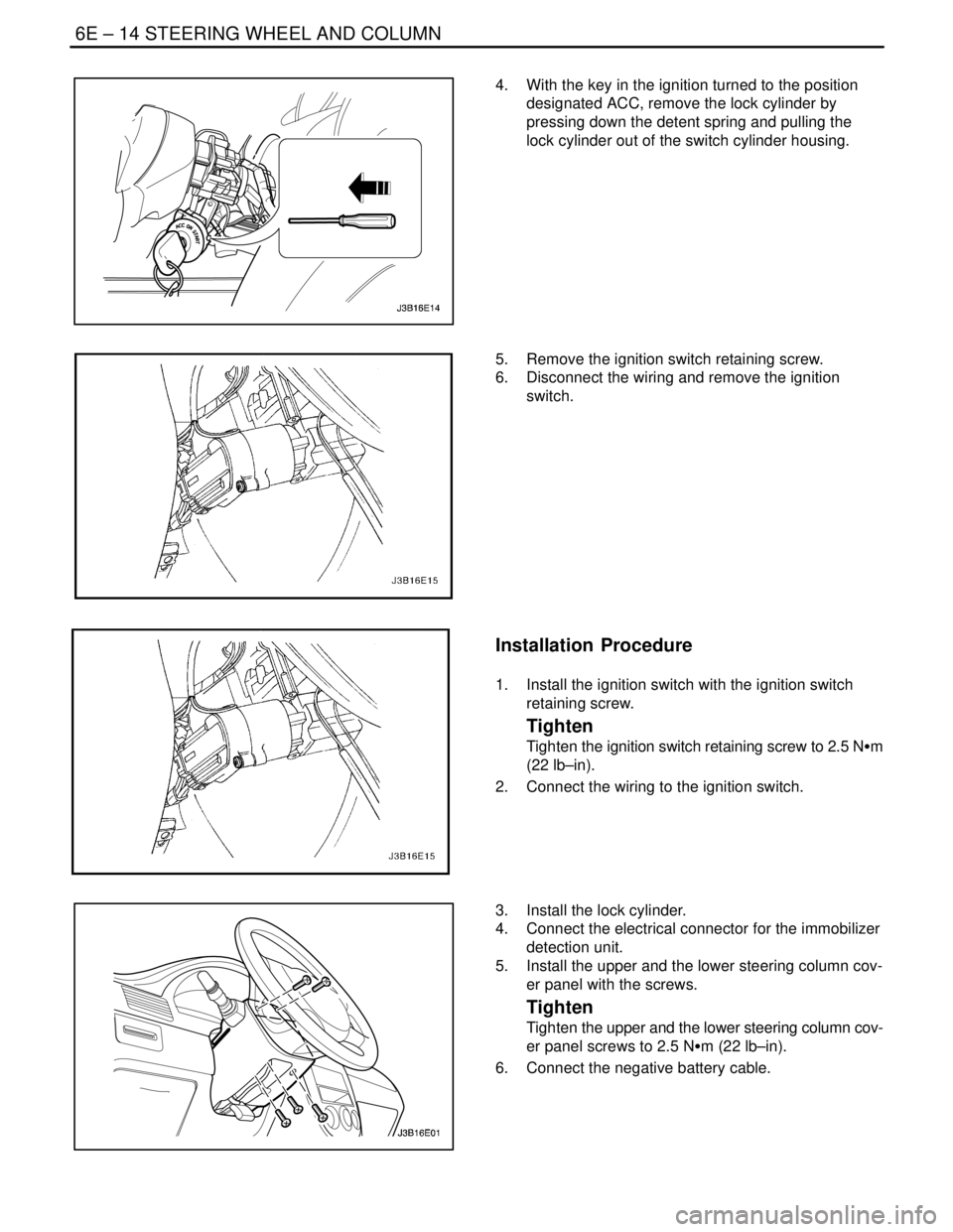
4. With the key in the ignition turned to the position
designated ACC, remove the lock cylinder by
pressing down the detent spring and pulling the
lock cylinder out of the switch cylinder housing.
5. Remove the ignition switch retaining screw.
6. Disconnect the wiring and remove the ignition
switch.
Installation Procedure
1. Install the ignition switch with the ignition switch
retaining screw.
Tighten
Tighten the ignition switch retaining screw to 2.5 NSm
(22 lb–in).
2. Connect the wiring to the ignition switch.
3. Install the lock cylinder.
4. Connect the electrical connector for the immobilizer
detection unit.
5. Install the upper and the lower steering column cov-
er panel with the screws.
Tighten
Tighten the upper and the lower steering column cov-
er panel screws to 2.5 NSm (22 lb–in).
6. Connect the negative battery cable.
Page 1969 of 2643
STEERING WHEEL AND COLUMN 6E – 15
DAEWOO V–121 BL4
STEERING COLUMN
(Left–Hand Drive Shown, Right–Hand Dirve
Similar)
Important : Remove the steering column only if the follow-
ing conditions exist:
S The steering column requires replacement.
S The steering and the ignition lock housing require
replacement.
S Another operation requires the removal of the
steering column.
Notice : The steering column is extremely susceptible to
damage after it has been removed from the vehicle. Drop-
ping the column assembly on its end or hammering the
end of the steering shaft can collapse the steering shaft or
loosen the plastic injections which maintain column rigid-
ity. Leaning on the column can cause it to bend or deform.
Any of the above damage can impair the column’s collaps-
ible design. If it is necessary to remove the steering wheel,
use only the specified steering wheel puller.
Removal Procedure
1. Disconnect the negative battery cable and let the
vehicle sit for 1 minute to deactivate the airbag.
2. Remove the the lower instrument trim panels. Refer
to Section 9E, Instrumentation/Driver Information.
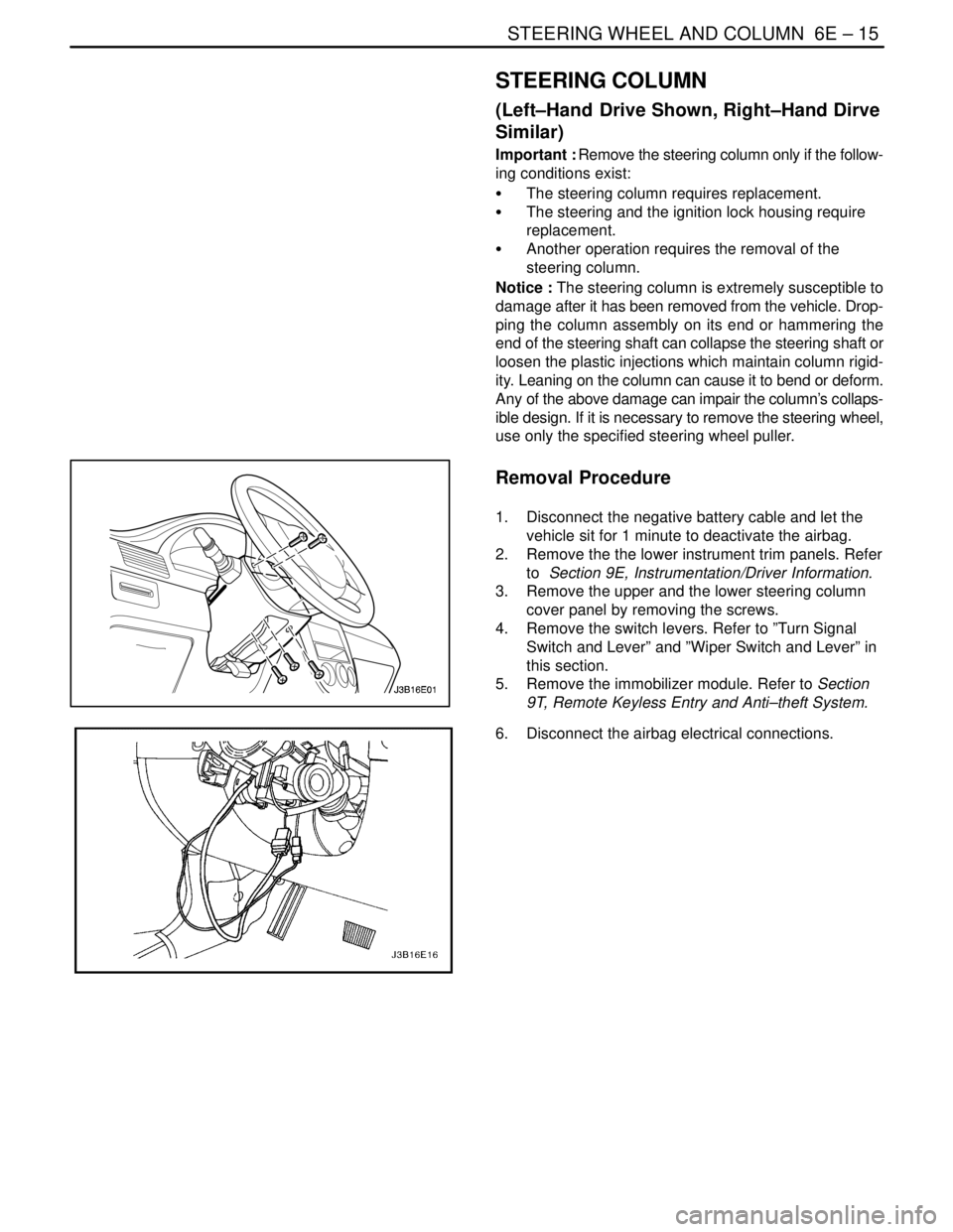
3. Remove the upper and the lower steering column
cover panel by removing the screws.
4. Remove the switch levers. Refer to ”Turn Signal
Switch and Lever” and ”Wiper Switch and Lever” in
this section.
5. Remove the immobilizer module. Refer to Section
9T, Remote Keyless Entry and Anti–theft System.
6. Disconnect the airbag electrical connections.
Page 1972 of 2643
6E – 18ISTEERING WHEEL AND COLUMN
DAEWOO V–121 BL4
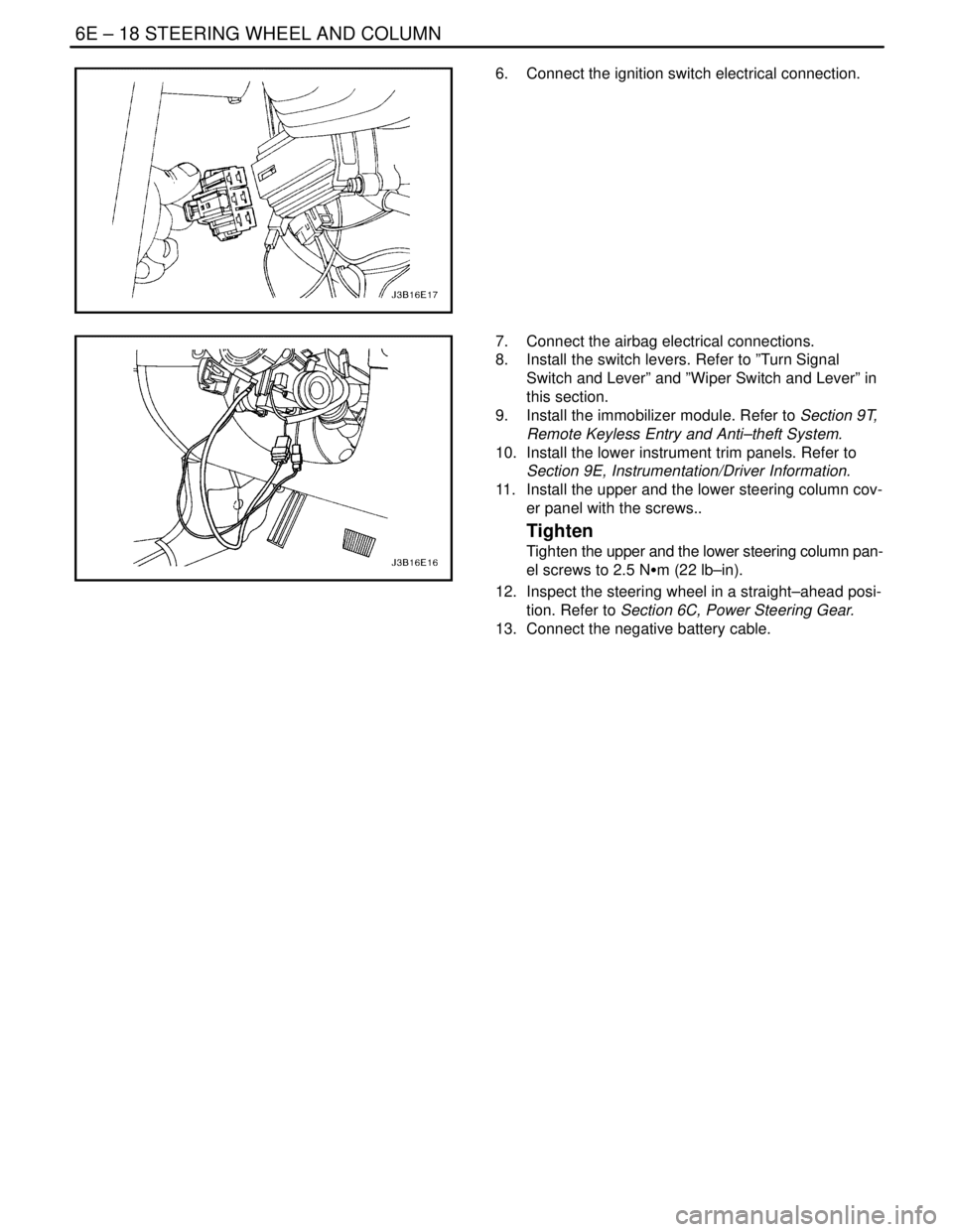
6. Connect the ignition switch electrical connection.
7. Connect the airbag electrical connections.
8. Install the switch levers. Refer to ”Turn Signal
Switch and Lever” and ”Wiper Switch and Lever” in
this section.
9. Install the immobilizer module. Refer to Section 9T,
Remote Keyless Entry and Anti–theft System.
10. Install the lower instrument trim panels. Refer to
Section 9E, Instrumentation/Driver Information.
11. Install the upper and the lower steering column cov-
er panel with the screws..
Tighten
Tighten the upper and the lower steering column pan-
el screws to 2.5 NSm (22 lb–in).
12. Inspect the steering wheel in a straight–ahead posi-
tion. Refer to Section 6C, Power Steering Gear.
13. Connect the negative battery cable.
Page 1974 of 2643

6E – 20ISTEERING WHEEL AND COLUMN
DAEWOO V–121 BL4
GENERAL DESCRIPTION
AND SYSTEM OPERATION
STEERING WHEEL AND COLUMN
CAUTION : To ensure the energy–absorbing action of
the steering column, it is important to use only the
specified screws, bolts, and nuts, tightened to the
specified torque.
In addition to the steering function, the steering column
provides safety and security.
The energy–absorbing column is designed to compress in
a front–end collision to lessen the chance of driver injury.
The ignition switch and the lock are mounted on the col-
umn, allowing the ignition and steering operations to be
locked to inhibit theft of the car.
The column levers trigger the turn signals, the headlight
beams, and the windshield washer and wipers.The tilt steering column uses telescopic function to allow
the steering wheel to tilt up and down in and out. This en-
ables the driver to adjust the steering wheel to a comfort-
able position.
Notice : Apply a thin coat of lithium grease to all friction
points when reassembling.
The column may be disassembled and reassembled easi-
ly.IGNITION KEY REMINDER
The ignition key reminder alerts the driver that the key is
still in the ignition when the driver attempts to exit the ve-
hicle.
An internal switch in the ignition lock cylinder supplies bat-
tery voltage to the reminder chime module when all of the
following conditions are true:
S The key is in the ignition switch.
S The ignition is OFF.
S The driver’s door is open.
For information on removal and installation of the reminder
chime module, refer to Section 9E, Instrumentation/Driver
Information.
Page 2039 of 2643

MANUAL CONTROL HEATING, VENTILATION AND AIR CONDITIONING SYSTEM 7B – 37
DAEWOO V–121 BL4
UNIT REPAIR
COMPONENT LOCATOR
V5 COMPRESSOR
1. Rear Head Compressor
2. Control Valve O–Ring
3. Rear Head Gasket
4. Valve Plate
5. Suction Reed
6. Clutch Coil
7. Retaining Ring
8. Drive Plate Clutch
9. Pulley Bearing
10. Clutch Hub Key
11. Shaft Nut
12. Seal Retaining Ring
13. Shaft Lip Seal
14. Shaft Seal O–Ring
15. Compressor Housing16. Compressor Control Valve
17. Pulley Bearing–to–Head Retaining Ring
18. Rotor Pulley
19. Through–Bolt
20. Through–Gasket
21. Compressor Housing–to–Cylinder O–Ring
22. Shaft and Guide Pin Assembly Cylinder
23. Rear Head O–Ring
24. Thrust Washer
25. Race
26. Bearing
27. Oil Drain Plug
28. Clutch and Hub Keyway
29. Compressor Shaft
Page 2040 of 2643
7B – 38IMANUAL CONTROL HEATING, VENTILATION AND AIR CONDITIONING SYSTEM
DAEWOO V–121 BL4
V5 AIR CONDITIONING COMPRESSOR OVERHAUL
CLUTCH PLATE AND HUB
ASSEMBLY
Tools Required
J–33013–B Hub and Drive Plate Remover/Installer
J–33022 Shaft Nut Socket
J–33027 Clutch Hub Holding Tool
J–34992 Compressor Holding Fixture
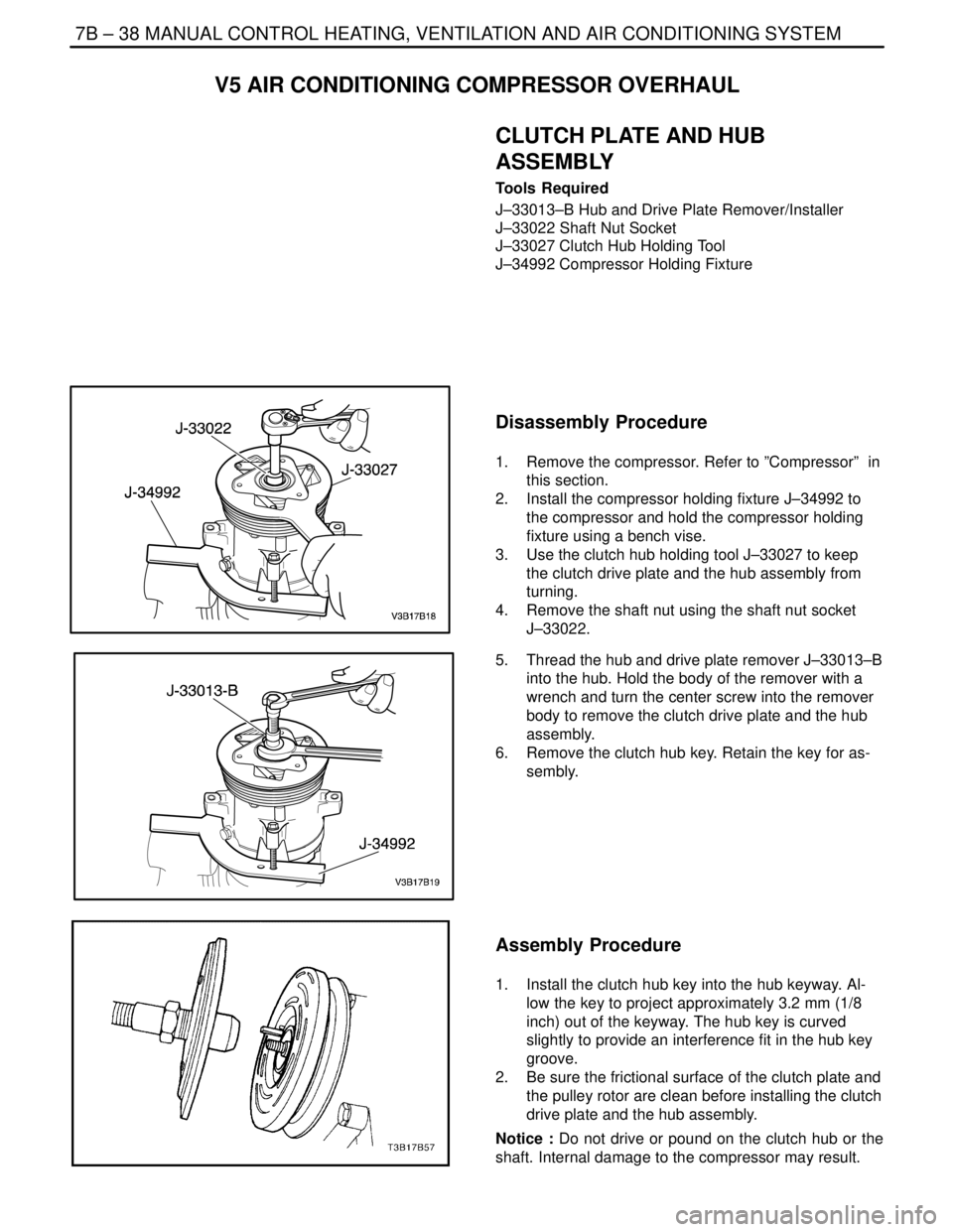
Disassembly Procedure
1. Remove the compressor. Refer to ”Compressor” in
this section.
2. Install the compressor holding fixture J–34992 to
the compressor and hold the compressor holding
fixture using a bench vise.
3. Use the clutch hub holding tool J–33027 to keep
the clutch drive plate and the hub assembly from
turning.
4. Remove the shaft nut using the shaft nut socket
J–33022.
5. Thread the hub and drive plate remover J–33013–B
into the hub. Hold the body of the remover with a
wrench and turn the center screw into the remover
body to remove the clutch drive plate and the hub
assembly.
6. Remove the clutch hub key. Retain the key for as-
sembly.
Assembly Procedure
1. Install the clutch hub key into the hub keyway. Al-
low the key to project approximately 3.2 mm (1/8
inch) out of the keyway. The hub key is curved
slightly to provide an interference fit in the hub key
groove.
2. Be sure the frictional surface of the clutch plate and
the pulley rotor are clean before installing the clutch
drive plate and the hub assembly.
Notice : Do not drive or pound on the clutch hub or the
shaft. Internal damage to the compressor may result.
Page 2041 of 2643
MANUAL CONTROL HEATING, VENTILATION AND AIR CONDITIONING SYSTEM 7B – 39
DAEWOO V–121 BL4
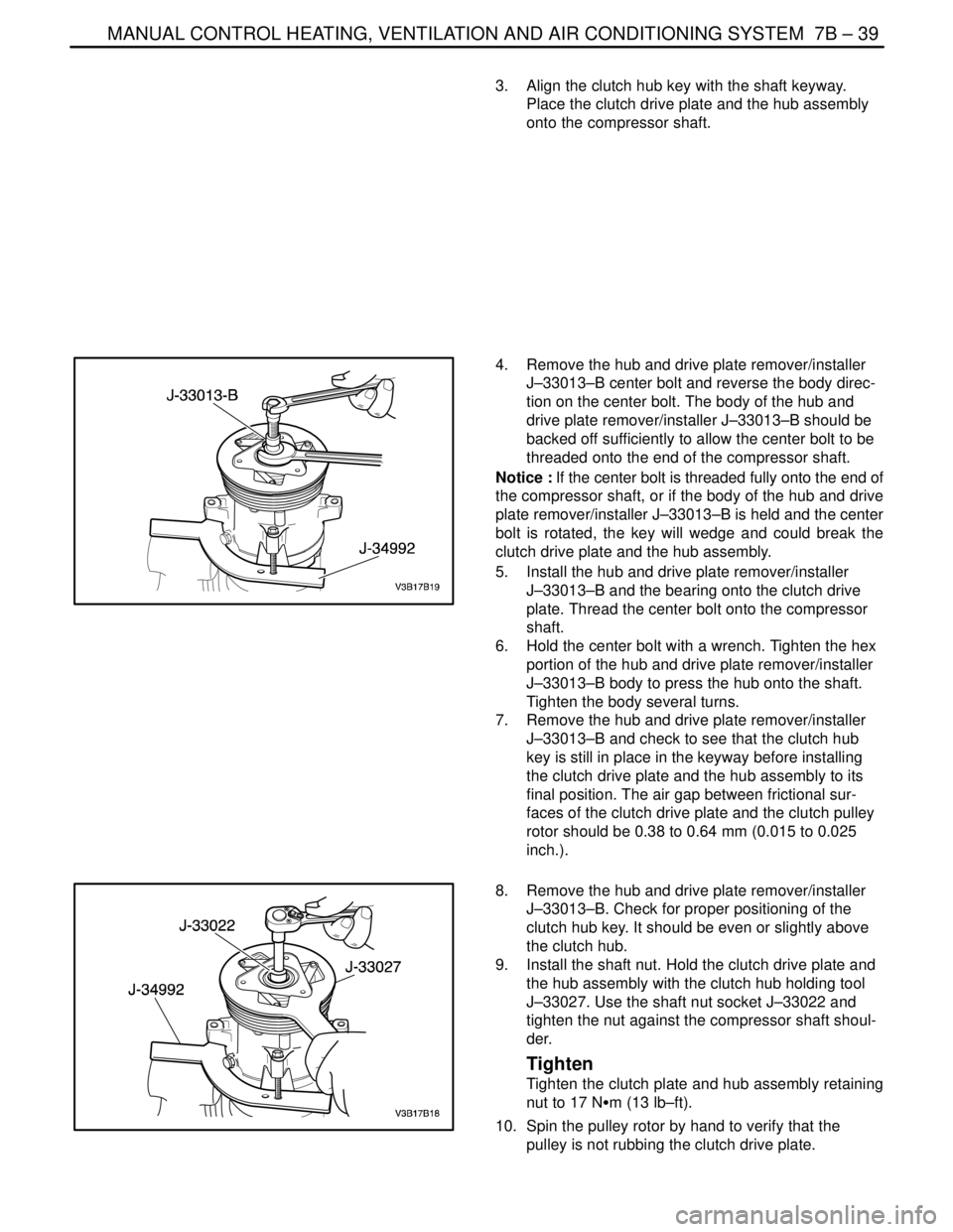
3. Align the clutch hub key with the shaft keyway.
Place the clutch drive plate and the hub assembly
onto the compressor shaft.
4. Remove the hub and drive plate remover/installer
J–33013–B center bolt and reverse the body direc-
tion on the center bolt. The body of the hub and
drive plate remover/installer J–33013–B should be
backed off sufficiently to allow the center bolt to be
threaded onto the end of the compressor shaft.
Notice : If the center bolt is threaded fully onto the end of
the compressor shaft, or if the body of the hub and drive
plate remover/installer J–33013–B is held and the center
bolt is rotated, the key will wedge and could break the
clutch drive plate and the hub assembly.
5. Install the hub and drive plate remover/installer
J–33013–B and the bearing onto the clutch drive
plate. Thread the center bolt onto the compressor
shaft.
6. Hold the center bolt with a wrench. Tighten the hex
portion of the hub and drive plate remover/installer
J–33013–B body to press the hub onto the shaft.
Tighten the body several turns.
7. Remove the hub and drive plate remover/installer
J–33013–B and check to see that the clutch hub
key is still in place in the keyway before installing
the clutch drive plate and the hub assembly to its
final position. The air gap between frictional sur-
faces of the clutch drive plate and the clutch pulley
rotor should be 0.38 to 0.64 mm (0.015 to 0.025
inch.).
8. Remove the hub and drive plate remover/installer
J–33013–B. Check for proper positioning of the
clutch hub key. It should be even or slightly above
the clutch hub.
9. Install the shaft nut. Hold the clutch drive plate and
the hub assembly with the clutch hub holding tool
J–33027. Use the shaft nut socket J–33022 and
tighten the nut against the compressor shaft shoul-
der.
Tighten
Tighten the clutch plate and hub assembly retaining
nut to 17 NSm (13 lb–ft).
10. Spin the pulley rotor by hand to verify that the
pulley is not rubbing the clutch drive plate.
Page 2112 of 2643

8B – 8ISUPPLEMENTAL INFLATABLE RESTRAINTS (SIR)
DAEWOO V–121 BL4
SIR DIAGNOSTIC SYSTEM CHECK
Notice : If the vehicle interior has been exposed to exten-
sive water intrusion such as water leaks, driving through
high water, flooding, or other causes, the sensing and
diagnostic module(SDM) and SDM connector may need
to be replaced. With ignition OFF, inspect the area around
the SDM, including the carpet. If any significant soaking or
evidence of previous soaking is detected, the water must
be removed, water damage repaired, and the SDM and
the SDM connector must be replaced. Before attempting
any of these repairs, the supplemental inflatable re-
straints(SIR) must be disabled. Refer to ”Disabling the
SIR” and ”Sensing and Diagnostic Module(SDM)” in this
section for instructions on how to disable the SIR and re-
place the SDM.
The SIR Diagnostic System Check must always be the
starting point for any SIR diagnosis. The Diagnostic Sys-
tem Check reveals diagnostic trouble codes(DTCs)
through the use of scan tool. The diagnostic procedures
used in this section are designed to find any repair SIR
conditions. To get the best results, it is important to use the
diagnostic charts and follow the sequence listed below.
1. Perform the SIR Diagnostic System Check, which
reveal diagnostic trouble codes(DTCs) through theuse of scan tool.. It also checks for proper airbag
indicator operation.
2. Refer to the proper diagnostic chart as directed by
SIR Diagnostic System Check. Bypassing these
procedures may result in extended diagnostic time,
incorrect diagnosis, and incorrect parts replace-
ment.
3. Repeat the SIR Diagnostic System Check after any
repair or diagnostic procedures have been per-
formed to ensure that the repair has been made
correctly and that no other malfunction exists.
Circiut Description
When the ignition switch is first turned to ON, ignition volt-
age is supplied from airbag fuse to find the SDM at input
terminal A1. The SDM responds by flashing the airbag in-
dicator seven times and then turning it off while the SDM
performs tests on the SIR.
Diagnostic Aids
The order in which DTCs are diagnosed is very important.
Failure to diagnose the DTCs in the order specified may
result in extended diagnostic time, incorrect diagnosis,
and incorrect parts replacement.
SIR Diagnostic System Check
CAUTION : The sensing and the diagnosis module
(SDM) can maintain surfficient voltage to deploy the
airbags and pretensioners for 1 minute after the igni-
tion is OFF and the fuse has been removed. If the air-
bags and pretensioners are not disconnected, do not
begin service until one minute has been passed after
disconnecting power to the SDM. Otherwise, injury
could result.
CAUTION : During service procedure, be very careful
when handling the SDM. Never strike or jar the SDM.Never power the supplemental inflatable re-
straints(SIR) when the SDM is not rigidly attached to
the vehicle. All SDM mounting bolts must be carefully
tightened , and the arrow on the SDM must be point
toward the front of the vehicle to ensure proper op-
eration of the SIR. The SDM could be activated if it is
powered when it is not rigidly attached to the vehicle,
resulting in unexpected deployment and possible in-
jury.
Step
ActionValue(s)YesNo
11. Turn the ignition switch ON.
2. Observe the airbag indicator as the ignition is
being turned ON. Does the indicator flash
seven times?–System OKGo to Step 2
21. Turn the ignition to LOCK and remove the key.
2. Connect the scan tool to the data link connec-
tor(DLC). Follow the directions given in the
scan tool manual.
3. Are any DTCs displayed on the scan tool?–Go to the
DTC check
procedureGo to Step 3
3Check the fuse F1 in the interior fuse box.
Is the fuse F1 blown?–Go to Step 4Go to Step 5
4Replace the fuse F1.–––
51. Disconnect the connector C207.
2. Check the wiring shortage between the fuse F1
and the terminal 1 of the connector C207.
3. Is the wiring shorted? Then, repair the wiring.––Go to Step 6