Lay down DAEWOO NUBIRA 2004 Service User Guide
[x] Cancel search | Manufacturer: DAEWOO, Model Year: 2004, Model line: NUBIRA, Model: DAEWOO NUBIRA 2004Pages: 2643, PDF Size: 80.54 MB
Page 1103 of 2643

4F – 22IANTILOCK BRAKE SYSTEM
DAEWOO V–121 BL4
SELF–DIAGNOSTICS
Important : The electronic brake control module (EBCM)
turns the valve relay off when a diagnostic trouble code
(DTC) is set. The scan tool will indicate that the valve relay
is off when it is used to monitor the data list. This is normal
and should not be considered a malfunction.
Important : For safety reasons it is recommended that the
vehicle not be driven with test equipment connected. Ex-
ception : for testing of wheel speeds provided the test reg-
ulations are met.
The EBCM performs system self–diagnostics and can de-
tect and often isolate system malfunctions. When it de-
tects a malfunction, the EBCM sets a DTC that represents
the malfunction, turns ON the ABS and/or the EBD indica-
tors in most instances, and may disable the ABS and/or
the EBD functions as necessary for the duration of the igni-
tion cycle.
Once each ignition cycle, the EBCM performs an automat-
ic test when the vehicle speed > 6 km/h and the brake ped-
al is not actuated or when the vehicle speed > 15 km/h and
the brake pedal is actuated. In the course of this test, the
system cycles each valve solenoid and the pump motor,
along with the necessary relays, to check component op-
eration. If the EBCM detects any malfunctions, it will set
a DTC as described above.
DISPLAYING DTCS
Tools Required
Scan Tool
DTCs can be read through the use of the scan tool.
CLEARING DTCS
Tools Required
Scan Tool
The diagnostic trouble codes (DTCs) in the electronic
brake control module (EBCM) memory are erased:S Use the scan tool ”Clear DTCs” selection.
The method is detailed below. Be sure to verify proper sys-
tem operation and absence of DTCs when the clearing
procedure is completed.
The EBCM will not permit DTC clearing until all DTCs have
been displayed. Also, DTCs cannot be cleared by discon-
necting the EBCM, disconnecting the battery cables, or
turning the ignition switch to LOCK.
Scan Tool Method
The scan tool can clear ABS system DTCs using the mass
storage cartridge.
1. Install the scan tool and the mass storage cartridge.
2. Select ”Fault Memory.”
3. Select ”Clear Fault Memory.”
Clearing the fault memory cannot reset a valve relay which
was shut down when the fault was recognized. Changes
are possible only after the fault has been eliminated and
the next ignition cycle has begun.
INTERMITTENTS AND POOR
CONNECTIONS
As with most electronic systems, intermittent malfunctions
may be difficult to diagnose accurately. The following is a
method to try to isolate an intermittent malfunction, espe-
cially in wheel speed circuitry.
If an ABS malfunction occurs, the ABS indicator will illumi-
nate during the ignition cycle in which the malfunction was
detected. If it is an intermittent problem which seems to
have corrected itself (ABS indicator off), a history DTC will
be stored. Also stored will be the history data of the DTC
at the time the malfunction occurred. Use the scan tool
modular diagnostic system to read ABS history data.
Most intermittents are caused by faulty electrical connec-
tions or wiring, although a sticking relay or solenoid can oc-
casionally be at fault.
Page 1394 of 2643

ZF 4 HP 16 AUTOMATIC TRANSAXLE 5A1 – 45
DAEWOO V–121 BL4
CLUTCH PLATE DIAGNOSIS
Composition Plates
Dry the plate and inspect the plates for the following condi-
tions :
S Pitting
S Flaking
S Wear
S Glazing
S Cracking
S Charring
Chips or metal particles embedded in the lining
Replace a composition plate which shows any of these
conditions.
Steel Plates
Wipe the plates dry and check the plates for heat discolor-
ation. If the surfaces are smooth, even if colorsmear is in-
dicated, you can reuse the plate. If the plate is discolored
with hot spots or if the surface is scuffed, replace the plate.
Important : If the clutch shows evidence or extreme heat
or burning, replace the springs.
Causes of Burned Clutch Plates
The following conditions can result in a burned clutch
plate:
S Incorrect usage of clutch plates.
S Engine coolant in the transaxle fluid.
S A cracked clutch piston.
S Damaged or missing seals.
S Low line pressure.
S Valve problems.
– The valve body face is not flat
– Porosity between channels
– The valve bushing clips are improperly installed.
– The check balls are misplaced.
S The seal rings are worn or damaged
Engine Coolant in Transaxle
Notice : Antifreeze will deteriorate the O–ring seals and
the glue used to bond the clutch material to the pressure
plate. Both conditions may cause transaxle damage.
Perform the following steps if the transaxle oil cooler has
developed a leak, allowing engine coolant to enter the
transaxle:
1. Because the coolant will attach to the seal material
causing leakage, disassemble the transaxle and
replace all rubber type seals.
2. Because the facing material may become sepa-
rated from the steel center portion, replace the
composition faced clutch plate assemblies.
3. Replace all nylon parts including washers.
4. Replace the torque converter.
5. Thoroughly clean and rebuild the transaxle, using
new gaskets and oil filter.6. Flush the cooler lines after you have properly re-
paired or replaced the transaxle.
COOLER FLUSHING AND FLOW
TEST
Notice : You must flush the cooler whenever you receive
a transaxle for service. Cooler flushing is essential for
SRTA installation, major overhaul, whenever you replace
a pump or torque converter, or whenever you suspect that
the fluid has been contaminated.
After filling the transaxle with fluid, start the engine and run
for 30 seconds. This will remove any residual moisture
from the oil cooler. Disconnect the return line at the trans-
axle and observe the flow with the engine running. If the
fluid flow is insufficient, check the fluid flow by disconnect-
ing the feed line at the cooler. Observe the flow with the
engine running.
S If the flow from the cooler return line at the trans-
axle is insufficient, check the flow rate from the feed
line to the cooler. BLockage exists in the transaxle
or the cooler.
S If the flow from the transaxle feed line to the cooler
is insufficient, the transaxle is the cause of the fluid
flow problem.
S If the flow the transaxle feed line to the cooler is
insufficient, but flow from the cooler return line to
the transaxle is insufficient, inspect the cooler pipes
and fittings. Then repeat the cooler flushing proce-
dure. If the flow is still insufficient, replace the cool-
er.
TRANSAXLE FLUID LEVEL SERVICE
PROCEDURE
This procedure is to be used when checking a concern
with the fluid level in a vehicle. A low fluid level will result
in slipping and loss of drive/ reverse or delay on engage-
ment of drive/ reverse when the vehicle is cold.
The vehicle is first checked for transaxle diagnostic mes-
sages on the scan tool. If the oil level is low, it is possible
to register a vehicle speed signal fault.
The vehicle is to be test driven to determine if there is an
abnormal delay when selecting drive or reverse, or loss of
drive. One symptom of low fluid level is a momentary loss
of drive when driving the vehicle around a corner. Also
when the transaxle fluid level is low, a loss of drive may oc-
cur when the transaxle fluid temperature is low.
When adding or changing transaxle fluid use only ESSO
LT 71141 automatic transaxle fluid or other approved
fluids. The use of incorrect fluid will cause the performance
and durability of the transaxle to be severely degraded.
Fluid Level Diagnosis Procedure
1. If the vehicle is at operating temperature allow the
vehicle to cool down for two hours, but no greater
than four hours. Or if the vehicle is at cool status,
start the engine and allow the engine to idle for
approximately 5 minutes (825~875 rpm), if pos-
Page 1566 of 2643
ZF 4 HP 16 AUTOMATIC TRANSAXLE 5A1 – 217
DAEWOO V–121 BL4
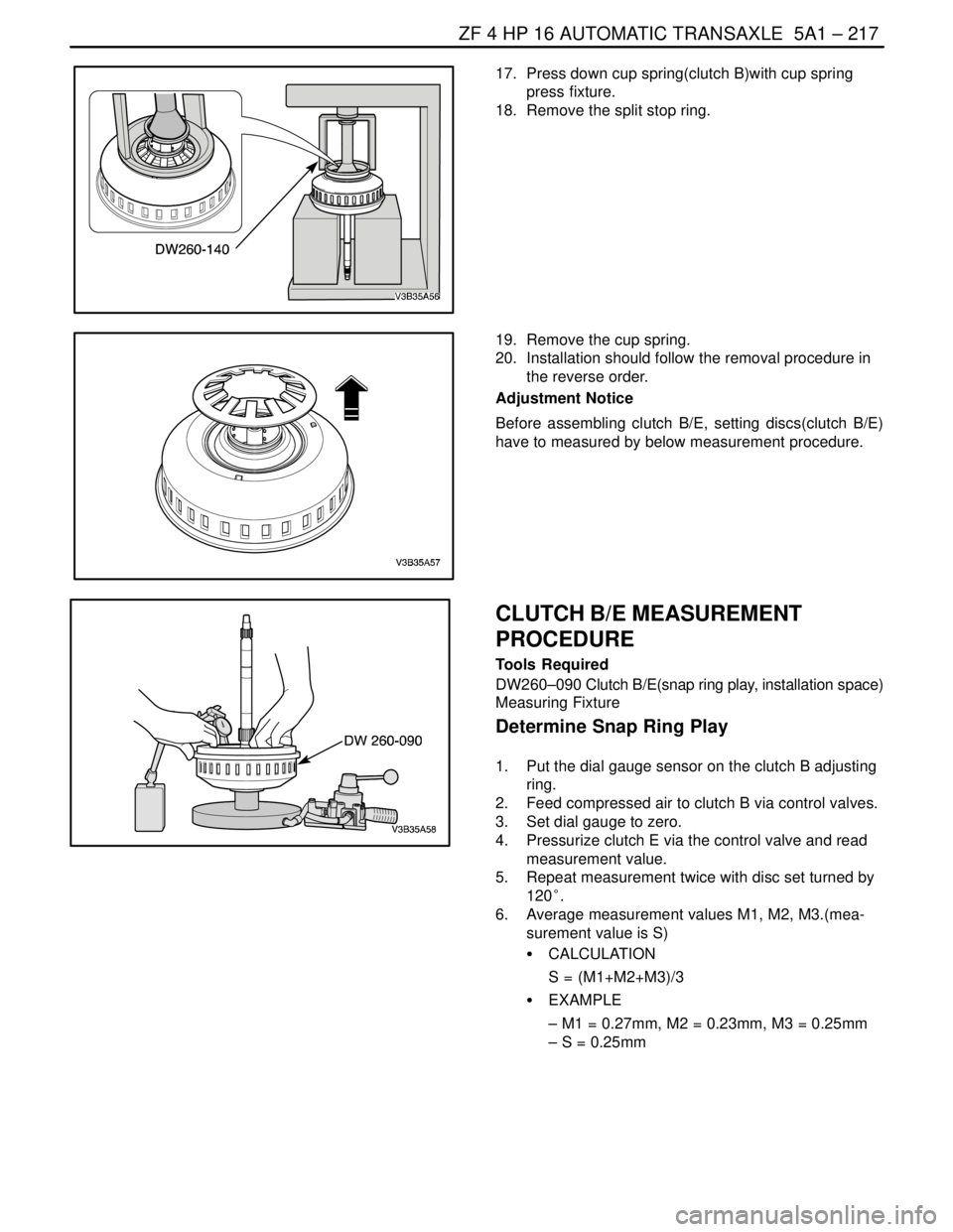
17. Press down cup spring(clutch B)with cup spring
press fixture.
18. Remove the split stop ring.
19. Remove the cup spring.
20. Installation should follow the removal procedure in
the reverse order.
Adjustment Notice
Before assembling clutch B/E, setting discs(clutch B/E)
have to measured by below measurement procedure.
CLUTCH B/E MEASUREMENT
PROCEDURE
Tools Required
DW260–090 Clutch B/E(snap ring play, installation space)
Measuring Fixture
Determine Snap Ring Play
1. Put the dial gauge sensor on the clutch B adjusting
ring.
2. Feed compressed air to clutch B via control valves.
3. Set dial gauge to zero.
4. Pressurize clutch E via the control valve and read
measurement value.
5. Repeat measurement twice with disc set turned by
120°.
6. Average measurement values M1, M2, M3.(mea-
surement value is S)
S CALCULATION
S = (M1+M2+M3)/3
S EXAMPLE
– M1 = 0.27mm, M2 = 0.23mm, M3 = 0.25mm
– S = 0.25mm
Page 1588 of 2643

ZF 4 HP 16 AUTOMATIC TRANSAXLE 5A1 – 239
DAEWOO V–121 BL4
S Excessive transaxle fluid leaking into the connector,
wicking up into the external wiring harness, and
degrading the wire insulation.
S Water/moisture intrusion in the connector.
S Low pin retention in the external connector from
excessive connection and disconnection of the wir-
ing connector assembly.
S Pin corrosion from contamination.
S Broken/cracked connector assembly.
S Points to remember when working with transaxle
wiring connector assembly.
S To remove the connector, squeeze the two tabs
towards each other and pull straight up (refer to
illustration).Carefully limit twisting or wiggling the connector during re-
moval. Bent pins can occur.
DO NOT pry the connector off with a screwdriver or other
tool.
To reinstall the external wiring connector, first orient the
pins by lining up arrows on each half of the connector.
Push the connector straight down into the transaxle with-
out twisting or angling the mating parts.
The connector should click into place with a positive feel
and/or noise.
Transaxle Control Module (TCM)
The transaxle control module (TCM) is an electronic de-
vice which monitors inputs to control various transaxle
functions including shift quality and transaxle sensors,
switches, and components to process for use within its’
control program. Based on this input information, the TCM
controls various transaxle output functions and devices.
Data Link Connector (DLC)
The data link connector (DLC) is a multiple cavity connec-
tor. The DLC provides the means to access serial data
from the TCM to aid in powertrain diagnosis. The DLC al-
lows the technician to use a scan tool to monitor various
systems and display diagnostic trouble codes (DTCs).
The DLC connector is located within the driver’s compart-
ment, directly below the steering column.
Page 1924 of 2643

POWER STEERING GEAR 6C – 7
DAEWOO V–121 BL4
SPEED SENSITIVE POWER STEERING SYSTEM
OPERATING WITH FULL ASSIST AT ALL TIMES
StepActionValue(s)YesNo
1Perform an initial inspection of the power steering
system.
Is the system operational?–Go to Step 2Go to
Section 6A,
Power Steering
System
2Check the speedometer.
Is the speedometer inoperative?–Go to
Section5,
TransaxleGo to Step 3
3Check the diagnostic trouble codes at the engine
control module (ECM).
Is the ECM code 24 set?–Go to
Section1F,
Engine
ControlsGo to Step 4
41. Turn the ignition ON.
2. Disconnect the electronic variable orifice (EVO)
solenoid actuator electrical connector at the
power steering pump.
3. Probe terminal 1 of the EVO actuator connec-
tor with a voltmeter.
Does the voltmeter display the specified value?–Go to Step 6Go to Step 5
5Repair the open or short in the circuit between termi-
nal 1 of the EVO solenoid actuator electrical connec-
tor and terminal 2 on the speed sensitive power
steering (SSPS) control module connector.
Is the repair complete?–System OK–
61. Remove the EVO solenoid actuator from the
power steering pump.
2. Turn the actuator upside down to position the
pintle.
3. Stimulate the actuator by connecting it to the
battery.
Does the actuator click?–Go to Step 8Go to Step 7
7Replace the EVO solenoid actuator.
Is the repair complete?–System OK–
81. Turn the ignition OFF.
2. Remove the SSPS control module from the
control module bracket.
3. Disconnect the SSPS control module connec-
tor.
4. Connect a test light from terminal 8 on the
SSPS control module connector to the ground.
5. Turn the ignition ON.
Is the test light on?–Go to Step 14Go to Step 9
9Check the ignition fuse.
Is the ignition fuse open?–Go to Step 10Go to Step 11
10Replace the ignition fuse.
Is the repair complete?–System OK–
11Check for an open or short in the circuit between ter-
minal 8 of the control module connector and the I/P
fuse block.
Is the connection faulty?–Go to Step 12Go to Step 13
Page 1970 of 2643
6E – 16ISTEERING WHEEL AND COLUMN
DAEWOO V–121 BL4
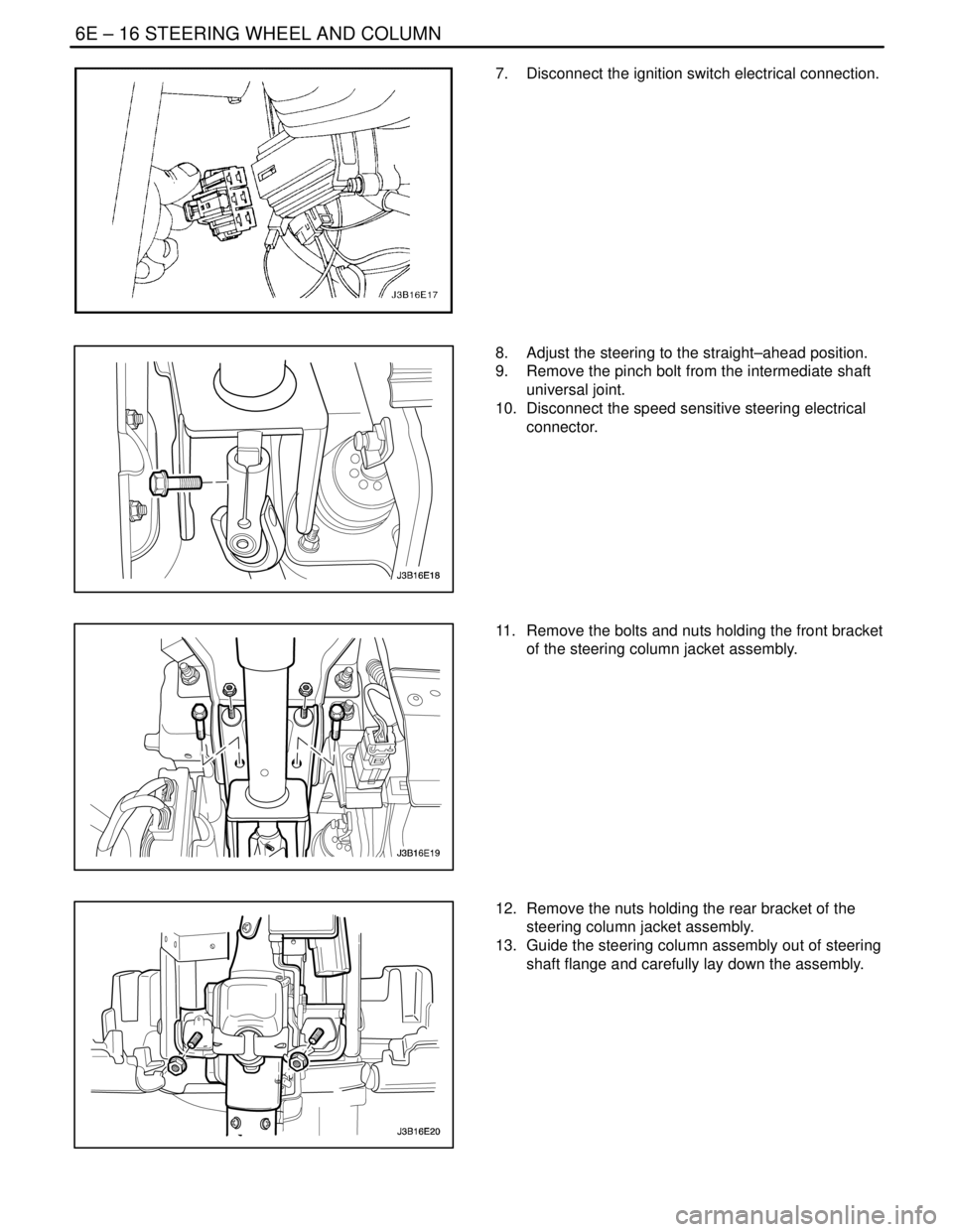
7. Disconnect the ignition switch electrical connection.
8. Adjust the steering to the straight–ahead position.
9. Remove the pinch bolt from the intermediate shaft
universal joint.
10. Disconnect the speed sensitive steering electrical
connector.
11. Remove the bolts and nuts holding the front bracket
of the steering column jacket assembly.
12. Remove the nuts holding the rear bracket of the
steering column jacket assembly.
13. Guide the steering column assembly out of steering
shaft flange and carefully lay down the assembly.
Page 1998 of 2643
7A – 24IHEATING AND VENTILATION SYSTEM
DAEWOO V–121 BL4
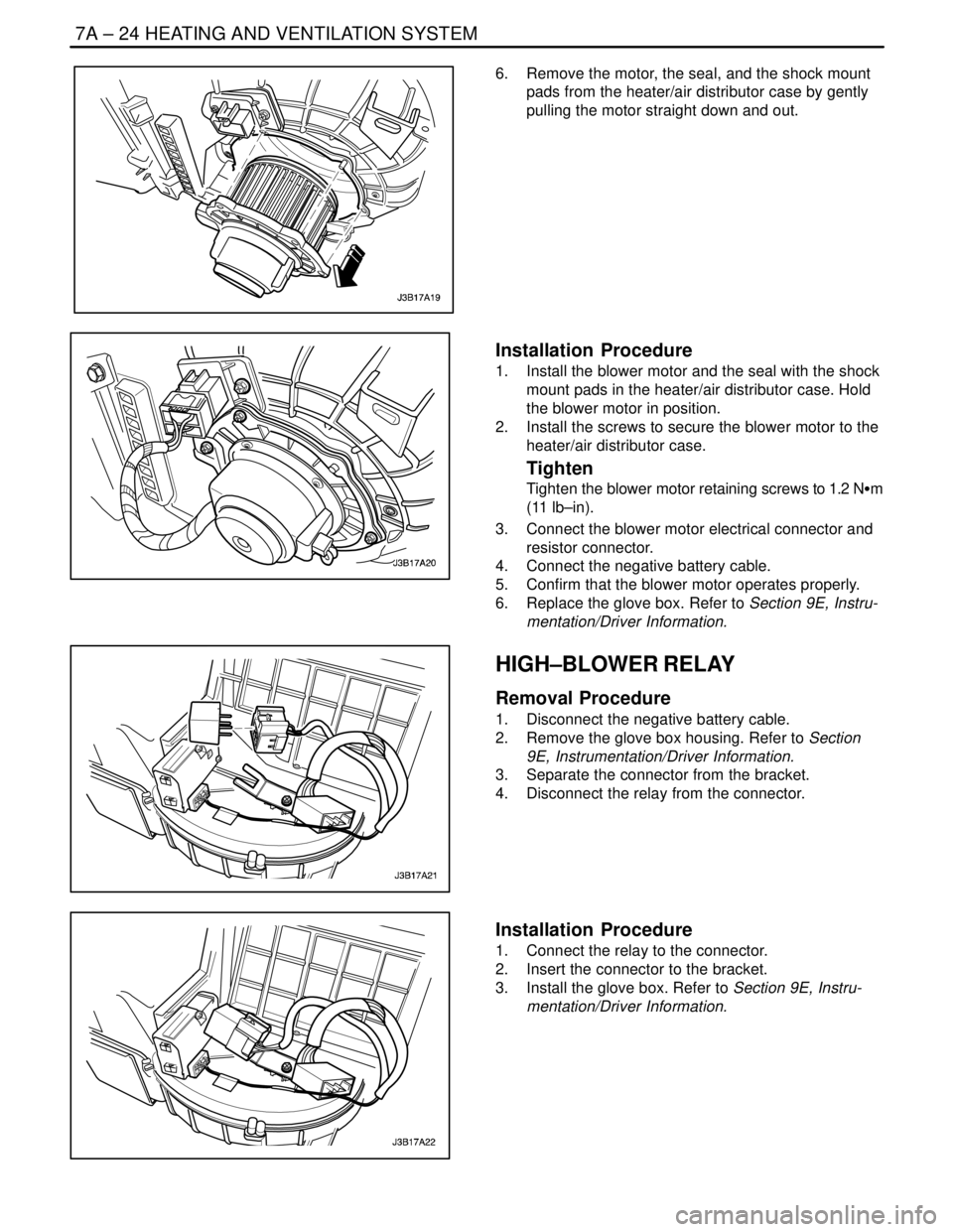
6. Remove the motor, the seal, and the shock mount
pads from the heater/air distributor case by gently
pulling the motor straight down and out.
Installation Procedure
1. Install the blower motor and the seal with the shock
mount pads in the heater/air distributor case. Hold
the blower motor in position.
2. Install the screws to secure the blower motor to the
heater/air distributor case.
Tighten
Tighten the blower motor retaining screws to 1.2 NSm
(11 lb–in).
3. Connect the blower motor electrical connector and
resistor connector.
4. Connect the negative battery cable.
5. Confirm that the blower motor operates properly.
6. Replace the glove box. Refer to Section 9E, Instru-
mentation/Driver Information.
HIGH–BLOWER RELAY
Removal Procedure
1. Disconnect the negative battery cable.
2. Remove the glove box housing. Refer to Section
9E, Instrumentation/Driver Information.
3. Separate the connector from the bracket.
4. Disconnect the relay from the connector.
Installation Procedure
1. Connect the relay to the connector.
2. Insert the connector to the bracket.
3. Install the glove box. Refer to Section 9E, Instru-
mentation/Driver Information.
Page 2095 of 2643

7D – 40IAUTOMATIC TEMPERATURE CONTROL HEATING, VENTILATION, AND AIR CONDITIONING SYSTEM
DAEWOO V–121 BL4
GENERAL DESCRIPTION
AND SYSTEM OPERATION
GENERAL INFORMATION
THE V5 SYSTEM
Refer to Section 7B, Manual Control Heating, Ventilation,
and Air Conditioning System,for general information de-
tails for the following:
S System Components – Functional.
S The V5 A/C System.
S V5 Compressor – Description of Operation.
S V5 Compressor – General Description.
SYSTEM COMPONENTS–CONTROL
Controller
The operation of the A/C system is controlled by the
switches on the control head. This console–mounted
heating and ventilation system contains the following
knobs and display:
Temperature Control Push Knobs
1. Raise the temperature of the air entering the ve-
hicle by pressing the top switch, with the red arrow
pointing upward.
2. Lower the temperature by pressing the bottom
switch, with the blue arrow pointing downward.
3. Actuate the air mix door by an electric motor.
4. Vary the mix of the air passing through the heater
core with the air bypassing the core.
Each press of a switch changes the set temperature by in-
crements of 0.5°C (1°F). This is shown in the temperature
window on the function display.
The Function Display
This is an LCD display indicating the status of the control
settings selected. Starting from the left end of the display,
the sections are as follows:
1. Temperature setting – Indicates the temperature set
with the temperature control knob.
2. Auto status – Indicates whether the system is oper-
ating in the full auto mode or the manual mode.
3. Defroster icon – Indicates manual selection of full
defrost mode.
4. Mode – Indicated by icon, the mode chosen by the
system in auto (or by the operator in manual) is
shown by an illumination arrow indicating the air
path.
5. A/C – A snowflake icon indicating whether the A/C
is ON or OFF.
6. Fan speed – Indicates the fan speed by illuminating
a bar based on the segment at the front, for low
speed, and adding additional segments in order up
to the fifth, for high speed.Eight Additional Push Knobs
1. Full defrost – Causes the mode motors to direct all
air to the windshield and aide window outlets for
maximum defrosting.
2. Air intake – Switches between fresh air intake, the
default, and recirculating air. Airflow arrows on the
display indicate the mode in effect.
3. Full Auto Switch – Maintains the set temperature
automatically. In this mode, the fully automatic tem-
perature control (FATC) system controls the follow-
ing:
S The air mix door motor.
S The mode door motor.
S The blower motor speed.
S The inlet air door motor.
S A/C ON/OFF.
4. OFF Switch – Turns the automatic air conditioning
and fan control off.
5. Mode Switch – Allows manual selection of the air-
flow direction.
S Selection is shown on the function display.
S Each time the mode switch is pressed, the next
function is displayed.
6. A/C Switch – Allows manual selection and control
of the air conditioning function.
7. Fan Control Switch – Allows manual selection
among five fan speeds.
8. Defogger Switch – Turns on the electric defogging
heater in the rear window and the outside rearview
mirrors, if the vehicle is equipped with heated mir-
rors.
Pressure Transducer
Pressure transducer switching incorporates the functions
of the high–pressure and the low–pressure cutout
switches along with the fan cycling switch. The pressure
transducer is located in the high–side liquid refrigerant line
behind the right strut tower, between the right strut tower
and the fire wall. The output from this pressure transducer
goes to the electronic control module (ECM), which con-
trols the compressor function based on the pressure sig-
nal.
Wide–Open Throttle (WOT) Compressor
Cutoff
During full–throttle acceleration, the throttle position sen-
sor (TPS) sends a signal to the ECM, which then controls
the compressor clutch.
High RPM Cutoff
As engine rpm approaches the maximum limit, the ECM
will disengage the compressor clutch until the engine
slows to a lower rpm.
Page 2329 of 2643

9E – 30IINSTRUMENTATION/DRIVER INFORMATION
DAEWOO V–121 BL4
GENERAL DESCRIPTION
AND SYSTEM OPERATION
CIGAR LIGHTER
The cigar lighter is located in the front portion of the floor
console. To use the lighter, push it in completely. When the
lighter is hot, it will release itself from contact with the heat-
ing element. The lighter and the heating element can be
damaged if the lighter is not allowed to release itself fully
from the heating element.
ASHTRAY
The ashtray is located below the audio system. To access
the ashtray, pull it out from the center console. The ashtray
lamp will go on when the parking lamps or the headlamps
are turned on.
INSTRUMENT PANEL VENTS
The center and the side vents in the instrument panel can
be adjusted up and down and from side to side. The side
vents can also be aimed toward the side windows in order
to defog them.
GLOVE BOX
The glove box can be opened by pulling up on the latch
handle. The glove box must be removed in order to gain
access to the passenger’s side airbag module.
DIGTAL CLOCK
The digital clock is located in the instrument panel, above
the audio system. The clock is capable of a 12–hour or a
24–hour display.
INSTRUMENT CLUSTER
The instrument cluster is located above the steering col-
umn and in the instrument cluster trim panel. The instru-
ment cluster contains the instruments that provide the
driver with vehicle performance information. The instru-
ment cluster contains a speedometer, an odometer, a trip
odometer, a temperature gauge, a fuel gauge, and several
indicator lamps. For replacement of the indicator lamp
bulbs contained in the instrument cluster, refer to ”Instru-
ment Cluster Indicator Lamps Specifications” and”Instru-
ment Cluster Indicator Lamps” in this section.
SPEEDOMETER/ODOMETER/TRIP
ODOMETER
The speedometer measures the speed of the vehicle in
km/h (mph in some countries). It consists of an instrument
cluster gauge connected to the vehicle speed sensor
(VSS) on the transaxle output shaft.The odometer measures in kilometers (miles in some
countries) the total distance the vehicle has traveled since
it was manufactured. It consists of an instrument cluster
gauge connected to the VSS on the transaxle output shaft.
The trip odometer measures the distance the vehicle has
traveled since the odometer was last reset. It consists of
an instrument cluster gauge connected to the VSS on the
transaxle output shaft. The trip odometer can be reset to
zero at any time so that the driver can record the distance
traveled from any starting point.
FUEL GAUGE
The fuel gauge consists of an instrument cluster gauge
connected to a sending unit in the fuel tank.
The fuel gauge indicates the quantity of fuel in the tank
only when the ignition switch is turned to ON or ACC.
When the ignition is turned to LOCK or START, the pointer
may come to rest at any position.
TEMPERATURE GAUGE
The temperature gauge consists of an instrument cluster
gauge connected to a temperature sensor that is in con-
tact with the circulating engine coolant.
The temperature gauge indicates the temperature of the
coolant. Prolonged driving or idling in very hot weather
may cause the pointer to move beyond the center of the
gauge. The engine is overheating if the pointer moves into
the red zone at the upper limit of the gauge.
INSTRUMENT CLUSTER INDICATOR
LAMPS
The instrument cluster contains indicator lamps that indi-
cate the functioning of certain systems or the existence of
potential problems with the operation of the vehicle. The
indicator lamps are replaceable. For replacement of the in-
dicator lamps contained in the instrument cluster, refer to
”Instrument Cluster Indicator Lamps Specifications”
and”Instrument Cluster Indicator Lamps” in this section.
CHIME MODULE
The chime module is located above the instrument panel
fuse block and will sound in order to bring attention to one
or more of the following conditions:
S The lamps are on, the door is ajar, and the ignition
switch is not in ACC, ON, or START.
S The seat belt is unbuckled when the ignition switch
is in ON or START.
S The door is open when the ignition switch is in ON
or START.
S The key is left in the ignition switch when the igni-
tion is in LOCK and the door is open.
Page 2488 of 2643

REMOTE KEYLESS ENTRY AND ANTI–THEFT SYSTEM 9T1 – 7
DAEWOO V–121 BL4
REMOTE KEYLESS ENTRY
TRANSMITTER PROGRAMMING
The Remote Keyless Entry System allows for the use of
as many as four(4) transmitters for each vehicle. Replace-
ment Remote Keyless Entry System Transmitters must
first be programmend to specific vehicle using the
Scan100 Secan tool.
This process is completed using serial data communica-
tion between the Scan 100 Scan tool and the Remote Key-
less Entry Control Unit and is the only method available for
programming Transmitters.
Notice : All Transmitters for a specific vehicle must be pro-
grammed at same time.
Notice : Once the programming function of the Remote
Keyless Entry System is activated, any Transmitter(exist-
ing or new) that is not programmed(or reprogrammed)
during the programming procedure will no longer operate
the Remote Keyless Entry System of that vehicle.
Notice : Ensure that the doors, hood and trunk/rear hatch
are closed prior to starting the programming procedure.
1. Connect the Scan 100 Scan Tool to the Data Link
Connector(DLC)
2. Turn the Scan 100 Scan Tool ”ON” by pressing the
”Power” Button, then wait for the MAIN MENU
screen to be displayed.
3. From the MAIN MENU screen, select ”Diagnostics”
by pressing #1 on the Key Pad.
4. From the MODEL YEAR screen, select the ap-
propriate model year of the specific vehicle by ei-
ther scrolling down to the year and pressing ”EN-
TER”, or by pressing the respective item number on
the Key Pad.
5. From the VEHICLE TYPE screen, select the specif-
ic vehicle model by either scrolling down to the
model name and pressing ”ENTER”, or by pressing
the respective item number on the Key Pad.
6. From the SYSTEM SELECTION MENU screen,
select ”Body” by pressing #2 on the Key Pad.
7. From the BODY SELECTION MENU screen, select
”Coding” by pressing #2 on the Key Pad.8. From the CODY SELECTION MENU screen, select
”Coding” by pressing #1 on the Key Pad.
9. From the SECRET NUMBER OF CODINGS
screen, enter for(4) zero’s (0–0–0–0) in the for(4)
boxes labeled ”1–2–3–4–”.
10. From the CODING SYSTEM SELECT screen, se-
lect ”Keyless Entry” by pressing #2 on the Key Pad.
Notice : A slight delay may occur and ”PLEASE WAIT”
may be displayed before the next screen appears.
11. From the KEYLESS ENTRY CODING SYSTEM
screen, select ”Coding Transmitter” by pressing #1
on the Key Pad.
12. When directed by the Scan 100 Scan Tool, press
any Button on the first Transmitter to be pro-
grammed.
CAUTION : Ensure that Transmitters from other ve-
hicles in the immediate area are not activated during
this procedure.
13. Continue programming Transmitters when directed
by the Scan 100 Scan Tool until all Transmitters
have been programmed.
Notice : A maximum of four(4) Transmitters may be pro-
grammed to a vehicle.
14. Once all Transmitters have been programmed,
press the ”ESC” Button on the Key Pad. The dis-
play will confirm the number of Transmitters pro-
grammed. If the number displayed does not match
the number of Transmitters programmed, repeat
the procedure.
15. Turn the Scan 100 Scan Tool ”OFF” by pressing the
”POWER” Button, then disconnect it from the Data
Link Connector.
16. Wait approximately 10 seconds, then test the op-
eration of each programmed Transmitter to ensure
it operates properly.
The control module/receiver leaves the programming
mode automatically and switches to the normal operating
mode when either of the following conditions occurs:
S the scan tool is disconnected from the ALDL.
S Four passwords are recorded in the control module/
receiver.