clutch DATSUN 210 1979 User Guide
[x] Cancel search | Manufacturer: DATSUN, Model Year: 1979, Model line: 210, Model: DATSUN 210 1979Pages: 548, PDF Size: 28.66 MB
Page 150 of 548
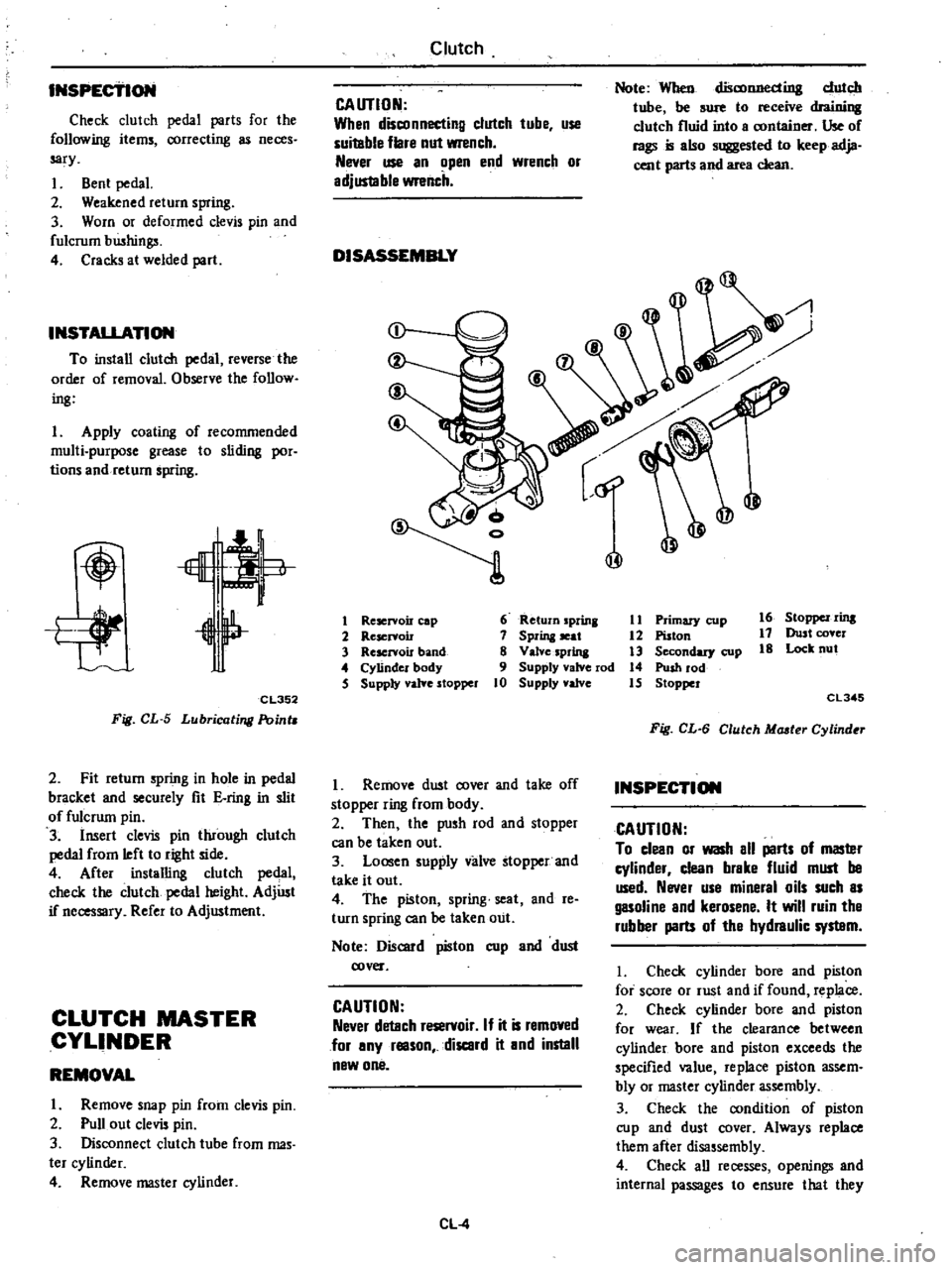
INSPECTION
Entire
system
U
S
A
MIT
models
except
FU
mo
el
1
Ensure
that
wiring
connectors
are
tight
in
pla
ce
2
Ensure
that
vacuum
hoses
are
properly
cof
1o
c
ed
to
their
positions
3
Ensure
that
distributor
vacuum
controller
properly
functions
4
Set
timing
light
and
start
engine
S
While
engine
cooling
water
tem
pefature
is
below
SOOC
I220F
check
function
of
system
as
follows
WARNING
To
protect
against
accidental
for
ward
surge
engage
parking
brake
firmly
while
above
check
is
being
made
I
Run
engine
and
keep
it
at
ap
proximately
1
600
rpm
2
Disengage
clutch
Shift
gears
in
top
3rd
then
neutral
positions
Read
spark
timing
in
respective
shift
posi
tions
The
system
is
properly
functioning
if
spark
timir
g
does
not
change
If
t
changes
check
thefmal
vacuum
valve
3
port
type
Note
Ensure
that
thermal
vacuum
wIve
is
closed
when
cooling
water
i
below
5
to
lSoC
41
to
640F
or
above
SO
to
630C
122
to
14S0F
I
6
After
the
engine
has
been
warmed
up
sufficiently
check
the
function
of
the
system
again
in
the
I
Same
manner
The
system
is
properly
functioning
if
spark
iimin
advances
in
top
posi
tion
If
not
check
thefmal
vacuum
valve
control
circuit
or
vaeu
um
switching
valve
Entire
system
FU
model
and
Canada
MIl
models
I
Ensure
that
wiri
lg
connectors
are
tight
in
place
Emission
Control
System
2
Ensure
that
vacuum
hoses
are
properly
connected
to
their
positions
3
Ensure
that
distributor
vacuum
controller
properly
fu
ctions
4
Set
timing
light
WARNING
To
protect
against
accidental
for
ward
surge
engage
parking
brake
firmly
while
above
check
is
being
made
5
Run
engine
and
keep
it
at
ap
proximately
1
600
1
m
6
Disengage
clutch
Shift
gears
in
4th
5th
ihen
neutral
positions
Read
spark
timing
in
respective
shift
posi
tions
The
system
is
properly
functioning
if
spark
timing
advances
in
top
gear
position
If
spark
timing
does
not
vary
at
all
in
tests
des
rilied
in
step
6
above
check
control
circuit
or
vacuum
switching
valve
Entire
system
California
AIT
models
I
Ensure
th
t
wiring
connectors
are
tight
in
place
2
Ensure
that
vacuum
hoses
are
properly
coIDwcted
to
thejr
positions
3
Ensure
that
distributor
vacuum
controller
function
s
properly
4
Set
timing
light
and
staft
engine
S
While
engine
cooling
water
tem
perature
is
below
SOOC
1220F
check
the
function
of
the
system
as
follows
WARNING
To
protect
againSt
accidental
for
ward
surge
engage
parking
brake
firmly
while
above
check
is
being
made
I
Run
engine
and
keep
it
at
ap
proximately
1
600
rpm
at
P
range
2
Make
a
short
circuit
between
the
specified
two
terminals
at
function
te
t
connector
EC31
The
entire
system
except
for
the
top
switch
is
properly
functioning
if
spark
timing
does
not
change
If
it
changes
check
the
thermal
vacuum
valve
3
pori
type
CAUTION
Pay
attention
not
to
make
a
short
circuit
between
other
terminals
than
the
specified
terminals
or
electrical
system
of
car
will
get
damaged
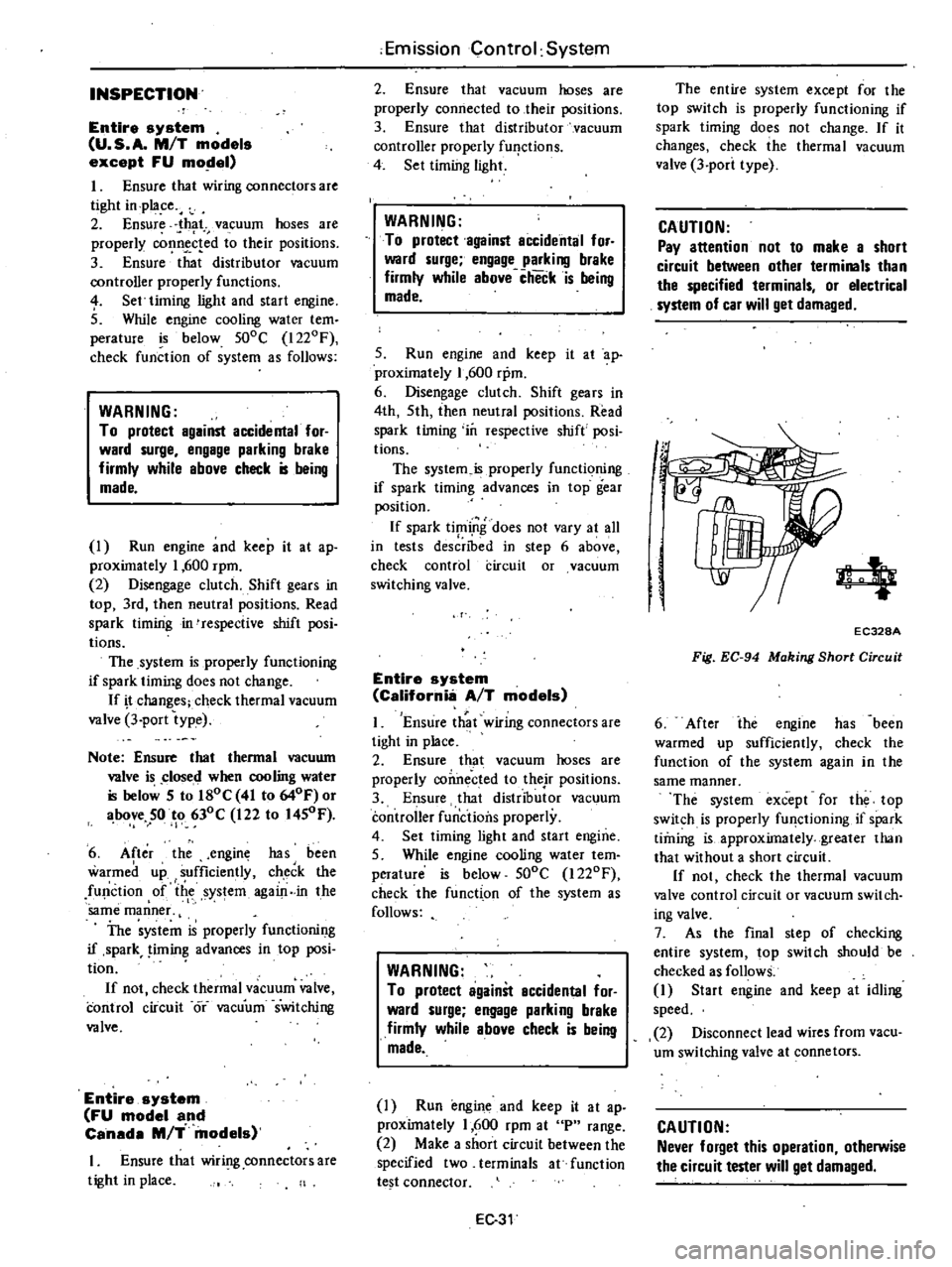
4
EC328A
Fig
EC
94
Making
Short
Circuit
6
After
ihe
engine
has
been
warmed
up
sufficiently
check
the
function
of
the
system
again
in
the
same
manner
The
system
except
for
the
top
switch
is
properly
fU
lctioning
if
spark
timing
is
approximately
greater
than
that
without
a
short
circuit
If
not
check
the
thermal
vacuum
valve
control
circuit
or
vacuum
switch
ing
valve
7
As
the
final
step
of
checking
entire
system
top
switch
should
be
checked
as
follows
1
Start
engine
and
keep
at
idling
speed
2
Disconnect
lead
wires
from
vacu
um
switching
valve
at
connetors
CAUTION
Never
forget
this
operation
otherwise
the
circuit
tester
will
get
damaged
Page 164 of 548
REMOVAL
AND
INSTALLATION
Disconnect
battery
ground
cable
Disconnect
harness
connector
and
battery
cable
at
magnetic
switch
2
Remove
bolts
securing
starting
motor
to
transmission
case
Pull
start
iog
motor
forward
and
remove
it
3
Inst
1I
starting
motor
in
reverse
order
of
removal
DISASSEMBLY
NON
REDUCTION
GEAR
TYPE
I
Disconnect
connecting
plate
from
M
terminal
of
magnetic
switch
Re
move
two
screws
securing
magnetic
switch
and
remove
magnetic
switch
assembly
2
Remove
dust
cover
E
ring
and
thrust
washer
s
EE311
@@
O
Fig
EE
8
Removing
DUll
Cover
E
ring
and
ThrUJJt
Washer
3
Remove
two
screws
securing
brush
holder
assembly
EE318
Fig
EE
9
Removing
Bru
h
Hold
Setacrews
Engine
Electrical
ystem
4
Remove
two
ihrough
bolts
and
rear
cover
5
Remove
brushes
from
their
hold
er
by
moving
each
brush
spring
away
from
brush
with
a
hook
Remove
brush
holder
6
Remove
yoke
assembly
and
with
draw
armature
assembly
and
shift
lever
7
Remove
pinion
stopper
located
at
the
end
of
armature
shaft
To
remove
stopper
first
move
stopper
toward
pinion
and
after
removing
stopper
clip
remove
stopper
with
overruniling
clutch
assembly
from
armature
shaft
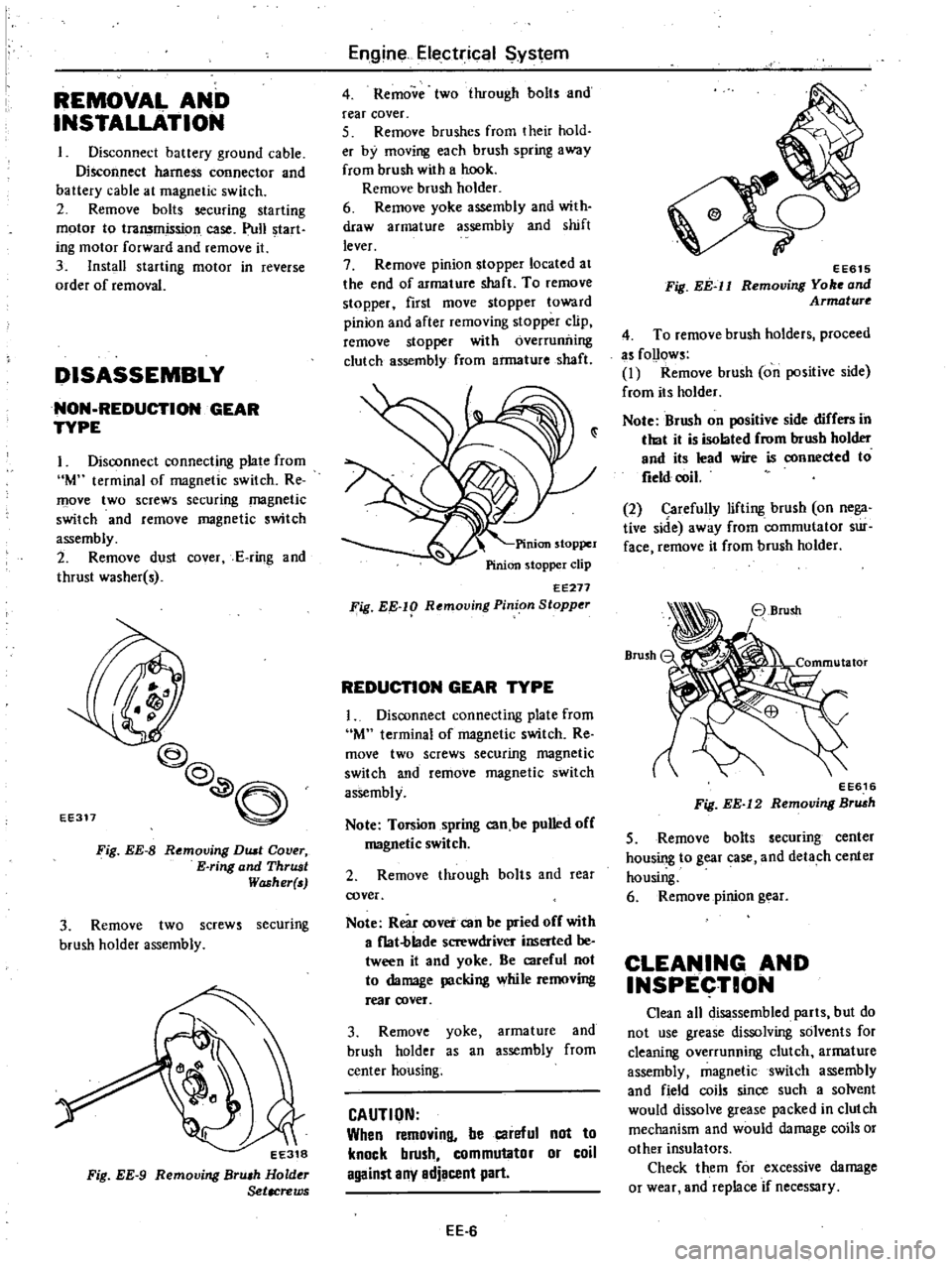
EE271
Fig
EE
lg
Rf
moving
Pinion
Stopper
REDUCTION
GEAR
TYPE
1
Disconnect
connecting
plate
from
M
terminal
of
magnetic
switch
Re
move
two
screws
securing
magnetic
switch
and
remove
magnetic
switch
assembly
Note
Torsion
spring
can
be
pulled
off
magnetic
switch
2
Remove
through
baIts
and
rea
cover
Note
Rear
cover
can
be
pried
off
with
a
f1at
blade
screwdriver
inserted
be
tween
it
and
yoke
Be
careful
not
to
damage
packing
while
removing
reaf
cover
3
Remove
yoke
armature
and
brush
holder
as
an
assembly
from
center
housing
CAUTION
When
removing
be
careful
not
to
knock
brush
commutator
or
coil
against
any
adjacent
part
EE
6
o
7
EE615
Fig
EE
ll
Removing
Yo
and
Armature
4
To
remove
brush
holders
proceed
as
follows
I
Remove
brush
on
positive
side
from
its
holder
Note
Brush
on
positive
side
differs
in
that
it
is
isolated
from
brush
holder
and
its
lead
wire
is
connected
to
field
coil
2
Carefully
lifting
brush
on
nega
tive
side
away
from
commutator
sur
face
remove
it
from
brush
holder
EE616
Fig
EE
12
Removing
Br
h
5
Remove
bolts
securing
center
housing
to
gear
case
and
detach
center
housing
6
Remove
pinion
gear
CLEANING
AND
INSPECTION
Clean
all
disassembled
parts
but
do
not
use
grease
dissolving
solvents
for
cleaning
overrunning
clutch
armature
assembly
magnetic
switch
assembly
and
field
coils
since
such
a
solvent
would
dissolve
grease
packed
in
clutch
mechanism
and
would
damage
coils
or
other
insulators
Check
them
for
excessive
damage
or
wear
and
replace
if
necessary
Page 166 of 548
2
Inspect
silldered
conneetibn
of
armature
lead
and
commutator
If
loose
connection
is
found
solder
it
using
resin
flux
3
Armature
test
for
ground
Using
a
circuit
tester
place
one
test
probe
onto
armature
core
or
shaft
and
other
onto
each
commutator
bar
If
tester
shows
continuity
armature
is
grounded
and
must
be
replaced
L
L
I
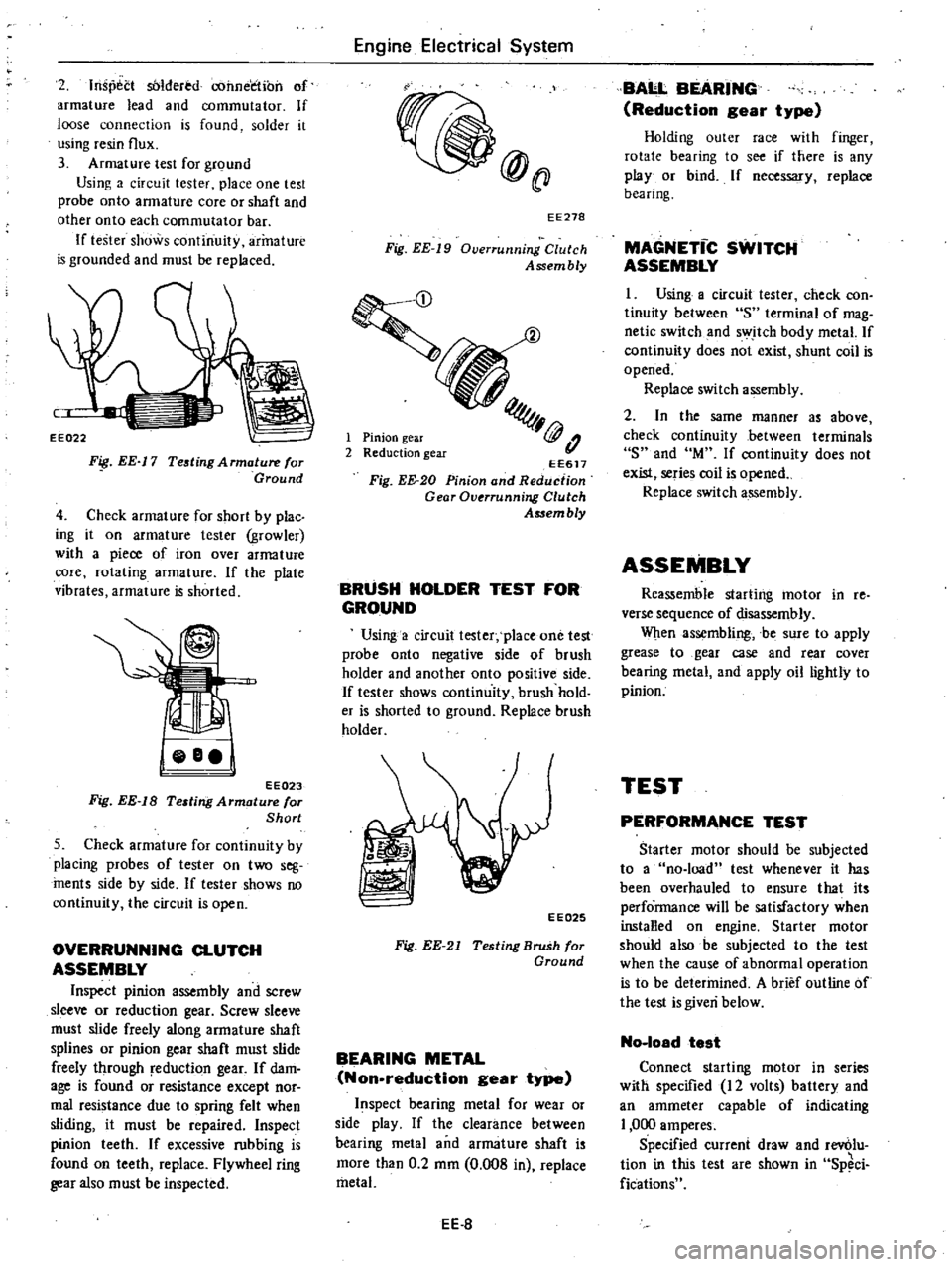
EE022
F
EE
17
Teating
Armature
for
Ground
4
Check
armature
for
short
by
plac
ing
it
on
armature
tester
growler
with
a
piece
of
iron
over
arma
t
ure
core
rotating
armature
If
the
plate
vibrates
armature
is
shorted
jeBel
EE023
Fig
EE
18
Testing
Armature
or
Short
5
Check
armature
for
continuity
by
placing
probes
of
tester
on
two
seg
ments
side
by
side
If
tester
shows
no
continuity
the
circuit
is
open
OVERRUNNING
CLUTCH
ASSEMBLY
Inspect
pinion
assembly
and
screw
sleeve
or
reduction
gear
Screw
sleeve
must
slide
freely
along
armature
shaft
splines
or
pinion
gear
shaft
must
slide
freely
through
reduction
gear
If
dam
age
is
found
or
resistance
except
nor
mal
resistance
due
to
spring
felt
when
sliding
it
must
be
repaired
Inspect
pinion
teeth
If
excessive
rubbing
is
found
on
teeth
replace
Flywheel
ring
gear
also
must
be
inspected
Engine
Electrical
System
@
ll
EE278
Fig
EE
19
Overrunning
Clutch
Assembly
1
Pinion
gear
2
Reduction
gear
EE617
Fig
EE
20
Pinion
and
Reduction
Gear
Overrunni11C
Clutch
AS5em
bly
BRUSH
HOLDER
TEST
FOR
GROUND
Using
a
circuit
tester
place
one
test
probe
onto
negative
side
of
brush
holder
and
another
onto
positive
side
If
tester
shows
continuity
brush
hold
er
is
shorted
to
ground
Replace
brush
holder
EE025
Fig
EE
21
Testing
Brush
for
Ground
BEARING
METAL
Non
reduction
gear
type
spect
bearing
metal
for
wear
or
side
play
If
the
clearance
between
bearing
metal
and
armature
shaft
is
more
than
0
2
mm
0
008
in
replace
metal
EE
8
BAI
L
BEARING
Reduction
gear
type
Holding
outer
race
with
finger
rotate
bearing
to
see
if
there
is
any
play
or
bind
If
necessary
replace
bearing
MAGNETic
SWITCH
ASSEMBLY
I
Using
a
circuit
tester
check
con
tinuity
between
S
terminal
of
mag
netic
switch
and
switch
body
metal
If
continuity
does
not
exist
shunt
coil
is
opened
Replace
switch
assembly
2
In
the
same
manner
as
above
check
continuity
between
terminals
S
and
M
If
continuity
does
not
exist
series
coil
is
opened
Replace
switch
assembly
ASSEMBLY
Reassemble
starting
motor
in
re
verse
sequence
of
disassembly
When
assembling
be
sure
to
apply
grease
to
gear
case
and
rear
cover
bearing
metal
and
apply
oil
lightly
to
pinion
TEST
PERFORMANCE
TEST
Starter
motor
should
be
subjected
to
a
no
load
test
whenever
it
has
been
overhauled
to
ensure
that
its
perfo
rmance
will
be
satisfactory
when
installed
on
engine
Starter
motor
should
also
be
subjected
to
the
test
when
the
cause
of
abnormal
operation
is
to
be
determined
A
brief
outline
of
the
test
is
given
below
No
loadtest
Connect
starting
motor
in
series
willi
specified
12
volts
battery
and
an
ammeter
capable
of
indicating
1
000
amperes
Specified
current
draw
and
rev6lu
tion
in
this
test
are
shown
in
Sp
ci
Cications
Page 199 of 548

REMOVAL
It
is
much
easier
to
remove
engine
and
transmission
as
a
single
unit
than
to
remove
alone
After
removal
engine
can
be
separated
from
the
transmission
assembly
WARNING
a
Place
wheel
chocks
in
fronl
of
front
wheels
and
in
rear
of
rear
wheels
b
Be
sure
to
hoist
engine
in
a
safe
manner
c
You
should
not
remove
engine
until
exhaust
system
has
com
pletely
cooled
off
Otherwise
you
may
burn
your
self
and
or
fire
may
break
out
in
fuel
line
Note
Fender
coven
should
be
used
to
protect
car
body
1
Disconnect
battery
ground
cable
from
battery
terminal
and
fusible
link
at
wire
connector
2
Remove
hood
as
follows
CAUTION
Have
an
assistant
help
you
so
as
to
prevent
damage
to
body
I
Mark
hood
hinge
locations
on
hood
to
facilitate
reinstallation
2
Support
hood
by
ltand
and
re
move
bolts
securing
it
to
hood
hinge
being
careful
not
to
let
hood
slip
when
bolts
are
removed
See
Fig
ER
2
3
Remove
hood
from
hood
hinge
f
Il
I
BF133A
Fig
ER
2
Removing
Hood
Remove
under
cover
Drain
radiator
coolant
and
engine
3
4
oil
5
Disconnect
upper
and
lower
hoses
from
radiator
and
disconnect
oil
cooler
hoses
automatic
transmission
only
6
Remove
four
bolts
securing
radia
Engine
Removal
Installation
tor
to
body
and
detach
radiator
after
removing
radiator
shroud
7
Remove
air
cleaner
assembly
from
carburetor
as
follows
1
Remove
fresh
air
duct
from
air
cleaner
2
Remove
hot
air
duct
from
air
cleaner
3
Loosen
air
cleaner
band
bolt
4
Disconnect
air
cleaner
to
air
pump
hose
at
air
cleaner
5
Disconnect
air
cleaner
ta
rocker
cover
hose
at
rocker
cover
6
Disconnect
air
cleaner
to
A
B
valve
hose
at
air
cleaner
7
Disconnect
air
cleaner
to
related
vacuum
hoses
at
air
cleaner
8
Disconnect
accelerator
control
wire
from
carburetor
9
Disconnect
the
following
cables
wires
and
hoses
Wire
to
auto
choke
heater
Wire
to
throttle
opener
cut
solenoid
or
throttle
switch
Wire
to
fuel
cut
solenoid
Wire
to
vacuum
switching
valve
High
tension
cable
between
igni
tion
coil
and
distributor
Battery
cable
to
starter
motor
Wire
to
distributor
Wire
to
thermal
transmitter
Wire
to
alternator
Engine
ground
cable
oil
pressure
switch
and
engine
harness
No
2
See
Fig
ER
3
o
1
Ground
cable
2
Engine
harness
No
2
3
Oil
pressure
switch
Fig
ER
3
EA368
Disconnecting
Cable
and
Wire
Fuel
hose
at
fuel
pump
and
fuel
return
hose
at
connection
Air
pump
air
cleaner
hose
Carbon
canister
hoses
Heater
inlet
and
outlet
hoses
if
so
equipped
ER
3
Vacuum
hose
of
brake
booster
at
intake
manifold
Air
conditioner
equipped
model
10
Remove
compressor
belt
To
remove
loosen
idler
pulley
nut
and
adjusting
bolt
1
Remove
air
pump
2
Remove
compressor
retaining
bolts
and
move
compressor
toward
fender
to
facilitate
removal
of
engine
Nole
Never
discharge
gas
from
com
pressor
while
work
is
being
per
formed
II
Compressor
EA478
Fig
ER
4
Location
of
Air
Compressor
3
Disconnect
vacuum
hose
of
air
conditioner
from
connector
of
intake
manifold
4
Remove
F
i
C
D
actuator
from
bracket
II
Remove
clutch
operating
cylin
der
from
clutch
housing
manual
trans
mission
only
dJ
Tightening
torque
Clutch
operating
cylinder
E
A3
to
clutch
housing
3
1
to
4
1
kg
22
to
30
ft
lbl
Fig
ER
5
Removing
Clutch
Operating
Cylinder
Page 201 of 548
INSTALLATION
Install
in
the
reverse
order
of
re
moval
observing
the
following
Note
When
inslal1ing
be
sure
to
check
thaI
electrical
harnesses
are
connected
ly
1
When
installing
first
secure
rear
engine
mounting
member
to
body
2
Refer
to
applicable
section
when
installing
and
adjusting
any
parts
Adjust
clutch
pedal
free
travel
Re
fer
to
Clutch
Pedal
Free
Travel
Section
CL
for
installation
and
adjustment
Adjust
accelerator
control
system
Refer
to
Engine
Control
System
Section
FE
for
adjustment
For
installation
of
air
conditioner
compressor
and
belt
adjustment
Refer
to
Idler
Pulley
and
Com
pressor
Drive
Belt
for
adjustment
of
belt
tension
3
When
installing
exhaust
front
tube
on
exhaust
manifold
be
sure
to
use
new
gasket
4
When
installing
hood
following
engine
installation
be
sure
that
it
is
properly
centered
and
that
hood
lock
operates
securely
Refer
to
Hood
See
tion
BF
for
adjustment
Engine
Removal
Installation
ENGINE
MOUNTING
INSULATOR
FRONT
INSULATOR
Removal
Disconnect
battery
ground
cable
2
Suspend
engine
with
wire
or
chain
3
Remove
front
engine
mounting
insulator
lower
and
upper
nuts
on
both
sides
4
Make
sure
that
wire
or
chain
used
to
suspend
engine
is
positioned
prqper
ly
so
that
no
load
is
applied
to
insulators
and
remove
nuts
complete
ly
5
Lift
up
engine
and
separate
in
sulators
from
engine
mounting
rack
ets
Inspection
If
there
is
damage
deterioration
or
separation
of
bounded
surface
re
place
Installation
Install
front
insulators
in
reverse
sequence
of
removal
noting
the
fol
lowing
1
Do
not
confuse
right
and
left
insulators
R
right
side
or
L
left
side
identification
mark
is
stamp
ed
on
each
insulator
2
Install
front
insulator
so
that
ER
5
position
pin
is
projected
upward
3
Tighten
the
bolts
and
nut
correct
ly
and
securely
See
Fig
ER
I
REAR
INSULATOR
Removal
l
Support
transmission
weight
with
ajack
2
Remove
nuts
securing
rear
engine
mounting
insulator
to
mounting
mem
ber
3
Remove
bolts
connecting
rear
en
gine
mounting
insulator
to
transmis
sion
reaf
extension
housing
4
Jack
up
the
transmission
a
little
and
remove
insulator
Inspection
If
there
is
damage
deterioration
or
separation
of
mating
surface
replace
Installation
Install
rear
engine
mounting
mem
ber
and
insulator
in
reverse
order
of
removal
noting
the
following
I
Install
insulator
in
place
so
that
direction
of
mounted
insulator
is
same
as
that
in
Fig
ER
2
Tighten
nuts
and
bolts
correctly
and
securely
As
for
tightening
torque
see
Fig
ER
l
Page 202 of 548
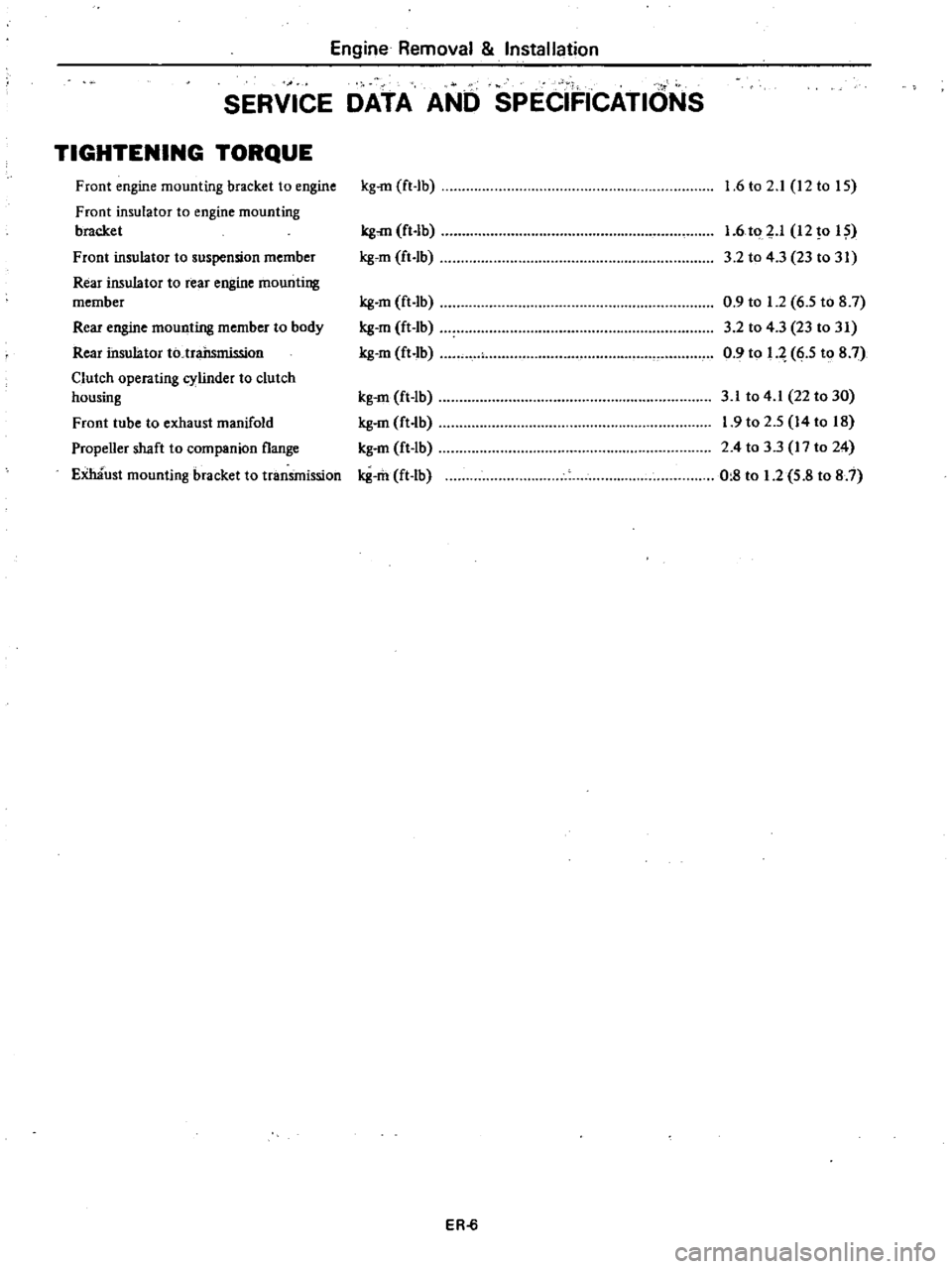
Engine
Removal
Installation
SERVICE
DATA
AND
SPECIFICATIONS
TIGHTENING
TORQUE
Front
engine
mounting
bracket
to
engine
Front
insulator
to
engine
mounting
bracket
Front
insulator
to
suspension
member
Rear
insulator
to
rear
engine
mounting
member
Rear
engine
mounting
member
to
body
Rear
insulator
to
trailsmission
Clutch
operating
cylinder
to
clutch
housing
Front
tube
to
exhaust
manifold
Propeller
shaft
to
companion
flange
Emaust
mounting
bracket
to
tranSmission
kg
rn
ft
lb
kg
rn
ft
Ib
gem
ft
Ib
g
m
ft
lb
g
m
ft
Ib
g
m
ft
Ib
kg
m
ft
Ib
g
m
ft
lb
kg
m
ft
lb
g
m
ft
Ib
ER
6
1
6
to
2
1
12
to
IS
1
6
to
p
12
0
I
3
2
to
4
3
23
to
31
0
9
to
1
2
6
5
to
8
7
3
2
to
4
3
23
to
31
0
9
to
q
6
5
to
8
7
3
1
to
4
1
22
to
30
1
9
to
2
5
14
to
18
2
4
to
3
3
17
to
24
0
8
to
1
2
5
8
to
8
7
Page 203 of 548
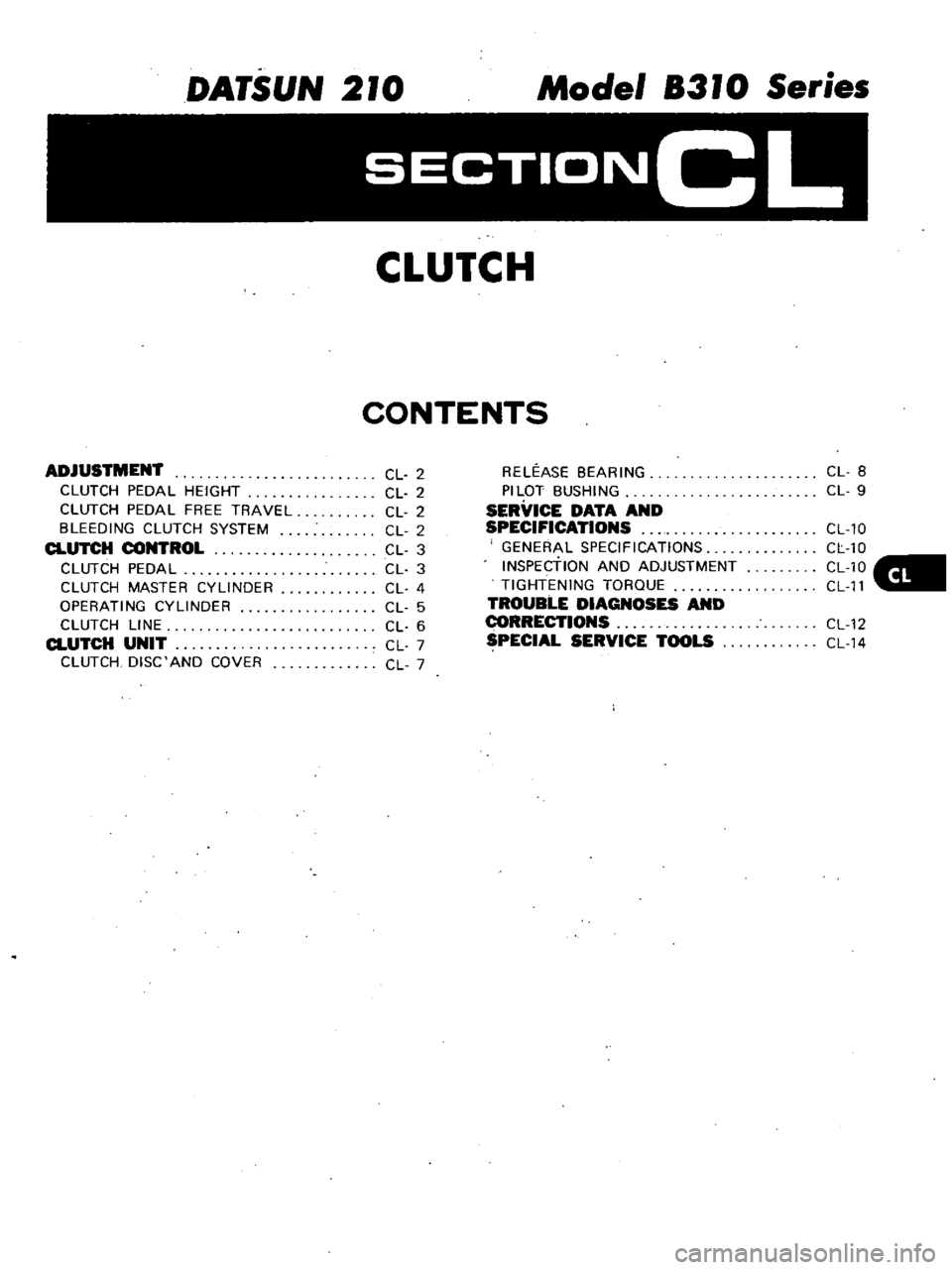
DATSUN
210
Model
8310
Series
SECTIONCL
CLUTCH
CONTENTS
ADJUSTMENT
CLUTCH
PEDAL
HEIGHT
CLUTCH
PEDAL
FREE
TRAVEL
BLEEDING
CLUTCH
SYSTEM
CLUTCH
CONTROL
CLUTCH
PEDAL
CLUTCH
MASTER
CYLINDER
OPERATING
CYLINDER
CLUTCH
LINE
CLUTCH
UNIT
CLUTCH
DISC
AND
COVER
CL
2
CL
2
CL
2
CL
2
CL
3
CL
3
CL
4
CL
5
CL
6
CL
7
CL
7
RELEASE
BEARING
PILOT
BUSHING
SERVICE
DATA
AND
SPECIFICATIONS
GENERAL
SPECIFICATIONS
INSPEctiON
AND
ADJUSTMENT
TIGHTENING
TORQUE
TROUBLE
DIAGNOSES
AND
I
ECTIONS
SPECIAL
SERVICE
TOOLS
CL
8
CL
9
CL
10
CL
10
CL10
CL
11
CL
12
CL
14
Page 204 of 548
CLUTCH
PEDAL
HEIGHT
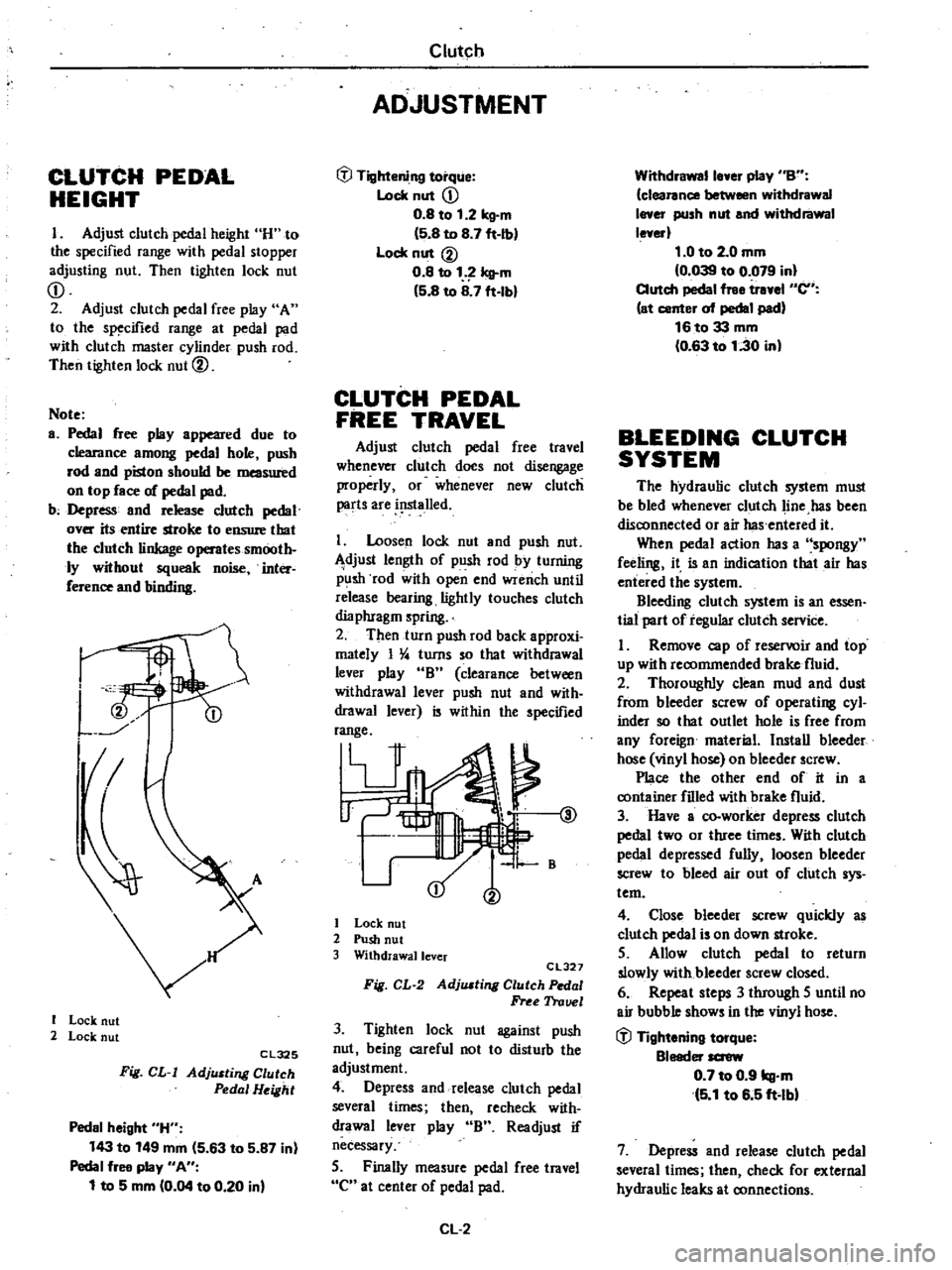
I
Adjust
clutch
pedal
height
H
to
the
specified
range
with
pedal
stopper
adjusting
nut
Then
tighten
lock
nut
CD
2
Adjust
clutch
pedal
free
play
A
to
the
specified
range
at
pedal
pad
with
clutch
master
cylinder
push
rod
Then
tighten
lock
nut
@
Note
a
Pedal
free
play
appeared
due
to
clearance
among
pedal
hole
push
rod
and
piston
should
be
measured
on
top
face
of
pedal
pad
b
Depress
and
release
clutch
pedal
over
its
entire
stroke
to
ensure
that
the
clutch
linkage
operates
smooth
ly
without
squeak
noise
inter
ference
and
binding
I
I
Lock
nut
2
Lock
nut
Cl325
Fig
CL
I
AdjlUting
Clutch
Pedal
Height
Pedal
height
H
143
to
149
mm
5
63
to
5
87
in
Pedal
free
play
An
1
to
5
mm
0
04
to
0
20
in
Clutch
ADJUSTMENT
tfl
Tightening
torque
Lock
nut
CD
0
8
to
1
2
kg
m
5
8
to
8
7
ft
Ib
Lock
nut
@
0
8
to
1
Icll
m
5
8
to
8
7
ft
lbl
CLUTCH
PEDAL
FREE
TRAVEL
Adjust
clutch
pedal
free
travel
whenever
clutch
does
not
disengage
properly
or
whenever
new
clutch
parts
are
i
lslalled
I
Loosen
lock
nut
and
push
nut
djust
length
of
push
rod
by
turning
p
lsh
rod
with
open
end
wrench
until
release
bearing
lightly
touches
clutch
dia
phragm
spring
2
Then
turn
push
rod
back
approxi
mately
I
4
turns
so
that
withdrawal
lever
play
B
clearance
between
withdrawal
lever
push
nut
and
with
drawal
lever
is
within
the
specified
range
V
@
1
B
I
Lock
nut
2
Push
nut
3
Withdrawallcver
CL327
Fig
CL
2
AdjlUting
Clutch
Pedal
Free
Trauel
3
Tighten
lock
nut
against
push
nut
being
careful
not
to
disturb
the
adjustment
4
Depress
and
release
clutch
pedal
several
times
then
recheck
with
drawal
lever
play
B
Readjust
if
necessary
5
Finally
measure
pedal
free
travel
C
at
center
of
pedal
pad
CL
2
Withdrawalle
er
play
nBn
clearance
between
withdrawal
I
er
push
nut
and
withdrawal
le
erl
1
0
to
2
0
mm
0
039
to
0
079
in
Clutch
pedal
free
tr
el
en
at
center
of
pedal
pad
16to33
mm
0
63
to
1
30
in
BLEEDING
CLUTCH
SYSTEM
The
hydraulic
clutch
system
must
be
bled
whenever
clutch
line
has
been
disconnected
or
air
has
entered
it
When
pedal
action
has
a
spongy
feeling
it
is
an
indication
that
air
has
entered
the
system
Bleeding
clutch
system
is
an
essen
tial
part
of
regular
clutch
service
I
Remove
cap
of
reservoir
and
top
up
with
recommended
brake
fluid
2
Thoroughly
clean
mud
and
dust
from
bleeder
screw
of
operating
cyl
inder
so
that
outlet
hole
is
free
from
any
foreign
material
Install
bleeder
hose
vinyl
hose
on
bleeder
screw
Place
the
other
end
of
it
in
a
container
filled
with
brake
fluid
3
Have
a
co
worker
depress
clutch
pedal
two
or
three
times
With
clutch
pedal
depressed
fully
loosen
bleeder
screw
to
bleed
air
out
of
clutch
sys
tem
4
Close
bleeder
screw
quickly
as
clutch
pedal
is
on
down
stroke
5
Allow
clutch
pedal
to
return
slowly
with
bleeder
screw
closed
6
Repeat
steps
3
through
5
until
no
air
bubble
shows
in
the
vinyl
hose
tfl
Tightening
torque
Bleeder
screw
0
7
to
0
9
kg
m
5
1
to
6
5
ft
lbl
7
Depress
and
release
clutch
pedal
several
times
then
check
for
external
hydraulic
leaks
at
connections
Page 205 of 548
Note
a
Brake
fluid
conlaining
air
is
white
and
has
visible
air
bubbles
b
Brake
fluid
containing
no
air
runs
out
of
bleeder
screw
in
a
1lO6d
stream
without
air
bubbles
c
Pay
close
attention
to
clutch
fluid
level
in
reservoir
during
bleeding
operation
Clutch
d
Pour
brake
fluid
into
reServoir
up
to
the
specified
level
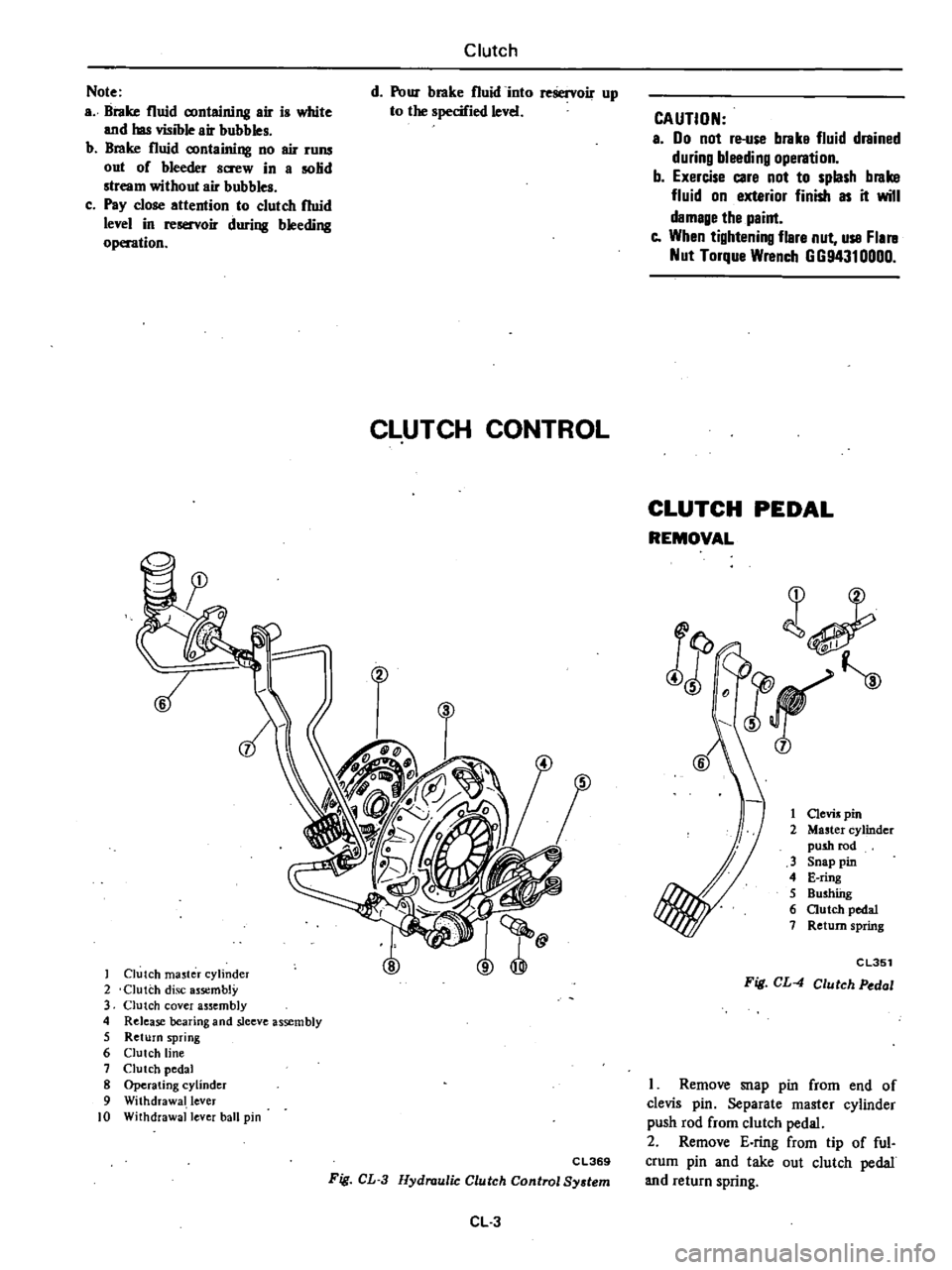
CLUTCH
CONTROL
Clutch
ma5ter
cylinder
2
Clutch
disc
assembly
3
Clutch
cover
assembly
4
Release
bearing
and
sleeve
assembly
5
Return
spring
6
Clutch
line
7
Clutch
pedal
8
Operating
cylinder
9
Withdrawal
lever
10
Withdrawal
lever
ball
pin
CAUTION
a
00
not
re
use
brake
fluid
drained
during
bleeding
operation
b
Exercise
care
not
to
splash
brake
fluid
on
exterior
finish
as
it
will
damage
the
paint
e
When
tightening
flare
nut
use
Flal
ll
Nut
Torque
Wrench
GG94310000
CLUTCH
PEDAL
REMOVAL
l
JF
j
1
Clevis
pin
2
Master
cylinder
push
rod
3
Snap
pin
4
E
ring
5
Bushfug
6
autch
pedal
7
Return
spring
j
CL351
Fig
CL
4
Clutch
Pedal
C
L369
Fig
CL
3
Hydraulic
Clutch
Control
System
CL
3
I
Remove
snap
pin
from
end
of
clevis
pin
Separate
master
cylinder
push
rod
from
clutch
pedal
2
Remove
E
ring
from
tip
of
ful
crum
pin
and
take
out
clutch
pedal
and
return
spring
Page 206 of 548
INSPEctiON
Check
clutch
pedal
parts
for
the
following
items
correcting
neces
sary
I
Bent
pedal
2
Weakened
return
spring
3
Worn
or
deformed
clevis
pin
and
fulcrum
bwhings
4
Cracks
at
welded
part
INSTAl1
ATION
To
install
clutch
pedal
reverse
the
order
of
removal
Observe
the
follow
ing
I
Apply
coating
of
recommended
multi
purpose
grease
to
sliding
por
tions
and
return
spring
Lt
of
I
ii
CL352
Fig
CL
5
Lubricating
Point
2
Fit
return
spring
in
hole
in
pedal
bracket
and
securely
fit
E
ring
in
slit
of
fulcrum
pin
3
Insert
clevis
pin
through
clutch
pedal
from
left
to
right
side
4
After
installing
clutch
pedal
check
the
clutch
pedal
height
AdjUst
if
necessary
Refer
to
Adjwtment
CLUTCH
MASTER
CYLINDER
REMOVAL
I
Remove
snap
pin
from
clevis
pin
2
Pull
out
clevis
pin
3
Disconnect
clutch
tube
from
mas
ter
cylinder
4
Remove
master
cylinder
Clutch
CAUTION
When
disconnecting
clutch
tube
use
suitable
flare
nut
wrench
Never
use
an
open
end
wrench
or
adjus1able
wrench
DISASSEMBLY
Note
When
disconnecting
dutch
tube
be
sure
to
receive
draioillll
clutch
fluid
into
a
container
Use
of
rags
is
also
suggested
to
keep
adja
cent
parts
and
area
clean
@
@
1
Reservoir
cap
6
Return
prina
11
Primary
cup
16
StOppel
rins
2
Reservoir
7
Sprina
seat
12
Piston
17
Dust
cover
3
Rescrvou
band
8
Valve
sprina
3
Secondary
cup
18
Lock
nut
4
Cylinder
body
9
Supply
valve
rod
14
Push
rod
5
Supply
yalYe
stopper
10
Supply
valve
15
Stopper
CL345
Fig
CL
6
Clutch
Mcuter
Cylind
r
I
Remove
dwt
cover
and
take
off
stopper
ring
from
body
2
Then
the
push
rod
and
stopper
can
be
taken
out
3
Loosen
supply
valve
stopper
and
take
it
out
4
The
piston
spring
seat
and
reo
turn
spring
can
be
taken
out
Note
Discard
piston
cup
and
dust
cover
CAUTION
Never
detach
reservoir
If
it
is
removed
for
any
reason
discard
it
and
instill
new
one
CL
4
INSPECTION
CAUTION
To
clean
or
wash
all
parts
of
masler
cylinder
clean
brake
fluid
must
be
used
Never
use
mineral
oils
such
as
gasoline
and
kerosene
It
will
ruin
tha
rubber
parts
of
tha
hydraulic
syslBm
I
Check
cylinder
bore
and
piston
for
score
or
rust
and
if
found
replace
2
Check
cylinder
bore
and
piston
for
wear
If
the
clearance
between
cylinder
bore
and
piston
exceeds
the
specified
value
replace
piston
assem
bly
or
master
cylinder
assembly
3
Check
the
condition
of
piston
cup
and
dust
cover
Always
replace
them
after
disassembly
4
Check
all
recesses
openings
and
internal
passages
to
ensure
that
they