ECU DODGE AVENGER 2008 Owner's Manual
[x] Cancel search | Manufacturer: DODGE, Model Year: 2008, Model line: AVENGER, Model: DODGE AVENGER 2008Pages: 467, PDF Size: 7.16 MB
Page 80 of 467
Pets should be restrained in the rear seat in pet harnesses
or pet carriers that are secured by seat belts.
ENGINE BREAK-IN RECOMMENDATIONS
A long break-in period is not required for the engine in
your vehicle.
Drive moderately during the first 300 mi (500 km). After
the initial 60 mi (100 km), speeds up to 50 or 55 mph (80
or 90 km/h) are desirable.
While cruising, brief full-throttle acceleration, within the
limits of local traffic laws, contributes to a good break-in.
Wide-open throttle acceleration in low gear can be detri-
mental and should be avoided.
The engine oil installed in the engine at the factory is a
high-quality energy-conserving type lubricant. Oil
changes should be consistent with anticipated climate
conditions under which vehicle operations will occur. For
the recommended viscosity and quality grades, refer to ªMaintenance Proceduresº in Section 7. NON-
DETERGENT OR STRAIGHT MINERAL OILS MUST
NEVER BE USED.
A new engine may consume some oil during its first few
thousand miles (kilometers) of operation. This should be
considered as a normal part of the break-in and not
interpreted as an indication of difficulty.
SAFETY TIPS
Exhaust Gas
WARNING!Exhaust gases can injure or kill. They contain carbon
monoxide (CO) which is colorless and odorless.
Breathing it can make you unconscious and can
eventually poison you. To avoid breathing (CO)
follow the safety tips below.78 THINGS TO KNOW BEFORE STARTING YOUR VEHICLE
Page 85 of 467
N Headlights With Wipers Feature
(Available With Auto Headlights Only) ......137
N Windshield Washers ...................138
N Adding Washer Fluid ..................138
m Tilt/Telescoping Steering Column ...........139
m Electronic Speed Control Ð If Equipped ......140
N To Activate ..........................140
N To Set Desired Speed ...................141
N To Deactivate ........................141
N To Resume Speed .....................141
N To Vary Speed Setting ..................142
N To Accelerate For Passing ...............142
m Garage Door Opener Ð If Equipped .........143 N Programming HomeLink t ...............144
N Gate Operator/Canadian Programming .....148
N Security ............................148
N Troubleshooting Tips ...................149
N General Information ...................149
m Power Sunroof Ð If Equipped .............150
N Sunroof Operation ....................151
N Auto Sunroof Express With Anti-Pinch
Protection Ð If Equipped ...............151
N Sunshade Operation ...................152
N Wind Buffeting .......................152
N Sunroof Maintenance ...................152
N Ignition Off Operation ..................152UNDERSTANDING THE FEATURES OF YOUR VEHICLE 83
3
Page 130 of 467
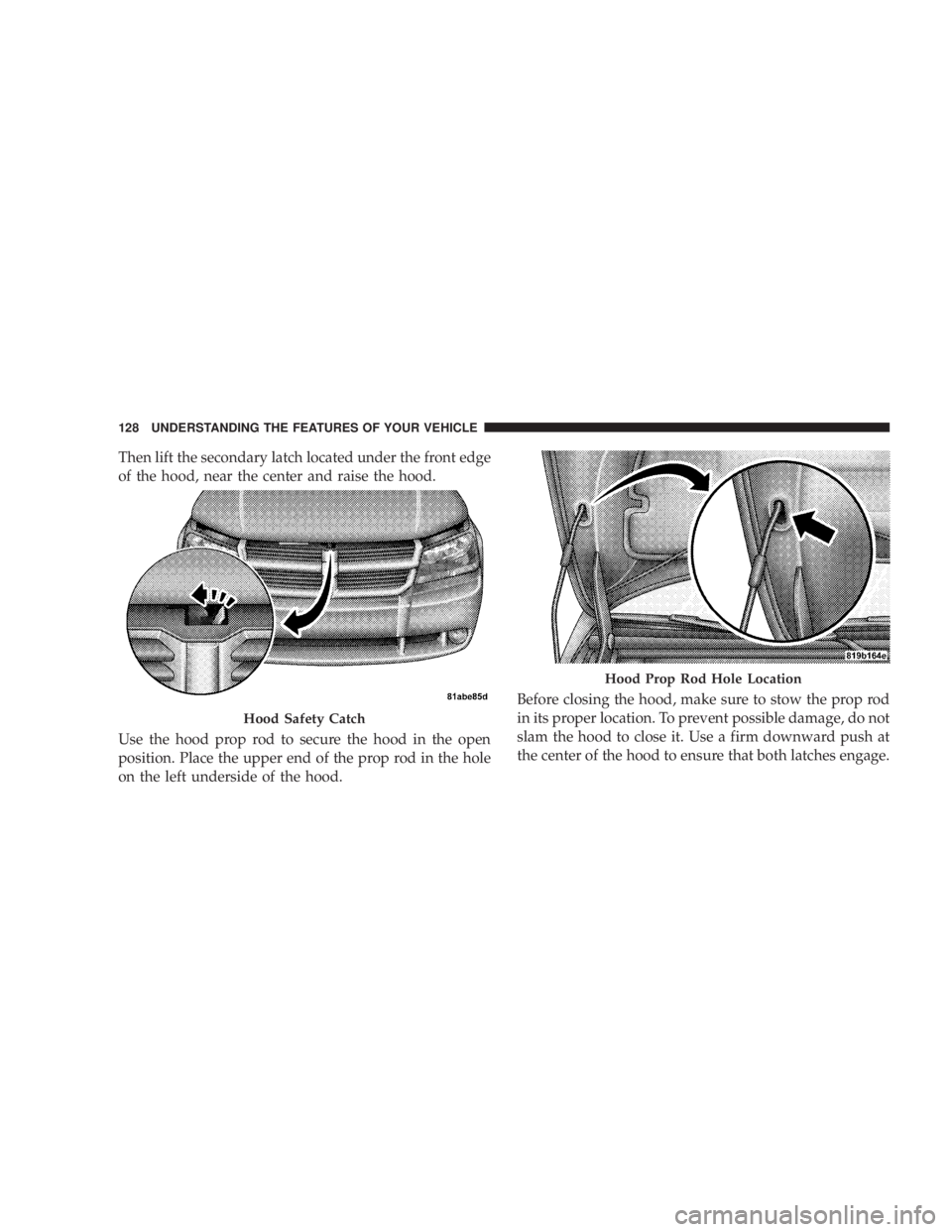
Then lift the secondary latch located under the front edge
of the hood, near the center and raise the hood.
Use the hood prop rod to secure the hood in the open
position. Place the upper end of the prop rod in the hole
on the left underside of the hood. Before closing the hood, make sure to stow the prop rod
in its proper location. To prevent possible damage, do not
slam the hood to close it. Use a firm downward push at
the center of the hood to ensure that both latches engage.Hood Safety Catch Hood Prop Rod Hole Location128 UNDERSTANDING THE FEATURES OF YOUR VEHICLE
Page 145 of 467
On steep hills, a greater speed loss or gain may occur so
it may be preferable to drive without speed control.
GARAGE DOOR OPENER Ð IF EQUIPPED
HomeLink t replaces up to three remote controls (hand-
held transmitters) that operate devices such as garage
door openers, motorized gates, lighting, or home security
systems. The HomeLink t unit operates off your vehicle's
battery.
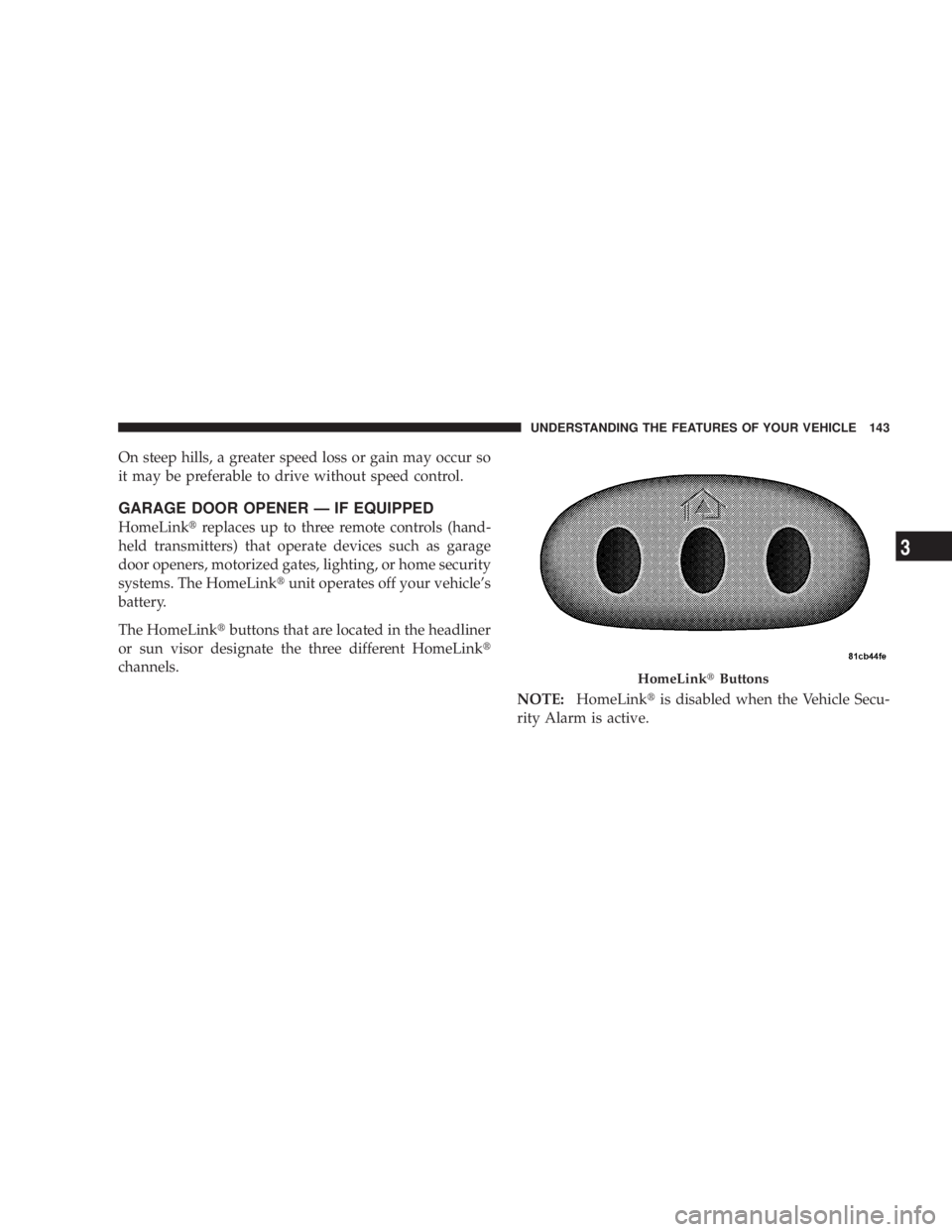
The HomeLink t buttons that are located in the headliner
or sun visor designate the three different HomeLink t
channels.
NOTE: HomeLink t is disabled when the Vehicle Secu-
rity Alarm is active. HomeLink t ButtonsUNDERSTANDING THE FEATURES OF YOUR VEHICLE 143
3
Page 149 of 467
NOTE: There are 30 seconds in which to initiate the next
step after the ªLearnº button has been pressed.
7. Return to the vehicle and press the programmed
HomeLink t button twice (holding the button for two
seconds each time). If the device is plugged in and
activates, programming is complete.
If the device does not activate, press the button a third
time (for two seconds) to complete the training.
If you have any problems, or require assistance, please
call toll-free 1±800±355±3515 or, on the Internet at
www.HomeLink.com for information or assistance.
To program the remaining two HomeLink t buttons,
repeat each step for each remaining button. DO NOT
erase the channels. Using HomeLink t
To operate, simply press and release the programmed
HomeLink t button. Activation will now occur for the
trained device (i.e., garage door opener, gate operator,
security system, entry door lock, home/office lighting,
etc. The hand-held transmitter of the device may also be
used at any time.
Reprogramming a Single Homelink t Button
To reprogram a channel that has been previously trained,
follow these steps:
1. Turn the ignition switch to the ON/RUN position.
2. Press and hold the desired HomeLink t button until
the indicator light begins to flash after 20 seconds. Do not
release the button.
3. Without releasing the button, proceed with Program-
ming Homelink t Step 2 and follow all remaining steps.UNDERSTANDING THE FEATURES OF YOUR VEHICLE 147
3
Page 150 of 467
GATE OPERATOR/CANADIAN PROGRAMMING
Canadian radio frequency laws require transmitter sig-
nals to time-out (or quit) after several seconds of trans-
mission ± which may not be long enough for HomeLink t
to pick up the signal during programming. Similar to this
Canadian law, some U.S. gate operators are designed to
time-out in the same manner.
It may be helpful to unplug the device during the cycling
process to prevent possible overheating of the garage
door or gate motor.
If you are having difficulties programming a garage door
opener or a gate operator, replace ªProgramming
HomeLink t º Step 3, with the following:
3. Continue to press and hold the HomeLink t button
while you press and release - every two seconds
(ªcycleº) your hand-held transmitter until HomeLink t has successfully accepted the frequency signal. The
indicator light will flash slowly and then rapidly when
fully trained.
If you unplugged the device for training, plug it back in
at this time.
Then proceed with Step 4 under ªProgramming
HomeLink t ,º earlier in this section.
SECURITY
It is advised to erase all channels before you sell or turn
in your vehicle.
To do this, press and hold the two outside buttons for 20
seconds until the red indicator flashes. Note that all
channels will be erased. Individual channels cannot be
erased.
The HomeLink t Universal Transceiver is disabled when
the Vehicle Security Alarm is active.148 UNDERSTANDING THE FEATURES OF YOUR VEHICLE
Page 152 of 467
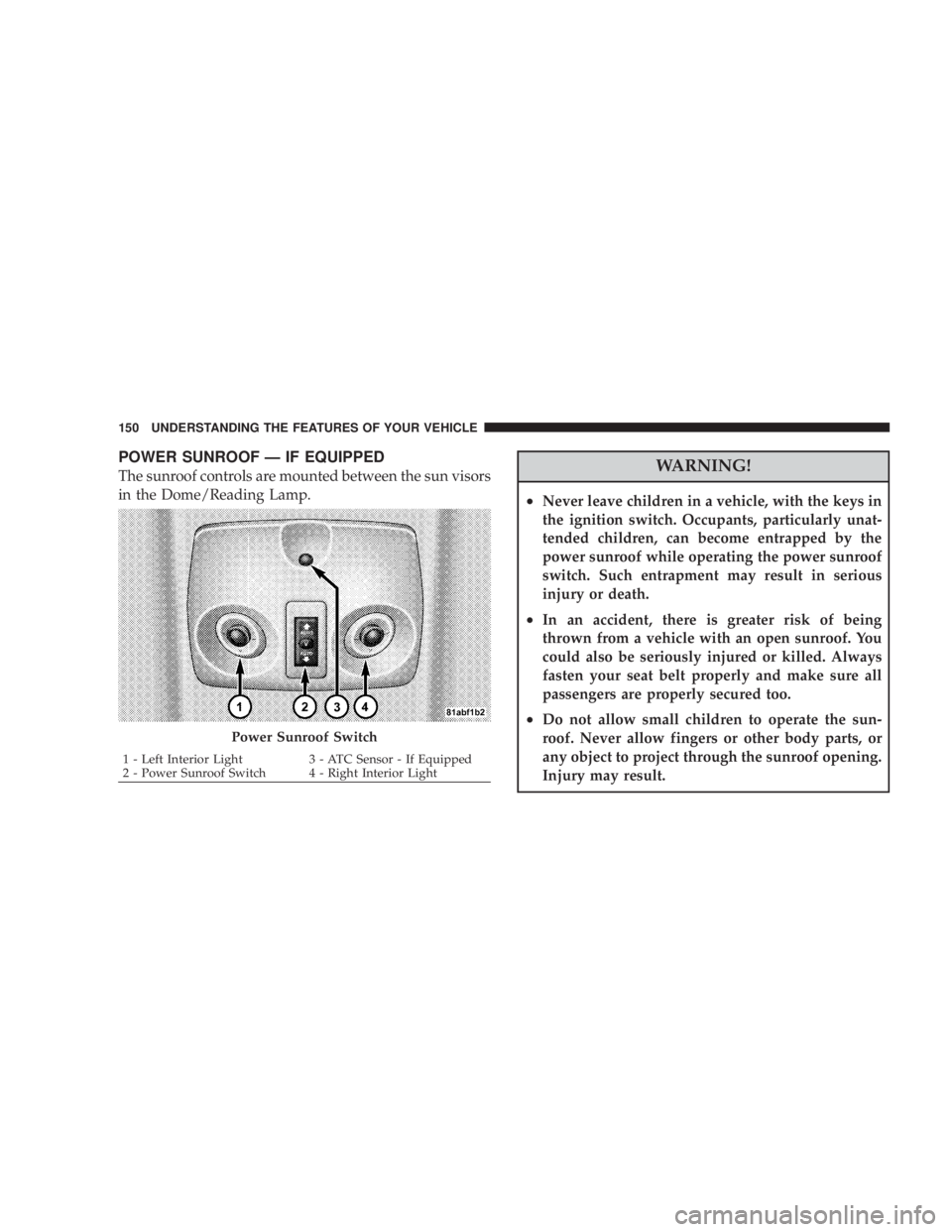
POWER SUNROOF Ð IF EQUIPPED
The sunroof controls are mounted between the sun visors
in the Dome/Reading Lamp.
WARNING!² Never leave children in a vehicle, with the keys in
the ignition switch. Occupants, particularly unat-
tended children, can become entrapped by the
power sunroof while operating the power sunroof
switch. Such entrapment may result in serious
injury or death.
² In an accident, there is greater risk of being
thrown from a vehicle with an open sunroof. You
could also be seriously injured or killed. Always
fasten your seat belt properly and make sure all
passengers are properly secured too.
² Do not allow small children to operate the sun-
roof. Never allow fingers or other body parts, or
any object to project through the sunroof opening.
Injury may result.Power Sunroof Switch1 - Left Interior Light 3 - ATC Sensor - If Equipped
2 - Power Sunroof Switch 4 - Right Interior Light150 UNDERSTANDING THE FEATURES OF YOUR VEHICLE
Page 162 of 467
WARNING!If containers of hot liquid are placed in the bottle
holder, they can spill when the door is closed, burn-
ing the occupants. Be careful when closing the doors
to avoid injury.
STORAGE
CARGO AREA
The 60/40 split-folding rear seat provides cargo-carrying
versatility. The seatbacks fold down easily by pulling
nylon tabs between the seatbacks and the bolsters. When
the seats are folded down, they provide a continuous,
nearly flat extension of the load floor.
When the seatback is folded to the upright position, make
sure it is latched by strongly pulling on the top of the
seatback above the seat strap. WARNING!² Be certain that the seatback is securely locked into
position. If the seatback in not securely locked
into position, the seat will not provide the proper
stability for child seats and/or passengers. An
improperly latched seat could cause serious injury.
² The cargo area in the rear of the vehicle (with the
rear seatbacks in the locked-up or folded down
position) should not be used as a play area by
children when the vehicle is in motion. They could
be seriously injured in an accident. Children
should be seated and using the proper restraint
system.
² To help protect against personal injury, passengers
should not be seated in the rear cargo area. The
rear cargo space is intended for load carrying
purposes only, not for passengers, who should sit
in seats and use seat belts.160 UNDERSTANDING THE FEATURES OF YOUR VEHICLE
Page 263 of 467
STARTING PROCEDURES
Before starting your vehicle, adjust your seat, adjust both
inside and outside mirrors, and fasten your seat belt.
Make sure all occupants have securely fastened their seat
belts.
WARNING!Never leave children alone in a vehicle. Leaving
children in a vehicle unattended is dangerous for a
number of reasons. A child or others could be seri-
ously or fatally injured. Don't leave the keys in the
ignition. A child could operate power windows,
other controls, or move the vehicle. WARNING!Be sure to turn off the engine and remove the key
from the ignition switch if you want to rest or sleep
in your car. Accidents can be caused by inadvertently
moving the gear selection lever or by pressing the
accelerator pedal. This may cause excessive heat in
the exhaust system, resulting in overheating and
vehicle fire which may cause serious or fatal injuries.
Automatic Transaxle
The gear selector must be in the PARK or NEUTRAL
position before you can start the engine. Apply the brakes
before shifting to any driving gear.
NOTE: You must press the brake pedal before shifting
out of Park. STARTING AND OPERATING 261
5
Page 266 of 467
CAUTION!To prevent damage to the starter, do not crank the
engine for more than 15 seconds at a time. Wait 10 to
15 seconds before trying again.
After Starting
The idle speed will automatically decrease as the engine
warms up. Remote Starting System Ð If Equipped
Remote start conveniently starts the engine from outside
the vehicle by using the Remote Keyless Entry (RKE) key
fob while maintaining security. The system has a targeted
range of 328 ft (100 m). The vehicle must be locked, the
deck lid and hood closed and the transmission in PARK
in order to start the engine using the Remote Start button
on the key fob.
NOTE: Remote start requires Automatic Transaxle
equipped vehicles.
How To Use Remote Start
To enter the Remote Start mode, depress the Remote Start
button twice on the key fob. The engine will start and the
vehicle will remain in the remote start mode for a 15
minute cycle.264 STARTING AND OPERATING