door lock DODGE AVENGER 2008 Owner's Manual
[x] Cancel search | Manufacturer: DODGE, Model Year: 2008, Model line: AVENGER, Model: DODGE AVENGER 2008Pages: 467, PDF Size: 7.16 MB
Page 40 of 467
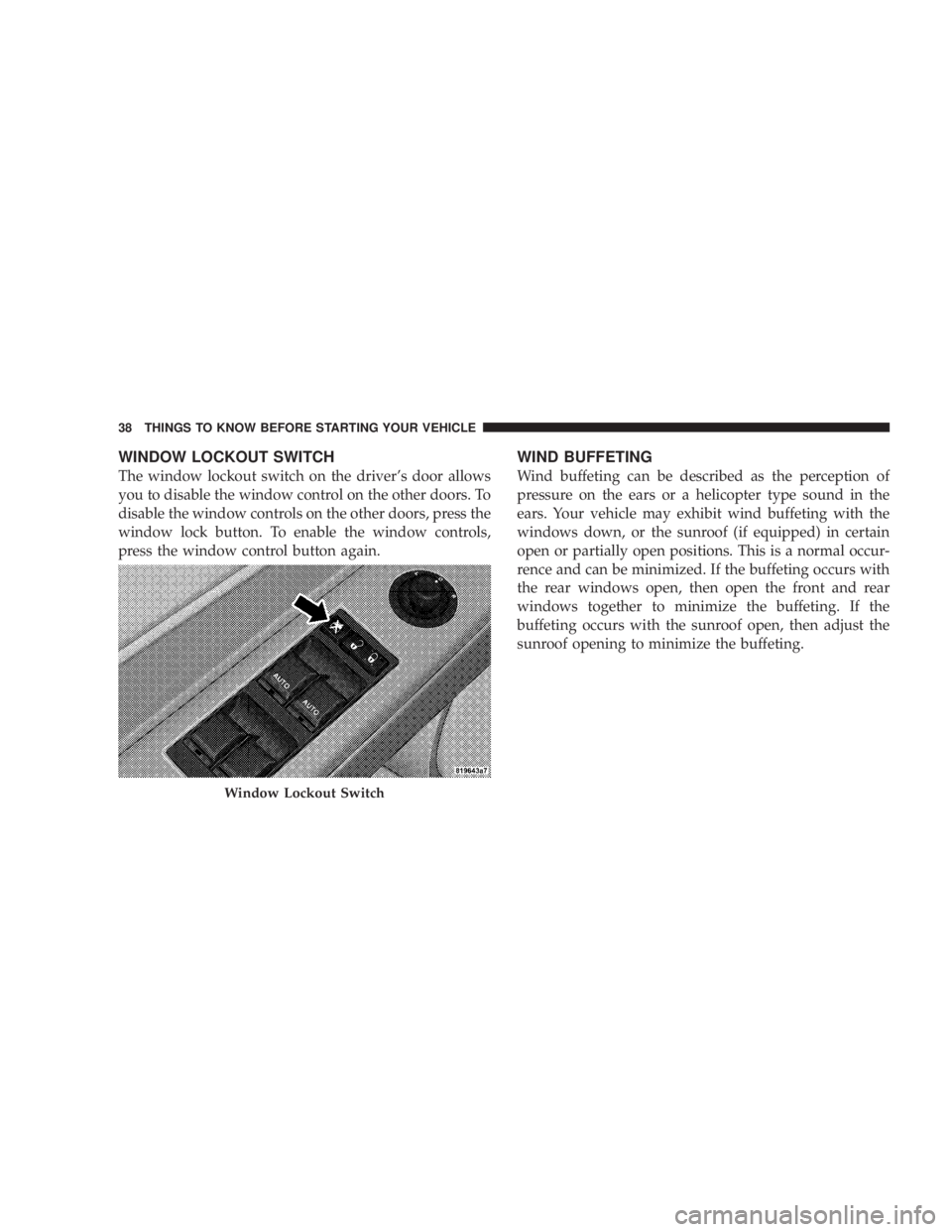
WINDOW LOCKOUT SWITCH
The window lockout switch on the driver's door allows
you to disable the window control on the other doors. To
disable the window controls on the other doors, press the
window lock button. To enable the window controls,
press the window control button again. WIND BUFFETING
Wind buffeting can be described as the perception of
pressure on the ears or a helicopter type sound in the
ears. Your vehicle may exhibit wind buffeting with the
windows down, or the sunroof (if equipped) in certain
open or partially open positions. This is a normal occur-
rence and can be minimized. If the buffeting occurs with
the rear windows open, then open the front and rear
windows together to minimize the buffeting. If the
buffeting occurs with the sunroof open, then adjust the
sunroof opening to minimize the buffeting.
Window Lockout Switch38 THINGS TO KNOW BEFORE STARTING YOUR VEHICLE
Page 58 of 467
WARNING!² Do not put anything on or around the airbag
covers or attempt to open them manually. You may
damage the airbags and you could be injured
because the airbags are not there to protect you.
These protective covers for the airbag cushions are
designed to open only when the airbags are inflat-
ing.
² Do not use accessory seat covers or place objects
between you and the side airbags; the performance
could be adversely affected and/or objects could
be pushed into you, causing serious injury. WARNING!² If your vehicle is equipped with left and right
window bags, do not stack luggage or other cargo
up high enough to block the location of the Side
Airbag Inflatable Curtains (SABIC). The area
where the side curtain airbag is located should
remain free from any obstructions.
² Do not attach cup holders or any other objects on
or around the door. The inflating side airbag could
drive the object into occupants, causing serious
injury.
Airbags inflate in moderate to high speed impacts. Along
with seat belts and pretensioners, front airbags, and side
airbags work with the knee bolsters to provide improved
protection for the driver and front passenger.56 THINGS TO KNOW BEFORE STARTING YOUR VEHICLE
Page 64 of 467
Enhanced Accident Response System
In the event of an impact that causes airbag deployment,
with the vehicle stopped, and the vehicle communication
network intact, and the power intact, the Enhanced
Accident Response System performs the following func-
tions:
² Cuts off fuel to the engine
² Flashes hazard lights
² Turns on the interior lights which remain on as long as
the battery has power or until the ignition key is
removed
² Unlocks the doors automatically
If A Deployment Occurs
The airbag systems are designed to deploy when the
Occupant Restraint Controller (ORC) detect a moderate-
to-severe collision, to help restrain the driver and front
passenger, and then immediately deflate. NOTE: A frontal collision that is not severe enough to
need airbag protection will not activate the system. This
does not mean something is wrong with the airbag
system.
If you do have a collision, which deploys the airbags, any
or all of the following may occur:
² The nylon airbag material may sometimes cause abra-
sions and/or skin reddening to the driver and front
passenger as the airbags deploy and unfold. The
abrasions are similar to friction rope burns or those
you might get sliding along a carpet or gymnasium
floor. They are not caused by contact with chemicals.
They are not permanent and normally heal quickly.
However, if you haven't healed significantly within a
few days, or if you have any blistering, see your doctor
immediately.
² As the airbags deflate, you may see some smoke-like
particles. The particles are a normal by-product of the62 THINGS TO KNOW BEFORE STARTING YOUR VEHICLE
Page 131 of 467
WARNING!If the hood is not fully latched it could fly up when
the vehicle is moving and block your forward vision.
You could have a collision. Be sure all hood latches
are fully latched before driving.
LIGHTS
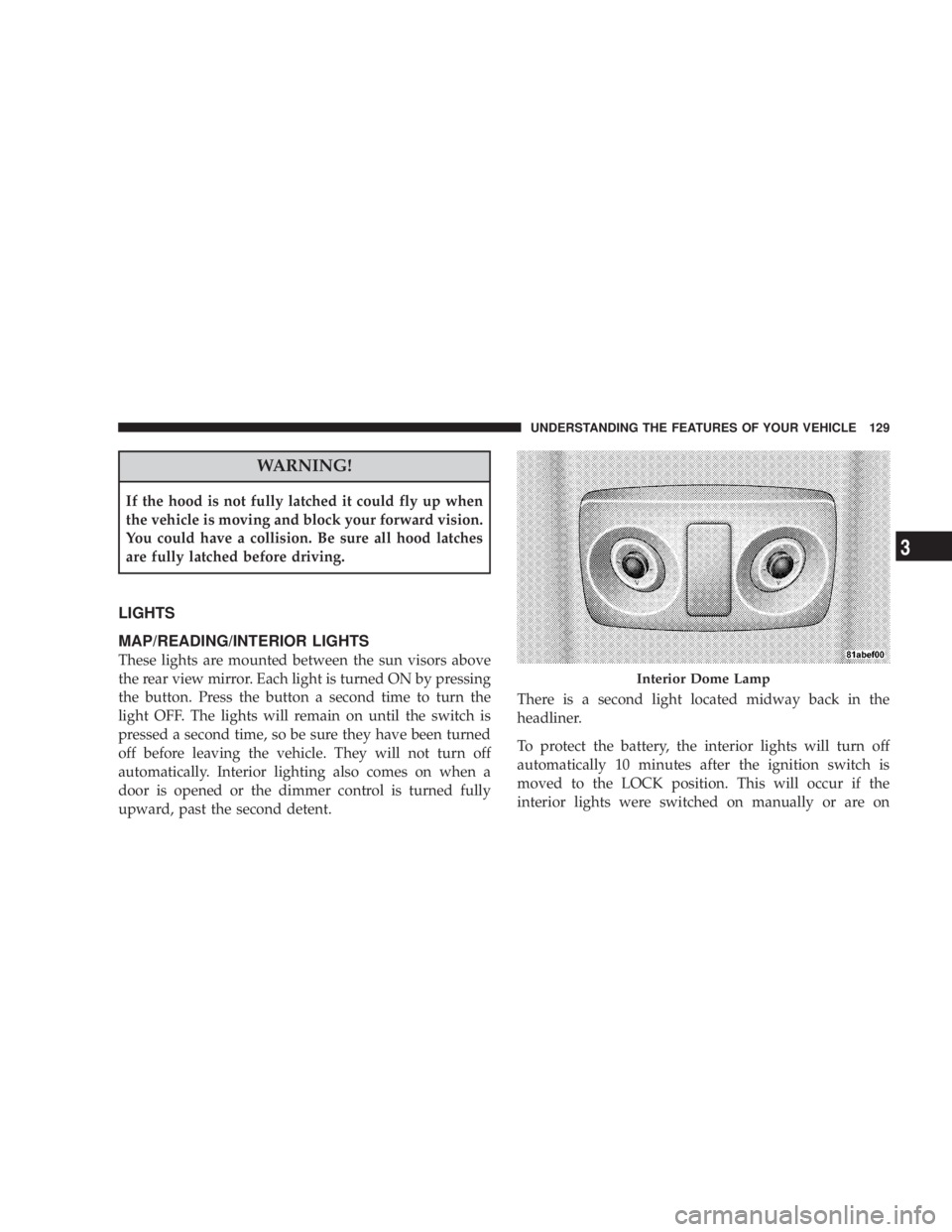
MAP/READING/INTERIOR LIGHTS
These lights are mounted between the sun visors above
the rear view mirror. Each light is turned ON by pressing
the button. Press the button a second time to turn the
light OFF. The lights will remain on until the switch is
pressed a second time, so be sure they have been turned
off before leaving the vehicle. They will not turn off
automatically. Interior lighting also comes on when a
door is opened or the dimmer control is turned fully
upward, past the second detent. There is a second light located midway back in the
headliner.
To protect the battery, the interior lights will turn off
automatically 10 minutes after the ignition switch is
moved to the LOCK position. This will occur if the
interior lights were switched on manually or are on Interior Dome LampUNDERSTANDING THE FEATURES OF YOUR VEHICLE 129
3
Page 149 of 467
NOTE: There are 30 seconds in which to initiate the next
step after the ªLearnº button has been pressed.
7. Return to the vehicle and press the programmed
HomeLink t button twice (holding the button for two
seconds each time). If the device is plugged in and
activates, programming is complete.
If the device does not activate, press the button a third
time (for two seconds) to complete the training.
If you have any problems, or require assistance, please
call toll-free 1±800±355±3515 or, on the Internet at
www.HomeLink.com for information or assistance.
To program the remaining two HomeLink t buttons,
repeat each step for each remaining button. DO NOT
erase the channels. Using HomeLink t
To operate, simply press and release the programmed
HomeLink t button. Activation will now occur for the
trained device (i.e., garage door opener, gate operator,
security system, entry door lock, home/office lighting,
etc. The hand-held transmitter of the device may also be
used at any time.
Reprogramming a Single Homelink t Button
To reprogram a channel that has been previously trained,
follow these steps:
1. Turn the ignition switch to the ON/RUN position.
2. Press and hold the desired HomeLink t button until
the indicator light begins to flash after 20 seconds. Do not
release the button.
3. Without releasing the button, proceed with Program-
ming Homelink t Step 2 and follow all remaining steps.UNDERSTANDING THE FEATURES OF YOUR VEHICLE 147
3
Page 162 of 467
WARNING!If containers of hot liquid are placed in the bottle
holder, they can spill when the door is closed, burn-
ing the occupants. Be careful when closing the doors
to avoid injury.
STORAGE
CARGO AREA
The 60/40 split-folding rear seat provides cargo-carrying
versatility. The seatbacks fold down easily by pulling
nylon tabs between the seatbacks and the bolsters. When
the seats are folded down, they provide a continuous,
nearly flat extension of the load floor.
When the seatback is folded to the upright position, make
sure it is latched by strongly pulling on the top of the
seatback above the seat strap. WARNING!² Be certain that the seatback is securely locked into
position. If the seatback in not securely locked
into position, the seat will not provide the proper
stability for child seats and/or passengers. An
improperly latched seat could cause serious injury.
² The cargo area in the rear of the vehicle (with the
rear seatbacks in the locked-up or folded down
position) should not be used as a play area by
children when the vehicle is in motion. They could
be seriously injured in an accident. Children
should be seated and using the proper restraint
system.
² To help protect against personal injury, passengers
should not be seated in the rear cargo area. The
rear cargo space is intended for load carrying
purposes only, not for passengers, who should sit
in seats and use seat belts.160 UNDERSTANDING THE FEATURES OF YOUR VEHICLE
Page 191 of 467
Auto Unlock on Exit
When ON is selected and the transaxle is in the PARK or
NEUTRAL position, all doors will unlock when the
driver's door is opened. To make your selection, press
and hold the RESET button until ON or OFF appears.
Remote Key Unlock
When ªDriver Door 1st Pressº is selected, only the
driver's door will unlock on the first press of the remote
keyless entry unlock button. When Driver Door 1st Press
is selected, you must press of the remote keyless entry
unlock button twice to unlock the passenger's doors.
When ªAll Doors 1st Pressº is selected, all of the doors
will unlock on the first press of the remote keyless entry
unlock button. To make your selection, press and release
the RESET button until ªDriver Door 1st Pressº or ªAll
Doors 1st Pressº appears. Sound Horn with Lock
When ON is selected, a short horn sound will occur when
the remote keyless entry LOCK button is pressed. This
feature may be selected with or without the flash lights
ON, LOCK/UNLOCK feature. To make your selection,
press and release the RESET button until ON or OFF
appears.
Flash Lights with Lock
When ON is selected, the front and rear turn signals will
flash when the doors are locked or unlocked with the
remote keyless entry transmitter. This feature may be
selected with or without the Sound Horn on LOCK
feature selected. To make your selection, press and re-
lease the RESET button until ON or OFF appears.
Headlights Off Delay
When this feature is selected, the driver can choose to
have the headlights remain on for 0, 30, 60, or 90 seconds UNDERSTANDING YOUR INSTRUMENT PANEL 189
4
Page 192 of 467
when exiting the vehicle. To make your selection, press
and hold the RESET button until 0, 30, 60, or 90 seconds
appears.
Headlights With Wipers (Available with Auto
Headlights Only)
When ON is selected, and the headlight switch is in the
AUTO position, the headlights will turn on approxi-
mately 10 seconds after the wipers are turned on. The
headlights will also turn off when the wipers are turned
off if they were turned on by this feature. To make your
selection, press and hold the RESET button until ON or
OFF appears.
NOTE: Turning the headlights on during the daytime
causes the instrument panel lights to dim. To increase the
brightness, refer to ªLightsº in Section 3 of this manual.
Key-Off Power Delay
When this feature is selected, the power window
switches, radio, hands±free system (if equipped), and power outlets will remain active for up to 10 minutes
after the ignition switch is turned to the LOCK position.
Opening a vehicle door will cancel this feature. To make
your selection, press and hold the RESET button until
Off, 45 sec., 5 min., or 10 min. appears.
Illumination Approach
When this feature is selected, the headlights will activate
and remain on for up to 90 seconds when the doors are
unlocked with the remote keyless entry transmitter. To
make your selection, press and hold the RESET button
until OFF, 30, 60, or 90 seconds appears.
Display Units in English or Metric
The EVIC and odometer can be changed between English
and Metric units of measure. To make your selection,
press and release the RESET button until U.S. or METRIC
appears.190 UNDERSTANDING YOUR INSTRUMENT PANEL
Page 268 of 467
The following conditions must be met before the engine
will remote start:
² Automatic Transaxle in PARK
² All doors are closed
² Hood is closed
² Hazard Switch is off
² Brake Switch is inactive
² Key is not in the ignition
² Battery is at an acceptable charge level
² PANIC button on key fob is not depressed ENGINE BLOCK HEATER Ð IF EQUIPPED
The engine block heater warms engine coolant and
permits quicker starts in cold weather. Connect the cord
to a standard 110-115 Volt AC electrical outlet with a
grounded, three-wire extension cord.
The engine block heater cord is bundled under the hood
between the headlight assembly and the Totally Inte-
grated Power Module (Fuse Box) on the driver's side of
the vehicle.
WARNING!Remember to disconnect the cord before driving.
Damage to the 110-115 Volt electrical cord could cause
electrocution.266 STARTING AND OPERATING
Page 388 of 467
STEERING LINKAGE
The tie rod end ball joints should be inspected for
external leakage and damage when other maintenance is
performed.
BODY LUBRICATION
Locks and all body pivot points, including seat tracks,
door hinges, trunk hinges, and hood hinges, should be
lubricated periodically to assure quiet, easy operation
and to protect against rust and wear. Prior to the appli-
cation of any lubricant, the parts concerned should be
wiped clean to remove dust and grit. After lubricating,
excess oil and grease should be removed. Particular
attention should also be given to hood latching compo-
nents to ensure proper function. When performing other
underhood services, the hood latch, release mechanism,
and safety catch should be cleaned and lubricated.
The external lock cylinders should be lubricated twice a
year, preferably in the fall and spring. Apply a small amount of a high quality lubricant such as Mopar t Lock
Cylinder Lubricant or equivalent directly into the lock
cylinder.
WINDSHIELD WIPER BLADES
Clean the rubber edges of the wiper blades and the
windshield periodically with a sponge or soft cloth and a
mild non-abrasive cleaner or use the washer solvent. This
will remove accumulations of salt, waxes, or road film
and help reduce streaking and smearing.
Operation of the wipers on dry glass for long periods
may cause deterioration of the wiper blades. Always use
washer fluid when using the wipers to remove salt or dirt
from a dry windshield.
Avoid using the wiper blades to remove frost or ice from
the windshield. Make sure that they are not frozen to the
glass before turning them on to avoid damaging the
blade.386 MAINTAINING YOUR VEHICLE