ignition DODGE AVENGER 2008 Repair Manual
[x] Cancel search | Manufacturer: DODGE, Model Year: 2008, Model line: AVENGER, Model: DODGE AVENGER 2008Pages: 467, PDF Size: 7.16 MB
Page 207 of 467
SALES CODE REQ Ð AM/FM STEREO RADIO
AND 6±DISC CD/DVD CHANGER (MP3/WMA AUX
JACK)
NOTE: The radio sales code is located on the lower right
side of your radio faceplate.
Operating Instructions - Radio Mode
NOTE: The ignition switch must be in the ON or ACC
position to operate the radio.
Power Switch/Volume Control (Rotary)
Push the On/Volume control knob to turn on the radio.
Press the control knob a second time to turn off the radio.
Electronic Volume Control
The electronic volume control turns continuously (360
degrees) in either direction without stopping. Turning the
On/Volume control knob to the right increases the vol-
ume and to the left decreases it. When the audio system is turned on, the sound will be
set at the same volume level as last played.
SEEK Buttons
Press and release the SEEK buttons to search for the next
listenable station in AM/FM mode. Press the right switch
to seek up and the left switch to seek down. The radio
will remain tuned to the new station until you make
another selection. Holding either button will bypass
stations without stopping until you release it.
SCAN Button
Pressing the SCAN button causes the tuner to search for
the next listenable station, in AM, FM or Satellite (if
equipped) frequencies, pausing for five seconds at each
listenable station before continuing to the next. To stop
the search, press the SCAN button a second time. UNDERSTANDING YOUR INSTRUMENT PANEL 205
4
Page 215 of 467
Every time a preset button is used, a corresponding
button number will display.
Button s1-6
These buttons tune the radio to the stations that you
commit to pushbutton memory {12 AM, 12 FM, and 12
Satellite (if equipped) stations}.
DISC Button
Pressing the DISC button will allow you to switch from
AM/FM modes to Disc modes.
Operation Instructions - (DISC MODE for CD and
MP3/WMA Audio Play, DVD-VIDEO)
The radio DVD player and many DVD discs are coded by
geographic region. These region codes must match in
order for the disc to play. If the region code for the DVD
disc does not match the region code for the radio DVD
player, it will not play the disc. Customers may take their
vehicle to an authorized dealer to change the region code
of the player a maximum of five times. CAUTION!The radio may shut down during extremely hot
conditions. When this occurs, the radio will indicate
ªDisc Hotº and shut off until a safe temperature is
reached. This shutdown is necessary to protect the
optics of the DVD player and other radio internal
components.
NOTE: The ignition switch must be in the ON or ACC
position to operate the radio.
LOAD Button Ð Loading Compact Disc(s)
Press the LOAD button and the pushbutton with the
corresponding number (1-6) where the CD is being
loaded. The radio will display PLEASE WAIT and
prompt when to INSERT DISC. After the radio displays
9 INSERT DISC, 9 insert the CD into the player. UNDERSTANDING YOUR INSTRUMENT PANEL 213
4
Page 216 of 467
Radio display will show 9 LOADING DISC 9 when the disc
is loading and ªREADING DISCº when the radio is
reading the disc.
CAUTION!This CD player will accept 4±3/4 in (12 cm) discs only.
The use of other sized discs may damage the CD
player mechanism.
Eject Button Ð Ejecting Compact Disc(s)
Press the EJECT button and the pushbutton
with the corresponding number (1-6) where the
CD was loaded and the disc will unload and
move to the entrance for easy removal. Radio
display will show 9 EJECTING DISC 9 when the disc is
being ejected and prompt the user to remove the disc. Press and hold the EJECT button for five seconds and all
CDs will be ejected from the radio.
The disc can be ejected with the radio and ignition OFF.
SEEK Button (CD MODE)
Press the right SEEK button for the next selection on the
CD. Press the left SEEK button to return to the beginning
of the current selection, or return to the beginning of the
previous selection if the CD is within the first second of
the current selection. Pressing and holding the SEEK
button will allow you to scroll through the tracks faster in
CD, MP3/MWA modes.
SCAN Button (CD MODE)
Press the SCAN button to scan through each track on the
CD currently playing.
TIME Button (CD MODE)
Press this button to change the display from a large CD
playing time display to a small CD playing time display.214 UNDERSTANDING YOUR INSTRUMENT PANEL
Page 234 of 467
number 888-539-7474, or visit the Sirius web site at
www.sirius.com, or at www.siriuscanada.ca for Cana-
dian residents.
Electronic Serial Number/Sirius Identification
Number (ESN/SID)
Please have the following information available when
calling:
1. The Electronic Serial Number/Sirius Identification
Number (ESN/SID).
2. Your Vehicle Identification Number.
To access the ESN/SID, refer to the following steps:
ESN/SID Access With REQ/RES Radios
With the ignition switch in the ON/RUN or ACC posi-
tion and the radio on, press the SETUP button and scroll
using the Tune/Scroll control knob until Sirius ID is
selected. Press the Tune/Scroll control knob and the Sirius ID number will display. The Sirius ID number
display will time out in two minutes. Press any button on
the radio to exit this screen.
ESN/SID Access With REN/RER Radios
While in SAT mode, press the MENU button on the radio
faceplate.
Next, touch the SUBSCRIPTION tab on the touch screen.
All the ESNs that apply to your vehicle will display.
ESN/SID Access With REU Radio
While in SAT mode, press the MENU button on the radio
faceplate.
Next, turn the knob surrounding the joystick in the center
of the radio to scroll to Subscription, and then press and
release the joystick. All of the ESNs that apply to your
vehicle will display.232 UNDERSTANDING YOUR INSTRUMENT PANEL
Page 235 of 467
Selecting Satellite Mode
Press the SAT button until 9 SAT 9 appears in the display. A
CD may remain in the radio while in the Satellite radio
mode.
Satellite Antenna
To ensure optimum reception, do not place items on the
roof around the rooftop antenna location or strap items to
the trunk lid around the trunk lid antenna (if equipped).
Metal objects placed within the line of sight of the
antenna will cause decreased performance. Larger lug-
gage items such as bikes should be placed as far rearward
as possible, within the loading design of the rack. Do not
place items directly on or above the antenna.
Reception Quality
Satellite reception may be interrupted due to one of the
following reasons:
² The vehicle is parked in an underground parking
structure or under a physical obstacle. ² Dense tree coverage may interrupt reception in the
form of short audio mutes.
² Driving under wide bridges or along tall buildings can
cause intermittent reception.
² Placing objects over or too close to the antenna can
cause signal blockage.
Operating Instructions - Satellite Mode
NOTE: The ignition switch must be in the ON or ACC
position to operate the radio.
SEEK Buttons
Press and release the SEEK buttons to search for the next
channel in Satellite mode. Press the right switch to seek
up and the left switch to seek down. The radio will
remain tuned to the new channel until you make another
selection. Holding either button will bypass channels
without stopping until you release it. UNDERSTANDING YOUR INSTRUMENT PANEL 233
4
Page 253 of 467
² Defrost
Air is directed through the windshield and side
window demist outlets. Use this mode with
maximum blower and temperature settings for best
windshield and side window defrosting.
² Air Conditioner Control
Press this button to turn on the air conditioning
during manual operation only. When the air
conditioning is turned on, cool dehumidified
air will flow through the outlets selected with the
Mode control dial. Press this button a second time to
turn off the air conditioning. An LED in the button
illuminates when manual compressor operation is
selected.
² Recirculation Control
The system will automatically control recir-
culation. However, pressing the Recircula-
tion Control button will temporarily put the system in recirculation mode (ten minutes). This can
be used when outside conditions such as smoke,
odors, dust, or high humidity are present. Activating
recirculation will cause the LED in the CONTROL
button to illuminate. After ten minutes, the system will
return to normal AUTO mode function and the LED
will turn off.
NOTE:
² When the ignition switch is turned to the LOCK
position, the recirculation feature will be cancelled.
² In cold weather, use of the Recirculation mode may
lead to excessive window fogging. The Recirculation
mode is not allowed in the floor, defrost, or defrost/
floor mode in order to improve window clearing.
Recirculation will be disabled automatically if these
modes are selected. UNDERSTANDING YOUR INSTRUMENT PANEL 251
4
Page 259 of 467
STARTING AND OPERATINGCONTENTS m Starting Procedures .....................261
N Automatic Transaxle ...................261
N Normal Starting ......................262
N Tip Start Ð Automatic Transaxle Only ......262
N Extremely Cold Weather
(Below 2 20ÉF Or 2 29ÉC) ................263
N If Engine Fails To Start .................263
N After Starting ........................264
N Remote Starting System Ð If Equippe d......264
N How To Use Remote Start ...............264 m Engine Block Heater Ð If Equipped .........266
m Automatic Transaxle .....................267
N Brake/Transaxle Interlock System ..........269
N Automatic Transaxle Ignition Interlock
System .............................269
N 4 Speed / 6 Speed Automatic Transaxle /
AutoStick t Ð If Equipped ...............270
m AutoStick t Ð If Equipped ................274
N AutoStick t Operation ..................274
N AutoStick t General Information ...........2745
Page 263 of 467
STARTING PROCEDURES
Before starting your vehicle, adjust your seat, adjust both
inside and outside mirrors, and fasten your seat belt.
Make sure all occupants have securely fastened their seat
belts.
WARNING!Never leave children alone in a vehicle. Leaving
children in a vehicle unattended is dangerous for a
number of reasons. A child or others could be seri-
ously or fatally injured. Don't leave the keys in the
ignition. A child could operate power windows,
other controls, or move the vehicle. WARNING!Be sure to turn off the engine and remove the key
from the ignition switch if you want to rest or sleep
in your car. Accidents can be caused by inadvertently
moving the gear selection lever or by pressing the
accelerator pedal. This may cause excessive heat in
the exhaust system, resulting in overheating and
vehicle fire which may cause serious or fatal injuries.
Automatic Transaxle
The gear selector must be in the PARK or NEUTRAL
position before you can start the engine. Apply the brakes
before shifting to any driving gear.
NOTE: You must press the brake pedal before shifting
out of Park. STARTING AND OPERATING 261
5
Page 264 of 467
Normal Starting
Normal Starting of either a cold or a warm engine does
not require pumping or depressing the accelerator pedal.
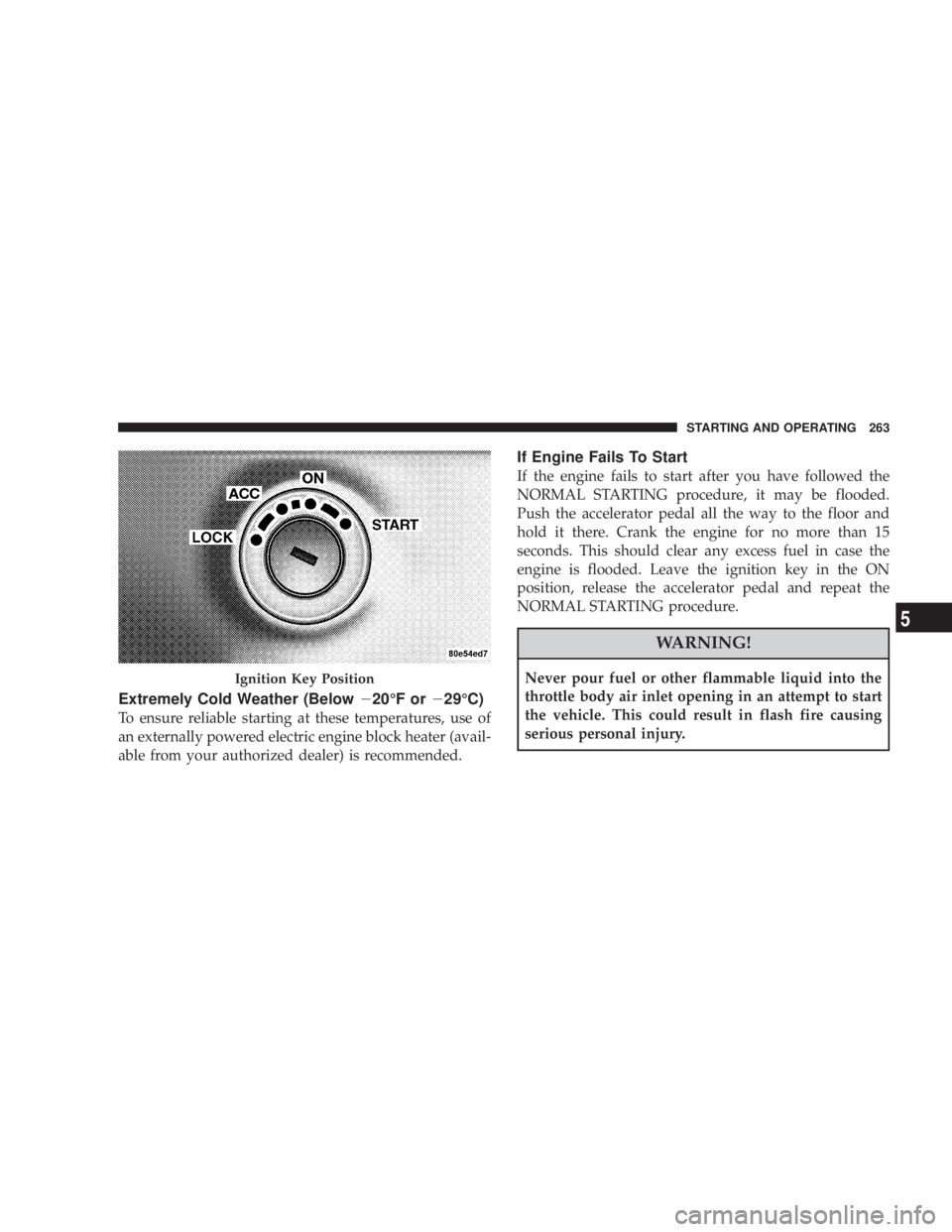
Simply turn the ignition switch to the START position
and release when the engine starts. If the engine fails to
start within 15 seconds, turn the ignition switch to the
LOCK position, wait 10 to 15 seconds, then repeat the
normal starting procedure. WARNING!Do not attempt to push or tow your vehicle to get it
started. Vehicles equipped with an automatic trans-
axle cannot be started this way. Unburned fuel could
enter the catalytic converter and once the engine has
started, ignite and damage the converter and vehicle.
If the vehicle has a discharged battery, booster cables
may be used to obtain a start from another vehicle.
This type of start can be dangerous if done improp-
erly, so follow the procedure carefully. See section 6
of this manual for jump starting instructions.
Tip Start Ð Automatic Transaxle Only
Do not press the accelerator. Turn the ignition key briefly
to START position, and release it. The starter motor will
continue to run, but will automatically disengage itself
when the engine is running.262 STARTING AND OPERATING
Page 265 of 467
Extremely Cold Weather (Below 2 20ÉF or 2 29ÉC)
To ensure reliable starting at these temperatures, use of
an externally powered electric engine block heater (avail-
able from your authorized dealer) is recommended. If Engine Fails To Start
If the engine fails to start after you have followed the
NORMAL STARTING procedure, it may be flooded.
Push the accelerator pedal all the way to the floor and
hold it there. Crank the engine for no more than 15
seconds. This should clear any excess fuel in case the
engine is flooded. Leave the ignition key in the ON
position, release the accelerator pedal and repeat the
NORMAL STARTING procedure.
WARNING!Never pour fuel or other flammable liquid into the
throttle body air inlet opening in an attempt to start
the vehicle. This could result in flash fire causing
serious personal injury.Ignition Key Position STARTING AND OPERATING 263
5