remote start DODGE AVENGER 2011 2.G User Guide
[x] Cancel search | Manufacturer: DODGE, Model Year: 2011, Model line: AVENGER, Model: DODGE AVENGER 2011 2.GPages: 494, PDF Size: 3.37 MB
Page 29 of 494
General Information
This device complies with part 15 of FCC rules and with
RS-210 of Industry Canada. Operation is subject to the
following conditions:
1. This device may not cause harmful interference.
2. This device must accept any interference that may be
received including interference that may cause undesired
operation.
NOTE:Changes or modifications not expressly ap-
proved by the party responsible for compliance could
void the user’s authority to operate the equipment.
If your RKE transmitter fails to operate from a normal
distance, check for these two conditions.
1. Weak battery in the RKE transmitter. The expected life
of a battery is five years. 2. Closeness to a radio transmitter such as a radio station
tower, airport transmitter, military base, and some mobile
or CB radios.
REMOTE START SYSTEM — IF EQUIPPED
This system uses the Remote Keyless Entry
(RKE) transmitter to start the engine conve-
niently from outside the vehicle while still
maintaining security. The system has a range of
approximately 300 ft (91 m).
NOTE: The vehicle must be equipped with an auto-
matic transmission to be equipped with Remote Start.
How To Use Remote Start
All of the following conditions must be met before the
engine will remote start:
•Shift lever in PARK
•Doors closed
2
THINGS TO KNOW BEFORE STARTING YOUR VEHICLE 27
Page 30 of 494
•Hood closed
•Trunk closed
•Hazard switch off
•Brake switch inactive (brake pedal not pressed)
•Ignition key removed from ignition switch
•Battery at an acceptable charge level, and
•RKE PANIC button not pressed
•System not disabled from previous remote start event
•Vehicle theft alarm not active
WARNING!
•Do not start or run an engine in a closed garage or
confined area. Exhaust gas contains Carbon Mon-
oxide (CO) which is odorless and colorless. Car-
bon Monoxide is poisonous and can cause serious
injury or death when inhaled.
•Keep Remote Keyless Entry (RKE) transmitters
away from children. Operation of the Remote Start
System, windows, door locks or other controls
could cause serious injury or death.
Remote Start Abort Message On Electronic Vehicle
Information Center (EVIC) — If Equipped
The following messages will display in the EVIC if the
vehicle fails to remote start or exits remote start prema-
turely:
•Remote Start Aborted — Door Ajar
28 THINGS TO KNOW BEFORE STARTING YOUR VEHICLE
Page 31 of 494
•Remote Start Aborted — Hood Ajar
•Remote Start Aborted — Trunk Ajar
•Remote Start Aborted — Fuel Low
•Remote Start Aborted — System Fault
The EVIC message stays active until the ignition is cycled
to the ON/RUN position.
To Enter Remote Start Mode
Press and release the REMOTE START button
on the RKE transmitter twice within five sec-
onds. The parking lights will flash and the horn
will chirp twice (if programmed). Then, the
engine will start and the vehicle will remain in the
Remote Start mode for a 15-minute cycle.
NOTE:
•If an engine fault is present the vehicle will start and
then shut down 10 seconds later.
•For security, power window operation is disabled
when the vehicle is in the Remote Start mode.
•The engine can be started two consecutive times (two
15 minute cycles) with the RKE transmitter. However,
the ignition switch must be cycled to the ON/RUN
position before you can repeat the start sequence for a
third cycle.
Remote start will also cancel if any of the following occur:
•The engine stalls or RPM exceeds 2500
•Any engine warning lamps come on
•Low Fuel Light turns on
•The hood is opened
•The hazard switch is pressed
•The transmission is moved out of PARK
•The brake pedal is pressed
2
THINGS TO KNOW BEFORE STARTING YOUR VEHICLE 29
Page 32 of 494
To Exit Remote Start Mode Without Driving The
Vehicle
Press and release the REMOTE START button one time or
allow the engine to run for the entire 15 minute cycle.
NOTE:To avoid unintentional shut downs, the system
will disable the one-time press of the Remote Start button
for two seconds after receiving a valid remote start
request.
To Exit Remote Start Mode And Drive The Vehicle
Before the end of the 15 minute cycle, press and release
the UNLOCK button on the RKE transmitter to unlock
the doors and disarm the Vehicle Security Alarm (if
equipped). Then insert the key into the ignition switch
and turn the switch to the ON/RUN position.
NOTE: The ignition switch must be in the ON/RUN
position in order to drive the vehicle.
DOOR LOCKS
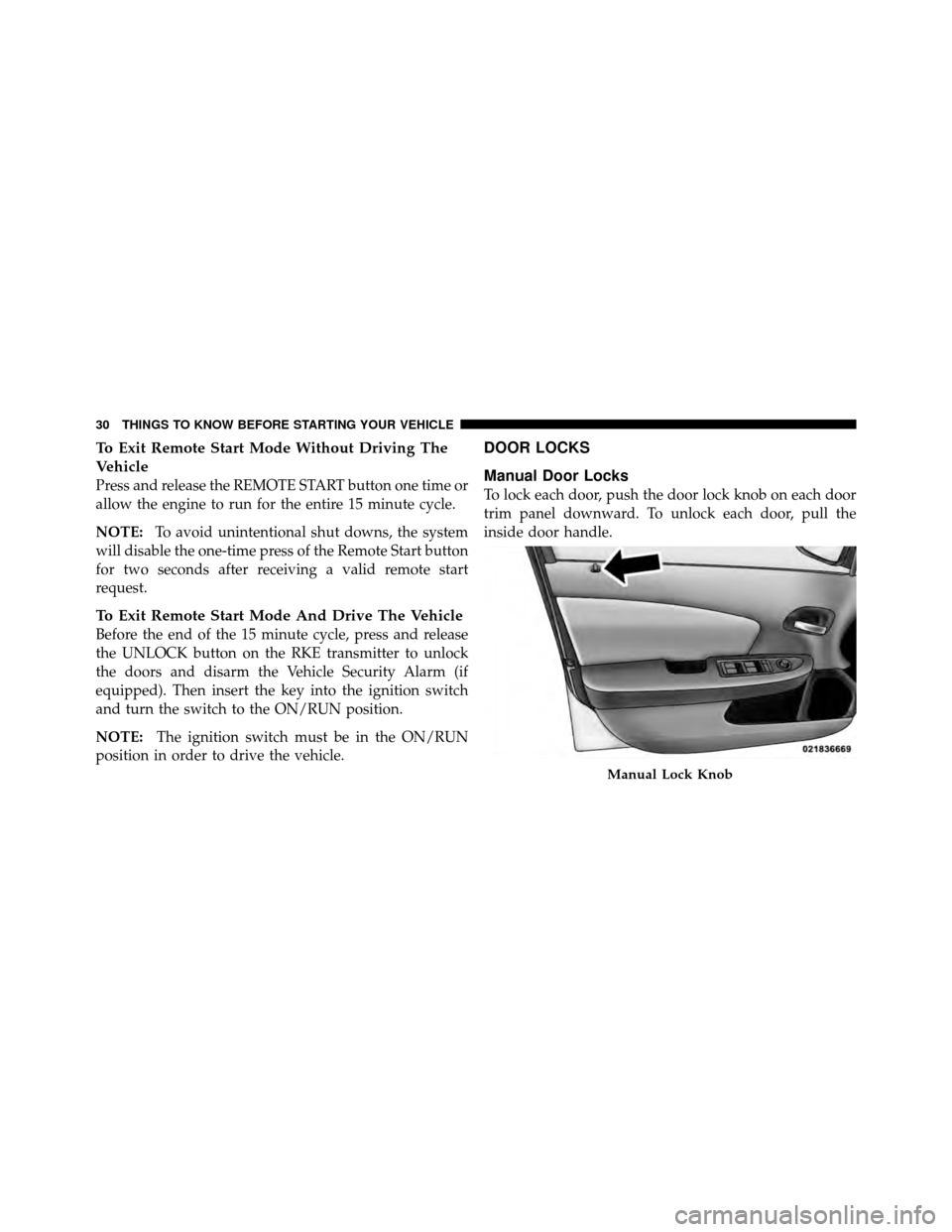
Manual Door Locks
To lock each door, push the door lock knob on each door
trim panel downward. To unlock each door, pull the
inside door handle.
Manual Lock Knob
30 THINGS TO KNOW BEFORE STARTING YOUR VEHICLE
Page 41 of 494
TRUNK RELEASE
Use the Remote Keyless Entry (RKE)
transmitter to open the trunk from
outside the vehicle. From inside the
vehicle the trunk lid can be released by
pressing the TRUNK RELEASE button
located on the instrument panel to the
left of the steering wheel.
NOTE: The shift lever must be in PARK for this switch
to operate.
With the ignition switch in the ON/RUN position, the
word “deck” will display in place of the odometer
display indicating that the trunk is open. The odometer
display will reappear once the trunk is closed or if the
trip button is depressed. With the ignition switch in the LOCK position or with the
key out, the word “deck” will display until the trunk is
closed.
On Electronic Vehicle Information Center (EVIC)
equipped vehicles, the words “Trunk Ajar” will display.
TRUNK SAFETY WARNING
WARNING!
Do not allow children to have access to the trunk,
either by climbing into the trunk from outside, or
through the inside of the vehicle. Always close the
trunk lid when your vehicle is unattended. Once in
the trunk, young children may not be able to escape,
even if they entered through the rear seat. If trapped
in the trunk, children can die from suffocation or
heat stroke.
Trunk Release
Button
2
THINGS TO KNOW BEFORE STARTING YOUR VEHICLE 39
Page 207 of 494
Press and release the SELECT Button to accept
a selection. The SELECT Button also resets
various Trip Functions.
Electronic Vehicle Information Center (EVIC)
Displays
When the appropriate conditions exist, the EVIC displays
the following messages:
•Turn Signal On (with a continuous warning chime
after one mile traveled)
•Left Front Turn Signal Light Out (with a single chime)
•Left Rear Turn Signal Light Out (with a single chime)
•Right Front Turn Signal Light Out (with a single
chime)
•Right Rear Turn Signal Light Out (with a single chime)
•RKE (Remote Keyless Entry) Battery Low (with a
single chime)
•Personal Settings Not Available – Vehicle Not In PARK
•Personal Settings Not Available – Vehicle in Motion
•Door(s) Ajar (with a single chime if vehicle is in
motion)
•Trunk Ajar (with a single chime)
•Headlights On
•Key In Ignition
•Remote start aborted — Door ajar
•Remote start aborted — Hood ajar
•Remote start aborted — Trunk ajar
•Remote start aborted — Fuel low
•Remote start disabled — System fault
SELECTButton
4
UNDERSTANDING YOUR INSTRUMENT PANEL 205
Page 216 of 494
Opening either front vehicle door will cancel this feature.
To make your selection, press the SELECT button until
Off, 45 sec., 5 min., or 10 min. appears.
Illumin. Approach
When this feature is selected, the headlights will activate
and remain on for up to 90 seconds when the doors are
unlocked with the remote keyless entry transmitter. To
make your selection, press the SELECT button until
“OFF,” “30 sec,” “60 sec,” or “90 sec” appears.
Hill Start Assist (HSA) — If Equipped
When on is selected, the HSA system is active. Refer to
“Electronic Brake Control System” in “Starting And
Operating” for system function and operating informa-
tion. To make your selection, press and release the
SELECT button until “On” or “Off” appears.
Display ECO — If Equipped
The “ECO” message is located in the EVIC, this message
can be turned on or off. To make your selection, press and
release the SELECT button until “ON” or “OFF” appears.
Display Units In
The EVIC and odometer can be changed between English
and Metric units of measure. To make your selection,
press and release the SELECT button until “ENGLISH”
or “METRIC” appears.
Calibrate Compass
Refer to “Compass Display” for more information.
Compass Variance
Refer to “Compass Display” for more information.
214 UNDERSTANDING YOUR INSTRUMENT PANEL
Page 271 of 494
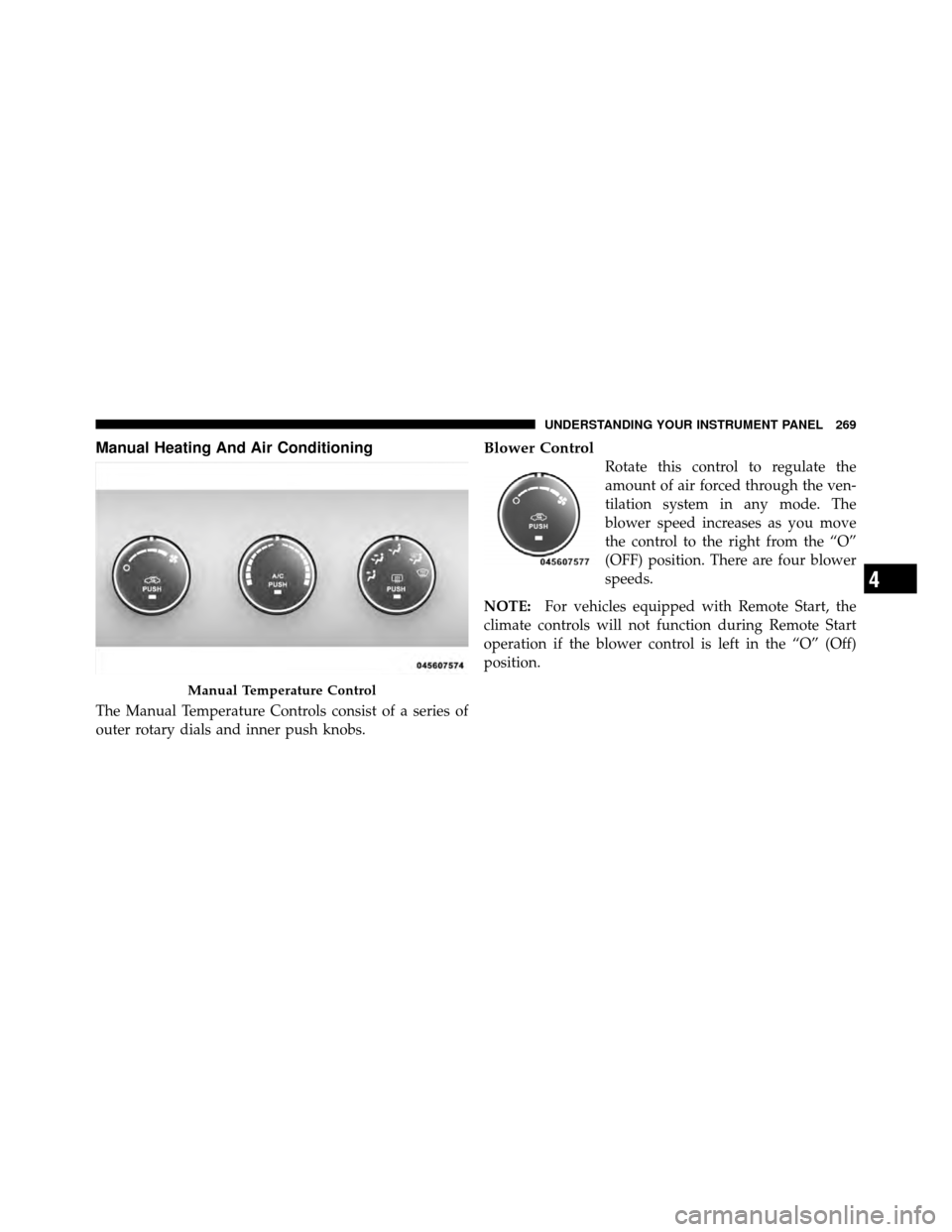
Manual Heating And Air Conditioning
The Manual Temperature Controls consist of a series of
outer rotary dials and inner push knobs.
Blower Control
Rotate this control to regulate the
amount of air forced through the ven-
tilation system in any mode. The
blower speed increases as you move
the control to the right from the “O”
(OFF) position. There are four blower
speeds.
NOTE: For vehicles equipped with Remote Start, the
climate controls will not function during Remote Start
operation if the blower control is left in the “O” (Off)
position.
Manual Temperature Control
4
UNDERSTANDING YOUR INSTRUMENT PANEL 269
Page 387 of 494
CAUTION!
Do not use a portable battery booster pack or any
other booster source with a system voltage greater
than 12 Volts or damage to the battery, starter motor,
alternator or electrical system may occur.
WARNING!
Do not attempt jump-starting if the battery is frozen.
It could rupture or explode and cause personal injury.
Preparations For Jump-Start
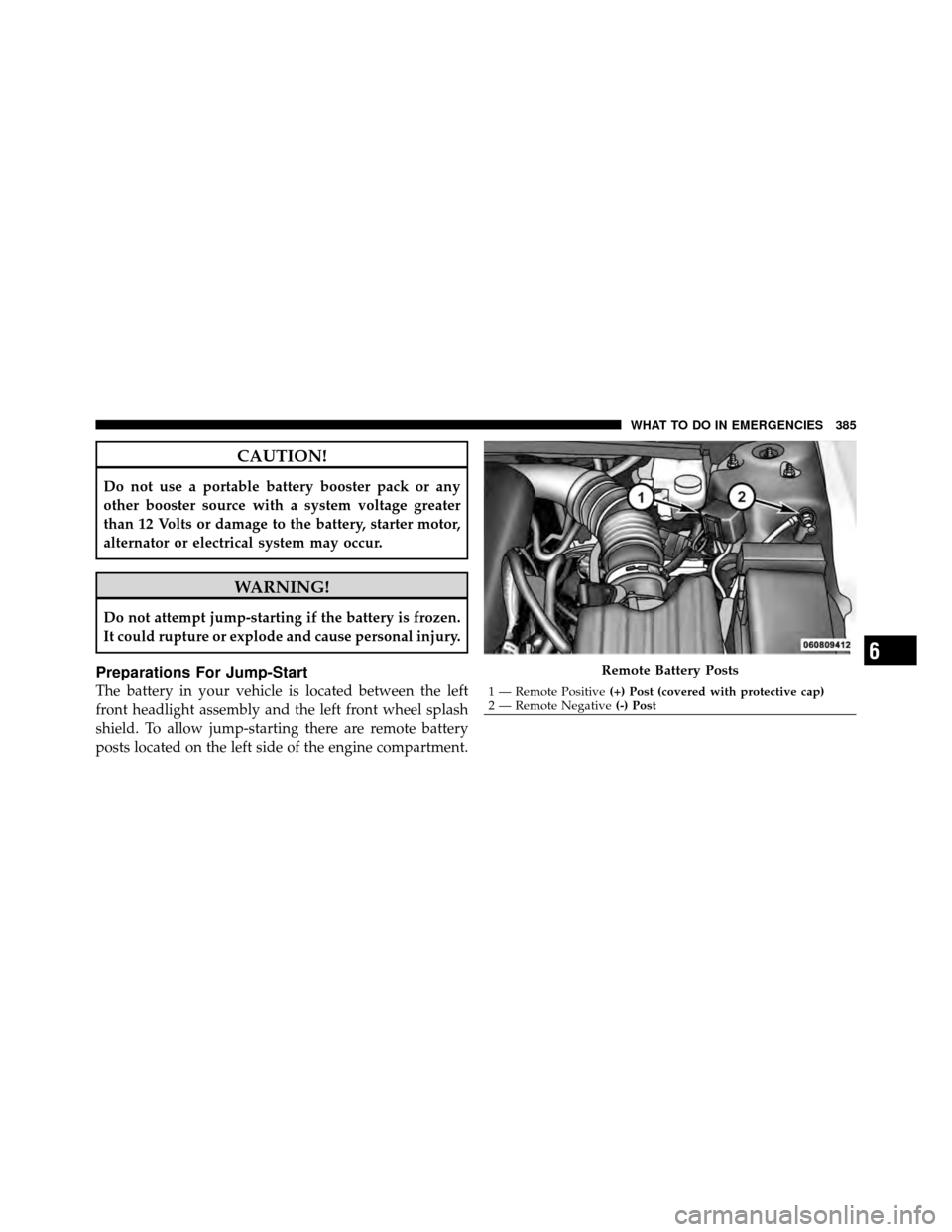
The battery in your vehicle is located between the left
front headlight assembly and the left front wheel splash
shield. To allow jump-starting there are remote battery
posts located on the left side of the engine compartment.
Remote Battery Posts
1 — Remote Positive(+) Post (covered with protective cap)
2 — Remote Negative (-) Post
6
WHAT TO DO IN EMERGENCIES 385
Page 388 of 494
WARNING!
•Take care to avoid the radiator cooling fan when-
ever the hood is raised. It can start anytime the
ignition switch is on. You can be injured by
moving fan blades.
•Remove any metal jewelry such as watch bands or
bracelets that might make an inadvertent electrical
contact. You could be seriously injured.
•Batteries contain sulfuric acid that can burn your
skin or eyes and generate hydrogen gas which is
flammable and explosive. Keep open flames or
sparks away from the battery.
1. Set the parking brake, shift the automatic transmission
into PARK and turn the ignition to LOCK.
2. Turn off the heater, radio, and all unnecessary electri-
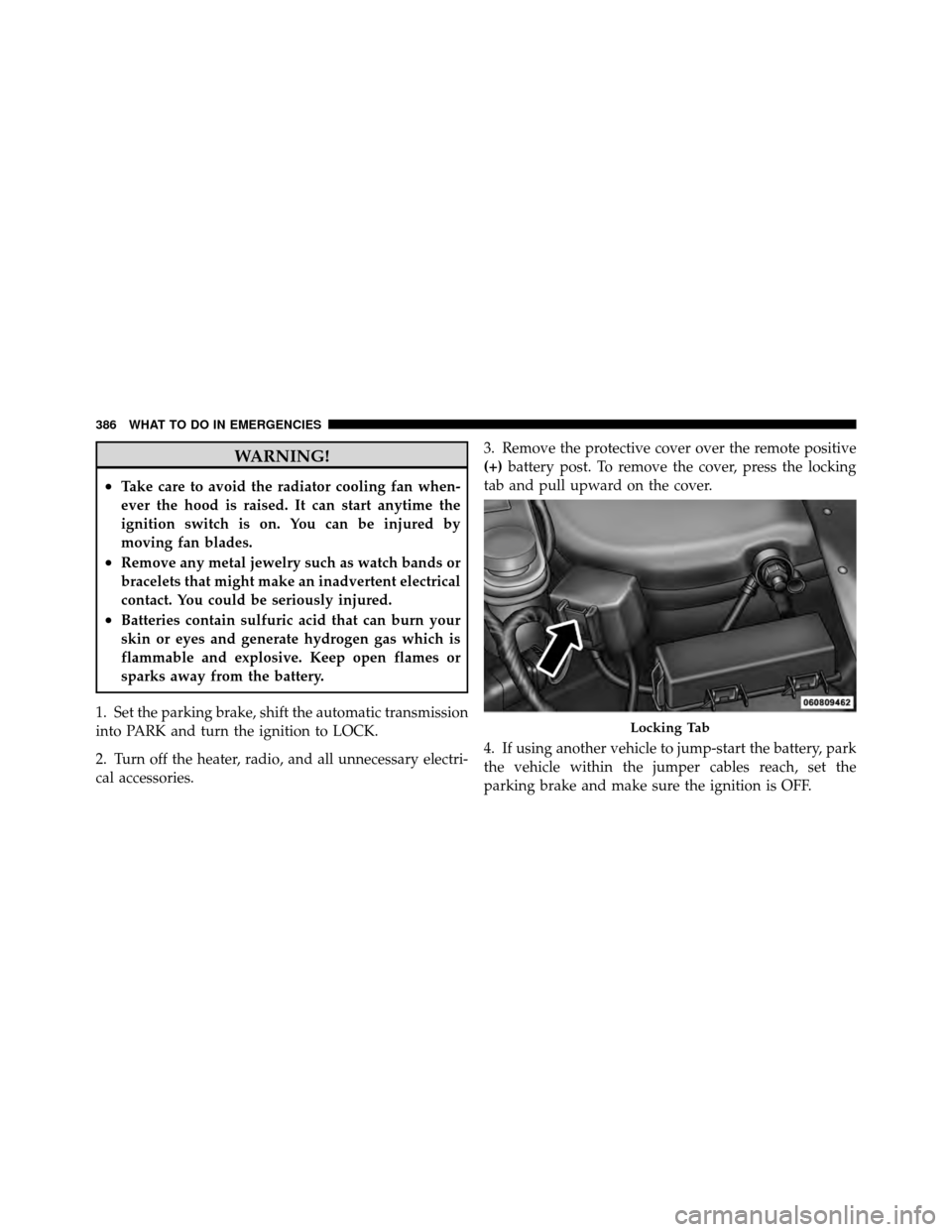
cal accessories. 3. Remove the protective cover over the remote positive
(+)
battery post. To remove the cover, press the locking
tab and pull upward on the cover.
4. If using another vehicle to jump-start the battery, park
the vehicle within the jumper cables reach, set the
parking brake and make sure the ignition is OFF.
Locking Tab
386 WHAT TO DO IN EMERGENCIES