ESP DODGE CALIBER SRT 2008 1.G User Guide
[x] Cancel search | Manufacturer: DODGE, Model Year: 2008, Model line: CALIBER SRT, Model: DODGE CALIBER SRT 2008 1.GPages: 373, PDF Size: 3 MB
Page 130 of 373
WARNING!
²Anti-lock system (ABS) cannot prevent the natural
laws of physics from acting on the vehicle, nor can
it increase braking or steering efficiency beyond
that afforded by the condition of the vehicle
brakes and tires or the traction afforded.
²The ABS cannot prevent accidents, including
those resulting from excessive speed in turns,
following another vehicle too closely, or hydro-
planing. Only a safe, attentive, and skillful driver
can prevent accidents.
²The capabilities of an ABS equipped vehicle must
never be exploited in a reckless or dangerous
manner which could jeopardize the user's safety
or the safety of others.
ELECTRONIC BRAKE CONTROL SYSTEM -
ABS/TCS/BAS/ESP
If your vehicle is equipped with the advanced electronic
brake control system that includes Anti-Lock Brake Sys-
tem (ABS), Traction Control System (TCS) Brake Assist
System (BAS), and Electronic Stability Program (ESP). All
four systems work together to enhance vehicle stability
and control in various driving conditions, and are com-
monly referred to as ESP.
Traction Control System (TCS)
This system monitors the amount of wheel spin of each of
the driven wheels. If wheel spin is detected, brake
pressure is applied to the slipping wheel(s) and engine
power is reduced to provide enhanced acceleration and
stability. A feature of the TCS system functions similar to
a limited slip differential and controls the wheel spin
across a driven axle. If one wheel on a driven axle is
spinning faster than the other, the system will apply the
UNDERSTANDING THE FEATURES OF YOUR VEHICLE 129
3
Page 132 of 373
ESP (Electronic Stability Program)
This system enhances directional control and stability of
the vehicle under various driving conditions. ESP cor-
rects for over/under steering of the vehicle by applying
the brake of the appropriate wheel to assist in counter-
acting the over/under steer condition. Engine power
may also be reduced to help the vehicle maintain the
desired path. ESP uses sensors in the vehicle to determine
the vehicle path intended by the driver and compares it
to the actual path of the vehicle. When the actual path
does not match the intended path, ESP applies the brake
of the appropriate wheel to assist in counteracting the
oversteer or understeer condition.
²Oversteer - when the vehicle is turning more than
appropriate for the steering wheel position.
²Understeer - when the vehicle is turning less than
appropriate for the steering wheel position.
ESP/TCS Indicator Light
The ªESP/TCS Indicator Lightº located in the instrument
cluster, starts to flash as soon as the tires lose traction and
the ESP system becomes active. The ªESP/TCS Indicator
Lightº also flashes when TCS is active. If the ªESP/TCS
Indicator Lightº begins to flash during acceleration, ease
up on the accelerator and apply as little throttle as
possible. Be sure to adapt your speed and driving to the
prevailing road conditions.
UNDERSTANDING THE FEATURES OF YOUR VEHICLE 131
3
Page 133 of 373
WARNING!
²Electronic Stability Program (ESP) cannot prevent
the natural laws of physics from acting on the
vehicle, nor can it increase the traction afforded by
prevailing road conditions.
²ESP cannot prevent accidents, including those
resulting from excessive speed in turns, driving on
very slippery surfaces, or hydroplaning. Only a
safe, attentive, and skillful driver can prevent
accidents.
²The capabilities of an ESP-equipped vehicle must
never be exploited in a reckless or dangerous
manner which could jeopardize the user's safety
or the safety of others.
ESP Operating Modes
The ESP system has 2 available operating modes.
ESP ON
This is the normal operating mode for ESP. Whenever the
vehicle is started the ESP system will be in this mode.
This mode should be used for most driving situations.
ESP should only be turned to ªPartial ESPº for specific
reasons as noted below.
PARTIAL ESP
This mode is entered by momentarily depressing the
ªESP OFFº button.
When in ªPartial ESPº mode, the TCS portion of ESP has
been disabled, the thresholds for ESP activation are
raised, and the ªESP/TCS Indicator Lightº will be illu-
minated. This mode is intended to be used for a more
spirited driving experience, or if the vehicle is in deep
snow, sand, or gravel conditions and more wheel spin
than ESP would normally allow is required.
132 UNDERSTANDING THE FEATURES OF YOUR VEHICLE
Page 134 of 373
To turn ESP on again, momentarily depress the
ªESP OFFº button.
WARNING!
In the Partial ESP mode, the engine torque reduction
and stability features are desensitized. Therefore, the
enhanced vehicle stability offered by ESP is
unavailable.
NOTE:To improve the vehicle's traction when driving
with snow chains, or starting off in deep snow, sand or
gravel, it may be desirable to switch to the ªPartial ESPº
mode by pressing the ªESP OFFº button. Once the
situation requiring ESP to be switched to the ªPartialESPº mode is overcome, turn ESP back on by momen-
tarily depressing the ªESP OFFº button. This may be
done while the vehicle is in motion.
ESP/BAS Warning Light and ESP/TCS Indicator
Light
The malfunction indicator for the ESP is combined with
the BAS indicator. The yellow ªESP/BAS Warning
Lampº and the yellow ªESP/TCS Indicator Lightº in the
instrument cluster both come on when the ignition
switch is turned to the ªONº position. They should both
go out with the engine running. If the ªESP/BAS Warn-
ing Lampº comes on continuously with the engine
running, a malfunction has been detected in either the
ESP or BAS system, or both. If this light remains on after
several ignition cycles, and the vehicle has been driven
several miles at speeds greater than 30 mph (48 km/h),
see your authorized dealer as soon as possible to have the
problem diagnosed and corrected.
UNDERSTANDING THE FEATURES OF YOUR VEHICLE 133
3
Page 135 of 373
NOTE:
²The ªESP Indicator Lightº and the ªESP/BAS Warning
Lightº come on momentarily each time the ignition
switch is turned ON.
²Each time the ignition is turned ON, the ESP System
will be ON even if it was turned off previously.
²The ESP Control System will make buzzing or clicking
sounds when it is active. This is normal; the sounds
will stop when ESP becomes inactive following the
maneuver that caused the ESP activation.
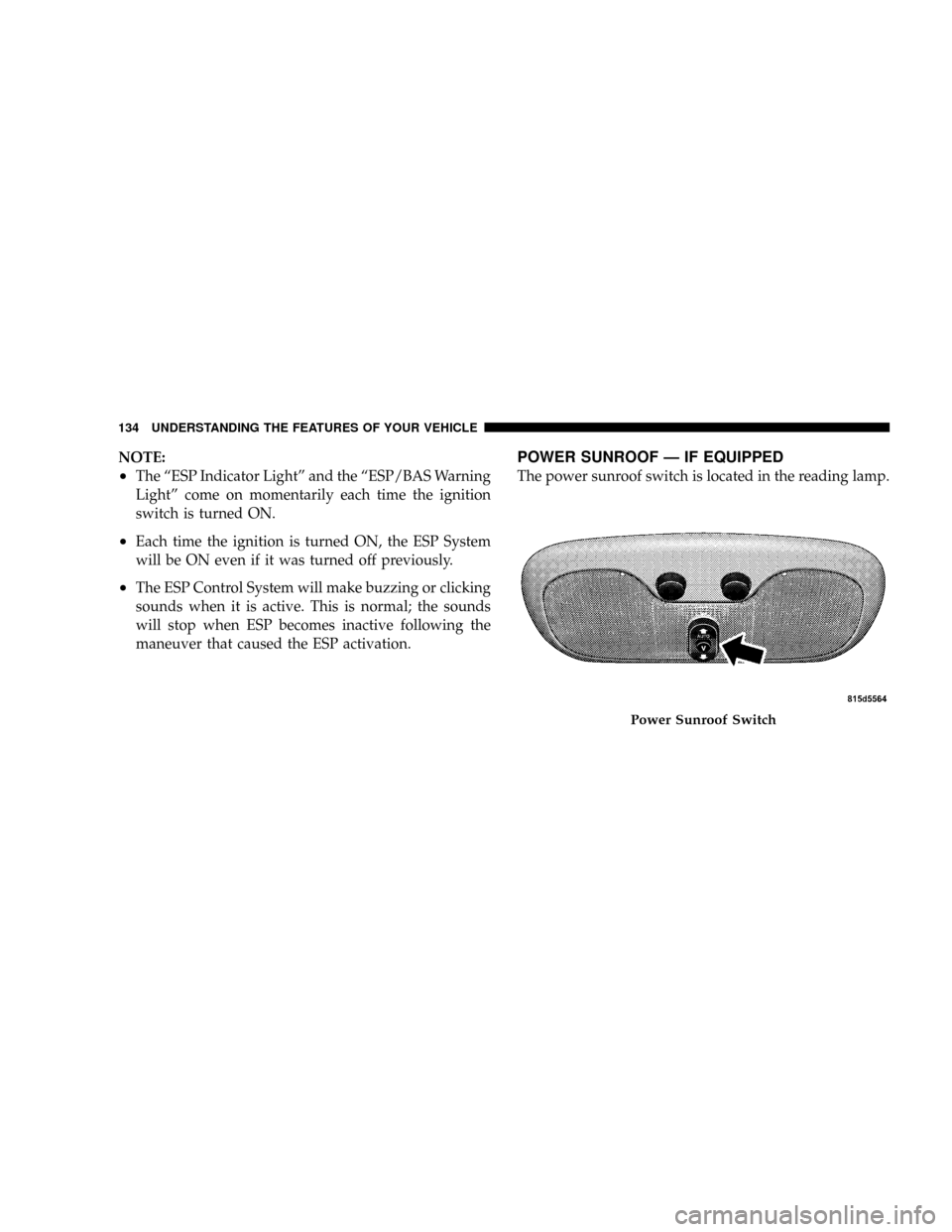
POWER SUNROOF Ð IF EQUIPPED
The power sunroof switch is located in the reading lamp.
Power Sunroof Switch
134 UNDERSTANDING THE FEATURES OF YOUR VEHICLE
Page 162 of 373
15. Odometer/Trip Odometer Reset Knob
Press this button to change the display from odometer to
either of the two trip odometer settings. Trip A or Trip B
will appear when in the trip odometer mode. Push in and
hold the button for two seconds to reset the trip odometer
to 0 miles or kilometers. The odometer must be in trip
mode to reset.
16. Electronic Throttle Control Indicator Light
This light informs you of a problem with the
Electronic Throttle Control system. If a prob-
lem is detected, the light will come on while the
engine is running. If the light remains lit with
the engine running your vehicle will usually be drivable
and not need towing, however see your dealer for service
as soon as possible.
If the light is flashing when the engine is running you
may experience power loss, an elevated/rough idle, andincreased brake pedal effort, and your vehicle may
require towing. Immediate service is required.
The light will come on when the ignition switch is first
turned on and remain on briefly as a bulb check. This is
normal. If the light does not come on during starting,
have the system checked by an authorized dealer.
17. Electronic Stability Program (ESP) Indicator
Light/Traction Control System (TCS) Indicator Light Ð
If Equipped
If this indicator light flashes during accelera-
tion, apply as little throttle as possible. While
driving, ease up on the accelerator. Adapt your
speed and driving to the prevailing road con-
ditions, and do not switch off the ESP, or TCS Ð if
equipped.
18. Brake Warning Light
The red ªBRAKEº warning light will come on when the
ignition key is first turned on, and stay on briefly as a
UNDERSTANDING YOUR INSTRUMENT PANEL 161
4
Page 163 of 373
bulb check. If the bulb does not come on during starting,
see your authorized dealer for service. If the light stays
on, it may be an indication that the parking brake has not
been released, or there is a low brake fluid level. If the
light remains on when the parking brake has been
disengaged, and the fluid level is at the full mark on the
master cylinder reservoir, it indicates a possible brake
hydraulic system malfunction or a problem with the
Brake Booster. In this case, the light will remain on until
the condition has been corrected. If the problem is related
to the brake Booster the ABS pump will run when
applying the brake.
The ªBRAKEº warning light will flash whether or not it
is in gear, if the park brake is applied, and the engine is
running.
If brake failure is indicated, immediate repair is neces-
sary. Operating the vehicle in this condition is danger-
ous!19. Turn Signal Indicators
The arrows will flash in unison with the exterior
turn signal, when using the turn signal lever.
20. Front Fog Light Indicator Ð If Equipped
This light shows when the front fog lights are ON.
21. Electronic Stability Program (ESP) Indicator Light
The malfunction lamp for the ESP is combined
with BAS. The yellow ªESP/BAS Warning
Lampº comes on when the ignition switch is
turned to the ªONº position. They should go
out with the engine running. If the ªESP/BAS Warning
Lampº comes on continuously with the engine running,
a malfunction has been detected in either the ESP or the
BAS system. If this light remains on after several ignition
cycles, and the vehicle has been driven several miles at
speeds greater than 30 mph (48 km/h), see your autho-
rized dealer as soon as possible.
162 UNDERSTANDING YOUR INSTRUMENT PANEL
Page 164 of 373
22. Tire Pressure Monitor Light Ð If Equipped
Each tire, including the spare (if provided),
should be checked monthly when cold and
inflated to the inflation pressure recommended
by the vehicle manufacturer on the vehicle
placard or tire inflation pressure label. (If your vehicle
has tires of a different size than the size indicated on the
vehicle placard or tire inflation pressure label, you should
determine the proper tire inflation pressure for those
tires.)
As an added safety feature, your vehicle has been
equipped with a tire pressure monitoring system (TPMS)
that illuminates a low tire pressure telltale when one or
more of your tires are significantly under-inflated. Ac-
cordingly, when the low tire pressure telltale illuminates,
you should stop and check your tires as soon as possible,
and inflate them to the proper pressure. Driving on asignificantly under-inflated tire causes the tire to over-
heat and can lead to tire failure. Under-inflation also
reduces fuel efficiency and tire tread life, and may affect
the vehicle's handling and stopping ability.
Please note that the TPMS is not a substitute for proper
tire maintenance, and it is the driver 's responsibility to
maintain correct tire pressure, even if under-inflation has
not reached the level to trigger illumination of the TPMS
low tire pressure telltale.
The Tire Pressure Monitoring Telltale Lamp will illumi-
nate in the instrument cluster, and an audible chime will
be activated when one or more tire pressures is low. The
Tire Pressure Monitoring Telltale Lamp will flash on and
off for 60 seconds when a system fault is detected. The
flash cycle will repeat every ten minutes or until the fault
condition is removed and reset.
UNDERSTANDING YOUR INSTRUMENT PANEL 163
4
Page 174 of 373
Personal Settings (Customer Programmable
Features)
This allows the driver to set and recall features when the
vehicle is stopped.
Press and release the EVIC button until Personal Settings
is displayed in the EVIC.
Use the EVIC button to display one of the following
choices:
Language
When in this display you may select different languages
for all display nomenclature, including the trip functions.
Pressing the EVIC button while in this display selects
English, Espanol, or Francais depending on availability.
As you continue the displayed information will be shown
in the selected language.
NOTE:UConnectŸ language will not change using the
EVIC. Please refer to ªLanguage Selectionº in theHANDS±FREE COMMUNICATION (UConnectŸ) Ð IF
EQUIPPED section of this manual for details.
Lock Doors Automatically at 15 MPH (24 km/h)
When ON is selected all doors lock automatically when
the speed of the vehicle reaches 15 MPH (24 km/h). Press
and hold the EVIC button when in this display until
ªONº or ªOFFº appears to make your selection.
Auto Unlock On Exit
When ON is selected all the vehicle's doors will unlock
when the driver's door is opened if the vehicle is
stopped. Press and hold the EVIC button when in this
display until ªONº or ªOFFº appears to make your
selection.
Remote Unlock Driver's Door 1st
WhenDRIVER'S DOOR 1STis selected only the driv-
er's door will unlock on the first press of the remote
keyless entry unlock button and require a second press to
unlock the remaining locked doors. WhenREMOTE
UNDERSTANDING YOUR INSTRUMENT PANEL 173
4
Page 177 of 373
indicator system is duty cycle based, which means the
engine oil change interval may fluctuate dependent upon
your personal driving style.
Unless reset, this message will continue to display each
time you turn the ignition switch to the ON/RUN
position. To turn off the message temporarily, press and
release the Menu button. To reset the oil change indicator
system (after performing the scheduled maintenance)
refer to the following procedure.
1. Turn the ignition switch to the ON position(Do not
start the engine).
2. Fully depress the accelerator pedal slowly three times
within 10 seconds.
3. Turn the ignition switch to the OFF/LOCK position.
NOTE:If the indicator message illuminates when you
start the vehicle, the oil change indicator system did not
reset. If necessary repeat this procedure.Setting The Compass Variance And Compass
Calibration
Compass Variance
Compass Variance is the difference between magnetic
North and Geographic North. In some areas of the
country, the difference between magnetic and geographic
North is great enough to cause the compass to give false
readings. In order to ensure compass accuracy, the com-
pass variance should be set to the zone number on the
compass variance map that corresponds to the current
location of the vehicle.
NOTE:Magnetic materials should be kept away from
the Instrument Panel. This is where the compass sensor is
located.
176 UNDERSTANDING YOUR INSTRUMENT PANEL