audio DODGE CALIBER SRT 2008 1.G User Guide
[x] Cancel search | Manufacturer: DODGE, Model Year: 2008, Model line: CALIBER SRT, Model: DODGE CALIBER SRT 2008 1.GPages: 373, PDF Size: 3 MB
Page 172 of 373
0-60 MPH (0-100 kp/h)
When the 0-60 mph (100 kp/h) screen is active, the time
that the vehicle takes to reach 60 MPH (100 kp/h) will be
displayed.
²The feature will ªreadyº when the vehicle is at 0 mph.
The SEC text will flash indicating that conditions are
met for the event to begin.
²If the vehicle does not reach 60 MPH (100 kp/h) in less
then 10 seconds, the display will revert back to dashes.
²Pressing the trip button will display the vehicle best
time to 60 MPH (100 kp/h).
²To clear the vehicle best, hold the trip button, then
press and release the EVIC button. This will reset the
best and current values.
G-Force
When the G-Force Screen is active, all four G-force values
will be displayed; two longitude and two latitude.
²When a force greater than 0 is measured, the display
will update the values as it climbs. As the G-Forces fall
in value, the peak forces are held. After0Gis
measured in the vehicle the peak values will continue
to be displayed for 3 seconds. After 3 seconds, the
value will revert back to 0.
Compass/Temperature/Audio Ð If Equipped
Press and release the EVIC button to display one of eight
compass headings to indicate the direction the vehicle is
facing, the outside temperature and the current radio
station.
For additional information regarding the compass, refer
to Personal Settings (Customer Programmable Features)
in this section.
UNDERSTANDING YOUR INSTRUMENT PANEL 171
4
Page 181 of 373
will remain active for up to 10 minutes after the ignition
switch has been turned OFF. Opening a vehicle front
door will cancel this feature.
ELECTRONIC DIGITAL CLOCK
The clock and radio each use the display panel built into
the radio. A digital readout shows the frequency and/or
time in hours and minutes (depending on your radio
model), whenever the ignition switch is in the ON or
ACC position.
When the ignition switch is in the OFF position, or when
the radio frequency is being displayed, timekeeping is
accurately maintained.
On the AM/FM/CD (6-disc) radio, the time button
alternates the location of the time and frequency on the
display. On the AM/FM/CD (single-disc) radio, only one
of the two, time or frequency, is displayed.
Clock Setting Procedure
1. Press and hold the TIME button until the hours blink.
2. Adjust the hours by turning the right side TUNE/
AUDIO control knob.
3. After the hours are adjusted, push the right side
TUNE/AUDIO control knob to set the minutes.
4. Adjust the minutes by turning the right side TUNE/
AUDIO control knob.
5. To exit, press any button/knob, or wait approximately
five seconds.
180 UNDERSTANDING YOUR INSTRUMENT PANEL
Page 182 of 373
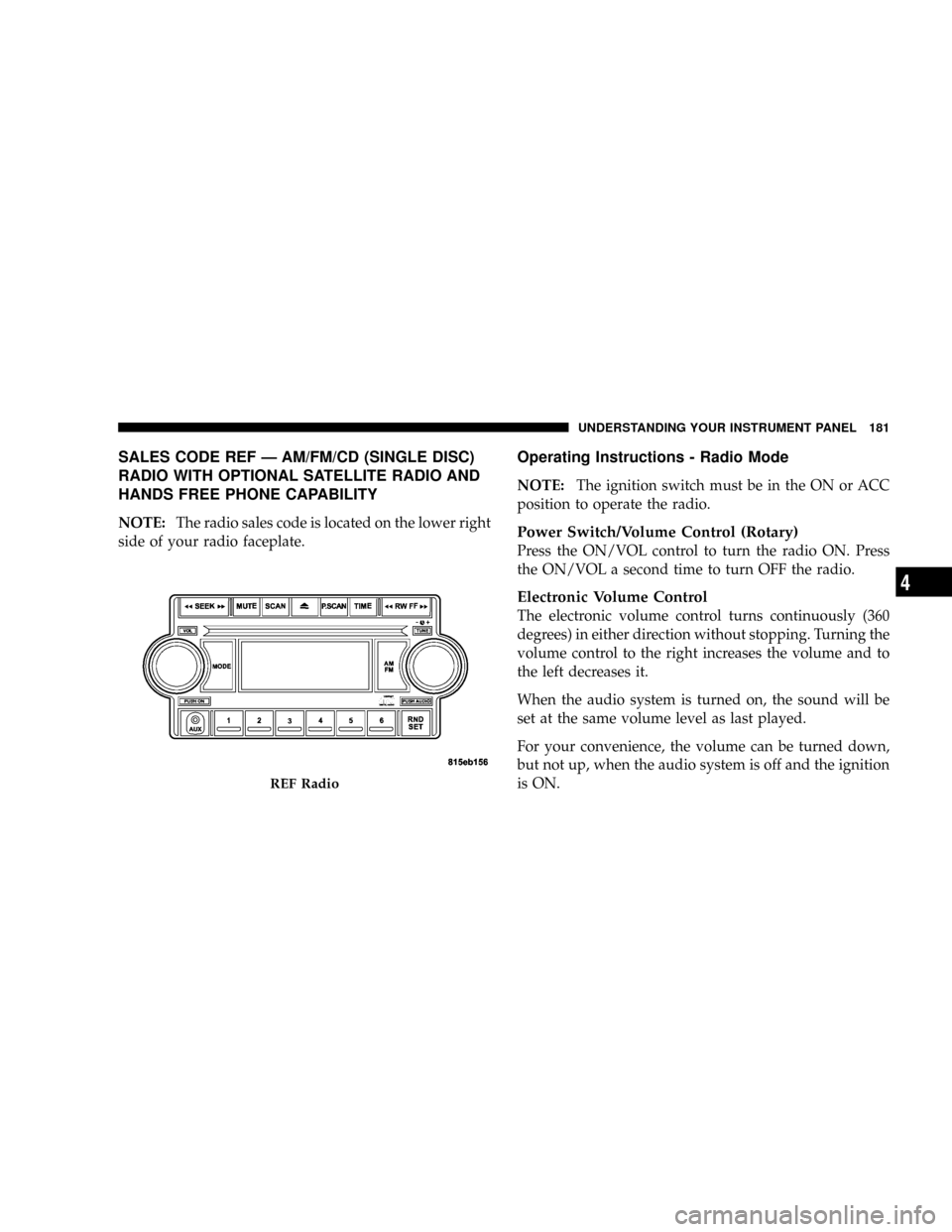
SALES CODE REF Ð AM/FM/CD (SINGLE DISC)
RADIO WITH OPTIONAL SATELLITE RADIO AND
HANDS FREE PHONE CAPABILITY
NOTE:The radio sales code is located on the lower right
side of your radio faceplate.
Operating Instructions - Radio Mode
NOTE:The ignition switch must be in the ON or ACC
position to operate the radio.
Power Switch/Volume Control (Rotary)
Press the ON/VOL control to turn the radio ON. Press
the ON/VOL a second time to turn OFF the radio.
Electronic Volume Control
The electronic volume control turns continuously (360
degrees) in either direction without stopping. Turning the
volume control to the right increases the volume and to
the left decreases it.
When the audio system is turned on, the sound will be
set at the same volume level as last played.
For your convenience, the volume can be turned down,
but not up, when the audio system is off and the ignition
is ON.
REF Radio
UNDERSTANDING YOUR INSTRUMENT PANEL 181
4
Page 184 of 373
Clock Setting Procedure
1. Press and hold the TIME button until the hours blink.
2. Adjust the hours by turning the right side Tune/
Audio control.
3. After the hours are adjusted, press the right side
Tune/Audio control to set the minutes. The minutes will
begin to blink.
4. Adjust the minutes using the right side Tune/Audio
control.
5. To exit, press any button/knob or wait five seconds.
RW/FF (Radio Mode)
Pressing the rewind/fast forward button causes the tuner
to search for the next frequency in the direction of the
arrows. This feature operates in either AM, FM or Satel-
lite (if equipped) frequencies.
TUNE Control (Radio Mode)
Turn the right side rotary control clockwise to increase or
counterclockwise to decrease the frequency.
AM/FM Button (Radio Mode)
Press the button to select AM or FM modes.
Setting the Tone, Balance, and Fade
Press the rotary TUNE control and BASS will display.
Turn the TUNE control to the right or left to increase or
decrease the Bass tones.
Press the rotary TUNE control a second time and MID
will display. Turn the TUNE control to the right or left to
increase or decrease the Mid-Range tones.
Press the rotary TUNE control a third time and TREB will
display. Turn the TUNE control to the right or left to
increase or decrease the Treble tones.
UNDERSTANDING YOUR INSTRUMENT PANEL 183
4
Page 188 of 373
Operation Instructions - Auxiliary Mode
The auxiliary (AUX) jack is an audio input jack, which
allows the user to plug in a portable device such as an
MP3 player, cassette player, or microphone and utilize
the vehicle's audio system to amplify the source and play
through the vehicle speakers.
The auxiliary mode becomes active when an electrical
device is plugged into the AUX jack using a standard 3.5
mm stereo audio cable and the user presses and releases
the MODE button until AUX appears on the display.
NOTE:The radio will return to the last stored mode if
the ignition switch is turned from the OFF/LOCK posi-
tion to the ACC position, the radio is turned on, and the
radio was previously in the AUX mode.
SEEK Button (Auxiliary Mode)
No function.
MUTE Button (Auxiliary Mode)
Press the MUTE button to cancel the sound from the
speakers.9MUTE9will display. Press the MUTE button a
second time and the sound from the speakers will return.
Rotating the volume control or turning off the ignition
will also return the sound from the speakers.
SCAN Button (Auxiliary Mode)
No function.
EJECT Button (Auxiliary Mode)
No function.
PSCAN Button (Auxiliary Mode)
No function.
TIME Button (Auxiliary Mode)
Press this button to change the display from elapsed
playing time to time of day. The time of day will display
for five seconds.
UNDERSTANDING YOUR INSTRUMENT PANEL 187
4
Page 190 of 373
Operating Instructions - Radio Mode
NOTE:The ignition switch must be in the ON or ACC
position to operate the radio.
Power Switch/Volume Control (Rotary)
Press the ON/VOL control to turn the radio ON. Press
the ON/VOL a second time to turn OFF the radio.
Electronic Volume Control
The electronic volume control turns continuously (360
degrees) in either direction without stopping. Turning the
volume control to the right increases the volume and to
the left decreases it.
When the audio system is turned on, the sound will be
set at the same volume level as last played.
Mode Button (Radio Mode)
Press the Mode button repeatedly to select between the
CD player, Cassette, Satellite, or Vehicle Entertainment
System (VESŸ) (if equipped).
SEEK Button (Radio Mode)
Press and release the SEEK button to search for the next
station in either AM/FM or Satellite (if equipped) mode.
Press the right side of the button to seek up and the left
side to seek down. The radio will remained tuned to the
new station until you make another selection. Holding
the button and will bypass stations without stopping
until you release it.
SCAN Button (Radio Mode)
Pressing the SCAN button causes the tuner to search for
the next station, in either AM, FM or Satellite (if
equipped) frequencies, pausing for five seconds (satellite
scan eight seconds) at each listenable station before
continuing to the next. To stop the search, press SCAN a
second time.
TIME Button
Press the time button and the time of day will display for
five seconds.
UNDERSTANDING YOUR INSTRUMENT PANEL 189
4
Page 191 of 373
Clock Setting Procedure
1. Press and hold the TIME button until the hours blink.
2. Adjust the hours by turning the right side Tune/
Audio control.
3. After the hours are adjusted, press the right side
Tune/Audio control to set the minutes. The minutes will
begin to blink.
4. Adjust the minutes using the right side Tune/Audio
control.
5. To exit, press any button/knob or wait five seconds.
INFO Button (Radio Mode)
Press the INFO button for an RBDS station (one with call
letters displayed). The radio will return a Radio Text
message broadcast (if available) from an FM station (FM
mode only).
RW/FF (Radio Mode)
Pressing the rewind/fast forward button causes the tuner
to search for the next frequency in the direction of the
arrows. This feature operates in either AM, FM or Satel-
lite (if equipped) frequencies.
TUNE Control (Radio Mode)
Turn the right side rotary control to increase or decrease
the frequency.
AM/FM Button (Radio Mode)
Press the button to select AM or FM modes.
Setting the Tone, Balance, and Fade
Press the rotary TUNE control and BASS will display.
Turn the TUNE control to the right or left to increase or
decrease the Bass tones.
Press the rotary TUNE control a second time and MID
will display. Turn the TUNE control to the right or left to
increase or decrease the Mid-Range tones.
190 UNDERSTANDING YOUR INSTRUMENT PANEL
Page 195 of 373
SCAN Button
Press this button to play 10 seconds of each selection.
Press the SCAN button a second time to cancel the
feature.
Changing Tape Direction
If you wish to change the direction of tape travel (side
being played), press Preset 6. The lighted arrow in the
display window will show the new direction.
Metal Tape Selection
If a standard metal tape is inserted into the player, the
player will automatically select the correct equalization.
Pinch Roller Release
If ignition power or the radio ON/OFF switch is turned
off, the pinch roller will automatically retract to protect
the tape from any damage. When power is restored to the
tape player, the pinch roller will automatically reengage
and the tape will resume play.
Noise Reduction
The Dolby Noise Reduction System* is on whenever the
tape player is on, but may be switched off.
To turn off the Dolby Noise Reduction System: Press
Preset 1 after you insert the tape. The NR light in the
display will go off when the Dolby System is off.
* ºDolbyº noise reduction is manufactured under license
from Dolby Laboratories Licensing Corporation. Dolby
and the double-D symbol are trademarks of Dolby Labo-
ratories Licensing Corporation.
Operation Instructions - (CD MODE for CD Audio
Play)
NOTE:The ignition switch must be in the ON or ACC
position to operate the radio.
NOTE:
This Radio is capable of playing compact discs
(CD), recordable compact discs (CD-R), rewritable compact
194 UNDERSTANDING YOUR INSTRUMENT PANEL
Page 196 of 373
discs (CD-RW) compact discs with MP3 tracks and multi-
session compact discs with CD and MP3 tracks and WMA.
Inserting Compact Disc(s)
CAUTION!
This CD player will accept 4 3/4 inch (12 cm) discs
only. The use of other sized discs may damage the
CD player mechanism.
You may eject a disc with the radio OFF.
If you insert a disc with the ignition ON and the radio
ON, the unit will switch from radio to CD mode and
begin to play when you insert the disc. The display will
show the disc number, the track number, and index time
in minutes and seconds. Play will begin at the start of
track one.
SEEK Button (CD MODE for CD Audio Play)
Press the right side of the SEEK button for the next
selection on the CD. Press the left side of the button to
return to the beginning of the current selection, or return
to the beginning of the previous selection if the CD is
within the first five seconds of the current selection.
SCAN Button (CD MODE for CD Audio Play)
Press the SCAN button to scan through each track on the
CD currently playing.
LOAD/EJECT Button (CD Mode for CD Audio
Play)
LOAD/EJECT - Load
Press the LOAD/EJT button and the push-
button with the corresponding number where
the CD is being loaded. The radio will display
PLEASE WAIT and prompt when to INSERT
DISC. After the radio displays9INSERT DISC,9insert the
CD into the player.
UNDERSTANDING YOUR INSTRUMENT PANEL 195
4
Page 197 of 373
Radio display will show9LOADING DISC9when the disc
is loading and ªREADING DISCº when the radio is
reading the disc.
LOAD/EJT - Eject
Press the LOAD/EJT button and the push-
button with the corresponding number where
the CD was loaded and the disc will unload
and move to the entrance for easy removal.
Radio display will show9EJECTING DISC9when the disc
is being ejected and prompt the user to remove the disc.
Press and hold the LOAD/EJT button for five seconds
and all CDs will be ejected from the radio.
If you have ejected a disc and have not removed it within
15 seconds, it will be reloaded. If the CD is not removed,
the radio will continue to play the non-removed CD. If
the CD is removed and there are other CDs in the radio,
the radio will play the next CD after a two-minute
timeout. If the CD is removed and there are no other CDsin the radio, the radio will remain in CD mode and
display9INSERT DISCº for two minutes. After two
minutes, the radio will go to the previous tuner mode.
The disc can be ejected with the radio and ignition OFF.TIME Button (CD MODE for CD Audio Play)
Press this button to change the display from a large CD
playing time display to a small CD playing time display.
RW/FF (CD MODE for CD Audio Play)
Press and hold FF (Fast Forward) and the CD player will
begin to fast forward until FF is released or RW or
another CD button is pressed. The RW (Reverse) button
works in a similar manner.
Press and hold the FF button to fast forward through the
tracks. Release the FF button to stop the fast forward
feature. If the RW button is pressed, the current track will
reverse to the beginning of the track and begin playing.
196 UNDERSTANDING YOUR INSTRUMENT PANEL