ignition DODGE CALIBER SRT 2008 1.G Owner's Manual
[x] Cancel search | Manufacturer: DODGE, Model Year: 2008, Model line: CALIBER SRT, Model: DODGE CALIBER SRT 2008 1.GPages: 373, PDF Size: 3 MB
Page 55 of 373
Airbag Warning Light
You will want to have the airbags ready to
inflate for your protection in an impact. While
the airbag system is designed to be mainte-
nance free, if any of the following occurs, have
an authorized dealer service the system
promptly:
²The Airbag Warning Light does not come on or flickers
during the 6 to 8 seconds when the ignition switch is
first turned on.
²The light remains on or flickers after the 6 to 8 second
interval.
²The light flickers or comes on and remains on while
driving.
Event Data Recorder (EDR)
In the event of an accident, your vehicle is designed to
record up to 5 - seconds of specific vehicle data param-
eters (see list below) in an event data recorder prior to the
moment of airbag deployment, or near-deployment, and
up to a quarter second of high-speed deceleration data
during and/or after air bag deployment or near-
deployment. EDR data are ONLY recorded if an airbag
deploys, or nearly deploys, and are otherwise unavail-
able.
NOTE:
1. A near-deployment event occurs when the airbag
sensor detects severe vehicle deceleration usually indica-
tive of a crash, but not severe enough to warrant airbag
deployment.
2. Under certain circumstances, EDR data may not be
recorded (e.g., loss of battery power).
54 THINGS TO KNOW BEFORE STARTING YOUR VEHICLE
Page 57 of 373
Data Parameters that May Be Recorded:
²Diagnostic trouble code(s) and warning lamp status
for electronically-controlled safety systems, including
the airbag system
²Airbag disable lamp status (if equipped)
²9Time9of airbag deployment (in terms of ignition
cycles and vehicle mileage)
²Airbag deployment level (if applicable)
²Impact acceleration and angle
²Seatbelt status
²Brake status (service and parking brakes)
²Accelerator status (including vehicle speed)
²Engine control status (including engine speed)
²Transmission gear selection
²Cruise control status
²Traction/stability control status
²Tire pressure monitoring system status
Child Restraint
Everyone in your vehicle needs to be buckled up at all
times Ð babies and children, too. Every state in the
United States and all Canadian provinces require that
small children ride in proper restraint systems. This is the
law, and you can be prosecuted for ignoring it.
Children 12 years and under should ride properly buck-
led up in a rear seat, if available. According to crash
statistics, children are safer when properly restrained in
the rear seats, rather than in the front.
56 THINGS TO KNOW BEFORE STARTING YOUR VEHICLE
Page 67 of 373
If it is necessary to sit in a parked vehicle with the engine
running, adjust your heating or cooling controls to force
outside air into the vehicle. Set the blower at high speed.
WARNING!
If you are required to drive with the deck lid / liftgate
open, make sure that all windows are closed, and the
climate control blower switch is set at high speed.
DO NOT use the recirculation mode.
Safety Checks You Should Make Inside The
Vehicle
Seat Belts
Inspect the belt system periodically, checking for cuts,
frays and loose parts. Damaged parts must be replaced
immediately. Do not disassemble or modify the system.Front seat belt assemblies must be replaced after a
collision. Rear seat belt assemblies must be replaced after
a collision if they have been damaged (bent retractor, torn
webbing, etc. If there is any question regarding belt or
retractor condition, replace the belt.
Airbag Light
The light should come on and remain on for 6 to 8
seconds as a bulb check when the ignition switch is first
turned ON. If the LED is not lit during starting, have it
checked. If the light stays on or comes on while driving,
have the system checked by an authorized dealer.
Defroster
Check operation by selecting the defrost mode and place
the blower control on high speed. You should be able to
feel the air directed against the windshield. See your
authorized dealer for service if your defroster is inoper-
able.
66 THINGS TO KNOW BEFORE STARTING YOUR VEHICLE
Page 73 of 373
NClosing Sunroof Ð Express Mode..........136
NPinch Protect Feature...................136
NPinch Protect Override.................136
NVenting Sunroof Ð Express..............136
NSunshade Operation...................137
NWind Buffeting.......................137
NSunroof Maintenance...................137
NIgnition Off Operation..................137
mElectrical Power Outlets..................138
NElectrical Outlet Use With Engine Off.......140
mConsole Features.......................140
mCargo Area Features.....................141NCargo Light/Removable Self- Recharging
Flashlight ± If Equipped................141
NTonneau Cover Ð If Equipped............143
NRemovable Load Floor..................144
NCargo Tie-Down Loops.................144
NFold Down Speakers ± If Equipped.........145
mRear Window Features...................146
NRear Window Wiper/Washer.............146
NRear Window Defroster.................147
mRoof Luggage Rack Ð If Equipped..........148
mCooled Beverage Storage Bin/Glove
Compartment Ð If Equipped..............148
72 UNDERSTANDING THE FEATURES OF YOUR VEHICLE
Page 89 of 373
Call Continuation
Call continuation is progression of a phone call on
UConnectŸ system after the vehicle ignition key has
been switched to off. Call continuation functionality
available on the vehicle can be any one of three types:
²After ignition key is switched off, a call can continue
on the UConnectŸ system either until the call ends or
until the vehicle battery condition dictates cessation of
the call on the UConnectŸ system and transfer of the
call to the mobile phone.
²After ignition key is switched to off, a call can continue
on the UConnectŸ system for certain duration, after
which the call is automatically transferred from the
UConnectŸ system to the mobile phone.
²An active call is automatically transferred to the
mobile phone after ignition key is switched to off.
UConnectŸ System Features
Language Selection
To change the language that the UConnectŸ system is
using,
²Press the ªPhoneº button to begin.
²After the9Ready9prompt and the following beep, say
the name of the language you wish to switch to
(English, Espanol, or Francais, if so equipped).
²Continue to follow the system prompts to complete
language selection.
After selecting one of the languages, all prompts and
voice commands will be in that language.
NOTE:After every UConnectŸ language change op-
eration, only the language specific 32-name phone book
is usable. The paired phone name is not language specific
and usable across all languages.
88 UNDERSTANDING THE FEATURES OF YOUR VEHICLE
Page 98 of 373
²dry weather condition.
²operation from driver seat.
²Performance, such as audio clarity, echo, and loudness
to a large degree rely on the phone and network, and
not the UConnectŸ system.
²Echo at far end can sometime be reduced by lowering
the in-vehicle audio volume.
²In a convertible vehicle, system performance may be
compromised with the convertible top down.
Bluetooth Communication Link
Cellular phones have been found to lose connection to
the UConnectŸ system. When this happens, the connec-
tion can generally be re-established by switching the
phone off/on. Your cell phone is recommended to remain
in Bluetooth9on9mode.
Power-Up
After switching the ignition key from OFF to either ON
or ACC position, or after a language change, you must
wait at least five (5) seconds prior to using the system.
UNDERSTANDING THE FEATURES OF YOUR VEHICLE 97
3
Page 113 of 373
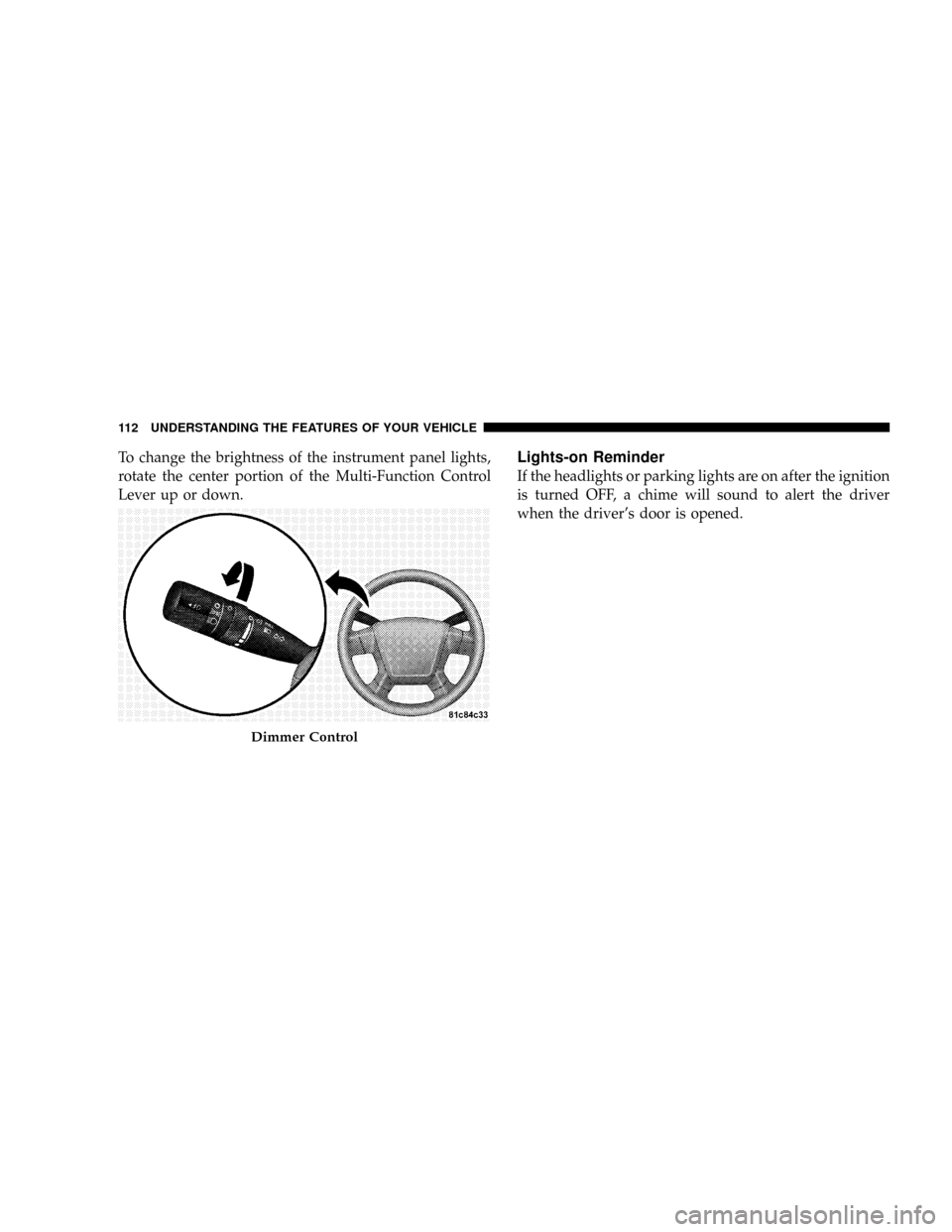
To change the brightness of the instrument panel lights,
rotate the center portion of the Multi-Function Control
Lever up or down.Lights-on Reminder
If the headlights or parking lights are on after the ignition
is turned OFF, a chime will sound to alert the driver
when the driver's door is opened.
Dimmer Control
112 UNDERSTANDING THE FEATURES OF YOUR VEHICLE
Page 116 of 373
Passing Light
You can signal another vehicle with your headlights by
lightly pulling the Multi-Function Control Lever toward
you. This will cause the headlights to turn on at high
beam and remain on until the lever is released.
NOTE:If the Multi-Function Control Lever is held in
the flash to pass position for more than 15 seconds, the
high beams will shut off. If this occurs, wait 30 seconds
for the next flash to pass operation.
Daytime Running Lights (DRL) Ð If Equipped
Functionality
The high beam lights will come on as Daytime Running
Lights (DRL) at DRL intensity (lower), whenever the
ignition is on, the engine is running, the headlight switch
is off, the parking brake is off, the turn signal is off, and
the gear shift is in any position except park.NOTE:On this vehicle, the daytime running light will
automatically turn off when the turn signals or hazard
warning flashers are in operation and automatically turn
back on when the turn signals or hazard warning flashers
are not operating.
WINDSHIELD WIPERS AND WASHERS
The wipers and washers are operated by a switch
on the control lever. The lever is located on the
right side of the steering column.
Windshield Washers
To use the washer, pull the control lever toward you and
hold while spray is desired. If the lever is pulled while in
the delay range, the wiper will operate in low speed for
two wipe cycles after the lever is released, and then
resume the intermittent interval previously selected.
UNDERSTANDING THE FEATURES OF YOUR VEHICLE 115
3
Page 121 of 373
WARNING!
Leaving the Electronic Speed Control system on
when not in use is dangerous. You could accidentally
set the system or cause it to go faster than you want.
You could lose control and have an accident. Always
leave the system OFF when you are not using it.
To Set At A Desired Speed:
When the vehicle has reached the desired speed, press
down on the lever and release. Release the accelerator
and the vehicle will operate at the selected speed.
NOTE:The vehicle should be traveling at a steady
speed and on level ground before pressing the SET lever.
To Deactivate:
A soft tap on the brake pedal, pulling the speed control
lever towards you ªCANCELº, or normal brake or clutch
pressure while slowing the vehicle will deactivate speed
control without erasing the set speed memory. Pressing
the ON/OFF button or turning off the ignition switch
erases the set speed memory.
To Resume Speed:
To resume a previously set speed, push the ªRESUME
ACCELº lever up and release. Resume can be used at any
speed above 20 mph (32 km/h).
To Vary The Speed Setting:
When the speed control is ON, speed can be increased by
pushing up and holding ªRESUME ACCELº. Release the
lever when the desired speed is reached, and the new
speed will be set.
120 UNDERSTANDING THE FEATURES OF YOUR VEHICLE
Page 125 of 373
Your vehicle should be parked outside of the garage
when programming.
1. Turn the ignition switch to the ON/RUN position.
2. Hold the battery side of the hand-held transmitter
away from the HomeLinktbutton you wish to program.
Place the hand-held transmitter 1±3 in (3-8 cm) away
from the HomeLinktbutton you wish to program while
keeping the indicator light in view.
3. Simultaneously press and hold both the chosen
HomeLinktbutton and the hand-held transmitter button
until the HomeLinktindicator changes from a slow to a
rapidly blinking light, then release both the HomeLinkt
and hand-held transmitter buttons.
Watch for the HomeLinktindicator to change flash rates.
When it changes, it is programmed. It may take up to 30
seconds, or longer in rare cases. The garage door may
open and close while you train.NOTE:
²Some gate operators and garage door openers may
require you to replace Step 3 with procedures noted in
the ªGate Operator/Canadian Programmingº section.
²After training a HomeLinktchannel, if the garage
door does not operate with HomeLinktand the ga-
rage door opener was manufactured after 1995, the
garage door opener may have a rolling code. If so,
proceed to the heading ªProgramming A Rolling Code
System.º
4. Press and hold the just-trained HomeLinktbutton
and observe the indicator light.
If the indicator light stays on constantly, programming is
complete and the garage door (or device) should activate
when the HomeLinktbutton is pressed.
124 UNDERSTANDING THE FEATURES OF YOUR VEHICLE