ECU DODGE CARAVAN 2004 4.G User Guide
[x] Cancel search | Manufacturer: DODGE, Model Year: 2004, Model line: CARAVAN, Model: DODGE CARAVAN 2004 4.GPages: 397, PDF Size: 6.83 MB
Page 76 of 397

NErasing Homelink Buttons...............124
NReprogramming a Single Homelink Button . . . 124
NSecurity............................124
mPower Sunroof Ð If Equipped.............125
NExpress Open Feature..................126
NWind Buffeting.......................127
NSunroof Maintenance...................127
mElectrical Power Outlets Ð If Equipped.......127
NElectrical Outlet Use With Engine Off.......129
mConvenience Tray Drawer And Cup Holders . . . 129
NInstrument Panel Cup Holders............129NConvenience Tray And Optional Smoker's
Package Kit.........................130
NRear Cupholders......................130
mStorage..............................132
NFront Seat Storage Bin Ð If Equipped.......132
NRemovable Floor Console Ð If Equipped....132
NRear Compartment Storage Bins...........135
NCargo Area Storage....................135
NCargo Organizer Ð If Equipped...........136
mRoof Luggage Rack Ð If Equipped..........139
mLoad Leveling System...................141
76 UNDERSTANDING THE FEATURES OF YOUR VEHICLE
Page 97 of 397
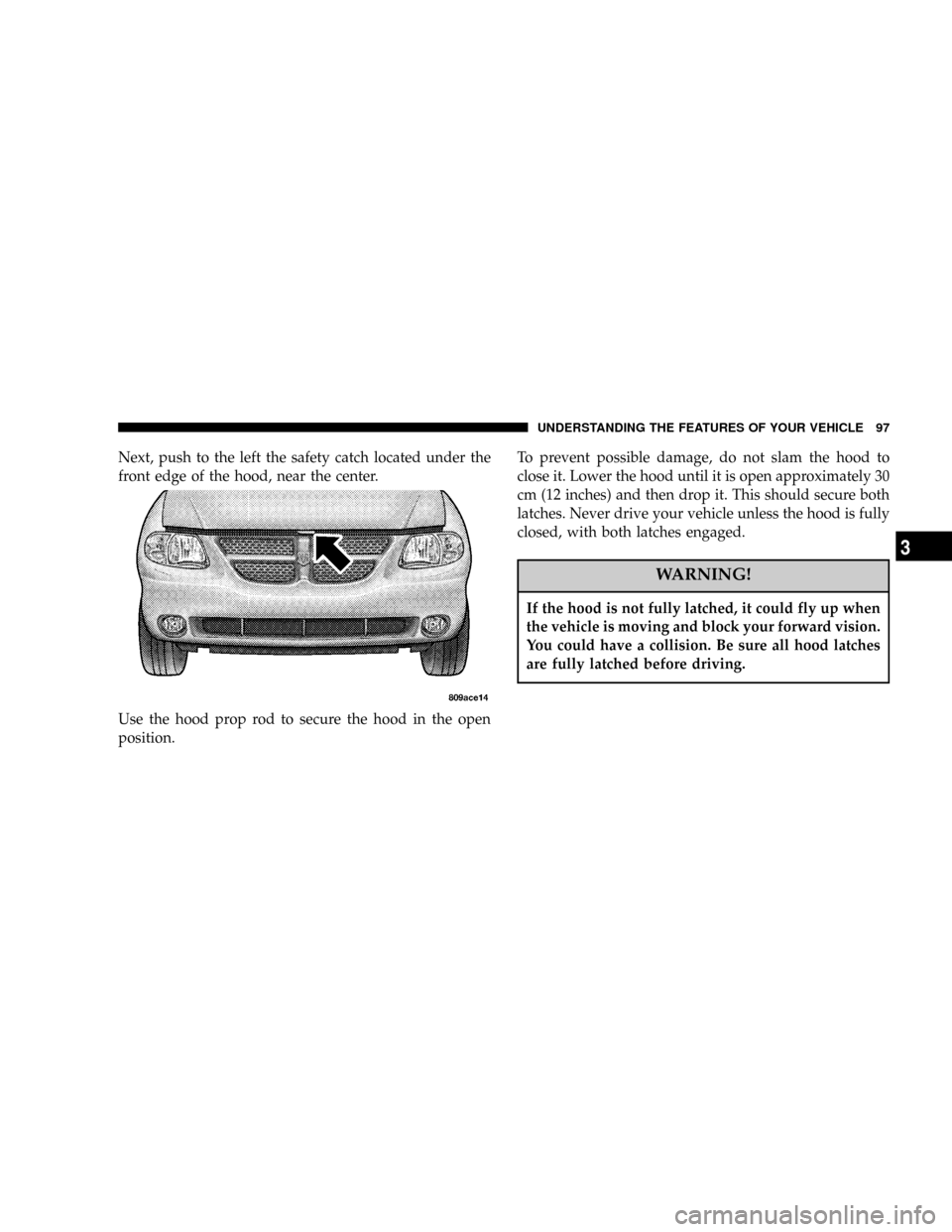
Next, push to the left the safety catch located under the
front edge of the hood, near the center.
Use the hood prop rod to secure the hood in the open
position.To prevent possible damage, do not slam the hood to
close it. Lower the hood until it is open approximately 30
cm (12 inches) and then drop it. This should secure both
latches. Never drive your vehicle unless the hood is fully
closed, with both latches engaged.
WARNING!
If the hood is not fully latched, it could fly up when
the vehicle is moving and block your forward vision.
You could have a collision. Be sure all hood latches
are fully latched before driving.
UNDERSTANDING THE FEATURES OF YOUR VEHICLE 97
3
Page 123 of 397

and, depending on the brand of the garage door opener
(or other rolling code equipped device), repeat this
sequence a third time to complete the programming.
HomeLink should now activate your rolling code
equipped device.
NOTE:To program the remaining two HomeLink but-
tons, begin with9Programming9step two. Do not repeat
step one. For questions or comments, please contact
HomeLink atwww.homelink.com or 1-800-355-3515.
Canadian Programming/Gate Programming
Canadian radio-frequency laws require transmitter sig-
nals to9time-out9(or quit) after several seconds of
transmission which may not be long enough for
HomeLink to pick up the signal during programming.
Similar to this Canadian law, some U.S. gate operators are
designed to9time-out9in the same manner.If you live in Canada or you are having difficulties
programming a gate operator by using the9Program-
ming9procedures (regardless of where you live),replace
(Programming HomeLink(step 3with the following:
NOTE:If programming a garage door opener or gate
operator, it is advised to unplug the device during the
9cycling9process to prevent possible overheating.
3. Continue to press and hold the HomeLink button
while youpress and release every two seconds(9cycle9)
your hand-held transmitter until the frequency signal has
successfully been accepted by HomeLink. (The indicator
light will flash slowly and then rapidly.) Proceed with
9Programming9step four to complete.
Using HomeLink
To operate, simply press and release the programmed
HomeLink button. Activation will now occur for the
trained device (i.e. garage door opener, gate operator,
security system, entry door lock, home/office lighting,
UNDERSTANDING THE FEATURES OF YOUR VEHICLE 123
3
Page 124 of 397

etc.). For convenience, the hand-held transmitter of the
device may also be used at any time. In the event that
there are still programming difficulties or questions,
contact HomeLink at:www.homelink.com or 1-800-355-
3515.
Erasing HomeLink Buttons
To erase programming from the three buttons (individual
buttons cannot be erased but can be9reprogrammed9-
note below), follow the step noted:
²Press and hold the two outer HomeLink buttons until
the indicator light begins to flash-after 20 seconds.
Release both buttons. Do not hold for longer that 30
seconds. HomeLink is now in the train (or learning)
mode and can be programmed at any time beginning
with9Programming9- step 2.
Reprogramming a Single HomeLink Button
To program a device to HomeLink using a HomeLink
button previously trained, follow these steps:
1. Press and hold the desired HomeLink button.Do
NOTrelease the button.
2. The indicator light will begin to flash after 20 seconds.
Without releasing the HomeLink button, proceed with
9Programming9step 2
For questions or comments, contact HomeLink at:
www.homelink.com or 1-800-355-3515.
Security
If you sell your vehicle, be sure to erase the frequencies.
To erase all of the previously trained frequencies, hold
down both outside buttons until the green light begins to
flash.
124 UNDERSTANDING THE FEATURES OF YOUR VEHICLE
Page 127 of 397
WARNING!
In an accident, there is a greater risk of being thrown
from a vehicle with an open sunroof. You could also
be seriously injured or killed. Always fasten your
seat belt properly and make sure all passengers are
properly secured too.
Do not allow small children to operate the sunroof.
Never allow fingers or other body parts, or any
object to project through the sunroof opening. Injury
may result.
Wind Buffeting
Wind buffeting can be described as the perception of
pressure on the ears or a helicopter type sound in the
ears. Your vehicle may exhibit wind buffeting with the
windows down, or the sunroof (if equipped) in certainopen or partially open positions. This is a normal occur-
rence and can be minimized. If the buffeting occurs with
the rear windows open, open the front and rear windows
together to minimize the buffeting. If the buffeting occurs
with the sunroof open, adjust the sunroof opening to
minimize the buffeting or open any window.
Sunroof Maintenance
Use only a non-abrasive cleaner and a soft cloth to clean
the glass panel.
ELECTRICAL POWER OUTLETS Ð IF EQUIPPED
To the left of the instrument panel cup holder are two 12
volt power outlets. The upper outlet is controlled by the
ignition switch and the lower outlet is connected directly
to the battery. The upper outlet will also operate a
conventional cigar lighter unit (if equipped with an
optional Smoker's Package).
UNDERSTANDING THE FEATURES OF YOUR VEHICLE 127
3
Page 136 of 397
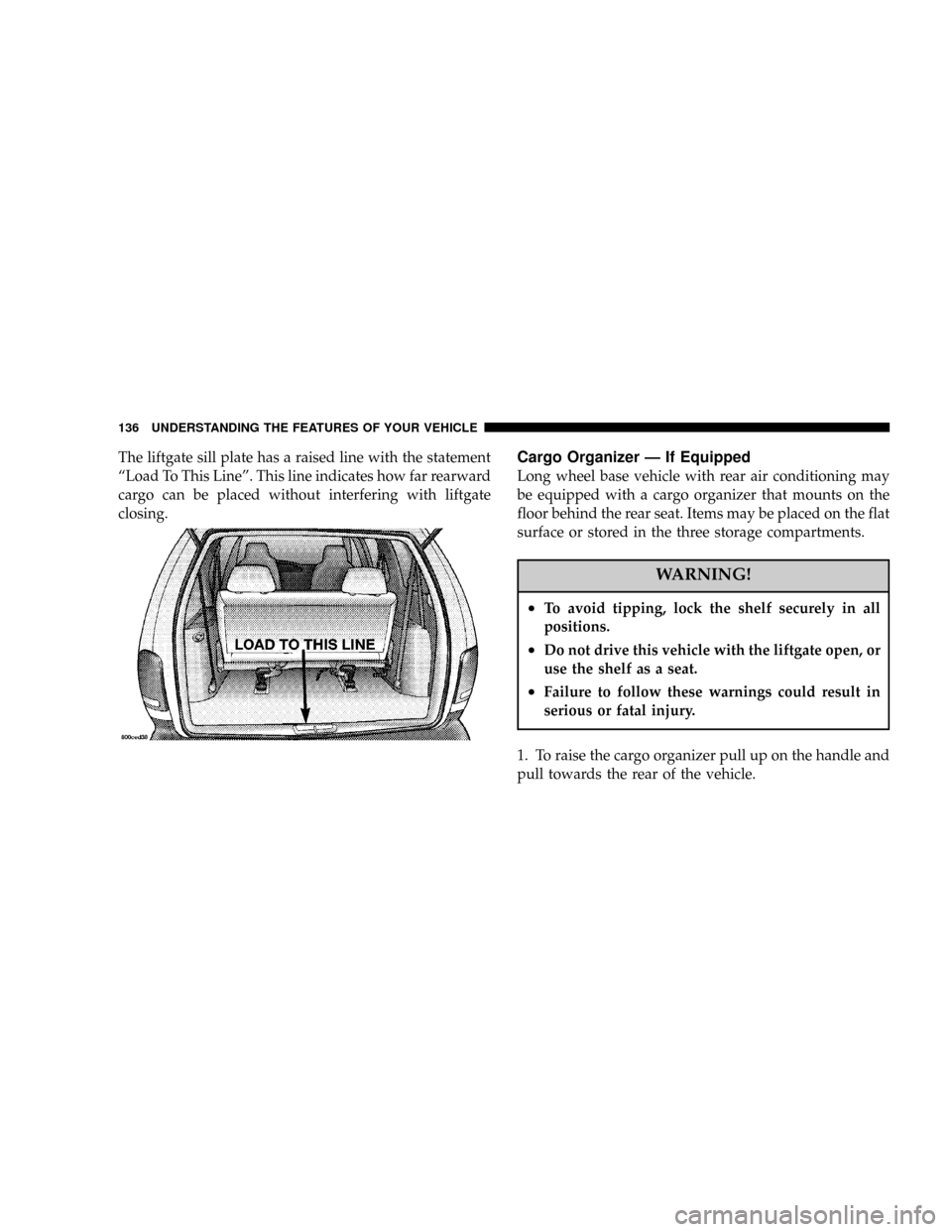
The liftgate sill plate has a raised line with the statement
ªLoad To This Lineº. This line indicates how far rearward
cargo can be placed without interfering with liftgate
closing.Cargo Organizer Ð If Equipped
Long wheel base vehicle with rear air conditioning may
be equipped with a cargo organizer that mounts on the
floor behind the rear seat. Items may be placed on the flat
surface or stored in the three storage compartments.
WARNING!
²To avoid tipping, lock the shelf securely in all
positions.
²Do not drive this vehicle with the liftgate open, or
use the shelf as a seat.
²Failure to follow these warnings could result in
serious or fatal injury.
1. To raise the cargo organizer pull up on the handle and
pull towards the rear of the vehicle.
136 UNDERSTANDING THE FEATURES OF YOUR VEHICLE
Page 140 of 397

capacity of the vehicle. Be sure the total load of cargo
inside the vehicle plus that on the external rack does not
exceed the maximum vehicle load capacity.
To move the cross bars, press the upper edge of each
cross bar button pass the detent, then move the cross bar
to the desired position. Once the cross bar is in place,
press the lower edge of the cross bar button to lock it into
position.
Attempt to move the crossbar again to ensure that it has
properly locked into position.NOTE:To help control wind noise when installing the
cross bars make sure that the arrows marked on the front
side of the cross bars are facing the front of the vehicle.
Also, when the cross bars are not in use the notch on the
cross bars should be aligned with the arrows on the side
rails. This will help reduce the amount of wind noise
when the crossbars are not in use.
The tie down holes on the cross bar ends should always
be used to tie down the load. Check the straps frequently
to be sure that the load remains securely attached.
140 UNDERSTANDING THE FEATURES OF YOUR VEHICLE
Page 141 of 397
CAUTION!
²To avoid damage to the roof rack and vehicle, do
not exceed the maximum roof rack load capacity
of 150 lbs (68 kg). Always distribute heavy loads
as evenly as possible and secure the load appro-
priately.
²Long loads which extend over the windshield,
such as wood panels or surfboards, or loads with
large frontal area should be secured to both the
front and rear of the vehicle.
²Travel at reduced speeds and turn corners care-
fully when carrying large or heavy loads on the
roof rack. Wind forces, due to natural causes or
nearby truck traffic, can add sudden upward
loads. This is especially true on large flat loads
and may result in damage to the cargo or your
vehicle.
WARNING!
Cargo must be securely tied before driving your
vehicle. Improperly secured loads can fly off the
vehicle, particularly at high speeds, resulting in
personal injury or property damage. Follow the Roof
Rack Cautions when carrying cargo on your roof
rack.
LOAD LEVELING SYSTEM
The automatic load leveling system will provide a level
riding vehicle under most passenger and cargo loading
conditions.
A hydraulic pump contained within the shock absorbers
raises the rear of the vehicle to the correct height. It takes
approximately 1 mile (1.6 km) of driving for the leveling
to complete depending on road surface conditions.
UNDERSTANDING THE FEATURES OF YOUR VEHICLE 141
3
Page 233 of 397

Reset Mode - Electronic Transmission
The transmission is monitored electronically for abnor-
mal conditions. If a condition is detected that could cause
damage, the transmission automatically shifts into sec-
ond gear. The transmission remains in second gear
despite the forward gear selected. Park (P), Reverse (R),
and Neutral (N) will continue to operate. This Reset
feature allows the vehicle to be driven to a dealer for
service without damaging the transmission.
In the event that the problem has been momentary, the
transmission can be reset to regain all forward gears.
²Stop the vehicle and shift into Park (P).
²Turn the key to OFF then restart the engine.
²Shift into the desired range and resume driving.
NOTE:Even if the transmission can be reset, it is
recommended that you visit a dealer at your earliestpossible convenience. Your dealer has diagnostic equip-
ment to determine if the problem could recur.
If the transmission cannot be reset, dealer service is
required.
Gear Ranges
DO NOT race the engine when shifting from PARK or
NEUTRAL positions into another gear range.
²ªPº Park
Supplements the parking brake by locking the transmis-
sion. The engine can be started in this range. Never
attempt to use PARK while vehicle is in motion.
STARTING AND OPERATING 233
5
Page 271 of 397
CAUTION!
Damage to the fuel system or emission control
system could result from using an improper fuel
tank filler tube cap (gas cap). A poorly fitting cap
could let impurities into the fuel system.
NOTE:The driver's side sliding door cannot be opened
while the fuel door is open. This feature operates only
when the sliding door is fully closed prior to opening the
fuel door.
The fuel tank filler tube, on vehicles equipped with a
catalytic converter, has a restricting door about 50 mm (2
inches) inside the opening. If using a portable fuel
container, it should have a flexible nozzle long enough to
force open the restricting door.
CAUTION!
To avoid fuel spillage and overfilling, do not ªtop
offº the fuel tank after filling.
NOTE:
²Tighten the gas cap until you hear a ªclickingº sound.
This is an indication that the gas cap is properly
tightened. If the gas cap is not secured properly the
Malfunction Indicator Light will turn on. Make sure
that the gas cap is tightened each time the vehicle is
refueled.
²When the fuel nozzle ªclicksº or shuts off, the fuel
tank is full.
STARTING AND OPERATING 271
5