display DODGE CARAVAN 2004 4.G User Guide
[x] Cancel search | Manufacturer: DODGE, Model Year: 2004, Model line: CARAVAN, Model: DODGE CARAVAN 2004 4.GPages: 397, PDF Size: 6.83 MB
Page 117 of 397

the Tire Pressure Monitor system and the training routine
is not performed, training will be cancelled after one
minute or the next time you cycle the ignition key. See
your authorized dealer for service and retraining of the
system.
Use Factory Settings
If ªYesº is selected, all of the customer programmable
features will be set to the factory default and not dis-
played. If ªNoº is selected you can program the Vehicle
Information Center to your own personal preferences.
Auto Door Locks
When this feature is selected, all doors and the liftgate
lock automatically when the speed of the vehicle reaches
18 mph (29 km/h). Pressing the ªSTEPº button when in
this display will select ªYesº or ªNo.º
Auto Unlock On Exit (Available Only When the
AUTO DOOR LOCKS Feature is Turned On)
When this feature is selected all the vehicle's doors will
unlock whenever any door is opened if the vehicle is
stopped and the transmission is in ªPº (Park) or ªNº
(Neutral) position. Pressing the ªSTEPº button when in
this display will select ªYesº or ªNo.º
Remote Unlock Driver's Door 1st
When this feature is selected only the driver's door will
unlock on the first press of the remote keyless entry
unlock button and require a second press to unlock the
remaining locked doors and liftgate. WhenªREMOTE
UNLOCK ALL DOORSºis selected all of the doors and
the liftgate will unlock at the first press of the remote
keyless entry unlock button. Pressing the ªSTEPº button
when in this display will select ªDRIVER'S DOOR 1STº
or ªALL DOORSº.
UNDERSTANDING THE FEATURES OF YOUR VEHICLE 117
3
Page 118 of 397

Remote Linked To Memory (Available with
Memory Seat and Pedals Only)
When this feature is selected, pressing the Unlock button
on any Remote Keyless Entry transmitter already linked
to memory will return the driver's seat, driver's outside
mirror, adjustable brake and accelerator pedals, and
radio station presets to their memory set positions.
If this feature is not selected, the driver's seat, driver's
mirror, adjustable pedals, and radio settings can only
return to their memory set positions using the memory
recall buttons (1or 2) on the driver's door panel.
Any transmitter linked to memory will remain linked,
but will not recall the memory positions. The transmitter
memory recall function will operate again when this
feature is selected. Refer to Driver Memory System for
more information. Pressing the9STEP9button when in
this mode will select between9Ye s9or9No9.
Sound Horn On Lock
When this feature is selected a short horn sound will
occur when the remote keyless entry ªLockº button is
pressed. This feature may be selected with or without the
flash lights on LOCK/UNLOCK feature. Pressing the
ªSTEPº button when in this display will select ªYesº or
ªNo.º
Flash Lights On Lock/Unlock?
When this feature is selected, the front and rear turn
signals will flash when the doors are locked or unlocked
using the remote keyless entry transmitter. This feature
may be selected with or without the sound horn on lock
feature selected. Pressing the ªSTEPº button when in this
display will select ªYesº or ªNo.º
Headlamp Delay
When this feature is selected the driver can choose, when
exiting the vehicle, to have the headlamps remain on for
118 UNDERSTANDING THE FEATURES OF YOUR VEHICLE
Page 119 of 397

30, 60, or 90 seconds, or not remain on. Pressing the
ªSTEPº button when in this display will select 30, 60, 90,
or ªOFF.º
Headlamp On With Wipers (Available with Auto
Headlights Only)
When this feature is selected and the headlight switch
has been moved to the ªAUTOº position, the engine is
running and, the front wipers are turned on for 10
seconds, the headlights will turn ON. The display will
remain on Parade Mode (Daytime Brightness) for ease of
viewing. Pressing the ªSTEPº button when in this display
will select ªYesº or ªNo.º
Power Accessory Delay
When this feature is selected, accessory power will be
supplied for up to 45 seconds for the power windows,radio, power vent windows, power outlets, and remov-
able center console, when the ignition switch is turned off
or until the key is removed and either front door is
opened.
GARAGE DOOR OPENER Ð IF EQUIPPED
The HomeLinktUniversal Transceiver replaces up to
three remote controls (hand held transmitters) that oper-
ate devices such as garage door openers, motorized
gates, or home lighting. It triggers these devices at the
push of a button. The Universal Transceiver operates off
your vehicle's battery and charging system; no batteries
are needed.
For additional information on HomeLinkt, call 1±800±
355±3515, or on the internet at www.homelink.com.
UNDERSTANDING THE FEATURES OF YOUR VEHICLE 119
3
Page 145 of 397

NProgram Button 4 (Random Play)..........169
NMode..............................169
NTape CD Button......................169
NTime Button.........................170
NScan Button.........................170
NCD Changer Control Capability Ð If
Equipped...........................170
mSales Code RBQÐAM/FM Stereo Radio With
6 - Disc CD Changer....................171
NRadio Operation......................171
NCD Player Operation...................174
mSales Code RBKÐAM/ FM Stereo Radio With
CD Player And CD Changer Controls........178
NRadio Operation......................178NCD Player Operation...................180
NCD Changer Control Capability Ð If
Equipped...........................182
NRadio Display Messages................184
m6 Disc CD Changer Ð If Equipped..........184
NLoading The CD Changer...............185
NPlaying Discs........................185
NSeek Button.........................185
NFF/Tune/RW........................185
NMode Button........................186
NProgram Button 1.....................186
NProgram Button 4 (Random Play)..........186
NProgram Button 5.....................186
UNDERSTANDING YOUR INSTRUMENT PANEL 145
4
Page 155 of 397
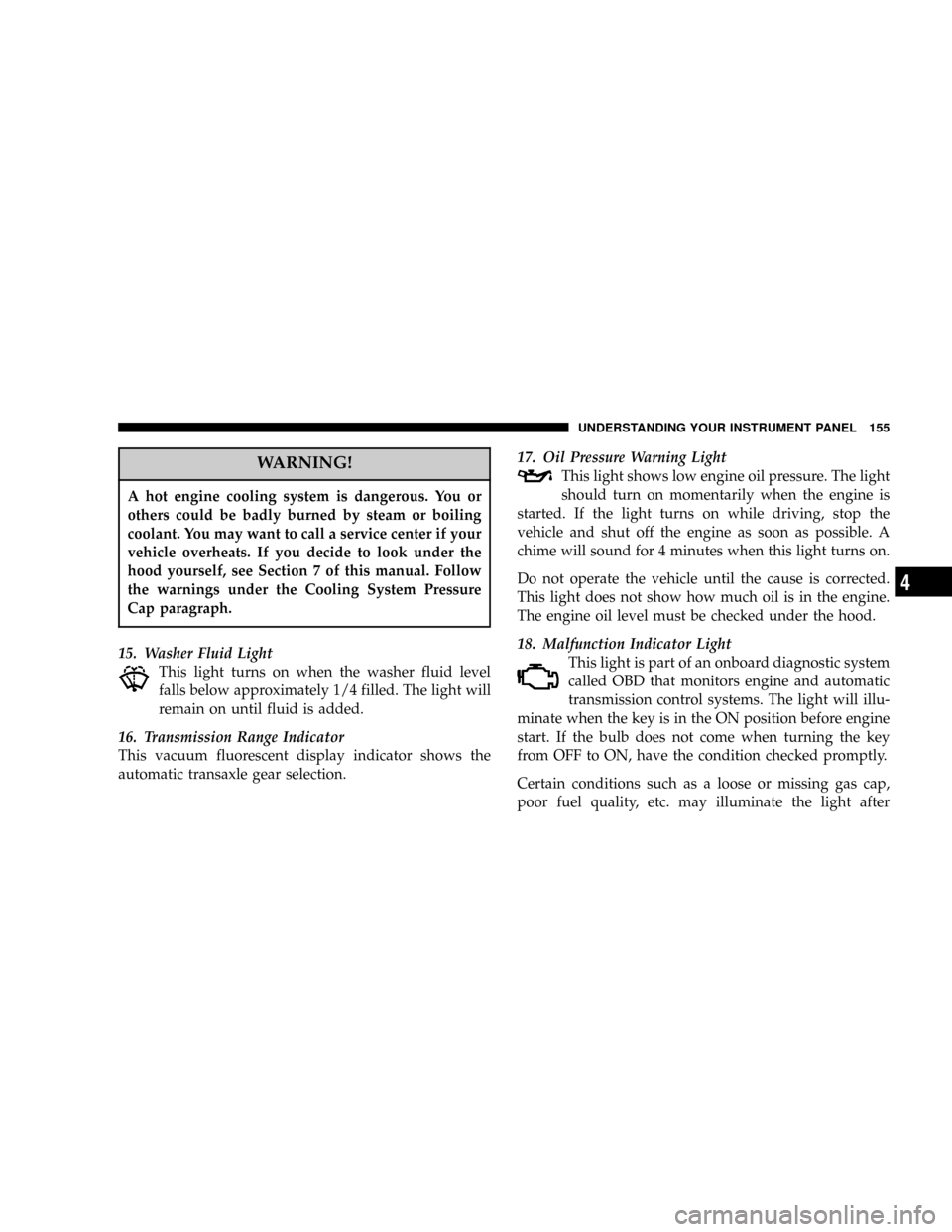
WARNING!
A hot engine cooling system is dangerous. You or
others could be badly burned by steam or boiling
coolant. You may want to call a service center if your
vehicle overheats. If you decide to look under the
hood yourself, see Section 7 of this manual. Follow
the warnings under the Cooling System Pressure
Cap paragraph.
15. Washer Fluid Light
This light turns on when the washer fluid level
falls below approximately 1/4 filled. The light will
remain on until fluid is added.
16. Transmission Range Indicator
This vacuum fluorescent display indicator shows the
automatic transaxle gear selection.17. Oil Pressure Warning Light
This light shows low engine oil pressure. The light
should turn on momentarily when the engine is
started. If the light turns on while driving, stop the
vehicle and shut off the engine as soon as possible. A
chime will sound for 4 minutes when this light turns on.
Do not operate the vehicle until the cause is corrected.
This light does not show how much oil is in the engine.
The engine oil level must be checked under the hood.
18. Malfunction Indicator Light
This light is part of an onboard diagnostic system
called OBD that monitors engine and automatic
transmission control systems. The light will illu-
minate when the key is in the ON position before engine
start. If the bulb does not come when turning the key
from OFF to ON, have the condition checked promptly.
Certain conditions such as a loose or missing gas cap,
poor fuel quality, etc. may illuminate the light after
UNDERSTANDING YOUR INSTRUMENT PANEL 155
4
Page 156 of 397

engine start. The vehicle should be serviced if the light
stays on through several of your typical driving cycles. In
most situations the vehicle will drive normally and will
not require towing.
The Malfunction Indicator Light flashes to alert to serious
conditions that could lead to immediate loss of power or
severe catalytic converter damage. The vehicle should be
serviced as soon as possible if this occurs.
19. Trac Off Indicator Ð If Equipped
This vacuum fluorescent display indicator should illumi-
nate for approximately four seconds as a bulb check
when the ignition switch is first turned ON.
The ªTRAC OFFº Indicator will flash if the traction
control is in use.
The ªTRAC OFFº Indicator will illuminate if:
²The Traction Control switch has been used to turn
the system OFF.
²There is a Traction Control System malfunction
²The system has been deactivated to prevent damage
to the brake system due to overheated brake tem-
peratures.
NOTE:Extended heavy use of Traction Control may
cause the system to deactivate and turn on the TRAC and
the OFF indicators located in the instrument cluster.
This is to prevent overheating of the brake system and is
a normal condition. The system will remain disabled for
about 4 minutes until the brakes have cooled. The system
will automatically reactivate and turn off the TRAC and
the OFF indicators.
If your vehicle becomes stuck in mud, ice, or snow, turn
the Traction Control System OFF before attempting to
ªrockº the vehicle free.
156 UNDERSTANDING YOUR INSTRUMENT PANEL
Page 157 of 397

20. Odometer/Trip Odometer
The odometer shows the total distance the vehicle has
been driven.
U.S. federal regulations require that upon transfer of
vehicle ownership, the seller certify to the purchaser the
correct mileage that the vehicle has been driven. There-
fore, if the odometer reading is changed during repair or
replacement, be sure to keep a record of the reading
before and after the service so that the correct mileage can
be determined.
The trip odometer shows individual trip mileage. To
switch from odometer to trip odometer, press the Trip
Odometer button.
21. Cruise Indicator
This vacuum fluorescent display indicator shows that the
Speed Control System is ON.22. Trip Odometer Button
Press this button to change the display from odometer to
trip odometer. The word TRIP will appear when in the
trip odometer mode.
Push in and hold the button for two seconds to reset the
trip odometer to 0 miles or kilometers. The odometer
must be in trip mode to reset.
23. Tire Pressure Monitor Warning Light Ð If
Equipped
This light will turn on when there is a Low tire
pressure condition. The light will also turn on
if a problem exist with any tire sensor. The light
will remain on until the tire pressure is prop-
erly set or the problem with the sensor is corrected.
This light will turn on momentarily as a bulb check when
the engine is started.
UNDERSTANDING YOUR INSTRUMENT PANEL 157
4
Page 159 of 397

INFORMATION CENTER Ð IF EQUIPPED
Turn Signal Indicators
The arrow will flash with the exterior turn signal
when the turn signal lever is operated.
If the vehicle electronics sense that the vehicle has
traveled about one mile with the turn signals on, a chimewill sound to alert you to turn the signals off. If either
indicator flashes at a rapid rate, check for a defective
outside light bulb.
High Beam Light
This light shows that the headlights are on high
beam. Pull the turn signal lever towards the
steering wheel to switch the headlights from high or low
beam.
ELECTRONIC DIGITAL CLOCK
The clock and radio each use the display panel built into
the radio. A digital readout shows the time in hours and
minutes whenever the ignition switch is in the ON or
ACC position and the time button is pressed.
When the ignition switch is in the OFF position, or when
the radio frequency is being displayed, time keeping is
accurately maintained.
UNDERSTANDING YOUR INSTRUMENT PANEL 159
4
Page 162 of 397
Power Switch, Volume Control
Press the ON/VOL control to turn the radio on. Turn the
volume control clockwise to increase the volume. The
volume will be displayed and continuously updated
while the button is pressed.
Seek Button (Radio Mode)
Press and release the Seek button to search for the next
station in either the AM or FM mode. Press the top of the
button to seek up and the bottom to seek down. Holding
the button will by pass stations until you release the
button.
Tuning
Press the TUNE control up or down to increase or
decrease the frequency. If you press and hold the button,
the radio will continue to tune until you release the
button. The frequency will be displayed and continu-
ously updated while the button is pressed.
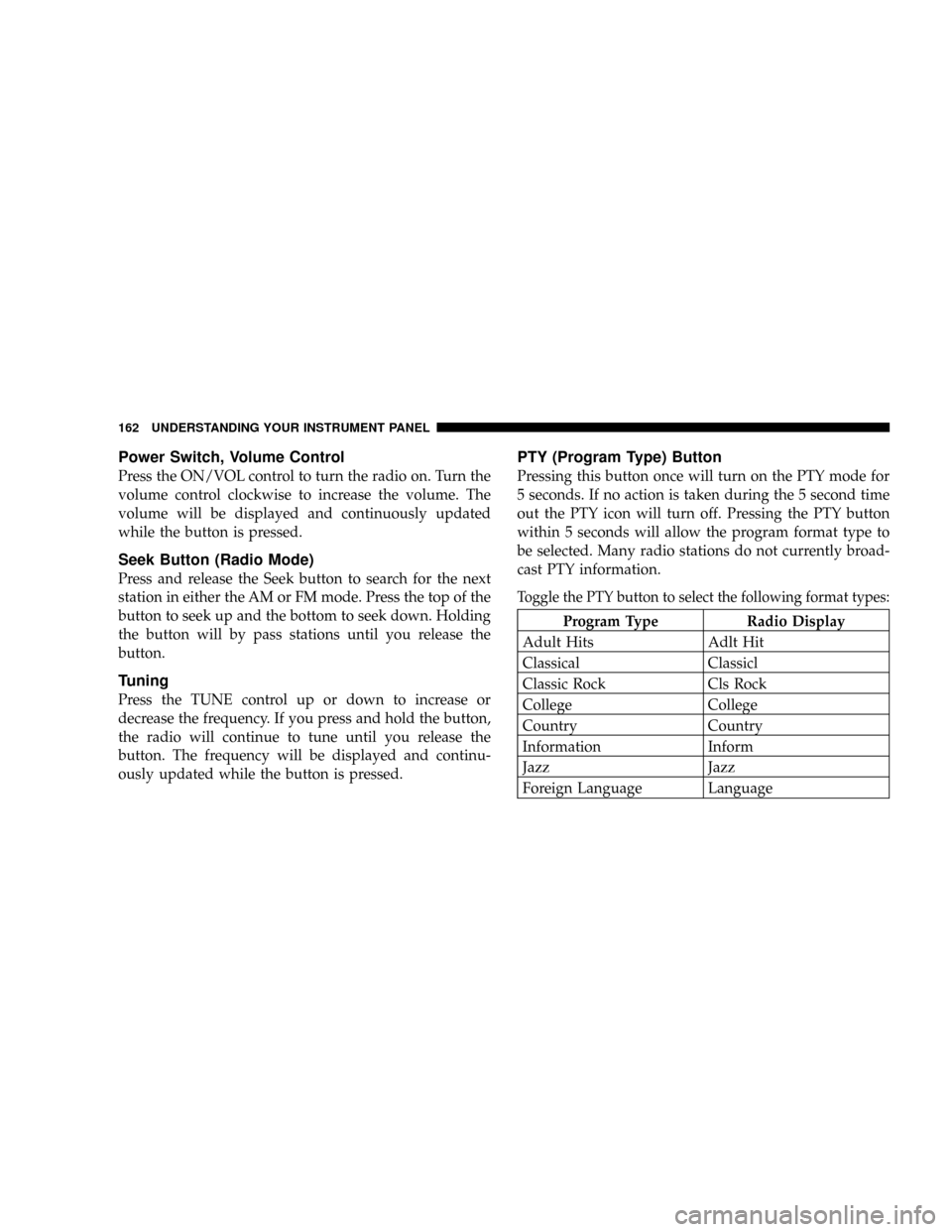
PTY (Program Type) Button
Pressing this button once will turn on the PTY mode for
5 seconds. If no action is taken during the 5 second time
out the PTY icon will turn off. Pressing the PTY button
within 5 seconds will allow the program format type to
be selected. Many radio stations do not currently broad-
cast PTY information.
Toggle the PTY button to select the following format types:
Program Type Radio Display
Adult Hits Adlt Hit
Classical Classicl
Classic Rock Cls Rock
College College
Country Country
Information Inform
Jazz Jazz
Foreign Language Language
162 UNDERSTANDING YOUR INSTRUMENT PANEL
Page 163 of 397
Program Type Radio Display
News News
Nostalgia Nostalga
Oldies Oldies
Personality Persnlty
Public Public
Rhythm and Blues R & B
Religious Music Rel Musc
Religious Talk Rel Talk
Rock Rock
Soft Soft
Soft Rock Soft Rck
Soft Rhythm and Blues Soft R&B
Sports Sports
Talk Talk
Top 40 Top 40
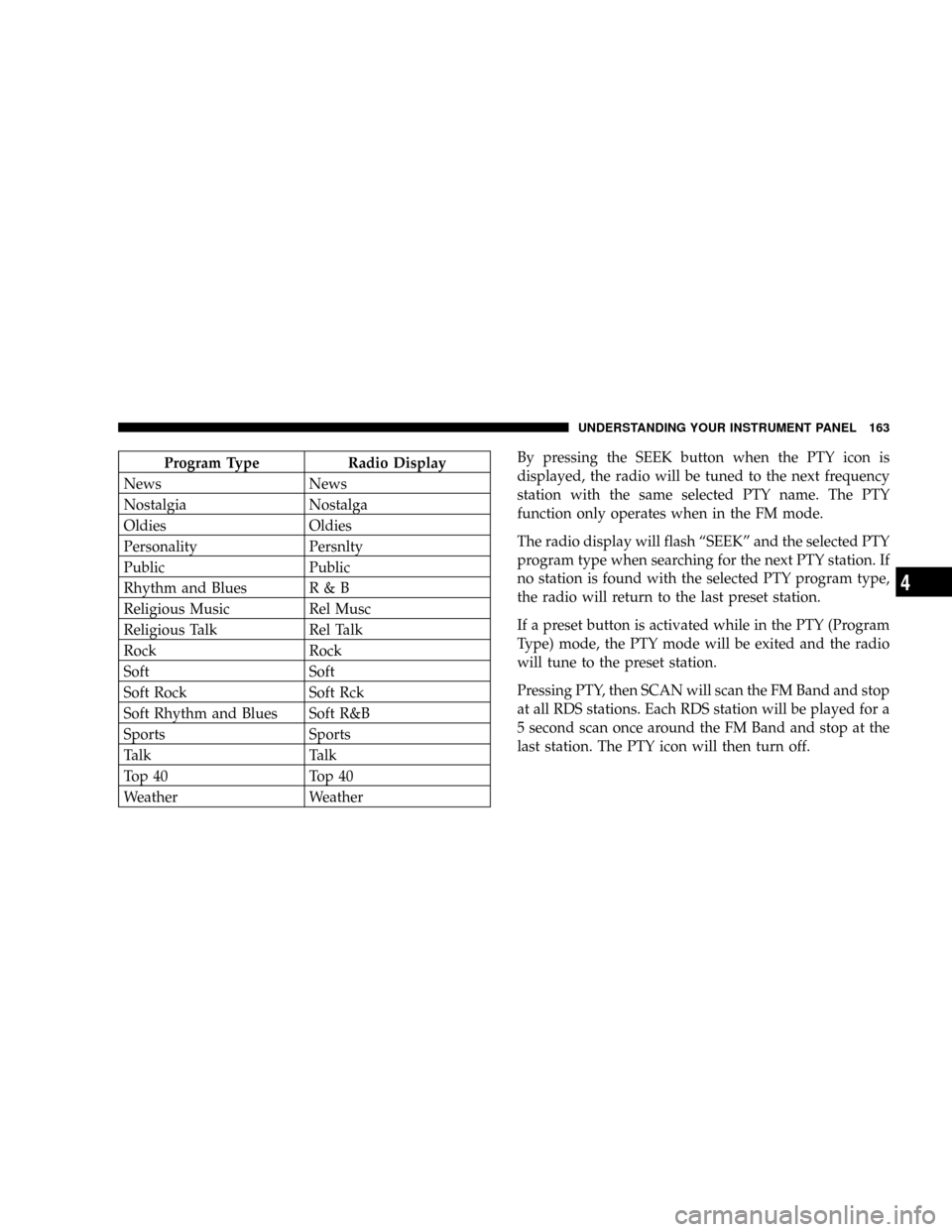
Weather WeatherBy pressing the SEEK button when the PTY icon is
displayed, the radio will be tuned to the next frequency
station with the same selected PTY name. The PTY
function only operates when in the FM mode.
The radio display will flash ªSEEKº and the selected PTY
program type when searching for the next PTY station. If
no station is found with the selected PTY program type,
the radio will return to the last preset station.
If a preset button is activated while in the PTY (Program
Type) mode, the PTY mode will be exited and the radio
will tune to the preset station.
Pressing PTY, then SCAN will scan the FM Band and stop
at all RDS stations. Each RDS station will be played for a
5 second scan once around the FM Band and stop at the
last station. The PTY icon will then turn off.
UNDERSTANDING YOUR INSTRUMENT PANEL 163
4