instrument cluster DODGE CARAVAN 2008 5.G User Guide
[x] Cancel search | Manufacturer: DODGE, Model Year: 2008, Model line: CARAVAN, Model: DODGE CARAVAN 2008 5.GPages: 531, PDF Size: 7.72 MB
Page 226 of 531
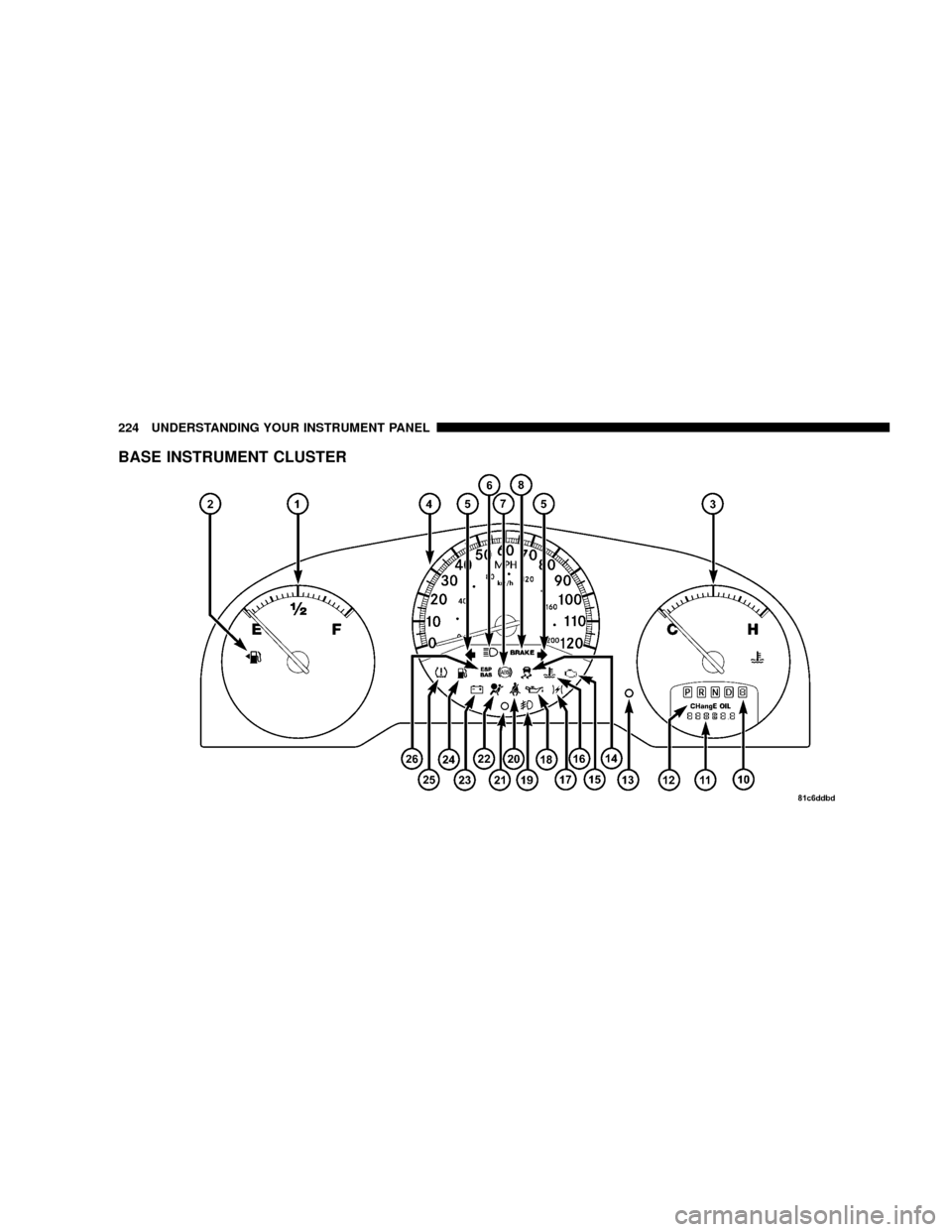
BASE INSTRUMENT CLUSTER
224 UNDERSTANDING YOUR INSTRUMENT PANEL
Page 227 of 531
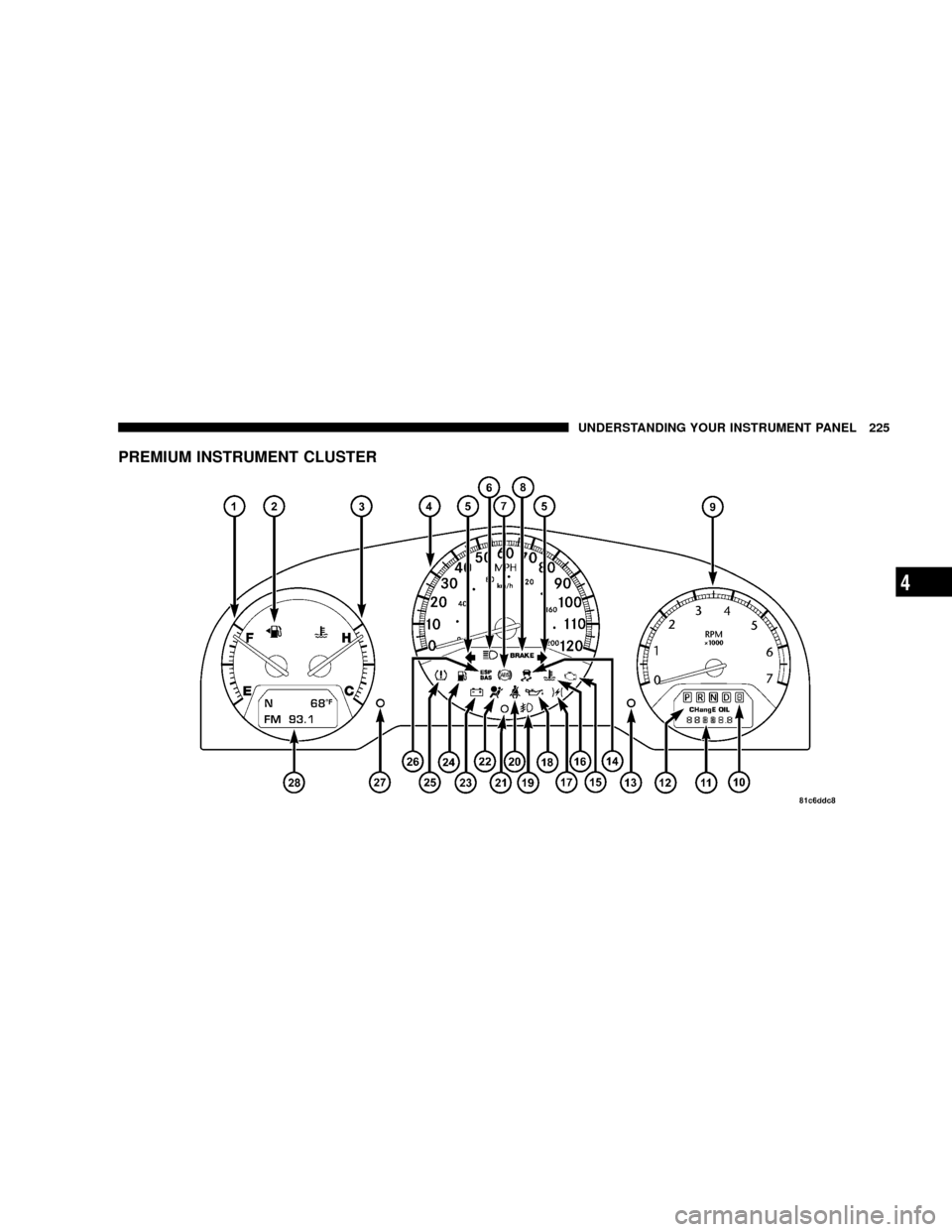
PREMIUM INSTRUMENT CLUSTER
UNDERSTANDING YOUR INSTRUMENT PANEL 225
4
Page 228 of 531
INSTRUMENT CLUSTER DESCRIPTIONS
1. Fuel Gauge
The pointer shows the level of fuel in the fuel tank when
the ignition switch is in the ON position.
2. Fuel Door Reminder
The arrow in this symbol is a reminder that the
Fuel Filler Door is located on the left side of the
vehicle.
3. Temperature Gauge
The temperature gauge shows engine coolant tempera-
ture. Any reading within the normal range indicates that
the engine cooling system is operating satisfactorily.The gauge pointer will likely indicate a higher tempera-
ture when driving in hot weather, up mountain grades,
or when towing a trailer. It should not be allowed to
exceed the upper limits of the normal operating range.
CAUTION!
Driving with a hot engine cooling system could
damage your vehicle. If temperature gauge reads
ªHª, pull over and stop the vehicle. Idle the vehicle
with the air conditioner turned off until the pointer
drops back into the normal range. If the pointer
remains on the ªHº, and you hear continuous chimes,
turn the engine off immediately, and call an autho-
rized dealer for service.
226 UNDERSTANDING YOUR INSTRUMENT PANEL
Page 231 of 531
Brake Warning Light will turn on along with the ABS
Light. Immediate repair to the ABS system is required.
The operation of the Brake Warning Light can be checked
by turning the ignition switch from the OFF position to
the ON position. The light should illuminate for approxi-
mately two seconds. The light should then turn off unless
the parking brake is applied or a brake fault is detected.
If the light does not illuminate, have the light inspected
by an authorized dealer.
The light also will turn on when the parking brake is
applied with the ignition switch in the ON position.
NOTE:This light shows only that the parking brake is
applied. It does not show the degree of brake application.9.Tachometer Ð Premium Instrument Cluster Only
The white area of the scale shows the permissible engine
revolutions-per-minute (RPM x 1000) for each gear range.
Before reaching the red area, ease up on the accelerator to
prevent engine damage.
10. Transmission Range Indicator
This display indicator shows the automatic transaxle gear
selection.
NOTE:You must apply the brakes before shifting from
Park.
11. Odometer/Trip Odometer Ð If Equipped
The odometer shows the total distance the vehicle has
been driven.
U.S. federal regulations require that upon transfer of
vehicle ownership, the seller certify to the purchaser the
correct mileage that the vehicle has been driven. There-
fore, if the odometer reading is changed during repair or
UNDERSTANDING YOUR INSTRUMENT PANEL 229
4
Page 232 of 531
replacement, be sure to keep a record of the reading
before and after the service so that the correct mileage can
be determined.
The trip odometer shows individual trip mileage. To
switch from odometer to trip odometer, press the Trip
Odometer button.
To reset a trip odometer, display the desired trip odom-
eter to be reset then push and hold the button until the
display resets (approximately two seconds).
12. PRNDL/Odometer Display Area
When the appropriate conditions exist, the following
odometer messages will display:
CHAngE OIL............... OilChange Required
CRUISE.....................Cruise Control On
door.............................Door Ajar
ESPOFF............................ ESPOffgATE..........................Lift Gate Ajar
gASCAP.......................Fuel Cap Fault
hood*............................Hood Ajar
noFUSE..........................Fuse Fault
LoCOOL........................ LowCoolant
LoWASH.................... LowWasher Fluid
NOTE:If your vehicle is equipped with an hood switch,
in the case of hood ajar, a warning message will be
displayed in either the PRNDL/Odometer display as
ªhoodº or ªHood Ajarº in the EVIC display.
NOTE:Some of the above warnings will be displayed in
the Compass Mini-Trip Computer / Electronic Vehicle
Information Center Display Area under the Speedometer.
CHAngE OIL
Your vehicle is equipped with an engine oil change
indicator system. The ªChange Oilº message will flash in
the instrument cluster odometer for approximately 12
230 UNDERSTANDING YOUR INSTRUMENT PANEL
Page 233 of 531
seconds after a single chime has sounded to indicate the
next scheduled oil change interval. The engine oil change
indicator system is duty cycle-based, which means the
engine oil change interval may fluctuate dependent upon
your personal driving style.
Unless reset, this message will continue to display each
time you turn the ignition switch to the ON/RUN
position. To turn off the message temporarily, press and
release the Trip Odometer button on the instrument
cluster. To reset the oil change indicator system (after
performing the scheduled maintenance) refer to the fol-
lowing procedure.
1. Turn the ignition switch to the ON position (Do not
start the engine).
2. Fully depress the accelerator pedal slowly three times
within 10 seconds.
3. Turn the ignition switch to the OFF/LOCK position.NOTE:If the indicator message illuminates when you
start the vehicle, the oil change indicator system did not
reset. If necessary repeat this procedure.
13. Odometer Display Reset Button
To reset a message display (gATE, gASCAP, noFUSE,
CHAngE OIL, LoCOOL, LoWASH), push and hold the
button until the display resets (approximately two sec-
onds).
14. Electronic Stability Program (ESP) Indicator
Light/Traction Control System (TCS) Indicator Light
If this indicator light flashes during accelera-
tion, apply as little throttle as possible. While
driving, ease up on the accelerator. Adapt your
speed and driving to the prevailing road con-
ditions, and do not switch off the ESP, or TCS.
UNDERSTANDING YOUR INSTRUMENT PANEL 231
4
Page 240 of 531
COMPASS MINI-TRIP COMPUTER (CMTC) Ð IF
EQUIPPED
NOTE:The compass on your vehicle is self-calibrating,
eliminating the need to manually calibrate the compass.
The Compass Mini-Trip Computer features a driver-
interactive display (displays information on outside tem-
perature, compass direction, and trip information). It is
located in the instrument cluster, below the Fuel and
Temperature gauges.
Compass Mini-Trip Computer (CMTC) Odometer
Displays
When the appropriate conditions exist, the following
odometer messages will display:
CHAngE OIL............... OilChange Required
CRUISE......................Cruise Activated
door.............................Door AjarESPOFF...................... ESPDeactivated
gATE..........................Lift Gate Ajar
gASCAP.......................Fuel Cap Fault
hood............................Hood Ajar
noFUSE..........................Fuse Fault
LoCOOL........................ LowCoolant
LoWASH.................... LowWasher Fluid
These messages can be manually turned off by pressing
the right reset button (on the instrument cluster).
Compass Mini-Trip Computer (CMTC) Reset
Buttons
CMTC Reset Button
Press the left reset button located on the instrument
cluster to scroll through the sub menus (i.e., Trip Func-
tions: AVG Fuel Economy, DTE, Elapsed Time, and
Units).
238 UNDERSTANDING YOUR INSTRUMENT PANEL
Page 241 of 531
To reset the display shown, turn the ignition switch to the
ON position, then press and hold the reset button for
approximately two seconds.
When the appropriate conditions exist, the following
odometer messages will display:
NE.......Eight-point compass headings are displayed
(N, S, E, W, NE, NW, SE, SW)
14ÉF............ Temperature (Fahrenheit or Celsius)
AV G......... AverageFuel Economy (U.S. or Metric)
DTE.......................Distance to Empty
ET............................Elapsed Time
P.......................... ParkAssist On/Off
Should this wrench symbol display with the
letterPnext to it, your Park Assist System
needs servicing. Contact your authorized
dealer.NOTE:Temperature and Average Fuel Economy can be
changed from U.S. or Metric by pressing and holding the
left CMTC Reset Button located on the instrument cluster
near the temperature gauge.
Compass Mini-Trip Computer (CMTC) Trip
Odometer (ODO)
This display shows the distance traveled since the last
reset. Press and release the right button located on the
instrument cluster to switch from odometer, to trip A or
trip B. Press and hold the right button while the
odometer/trip odometer is displayed to reset.
Trip A
Shows the total distance traveled for Trip A since the last
reset.
Trip B
Shows the total distance traveled for Trip B since the last
reset.
UNDERSTANDING YOUR INSTRUMENT PANEL 239
4
Page 253 of 531
Rear Park Assist System Ð If Equipped
When ENABLE is selected, the Rear Park Assist System is
activated. When DISABLE is selected, the System is
deactivated and, the instrument cluster will display the
9PARK ASSIST DISABLED9message.
Display Units of Measure in
The EVIC, odometer, and navigation system (if
equipped) can be changed between English and Metric
units of measure. To make your selection, press and
release the RESET button until US or METRIC appears.
RADIO GENERAL INFORMATION
RADIO BROADCAST SIGNALS
Your radio will provide excellent reception under most
operating conditions. Like any system, however, car
radios have performance limitations, due to mobile op-
eration and natural phenomena, which might lead you to
believe your sound system is malfunctioning. To helpyou understand and save you concern about these ªap-
parentº malfunctions, you must understand a point or
two about the transmission and reception of radio sig-
nals.
Two Types of Signals
There are two basic types of radio signals:
1. AM or Amplitude Modulation, in which the transmit-
ted sound causes the amplitude, or height, of the radio
waves to vary.
2. FM or Frequency Modulation, in which the frequency
of the wave is varied to carry the sound.
AM Reception
AM sound is based on wave amplitude, so AM reception
can be disrupted by such things as lightning, power lines
and neon signs.
UNDERSTANDING YOUR INSTRUMENT PANEL 251
4
Page 332 of 531
the instrument cluster will display transmission gear
selection as 6, 5, 4, 3, 2, 1 for six-speed and 4, 3, 2, 1 for
four-speed transmissions.
Gear Ranges
DO NOT race the engine when shifting the gear selector
lever from PARK or NEUTRAL positions into another
gear range.
PARK
Shifting the gear selector lever in PARK supplements the
parking brake by locking the transmission. The engine
can be started in this gear. Never attempt to use PARK
while vehicle is in motion. Apply the parking brake when
leaving the vehicle in this gear.
When parking on a flat surface, place the shift lever in the
PARK position first, and then apply the parking brake.When parking on a hill, it is important to set the parking
brake before placing the shift lever in PARK, otherwise
the load on the transmission locking mechanism may
make it difficult to move the shift lever out of PARK. As
an added precaution, turn the front wheels toward the
curb on a downhill grade and away from the curb on an
uphill grade.
WARNING!
Never use PARK position on an automatic transmis-
sion as a substitute for the parking brake. Always
apply parking brake fully when parked to guard
against vehicle movement and possible injury or
damage.
330 STARTING AND OPERATING