radio DODGE CARAVAN 2008 5.G Owner's Manual
[x] Cancel search | Manufacturer: DODGE, Model Year: 2008, Model line: CARAVAN, Model: DODGE CARAVAN 2008 5.GPages: 531, PDF Size: 7.72 MB
Page 225 of 531
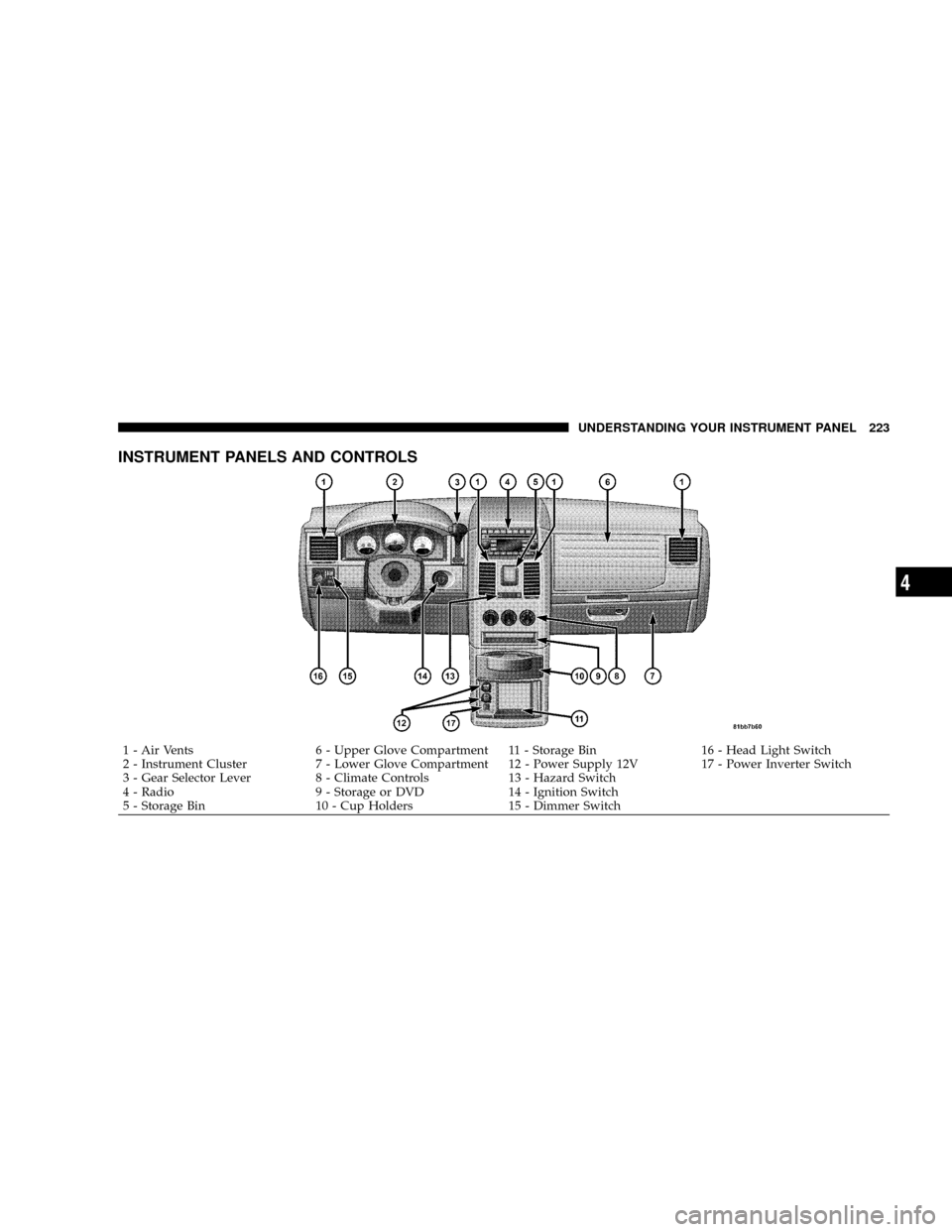
INSTRUMENT PANELS AND CONTROLS
1 - Air Vents 6 - Upper Glove Compartment 11 - Storage Bin 16 - Head Light Switch
2 - Instrument Cluster 7 - Lower Glove Compartment 12 - Power Supply 12V 17 - Power Inverter Switch
3 - Gear Selector Lever 8 - Climate Controls 13 - Hazard Switch
4 - Radio 9 - Storage or DVD 14 - Ignition Switch
5 - Storage Bin 10 - Cup Holders 15 - Dimmer SwitchUNDERSTANDING YOUR INSTRUMENT PANEL 223
4
Page 238 of 531
For additional information on TPMS, refer to Section 5 Ð
Starting and Operating, ªTire Pressure Monitoring Sys-
temº of this manual.
For additional information on Tire Pressures, refer to
Section 5 Ð Starting and Operating, ªTire Inflation
Pressuresº of this manual.
26. Electronic Stability Program (ESP) Indicator Light
The malfunction lamp for the ESP is combined
with BAS. The yellow ªESP/BAS Warning
Lampº comes on when the ignition switch is
turned to the ªONº position. They should go
out with the engine running. If the ªESP/BAS Warning
Lampº comes on continuously with the engine running,
a malfunction has been detected in either the ESP or the
BAS system. If this light remains on after several ignition
cycles, and the vehicle has been driven several miles/
kilometers at speeds greater than 30 mph (48 km/h), see
your authorized dealer as soon as possible.27. Compass Mini-Trip Computer (CMTC) Reset
Button
Press the reset button to scroll through sub menus (i.e.,
Trip Functions: AVG Fuel Economy, DTE, Elapsed Time,
and Units.
NOTE:For more detailed operation, refer to ªCompass
Mini-Trip Computerº later in this section.
28. Compass Mini-Trip Computer (CMTC) Display /
Electronic Vehicle Information Center (EVIC) DisplayÐ
If Equipped
Compass Mini-Trip Computer (CMTC) Ð If Equipped
On vehicles equipped with CMTC, the display provides
the outside temperature, one of eight compass headings
to indicate the direction the vehicle is facing and the
current radio station. Refer to ªCompass Mini-Trip Com-
puterº later in this section.
236 UNDERSTANDING YOUR INSTRUMENT PANEL
Page 252 of 531
SELECT button until YES (Y) or NO (N) appears. Refer to
ªLights/SmartBeams Ð If Equippedº in Section 3 of this
manual for more information.
Headlights On with Wipers (Available with Auto
Headlights Only)
When YES (Y) is selected, and the headlight switch is in
the AUTO position, the headlights will turn on approxi-
mately 10 seconds after the wipers are turned on. The
headlights will also turn off when the wipers are turned
off if they were turned on by this feature. To make your
selection, press and release the FUNCTION SELECT
button until YES (Y) or NO (N) appears.
NOTE:Turning the headlights on during the daytime
causes the instrument panel lights to dim. To increase the
brightness, refer to ªLightsº in Section 3 of this manual.
Delay Turning Headlights Off
When this feature is selected, the driver can choose to
have the headlights remain on for 0, 30, 60, or 90 secondswhen exiting the vehicle. To make your selection, press
and release the RESET button until 0, 30, 60, or 90
appears.
Turn Headlights On with Remote Key Unlock
When this feature is selected, the headlights will activate
and remain on for up to 90 seconds when the doors are
unlocked with the remote keyless entry transmitter. To
make your selection, press and release the RESET button
until OFF, 30 sec., 60 sec., or 90 sec. appears.
Delay Power Off to Accessories Until Exit
When this feature is selected, the power window
switches, radio, hands±free system (if equipped), DVD
video system (if equipped), power sunroof (if equipped),
and power outlets will remain active for up to 10 minutes
after the ignition switch is turned off. Opening a vehicle
door will cancel this feature. To make your selection,
press and release the RESET button until Off, 45 sec., 5
min., or 10 min. appears.
250 UNDERSTANDING YOUR INSTRUMENT PANEL
Page 253 of 531
Rear Park Assist System Ð If Equipped
When ENABLE is selected, the Rear Park Assist System is
activated. When DISABLE is selected, the System is
deactivated and, the instrument cluster will display the
9PARK ASSIST DISABLED9message.
Display Units of Measure in
The EVIC, odometer, and navigation system (if
equipped) can be changed between English and Metric
units of measure. To make your selection, press and
release the RESET button until US or METRIC appears.
RADIO GENERAL INFORMATION
RADIO BROADCAST SIGNALS
Your radio will provide excellent reception under most
operating conditions. Like any system, however, car
radios have performance limitations, due to mobile op-
eration and natural phenomena, which might lead you to
believe your sound system is malfunctioning. To helpyou understand and save you concern about these ªap-
parentº malfunctions, you must understand a point or
two about the transmission and reception of radio sig-
nals.
Two Types of Signals
There are two basic types of radio signals:
1. AM or Amplitude Modulation, in which the transmit-
ted sound causes the amplitude, or height, of the radio
waves to vary.
2. FM or Frequency Modulation, in which the frequency
of the wave is varied to carry the sound.
AM Reception
AM sound is based on wave amplitude, so AM reception
can be disrupted by such things as lightning, power lines
and neon signs.
UNDERSTANDING YOUR INSTRUMENT PANEL 251
4
Page 254 of 531
FM Reception
Because FM transmission is based on frequency varia-
tions, interference that consists of amplitude variations
can be filtered out, leaving the reception relatively clear,
which is the major feature of FM radio.
NOTE:The radio, steering wheel radio controls (if
equipped), and six-disc CD/DVD changer (if equipped)
will remain active for up to 90 seconds after the ignition
switch has been turned OFF, depending upon the EVIC,
Accessory Delay setting. Opening a vehicle front door
will cancel this feature.
Electrical Disturbances
Radio waves may pick up electrical disturbances during
transmission. They mainly affect the wave amplitude,
and thus remain a part of the AM reception. They
interfere very little with the frequency variations that
carry the FM signal.
SALES CODE REQ Ð AM/FM STEREO RADIO
AND 6±DISC CD/DVD CHANGER (MP3/WMA AUX
JACK)
NOTE:The radio sales code is located on the lower right
side of your radio faceplate.
Operating Instructions - Radio Mode
NOTE:The ignition switch must be in the ON or ACC
position to operate the radio.
Power Switch/Volume Control (Rotary)
Push the On/Volume control knob to turn on the radio.
Press the control knob a second time to turn off the radio.
Electronic Volume Control
The electronic volume control turns continuously (360
degrees) in either direction without stopping. Turning the
On/Volume control knob to the right increases the vol-
ume and to the left decreases it.
252 UNDERSTANDING YOUR INSTRUMENT PANEL
Page 255 of 531
When the audio system is turned on, the sound will be
set at the same volume level as last played.
SEEK Buttons
Press and release the SEEK buttons to search for the next
listenable station in AM/FM mode. Press the right switch
to seek up and the left switch to seek down. The radio
will remain tuned to the new station until you make
another selection. Holding either button will bypass
stations without stopping until you release it.
SCAN Button
Pressing the SCAN button causes the tuner to search for
the next listenable station, in AM, FM or Satellite (if
equipped) frequencies, pausing for five seconds at each
listenable station before continuing to the next. To stop
the search, press the SCAN button a second time.
Voice Recognition Button (UConnecttHands-Free
Phone) Ð If Equipped
Press this button to operate the Hands-Free Phone
(UConnectt) feature (if equipped). Refer to ªHands-Free
Communication (UConnectt)º in Section 3.
If your vehicle is not equipped with or this feature is not
available on your vehicle, a ªNot Equipped With
UConnectº message will display on the radio screen.
Phone Button (UConnecttHands-Free Phone) Ð If
Equipped
Press this button to operate the Hands-Free Phone
(UConnectt) feature (if equipped). Refer to ªHands-Free
Communication (UConnectt)º in Section 3.
If your vehicle is not equipped with or this feature is not
available on your vehicle, a ªNot Equipped With
UConnectº message will display on the radio screen.
UNDERSTANDING YOUR INSTRUMENT PANEL 253
4
Page 256 of 531
TIME Button
Press the TIME button and the time of day will display. In
AM or FM mode, pressing the TIME button will switch
between the time and frequency displays.
Clock Setting Procedure
1. Press and hold the TIME button until the hours blink.
2. Adjust the hours by turning the right side Tune/Scroll
control knob.
3. After adjusting the hours, press the right side Tune/
Scroll control knob to set the minutes. The minutes will
begin to blink.
4. Adjust the minutes using the right side Tune/Scroll
control knob. Press the Tune/Scroll control knob to save
the time change.
5. To exit, press any button/knob or wait five seconds.The clock can also be set by pressing the SETUP button
and selecting the ªSET HOME CLOCKº entry. Once in
this display follow the above procedure, starting at Step
2.
INFO Button
Press the INFO button for an RDS station (one with call
letters displayed). The radio will return a Radio Text
message broadcast from an FM station (FM mode only).
RW/FF
Pressing the RW (Rewind) or FF (Fast Forward) buttons
causes the tuner to search for the next frequency in the
direction of the arrows. This feature operates in AM, FM
or Satellite (if equipped) frequencies.
TUNE Control
Turn the rotary Tune/Scroll control knob clockwise to
increase or counterclockwise to decrease the frequency.
254 UNDERSTANDING YOUR INSTRUMENT PANEL
Page 257 of 531
Setting the Tone, Balance, and Fade
Push the rotary Tune/Scroll control knob and BASS will
display. Turn the Tune/Scroll control knob to the right or
left to increase or decrease the bass tones.
Push the rotary Tune/Scroll control knob a second time
and MID will display. Turn the Tune/Scroll control knob
to the right or left to increase or decrease the mid-range
tones.
Push the rotary Tune/Scroll control knob a third time and
TREBLE will display. Turn the Tune/Scroll control knob
to the right or left to increase or decrease the treble tones.
Push the rotary Tune/Scroll control knob a fourth time
and BALANCE will display. Turn the Tune/Scroll control
knob to the right or left to adjust the sound level from the
right or left side speakers.Push the rotary Tune/Scroll control knob a fifth time and
FADE will display. Turn the Tune/Scroll control knob to
the left or right to adjust the sound level between the
front and rear speakers.
Push the rotary Tune/Scroll control knob again to exit
setting tone, balance, and fade.
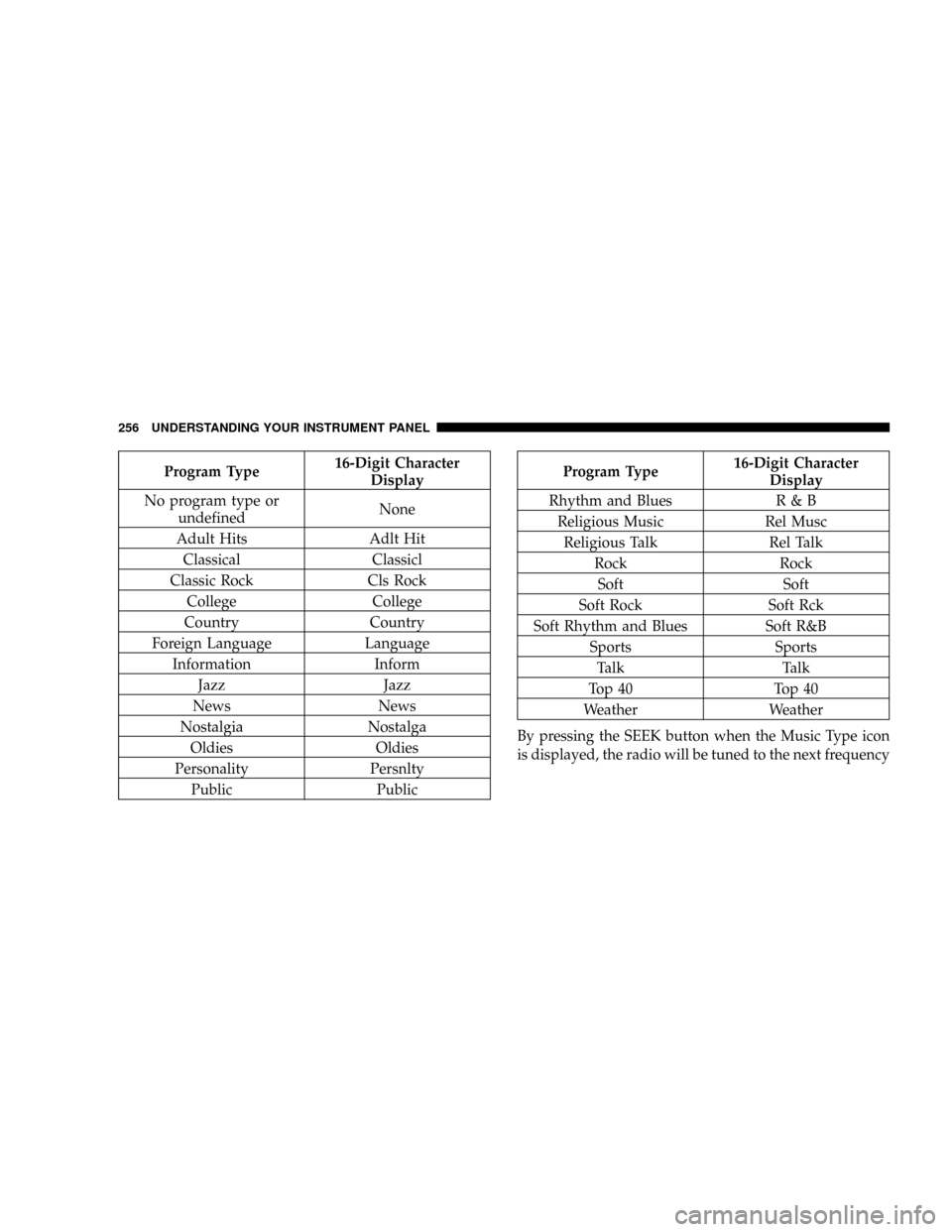
MUSIC TYPE Button
Pressing this button once will turn on the Music Type
mode for five seconds. Pressing the MUSIC TYPE button
or turning the Tune/Scroll control knob within five
seconds will allow the program format type to be se-
lected. Many radio stations do not currently broadcast
Music Type information.
Toggle the MUSIC TYPE button to select the following
format types:
UNDERSTANDING YOUR INSTRUMENT PANEL 255
4
Page 258 of 531
Program Type16-Digit Character
Display
No program type or
undefinedNone
Adult Hits Adlt Hit
Classical Classicl
Classic Rock Cls Rock
College College
Country Country
Foreign Language Language
Information Inform
Jazz Jazz
News News
Nostalgia Nostalga
Oldies Oldies
Personality Persnlty
Public PublicProgram Type16-Digit Character
Display
Rhythm and Blues R & B
Religious Music Rel Musc
Religious Talk Rel Talk
Rock Rock
Soft Soft
Soft Rock Soft Rck
Soft Rhythm and Blues Soft R&B
Sports Sports
Talk Talk
Top 40 Top 40
Weather Weather
By pressing the SEEK button when the Music Type icon
is displayed, the radio will be tuned to the next frequency
256 UNDERSTANDING YOUR INSTRUMENT PANEL
Page 259 of 531
station with the same selected Music Type name. The
Music Type function only operates when in the FM
mode.
If a preset button is activated while in the Music Type
(Program Type) mode, the Music Type mode will be
exited and the radio will tune to the preset station.
SETUP Button
Pressing the SETUP button allows you to select between
the following items:
NOTE:Turn the Tune/Scroll control knob to scroll
through the entries. Push the AUDIO/SELECT button to
select an entry and make changes.
²DVD Enter -When the disc is in DVD Menu mode,
selecting DVD Enter will allow you to play the current
highlighted selection. Use the remote control to scroll
up and down the menu (if equipped).
²DISC Play/Pause -You can toggle between
playing the DVD and pausing the DVD by
pushing the SELECT button (if equipped).
²DVD Play Options -Selecting the DVD Play Options
will display the following:
²Subtitle ± Repeatedly pressing SELECT will switch
subtitles to different subtitle languages that are
available on the disc (if equipped).
²Audio Stream ± Repeatedly pressing SELECT will
switch to different audio languages (if supported on
the disc) (if equipped).
²Angle ± Repeatedly pressing SELECT will change
the viewing angle if supported by the DVD disc (if
equipped).
NOTE:The available selections for each of the above
entries varies depending upon the disc.
UNDERSTANDING YOUR INSTRUMENT PANEL 257
4