display DODGE CARAVAN 2008 5.G Repair Manual
[x] Cancel search | Manufacturer: DODGE, Model Year: 2008, Model line: CARAVAN, Model: DODGE CARAVAN 2008 5.GPages: 531, PDF Size: 7.72 MB
Page 293 of 531
Pressing the MUSIC TYPE button again will close the
MUSIC TYPE screen. Once closed, seek up, seek down,
and scan will no longer be based on your selection.
SETUP Button
Pressing the SETUP button allows you to select the
following items:
²Display Sirius ID number Ð Press the AUDIO/
SELECT button to display the Sirius ID number. This
number is used to activate, deactivate, or change the
Sirius subscription.
SET Button ± To Set the Pushbutton Memory
When you are receiving a channel that you wish to
commit to pushbutton memory, press the SET button.
The symbol SET 1 will now show in the display window.
Select the button (1-6) you wish to lock onto this channel
and press and release that button. If a button is notselected within five seconds after pressing the SET but-
ton, the channel will continue to play but will not be
stored into pushbutton memory.
You may add a second channel to each pushbutton by
repeating the above procedure with this exception: Press
the SET button twice and SET 2 will show in the display
window. Each button can be set for SET 1 and SET 2. This
allows a total of 12 Satellite channels to be stored into
pushbutton memory. The channels stored in SET 2
memory can be selected by pressing the pushbutton
twice.
Every time a preset button is used, a corresponding
button number will display.
Buttons1-6
These buttons tune the radio to the channels that you
commit to pushbutton memory (12 Satellite stations).
UNDERSTANDING YOUR INSTRUMENT PANEL 291
4
Page 294 of 531
Operating Instructions - Hands-Free Phone (If
Equipped)
Refer to ªHands-Free Communication (UConnectt)º in
Section 3.
Operating Instructions - Video Entertainment
System (VEST) (If Equipped)
Refer to separate ªVideo Entertainment System (VESt)
Guide.º
UNIVERSAL CONSUMER INTERFACE (UCI) Ð IF
EQUIPPED
NOTE:This section is for sales code RES/REL and
REQ/RET radios only with UConnectt. For sales code
REN/REZ touch screen radio and REU/REX/RE1 radio,
refer to the separate User's Manual.This feature allows you to plug an iPodtmobile digital
device into the vehicle's sound system through a connec-
tor (UCI connector) using an optional connection cable
(available through MOPARt). See your authorized dealer
for details.
Using this feature,
²the iPodtaudio can be played on the vehicle's sound
system, providing metadata (Track Title, Artist, Al-
bum, etc.) information display on radio.
²the iPodtcan be controlled using the radio buttons to
Play, Browse and List the iPodtcontents.
²the iPodtbattery charges when plugged into the UCI
connector.
292 UNDERSTANDING YOUR INSTRUMENT PANEL
Page 295 of 531
Connecting The iPodTDevice
Use the optional connection cable to connect an iPodtto
the vehicle's UCI connector (which is located in the glove
box or center console on some vehicles. This location may
vary with vehicle). Once the iPodtis connected and
synchronized to the vehicle system (this may take a few
seconds to connect), the vehicle brand logo appears on
the iPodtdisplay, and it starts charging and is ready for
use by pressing radio switches as described below.
Controlling The iPodTUsing Radio Buttons
To get into the UCI (iPodt) mode and access a connected
iPodt, press the AUX button on the radio faceplate. Once
in the UCI (iPodt) mode, the iPodtaudio track (if
available from iPodt) will start playing over the vehicle
audio system.
Play Mode
When switched to UCI mode the iPodtwill be in Play
mode. In Play mode, you may use the following buttons
on the radio faceplate to control the iPodtand display
data:
Tune/Scroll Knob
Use the Tune/Scroll knob to go to the next or previous
track.
The Tune/Scroll knob functions similar to the scroll
wheel on the iPodtmobile digital device.
Turning it clockwise (forward) by one click while playing
a track skips to the next track.
Turning it counterclockwise (backward) by one click
during the first two seconds of the track will jump to the
previous track in the list and turning this button at any
other time in the track will jump to the beginning of the
current track.
UNDERSTANDING YOUR INSTRUMENT PANEL 293
4
Page 297 of 531
SCAN Button
Pressing the SCAN button will play the first five seconds
of each track in the current list and then forward to the
next song. To stop the SCAN mode and start playing the
desired track, press the SCAN button again.
During the SCAN mode, you can also press the SEEK
button to the left or right to go to the previous or next
tracks.
RND (Random) Button (RES/REL Radios Only)
Pressing the RND button will switch between the shuffle
on and shuffle off modes of the iPodt. If the RND icon is
showing on the radio display then the Shuffle mode is on.
List or Browse Mode
During Play mode, pressing any of the following buttons
will take you to List mode. List mode enables you to
scroll through the list of menus and tracks on the iPodt
device.Tune/Scroll Knob
In the List mode, the Tune/Scroll knob functions in a
similar manner as the scroll wheel on the iPodt.
Turning the Tune/Scroll knob clockwise (forward) and
counterclockwise (backward) scrolls through lists, dis-
playing the track detail on the radio display. Once you
have the track to be played highlighted on the radio
display, press the Tune/Scroll knob to select and start
playing the track. By turning the Tune/Scroll knob fast,
you can jump through the list faster. During fast scroll,
you may notice a slight delay in updating the informa-
tion on the radio display.
During all List modes, the iPodtwill display all lists in
ªwrap-aroundº mode. So if the track you wish to select is
at the bottom of the list, you just turn the Tune/Scroll
knob backward (counterclockwise) to get to the track
faster.
UNDERSTANDING YOUR INSTRUMENT PANEL 295
4
Page 313 of 531
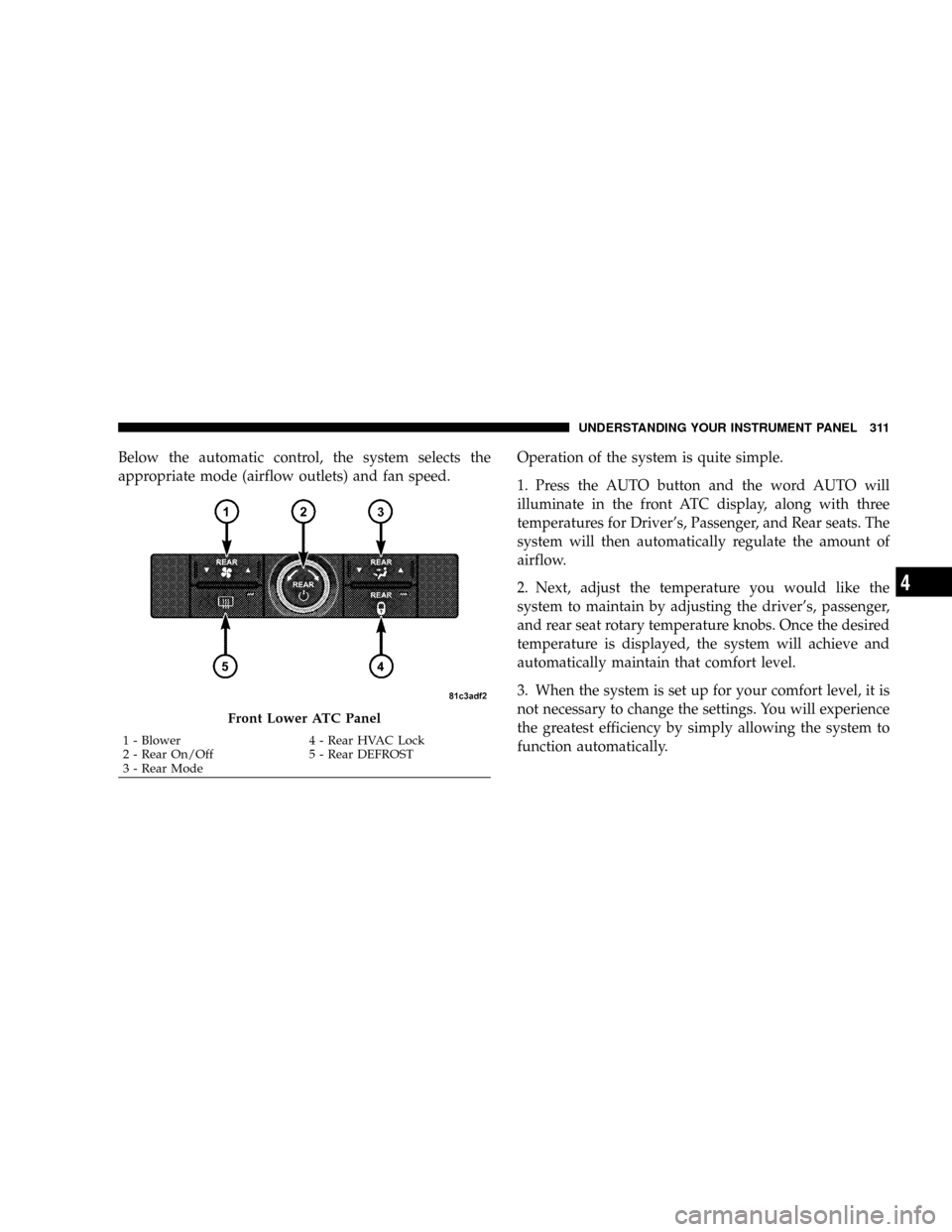
Below the automatic control, the system selects the
appropriate mode (airflow outlets) and fan speed.Operation of the system is quite simple.
1. Press the AUTO button and the word AUTO will
illuminate in the front ATC display, along with three
temperatures for Driver's, Passenger, and Rear seats. The
system will then automatically regulate the amount of
airflow.
2. Next, adjust the temperature you would like the
system to maintain by adjusting the driver's, passenger,
and rear seat rotary temperature knobs. Once the desired
temperature is displayed, the system will achieve and
automatically maintain that comfort level.
3. When the system is set up for your comfort level, it is
not necessary to change the settings. You will experience
the greatest efficiency by simply allowing the system to
function automatically.
Front Lower ATC Panel
1 - Blower 4 - Rear HVAC Lock
2 - Rear On/Off 5 - Rear DEFROST
3 - Rear ModeUNDERSTANDING YOUR INSTRUMENT PANEL 311
4
Page 314 of 531
NOTE:
²It is not necessary to move the temperature settings for
cold or hot vehicles. The system automatically adjusts
the temperature, mode and fan speed to provide
comfort as quickly as possible.
²The temperature can be displayed in U.S. or Metric by
selecting the US/M customer programmable feature.
Refer to the ªCustomer Programmable Featuresº in
Section 3 of this manual.
To provide you with maximum comfort in the automatic
mode, during cold start-ups, the blower fan will remain
on low and the DELAY symbol will appear in the front
ATC display until the engine warms up. The fan will
engage immediately if the DEFROST mode is selected or
by rotating the blower control to any fixed blower speed.
Manual Operation
This system offers a full complement of manual override
features. The AUTO symbol in the front ATC display will
be turned off when the system is being used in the
manual mode.
NOTE:Each of these features operate independently
from each other. If any one feature is controlled manually,
the remaining features will continue to operate automati-
cally.
The left blower control knob can be set to any fixed
blower speed by pressing the upper front blower rocker
button. The fan will now operate at a fixed speed until
additional speeds are selected. This allows the front
occupants to control the volume of air circulated in the
vehicle and cancel the AUTO mode.
The operator can also select the direction of the selecting
one of the following positions.
312 UNDERSTANDING YOUR INSTRUMENT PANEL
Page 316 of 531
The SNOWFLAKE mode or A/C button allows
the operator to manually activate or deactivate the
air conditioning system. When in SNOWFLAKE
mode the ATC display is on, cool, dehumidified air flows
through the air outlets. If ECONOMY mode is desired,
press the SNOWFLAKE button to turn off the SNOW-
FLAKE mode in the ATC display and deactivate the A/C
system. Note: If fog or mist appears on the windshield or
side glass, select DEFROST mode and increase blower
speed.
RECIRCULATION Control
When outside air contains smoke, odors, or
high humidity, or if rapid cooling is desired,
you may wish to recirculate interior air by
pressing the RECIRCULATION mode control
button. RECIRCULATION mode should only be used
temporarily. The recirculation symbol will illuminate in
the display when this button is selected. Push the buttona second time to turn off the RECIRCULATION mode
LED and allow outside air into the vehicle.
NOTE:In cold weather, use of the RECIRCULATION
mode may lead to excessive window fogging. The RE-
CIRCULATION mode is not allowed in the FLOOR, MIX
and DEFROST modes to improve window clearing op-
eration. Recirculation will be disabled automatically if
these modes are selected. Recirculation will be disabled
automatically if these modes are selected.
Rear Automatic Temperature Control (ATC) Ð If
Equipped
The Rear ATC System has floor air outlets at the rear of
the right side sliding door and overhead outlets at each
outboard rear seating positions. The system provides
heated air through the floor outlets or cool, dehumidified
air through the headliner outlets.
314 UNDERSTANDING YOUR INSTRUMENT PANEL
Page 317 of 531
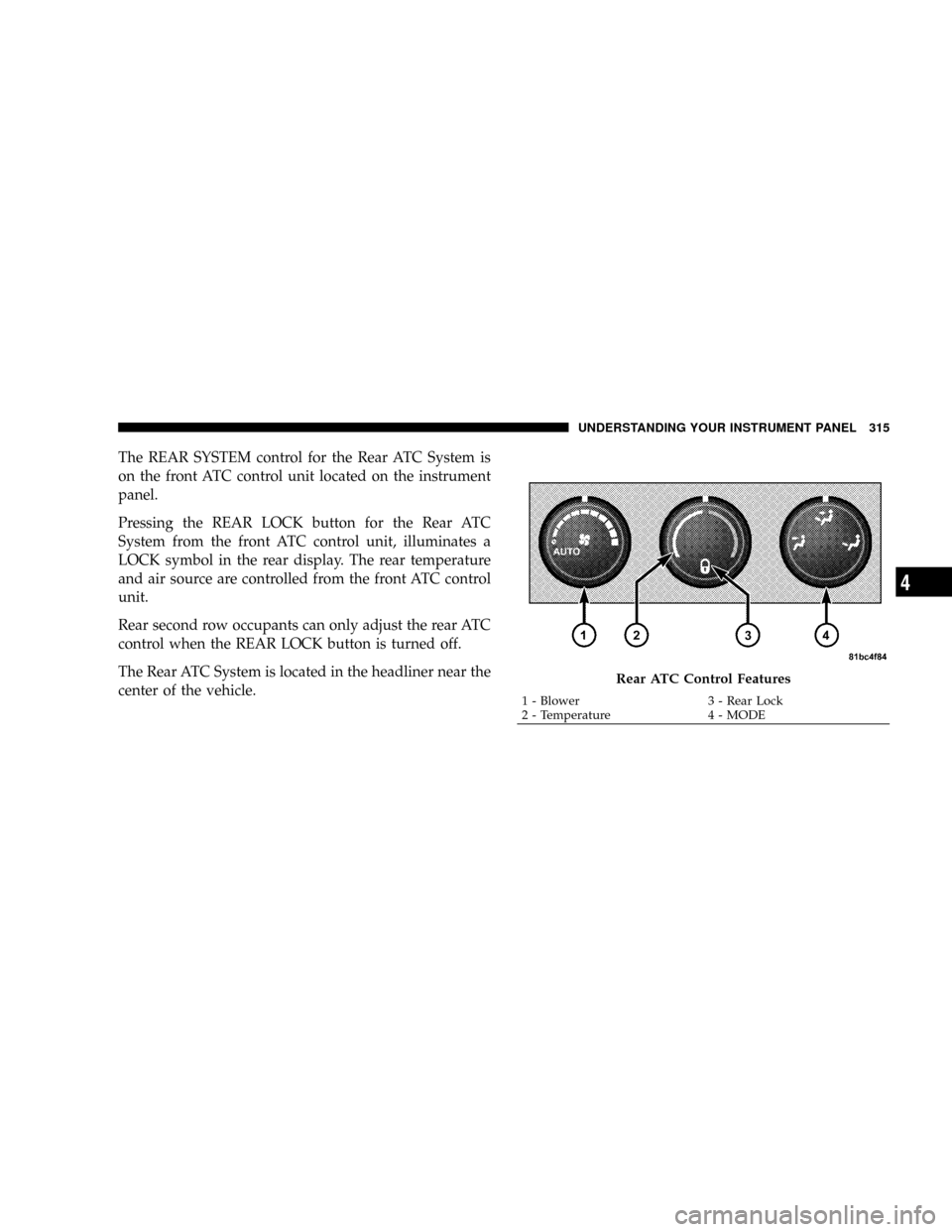
The REAR SYSTEM control for the Rear ATC System is
on the front ATC control unit located on the instrument
panel.
Pressing the REAR LOCK button for the Rear ATC
System from the front ATC control unit, illuminates a
LOCK symbol in the rear display. The rear temperature
and air source are controlled from the front ATC control
unit.
Rear second row occupants can only adjust the rear ATC
control when the REAR LOCK button is turned off.
The Rear ATC System is located in the headliner near the
center of the vehicle.
Rear ATC Control Features
1 - Blower 3 - Rear Lock
2 - Temperature 4 - MODEUNDERSTANDING YOUR INSTRUMENT PANEL 315
4
Page 318 of 531
Operation of the rear system is quite simple.
1. Press the REAR LOCK button on the front ATC control
unit. This turns off the REAR LOCK icon in the rear
temperature knob.
2. Rotate the Rear Blower, Rear Temperature and the
Rear Mode Control knobs to suit your comfort needs.
3. ATC is selected by adjusting the rear blower knob
counterclockwise to AUTO.
Once the desired temperature is displayed, the ATC
System will automatically achieve and maintain that
comfort level. When the system is set up for your comfort
level, it is not necessary to change the settings. You will
experience the greatest efficiency by simply allowing the
system to function automatically.NOTE:
²It is not necessary to move the temperature settings for
cold or hot vehicles. The system automatically adjusts
the temperature, mode and fan speed to provide
comfort as quickly as possible.
²The temperature can be displayed in U.S. or Metric by
selecting the US/M customer programmable feature.
Refer to ELECTRONIC VEHICLE INFORMATION
CENTER (EVIC) Ð IF EQUIPPED, Personal Settings
(Customer Programmable Features) in Section 4 of this
manual.
Rear Blower Control
The rear blower control knob can be manually set to off
or any fixed blower speed by rotating the knob from low
to high. This allows the rear seat occupants to control the
volume of air circulated in the rear of the vehicle.
316 UNDERSTANDING YOUR INSTRUMENT PANEL
Page 319 of 531
CAUTION!
Interior air enters the Rear Automatic Temperature
Control System through an intake grille located in
the passenger side trim panel behind the third seat.
The heater outlets are located in the passenger side
trim panel just behind the sliding door. Do not block
or place objects directly in front of the inlet grille or
heater outlets. The electrical system could overload
causing damage to the blower motor.
Rear Temperature Control
To change the temperature in the rear of the vehicle,
rotate the temperature knob counterclockwise to lower
the temperature and clockwise to increase the tempera-
ture. The REAR temperature settings are displayed in the
front ATC control.When rear controls are locked by the front system, the
LOCK symbol on the temperature knob is illuminated
and any rear overhead adjustments are ignored.
Rear Mode Control
AUTO Mode
The rear system automatically maintains the correct
mode and comfort level desired by the rear seat occu-
pants.
FLOOR Mode
Air comes from the floor outlets.
BI-LEVEL Mode
Air comes from both the headliner outlets and the
floor outlets.
NOTE:In many temperature positions, the BI-LEVEL
mode is designed to provide cooler air out of the head-
liner outlets and warmer air from the floor outlets.
UNDERSTANDING YOUR INSTRUMENT PANEL 317
4