tow DODGE CARAVAN 2009 Owner's Manual
[x] Cancel search | Manufacturer: DODGE, Model Year: 2009, Model line: CARAVAN, Model: DODGE CARAVAN 2009Pages: 534, PDF Size: 9.93 MB
Page 184 of 534
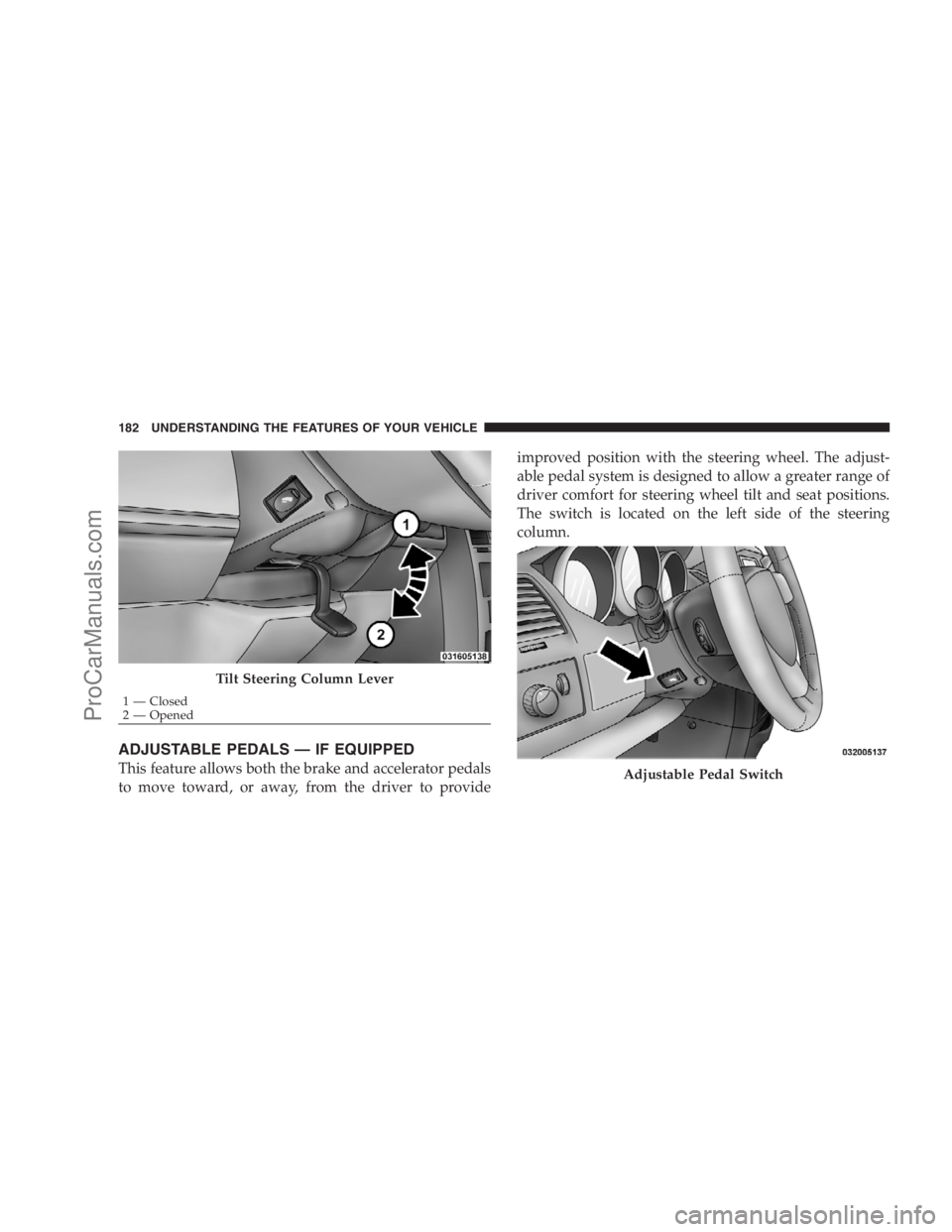
ADJUSTABLE PEDALS — IF EQUIPPED
This feature allows both the brake and accelerator pedals
to move toward, or away, from the driver to provideimproved position with the steering wheel. The adjust-
able pedal system is designed to allow a greater range of
driver comfort for steering wheel tilt and seat positions.
The switch is located on the left side of the steering
column.
Tilt Steering Column Lever
1 — Closed
2 — Opened
Adjustable Pedal Switch
182 UNDERSTANDING THE FEATURES OF YOUR VEHICLE
ProCarManuals.com
Page 185 of 534
Press the button forward to move the pedals forward
(toward the front of the vehicle).
Press the button rearward to move the pedals rearward
(toward the driver).
•The pedals can be adjusted with the ignition OFF.
•The pedals can be adjusted while driving.
•The pedalscannotbe adjusted when the vehicle is in
REVERSE or when the Electronic Speed Control Sys-
tem is on. The following messages will be displayed
on vehicles equipped with the Electronic Vehicle In-
formation System (EVIC) if the pedals are attempted to
be adjusted when the system is locked out (“Adjust-
able Pedal Disabled — Cruise Control Engaged” or
“Adjustable Pedal Disabled — Vehicle In Reverse”.
CAUTION!
Do not place any article under the adjustable pedals
or impede its ability to move, as it may cause damage
to the pedal controls. Pedal travel may become lim-
ited if movement is stopped by an obstruction in the
adjustable pedal’s path.
ELECTRONIC SPEED CONTROL — IF EQUIPPED
When engaged, Electronic Speed Control takes over the
accelerator operation at speeds greater than 25 mph
(40 km/h).
UNDERSTANDING THE FEATURES OF YOUR VEHICLE 183
3
ProCarManuals.com
Page 187 of 534
Deactivating Electronic Speed Control
A soft tap on the brake pedal or pulling the Electronic
Speed Control lever (CANCEL) toward you will deacti-
vate the Electronic Speed Control without erasing the set
speed memory. Pushing the ON/OFF button to the OFF
position or turning OFF the ignition erases the set speed
memory.
Resuming Speed
To resume a previously set speed, raise the Electronic
Speed Control lever (RESUME/ACCEL) upward, and
release. Resume can be used at any speed above 25 mph
(40 km/h).
Varying The Speed Setting
When the Electronic Speed Control is SET, speed can be
increased by raising and holding the RESUME/ACCEL
lever upwards. When released, a new set speed will be
established.Raising the RESUME/ACCEL lever upward, once, will
result in a 1 mph (1 km/h) speed increase. Each time the
lever is tapped upward speed increases, so tapping the
Electronic Speed Control lever three times will increase
speed by 3 mph (5 km/h), etc.
To decrease speed while speed control is set, press the
SET/DECEL lever downward, and hold. Release the
Electronic Speed Control lever when the desired speed is
reached, and the new speed will be set.
Tapping the SET/DECEL lever downward, once, will
result in a 1 mph (1 km/h) speed decrease. Each time the
Electronic Speed Control lever is tapped downward,
speed decreases.
NOTE:In order to ensure proper operation the Elec-
tronic Speed Control system has been designed to shut
down if multiple speed control switch functions are
operated simultaneously. If this occurs, the Electronic
UNDERSTANDING THE FEATURES OF YOUR VEHICLE 185
3
ProCarManuals.com
Page 192 of 534
WARNING!
•Drivers must be careful when backing up, even
when using the Rear Park Assist System. Always
check carefully behind your vehicle, and be sure to
check for pedestrians, animals, other vehicles, ob-
structions, or blind spots before backing up. You
are responsible for the safety of your surroundings
and must continue to pay attention while backing
up. Failure to do so can result in serious injury or
death.
(Continued)
WARNING! (Continued)
•Before using the Rear Park Assist system, it is
strongly recommended that the ball mount and
hitch ball assembly be disconnected from the
vehicle, when the vehicle is not used for towing.
Failure to do so can result in injury or damage to
vehicles or obstacles, because the hitch ball will be
much closer to the obstacle than the rear fascia
when the warning display turns the red LEDs on.
Also, the sensors could detect the ball mount and
hitch ball assembly, depending on its size and
shape, giving a false indication that an obstacle is
behind the vehicle.
190 UNDERSTANDING THE FEATURES OF YOUR VEHICLE
ProCarManuals.com
Page 193 of 534
CAUTION!
•To avoid vehicle damage, the Rear Park Assist
system should only be used as a parking aid and is
unable to recognize every obstacle, including
small objects. Parking curbs might be temporarily
detected or not detected at all. Obstacles located
above or below the sensors will not be detected
when they are in close proximity to the rear of the
vehicle.
•To avoid vehicle damage, the vehicle must be
driven slowly when using the Rear Park Assist
system, to be able to stop in time when an obstacle
is detected. It is recommended that you look over
your shoulder when using the Rear Park Assist
system.NOTE:
•Ensure that the rear bumper is free of dirt and debris
to keep the system operating properly.
•Jackhammers, large trucks, and other vibrations could
affect the performance of the system.
Enabling and Disabling The Rear Park Assist
System
There are times when you may want to disable the Rear
Park Assist System, such as when towing a trailer.
Vehicles Equipped With the Electronic Vehicle
Information Center (EVIC)
You can turn the Rear Park Assist System ON or OFF
through the EVIC. For details, refer to “Personal Settings
(Customer Programmable Features)” under “Electronic
Vehicle Information Center (EVIC)” in Section 4.
UNDERSTANDING THE FEATURES OF YOUR VEHICLE 191
3
ProCarManuals.com
Page 218 of 534
Coat Hooks
Coat hooks are located along the headliner for the second
and third row seating positions. The coat hook load limit
is 10 lbs (4.5 kg). Exceeding the recommended load limit
can cause the coat hooks to break or disengage from the
vehicle.
Cargo Area Storage
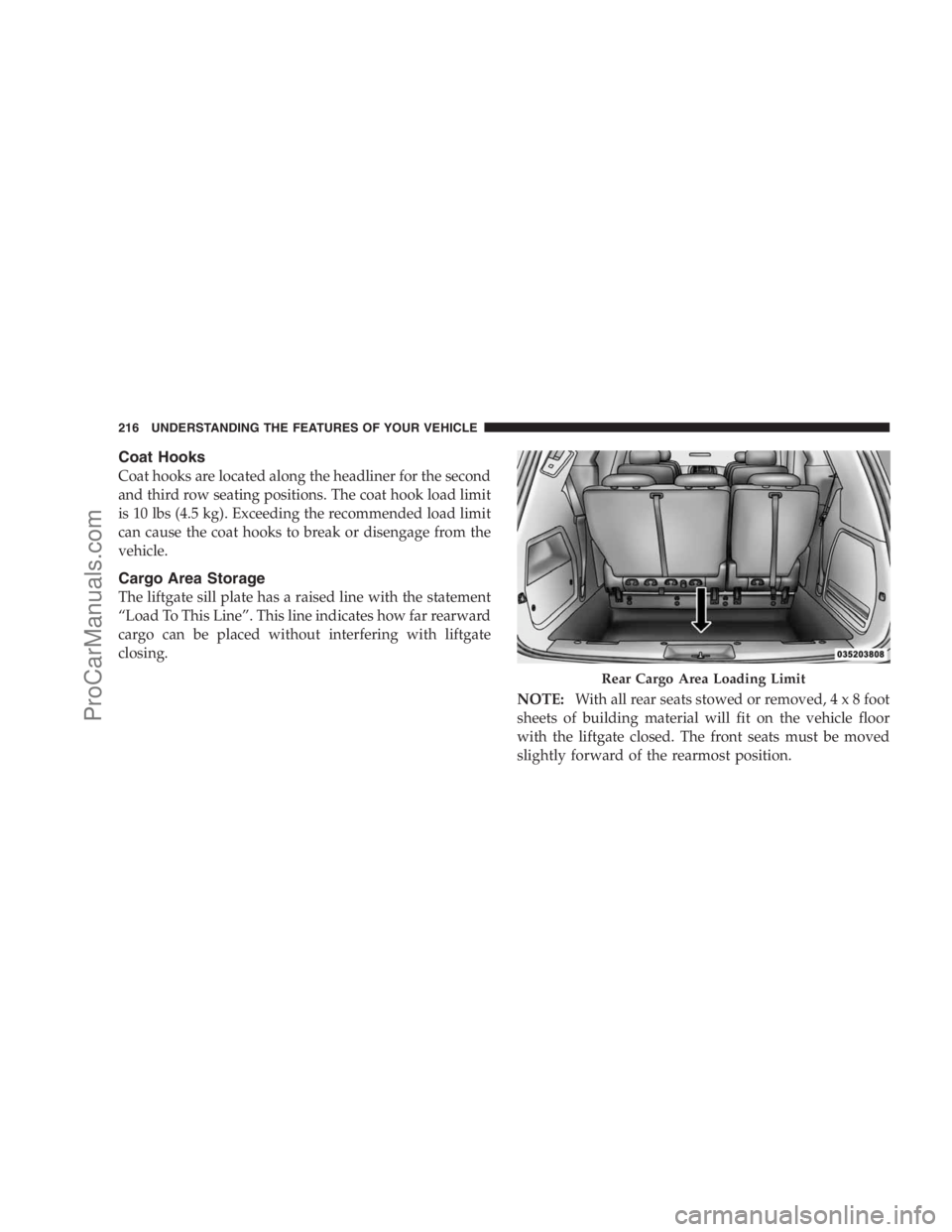
The liftgate sill plate has a raised line with the statement
“Load To This Line”. This line indicates how far rearward
cargo can be placed without interfering with liftgate
closing.
NOTE:With all rear seats stowed or removed,4x8foot
sheets of building material will fit on the vehicle floor
with the liftgate closed. The front seats must be moved
slightly forward of the rearmost position.
Rear Cargo Area Loading Limit
216 UNDERSTANDING THE FEATURES OF YOUR VEHICLE
ProCarManuals.com
Page 238 of 534
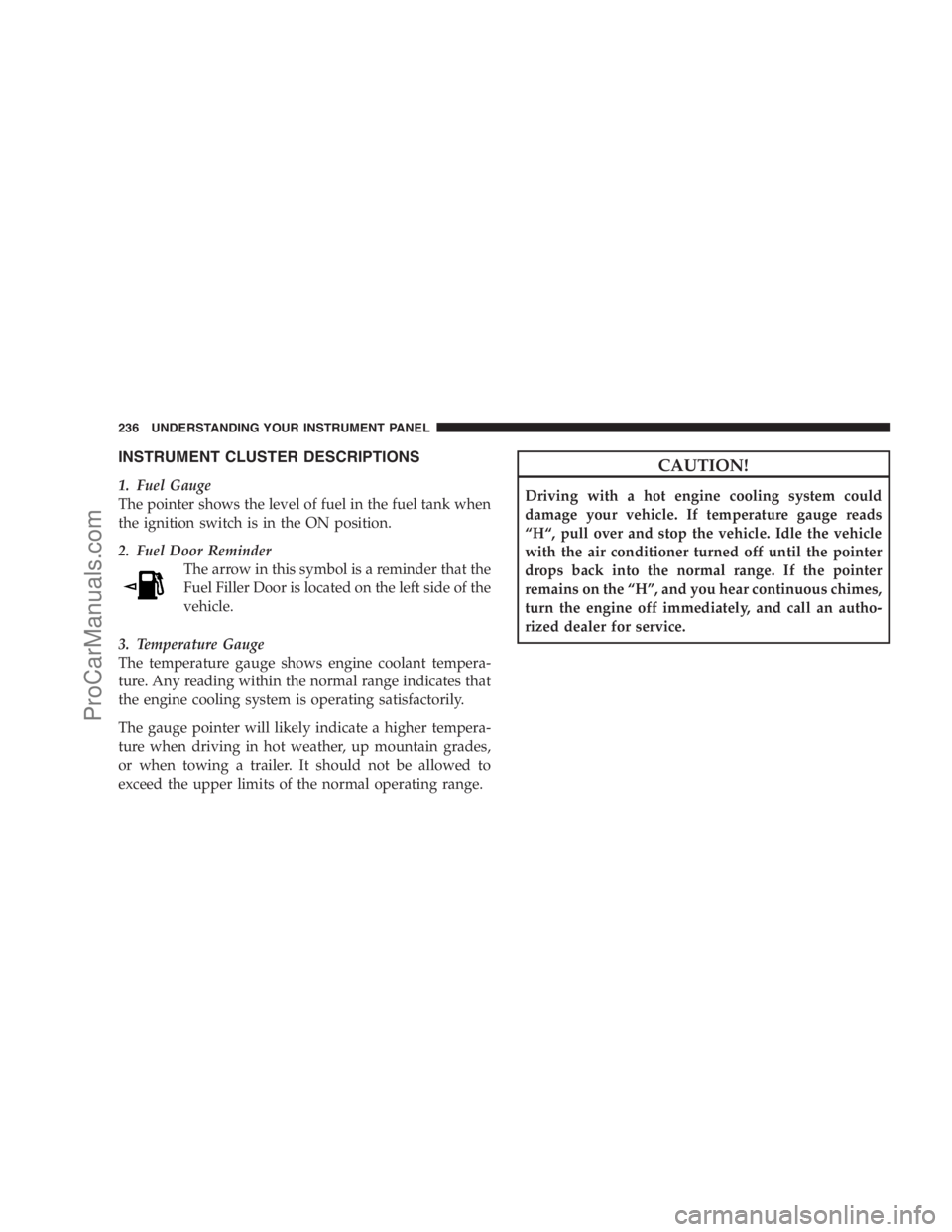
INSTRUMENT CLUSTER DESCRIPTIONS
1. Fuel Gauge
The pointer shows the level of fuel in the fuel tank when
the ignition switch is in the ON position.
2. Fuel Door Reminder
The arrow in this symbol is a reminder that the
Fuel Filler Door is located on the left side of the
vehicle.
3. Temperature Gauge
The temperature gauge shows engine coolant tempera-
ture. Any reading within the normal range indicates that
the engine cooling system is operating satisfactorily.
The gauge pointer will likely indicate a higher tempera-
ture when driving in hot weather, up mountain grades,
or when towing a trailer. It should not be allowed to
exceed the upper limits of the normal operating range.
CAUTION!
Driving with a hot engine cooling system could
damage your vehicle. If temperature gauge reads
“H“, pull over and stop the vehicle. Idle the vehicle
with the air conditioner turned off until the pointer
drops back into the normal range. If the pointer
remains on the “H”, and you hear continuous chimes,
turn the engine off immediately, and call an autho-
rized dealer for service.
236 UNDERSTANDING YOUR INSTRUMENT PANEL
ProCarManuals.com
Page 239 of 534
WARNING!
A hot engine cooling system is dangerous. You or
others could be badly burned by steam or boiling
coolant. You may want to call an authorized dealer if
your vehicle overheats. If you decide to look under
the hood yourself, see Section 7 of this manual.
Follow the warnings under the Cooling System Pres-
sure Cap paragraph.
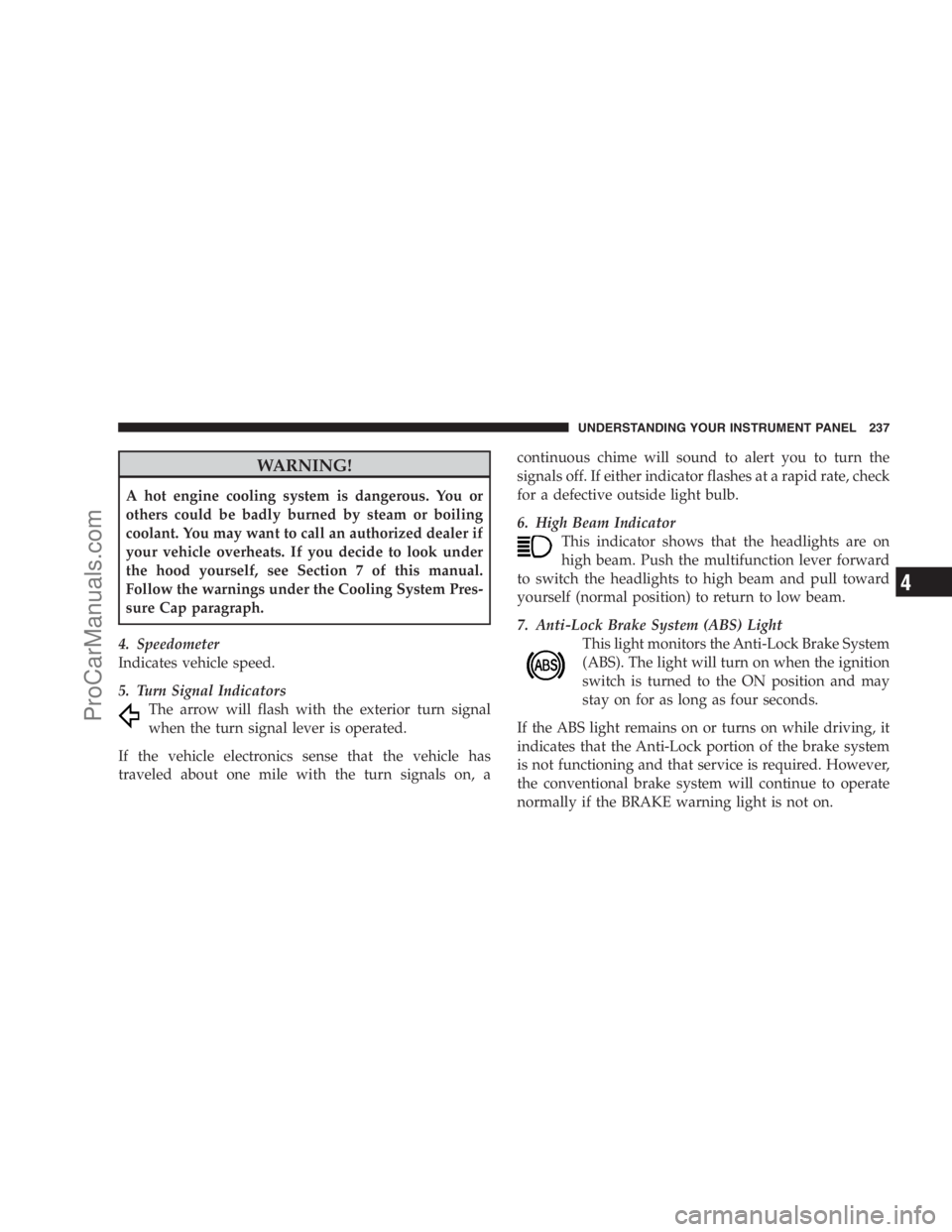
4. Speedometer
Indicates vehicle speed.
5. Turn Signal Indicators
The arrow will flash with the exterior turn signal
when the turn signal lever is operated.
If the vehicle electronics sense that the vehicle has
traveled about one mile with the turn signals on, acontinuous chime will sound to alert you to turn the
signals off. If either indicator flashes at a rapid rate, check
for a defective outside light bulb.
6. High Beam Indicator
This indicator shows that the headlights are on
high beam. Push the multifunction lever forward
to switch the headlights to high beam and pull toward
yourself (normal position) to return to low beam.
7. Anti-Lock Brake System (ABS) Light
This light monitors the Anti-Lock Brake System
(ABS). The light will turn on when the ignition
switch is turned to the ON position and may
stay on for as long as four seconds.
If the ABS light remains on or turns on while driving, it
indicates that the Anti-Lock portion of the brake system
is not functioning and that service is required. However,
the conventional brake system will continue to operate
normally if the BRAKE warning light is not on.
UNDERSTANDING YOUR INSTRUMENT PANEL 237
4
ProCarManuals.com
Page 244 of 534
NOTE:If the indicator message illuminates when you
start the vehicle, the oil change indicator system did not
reset. If necessary repeat this procedure.
13. Odometer Display Reset Button
To reset a message display (gATE, gASCAP, noFUSE,
CHAngE OIL, LoCOOL, LoWASH), push and hold the
button until the display resets (approximately two sec-
onds).
14. Electronic Stability Program (ESP) Indicator Light
/ Traction Control System (TCS) Indicator Light
If this indicator light flashes during accelera-
tion, apply as little throttle as possible. While
driving, ease up on the accelerator. Adapt your
speed and driving to the prevailing road con-
ditions, and do not switch off the Electronic Stability
Program (ESP), or Traction Control System (TCS).15. Malfunction Indicator Light (MIL)
The Malfunction Indicator Light (MIL) is part of
an onboard diagnostic system called OBD that
monitors engine and automatic transmission con-
trol systems. The light will illuminate when the key is in
the ON position before engine start. If the bulb does not
come on when turning the key from OFF to ON, have the
condition checked promptly.
Certain conditions such as a loose or missing gas cap,
poor fuel quality, etc. may illuminate the MIL after engine
start. The vehicle should be serviced if the light stays on
through several of your typical driving cycles. In most
situations the vehicle will drive normally and will not
require towing.
The MIL flashes to alert to serious conditions that could
lead to immediate loss of power or severe catalytic
converter damage. The vehicle should be serviced at an
authorized dealer as soon as possible if this occurs.
242 UNDERSTANDING YOUR INSTRUMENT PANEL
ProCarManuals.com
Page 245 of 534
16. Engine Temperature Warning Light
This light warns of an overheated engine condi-
tion. As temperatures rise and the gauge ap-
proachesH, this indicator will illuminate and a
single chime will sound after reaching a set threshold.
Further overheating will cause the temperature gauge to
passH, the indicator will continuously flash and a
continuous chime will occur until the engine is allowed
to cool.
If the light turns on while driving, safely pull over and
stop the vehicle. If the A/C system is on, turn it off. Also,
shift the transmission into NEUTRAL and idle the ve-
hicle. If the temperature reading does not return to
normal, turn the engine off immediately and call for
service. Refer to “If Your Engine Overheats” in Section 6
for more information.17. Electronic Throttle Control (ETC) Light
This light informs you of a problem with the
Electronic Throttle Control (ETC) system. The
light will come on when the ignition is first
turned ON and remain on briefly as a bulb
check. If the light does not come on during starting, have
the system checked by an authorized dealer.
If a problem is detected, the light will come on while the
engine is running. Cycle the ignition key when the
vehicle has completely stopped and the shift lever is
placed in the PARK position, the light should turn off.
If the light remains lit with the engine running your
vehicle will usually be drivable, however, see an autho-
rized dealer for service as soon as possible. If the light is
flashing when the engine is running, immediate service is
required and you may experience reduced performance,
an elevated/rough idle or engine stall and your vehicle
may require towing.
UNDERSTANDING YOUR INSTRUMENT PANEL 243
4
ProCarManuals.com