fuel DODGE CHALLENGER 2015 3.G User Guide
[x] Cancel search | Manufacturer: DODGE, Model Year: 2015, Model line: CHALLENGER, Model: DODGE CHALLENGER 2015 3.GPages: 603, PDF Size: 14.97 MB
Page 250 of 603
Trip Info
Push and release the UP or DOWN arrow button until
the Trip Menu item is highlighted in the DID (Toggle left
or right to select Trip A or Trip B). The Trip information
will display the following:
•Distance
•Average Fuel Economy
•Elapsed Time
Hold the OK button to reset feature information.
Audio
Push and release the UP or DOWN arrow button until
the Audio Menu displays in the DID.
Stored Messages
Push and release the UP or DOWN arrow button until
the Messages Menu item is highlighted in the DID. This
feature shows the number of stored warning messages.
Pushing the RIGHT arrow button will allow you to see
what the stored messages are.
Screen Setup
Push and release the UP or DOWN arrow button until
the Screen Setup Menu displays in the DID. Push and
release the OK button to enter the sub-menus. The Screen
Setup feature allows you to change what information is
displayed in the instrument cluster as well as the location
that information is displayed.
248 UNDERSTANDING YOUR INSTRUMENT PANEL
Page 256 of 603
Units
After pressing the “Units” button on the touchscreen the
following settings will be available:
•Units
When in this display, you may select each unit of measure
independently displayed in the Driver Information Dis-
play (DID), and navigation system (if equipped). The
following selectable units of measure are listed below:
•Speed
Select from: “MPH” or “km/h.”
•Distance
Select from: “mi” or “km.”
•Fuel Consumption
Select from: “MPG” (US), “MPG” (UK), “L/100 km” or
“km/L.”
•Capacity
Select from: “gal” (US), “gal” (UK), or “L.”
•Pressure
Select from: “psi,” “kPa,” or “bar.”
•Temperature
Select from: “°C,” or “°F.”
•Power
Select from: “HP” (US), “HP” (UK), and “kW.”
•Torque
Select from: “lb-ft” or “Nm.”
•After the desired setting has been selected, press the
back arrow/Done button on the touchscreen to return
to the previous menu.
254 UNDERSTANDING YOUR INSTRUMENT PANEL
Page 273 of 603
•Navigation Turn-By-Turn In Cluster — If Equipped
When this feature is selected, the turn-by-turn directions
will appear in the display as the vehicle approaches a
designated turn within a programmed route. To make
your selection, press the “Navigation Turn-By-Turn In
Cluster” button on the touchscreen, until a check-mark
appears next to the setting, showing that setting has been
selected. Press the back arrow button on the touchscreen
to return to the previous menu.
Units
After pressing the “Units” button on the touchscreen the
following settings will be available:
•Units
When in this display, you may select each unit of measure
independently displayed in the Driver Information Dis-
play (DID), and navigation system (if equipped). The
following selectable units of measure are listed below:
•Speed
Select from: “MPH” or “km/h.”
•Distance
Select from: “mi” or “km.”
•Fuel Consumption
Select from: “MPG” (US), “MPG” (UK), “L/100 km” or
“km/L.”
•Capacity
Select from: “gal” (US), “gal” (UK), or “L.”
•Pressure
Select from: “psi,” “kPa,” or “bar.”
•Temperature
Select from: “°C,” or “°F.”
4
UNDERSTANDING YOUR INSTRUMENT PANEL 271
Page 323 of 603
Climate Control Functions
A/C (Air Conditioning)
The Air Conditioning (A/C) button allows the operator
to manually activate or deactivate the air conditioning
system. When the air conditioning system is turned on,
cool dehumidified air will flow through the outlets into
the cabin. For improved fuel economy, press the A/C
button to turn off the air conditioning and manually
adjust the blower and airflow mode settings. Also, make
sure to select only Panel, Bi-Level or Floor modes.
NOTE:
•If fog or mist appears on the windshield or side glass,
select Defrost mode and adjust blower speed if
needed.
•If your air conditioning performance seems lower than
expected, check the front of the A/C condenser (lo-
cated in front of the radiator), for an accumulation of
dirt or insects. Clean with a gentle water spray from
behind the radiator and through the condenser. Fabric
front fascia protectors may reduce airflow to the
condenser, reducing air conditioning performance.
MAX A/C
MAX A/C sets the control for maximum cooling perfor-
mance.
Press and release to toggle between MAX A/C and the
prior settings. The button on the touchscreen illuminates
when MAX A/C is ON.
In MAX A/C, the blower level and mode position can be
adjusted to desired user settings. Pressing other settings
will cause the MAX A/C operation to switch to the prior
settings and the MAX A/C indicator will turn off.
4
UNDERSTANDING YOUR INSTRUMENT PANEL 321
Page 342 of 603
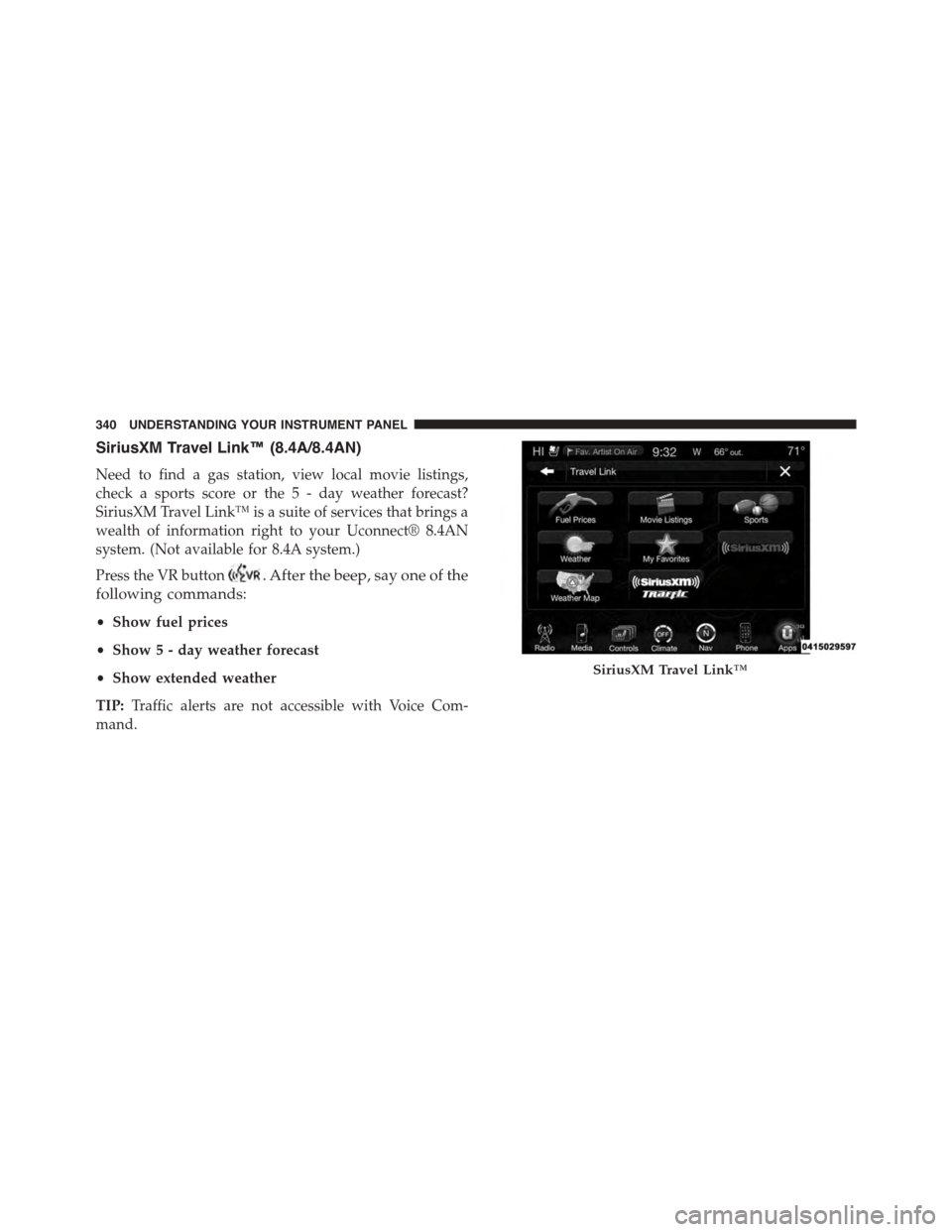
SiriusXM Travel Link™ (8.4A/8.4AN)
Need to find a gas station, view local movie listings,
check a sports score or the 5 - day weather forecast?
SiriusXM Travel Link™ is a suite of services that brings a
wealth of information right to your Uconnect® 8.4AN
system. (Not available for 8.4A system.)
Press the VR button. After the beep, say one of the
following commands:
•Show fuel prices
•Show 5 - day weather forecast
•Show extended weather
TIP:Traffic alerts are not accessible with Voice Com-
mand.
SiriusXM Travel Link™
340 UNDERSTANDING YOUR INSTRUMENT PANEL
Page 346 of 603
▫Eight-Speed Automatic Transmission — If
Equipped...........................362
!AUTOSTICK®.........................369
▫Operation...........................369
!SPORT MODE — WITHOUT PERFORMANCE
CONTROL............................372
!DRIVING ON SLIPPERY SURFACES.........372
▫Acceleration.........................372
▫Traction............................373
!DRIVING THROUGH WATER.............373
▫Flowing/Rising Water..................374
▫Shallow Standing Water.................374
!ELECTRIC POWER STEERING.............376
!FUEL SAVER TECHNOLOGY 5.7L/6.4L ENGINES
ONLY — IF EQUIPPED..................377
!PARKING BRAKE......................377
▫Manual Transmission — If Equipped........378
▫Automatic Transmission — If Equipped......379
!BRAKE SYSTEM.......................381
!ELECTRONIC BRAKE CONTROL SYSTEM . . . .381
▫Anti-Lock Brake System (ABS)............382
▫Traction Control System (TCS)............384
▫Brake Assist System (BAS)...............385
▫Hill Start Assist (HSA).................385
▫Electronic Stability Control (ESC)..........386
▫ESC Activation/Malfunction Indicator Light And
ESC OFF Indicator Light................390
344 STARTING AND OPERATING
Page 347 of 603
!TIRE SAFETY INFORMATION.............391
▫Tire Markings........................391
▫Tire Identification Number (TIN)...........395
▫Tire Terminology And Definitions..........397
▫Tire Loading And Tire Pressure...........398
!TIRES — GENERAL INFORMATION........403
▫Tire Pressure........................403
▫Tire Inflation Pressures.................404
▫Tire Pressures For High Speed Operation . . . .406
▫Radial Ply Tires......................406
▫Tire Types...........................407
▫Run Flat Tires — If Equipped.............409
▫Spare Tires — If Equipped...............409
▫Tire Spinning........................412
▫Tread Wear Indicators..................412
▫Life Of Tire.........................413
▫Replacement Tires.....................413
!TIRE CHAINS (TRACTION DEVICES).......415
!TIRE ROTATION RECOMMENDATIONS.....416
!TIRE PRESSURE MONITOR SYSTEM (TPMS) . .417
▫Premium System......................421
▫General Information...................424
!FUEL REQUIREMENTS..................425
▫3.6L Engine — If Equipped...............425
▫5.7L Engine (With Automatic Transmission) . . .425
▫5.7L Engine (With Manual Transmission).....426
5
STARTING AND OPERATING 345
Page 348 of 603
▫6.4L Engine..........................426
▫Reformulated Gasoline.................427
▫Gasoline/Oxygenate Blends..............427
▫E-85 Usage In Non-Flex Fuel Vehicles.......428
▫MMT In Gasoline.....................428
▫Materials Added To Fuel................429
▫Fuel System Cautions...................429
▫Carbon Monoxide Warnings.............430
!ADDING FUEL........................431
▫Fuel Filler Cap (Gas Cap)...............431
▫Loose Fuel Filler Cap Message............433
!VEHICLE LOADING....................433
▫Vehicle Certification Label...............433
▫Gross Vehicle Weight Rating (GVWR).......434
▫Gross Axle Weight Rating (GAWR).........434
▫Overloading.........................434
▫Loading............................435
!TRAILER TOWING.....................435
▫Common Towing Definitions.............436
▫Trailer Hitch Classification...............439
▫Trailer Towing Weights (Maximum Trailer Weight
Ratings)............................440
▫Trailer And Tongue Weight..............440
▫Towing Requirements..................441
▫Towing Tips.........................446
!RECREATIONAL TOWING (BEHIND
MOTORHOME, ETC.)...................448
▫Towing This Vehicle Behind Another Vehicle . .448
346 STARTING AND OPERATING
Page 350 of 603
Press the clutch pedal fully to the floor, and cycle the
ignition switch to the START position and release when
the engine starts. If the engine fails to start within 15
seconds, place the ignition in the OFF position, wait 10 to
15 seconds, then repeat the “Normal Starting” procedure.
WARNING!
Do not attempt to push or tow your vehicle to get it
started. Unburned fuel could enter the catalytic con-
verter and once the engine has started, ignite and
damage the converter and vehicle. If the vehicle has
a discharged battery, booster cables may be used to
obtain a start from another vehicle. This type of start
can be dangerous if done improperly, so follow the
procedure carefully. Refer to “Jump Starting” in
“What To Do In Emergencies” for further informa-
tion.
Automatic Transmission — If Equipped
The shift lever must be in the NEUTRAL or PARK
position before you can start the engine. Apply the brakes
before shifting into any driving gear.
CAUTION!
Damage to the transmission may occur if the follow-
ing precautions are not observed:
•Do not shift from REVERSE, PARK, or NEUTRAL
into any forward gear when the engine is above
idle speed.
•Shift into PARK only after the vehicle has come to
a complete stop.
•Shift into or out of REVERSE only after the vehicle
has come to a complete stop and the engine is at
idle speed.
•Before shifting into any gear, make sure your foot
is firmly on the brake pedal.
348 STARTING AND OPERATING
Page 354 of 603
switch position will remain in the ACC position until
the vehicle is stopped and the button is pressed twice
to the OFF position.
Keyless Enter-N-Go™ Functions — With Driver ’s
Foot OFF The Brake Pedal/Clutch Pedal (In PARK
Or NEUTRAL Position)
The Keyless Enter-N-Go™ feature operates similar to an
ignition switch. It has three positions, OFF, ACC and
RUN. To change the ignition switch positions without
starting the vehicle and use the accessories follow these
steps starting with the ignition switch in the OFF posi-
tion:
1. Press the ENGINE START/STOP button once to
change the ignition switch to the ACC position,
2. Press the ENGINE START/STOP button a second time
to change the ignition switch to the RUN position,
3. Press the ENGINE START/STOP button a third time
to return the ignition switch to the OFF position.
Extreme Cold Weather (Below –20°F Or−29°C)
To ensure reliable starting at these temperatures, use of
an externally powered electric engine block heater (avail-
able from your authorized dealer) is recommended.
If Engine Fails To Start
WARNING!
•Never pour fuel or other flammable liquids into
the throttle body air inlet opening in an attempt to
start the vehicle. This could result in a flash fire
causing serious personal injury.
(Continued)
352 STARTING AND OPERATING