USB DODGE CHALLENGER 2017 3.G User Guide
[x] Cancel search | Manufacturer: DODGE, Model Year: 2017, Model line: CHALLENGER, Model: DODGE CHALLENGER 2017 3.GPages: 506, PDF Size: 4.44 MB
Page 293 of 506
Apple CarPlay — If Equipped
Apple CarPlay allows you to use your voice to interact
with Siri through your vehicle’s voice recognition system,
and use your smartphone’s data plan to project your
iPhone and a number of its apps onto your Uconnect
touchscreen. Connect your iPhone 5, or higher, to one of
the media USB ports, using the factory-provided Lightning
cable, and press the new CarPlay icon that replaces your
“Phone” icon on the main menu bar to begin Apple
CarPlay. Press and hold the VR button on the steering
wheel, or press and hold the “Home” button within Apple
CarPlay, to activate Siri, which recognizes natural voice
commands to use a list of your iPhone’s features:
•Phone
• Music
• Messages
• Maps
• Additional Apps Refer to your Uconnect Owner ’s Manual Supplement for
further information.
Apple CarPlay
4
UNDERSTANDING YOUR INSTRUMENT PANEL 291
Page 294 of 506

Android Auto — If Equipped
Android Auto allows you to use your voice to interact with
Android’s best-in-class speech technology through your
vehicle’s voice recognition system, and use your smart-
phone’s data plan to project your Android powered smart-
phone and a number of its apps onto your Uconnect
touchscreen. Connect your Android 5.0 (Lollipop), or
higher, to one of the media USB ports, using the factory-
provided USB cable, and press the new Android Auto icon
that replaces your “Phone” icon on the main menu bar to
begin Android Auto. Push and hold the VR button on the
steering wheel, or press and hold the “Microphone” icon
within Android Auto, to activate Android’s VR, which
recognizes natural voice commands, to use a list of your
smartphone’s features:
•Maps
• Music
• Phone
• Text Messages
• Additional Apps Refer to your Uconnect Owner ’s Manual Supplement for
further information.
Android Auto
292 UNDERSTANDING YOUR INSTRUMENT PANEL
Page 452 of 506
CAUTION!(Continued)
•When replacing a blown fuse, it is important to use
only a fuse having the correct amperage rating. The
use of a fuse with a rating other than indicated may
result in a dangerous electrical system overload. If a
properly rated fuse continues to blow, it indicates a
problem in the circuit that must be corrected.
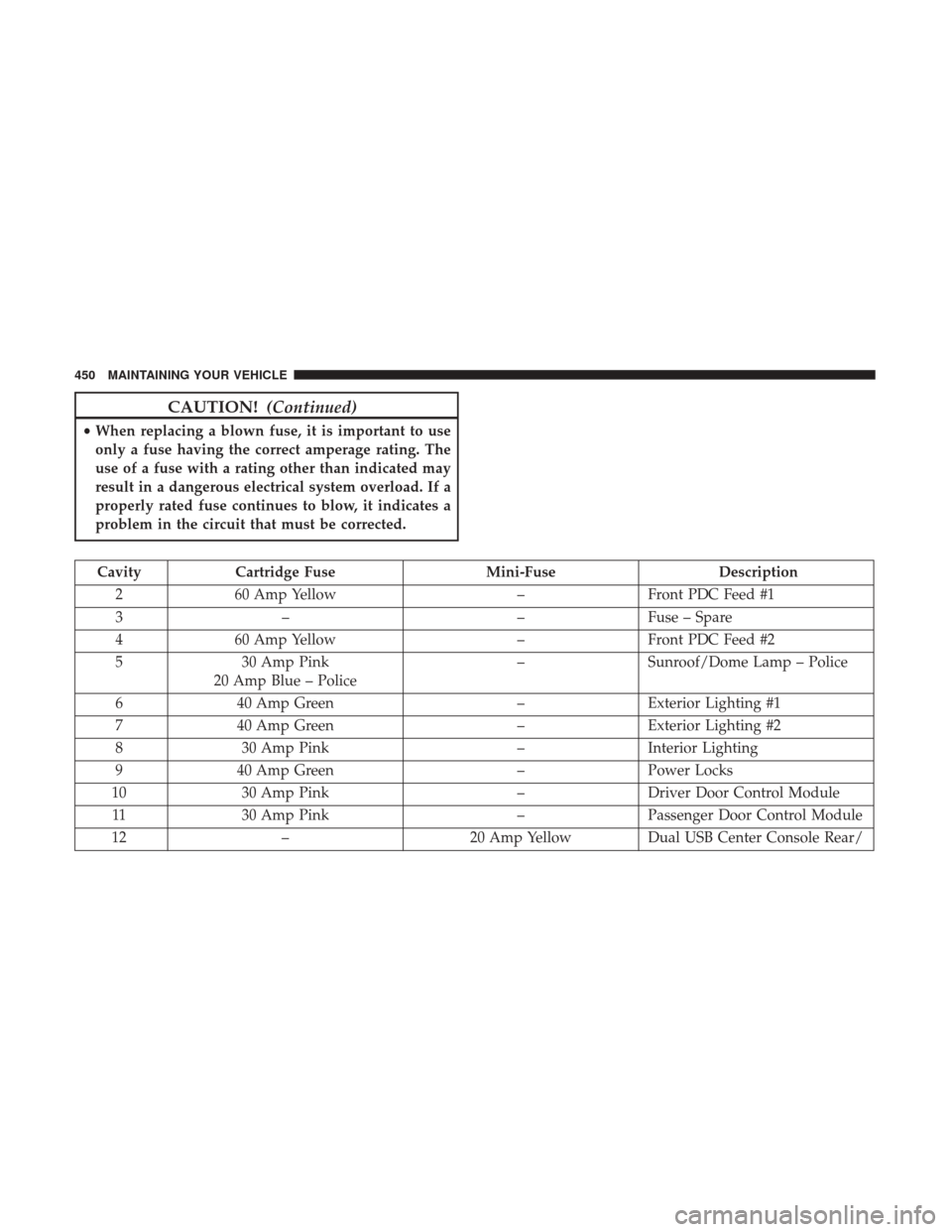
Cavity Cartridge Fuse Mini-FuseDescription
2 60 Amp Yellow –Front PDC Feed #1
3 – –Fuse – Spare
4 60 Amp Yellow –Front PDC Feed #2
5 30 Amp Pink
20 Amp Blue – Police –
Sunroof/Dome Lamp – Police
6 40 Amp Green –Exterior Lighting #1
7 40 Amp Green –Exterior Lighting #2
8 30 Amp Pink –Interior Lighting
9 40 Amp Green –Power Locks
10 30 Amp Pink –Driver Door Control Module
11 30 Amp Pink –Passenger Door Control Module
12 – 20 Amp YellowDual USB Center Console Rear/
450 MAINTAINING YOUR VEHICLE
Page 456 of 506
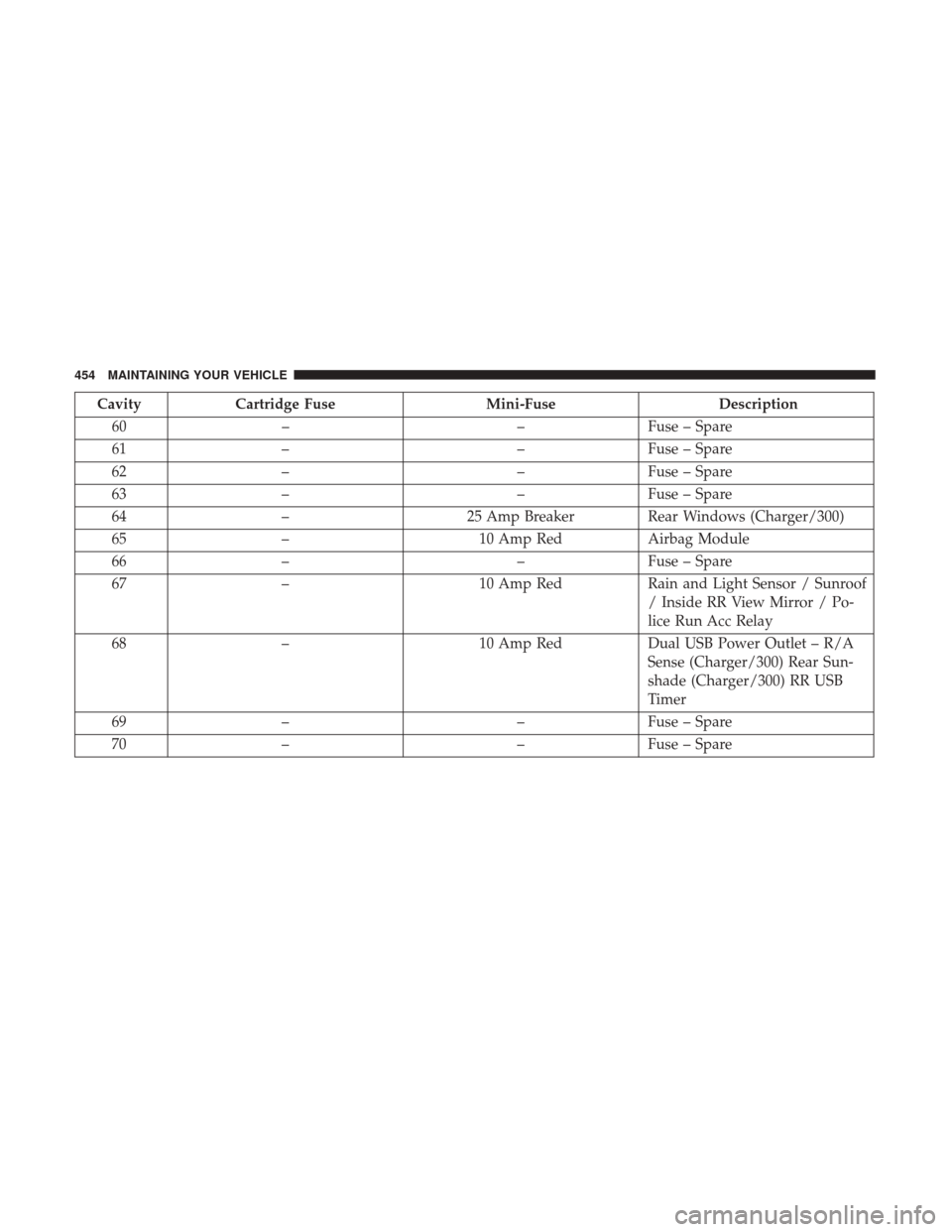
CavityCartridge Fuse Mini-FuseDescription
60 – –Fuse – Spare
61 – –Fuse – Spare
62 – –Fuse – Spare
63 – –Fuse – Spare
64 – 25 Amp Breaker Rear Windows (Charger/300)
65 – 10 Amp RedAirbag Module
66 – –Fuse – Spare
67 – 10 Amp RedRain and Light Sensor / Sunroof
/ Inside RR View Mirror / Po-
lice Run Acc Relay
68 – 10 Amp RedDual USB Power Outlet – R/A
Sense (Charger/300) Rear Sun-
shade (Charger/300) RR USB
Timer
69 – –Fuse – Spare
70 – –Fuse – Spare
454 MAINTAINING YOUR VEHICLE
Page 494 of 506
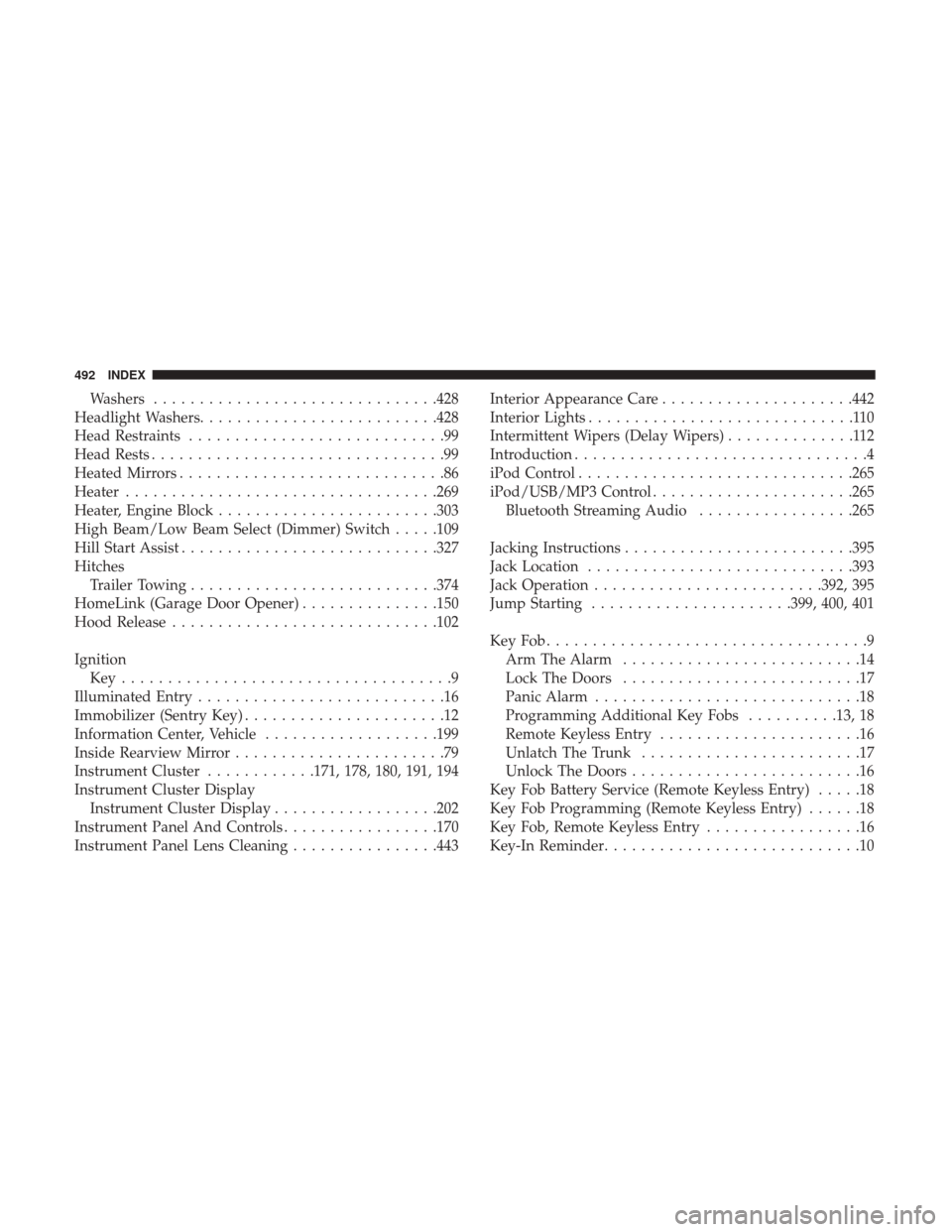
Washers.............................. .428
Headlight Washers ......................... .428
Head Restraints ............................99
Head Rests ................................99
Heated Mirrors .............................86
Heater ................................. .269
Heater, Engine Block ....................... .303
High Beam/Low Beam Select (Dimmer) Switch .....109
Hill Start Assist ........................... .327
Hitches Trailer Towing .......................... .374
HomeLink (Garage Door Opener) ...............150
Hood Release ............................ .102
Ignition Key....................................9
Illuminated Entry ...........................16
Immobilizer (Sentry Key) ......................12
Information Center, Vehicle ...................199
Inside Rearview Mirror .......................79
Instrument Cluster ............171, 178, 180, 191, 194
Instrument Cluster Display Instrument Cluster Display ..................202
Instrument Panel And Controls .................170
Instrument Panel Lens Cleaning ................443Interior Appearance Care
.....................442
Interior Lights .............................110
Intermittent Wipers (Delay Wipers) ..............112
Introduction ................................4
iPod Control ............................. .265
iPod/USB/MP3 Control ..................... .265
Bluetooth Streaming Audio .................265
Jacking Instructions ........................ .395
Jack Location ............................ .393
Jack Operation ........................ .392, 395
Jump Starting ..................... .399, 400, 401
KeyFob...................................9 Arm The Alarm ..........................14
Lock The Doors ..........................17
Panic Alarm .............................18
Programming Additional Key Fobs ..........13, 18
Remote Keyless Entry ......................16
Unlatch The Trunk ........................17
Unlock
The Doors .........................16
Key Fob Battery Service (Remote Keyless Entry) .....18
Key Fob Programming (Remote Keyless Entry) ......18
Key Fob, Remote Keyless Entry .................16
Key-In Reminder ............................10
492 INDEX