change time DODGE CHALLENGER 2017 3.G Owner's Manual
[x] Cancel search | Manufacturer: DODGE, Model Year: 2017, Model line: CHALLENGER, Model: DODGE CHALLENGER 2017 3.GPages: 506, PDF Size: 4.44 MB
Page 238 of 506
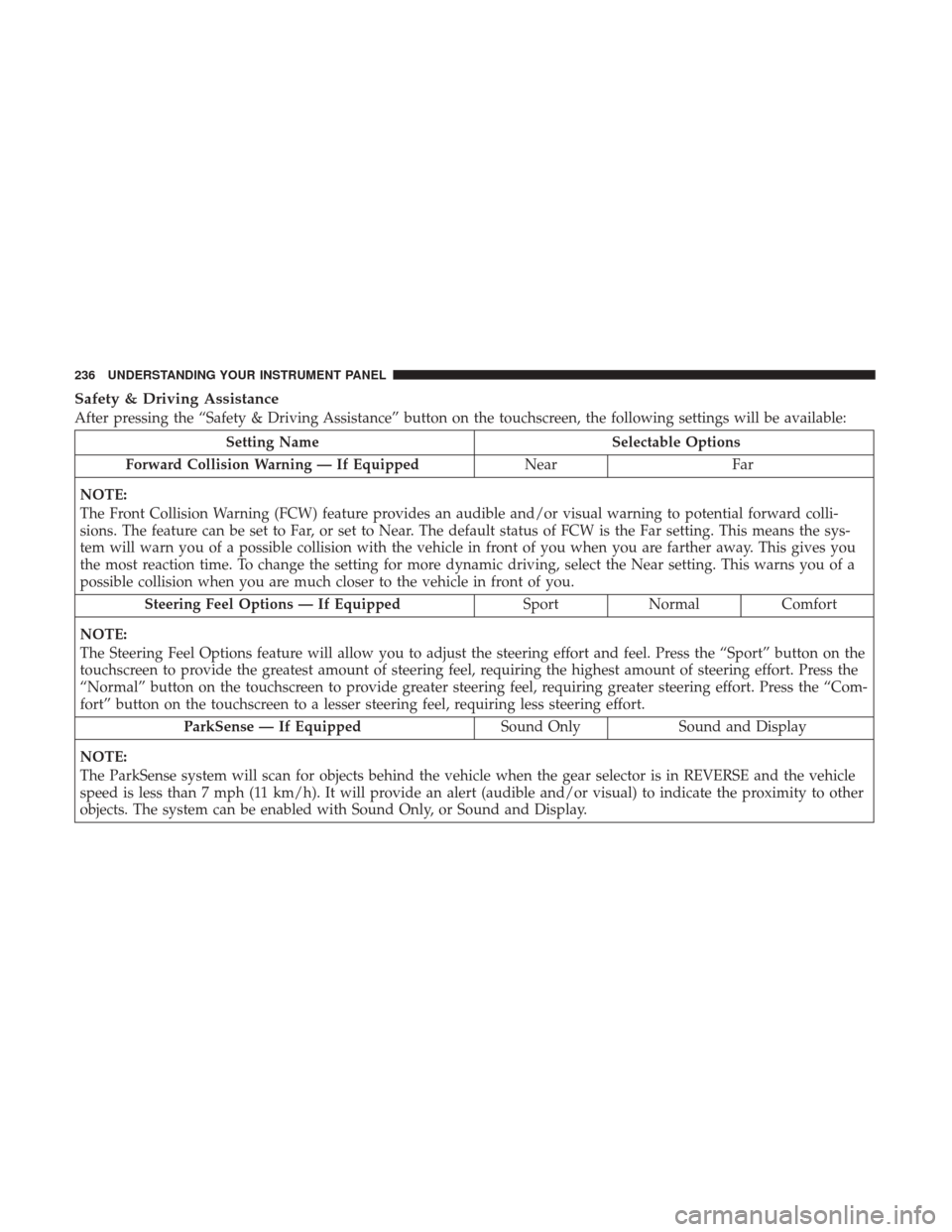
Safety & Driving Assistance
After pressing the “Safety & Driving Assistance” button on the touchscreen, the following settings will be available:
Setting NameSelectable Options
Forward Collision Warning — If Equipped NearFar
NOTE:
The Front Collision Warning (FCW) feature provides an audible and/or visual warning to potential forward colli-
sions. The feature can be set to Far, or set to Near. The default status of FCW is the Far setting. This means the sys-
tem will warn you of a possible collision with the vehicle in front of you when you are farther away. This gives you
the most reaction time. To change the setting for more dynamic driving, select the Near setting. This warns you of a
possible collision when you are much closer to the vehicle in front of you. Steering Feel Options — If Equipped SportNormal Comfort
NOTE:
The Steering Feel Options feature will allow you to adjust the steering effort and feel. Press the “Sport” button on the
touchscreen to provide the greatest amount of steering feel, requiring the highest amount of steering effort. Press the
“Normal” button on the touchscreen to provide greater steering feel, requiring greater steering effort. Press the “Com-
fort” button on the touchscreen to a lesser steering feel, requiring less steering effort. ParkSense — If Equipped Sound OnlySound and Display
NOTE:
The ParkSense system will scan for objects behind the vehicle when the gear selector is in REVERSE and the vehicle
speed is less than 7 mph (11 km/h). It will provide an alert (audible and/or visual) to indicate the proximity to other
objects. The system can be enabled with Sound Only, or Sound and Display.
236 UNDERSTANDING YOUR INSTRUMENT PANEL
Page 243 of 506
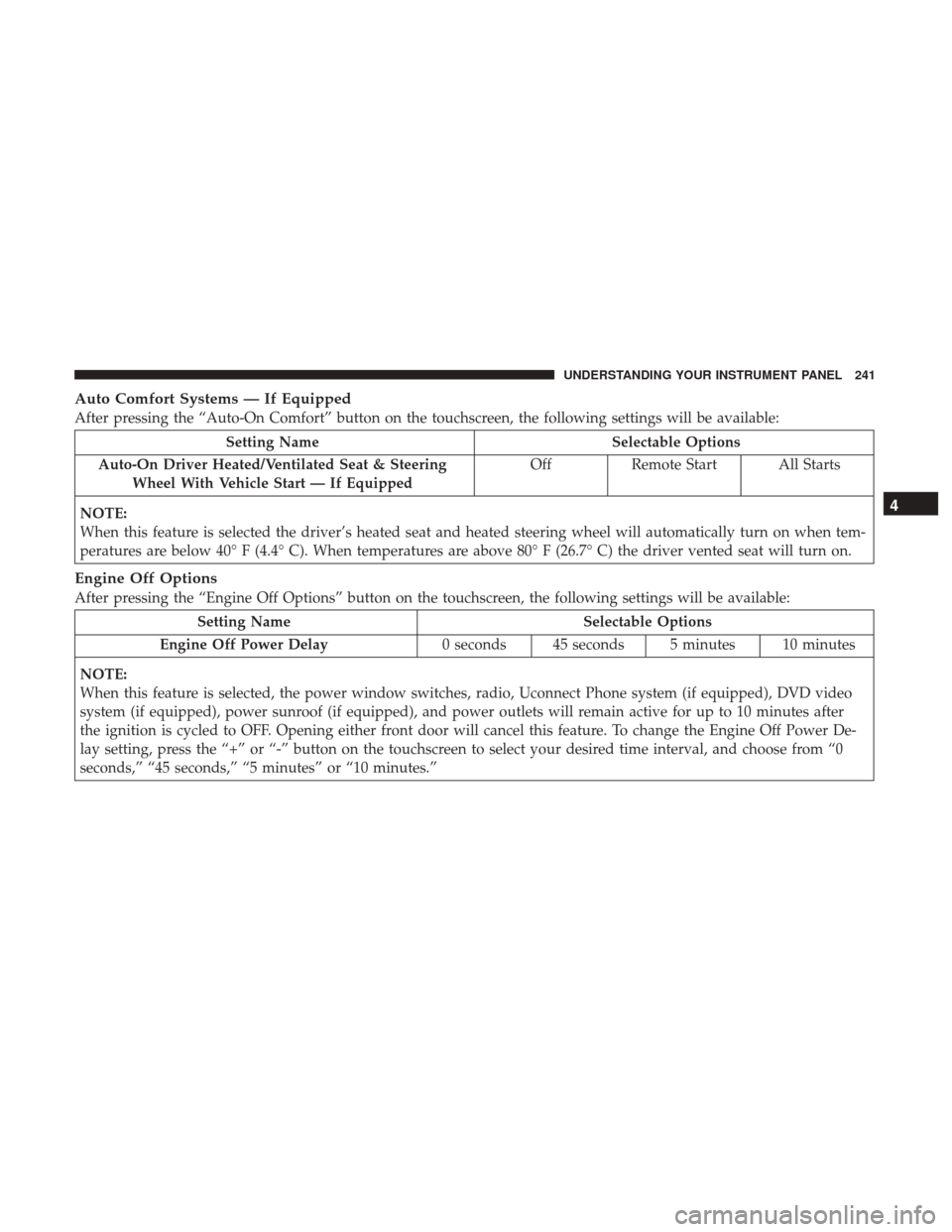
Auto Comfort Systems — If Equipped
After pressing the “Auto-On Comfort” button on the touchscreen, the following settings will be available:
Setting NameSelectable Options
Auto-On Driver Heated/Ventilated Seat & Steering Wheel With Vehicle Start — If Equipped Off
Remote Start All Starts
NOTE:
When this feature is selected the driver’s heated seat and heated steering wheel will automatically turn on when tem-
peratures are below 40° F (4.4° C). When temperatures are above 80° F (26.7° C) the driver vented seat will turn on.
Engine Off Options
After pressing the “Engine Off Options” button on the touchscreen, the following settings will be available:
Setting Name Selectable Options
Engine Off Power Delay 0 seconds 45 seconds 5 minutes 10 minutes
NOTE:
When this feature is selected, the power window switches, radio, Uconnect Phone system (if equipped), DVD video
system (if equipped), power sunroof (if equipped), and power outlets will remain active for up to 10 minutes after
the ignition is cycled to OFF. Opening either front door will cancel this feature. To change the Engine Off Power De-
lay setting, press the “+” or “-” button on the touchscreen to select your desired time interval, and choose from “0
seconds,” “45 seconds,” “5 minutes” or “10 minutes.”
4
UNDERSTANDING YOUR INSTRUMENT PANEL 241
Page 244 of 506
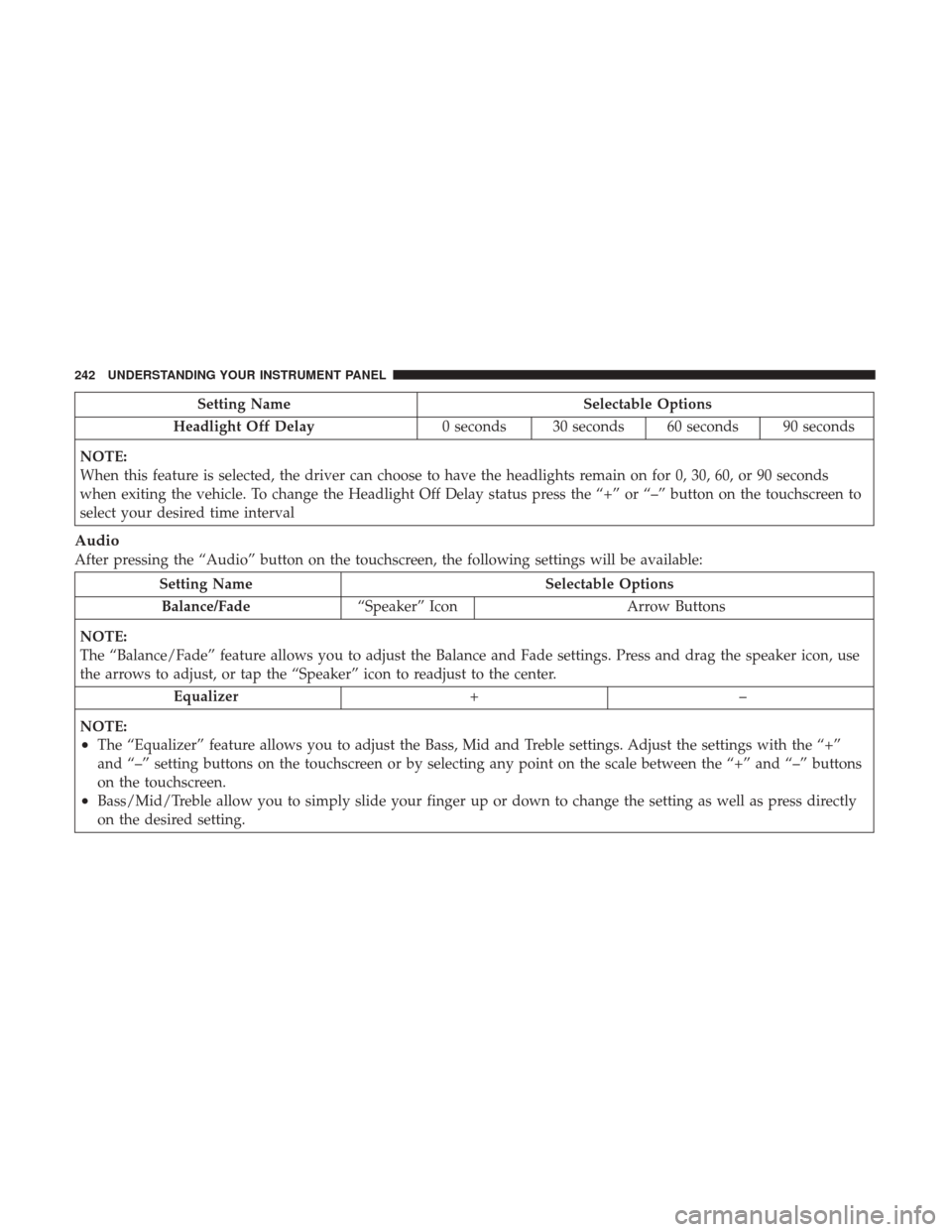
Setting NameSelectable Options
Headlight Off Delay 0 seconds 30 seconds 60 seconds 90 seconds
NOTE:
When this feature is selected, the driver can choose to have the headlights remain on for 0, 30, 60, or 90 seconds
when exiting the vehicle. To change the Headlight Off Delay status press the “+” or “–” button on the touchscreen to
select your desired time interval
Audio
After pressing the “Audio” button on the touchscreen, the following settings will be available:
Setting Name Selectable Options
Balance/Fade “Speaker” Icon Arrow Buttons
NOTE:
The “Balance/Fade” feature allows you to adjust the Balance and Fade settings. Press and drag the speaker icon, use
the arrows to adjust, or tap the “Speaker” icon to readjust to the center. Equalizer +–
NOTE:
•The “Equalizer” feature allows you to adjust the Bass, Mid and Treble settings. Adjust the settings with the “+”
and “–” setting buttons on the touchscreen or by selecting any point on the scale between the “+” and “–” buttons
on the touchscreen.
•Bass/Mid/Treble allow you to simply slide your finger up or down to change the setting as well as press directly
on the desired setting.
242 UNDERSTANDING YOUR INSTRUMENT PANEL
Page 260 of 506
•The ESC system detects that the vehicle is no longer
moving in a straight line.
• The “ESC OFF” button is pressed to change the ESC
system to another mode if Launch Control is enabled.
CAUTION!
Do not attempt to shift when the drive wheels are
spinning and do not have traction. Damage to the
transmission may occur.
Drive Mode Set-Up
Pressing the “Drive Mode Set-Up” button on the touch-
screen within the Performance Control screen indicates the
real-time status of the various systems. Pressing the “Sport
Mode Set-Up” or “Default Mode Set-Up” buttons on the
touchscreen, the driver can configure their individual drive
modes and see how those configurations affect the perfor-
mance of the vehicle.
NOTE: Not all of the options listed in this manual are
available on every vehicle, below is a chart with all
available Drive Mode vehicle configurations.
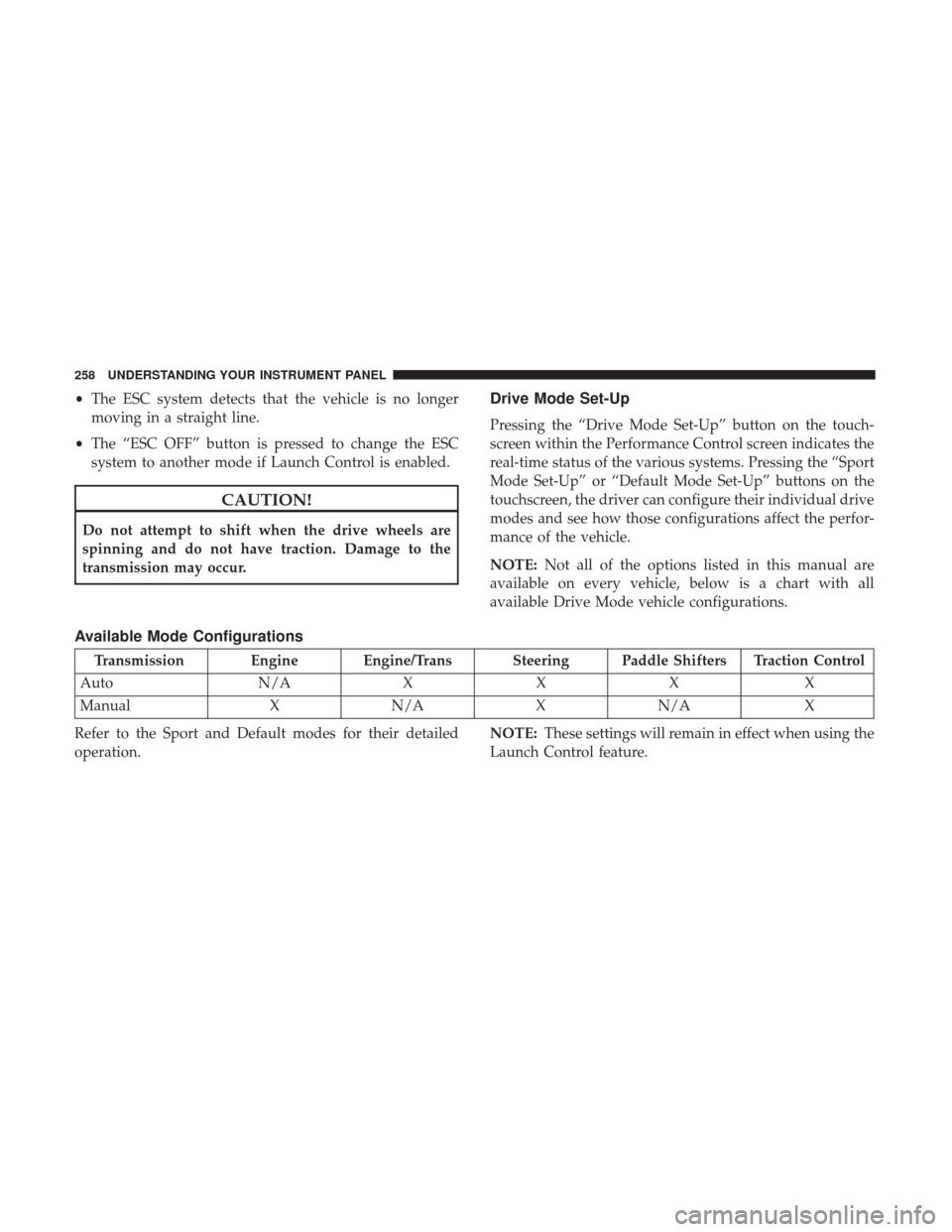
Available Mode Configurations
Transmission Engine Engine/Trans Steering Paddle Shifters Traction Control
Auto N/AXXX X
Manual XN/A XN/A X
Refer to the Sport and Default modes for their detailed
operation. NOTE:
These settings will remain in effect when using the
Launch Control feature.
258 UNDERSTANDING YOUR INSTRUMENT PANEL
Page 278 of 506
Recirculation
When outside air contains smoke, odors, or high humidity,
or if rapid cooling is desired, you may wish to recirculate
interior air by pressing the Recirculation control button.
The recirculation indicator will illuminate when this button
is selected. Press the button a second time to turn off the
Recirculation mode and allow outside air into the vehicle.
NOTE:In cold weather, use of recirculation mode may lead
to excessive window fogging. The recirculation feature
may be unavailable (button on the touchscreen greyed out)
if conditions exist that could create fogging on the inside of
the windshield. On systems with Manual Climate Controls,
the Recirculation mode is not allowed in Defrost mode to
improve window clearing operation. Recirculation will be
disabled automatically if this mode is selected. Attempting
to use Recirculation while in this mode will cause the LED
in the control button to blink and then turn off.
Automatic Temperature Control (ATC) — If
Equipped
Automatic Operation
1. Push the AUTO button on the faceplate, or the AUTO button on the touchscreen on the Automatic Tempera-
ture Control (ATC) Panel. 2. Adjust the temperature you would like the system to
maintain by adjusting the driver and passenger tem-
perature control buttons. Once the desired temperature
is displayed, the system will achieve and automatically
maintain that comfort level.
3. When the system is set up for your comfort level, it is not necessary to change the settings. You will experience
the greatest efficiency by simply allowing the system to
function automatically.
NOTE:
• It is not necessary to move the temperature settings for
cold or hot vehicles. The system automatically adjusts
the temperature, mode, and blower speed to provide
comfort as quickly as possible.
• The temperature can be displayed in U.S. or Metric units
by selecting the US/Metric customer-programmable fea-
ture. Refer to “Uconnect Settings” in this section of the
manual.
To provide you with maximum comfort in the Automatic
mode during cold start-ups, the blower fan will remain on
low until the engine warms up. The blower will increase in
speed and transition into Auto mode.
276 UNDERSTANDING YOUR INSTRUMENT PANEL
Page 304 of 506
NOTE:
•If the ignition switch is left in the ACC position, the
system will automatically time out after 30 minutes of
inactivity and the ignition will switch to the OFF posi-
tion.
• If the ignition switch is left in the RUN position, the
system will automatically time out after 30 minutes of
inactivity if the vehicle speed is 0 mph (0 km/h) and the
engine is not running.
• If the vehicle speed is above 5 mph (8 km/h), the
ENGINE START/STOP button must be held for two
seconds or three short pushes in a row before the engine
will shut off. The ignition switch position will remain in
the ACC position until the vehicle is stopped, placed in
park and the button is pushed twice to the OFF position.
Keyless Enter-N-Go Functions — With Driver ’s Foot
OFF The Brake Pedal/Clutch Pedal (In PARK Or
NEUTRAL Position)
The Keyless Enter-N-Go feature operates similar to an
ignition switch. It has three positions, OFF, ACC and RUN.
To change the ignition switch positions without starting the
vehicle and use the accessories, follow these steps starting
with the ignition switch in the OFF position: 1. Push the ENGINE START/STOP button once to change
the ignition switch to the ACC position,
2. Push the ENGINE START/STOP button a second time to change the ignition switch to the RUN position,
3. Push the ENGINE START/STOP button a third time to return the ignition switch to the OFF position.
Extreme Cold Weather (Below –22°F Or 30°C)
To ensure reliable starting at these temperatures, use of an
externally powered electric engine block heater (available
from your authorized dealer) is recommended.
If Engine Fails To Start
WARNING!
•Never pour fuel or other flammable liquid into the
throttle body air inlet opening in an attempt to start
the vehicle. This could result in flash fire causing
serious personal injury.
• Do not attempt to push or tow your vehicle to get it
started. Vehicles equipped with an automatic trans-
mission cannot be started this way. Unburned fuel
could enter the catalytic converter and once the
(Continued)
302 STARTING AND OPERATING
Page 331 of 506
WARNING!(Continued)
•Failure to follow these warnings may cause the
vehicle to roll down the incline and could collide
with another vehicle, object or person, and cause
serious or fatal injury. Always remember to use the
parking brake while parking on a hill and that the
driver is responsible for braking the vehicle.
Disabling And Enabling HSA
This feature can be turned on or turned off. To change the
current setting, proceed as follows:
• For vehicles equipped with the instrument cluster dis-
play, refer to “Instrument Cluster Display” in “Under-
standing Your Instrument Panel” for further informa-
tion.
• If disabling HSA using Uconnect Settings, refer to
“Uconnect Settings” in “Understanding Your Instrument
Panel” for further information.
For vehicles not equipped with the instrument cluster
display, perform the following steps:
1. Center the steering wheel (front wheels pointing straight forward). 2. Shift the transmission into PARK.
3. Apply the parking brake.
4. Start the engine.
5. Rotate the steering wheel slightly more than one-half
turn to the left.
6. Push the “ESC Off” button located in the lower switch bank below the climate control four times within twenty
seconds. The “ESC Off Indicator Light” should turn on
and turn off two times.
7. Rotate the steering wheel back to center and then an additional slightly more than one-half turn to the right.
8. Turn the ignition switch to the OFF position and then back to the ON position. If the sequence was completed
properly, the “ESC Off Indicator Light” will blink sev-
eral times to confirm HSA is disabled.
9. Repeat these steps if you want to return this feature to its previous setting.
Traction Control System (TCS)
This system monitors the amount of wheel spin of each of
the driven wheels. If wheel spin is detected, the TCS may
apply brake pressure to the spinning wheel(s) and/or
5
STARTING AND OPERATING 329
Page 333 of 506
WARNING!(Continued)
driver input for the conditions. Only a safe, attentive,
and skillful driver can prevent accidents. The capa-
bilities of an ESC equipped vehicle must never be
exploited in a reckless or dangerous manner which
could jeopardize the user ’s safety or the safety of
others.
• Vehicle modifications, or failure to properly main-
tain your vehicle, may change the handling charac-
teristics of your vehicle, and may negatively affect
the performance of the ESC system. Changes to the
steering system, suspension, braking system, tire
type and size or wheel size may adversely affect ESC
performance. Improperly inflated and unevenly
worn tires may also degrade ESC performance. Any
vehicle modification or poor vehicle maintenance
that reduces the effectiveness of the ESC system can
increase the risk of loss of vehicle control, vehicle
rollover, personal injury and death.
ESC Operating Modes
NOTE: Depending upon model and mode of operation, the
ESC system may have multiple operating modes. ESC On
This is the normal operating mode for the ESC. Whenever
the vehicle is started, the ESC system will be in this mode.
This mode should be used for most driving conditions.
Alternate ESC modes should only be used for specific
reasons as noted in the following paragraphs.
Partial Off
The “Partial Off” mode is intended for times when a more
spirited driving experience is desired. This mode may
modify TCS and ESC thresholds for activation, which
allows for more wheel spin than normally allowed. This
mode may be useful if the vehicle becomes stuck.
To enter the “Partial Off” mode, momentarily push the
“ESC Off” switch and the “ESC Off Indicator Light” will
illuminate. To turn the ESC on again, momentarily push
the “ESC Off” switch and the “ESC Off Indicator Light”
will turn off.
WARNING!
•
When in “Partial Off” mode, the TCS functionality
of ESC, (except for the limited slip feature described
(Continued)
5
STARTING AND OPERATING 331
Page 336 of 506
Electronic Roll Mitigation (ERM)
This system anticipates the potential for wheel lift by
monitoring the driver ’s steering wheel input and the speed
of the vehicle. When ERM determines that the rate of
change of the steering wheel angle and vehicle’s speed are
sufficient to potentially cause wheel lift, it then applies the
appropriate brake and may also reduce engine power to
lessen the chance that wheel lift will occur. ERM can only
reduce the chance of wheel lift occurring during severe or
evasive driving maneuvers; it cannot prevent wheel lift
due to other factors, such as road conditions, leaving the
roadway, or striking objects or other vehicles.
NOTE:ERM is disabled anytime the ESC is in “Full Off”
mode (if equipped). Refer to “Electronic Stability Control
(ESC)” in this section for a complete explanation of the
available ESC modes.
WARNING!
Many factors, such as vehicle loading, road conditions
and driving conditions, influence the chance that
wheel lift or rollover may occur. ERM cannot prevent
all wheel lift or roll overs, especially those that involve
(Continued)
WARNING! (Continued)
leaving the roadway or striking objects or other ve-
hicles. The capabilities of an ERM-equipped vehicle
must never be exploited in a reckless or dangerous
manner which could jeopardize the user’s safety or the
safety of others.
Ready Alert Braking (RAB)
Ready Alert Braking may reduce the time required to reach
full braking during emergency braking situations. It antici-
pates when an emergency braking situation may occur by
monitoring how fast the throttle is released by the driver.
The EBC will prepare the brake system for a panic stop.
Rain Brake Support (RBS)
Rain Brake Support may improve braking performance in
wet conditions. It will periodically apply a small amount of
brake pressure to remove any water buildup on the front
brake rotors. It functions when the windshield wipers are
in LO or HI speed. When Rain Brake Support is active,
there is no notification to the driver and no driver interac-
tion is required.
334 STARTING AND OPERATING
Page 420 of 506
oil level between the MIN and MAX markings on the
dipstick. Adding 1.0 quart (1.0 liter) of oil when the reading
is at the MIN mark will result in a MAX reading on these
engines.
CAUTION!
Overfilling or underfilling will cause oil aeration or
loss of oil pressure. This could damage your engine.
Checking Oil Level — 5.7L and 6.4L Engine
To assure proper engine lubrication, the engine oil must be
maintained at the correct level. Check the oil level at
regular intervals, such as every fuel stop. The best time to
check the engine oil level is about five minutes after a fully
warmed engine is shut off.
Checking the oil while the vehicle is on level ground will
improve the accuracy of the oil level readings. Maintain the
oil level in the “SAFE” range. Adding 1.0 quart (1.0 liter) of
oil when the reading is at the bottom of the “SAFE” range
will result in an oil level at the top of the “SAFE” range on
these engines.
CAUTION!
Overfilling or underfilling will cause oil aeration or
loss of oil pressure. This could damage your engine.
Change Engine Oil — 3.6L and 5.7L Engine
The oil change indicator system will remind you that it is
time to take your vehicle in for scheduled maintenance.
Refer to the “Maintenance Schedule” for further informa-
tion.
NOTE:Under no circumstances should oil change inter-
vals exceed 10,000 miles (16,000 km), twelve months or 350
hours of engine run time, whichever comes first. The 350
hours of engine run or idle time is generally only a concern
for fleet customers.
Change Engine Oil — 6.4L Engine
The oil change indicator system will remind you that it is
time to take your vehicle in for scheduled maintenance.
Refer to “Maintenance Schedule” for further information.
NOTE: Under no circumstances should oil change inter-
vals exceed 6,000 miles (10,000 km) or six months, which-
ever occurs first.
418 MAINTAINING YOUR VEHICLE