engine DODGE CHALLENGER 2019 Owners Manual
[x] Cancel search | Manufacturer: DODGE, Model Year: 2019, Model line: CHALLENGER, Model: DODGE CHALLENGER 2019Pages: 532, PDF Size: 5.01 MB
Page 413 of 532
Carbon Monoxide Warnings
WARNING!
Carbon monoxide (CO) in exhaust gases is deadly.
Follow the precautions below to prevent carbon mon-
oxide poisoning:
•Do not inhale exhaust gases. They contain carbon
monoxide, a colorless and odorless gas, which can
kill. Never run the engine in a closed area, such as a
garage, and never sit in a parked vehicle with the
(Continued)
WARNING! (Continued)
engine running for an extended period. If the vehicle
is stopped in an open area with the engine running
for more than a short period, adjust the ventilation
system to force fresh, outside air into the vehicle.
• Guard against carbon monoxide with proper main-
tenance. Have the exhaust system inspected every
time the vehicle is raised. Have any abnormal condi-
tions repaired promptly. Until repaired, drive with
all side windows fully open.
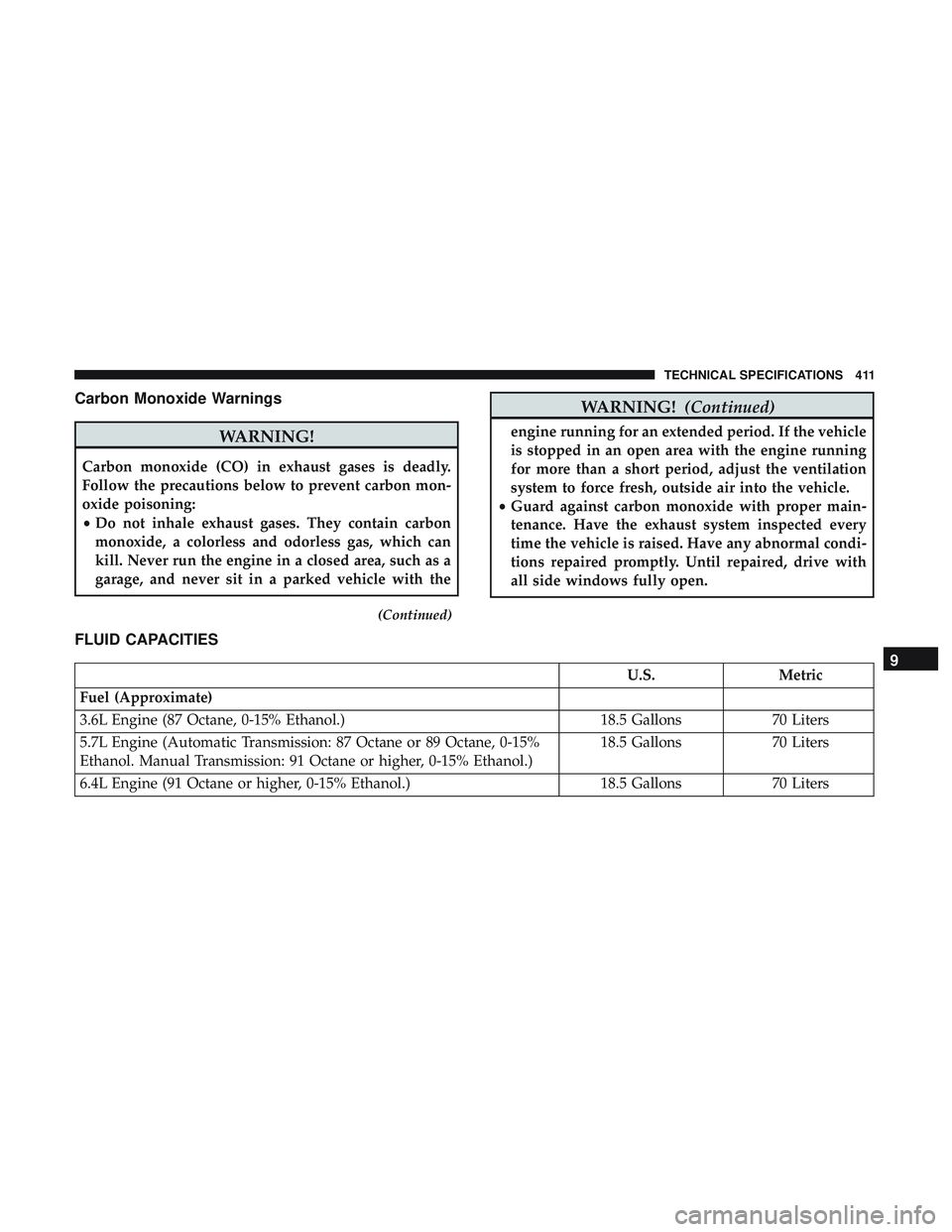
FLUID CAPACITIES
U.S. Metric
Fuel (Approximate)
3.6L Engine (87 Octane, 0-15% Ethanol.) 18.5 Gallons70 Liters
5.7L Engine (Automatic Transmission: 87 Octane or 89 Octane, 0-15%
Ethanol. Manual Transmission: 91 Octane or higher, 0-15% Ethanol.) 18.5 Gallons
70 Liters
6.4L Engine (91 Octane or higher, 0-15% Ethanol.) 18.5 Gallons70 Liters9
TECHNICAL SPECIFICATIONS 411
Page 414 of 532
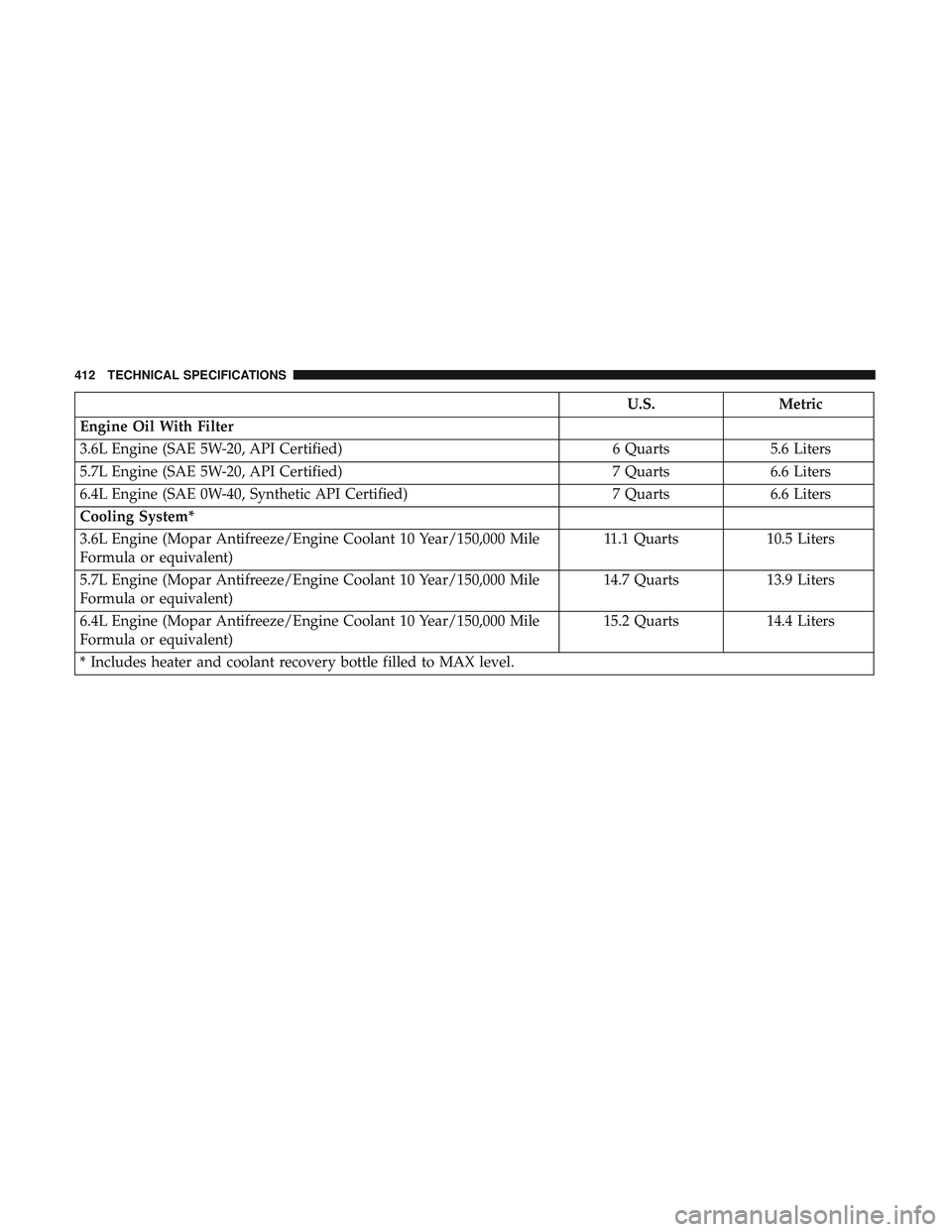
U.S.Metric
Engine Oil With Filter
3.6L Engine (SAE 5W-20, API Certified) 6 Quarts5.6 Liters
5.7L Engine (SAE 5W-20, API Certified) 7 Quarts6.6 Liters
6.4L Engine (SAE 0W-40, Synthetic API Certified) 7 Quarts6.6 Liters
Cooling System*
3.6L Engine (Mopar Antifreeze/Engine Coolant 10 Year/150,000 Mile
Formula or equivalent) 11.1 Quarts
10.5 Liters
5.7L Engine (Mopar Antifreeze/Engine Coolant 10 Year/150,000 Mile
Formula or equivalent) 14.7 Quarts
13.9 Liters
6.4L Engine (Mopar Antifreeze/Engine Coolant 10 Year/150,000 Mile
Formula or equivalent) 15.2 Quarts
14.4 Liters
* Includes heater and coolant recovery bottle filled to MAX level.
412 TECHNICAL SPECIFICATIONS
Page 415 of 532
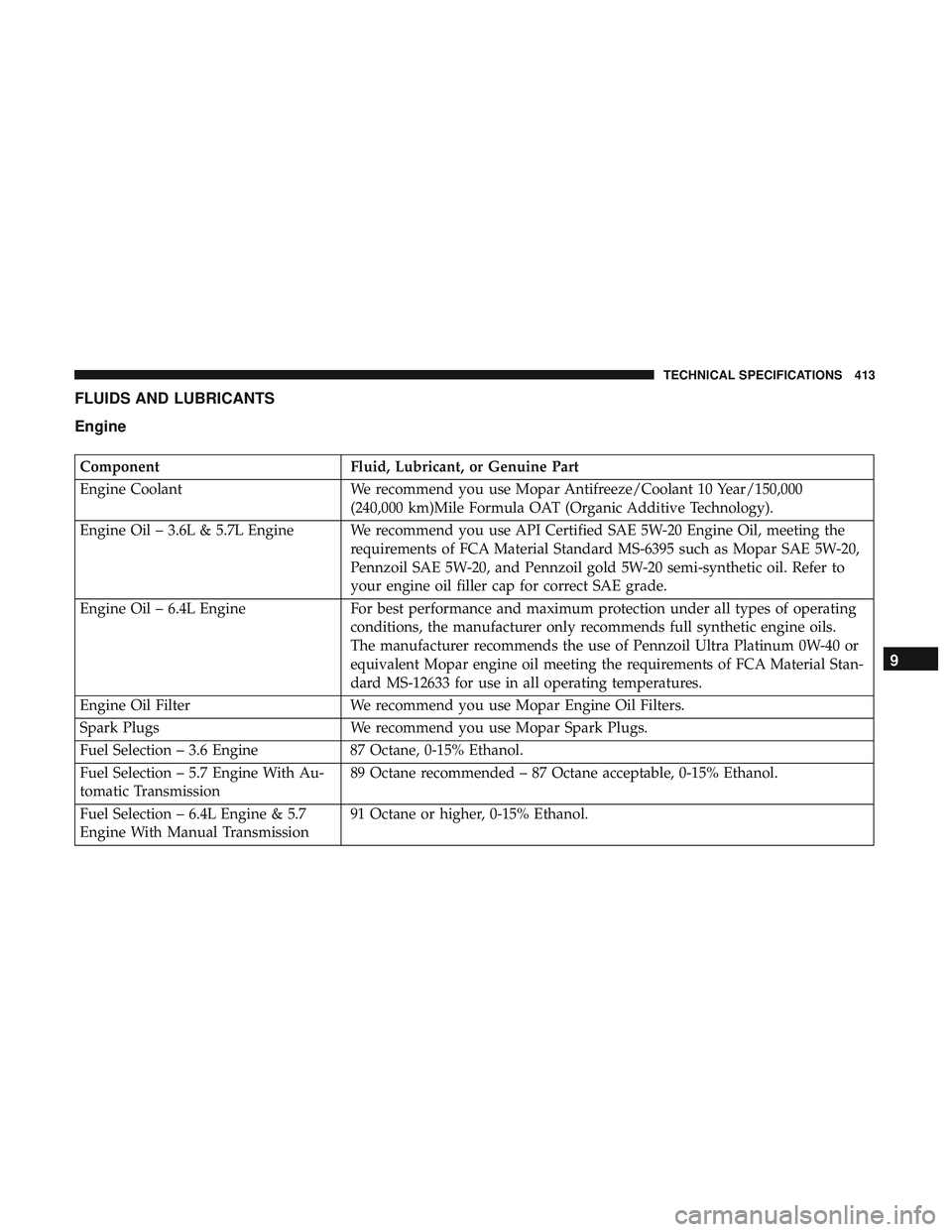
FLUIDS AND LUBRICANTS
Engine
ComponentFluid, Lubricant, or Genuine Part
Engine Coolant We recommend you use Mopar Antifreeze/Coolant 10 Year/150,000
(240,000 km)Mile Formula OAT (Organic Additive Technology).
Engine Oil – 3.6L & 5.7L Engine We recommend you use API Certified SAE 5W-20 Engine Oil, meeting the requirements of FCA Material Standard MS-6395 such as Mopar SAE 5W-20,
Pennzoil SAE 5W-20, and Pennzoil gold 5W-20 semi-synthetic oil. Refer to
your engine oil filler cap for correct SAE grade.
Engine Oil – 6.4L Engine For best performance and maximum protection under all types of operating
conditions, the manufacturer only recommends full synthetic engine oils.
The manufacturer recommends the use of Pennzoil Ultra Platinum 0W-40 or
equivalent Mopar engine oil meeting the requirements of FCA Material Stan-
dard MS-12633 for use in all operating temperatures.
Engine Oil Filter We recommend you use Mopar Engine Oil Filters.
Spark Plugs We recommend you use Mopar Spark Plugs.
Fuel Selection – 3.6 Engine 87 Octane, 0-15% Ethanol.
Fuel Selection – 5.7 Engine With Au-
tomatic Transmission 89 Octane recommended – 87 Octane acceptable, 0-15% Ethanol.
Fuel Selection – 6.4L Engine & 5.7
Engine With Manual Transmission 91 Octane or higher, 0-15% Ethanol.
9
TECHNICAL SPECIFICATIONS 413
Page 416 of 532
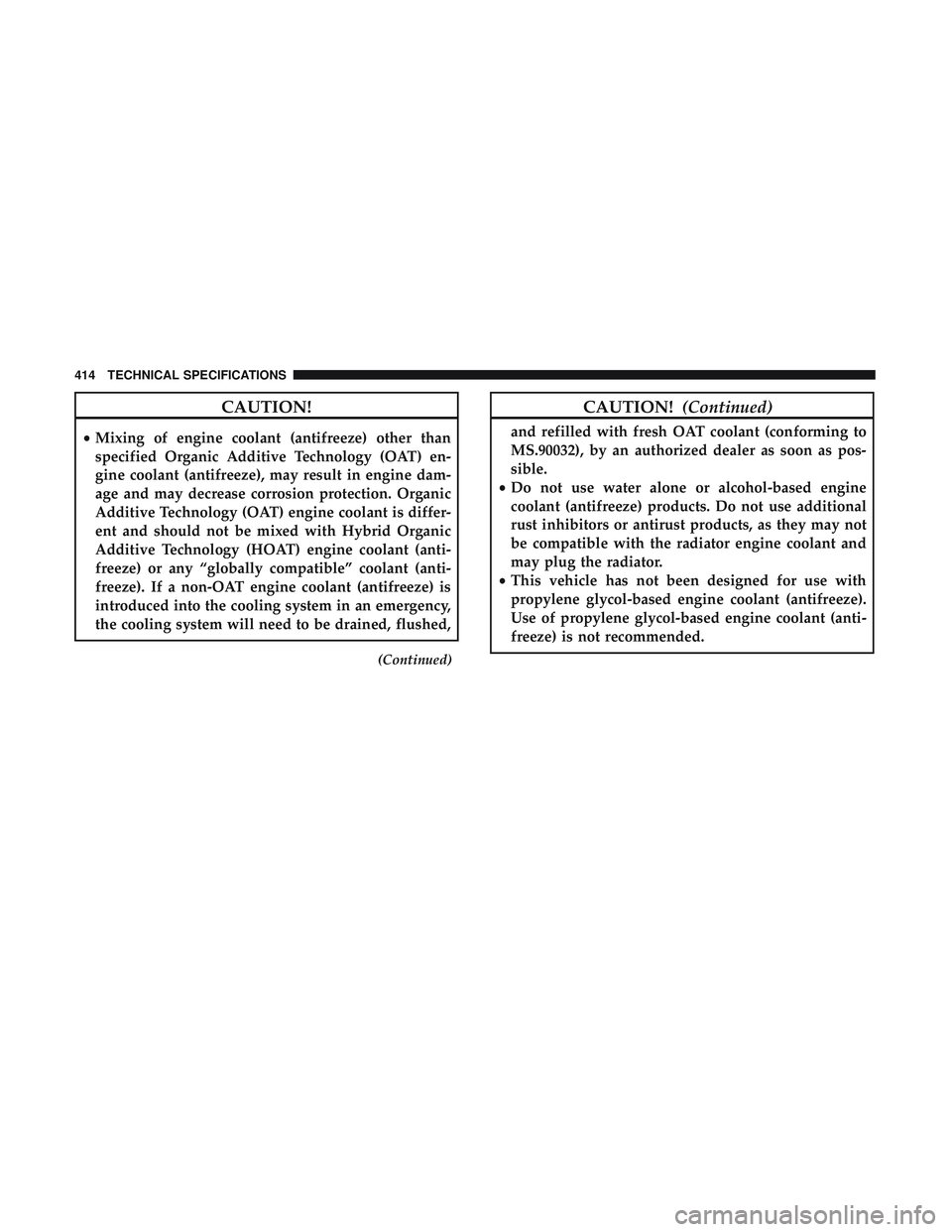
CAUTION!
•Mixing of engine coolant (antifreeze) other than
specified Organic Additive Technology (OAT) en-
gine coolant (antifreeze), may result in engine dam-
age and may decrease corrosion protection. Organic
Additive Technology (OAT) engine coolant is differ-
ent and should not be mixed with Hybrid Organic
Additive Technology (HOAT) engine coolant (anti-
freeze) or any “globally compatible” coolant (anti-
freeze). If a non-OAT engine coolant (antifreeze) is
introduced into the cooling system in an emergency,
the cooling system will need to be drained, flushed,
(Continued)
CAUTION! (Continued)
and refilled with fresh OAT coolant (conforming to
MS.90032), by an authorized dealer as soon as pos-
sible.
• Do not use water alone or alcohol-based engine
coolant (antifreeze) products. Do not use additional
rust inhibitors or antirust products, as they may not
be compatible with the radiator engine coolant and
may plug the radiator.
• This vehicle has not been designed for use with
propylene glycol-based engine coolant (antifreeze).
Use of propylene glycol-based engine coolant (anti-
freeze) is not recommended.
414 TECHNICAL SPECIFICATIONS
Page 417 of 532
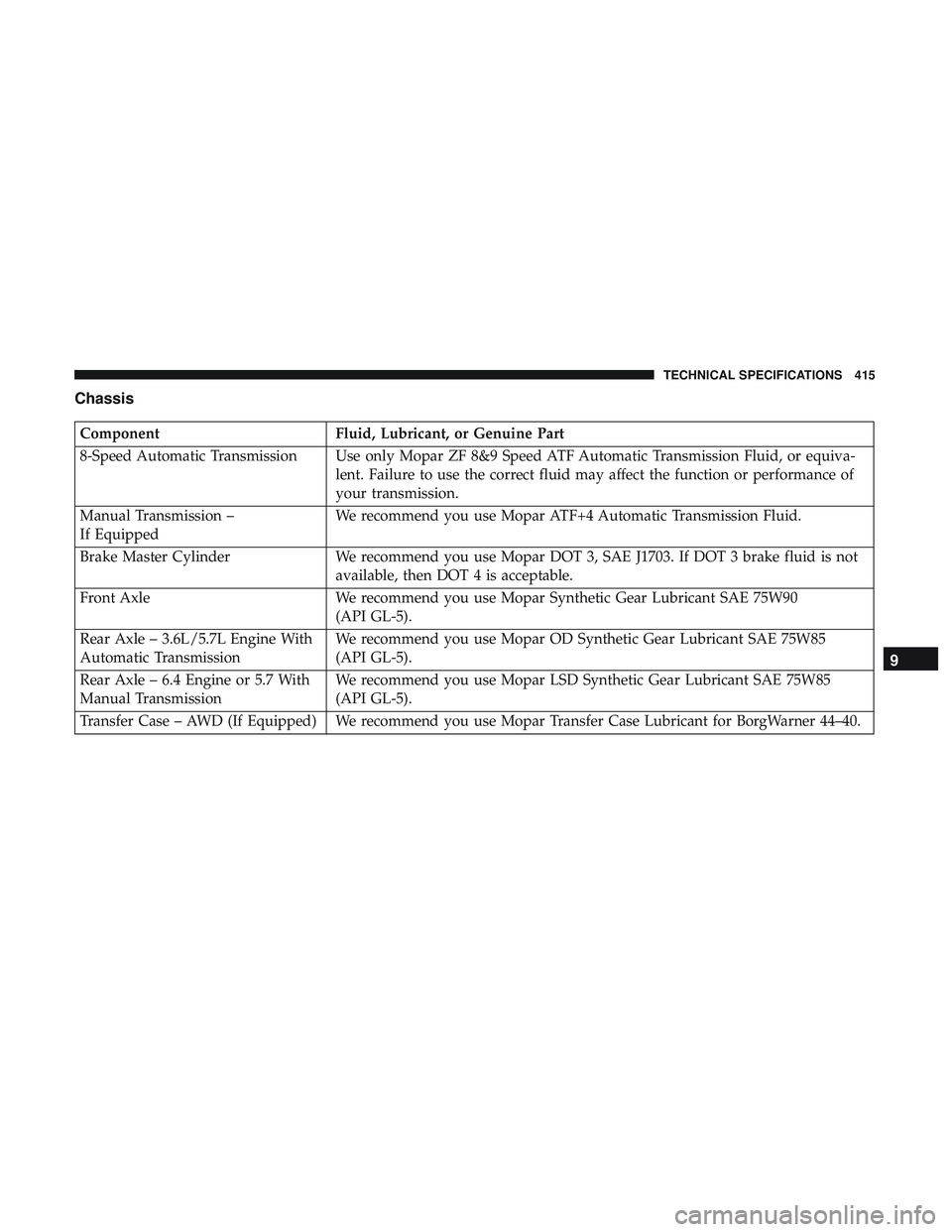
Chassis
ComponentFluid, Lubricant, or Genuine Part
8-Speed Automatic Transmission Use only Mopar ZF 8&9 Speed ATF Automatic Transmission Fluid, or equiva- lent. Failure to use the correct fluid may affect the function or performance of
your transmission.
Manual Transmission –
If Equipped We recommend you use Mopar ATF+4 Automatic Transmission Fluid.
Brake Master Cylinder We recommend you use Mopar DOT 3, SAE J1703. If DOT 3 brake fluid is not
available, then DOT 4 is acceptable.
Front Axle We recommend you use Mopar Synthetic Gear Lubricant SAE 75W90
(API GL-5).
Rear Axle – 3.6L/5.7L Engine With
Automatic Transmission We recommend you use Mopar OD Synthetic Gear Lubricant SAE 75W85
(API GL-5).
Rear Axle – 6.4 Engine or 5.7 With
Manual Transmission We recommend you use Mopar LSD Synthetic Gear Lubricant SAE 75W85
(API GL-5).
Transfer Case – AWD (If Equipped) We recommend you use Mopar Transfer Case Lubricant for BorgWarner 44–40.
9
TECHNICAL SPECIFICATIONS 415
Page 437 of 532
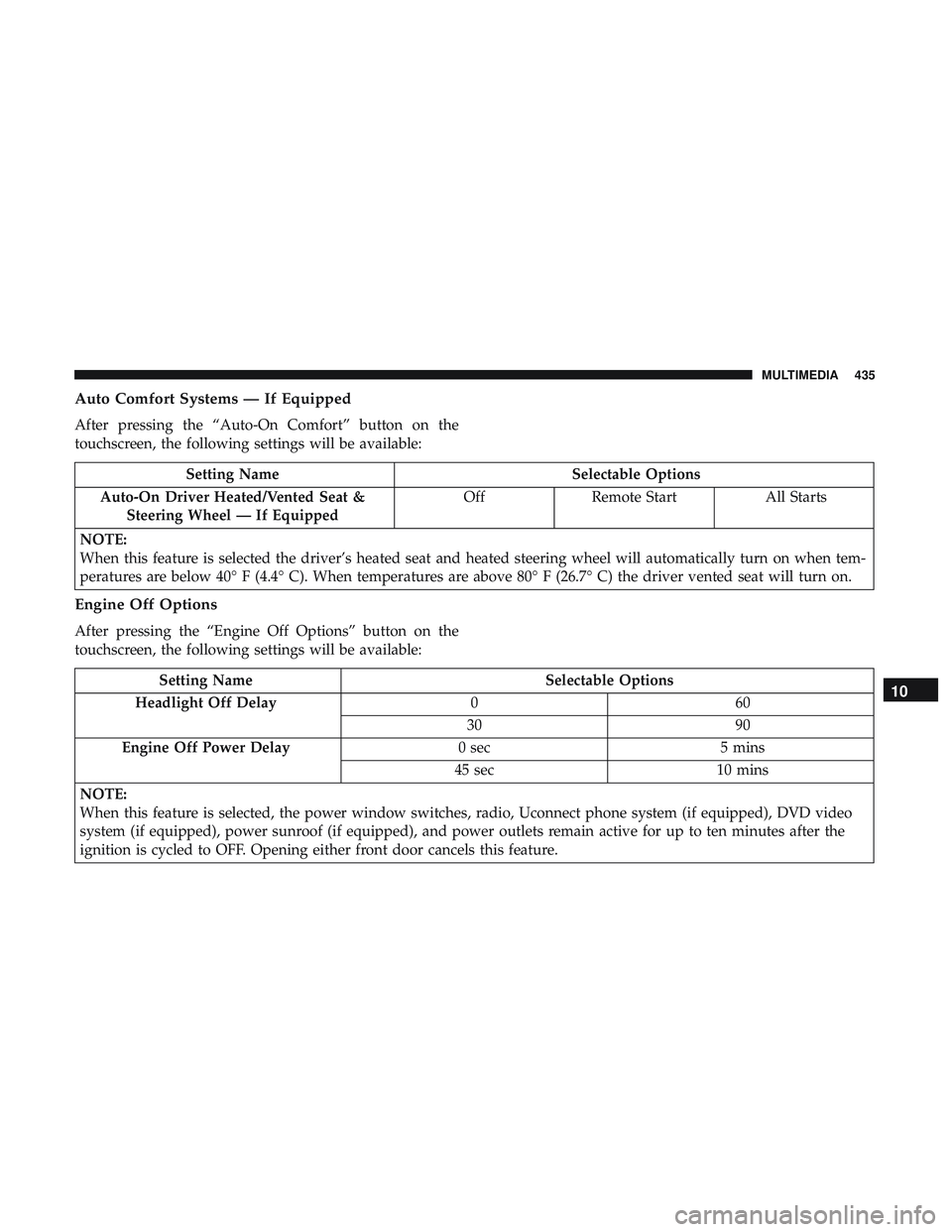
Auto Comfort Systems — If Equipped
After pressing the “Auto-On Comfort” button on the
touchscreen, the following settings will be available:
Setting NameSelectable Options
Auto-On Driver Heated/Vented Seat & Steering Wheel — If Equipped Off
Remote Start All Starts
NOTE:
When this feature is selected the driver’s heated seat and heated steering wheel will automatically turn on when tem-
peratures are below 40° F (4.4° C). When temperatures are above 80° F (26.7° C) the driver vented seat will turn on.
Engine Off Options
After pressing the “Engine Off Options” button on the
touchscreen, the following settings will be available:
Setting Name Selectable Options
Headlight Off Delay 060
30 90
Engine Off Power Delay 0 sec5 mins
45 sec 10 mins
NOTE:
When this feature is selected, the power window switches, radio, Uconnect phone system (if equipped), DVD video
system (if equipped), power sunroof (if equipped), and power outlets remain active for up to ten minutes after the
ignition is cycled to OFF. Opening either front door cancels this feature.10
MULTIMEDIA 435
Page 459 of 532
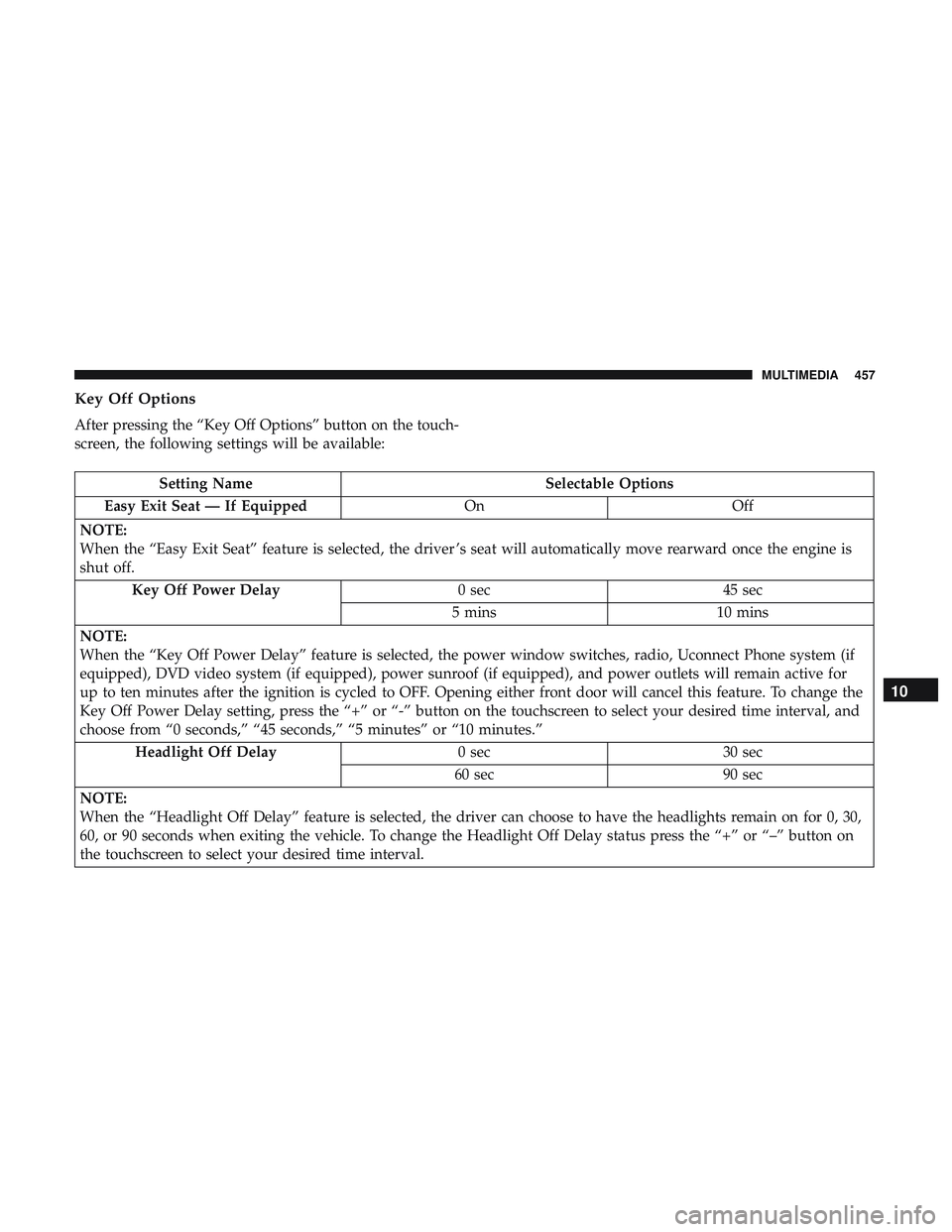
Key Off Options
After pressing the “Key Off Options” button on the touch-
screen, the following settings will be available:
Setting NameSelectable Options
Easy Exit Seat — If Equipped OnOff
NOTE:
When the “Easy Exit Seat” feature is selected, the driver ’s seat will automatically move rearward once the engine is
shut off. Key Off Power Delay 0 sec45 sec
5 mins 10 mins
NOTE:
When the “Key Off Power Delay” feature is selected, the power window switches, radio, Uconnect Phone system (if
equipped), DVD video system (if equipped), power sunroof (if equipped), and power outlets will remain active for
up to ten minutes after the ignition is cycled to OFF. Opening either front door will cancel this feature. To change the
Key Off Power Delay setting, press the “+” or “-” button on the touchscreen to select your desired time interval, and
choose from “0 seconds,” “45 seconds,” “5 minutes” or “10 minutes.” Headlight Off Delay 0 sec30 sec
60 sec 90 sec
NOTE:
When the “Headlight Off Delay” feature is selected, the driver can choose to have the headlights remain on for 0, 30,
60, or 90 seconds when exiting the vehicle. To change the Headlight Off Delay status press the “+” or “–” button on
the touchscreen to select your desired time interval.
10
MULTIMEDIA 457
Page 466 of 532
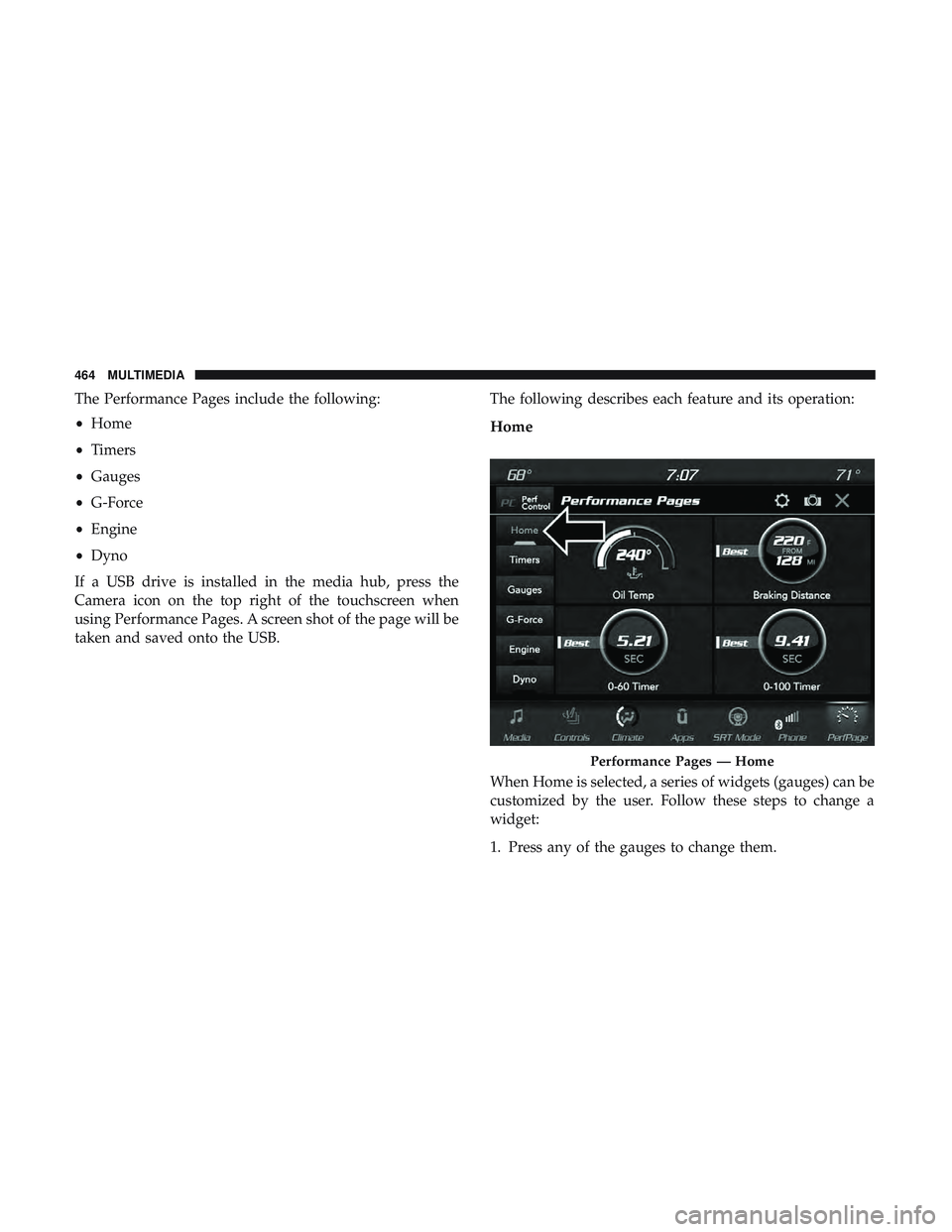
The Performance Pages include the following:
•Home
• Timers
• Gauges
• G-Force
• Engine
• Dyno
If a USB drive is installed in the media hub, press the
Camera icon on the top right of the touchscreen when
using Performance Pages. A screen shot of the page will be
taken and saved onto the USB. The following describes each feature and its operation:
Home
When Home is selected, a series of widgets (gauges) can be
customized by the user. Follow these steps to change a
widget:
1. Press any of the gauges to change them.
Performance Pages — Home
464 MULTIMEDIA
Page 467 of 532
2. Press the gear icon and select the following option fromthe menu:
• Set Widget: Top Left
• Set Widget: Top Right
• Set Widget: Bottom Left
• Set Widget: Bottom Right
3. After selecting a Widget location: select the gauge to display:
• Gauge: Oil Temp
• Gauge: Oil Pressure
• Gauge: Coolant Temp
• Gauge: Battery Voltage
• Gauge: Trans Temp — If Equipped with an Automatic
Transmission
• Gauge: Boost Pressure — If Equipped
• Gauge: Air/Fuel Ratio — If Equipped •
Gauge: I/C Coolant Temp — If Equipped
• Gauge: Intake Air Temp
• Gauge: Engine Torque
• Gauge: Engine Power
• Gauge: G-Force
• Gauge: Steering Angle
• Gauge: Current Gear
• Gauge: Current Speed
• Timer: 0-60 MPH
• Timer: 0-100 MPH
• Timer: 1/8 Mile
• Timer: 1/4 Mile
• Timer: Brake Distance
• Timer: Reaction Time
10
MULTIMEDIA 465
Page 473 of 532
•Steering Wheel Angle:
Steering Wheel Angle utilizes the steering angle sensor to
measure the degree of the steering wheel relative to zero.
The zero degree measurement indicates a steering wheel
straight ahead position. When the steering angle value is
negative, this indicates a turn to the left, and when the
steering angle value is positive, a turn to the right.
The friction circle display shows instantaneous G-Force as
a highlight and previous G-Force as dots within the circle.
The system records previous G-Force for three minutes. If
there are multiple samples at a given point, the color of the
dot will darken from blue to red. Vectors more frequent
will show in red; infrequent vectors will show in blue.Engine
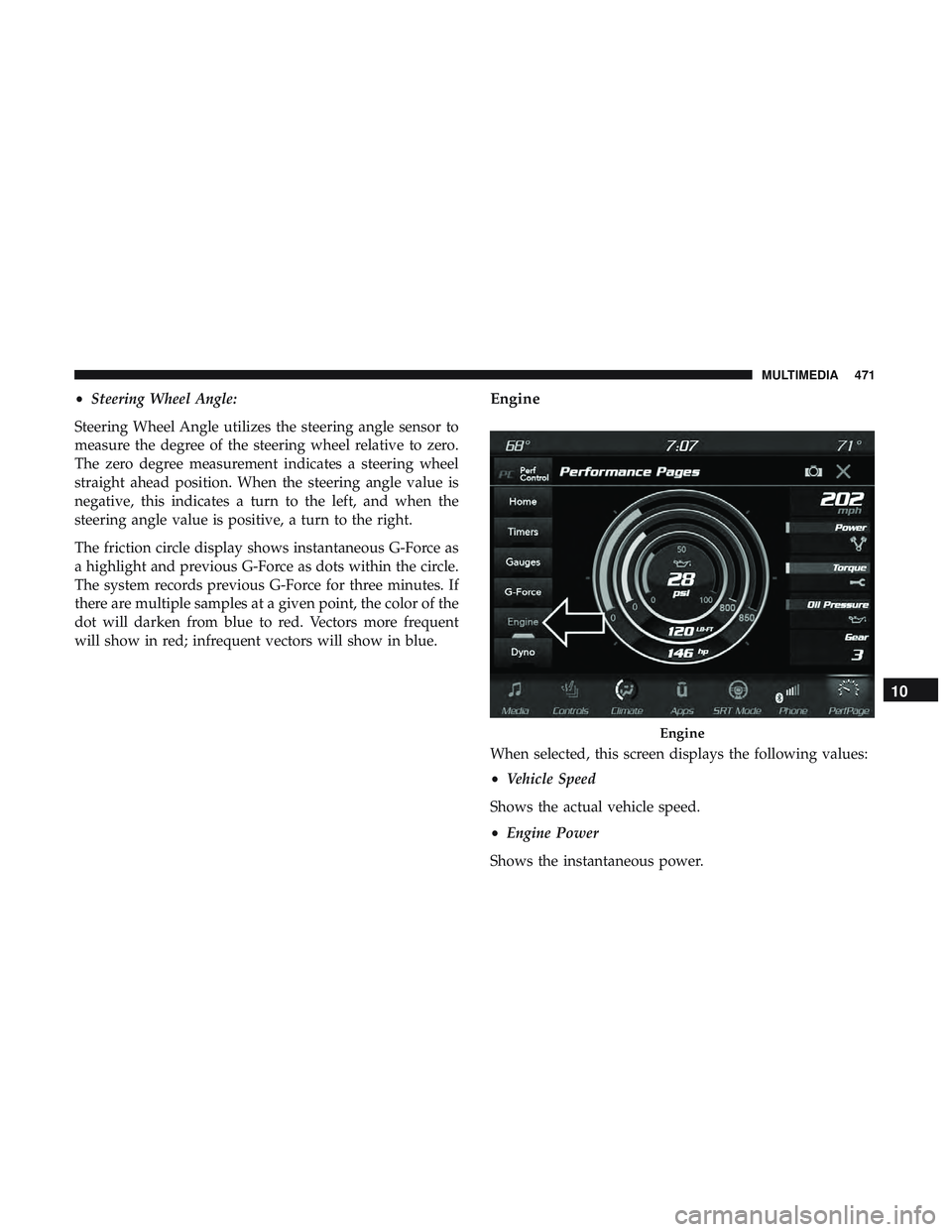
When selected, this screen displays the following values:
• Vehicle Speed
Shows the actual vehicle speed.
• Engine Power
Shows the instantaneous power.
Engine
10
MULTIMEDIA 471